
GLOTRENDS M.2 NVMe to PCIe 4.0 X4 Adapter with Heatsink for NVMe SSD
4.6Editor score
Affordable price point
Includes dual profile brackets
Effective passive cooling design
This guide compares the top M2 Pcie Adapter models for speed and compatibility helping you choose the right NVMe expansion card for your system.
Upgrading your storage often requires an M2 Pcie Adapter to connect fast NVMe drives to standard expansion slots. These cards allow you to bypass SATA limits and access true PCIe speeds for boot drives or high throughput storage arrays.
We evaluated ten leading adapters based on build quality cooling solutions and supported drive formats. Our comparison covers single and multi-drive options from budget friendly to professional grade cards designed for servers.
Each pick highlights key strengths and trade offs so you can match the adapter to your motherboard capabilities. Prices change frequently so check current listings before buying to confirm compatibility and availability.
4.6Editor score
4.6Editor score

4.4Editor score
The following table provides a side by side overview of all ten adapters including key specifications like slot compatibility drive support and cooling features to help you decide quickly.




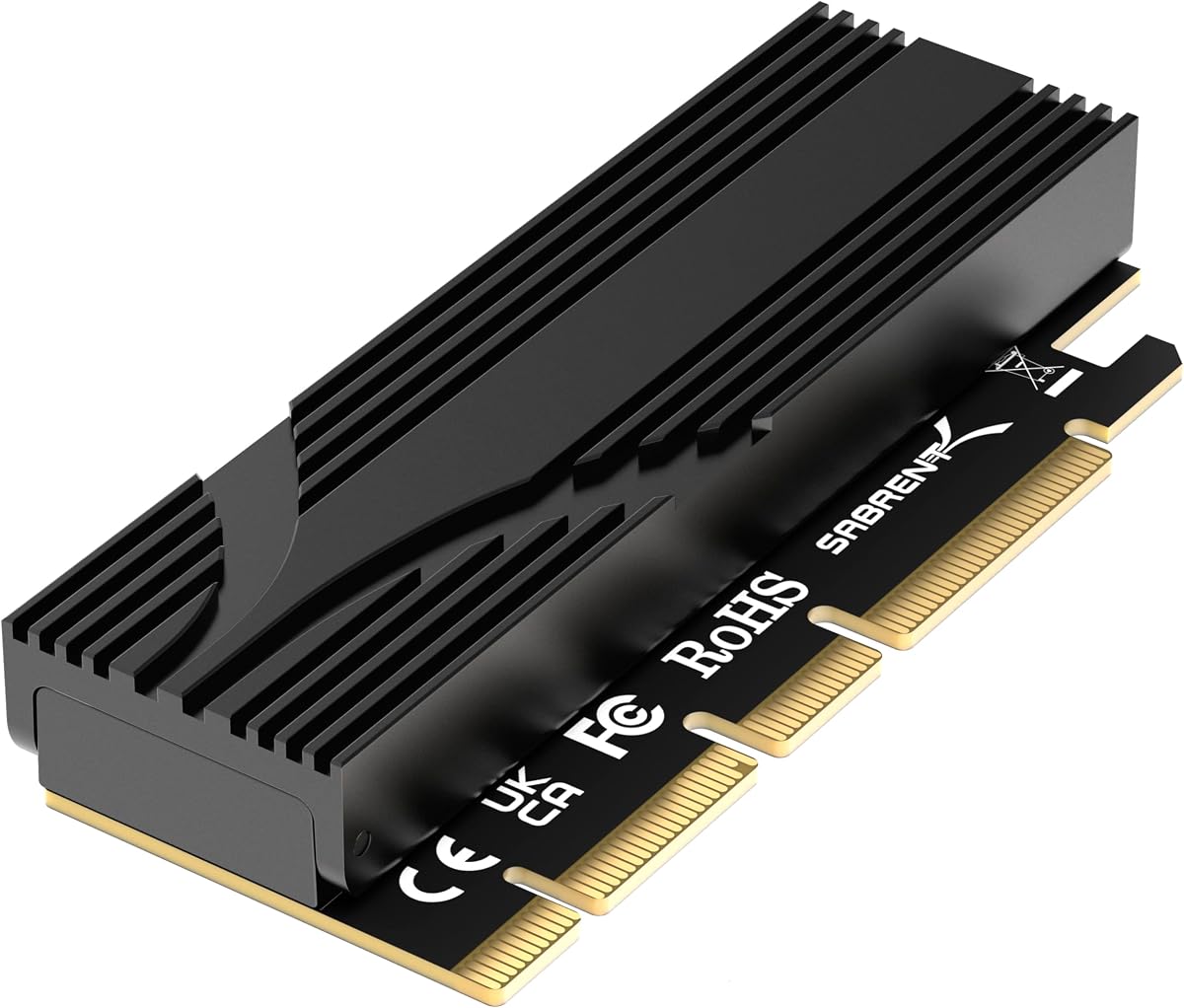
The SABRENT M.2 NVMe SSD to PCIe x16 Adapter Card stands out as a top choice for builders seeking future ready storage expansion. It currently holds a strong rating from users who appreciate its ability to support PCIe 5.0 speeds when paired with compatible motherboards. The build quality is robust and the inclusion of an aluminum heatsink ensures thermal management even under heavy loads without active fan noise.
We may earn a commission when you buy through this link, at no additional cost to you.
This adapter excels in convenience with its tool free installation mechanism that lets you drop in M.2 M-key drives without hunting for tiny screws. The card is designed to fit into x16 slots physically but can also work in x4 or x8 slots depending on your motherboard layout. Users report that the thermal padding keeps drive temperatures low during sustained file transfers which is critical for maintaining peak speeds.
One trade off is that this card does not support SATA based M.2 drives meaning you must ensure your SSD is NVMe compatible before purchasing. Additionally the Gen5 speed is dependent on your host slot generation so you will not get Gen5 performance in a Gen3 slot but the card will still function at the lower generation speed. This limitation is acceptable given the price point and the forward looking design.
For anyone building a new high end system or upgrading an existing workstation this adapter is a strong recommendation. It offers the best balance of performance ease of use and cooling among single drive options. If you need boot drive capability and want to avoid cluttering your PCIe slots this pick is ideal.
SABRENT provides technical support via their website so you can register the product for warranty purposes. The card is a versatile solution that grows with your hardware as you move to newer generations of motherboards and CPUs.
This card is especially suited for gamers and professionals who need fast storage arrays without sacrificing GPU slots. The passive cooling system is quiet and effective which benefits noise sensitive environments like home studios.
Installation is straightforward even for first time builders since no tools are required to secure the drive. The physical x16 connector adds stability so the card does not wiggle in the slot which is a common issue with cheaper adapters.
The card supports up to PCIe 5.0 so you can upgrade to Gen5 SSDs without replacing the adapter later.
Drive retention is handled with a locking mechanism that eliminates the need for small screws or a screwdriver.
We may earn a commission when you buy through this link, at no additional cost to you.
The GLOTRENDS M.2 NVMe to PCIe 4.0 X4 Adapter is an excellent entry point for those needing to expand storage on a budget. It has earned high marks for delivering reliable performance without a high price tag. The package includes everything you need such as brackets and heatsinks making it ready to use right out of the box for most PC builds.
We may earn a commission when you buy through this link, at no additional cost to you.
This adapter converts standard PCIe slots into an M.2 Key M slot allowing you to install NVMe SSDs directly. The included heatsinks are effective at reducing temperatures by 5 to 20 degrees which helps prevent thermal throttling. You get both regular and low profile brackets so it fits in standard and small form factor chassis equally well.
One consideration is that M.2 SATA SSDs are not supported so you must verify your drive type. Also new SSDs may need initialization and formatting before they are recognized by your OS. These are minor hurdles given the value and the adapter works great for boot drives on Windows 10 and 11.
If you are looking for a cost effective way to add a fast SSD this adapter is highly recommended. It provides full PCIe 4.0 speeds when your system supports it and remains backward compatible with older PCIe versions. The lifetime tech support adds peace of mind for long term use.
Installation is simple and requires no special drivers on modern Windows systems. The adapter is a practical solution for older desktops that lack M.2 slots or for adding extra storage to workstations without replacing the motherboard.
Users appreciate the compact design which does not obstruct adjacent slots when installed in the correct position. The heatsink is lightweight yet effective at dissipating heat from the drive under load.
This card is ideal for budget builders or those upgrading legacy systems to leverage NVMe performance. The inclusion of brackets makes it versatile across many PC cases including low profile business PCs.
At a low price point this adapter delivers full PCIe 4.0 speeds and reliable connectivity for NVMe drives.
Both regular and low profile brackets are included to ensure compatibility with different PC case sizes.
We may earn a commission when you buy through this link, at no additional cost to you.
The ASUS Hyper M.2 X16 PCIe 3.0 X4 Expansion Card V2 is a premium solution for workstations and servers that need massive storage bandwidth. It allows you to connect up to four NVMe M.2 drives through a single PCIe x16 slot which is perfect for RAID arrays or large scratch disks. The card features a stylish heatsink and an integrated blower style fan to keep temperatures in check.
We may earn a commission when you buy through this link, at no additional cost to you.
This adapter is Intel VROC ready and supports AMD Ryzen Threadripper NVMe RAID making it suitable for professional environments. It can reach transfer speeds up to 128 Gbps when all four drives are utilized. The two phase power solution provides stable power to the drives which is important for data integrity during heavy workloads.
While it is pricier than single drive adapters the cost is justified by the multi drive capability and advanced features. You need to ensure your motherboard supports PCIe bifurcation to use all four slots. Without this support only one drive might be recognized so check your manual before installation.
For server administrators and content creators who need to consolidate high speed storage this card is an ideal pick. It offers a clean way to manage multiple drives without using up multiple PCIe slots on the motherboard. The active cooling ensures the drives do not throttle even during continuous writes.
The card fits into PCIe x16 slots and is compatible with x8 slots as well. The design is robust and supports a wide range of M.2 lengths including 2242 to 22110 mm. This flexibility makes it easy to mix different drive sizes if needed.
Installation involves securing the card and adjusting BIOS settings for bifurcation. The included manual provides guidance on enabling these settings on supported motherboards. The fan is relatively quiet but provides necessary airflow for dense drive configurations.
This premium adapter is a future proof investment for high end builds. It transforms a single PCIe slot into a powerful storage array and simplifies cable management compared to traditional SATA arrays.
Supports four NVMe drives simultaneously for up to 128 Gbps total bandwidth when using RAID or striped arrays.
An integrated blower style fan prevents throttling on dense drive configurations with higher thermal output.
We may earn a commission when you buy through this link, at no additional cost to you.
The Dual M.2 PCIE Adapter is designed for users who need to connect two drives using a single PCIe slot. It supports one SATA M.2 drive and one NVMe M.2 drive simultaneously giving you flexibility in drive types. The heat sink solution helps dissipate heat from both drives and LED indicators show power and data transfer status.
We may earn a commission when you buy through this link, at no additional cost to you.
This card converts the PCIe slot into separate interfaces for SATA and NVMe protocols. The SATA side needs a SATA cable connection which may add cable clutter but allows you to reuse older SATA M.2 drives. The NVMe side provides PCIe 3.0 x4 speeds which is fast for most consumer workloads.
Support for 2230 to 22110 mm drives makes it compatible with most M.2 form factors. The regular and low profile brackets ensure it fits in various PC chassis. The LED lights are useful for quickly identifying if drives are active or facing issues without checking software.
If you have an old SATA M.2 drive and a new NVMe drive this adapter lets you use both without buying two separate cards. The cost effective design is great for budget builds that need extra storage options. The thermal solution keeps temperatures reasonable during normal use.
Installation is straightforward but you need to route a SATA cable to the motherboard. The card is recognized by Windows and Linux without extra drivers. It works as a storage expansion device and supports boot drives for NVMe if your BIOS allows.
This adapter is a great choice for hybrid setups where you want to maximize slot usage. The included brackets and heat sinks make it a complete package ready for installation. It is an economical way to add dual drive storage to systems with limited slots.
The PCIe 2.0 compatibility ensures it works on older motherboards but limits maximum speed. For modern systems the PCIe 3.0 lane on the NVMe side is sufficient for most users. The mix capability is the key advantage here.
Allows one SATA M.2 and one NVMe M.2 drive to be connected simultaneously to a single PCIe slot.
LEDs indicate power and data transfer status so you can quickly see if drives are active or idle.
We may earn a commission when you buy through this link, at no additional cost to you.
The M.2 NVMe to PCIe X4 Adapter with Heatsink is a reliable choice for unlocking full speeds from modern NVMe SSDs. It supports PCIe 4.0 lanes and is backward compatible with older PCIe versions ensuring it works across many systems. The aluminum heatsink solution with thermal pads helps maintain low drive temperatures during extended use.
We may earn a commission when you buy through this link, at no additional cost to you.
This adapter provides full speed bandwidth for Gen4 SSDs up to 64 Gbps which is essential for large file transfers and professional applications. The package includes everything you need including spare bolts thermal pads and brackets for easy installation. It supports Windows Server and Linux distributions making it versatile for servers and desktops.
Installation is straightforward on modern operating systems with no drivers required. However Windows 7 may need an additional NVMe driver from the SSD manufacturer. The adapter works as a storage device and can boot systems if your BIOS supports PCIe booting.
If you need a simple plug and play solution that keeps drives cool this adapter is a strong pick. The included low profile bracket is great for compact cases and the thermal pads ensure consistent heat transfer to the heatsink. It is a cost effective way to add an NVMe drive to a system without M.2 slots.
The design is clean and does not add unnecessary bulk which helps with airflow in the case. Users report stable performance even during heavy reads and writes thanks to the cooling. The adapter is a solid everyday choice for expanding storage.
Compatibility with multiple OSes makes it suitable for developers and IT pros who use various environments. The included thermal pads are a nice touch that prevents you from needing to source them separately.
This adapter is ideal for general users and pros who want reliable Gen4 performance. The cooling solution is effective and the package completeness makes it easy to get up and running quickly.
Delivers up to 64 Gbps for PCIe 4.0 SSDs ensuring you get the full speed of your drive.
Includes thermal pads screws and brackets so you have everything needed for installation right out of the box.
We may earn a commission when you buy through this link, at no additional cost to you.
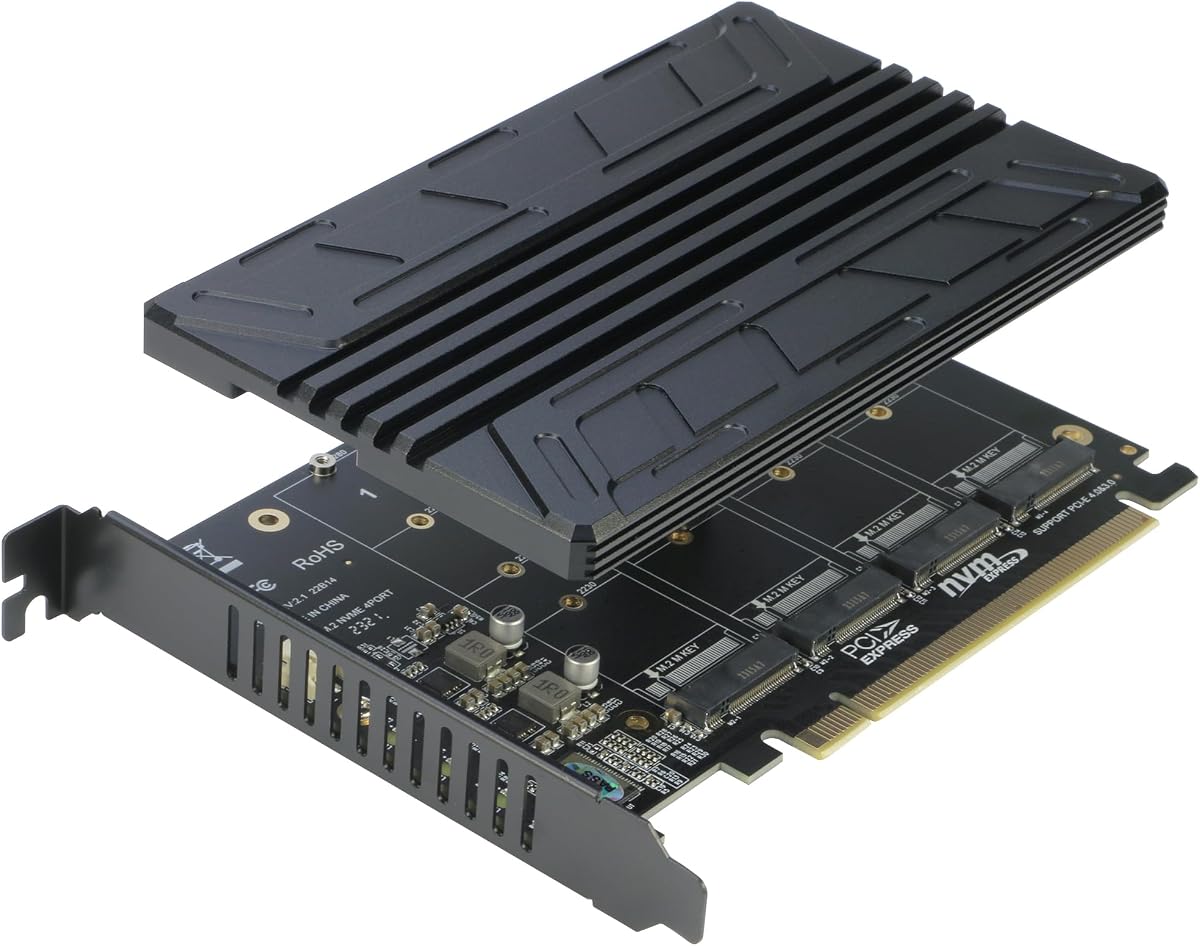
The RIITOP Quad NVMe PCIe Adapter allows you to add four NVMe SSDs to a single PCIe x16 slot which is ideal for high capacity storage solutions. It supports PCIe 4.0 and 3.0 speeds and the design includes a thin heatsink that does not block adjacent slots. Individual LED indicators show the status of each drive making troubleshooting easier.
We may earn a commission when you buy through this link, at no additional cost to you.
This card requires motherboard support for PCIe x16 bifurcation so you can split the lanes into four x4 sets. Most servers and high end X299 or X399 boards support this but you should check your manual. It does not support hardware RAID but you can build software RAID in Windows 10 or with third party tools.
The 0.32 inch heatsink prevents throttling without taking up much space which helps with airflow. It supports all common M.2 sizes including 2280 and 2230. The adapter is not compatible with SATA based M.2 drives so ensure your SSDs are NVMe.
If you need to maximize storage in a single slot this adapter is a practical choice for enthusiasts and pros. The individual LEDs give you clear visibility of which drives are active or failing. The cost is reasonable for a four drive solution.
Installation involves configuring the BIOS to enable bifurcation before the drives will be recognized. Once set up the system sees each drive independently. This card is a great way to build a fast scratch disk array for editing or rendering.
The design is compact and fits well in workstation chassis. The heatsink is sufficient to keep drives cool under normal loads but ensure your case has good airflow for best results.
This adapter is recommended for users who need four NVMe drives without a specialized RAID card. The software RAID support is flexible and works well for most use cases.
Each of the four slots has an LED indicator so you can monitor drive status at a glance.
The slim 0.32 inch heatsink does not block adjacent slots which helps maintain good case airflow.
We may earn a commission when you buy through this link, at no additional cost to you.
The ELUTENG M.2 NVMe PCIe Adapter is a cost effective option for adding fast NVMe storage to systems without M.2 slots. It supports PCIe 1.0 through 4.0 so it works on a wide range of motherboards. The aluminum heatsink and low profile bracket make it suitable for both standard and compact cases.
We may earn a commission when you buy through this link, at no additional cost to you.
This adapter is designed for stability with solid-state capacitors that regulate voltage and prevent current waves that could damage the SSD. It supports booting as a system disk if your BIOS allows PCIe boot which is essential for OS installation. The transfer speed can reach up to 16Gb/s theoretically depending on the interface.
Installation is simple and requires no driver on Windows 8 and above. On older systems like Windows 7 you may need to download drivers from the SSD manufacturer. The package includes the adapter and a bracket which helps ensure a snug fit in the chassis.
If you need a basic reliable adapter at a low price this is a good choice. The low profile bracket expands its usability to small form factor PCs and the heatsink helps keep the drive cool during operation. It supports a broad range of operating systems including Linux.
The build quality is solid for the price point and the adapter has earned good user ratings for reliability. It is a straightforward solution that does what it promises without extra frills. The voltage regulation adds a layer of protection for your valuable SSD.
This adapter is ideal for office PCs or home builds where budget is a priority. The wide compatibility ensures you can use it with older or newer systems as needed.
Users appreciate the clean look and the inclusion of the low profile bracket which is often sold separately by other brands.
Solid-state capacitors help stabilize power delivery to the drive reducing the risk of current surges.
Compatible with Windows 11 to 7 and various Linux distributions making it versatile for different use cases.
We may earn a commission when you buy through this link, at no additional cost to you.
The M.2 NVME to PCIe 4.0 x4 Adapter with Aluminum Heatsink Solution is a focused product that prioritizes cooling and speed. It supports PCIe 4.0 x4 slots and works with common NVMe drives like Samsung and Plextor models. The aluminum heatsink provides a cooling effect of 5 to 20 degrees to maintain performance.
We may earn a commission when you buy through this link, at no additional cost to you.
This adapter converts x4 x8 or x16 slots into an M.2 slot for NVMe drives. It supports 2280 2260 2242 and 2230 mm sizes which covers most consumer drives. The design is straightforward and does not require complex setup beyond inserting the drive and securing the heatsink.
The heatsink is effective enough to prevent throttling even during sustained writes which is common in video editing or data processing. The adapter does not support SATA M.2 drives so be sure your SSD is NVMe. It is a simple plug and play solution for most modern systems.
If you want a dedicated adapter that keeps your SSD cool without extra cost this is a strong pick. The build quality is good and the cooling benefit is measurable which helps with drive longevity. It is a cost effective way to add an M.2 slot to your system.
Installation is quick and the adapter is recognized by your OS without drivers. The aluminum heatsink is robust and stays in place with screws provided. This product is a good choice for users who run hot drives in enclosed cases.
The adapter is a reliable tool for extending storage capabilities. It is especially useful for systems that lack M.2 slots but have free PCIe slots available.
Users report consistent performance and stable temperatures which makes it a trusted option for daily use and heavy workloads.
The aluminum heatsink reduces operating temperature by up to 20 degrees to prevent performance throttling.
Compatible with popular NVMe models from Samsung Plextor and Kingston ensuring wide drive compatibility.
We may earn a commission when you buy through this link, at no additional cost to you.
The GLOTRENDS PA09-X1 M.2 NVMe to PCIe 4.0 X1 Adapter is designed to use a free PCIe X1 slot instead of a larger X16 slot. This leaves your main GPU slot free for graphics cards or other expansion devices. It is a cost effective way to add NVMe storage without sacrificing other slots.
We may earn a commission when you buy through this link, at no additional cost to you.
This adapter turns a X1 slot into an M.2 Key M slot for NVMe SSDs. The maximum bandwidth is limited to the speed of a X1 slot so you will not get full X4 speeds but it is still faster than SATA. The package includes regular and low profile brackets for flexibility in installation.
If you need an extra NVMe drive for storage or booting and want to keep your X16 slot free this adapter is a smart choice. The speed is sufficient for secondary storage and most workloads. The adapter works well for systems with limited PCIe slot availability.
The adapter supports 2T and 4T drives and requires no special drivers on modern OSes. It supports booting on most motherboards but check your BIOS for PCIe boot support. The low profile bracket helps it fit in compact cases easily.
Installation is simple and the adapter is recognized automatically by your system. It is a practical solution for users who want to maximize slot utility. The price point is low making it an accessible option for many.
This product is great for office PCs and budget builds where saving a X16 slot is a priority. The speed is adequate for most consumer uses where maximum throughput is not critical.
Users appreciate the convenience of using a small slot for storage and keeping the large slot available for other needs.
Uses a PCIe X1 slot so you can keep your X16 slot free for a graphics card or other devices.
Includes low profile bracket to ensure compatibility with small form factor PCs and compact cases.
We may earn a commission when you buy through this link, at no additional cost to you.
The StarTech M.2 PCIe SSD Adapter is a professional grade card known for its reliability and broad compatibility. It connects M.2 PCIe SSDs including NVMe and AHCI to your computer for fast data access. The adapter includes both full and low profile brackets so it fits in standard and small form factor systems.
We may earn a commission when you buy through this link, at no additional cost to you.
This card is compatible with PCIe 3.0 motherboards and backward compatible with PCIe 2.0 and 1.0. It supports drives up to 22110 mm which covers most enterprise and consumer SSDs. The setup is hassle free with native OS support meaning no drivers are needed for most systems.
The 2 year warranty and free technical support make it a safe choice for IT deployments. The adapter is designed for stability and performance making it suitable for workstations and servers. It is an investment in a long term solution for expanding storage.
If you need a card with a strong warranty and support network StarTech is a trusted brand in the industry. The full and low profile brackets make it versatile across many chassis. It delivers fast access speeds and works as a boot drive on supported systems.
Installation is simple with screw-in retention for the drive. The adapter fits into x8 and x16 slots which gives flexibility for motherboard layouts. The build quality is solid and designed to withstand heavy use.
This product is ideal for professionals and businesses that need dependable storage expansion. The warranty gives confidence and the support team can help with troubleshooting if needed.
Users value the simplicity and the wide compatibility with different drive types and motherboard generations.
Backed by a 2 year warranty and 24/5 tech support for peace of mind in business environments.
Includes both full profile and low profile brackets to suit different PC chassis sizes.
We may earn a commission when you buy through this link, at no additional cost to you.
Choosing the right adapter involves checking your motherboard slots drive types and cooling needs.
Check your motherboard for available PCIe x4 x8 or x16 slots. Some adapters fit x16 slots but may work in x8 or x4. Ensure the physical size fits without blocking other components.
Match the slot type to your adapter requirements for proper installation.
Adapters may support PCIe 3.0 4.0 or 5.0. A Gen5 adapter works on older slots but runs at the slot speed. Verify your motherboard generation to get the expected speed.
Choose an adapter that matches your motherboard generation for max performance.
Most adapters only support M.2 NVMe drives. SATA M.2 drives require specific SATA adapters. Confirm your drive key type (M key or B+M) before buying.
Ensure your drive matches the adapter support to avoid incompatibility.
Adapters vary in supported lengths like 2230 2242 2280 and 22110. If you use unusual sizes check the product details. Some cards have screws for multiple sizes.
Verify supported sizes to ensure your SSD will fit physically.
Thermal throttling can slow SSDs. Look for adapters with heatsinks or fans. Passive cooling is quieter but active cooling is better for heavy loads.
Pick a cooling solution that matches your drive heat output.
If you want to boot Windows from the adapter your BIOS must support PCIe boot. Check your motherboard specs and update BIOS if needed. Some older boards may not support it.
Confirm boot capability if you plan to install your OS on the adapter.
Multi-drive adapters require PCIe bifurcation in BIOS to split lanes. Not all motherboards support this so check your manual. Without it only one drive may be seen.
Ensure your motherboard supports bifurcation for multi-drive cards.
IT grade cards often include warranties and tech support. Budget adapters may have limited support. Check the warranty period and how to contact support for help.
Look for warranty coverage to protect your purchase.
To install power off your PC and open the case to access PCIe slots. Insert the adapter into the correct slot until the latch clicks and secure it with the screw provided. Mount your M.2 drive on the adapter and secure it with the screws or locking mechanism.
After closing the case boot into your BIOS and enable PCIe boot if needed. If using a multi-drive card set up bifurcation in BIOS to recognize all drives. Once booted initialize and format any new drives in disk management.
Monitor drive temperatures with software to ensure cooling is effective. If the adapter has a fan make sure airflow is not blocked. Keep vents clear and avoid covering the adapter with dust. Update your motherboard BIOS to ensure full compatibility and features.
Most M2 PCIe adapters only support NVMe M.2 drives. If your drive is SATA you need an adapter specifically designed for SATA M.2 drives or a converter that supports SATA protocols. Check the product details to confirm support before purchasing.
Most modern operating systems like Windows 10 and 11 support NVMe drives without extra drivers. However Windows 7 may require a driver from the SSD manufacturer. The adapter itself usually works as a plug and play device.
If you install the adapter in a PCIe x16 slot it may reduce GPU bandwidth. Using a x4 or x8 slot can avoid this issue. If your adapter fits in a x16 slot it often works fine in x4 mode for storage.
Yes you can boot from an M2 PCIe adapter if your motherboard BIOS supports PCIe boot. Check your motherboard specs and enable the setting in BIOS. Some older motherboards may not support booting from PCIe slots.
Bifurcation allows splitting PCIe lanes to support multiple devices like a multi-drive adapter. You need it if your adapter supports multiple M.2 drives. Check your motherboard manual for support and enable it in BIOS.
A fan is needed if your SSD runs hot under sustained load. Passive cooling with a heatsink is enough for most consumer drives. If you use high end drives or run heavy workloads active cooling helps prevent throttling.
We have explored ten top M2 Pcie adapter options ranging from budget single drive cards to professional multi-drive arrays. The SABRENT adapter leads as our top pick for future proofing and ease of use while the GLOTRENDS adapter offers the best value for most buyers.
When choosing prioritize compatibility with your motherboard slots and the types of drives you plan to use. Ensure your system supports PCIe boot and bifurcation if needed. Also consider cooling solutions to maintain performance under load.
Prices and availability change so verify current listings and check your motherboard manual before buying. With the right adapter you can unlock fast NVMe performance and expand your storage efficiently without replacing your entire system.