
HP Chromebook 14 x360 Plus
4.2Editor score
Flexible 2-in-1 Design
Crisp 14-inch Touchscreen
Chrome OS Security Features
Choosing a laptop that fits your workflow can be challenging. Many users seek powerful machines that offer versatility without breaking the bank. This guide explores the best options available today.
We analyzed ten distinct models ranging from budget-friendly Chromebooks to high-performance Windows and Apple devices. Each entry was evaluated on specs, usability, and real-world value for diverse needs.
Each pick highlights key strengths and potential limitations to help you decide. Note that prices and availability fluctuate frequently. Always verify current deals before purchasing your new device.
4.2Editor score

4.6Editor score

4.3Editor score
As an Amazon Associate we earn from qualifying purchases.
This table provides a side-by-side overview of every model featured in this guide. Use it to quickly compare processors, memory, storage, and key features across the lineup.


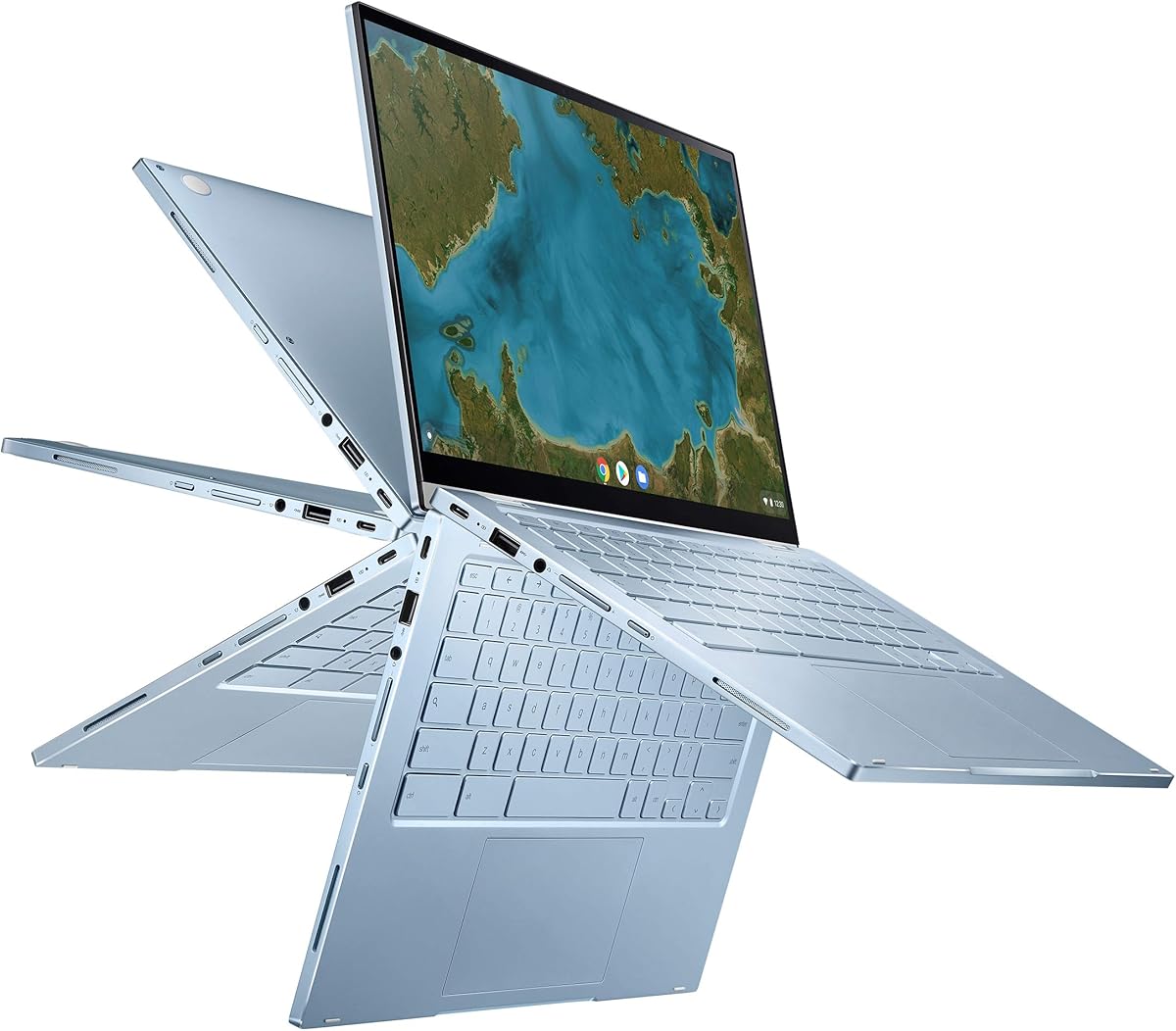


The HP Chromebook 14 x360 Plus stands out as a highly accessible entry point for those seeking an alternative to traditional MacBook models. With a flexible design and solid build quality, it delivers reliable performance for everyday tasks at an unbeatable price.
We may earn a commission when you buy through this link, at no additional cost to you.
This device features a 360-degree hinge that enables four versatile modes for different usage scenarios. The display offers crisp visuals with anti-glare coating, ensuring comfort during extended use. Connectivity options are generous for a budget device, including USB-C and USB-A ports.
While it excels in portability and basic productivity, heavy users may find the 4GB of RAM limiting for intensive workflows. Storage is also restricted compared to premium models, though cloud integration helps mitigate this limitation effectively for most students and casual users.
If you need a lightweight laptop for note-taking, streaming, and web browsing without overspending, this Chromebook is an excellent choice. It balances cost and functionality well, making it a top contender among budget-friendly MacBook alternatives available today.
The 360-degree hinge allows you to use the device in laptop, tent, stand, or tablet mode. This adaptability makes it ideal for both collaborative work and media consumption on the go.
Chrome OS offers built-in security features and automatic updates, ensuring your device stays protected without manual intervention. The interface is intuitive and perfect for users who prioritize simplicity.
We may earn a commission when you buy through this link, at no additional cost to you.
The ASUS Chromebook Flip CX1 offers a compelling mix of performance and value, specifically tailored for students and casual users. It includes a free Google One AI Premium plan, adding significant cloud storage and advanced AI tools to its feature set immediately.
We may earn a commission when you buy through this link, at no additional cost to you.
Its 360-degree convertible design supports multiple usage modes, enhancing versatility for note-taking or media consumption. The device is built to military standards, ensuring it can withstand the rigors of daily campus life. Connectivity is robust with USB-C and USB-A ports.
Although the Intel Celeron processor is adequate for web browsing and document editing, it might struggle with multiple heavy tabs or complex tasks. Storage is also somewhat limited, but cloud integration helps offset this for users primarily working online.
For learners needing a reliable, secure, and affordable laptop with extra AI benefits, this model is an outstanding option. It provides essential productivity tools and security features without requiring a large upfront investment.
Subscribers receive three months of Gemini Advanced and 2TB of cloud storage at no cost. This adds significant value for those who need ample space for files and advanced AI assistance.
Built to US Military Grade MIL-STD 810H standards, this laptop is designed to endure bumps and drops. Its lightweight chassis makes it easy to carry around campus or while traveling.
We may earn a commission when you buy through this link, at no additional cost to you.
The Samsung Galaxy Book4 2024 delivers professional-grade performance in a sleek, versatile package. Its powerful Intel Core 7 processor and generous RAM make it suitable for demanding business tasks and heavy multitasking without compromising efficiency.
We may earn a commission when you buy through this link, at no additional cost to you.
This laptop features a 15.6-inch display with anti-glare coating, ideal for long work sessions. The backlit keyboard with a numeric keypad and fingerprint reader adds convenience and security for office environments. Connectivity is extensive, including LAN and multiple USB options.
While its performance is strong, the device is heavier than some ultraportable competitors. It also lacks a touchscreen, which might be a drawback for users who prefer touch-based interactions. However, its productivity features largely outweigh these trade-offs.
If you need a reliable workstation for spreadsheets, presentations, and video calls, this laptop is a top recommendation. It balances power and practicality, making it an excellent alternative to premium MacBooks for professional users.
The 16GB of DDR4 memory ensures smooth performance even when running multiple applications simultaneously. This is crucial for professionals who rely on browser tabs, communication apps, and productivity software all at once.
This model includes LAN, HDMI, and multiple USB ports, making it easy to connect to monitors and peripherals. The inclusion of a full-sized keyboard with a numpad supports efficient data entry tasks.
We may earn a commission when you buy through this link, at no additional cost to you.
The Google Pixelbook Go is celebrated for its exceptional portability and refined build quality. It offers a fanless design that keeps the device cool and quiet, making it perfect for quiet environments like libraries or coffee shops.
We may earn a commission when you buy through this link, at no additional cost to you.
Its 12-hour battery life ensures you can work throughout the day without constantly searching for an outlet. The lightweight chassis and grippable design make it easy to carry anywhere. The backlit keyboard is comfortable for extended typing sessions.
Though it runs Chrome OS effectively, the internal specs are often modest for its price point. Some users might prefer more storage or RAM options. However, its premium feel and performance balance make it a compelling choice for many.
For those prioritizing mobility and a high-quality typing experience, this Chromebook is an ideal candidate. It delivers essential productivity features with a polished design that rivals more expensive competitors in the market.
Without a fan, the Pixelbook Go remains silent even during intensive tasks. This ensures that you can focus on your work or video calls without background noise interference.
With up to 12 hours of battery life, this device is built for users on the move. You can work through meetings, lectures, or long flights without needing a charger.
We may earn a commission when you buy through this link, at no additional cost to you.
The Lenovo Flex 14 2-in-1 offers a solid Windows experience with added versatility through its convertible design. It includes an active pen, allowing for direct drawing or note-taking on the touchscreen. The privacy shutter enhances security during calls.
We may earn a commission when you buy through this link, at no additional cost to you.
Powered by an AMD Ryzen 5 processor, this laptop handles daily tasks efficiently. The 12GB of RAM supports smooth multitasking for work and leisure. Storage is faster than eMMC options, improving boot and load times significantly for users.
While it provides great value, the weight is a consideration for those looking for an ultra-portable device. Additionally, Windows 10 is an older OS compared to Windows 11. However, the flexibility it offers is unmatched in this category.
If you need a touch-enabled device for creative tasks or digital notes without leaving the Windows ecosystem, this is a strong option. Its balance of performance and features makes it a versatile alternative to traditional laptops.
The included pen lets you draw directly on the screen. This is ideal for students taking handwritten notes or designers sketching concepts on the go without extra accessories.
A physical privacy shutter allows you to block the webcam when not in use. This adds a layer of security against unwanted access, ensuring your privacy is protected.
We may earn a commission when you buy through this link, at no additional cost to you.
The ASUS Chromebook Flip C433 brings a refined design to the Chromebook category with its sleek look. It features a 360-degree hinge and a NanoEdge display that maximizes screen space within a small footprint. This makes it easy to carry anywhere.
We may earn a commission when you buy through this link, at no additional cost to you.
The backlit keyboard ensures comfortable typing even in low light. With 8GB of RAM, multitasking remains smooth for browsing and streaming. The Chrome OS environment ensures security and quick updates automatically without manual user intervention needed.
Storage is limited compared to other models, which might require cloud reliance. Additionally, the base processor might struggle with heavy workloads. However, for everyday users, its build quality and portability are significant selling points.
This Chromebook is ideal for those who value aesthetics and portability. It offers a polished experience for daily web-based tasks. Its compact design ensures you can work comfortably without carrying bulk on your travels.
Ultra-narrow bezels allow a 14-inch screen to fit in a 13-inch chassis. This maximizes your workspace and viewing area while keeping the device compact and portable.
The backlit keys allow for comfortable typing in dark environments. Whether you are on a plane or in a dim room, you can continue working without strain or extra light.
We may earn a commission when you buy through this link, at no additional cost to you.
The Lenovo Flagship Chromebook is a slim and efficient device designed for modern web work. Its MediaTek Kompanio processor ensures great battery life while maintaining performance for daily tasks. The touchscreen allows for intuitive navigation.
We may earn a commission when you buy through this link, at no additional cost to you.
This device is remarkably lightweight, making it easy to carry around all day. It includes a privacy shutter for webcam security. Connectivity features Wi-Fi 6 for faster wireless speeds. The price point is highly competitive for students.
While the 4GB of RAM is enough for basics, it limits heavy multitasking. Storage is also minimal, but cloud usage solves this issue for most users. It is a solid budget choice with modern connectivity.
For those seeking a no-frills Chromebook with decent performance, this model works well. It covers essential needs effectively while keeping cost and weight low. It is a practical tool for basic education and home use.
This processor is designed for long battery life and reliable performance. It handles everyday tasks like browsing and video calls efficiently without draining power quickly.
With Wi-Fi 6 support, you get faster wireless speeds and better range. This ensures smooth video calls and downloads even in crowded network environments.
We may earn a commission when you buy through this link, at no additional cost to you.
The Apple 2026 MacBook Neo 13-inch brings premium features to a more accessible price point. With an A18 Pro chip and up to 16 hours of battery life, it delivers exceptional performance for students and professionals. It is built for AI tasks.
We may earn a commission when you buy through this link, at no additional cost to you.
The Liquid Retina display offers vibrant colors and crisp text, perfect for media and creative work. It comes in four beautiful colors with a durable recycled aluminum enclosure. The improved camera and speakers enhance video call quality significantly for users.
Although it lacks a touchscreen, its ecosystem integration with iPhone and iPad adds significant value. The memory and storage are fixed, which may limit long-term upgrades. However, its speed and battery efficiency remain unmatched in this segment.
If you value build quality, battery life, and modern AI features, this is the top choice. It bridges the gap between premium Apple performance and everyday affordability. It stands out as a leading option for creative and general users alike.
This device supports advanced AI tools for writing and organizing notes. These features help users complete assignments and tasks faster with privacy protections integrated at every step.
Up to 16 hours of battery life ensures you can work without plugging in. From early morning classes to late-night study sessions, the power holds up consistently.
We may earn a commission when you buy through this link, at no additional cost to you.
The Apple 2021 MacBook Pro 14 offers high-end performance for professionals who need maximum capability. Its M1 Max chip combined with 64GB of RAM allows for intensive video editing and development tasks. The renewed condition makes it more affordable than new units.
We may earn a commission when you buy through this link, at no additional cost to you.
It features a stunning display and robust connectivity options. The battery life remains strong despite its power. While it is heavier than newer models, its performance ceiling is unmatched. This makes it a workhorse for creative workflows.
Renewed units are inspected by Amazon suppliers, ensuring no visible cosmetic flaws. However, accessories may be generic. The value proposition here is strong for those who prioritize raw power over portability. It is a tool for serious work.
For professionals needing desktop-class power in a laptop, this is a top pick. It handles the most demanding workflows efficiently. If you are ready for a high-end machine, this model delivers professional results.
The M1 Max chip handles complex rendering and development tasks with ease. Paired with massive RAM, it ensures no slowdowns even during intensive multitasking.
Renewed products offer significant savings while maintaining high performance standards. They are professionally inspected and come with a 90-day replacement policy if issues arise.
We may earn a commission when you buy through this link, at no additional cost to you.
This Apple MacBook Pro 15-inch model offers an affordable entry into the Mac ecosystem. With a Core i7 processor and 512GB of storage, it provides solid capabilities for daily tasks. It is a renewed device, making it cost-effective.
We may earn a commission when you buy through this link, at no additional cost to you.
The Retina display ensures crisp visuals for media consumption and work. While it is older technology compared to Apple Silicon models, it remains capable for many users. The battery life and performance are decent for general productivity and browsing tasks.
However, reviews are mixed due to its age. Buyers should check current battery health. It is best for those needing a Mac at a low cost without expecting modern speeds. It delivers the Mac experience economically.
If you are budget-conscious and need Mac compatibility, this model works well. It is a practical choice for users who do not need the latest silicon performance. It offers value for casual and light professional use.
This model provides access to macOS at a lower cost than current models. It is ideal for users who need the Apple ecosystem for work or school.
As a renewed product, it undergoes professional inspection to ensure functionality. While older, it still offers a reliable computing experience for standard tasks.
We may earn a commission when you buy through this link, at no additional cost to you.
Selecting the right laptop depends on your specific needs. This section outlines key factors to consider before making a purchase decision.
Consider whether you need macOS, Windows, or ChromeOS. macOS offers seamless integration with other Apple devices. Windows is versatile for software compatibility. ChromeOS is fast and secure for web users.
Choose the OS that aligns with your daily tasks and software requirements.
Processors drive your computer's speed. For basic tasks, entry-level chips like Celeron suffice. For productivity, look for Core i5 or Ryzen 5. Creative work demands Core i7 or M-series chips.
Match processor power to your workload to ensure smooth performance.
RAM impacts multitasking capability. 8GB is a standard minimum. 16GB is better for heavy use. Storage speed matters; SSDs are essential for fast boots and loads.
Prioritize RAM and SSD storage over HDD for modern usability.
A good screen reduces eye strain. Look for Full HD (1080p) resolution. IPS panels offer better viewing angles. Touchscreens add versatility for creative work.
Ensure the display brightness and resolution meet your visual needs.
Battery life determines portability. Aim for at least 8 hours of use. Some premium models offer 12+ hours. Check reviews for real-world battery performance.
Longer battery life ensures you can work unplugged for longer periods.
Materials affect longevity. Aluminum bodies are durable and premium. Plastic is lighter but may feel cheaper. Military-grade tested laptops withstand rough handling.
Choose a build that suits your environment and usage intensity.
Check available ports for peripherals. USB-C is standard now but adapters may be needed. USB-A helps for legacy devices. HDMI simplifies projector connections.
Ensure the laptop has enough ports for your current and future devices.
Set a budget that fits your needs. Entry models are cheap but limited. Premium models cost more but offer better longevity. Consider renewed models for savings.
Find a balance between cost and features that delivers the best value for you.
Proper maintenance extends your device lifespan. Avoid placing heavy objects on your laptop in a bag. Use a protective sleeve to prevent scratches and impacts during transit.
Keep your device clean from dust. Use a soft, lint-free cloth to wipe the screen and keyboard. Avoid harsh chemicals that might damage the coating or screen surface.
Update your OS and apps regularly. Security patches protect your data. Avoid exposing your laptop to extreme heat or cold, which can degrade the battery and components over time.
Yes, Chromebooks are excellent for users who primarily work online. They are secure, easy to use, and affordable. However, they cannot run full Windows or Mac desktop apps without workarounds.
Generally no, but some Chromebooks support Linux apps or Android apps. For full Windows apps, you would need a Windows laptop. Virtualization is possible but requires powerful hardware.
The HP Chromebook 14 x360 Plus offers strong value with versatile design and durability. It is affordable and handles daily tasks well. It is ideal for students and home use.
Many alternatives offer impressive battery life. Chromebooks often last over 10 hours. The Apple Neo model claims up to 16 hours. Battery life varies by usage intensity and settings.
Yes, renewed models offer significant savings. They are inspected and usually have good battery health. However, check return policies and warranty coverage before purchasing.
No, touchscreens are optional. They help for creative tasks or tablet use. For typing and mouse work, a standard display works fine. It is a preference based on workflow.
We have reviewed ten diverse options ranging from budget Chromebooks to powerful Macs. Each serves different needs and budgets. The HP Chromebook stands out for value, while the Apple Neo offers premium features.
Prioritize factors like performance, battery life, and screen quality when deciding. Ensure the device fits your daily workflow. For students, flexibility and cost matter. For pros, speed is key.
Remember that prices change frequently. Always check current deals and availability before buying. With the right choice, you can enjoy the benefits of a modern laptop without the Apple premium.