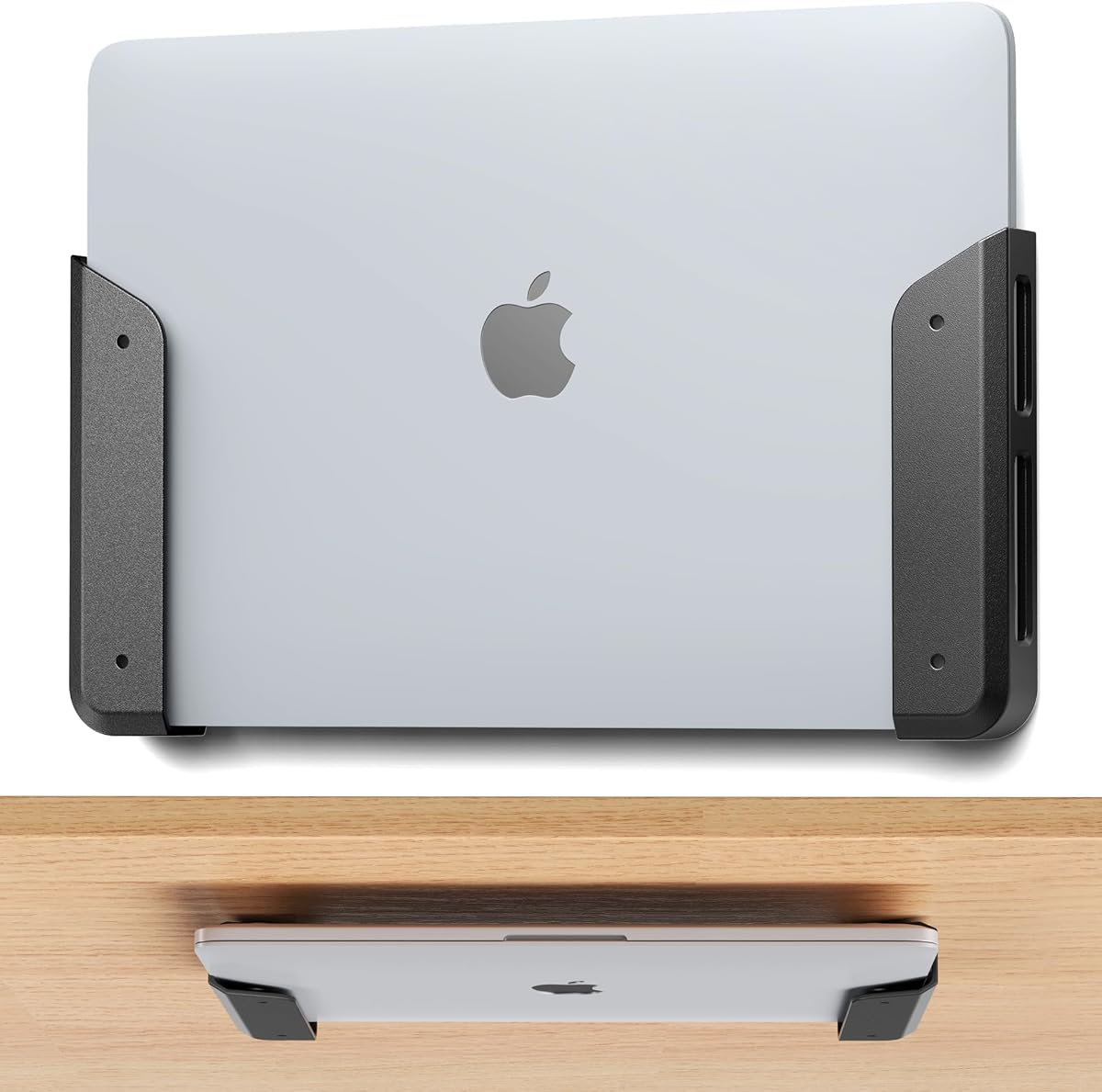
ELETIUO Wall & Under Desk Laptop Mount Holder
4.2Editor score
Dual mounting options for flexibility
Anti-scratch pads protect device
Universal compatibility with tablets
Transform your workspace with a laptop wall mount that elevates your device for better ergonomics and cleaner desks. These mounts offer flexibility for viewing angles and reduce clutter effectively.
We evaluated ten top-rated models based on build quality, adjustability, and ease of installation. Each option provides unique benefits for different environments and device sizes.
Every pick highlights specific strengths and trade-offs to guide your decision. Prices and availability may fluctuate, so verify current listings before purchasing your ideal mount.
4.2Editor score

4.6Editor score

4.5Editor score
As an Amazon Associate we earn from qualifying purchases.
This side-by-side comparison highlights key specifications for each model to help you identify the right fit for your specific workspace needs and device requirements.


The MOUNT PRO Laptop Wall Mount earns our top choice for its versatility and build quality. It supports devices from 4.4 to 19.8 pounds and fits laptops ranging from 11 to 17 inches comfortably. Its robust construction ensures stability even when extended fully, making it a reliable solution for daily use.
We may earn a commission when you buy through this link, at no additional cost to you.
One of its standout features is the dual-use capability, allowing conversion to a monitor arm via VESA plate. The arm offers full motion adjustment with tilt, swivel, and rotation options to optimize viewing angles. An integrated cable management system helps hide wires, maintaining a clean and professional workspace appearance.
While it requires secure installation into wood studs or concrete for safety, this constraint ensures maximum stability. The lack of drywall-only support is a trade-off but necessary for the weight capacity and arm strength it provides. This ensures your device remains safe during adjustments or movement.
This mount is ideal for home offices or classrooms where desk space is limited and flexibility is key. If you need a mount that adapts to different devices and offers ergonomic benefits, this is the best overall choice. It balances performance and features exceptionally well for most users.
The ability to switch between laptop and monitor modes provides long-term value and reduces the need for multiple purchases.
Ventilation slots promote airflow to prevent overheating during intensive tasks, ensuring device longevity and consistent performance.
We may earn a commission when you buy through this link, at no additional cost to you.
The ELETIUO Wall & Under Desk Laptop Mount is an excellent entry-level option for users seeking simplicity and affordability. It accommodates devices up to 1.02 inches thick, covering most modern laptops and tablets. Its dual mounting options allow you to choose between quick adhesive application or permanent screw installation.
We may earn a commission when you buy through this link, at no additional cost to you.
This model shines with its anti-scratch pads and cut-out design that keeps ports accessible while mounted. The universal compatibility means it works with MacBooks, surfaces, and even gaming consoles like the Switch. It effectively declutters your workspace without requiring complex assembly or structural wall changes.
The trade-off is limited adjustability compared to full-motion arms, as it primarily holds the device in a fixed position. Adhesive strips are great for temporary setups but might not support heavier units long term on all wall types. Still, it offers exceptional value for basic storage needs.
Ideal for dorms, bedrooms, or temporary workspaces, this mount provides a cost-effective way to organize your tech. If budget is a primary concern and you need a secure spot for lighter devices, this is the best budget pick. It delivers reliability without breaking the bank.
Choose between adhesive for quick setup or screws for permanent security depending on your specific wall surface and usage needs.
Its broad compatibility extends beyond laptops to include keyboards and tablets, offering flexible storage solutions for multiple electronics.
We may earn a commission when you buy through this link, at no additional cost to you.
The Long Arm 2-in-1 Laptop Wall Mount stands out with its extended reach and gas spring technology for effortless adjustments. It supports laptops up to 17 inches and can convert into a monitor arm when the tray is removed. This premium model ensures smooth motion without sagging, even after prolonged daily use.
We may earn a commission when you buy through this link, at no additional cost to you.
Its gas spring system provides consistent support, allowing you to reposition the device with minimal effort. The long arm extends up to 27.83 inches, giving you significant flexibility to place your laptop exactly where needed. This makes it perfect for kitchens, clinics, or large offices where distance matters.
The main drawback is its cost, which is higher than standard brackets or basic arms. Assembly requires attention to detail to ensure the gas tension is set correctly for your device weight. However, the stability and range of motion justify the investment for power users.
If you need maximum reach and ergonomic control without compromise, this premium mount is the top choice. It suits professionals and enthusiasts who value precision and durability in their setup. For those willing to invest in quality, it delivers superior performance and satisfaction.
The three-section gas spring arm provides a significantly longer reach than standard mounts for greater placement flexibility.
Built to resist sagging, the gas spring ensures the device stays secure at any angle without losing tension over time.
We may earn a commission when you buy through this link, at no additional cost to you.
This 2-in-1 Laptop Wall Mount offers robust support with a capacity of up to 22 pounds, accommodating heavier devices confidently. It features a locking mechanism and adjustable clamps to secure your laptop firmly during use. The open frame design prioritizes cooling, ensuring your device stays safe during extended sessions.
We may earn a commission when you buy through this link, at no additional cost to you.
With an 11-inch vertical adjustment range and full tilt swivel capabilities, you can optimize your viewing angle for comfort. It works as a laptop holder or converts into a monitor arm via VESA compatibility. This versatility makes it ideal for mixed-use environments where screen types vary.
Installation requires anchoring into solid materials like wood studs or concrete, as drywall alone cannot support its weight safely. While it demands more effort to set up, the resulting stability justifies the process. The hardware included simplifies the task for those with basic DIY skills.
For users needing high weight support and versatile use cases, this mount delivers reliable performance. It excels in crowded workspaces where maximizing space and cooling is essential. Choose this if you prioritize stability and dual-functionality over ease of quick setup.
Supporting up to 22 lbs, this mount handles heavier laptops and monitors securely for diverse device options.
Open frame design with slots prevents overheating, maintaining device performance during intensive workloads.
We may earn a commission when you buy through this link, at no additional cost to you.
The MOUNTUP Laptop Wall Mount combines affordability with premium features like a secure latch and full motion arm. It fits laptops up to 17 inches and monitors up to 32 inches with VESA compatibility. The ventilated tray helps prevent overheating, keeping your device safe during long tasks.
We may earn a commission when you buy through this link, at no additional cost to you.
Its extension reaches up to 20.7 inches, providing ample flexibility to position your screen where needed. You can tilt, swivel, and adjust height easily for ergonomic comfort. This model is praised for its stability and ease of use once installed correctly on a solid surface.
Installation requires wood studs or concrete to ensure safety, which may limit options in some rental properties. While it lacks a quick adhesive alternative, the stability benefits for daily workloads are significant. The included hardware ensures everything needed is ready for assembly.
This mount is a solid choice for home offices or clinics needing reliable daily performance. It balances cost and functionality effectively without compromising on essential features. Choose it if you need a durable solution that supports both laptops and monitors.
The innovative latch locks the laptop in place, preventing accidental slips or falls during movement.
Lifting devices off the desk frees up to 80 percent of workspace for improved organization.
We may earn a commission when you buy through this link, at no additional cost to you.
The WALI Laptop Wall Mount is designed to handle heavier setups with support for monitors up to 32 inches. Its ventilated cooling platform is a key feature that dissipates heat during intensive gaming or editing. The arm allows full motion adjustments to reduce eye and neck strain during extended use.
We may earn a commission when you buy through this link, at no additional cost to you.
With a high-grade monitor arm, you can extend, tilt, and swivel the device for optimal viewing angles. It supports VESA patterns and fits most standard monitors alongside laptops. This makes it a versatile option for gaming setups or small business environments needing flexibility.
Installation demands solid mounting to handle the weight safely, so ensure your wall structure can support it. While it may require two people to install initially due to its size, the stability is robust once set up. The cooling platform adds significant value for heat management.
Ideal for gamers and professionals working long hours, this mount offers ergonomic and thermal benefits. It prioritizes device health and user comfort without sacrificing structural integrity. Choose it if you need a powerful mount for larger screens and heavy usage.
Ventilation holes actively dissipate heat, stabilizing performance during high-intensity workloads like video editing.
Adjustability helps maintain healthy posture, reducing strain during long work or gaming sessions.
We may earn a commission when you buy through this link, at no additional cost to you.
This 2-in-1 Mount with a detachable tray allows you to switch between laptop and monitor modes easily. The platform width adjusts from 276 to 472 mm to fit different devices securely. Anti-scratch pads ensure your device is protected during insertion and removal from the tray.
We may earn a commission when you buy through this link, at no additional cost to you.
A concealed cable management system keeps wires organized, maintaining a clean aesthetic in your workspace. With 250 mm height adjustment, you can align the device comfortably with your eye level. This model offers balanced features for daily office use with a focus on organization.
Adjusting the platform width might require some effort to ensure a snug fit for different laptop models. Rotation is limited compared to full arms, but stability remains high. The detachable tray is a standout feature for those who use both laptops and monitors regularly.
If you value clean cable routing and adjustable width for various devices, this is a strong pick. It suits shared workspaces where multiple devices are used. Choose it for its organizational features and solid build quality.
The platform adjusts from 276 to 472 mm to accommodate different device widths securely.
Concealed management helps organize cables on the arm for an aesthetically pleasing environment.
We may earn a commission when you buy through this link, at no additional cost to you.
The VIVO Black Laptop Wall Mount features a pneumatic arm for tool-less, instant height adjustments. It is designed for smaller laptops ranging from 10 to 15.6 inches with weight constraints. The ventilated tray includes rubber tabs to prevent scratches and ensure secure device retention during use.
We may earn a commission when you buy through this link, at no additional cost to you.
A key benefit is its three-year manufacturer warranty, offering peace of mind for long-term use. The arm allows 360-degree rotation and 180-degree swivel for versatile positioning. However, it requires a minimum weight of 4.4 lbs for the balance mechanism to function properly.
For laptops under this weight, you may need to use a dummy weight to maintain balance, which adds complexity. Installation is straightforward but needs a stud or brick wall for stability. The tool-less height adjust makes daily use very convenient once mounted.
This model is best for users with lighter laptops who value smooth adjustments and warranty coverage. If you work with smaller devices and want a reliable pneumatic system, consider this option. It prioritizes ease of movement over heavy-duty capacity.
Tool-less instant height adjustment allows you to find the perfect ergonomic angle quickly.
The three-year warranty provides confidence in the durability and quality of the mount's components.
We may earn a commission when you buy through this link, at no additional cost to you.
The Mount-It! Ergonomic Laptop Arm stands out with options for both wall and pole mounting configurations. Its spring arm design ensures your device stays planted without sagging or drifting. You can adjust tension at the arm bolts to match your working style and device weight perfectly.
We may earn a commission when you buy through this link, at no additional cost to you.
With an extended reach of up to 21.8 inches, you can position your laptop precisely wherever needed. The US-based support team provides responsive help for any installation or setup questions. This makes it a great choice for shared workspaces where flexibility matters.
Note that the pole option requires purchasing a separate round pole if you prefer that mounting style. Setup involves ensuring the tension is set correctly for stability, which may need some trial. However, the result is a highly versatile mount that avoids common sagging issues.
Ideal for clinics or reception desks where a pole is available, this mount offers unique flexibility. If you need a sturdy arm that resists drooping, it delivers reliable performance. Choose it for its support and adaptable design.
Optional pole mounting allows for versatile setup beyond traditional wall surfaces.
The spring arm holds your laptop firmly without sagging over long daily use.
We may earn a commission when you buy through this link, at no additional cost to you.
This Universal Wall Mount features a two-tier design that can store multiple devices like laptops and keyboards simultaneously. It holds up to 22 pounds and supports devices up to 1.57 inches thick. The high-quality metal construction ensures stability and longevity for daily office use.
We may earn a commission when you buy through this link, at no additional cost to you.
EVA pads are included to protect your electronics from scratches when stored. It works well for various gadgets, including routers, modems, and tablets, not just laptops. The design focuses on space-saving and organization, keeping items accessible yet out of the way.
Unlike arm mounts, this is a fixed shelf with no tilt or rotation after installation. You must check your device size before purchasing to ensure it fits the shelf dimensions. However, for static storage, it provides excellent capacity and structural reliability.
Ideal for organizing tech accessories in living rooms or home offices, this mount saves significant desk space. If you need a simple, sturdy shelf for multiple devices, this is a great pick. It prioritizes capacity and simplicity over adjustability.
Store multiple laptops, keyboards, or devices simultaneously with the tiered shelf design.
EVA pads shield electronics from scratches during storage on the metal platform.
We may earn a commission when you buy through this link, at no additional cost to you.
Selecting the right laptop wall mount involves evaluating several key factors to ensure safety and ergonomic efficiency.
Check the maximum weight and size limits to ensure the mount supports your specific laptop or monitor. Exceeding these limits can lead to instability or damage to the device.
Always verify the weight and dimensions of your device before purchasing to avoid safety risks and ensure a secure fit.
Look for mounts offering tilt, swivel, and height adjustments to find the most comfortable viewing angle. Full motion arms allow for greater flexibility in positioning your device throughout the day.
Prioritize models with full motion adjustments to reduce neck strain and improve posture during long work sessions.
Review the mounting instructions to confirm whether the wall requires studs, concrete, or drywall anchors. Some models need solid surfaces for maximum safety, while others offer adhesive options for lighter devices.
Ensure your wall structure can support the weight before installation to maintain safety and device security.
Choose mounts made from durable materials like aluminum or steel to guarantee long-lasting stability and strength. High-quality materials prevent bending or sagging over time even under regular adjustments.
Select solid materials like aluminum or steel to ensure the mount remains sturdy and reliable for years.
Consider models with ventilated trays to prevent your laptop from overheating during intensive tasks. Adequate airflow helps maintain device performance and extends its overall lifespan.
Choose mounts with ventilation slots to keep your device cool and prevent thermal throttling during heavy use.
Integrated cable management systems help keep wires organized and improve the visual appeal of your workspace. Clutter-free setups reduce the risk of accidental tangles or disconnections.
Look for mounts with hidden cable routing to keep your workspace neat and prevent wire interference.
Check for manufacturer warranties that cover defects and provide technical support if issues arise. A solid warranty reflects the brand's confidence in the product's durability.
Verify warranty coverage to ensure peace of mind and reliable assistance if you encounter installation or quality problems.
Assess your specific environment, such as home offices, clinics, or kitchens, to find the most suitable design. Some mounts offer dual-purpose functionality for both laptops and monitors to maximize versatility.
Pick a model that aligns with your daily activities and space requirements to ensure optimal utility and satisfaction.
Install the mount on a solid wall surface using the provided hardware to ensure maximum stability. Always anchor into studs or concrete for heavy models to prevent falling risks and ensure safety.
Adjust your laptop or monitor to eye level regularly to promote good posture and reduce neck strain. Use the tilt and swivel functions to find the most comfortable position for your workflow.
Clean the mount periodically with a dry cloth to remove dust and prevent buildup in moving parts. Check screws and joints occasionally to ensure they remain tight and secure over time.
Yes, many universal laptop wall mounts support tablets as long as they fall within the weight and size limits. Check the specific compatibility notes in the product description to ensure your tablet fits securely.
Most heavy-duty models require drilling into wood studs or concrete for safety. Some lighter options offer adhesive strips for tool-free mounting, but these are typically for smaller, less heavy devices.
Pneumatic arms often require a minimum weight to balance properly. If your device is too light, you may need to use a small dummy weight or choose a different type of mount designed for lighter loads.
Look for mounts with ventilated trays that promote airflow around your device. Avoid enclosing your laptop in a solid case while mounted to allow heat to dissipate effectively during use.
Many models are 2-in-1 designs that can convert to a monitor arm with the included VESA plate. Ensure your monitor has the correct VESA pattern to use this feature successfully.
Some lighter mounts work on drywall if anchored with proper toggle bolts, but most recommend solid studs for heavy devices. Always follow the manufacturer's installation guidelines for your specific wall type.
Inspect screws and joints every few months to ensure they remain tight and secure. Regular checks help maintain stability and prevent potential issues from loosening over time.
Yes, wall mounts free up to 80 percent of desk space by elevating your device off the surface. This creates a cleaner workspace and allows for more room for other essentials.
Choosing the right laptop wall mount can transform your workspace into a cleaner and more ergonomic environment. Our top picks highlight a variety of options ranging from budget-friendly brackets to premium full-motion arms.
Prioritize features that match your daily needs, such as adjustability, cooling, and stability. Investing in a solid mount ensures safety and enhances your productivity by reducing strain and clutter.
Remember that prices and availability may change over time, so verify current listings before purchasing. This guide serves as a starting point to help you find a reliable and efficient solution for your device.