
Tonmom Laptop Stand for Desk
4.5Editor score
Seven level height adjustment
Lightweight foldable design
Anti-slip silicone pads
Finding the right laptop ventilation stand is essential for maintaining peak performance and extending the lifespan of your device during heavy use.
We evaluated ten leading models based on airflow design, build quality, ergonomic height options, and user feedback to identify the most reliable solutions.
Each pick below highlights specific strengths and ideal use cases so you can choose the perfect match for your workflow while prices may vary over time.
4.5Editor score

4.6Editor score

4.7Editor score
As an Amazon Associate we earn from qualifying purchases.
This side-by-side comparison highlights the key specifications and unique features of every model to help you decide which stand fits your needs best.




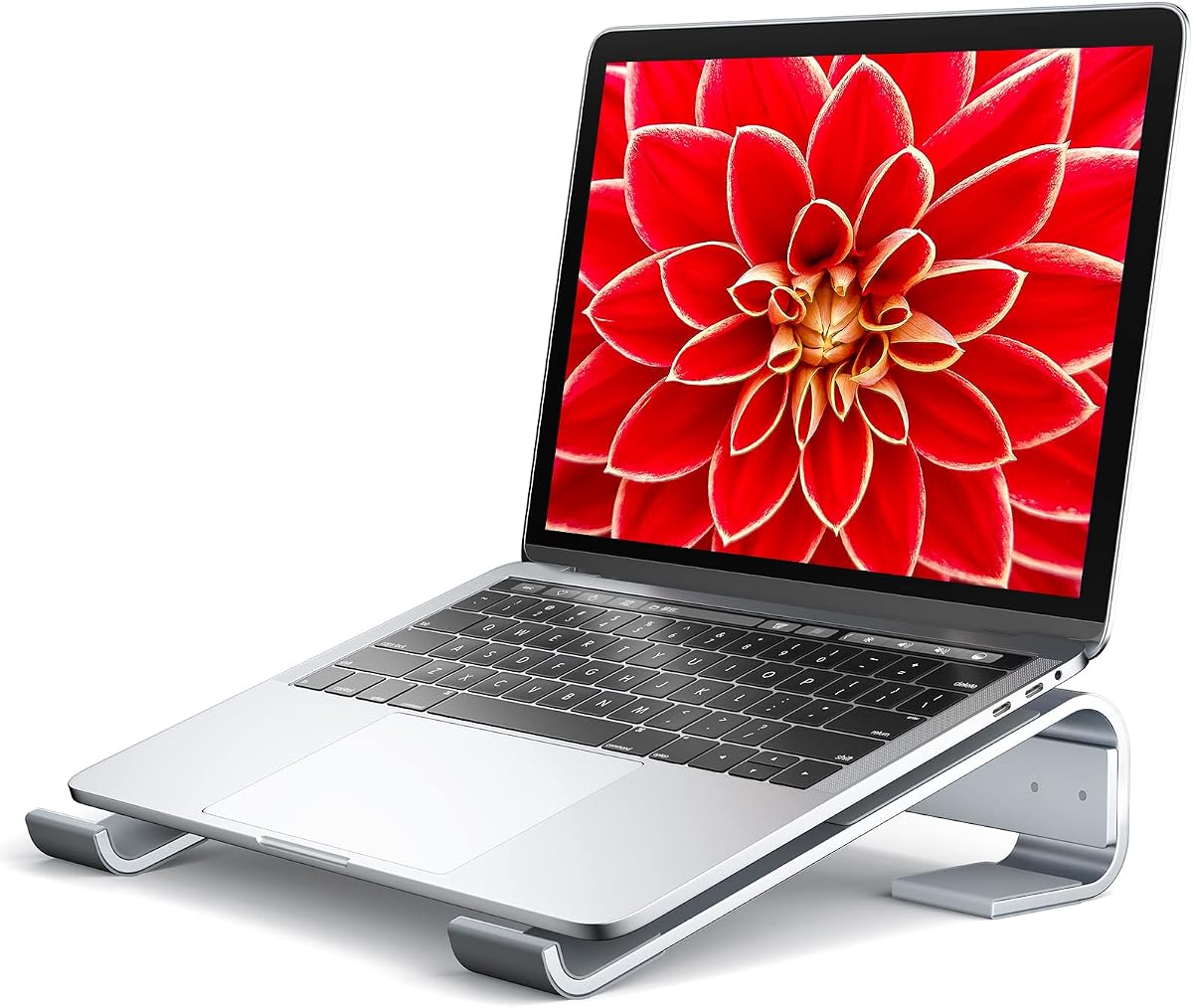

The Thibault Aluminum Laptop Stand is our top pick for those seeking a reliable and sleek cooling solution. With a strong 4.6 star rating it combines robust aluminum alloy construction with a minimalist aesthetic that suits any workspace.
We may earn a commission when you buy through this link, at no additional cost to you.
Its ventilated design ensures optimal airflow beneath your laptop which helps prevent overheating during intensive tasks. The stand is easy to assemble and features soft rubber pads to protect both your desk and device from scratches while providing a stable typing experience.
While it offers a fixed angle rather than adjustable height the tilt is ergonomically sound for most users. The trade-off is acceptable given the superior build quality and consistent cooling performance it delivers across various laptop sizes.
This stand is ideal for professionals and students who need a durable and efficient cooling solution without complex adjustments. We recommend it as the best overall choice for maintaining peak laptop performance.
The open vented structure allows air to circulate freely under the chassis which significantly reduces heat buildup during long sessions.
Crafted from high grade aluminum alloy it supports laptops up to 17 inches while rubber pads ensure stability and scratch protection.
We may earn a commission when you buy through this link, at no additional cost to you.
The Tonmom Laptop Stand offers exceptional value for users on a budget who still require ergonomic benefits and cooling airflow. It holds a 4.5 star rating and is praised for its portability and adjustability making it a favorite for travelers and remote workers.
We may earn a commission when you buy through this link, at no additional cost to you.
Its seven level height adjustment lets you find a comfortable eye level to reduce neck strain. The stand is incredibly light at only 0.53 pounds and folds flat to fit easily into laptop bags without adding bulk.
While it lacks heavy duty rigidity it provides sufficient stability for light to moderate typing. The open design promotes natural heat dissipation which is adequate for most daily computing tasks without active fans.
We recommend this stand for students and professionals who need a portable and affordable solution for better posture and ventilation. It is the best budget choice for enhancing your laptop setup on a tight budget.
Weighing less than half a pound it folds into a compact size that fits discreetly in backpacks for seamless travel anywhere.
With seven distinct height levels you can customize the viewing angle to suit your chair and desk height for improved comfort.
We may earn a commission when you buy through this link, at no additional cost to you.
The Nulaxy Ergonomic Adjustable Laptop Stand stands out as a premium option for those needing maximum stability and advanced cooling. With a 4.7 star rating it features a unique dual-rod mechanism that eliminates wobble even during intense typing sessions.
We may earn a commission when you buy through this link, at no additional cost to you.
Its advanced heat-vent panel provides superior airflow compared to standard solid stands helping to prevent thermal throttling. The stand supports devices up to 22 lbs making it suitable for heavy gaming laptops and all-in-one workstations.
While it costs more than basic models the build quality and engineering justify the investment for power users. The dual-foldable design ensures it remains portable despite its robust frame allowing for easy transport to client sites.
We recommend this for professionals and gamers who demand top tier stability and cooling performance. It is the best premium choice for heavy duty laptop support with ergonomic benefits.
The dual-rod support mechanism distributes weight evenly so your keyboard input remains steady and comfortable without any shaking.
A specialized geometric vent panel maximizes airflow directly under the laptop chassis to keep internal temperatures low under load.
We may earn a commission when you buy through this link, at no additional cost to you.
The Kootek Laptop Cooling Pad delivers active cooling with five quiet fans designed to keep your laptop from overheating. It earns a 4.4 star rating and is favored by gamers and content creators who run resource-intensive applications for hours.
We may earn a commission when you buy through this link, at no additional cost to you.
The stand offers six adjustable height settings to improve posture while the dual USB hub adds extra connectivity for peripherals. Blue LEDs provide a subtle aesthetic touch and you can control fan usage via switches to save power or reduce noise.
While it requires a power source and adds some bulk the cooling performance is significantly better than passive stands. The fan switches allow you to choose between one four or five fans depending on your current thermal needs.
We recommend this for users whose laptops tend to run hot during gaming or rendering tasks. It is the best choice for active cooling combined with ergonomic stand features.
Five high performance fans with blue LEDs deliver efficient heat dissipation while remaining quiet enough for office or study environments.
Dual USB ports let you connect mice or drives directly to the stand reducing cable clutter around your workspace.
We may earn a commission when you buy through this link, at no additional cost to you.
The havit HV-F2056 Cooling Pad is designed for portability and ease of use. It holds a 4.4 star rating and features three ultra-quiet fans that maintain a noise-free environment for work or entertainment.
We may earn a commission when you buy through this link, at no additional cost to you.
Its slim profile and lightweight build make it easy to slip into a bag for travel. The metal mesh surface ensures your laptop sits securely and the extra USB port provides convenient access for peripherals without plugging into the laptop.
While it has only two height settings it still improves airflow and posture compared to a flat desk. The fans are quiet enough to avoid distraction but powerful enough to prevent overheating during moderate use.
We recommend this for frequent travelers or commuters who need a compact cooling solution. It is the best portable choice for active cooling on the go.
Its lightweight slim form factor ensures it fits easily in most bags without adding significant weight to your daily carry.
The mesh top provides a rigid stable surface for your laptop and helps channel air efficiently to the intake vents.
We may earn a commission when you buy through this link, at no additional cost to you.
The Amazon Basics Sturdy Laptop Stand combines brand reliability with practical ergonomic features. With a 4.6 star rating it supports laptops up to 15.6 inches and offers significant height adjustment for better posture.
We may earn a commission when you buy through this link, at no additional cost to you.
Its lightweight rust-resistant aluminum construction supports up to 11 lbs which is ample for most devices. The open hollow design encourages airflow and it folds flat for easy storage in bags when not in use.
While aluminum may show dents over time it remains functional and effective for daily use. The simplicity of design ensures it works well with a wide range of laptop sizes and brands.
We recommend this for users seeking a dependable no-fuss solution from a trusted brand. It is the best reliable choice for everyday ergonomic laptop support.
Amazon Basics is known for delivering consistent and reliable products that meet everyday needs at a competitive price point.
The hollow structure allows heat to escape naturally from the bottom of your laptop keeping performance steady during use.
We may earn a commission when you buy through this link, at no additional cost to you.
The Adjustable Laptop Riser is a minimalistic solution that focuses on portability and basic ergonomic support. It holds a 4.5 star rating and weighs just 0.49 pounds making it one of the lightest options on the market.
We may earn a commission when you buy through this link, at no additional cost to you.
Six height levels allow you to adjust the viewing angle for comfort. The forward-tilt angle aids ventilation and the triangle support design ensures stability for laptops up to 15.6 inches.
While it is not built for heavy duty use it serves well for light work and travel. The smooth edges prevent hand injuries and the silicone pads keep your device secure during typing.
We recommend this for users who prioritize weight and price above all else. It is the best choice for ultra-light travel laptop stands.
At under half a pound this stand adds almost no weight to your bag and fits easily into any laptop compartment.
Six slots on the support bars let you set the height to match your desk and eye level quickly.
We may earn a commission when you buy through this link, at no additional cost to you.
The BESIGN LS03 Aluminum Stand is a premium fixed-height solution with detachable parts for easy transport. It boasts a 4.8 star rating and is praised for its sturdy build and lack of wobble during typing.
We may earn a commission when you buy through this link, at no additional cost to you.
Its detachable design allows you to disassemble it in three steps for compact storage. The open aluminum design offers good ventilation and it supports up to 8.8 lbs safely for most laptops and notebooks.
While it lacks height adjustments the fixed angle is ergonomically sound for most users. The premium finish and reliable build quality make it a stylish choice for home offices and studios.
We recommend this for users seeking a clean and sturdy permanent desk solution. It is the best choice for premium aesthetics and stable cooling.
The stand can be disassembled quickly into parts that take minimal space making it easy to store in a drawer.
Premium aluminum alloy construction ensures the stand remains rigid and wobble-free even with heavier laptops.
We may earn a commission when you buy through this link, at no additional cost to you.
The Soqool Laptop Stand offers a stable and simple solution for cooling and ergonomics. With a 4.7 star rating it features a triangle support design that prevents any wobbling or rocking during use.
We may earn a commission when you buy through this link, at no additional cost to you.
Made from high quality aluminum alloy it provides good ventilation to keep your laptop cool. The fixed angles are designed to protect your wrist and promote neutral posture for long typing sessions.
While it does not adjust in height or fold flat its stability is a strong point for stationary desks. The anti-skid silicone pads ensure your device stays secure and free from scratches.
We recommend this for users who want a reliable no-movement stand for home offices. It is the best choice for stable and simple cooling support.
The triangle support design keeps the stand fixed so your laptop does not shift or rock during typing or use.
Open design allows airflow to cool the device and prevents overheating during intensive computing tasks.
We may earn a commission when you buy through this link, at no additional cost to you.
The Aluminum Laptop Stand Riser is a minimalist wedge that provides a fixed height boost for your device. It holds a 4.6 star rating and is crafted from durable 6061 aluminum alloy with a sleek finish.
We may earn a commission when you buy through this link, at no additional cost to you.
Its 35 mm elevation creates a comfortable typing angle and increases airflow underneath the device. The base distributes weight evenly and the built-in dual-scale ruler adds a unique functional touch to your workspace.
While it lacks adjustable height or fans it offers a solid and stylish platform for your laptop. The silicone pads protect your device and prevent sliding on smooth surfaces.
We recommend this for users who prefer a minimalist aesthetic and fixed positioning. It is the best choice for a premium wedge style stand.
Laser-engraved markings turn the stand into a useful measuring tool for quick office or desk tasks.
6061 aluminum with a fine sandblasted finish complements modern workspaces and provides long lasting durability.
We may earn a commission when you buy through this link, at no additional cost to you.
Choosing the right ventilation stand involves considering material, cooling method, adjustability, and portability to match your specific workflow needs.
Materials like aluminum alloy offer durability and heat dissipation while plastic is lighter but may lack stability. Look for thick metals and strong joints that prevent wobbling during typing sessions to ensure longevity.
Prioritize aluminum or steel for heavy laptops and check for non-slip pads that protect your device from scratches during daily use.
Passive stands rely on open designs and elevation to improve natural airflow while active stands include built-in fans for stronger cooling. Passive models are quieter and more portable whereas active ones suit high-performance laptops that run hot.
Choose fans if your laptop overheats often but select passive stands for noise-free environments or travel where battery usage matters.
Adjustable height and tilt options help you find an eye-level viewing angle to reduce neck and back strain during long workdays. Fixed stands often have a preset tilt that may not suit everyone's posture needs or desk height.
Look for stands with multiple height slots or hinge designs that let you customize the angle to your personal comfort preferences.
Foldable stands are compact and lightweight making them ideal for frequent travelers or hybrid workers who move between home and office. Fixed wedge styles may be bulkier but offer greater stability for stationary desktop setups.
Consider the folded dimensions and weight if you plan to carry the stand daily and ensure it fits comfortably in your laptop bag.
Verify the stand supports your laptop's size and weight range to ensure safe and stable placement. Most stands fit 10 to 15.6 inch models but some accommodate up to 17 inch gaming laptops with higher weight capacity.
Check the maximum load limit especially if you own a heavier gaming laptop or all-in-one workstation to prevent the stand from bending.
A stable stand should not wobble or shift while you type which can cause discomfort and affect your work speed. Look for dual-rod designs or wide bases that distribute weight evenly and include rubber hooks or hooks for grip.
Test reviews for feedback on wobble and ensure the design offers enough friction to keep your laptop securely in place.
Extra features like USB hubs cable management slots or built-in rulers can enhance functionality and reduce desktop clutter. These add-ons vary by model and may be worth the investment if you need more connectivity or organization.
Decide if these features match your needs since they often add cost and bulk to the overall design of the stand.
Prices range from affordable plastic models to premium aluminum stands with advanced cooling features. Determine your budget based on how much you use the stand and whether you need active cooling or simple elevation.
Balance cost with build quality and longevity since a slightly pricier stand may save money over time by lasting longer.
Place your stand on a flat and stable surface to prevent tipping during use. Adjust the height or angle before placing your laptop to ensure it fits securely and aligns with your eye level.
Regularly clean the stand with a soft dry cloth to remove dust and debris that might affect airflow or stability. For aluminum models a damp cloth can help maintain the finish but avoid harsh chemicals that may scratch the surface.
When not in use fold the stand if possible and store it in a cool dry place. Avoid leaving it in direct sunlight or humid areas to prevent material degradation or corrosion over time.
A ventilation stand elevates your laptop to allow air to circulate underneath which prevents overheating during intensive tasks. It also helps improve posture by raising the screen to eye level reducing strain on your neck and back.
Most stands support laptops between 10 to 15.6 inches but some models accommodate up to 17 inch devices. Always check the product specifications for weight and size limits before purchasing to ensure compatibility.
Stands are passive and rely on elevation for airflow while cooling pads use fans to actively remove heat. Stands are quieter and more portable whereas cooling pads are better for laptops that run very hot under heavy loads.
Use a soft cloth to wipe the metal surface and remove dust or smudges. You can use a slightly damp cloth for stubborn dirt but dry it immediately to prevent water spots or corrosion.
Yes most stands work well with detachable keyboards since they elevate the screen portion while the keyboard remains on the desk. Ensure the stand supports your tablet's screen size and weight for safe positioning.
Using a stand does not void your warranty as long as you do not disassemble the laptop or cause damage. Ensure the stand has non-slip pads to protect your device from scratches during normal use.
The Thibault Aluminum Stand leads as the top pick for its balance of durability cooling and style while the Tonmom Stand offers the best budget-friendly portability.
Prioritize stability and ergonomic adjustability if you work long hours daily but consider active cooling fans if your laptop runs hot frequently.
Prices and availability change so always verify the current details on product pages before purchasing to ensure you get the best value today.