
LeapFrog 2-in-1 LeapTop Touch
4.7Editor score
Converts to tablet mode
Five learning modes
Includes battery demo
This guide compares the top laptops for 5 year olds to help parents choose educational toys that build skills without screen time.
Finding the right laptop for a five year old can be a challenging task for any parent. You want something that is educational, safe, and fun enough to keep them engaged for hours.
We have carefully compared the best options available on the market today. Our list includes toys designed by leading brands that focus on developing key skills through interactive play.
Each pick shows you the unique features and learning modes that set it apart. Remember that prices change frequently so check the current listing for the most accurate deal.
4.7Editor score

4.5Editor score

4.2Editor score
Here is a quick side-by-side comparison of all ten laptops to help you see the differences at a glance.





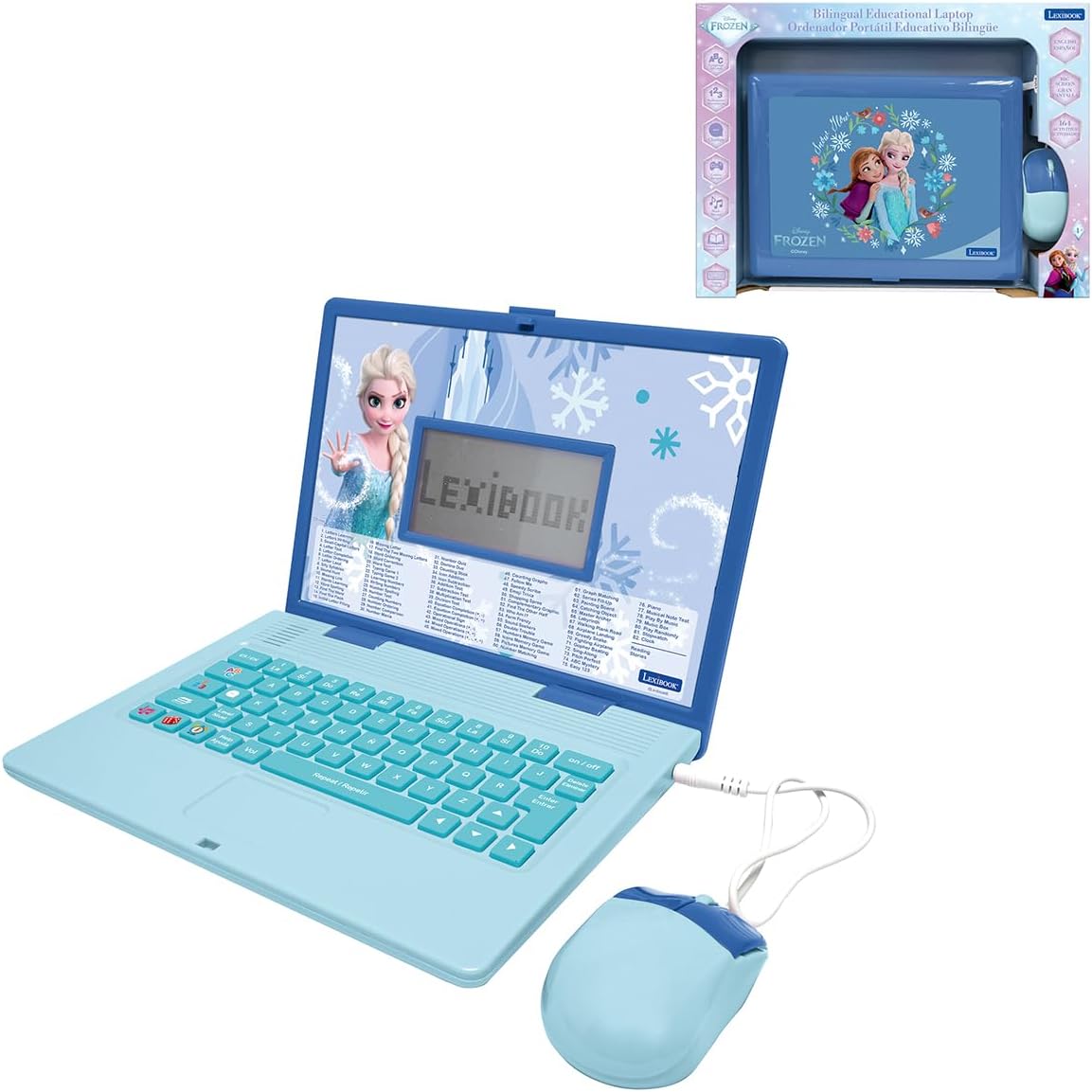
This laptop is designed to look and feel like a grown-up computer. It helps build basic computer skills using a full-size QWERTY keyboard and a cursor controller.
We may earn a commission when you buy through this link, at no additional cost to you.
Explore over eighty activities including apps like a weekly calendar notebook and music player. Games cover subjects including math science language arts music and Spanish.
Every activity can be played in English or Spanish so kids can be immersed in a new language. No internet connection is needed because every activity comes preloaded.
This is a great gift for kids ready to explore typing and basic computing skills. It encourages independent play while teaching valuable educational concepts.
The full-size keyboard helps children learn to type correctly from an early age.
Kids can switch between English and Spanish to build strong language skills.
We may earn a commission when you buy through this link, at no additional cost to you.
This two-in-one laptop toy features a screen that flips to convert from keyboard to tablet mode. It is perfect for preschoolers and early elementary kids.
We may earn a commission when you buy through this link, at no additional cost to you.
The laptop features a keyboard with letters A through Z and numbers one through ten. Swivel and transform it into a touch tablet for different activities.
Kids can pretend to be like mom and dad with role-play activities like emailing a virtual pet. Parents can customize it to help their child spell their own name.
Five learning modes include ABCs numbers games music and messages. This toy provides hours of fun and learning for a very reasonable price.
Children can switch between typing on the keyboard and using the touch screen.
The customization feature helps children learn their own name quickly.
We may earn a commission when you buy through this link, at no additional cost to you.
Immerse yourself in brilliance with a ten point one inch HD touchscreen and lightning-fast octa-core processor. This laptop is your gateway to endless entertainment and learning.
We may earn a commission when you buy through this link, at no additional cost to you.
The Power Academy app and three hundred ebooks with ReadEra empower learning. You can also access thousands of games and apps on Google Play.
Customizable profiles and robust parental controls ensure a safe and tailored experience for everyone in the family. Manage time and apps effortlessly while surfing securely.
This is a powerful device that bridges the gap between a toy and a real computer. It is excellent for tech-savvy parents who want controlled internet access.
Kids get a taste of real computing with a functioning operating system.
Access to Google Play means endless educational apps and entertainment.
We may earn a commission when you buy through this link, at no additional cost to you.
This laptop features a four point three inch color screen which will make kids watching the screen much more clear. It offers lifelike visuals combining convenience with comfort.
We may earn a commission when you buy through this link, at no additional cost to you.
There are forty-eight learning modes including alphabet mathematics colors animals and general knowledge. The screen has a protective film that needs to be peeled off.
Ergonomics are inspired by real laptops with a realistic mouse and keyboard. It is slim and elegant with a convenient size for easy handgrip.
Fun games test logic memory and speed after learning. This laptop is a solid choice for parents who want a color display without the high price.
The color screen helps keep children engaged longer than black and white models.
The mouse and keyboard mimic real computers to teach proper usage.
We may earn a commission when you buy through this link, at no additional cost to you.
This sleek toy laptop looks like a grown-ups and has thirty activities with leveled learning. You can personalize it with a childs name age avatar and more.
We may earn a commission when you buy through this link, at no additional cost to you.
Activities introduce children to beginning Spanish words letters and numbers. Identify letters explore letter sounds shapes and numbers and categorize foods.
Play logic games discover animal sounds and footprints and listen to instrument sounds with a music game. It is intended for ages three to six years.
This model is perfect for children who want something that looks modern and fun. The personalization options make it feel more special to the user.
Adding a name and avatar makes the child feel ownership of the device.
Activities grow with the child so they never get too bored.
We may earn a commission when you buy through this link, at no additional cost to you.
This kids laptop with camera is an ideal gift for birthday holiday or any occasion. It contains sixty-four activities including camera alphabet mathematics colors animals music and games.
We may earn a commission when you buy through this link, at no additional cost to you.
The laptop has clear lenses and is equipped with a variety of cute photo frames and filter effects. Kids can more freely express their creativity and record every beautiful memory.
It features a four point three inch TFT color display with vibrant true-to-life colors. The design is refined and compact enough for a natural easy handgrip.
After mastering educational activities kids can enjoy exciting games and take funny pictures. This laptop is a perfect blend of entertainment and education for hours of play.
The camera feature lets children document their world creatively.
With 64 modes it covers logic and art not just numbers and letters.
We may earn a commission when you buy through this link, at no additional cost to you.
Develop math reading writing coding problem-solving and creativity skills with more than twenty educator-approved learning apps that grow with kids. You can find hundreds more games and videos by going to the LeapFrog App Center.
We may earn a commission when you buy through this link, at no additional cost to you.
The learning tablet includes a stylus tough bumper with kickstand and a seven inch shatter-safe screen. Set time limits manage apps and explore kid-friendly web content with parent controls.
It includes a three-month trial of LeapFrog Academy to send kids on learning adventures filled with more than two thousand engaging games and eBooks. It is intended for ages three to eight years.
This device is part of a larger ecosystem that keeps kids engaged over a long period. The durability makes it a great investment for rough play.
The stylus helps kids learn to draw and write precisely on the screen.
The screen is built to withstand drops and everyday accidents.
We may earn a commission when you buy through this link, at no additional cost to you.
This educational laptop covers English and Spanish mathematics dactylography general knowledge logic music and clock reading. It has fun activities with different levels to learn test and improve knowledge.
We may earn a commission when you buy through this link, at no additional cost to you.
Fun games test logic memory and speed after learning. The design is inspired by real laptops with a realistic mouse and keyboard. It is slim elegant and convenient for easy handgrip.
Musical activities teach the first step in music notes learning composing and playing melodies. This makes it unique compared to other standard learning laptops.
If your child loves music this laptop is a fantastic choice. The design is visually appealing and encourages them to interact with the device often.
Kids can learn to compose and play melodies as part of the curriculum.
The slim and lightweight design makes it easy for small hands.
We may earn a commission when you buy through this link, at no additional cost to you.
Engage young minds with one hundred twenty-four activities in English and Spanish covering Math Clock Logic and Music. A comprehensive educational experience is designed to promote growth and knowledge acquisition.
We may earn a commission when you buy through this link, at no additional cost to you.
It is inspired by authentic laptops with a slim and stylish educational laptop featuring a realistic mouse and keyboard. Each activity offers multiple levels allowing kids to learn test and improve their skills.
After mastering educational activities kids can enjoy a range of exciting games like Snake Memory and Puzzle. It is compact and portable at twenty-four by eighteen centimeters when closed.
This laptop is ideal for on-the-go learning at home in the car or during family trips. It ensures knowledge and entertainment are always within reach.
The compact size makes it easy to toss in a backpack for travel.
Levels allow the child to progress as their skills improve over time.
We may earn a commission when you buy through this link, at no additional cost to you.
A complete learning laptop packed with one hundred sixty-four activities in English and Spanish exercises. It covers vocabulary spelling maths logic games and music.
We may earn a commission when you buy through this link, at no additional cost to you.
Kids can easily switch between English and Spanish to build strong language skills. The laptop features a comfortable keyboard helpful voice guidance and a clear LCD screen.
Includes quiz challenges logic games and musical functions that make every learning session enjoyable. It keeps children engaged from the first activity through the last.
This is lightweight and ideal for learning at home or taking on the go. The character theme helps get kids excited about doing educational activities.
Easy for small children to carry and use anywhere.
Voice guidance helps children who are not yet strong readers.
We may earn a commission when you buy through this link, at no additional cost to you.
There are several important factors to consider before you buy a laptop for a five year old.
Ensure the device matches your child's current developmental stage. A laptop that is too advanced will cause frustration while one too simple will bore them quickly.
Look for products labeled for ages five and up to guarantee the content is suitable.
Check the number of activities and modes included. More modes often mean more learning potential and fewer complaints of boredom.
Prioritize products that teach math reading and logic rather than just entertainment games.
Kids will likely drop or mishandle their devices so durability is key.
Look for sturdy materials and protective designs that can withstand rough play.
Battery life varies significantly between models. Consider whether the device uses disposable batteries or has a rechargeable one.
Rechargeable models save money over time and reduce waste.
A clear screen makes learning more enjoyable. Color screens are generally more engaging than black and white ones.
Ensure the screen is large enough for small eyes to see clearly without strain.
The interface should be simple enough for a child to navigate alone.
Look for intuitive controls like large buttons and clear prompts.
Even simple toys benefit from some oversight. Parents should be able to limit usage time.
Choose devices that offer settings to manage access and screen time.
If you plan to take the laptop on trips or to friends houses weight matters.
Look for compact and lightweight designs that fit easily into a bag.
Always insert batteries correctly and check polarity to avoid damage. This extends the life of your device.
Use a dry cloth to wipe the screen and keys regularly. Never use harsh chemicals on the electronics.
Store the laptop in a cool dry place away from direct sunlight to keep it in good condition.
Most educational laptops do not connect to the internet. This is a safety feature to protect children from inappropriate content. Always check the product details to be sure.
Most models require standard AA batteries. Some premium models may use rechargeable lithium-ion batteries. Always check the product page for specific requirements.
The email feature is usually simulated for pretend play. It does not send real messages to real email addresses. It is safe for role-play.
These are primarily toys and not replacements for real school laptops. They help build familiarity and basic skills. A real device is needed for actual homework.
Many models allow you to personalize them with a name or avatar. This makes the device feel unique to the child. Look for this feature in the product description.
Usually removing the batteries for a few minutes resets the device. This clears any temporary glitches. Always refer to the manual for specific reset instructions.
Choosing the right laptop for a five year old is about finding the perfect balance between fun and learning.
Consider your child's interests and how you want them to use the device daily.
Check current prices for the best deals on these educational toys.