
Transparent Mechanical Keyboard
3.2Editor score
Clear Acrylic Transparent Body
Triple-Mode Connectivity Options
Rotary Knob for Control
This guide compares the top 10 keyboards with acrylic chassis for aesthetics and performance, reviewing features, connectivity, and customization options to
In the world of mechanical keyboards, few materials capture attention quite like acrylic. These transparent chassis offer a modern, ethereal look that showcases internal components and RGB lighting beautifully. Choosing the right one involves balancing style with typing feel and connectivity options.
We evaluated ten distinct models based on build quality, switch performance, and wireless capabilities. Our analysis focuses on how well the acrylic construction holds up and how the internal dampening affects sound. Each pick represents a different approach to the transparent aesthetic.
Each review highlights specific strengths and potential trade-offs for daily use. We detail the unique features like rotary knobs and hot-swap support found in these models. Please note that pricing and availability may change over time as new stock arrives.
3.2Editor score

4.7Editor score
5.0Editor score
The following table provides a side-by-side comparison of all ten keyboards reviewed in this guide. It highlights key specifications and features to help you quickly identify which model fits your specific needs for aesthetics and performance.


The KiiBoom Phantom81 V4 stands out as a top choice for those seeking a translucent aesthetic without compromising on features. With a high rating in its category, it offers a semi-transparent finish that hides internal components while maintaining an elegant look.
We may earn a commission when you buy through this link, at no additional cost to you.
This keyboard excels in battery life thanks to an 8000mAh capacity that supports weeks of continuous use. The frosted acrylic construction resists fingerprints and scratches, ensuring the device looks new for longer. A stainless-steel weight base adds stability during intense gaming sessions.
While the driver software requires some learning to unlock full potential, the customization options are extensive. The hot-swap feature allows users to change switches easily without soldering, making it versatile for enthusiasts looking to refine their typing experience over time.
Buyers looking for a reliable wireless keyboard with a modern look will find this model highly suitable. It balances aesthetic appeal with functional performance, making it a great recommendation for both gamers and office workers who value style.
The 8000mAh battery ensures week-long reliability even with RGB lighting active. This eliminates battery anxiety during long work sessions or travel periods.
The frosted finish provides a sophisticated look that blends RGB lighting beautifully. It conceals internal parts while allowing light to pass through effectively.
We may earn a commission when you buy through this link, at no additional cost to you.
This Transparent Mechanical Keyboard offers an accessible entry point for those wanting a see-through acrylic chassis. It features a clear design that reveals internal mechanics and supports dynamic RGB customization via intuitive software.
We may earn a commission when you buy through this link, at no additional cost to you.
The keyboard includes triple-mode connectivity allowing seamless switching between Bluetooth, 2.4GHz, and USB-C. A rotary knob provides easy control over volume and lighting, adding convenience without extra cost. The 4000mAh battery ensures extended usage between charges.
While the build quality may feel more basic compared to premium models, it delivers solid performance for the price. Users should expect a straightforward experience without advanced driver features or heavy customization options found in higher-end boards.
Budget-conscious shoppers who prioritize aesthetics and basic wireless function will find this model a great fit. It is ideal for secondary setups or casual users looking to add a transparent touch to their desk without a large investment.
Switch between up to five devices easily with Bluetooth and 2.4GHz wireless support. This flexibility is perfect for multitasking across phones and laptops.
The linear switches provide ultra-quiet keystrokes suitable for office environments. Anti-ghosting ensures every key press is registered accurately during typing.
We may earn a commission when you buy through this link, at no additional cost to you.
The GravaStar Mercury K1 Lite is celebrated for its ethereal Crystal Aurora design that mimics the Northern Lights. It features a transparent chassis with pastel gradients that create a mesmerizing glow when paired with RGB lighting.
We may earn a commission when you buy through this link, at no additional cost to you.
Built with a five-layer gasket mount system, this keyboard delivers a soft and responsive typing experience. The open-frame construction enhances airflow and lighting effects, making it a standout piece for aesthetic desk setups. It supports tri-mode connectivity for versatile usage.
While the open frame looks stunning, it can be prone to collecting dust over time. Users may need to clean it more frequently than closed-chassis models. However, the visual impact and typing feel often outweigh this minor inconvenience for enthusiasts.
Creators and gamers who prioritize desk aesthetics will love the unique gradient and lighting effects. It serves as both a functional keyboard and a statement accessory that elevates the look of any workspace instantly.
Blends soft lavender and icy mint with crystal-clear accents for a dreamy gradient. This unique theme transforms any gaming or workspace setup.
Custom linear switches and gasket mount ensure light effortless keypresses. The sound profile is tuned for a deep satisfying thock without mods.
We may earn a commission when you buy through this link, at no additional cost to you.
The YUNZII X98 combines a compact 96% layout with a transparent aesthetic in a striking Milky White finish. It includes a programmable knob and QMK/VIA firmware for deep customization of macros and lighting effects.
We may earn a commission when you buy through this link, at no additional cost to you.
This model comes with pre-lubed switches that offer a smooth and creamy typing experience right out of the box. The gasket mount structure ensures a softer and more elastic feel with reduced vibration. It supports multiple wireless modes for clean desk setups.
The glossy bezel adds a premium look but can attract fingerprints easily. While the layout saves space compared to full-size boards, it may still be larger than 75% alternatives. However, the inclusion of arrow keys and a numpad adds productivity value.
Users who need a numpad but want to save space will appreciate this layout choice. It is ideal for productivity-focused gamers who want high-end features like hot-swap and customization without sacrificing desk real estate.
Remap keys and create macros easily with open-source firmware support. Custom knob functions allow volume control or other shortcuts efficiently.
Pre-lubed switches provide silky-smooth keystrokes without further modding. Hot-swap sockets allow users to upgrade switches without soldering skills.
We may earn a commission when you buy through this link, at no additional cost to you.
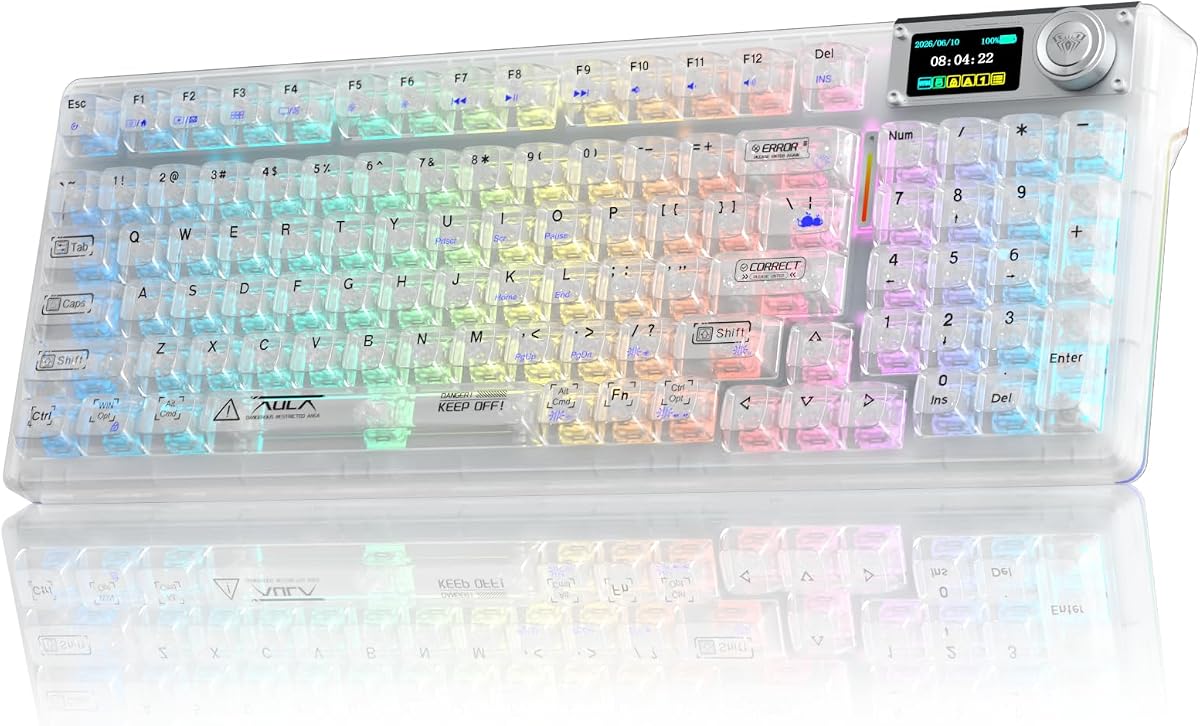
The Aula F98Pro V3 distinguishes itself with a smart TFT screen that displays battery and connection status in real time. This clear keyboard features a futuristic look with high light transmission and customizable RGB lighting.
We may earn a commission when you buy through this link, at no additional cost to you.
Equipped with Ice Crystal Switches, it offers fast actuation and a creamy sound profile. The 10000mAh battery is one of the largest in its class, ensuring long work and gaming sessions without charging. The rotary knob allows quick volume and RGB adjustments.
Drivers and screen customization currently require a wired connection on Windows systems. This limitation might inconvenience users who primarily use wireless modes. However, the battery capacity and screen features add significant utility for tech enthusiasts.
Buyers who want a unique screen interface and massive battery life will find this model compelling. It is well-suited for users who prioritize functionality alongside clear aesthetics and want to monitor status without checking software.
Real-time battery and connection status display enhances convenience. Screen images can be personalized via driver software for style.
Exclusive switches offer fast actuation and excellent light transmission. The design brings responsive and comfortable typing experience for users.
We may earn a commission when you buy through this link, at no additional cost to you.
This YUNZII X98 variant focuses on high-transparency materials that enhance the clarity of the casing and keycaps. It offers a 98% layout with arrow keys and a numpad, balancing compactness with functionality for daily use.
We may earn a commission when you buy through this link, at no additional cost to you.
The keyboard includes five layers of dampening materials to reduce resonance and improve sound quality. QMK/VIA firmware support allows users to remap keys and adjust RGB effects extensively. It supports tri-mode connectivity for easy switching across devices.
White finishes generally require more cleaning to maintain their pristine look. The 98% layout may not fit on extremely small desks compared to 75% models. Despite this, the value offered by the customization options and build quality is strong.
Users seeking a clear aesthetic with robust customization options will appreciate this model. It is a solid choice for those who want deep control over their keyboard experience without paying a premium price.
Double-layer clear keycaps keep characters anti-fading. South-facing LEDs ensure bright and uniform light transmission effects.
Gasket mount optimizes resilience for a softer typing feel. Dampening materials ensure clean acoustic output during keystrokes.
We may earn a commission when you buy through this link, at no additional cost to you.
The GravaStar Mercury V60 HE is designed for competitive gaming with a true 8000Hz polling rate and rapid trigger technology. Its transparent Crystal Rose chassis combines pink aesthetics with immersive RGB lighting for a visually appealing setup.
We may earn a commission when you buy through this link, at no additional cost to you.
Hall Effect switches allow adjustable actuation for faster movement and instant response. The keyboard features multi-layer acoustic foam for a satisfying thock sound. It supports wired connections for both Windows and Mac systems seamlessly.
While the gaming features are top-tier, the keyboard leans heavily into performance over typing comfort. The transparent design may require careful placement to avoid scratches. However, for FPS gamers, the low latency and customizable actuation are unmatched.
Competitive gamers who need the fastest response times will find this keyboard essential. It is an ideal choice for those who want a unique pink design while prioritizing speed and precision in high-level gameplay.
Ultra-low 0.125ms latency delivers faster reactions for competitive titles. 8000Hz polling rate ensures accurate tracking during intense matches.
Dynamically resets keys instantly upon release for smoother strafing. Enables faster directional control and rapid tapping in FPS games.
We may earn a commission when you buy through this link, at no additional cost to you.
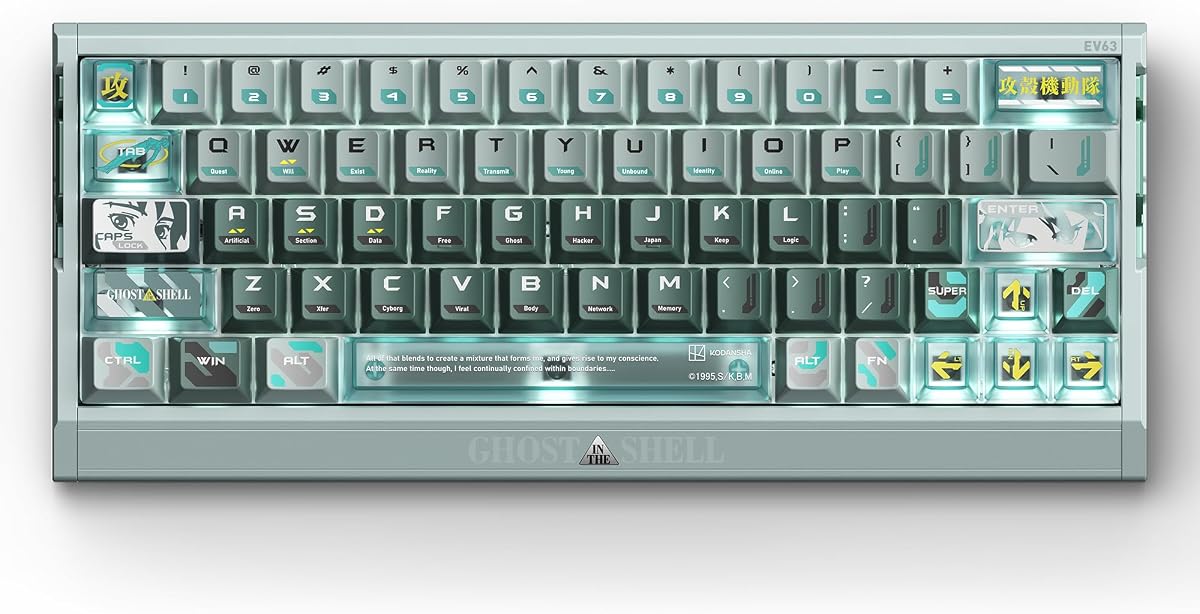
The IQUNIX EV63 Ghost in the Shell is a licensed masterpiece combining cyberpunk tactical aesthetics with high-performance magnetic switches. Built for players who want more than a standard gaming keyboard, it features a cold-touch CNC aluminum case.
We may earn a commission when you buy through this link, at no additional cost to you.
Pro-level FPS response is achieved through 0.01mm rapid trigger and low latency tech. HyperCore V3 firmware ensures consistent press-and-release control with stable Hall signals. The custom keyset includes lexicon sublegends and Motoko-inspired character artwork.
The aluminum case adds weight and stability but makes the keyboard heavy to move. The 60% layout requires using key combinations for arrows and navigation. Yet, the build quality and visual design justify the premium for collectors and enthusiasts.
FPS gamers and collectors looking for a high-end, themed terminal will love this board. It offers a unique blend of style and competitive functionality that stands out as a centerpiece in any desk setup.
Combines competitive magnetic switch performance with cyberpunk tactical aesthetics. Features Motoko-inspired artwork and lexicon sublegends for style.
0.01mm rapid trigger and 0.125ms latency ensure fast key registration. Tune actuation and reset behavior through the IQUNIX driver.
We may earn a commission when you buy through this link, at no additional cost to you.
The KiiBoom Phantom81 Lite offers a frosted ABS finish that guards against discoloration over time. It supports QMK/VIA for deep customization and features a sound-enhancing gasket structure for a creamy typing foundation.
We may earn a commission when you buy through this link, at no additional cost to you.
With tri-mode connectivity, users can toggle between five devices easily for seamless work transitions. The pre-lubricated stabilizers reduce rattling, yielding refined sound quality. It is compatible with Windows, Mac, and Linux for broad utility.
While the ABS molding is durable, PBT materials might offer longer lifespan. The frosted finish looks great but requires cleaning to avoid oils. Overall, it provides a strong balance of features for the price point.
Productivity-minded individuals and DIY enthusiasts will find this keyboard versatile for daily tasks. It is an ideal choice for those who need a portable yet customizable device for coding and office work.
QMK/VIA compatibility enables creative freedom for every key and RGB effect. Gamers and programmers can enhance efficiency with specific shortcuts.
Gasket-mounted structure with damping materials ensures rigidity and flexibility. Reduces ping noise and rattling for refined sound quality.
We may earn a commission when you buy through this link, at no additional cost to you.
This Aula F98Pro V3 unit prioritizes battery life with a massive 10000mAh capacity. It supports tri-mode connectivity and includes a smart TFT screen to display system information in real time for total visibility.
We may earn a commission when you buy through this link, at no additional cost to you.
Ice Crystal Switches provide excellent light transmission and a creamy sound profile. The keyboard features five layers of noise-dampening filling to eliminate cavity noise. A rotary knob allows easy control over volume and RGB lighting.
Charging with the original cable is recommended for safety. The screen images require a wired connection to calibrate which might limit some users. However, the battery endurance is exceptional for heavy users.
Users who need a keyboard that lasts for days without charging will love this model. It combines futuristic display features with robust wireless performance for gaming and office work.
Supports USB-C wired and 2.4GHz wireless and BT5.0 for flexible connections. Saves up to 3 devices seamlessly in BT mode.
Full-key hot swappable sockets allow switch customization easily. Clear keyboard design improves RGB brightness and uniformity for visuals.
We may earn a commission when you buy through this link, at no additional cost to you.
Choosing a keyboard with an acrylic chassis involves considering several key factors beyond aesthetics. This guide breaks down the most important features to help you make an informed decision.
Acrylic chassis can be clear or frosted. Clear acrylic shows internal components and allows RGB to shine through directly, while frosted acrylic offers a more diffuse and professional look. Ensure the material is reinforced to prevent flexing during typing.
Look for models with stainless-steel weights or thicker layers to ensure stability on your desk.
Most acrylic keyboards offer tri-mode connectivity including Bluetooth 5.0 and 2.4GHz wireless plus USB-C wired mode. Bluetooth is great for switching between multiple devices like phones and tablets. Wireless is better for gaming due to lower latency.
Verify the polling rate of the wireless mode if you plan to use the keyboard for competitive gaming.
Battery life varies significantly between models. Some offer 4000mAh while others may have 10000mAh. A larger battery is essential if you plan to keep RGB lighting on constantly throughout the day.
Choose a capacity that matches your daily usage habits to avoid frequent recharging interruptions.
Hot-swap support allows you to change switches without soldering which is valuable for acrylic boards where internal access is key. Magnetic switches offer adjustable actuation for gaming while traditional mechanical switches provide tactile feedback for typing.
Check if the keyboard supports QMK/VIA for advanced programming and remapping capabilities.
Transparent acrylic bodies work best with PBT or ABS keycaps that transmit light well. Ensure the keycaps are double-shot or have shine-through legends to match the aesthetic of the chassis.
Light transmission quality affects how uniform and bright your RGB effects appear.
Acrylic keyboards come in various sizes from 60% to 96%. Smaller layouts like 75% save space while larger ones like 96% include a numpad for productivity. Consider if you need arrow keys and a dedicated numpad for your tasks.
Match the layout to your available desk space and specific workflow needs.
Gasket mount designs provide a softer and more consistent typing feel compared to tray mounts. They also help isolate sound and reduce harsh vibrations during typing sessions.
Prioritize models with multi-layer dampening for the best acoustic experience.
Look for features like rotary knobs for volume control or integrated LCD screens. These additions can enhance usability and provide quick access to system settings without using software.
These features add value and convenience to your overall user experience.
To maintain the clarity of your acrylic chassis, clean the surface with a soft dry cloth. Avoid using alcohol or harsh solvents that can cloud the plastic over time. For deeper cleaning use a mild soap solution and dry thoroughly before use.
When customizing your switches ensure you align the pins correctly with the sockets. Hot-swap boards make this easy but forcing switches can damage the socket. Use a switch puller to safely remove switches if needed.
If your keyboard has a screen use the manufacturer driver to set custom images. Ensure the driver is downloaded via a wired connection to avoid setup issues. Regular updates can improve compatibility with new operating systems.
Yes, modern acrylic chassis are reinforced with internal structures or weights to prevent flexing. While acrylic is slightly more brittle than metal it resists scratches well. Choose models with stainless-steel weights for added stability during intense use.
Use a microfiber cloth to wipe away dust and fingerprints gently. For stubborn marks use a damp cloth with mild soap. Avoid abrasive materials or cleaners containing alcohol which can haze the acrylic finish.
Hot-swap sockets allow you to change switches without soldering. This means you can experiment with different switch types or replace a broken switch easily. It adds significant value for enthusiasts who want to customize their keyboard feel.
Most keyboards with acrylic chassis offer universal support for Windows and Mac. Check the product details for Mac compatibility and ensure the function keys are remappable via software. Many models include a Mac mode for layout adjustment.
A 75% layout is often preferred for gaming as it saves desk space while keeping arrow keys. Compact layouts allow for easier mouse movement which is crucial in FPS games. Ensure you have a programmable knob or macro support for added utility.
Yes, many models offer 2.4GHz wireless with low latency suitable for gaming. Verify the polling rate of the wireless connection. If you play pro-level games consider using wired mode for the absolute lowest response time.
Premium models use CNC aluminum cases or licensed designs which increase cost. Better internal dampening and higher battery capacity also add to the price. Invest in features like magnetic switches or advanced firmware if you need high performance.
Most models offer onboard lighting modes but full RGB customization requires the official driver. Download the software from the manufacturer's website. Ensure you use a wired connection for the setup to avoid connectivity issues.
We reviewed ten distinct keyboards that showcase the beauty and utility of acrylic chassis. Each model offers a unique blend of style and performance suitable for different needs.
Prioritize battery life and connectivity modes if you use your keyboard across multiple devices. Gamers should focus on polling rates and switch types while writers may prefer a solid gasket mount for comfort.
Always check current prices before buying as promotions may vary over time. Your perfect keyboard should match your desk setup and daily routine perfectly.