
Perixx PERIBOARD
4.2Editor score
Quiet scissor keys
Integrated touchpad
Full size with number pad
Selecting the right input device is crucial for efficient point of sale operations. A reliable keyboard ensures smooth transactions and reduces errors during busy hours. Businesses need tools that withstand frequent use and harsh environments while maintaining high performance standards.
We evaluated ten top models based on durability, layout efficiency, and connectivity options. Each product was reviewed for its suitability in retail, hospitality, and industrial settings. Our analysis focuses on features that directly impact daily workflow and operational speed.
Each pick highlights specific strengths and ideal use cases for different business types. You will find detailed breakdowns of key layouts, resistance features, and integration capabilities. Please note that prices and availability can change frequently over time.
4.2Editor score
4.5Editor score

4.2Editor score
As an Amazon Associate we earn from qualifying purchases.
This table provides a quick side by side overview of all ten selected models. Compare key features like key count, resistance, and interface types at a glance to find the right fit.


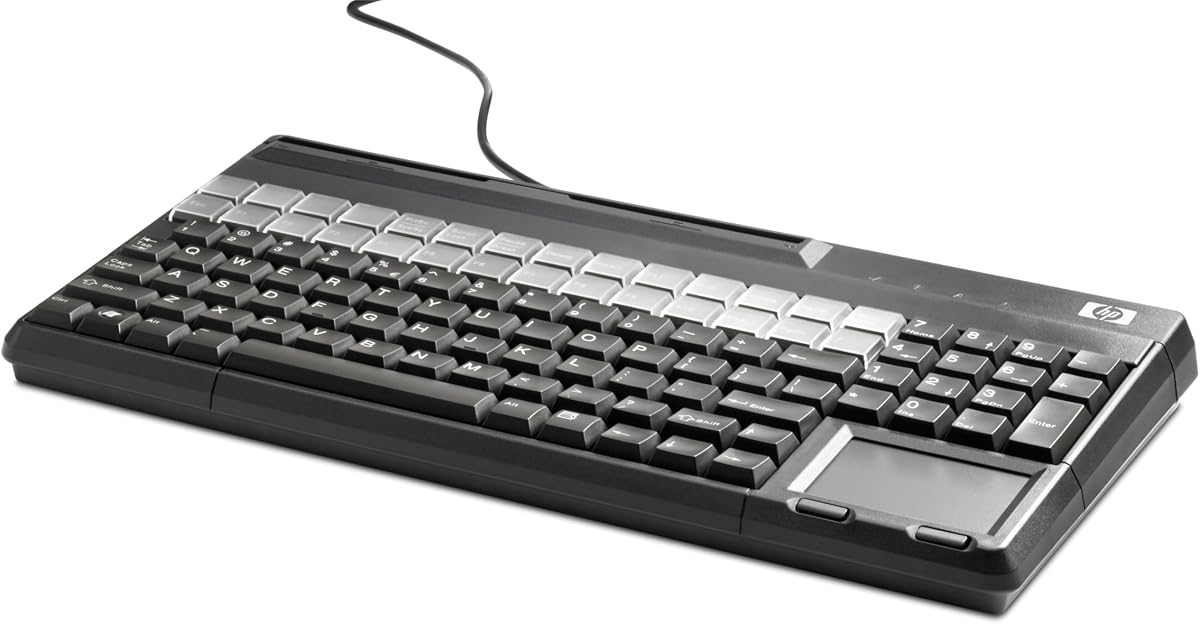
The HP POS Keyboard stands out as a comprehensive input solution for point of sale environments. It features a standard 106 key layout with 28 relegendable keys that allow businesses to map custom functions directly to the hardware. The inclusion of a magnetic stripe reader reduces the need for external card swipers, saving valuable counter space.
We may earn a commission when you buy through this link, at no additional cost to you.
Its integrated touchpad eliminates the need for a separate mouse, streamlining the setup in tight workstations. The USB interface ensures plug and play compatibility with most modern POS systems without requiring additional drivers. This model is built to handle continuous daily use in retail or hospitality settings where speed and efficiency are paramount.
While the relegendable keys offer great flexibility, they may require initial setup time to configure correctly for specific applications. The price is higher than basic keyboards but justified by the integrated features that replace multiple peripherals. It is a solid choice for businesses looking to consolidate hardware and improve workflow.
This keyboard is ideal for retail stores, restaurants, and offices that process payments directly at the desk. If you need a single device that handles typing, navigation, and card swiping, this model delivers reliable performance. It balances functionality and durability effectively for professional environments.
The 28 relegendable keys allow staff to program frequently used commands for faster checkout processes.
The built in magnetic stripe reader simplifies payment transactions by removing the need for external card devices.
We may earn a commission when you buy through this link, at no additional cost to you.
The Cherry G86 is a compact keyboard designed specifically for environments where space is limited but functionality cannot be compromised. Its spill resistant construction makes it suitable for busy kitchens, bars, or service counters where liquid spills are a common risk. The integrated touchpad provides essential navigation capabilities without taking up extra desk real estate.
We may earn a commission when you buy through this link, at no additional cost to you.
This model features a standard 106 key QWERTY layout that ensures familiar typing for staff. The USB interface offers stable connection options for POS terminals and other business computers. Cherry is known for reliability, and this keyboard reflects that reputation with durable keycaps and robust build quality.
The premium price tag reflects the industrial grade build quality and integrated features. While it may not offer the same level of programmability as some specialized POS units, it excels in durability and space saving. It is an excellent choice for small businesses needing a reliable and robust input device.
Consider this keyboard for restaurants, cafes, or retail counters where spills occur and counter space is at a premium. It provides a sturdy and functional typing experience with enough features to support efficient daily operations without requiring additional peripherals.
The spill resistant design protects internal components from accidental liquid exposure common in food service environments.
Integrated touchpad reduces the need for a mouse saving valuable desk space in compact workstations.
We may earn a commission when you buy through this link, at no additional cost to you.
The Perixx PERIBOARD-513III offers an affordable alternative for businesses seeking a full-featured keyboard without a high price tag. It includes a full size layout with a dedicated number pad essential for data entry tasks. The quiet scissor keys provide a comfortable typing experience similar to laptops which reduces noise in open office environments.
We may earn a commission when you buy through this link, at no additional cost to you.
An integrated touchpad allows users to navigate applications without a mouse which saves space on crowded desks. Multimedia hotkeys provide quick access to volume and media controls adding convenience for staff. The USB plug and play design ensures easy setup without needing to install additional drivers or software.
While not as rugged as industrial POS keyboards this model handles general office and light commercial use well. The build quality is sufficient for typical daily tasks but might not withstand extreme conditions like constant spills or heavy impacts. It represents great value for small businesses or startups on a tight budget.
This keyboard is best suited for administrative roles within retail or service businesses where intense physical wear is not expected. It provides a comfortable and functional typing experience with useful extras like the touchpad and hotkeys at a very competitive price point.
Scissor switch keys operate quietly reducing ambient noise in shared workspaces or customer facing areas.
Provides essential features like touchpad and number pad at a fraction of the cost of specialized POS hardware.
We may earn a commission when you buy through this link, at no additional cost to you.
The Cherry Lpos G86-71411 is designed for high volume environments requiring extensive keyboard customization and function access. With 169 keys and 42 relegendable options it allows complex workflows to be mapped directly to the keyboard. The integrated magnetic stripe reader simplifies payment processing by keeping card data entry within the same device.
We may earn a commission when you buy through this link, at no additional cost to you.
Its USB interface provides a reliable connection to POS terminals ensuring consistent performance during peak hours. The QWERTY layout ensures staff can type efficiently without relearning keyboard positions. This model is built to withstand continuous use in retail checkouts or warehouse operations where speed is critical.
The large number of keys means the keyboard has a larger footprint requiring more desk space. Programming the relegendable keys can be time-consuming initially but pays off in efficiency gains once set up. It is a specialized tool best for environments with complex input requirements.
Consider this keyboard for large retail stores or warehouses where staff process many different types of transactions. The customization options allow tailoring the keyboard to specific business processes making it an efficient tool for experienced operators.
42 relegendable keys allow complex command mapping for specialized retail or warehouse workflows.
Built-in magnetic stripe reader streamlines payment processes reducing the need for external peripherals.
We may earn a commission when you buy through this link, at no additional cost to you.
The Logitech K120 is a straightforward full-size keyboard ideal for basic entry tasks in POS systems. It features deep-profile keys and a standard layout with a number pad for efficient data entry. The spill-resistant design protects against minor liquid accidents making it suitable for environments where drinks are present.
We may earn a commission when you buy through this link, at no additional cost to you.
Setup is incredibly simple requiring only a USB connection to start typing immediately without any drivers. It is compatible with Windows operating systems ensuring broad compatibility with most business computers. Logitech is known for reliability and this model has a strong track record for long-term use.
While it lacks advanced features like programmable keys or touchpads it excels in simplicity and dependability. The low price point makes it an excellent backup option or primary device for simple tasks. It may require a separate mouse for navigation which adds to the total desk footprint.
This keyboard is a great choice for businesses needing a reliable input device without extra features. It works well for inventory management or order entry where complex POS functions are not required at the keyboard.
Spill resistant construction ensures the keyboard continues to function after accidental liquid exposure.
Plug and play USB connectivity means no software installation is needed before use.
We may earn a commission when you buy through this link, at no additional cost to you.
The Adesso Easy Touch 630UB is built for harsh environments with an IP67 waterproof rating that allows submersion in water. This makes it ideal for manufacturing, workshops, or food service areas where spills are frequent. The large 2x print size keys provide excellent contrast and readability for quick data entry.
We may earn a commission when you buy through this link, at no additional cost to you.
Its membrane switches are designed for long-lasting performance and withstand rough handling better than standard keyboards. The robust construction allows for easy cleaning which is essential in industrial or medical settings. Plug and play USB connectivity ensures quick setup across various Windows systems.
The waterproof construction adds weight and cost compared to standard keyboards. Typing feel may be less refined than mechanical options but durability is the primary focus. It is a specialized tool for environments where standard keyboards would fail quickly.
Choose this keyboard for industrial facilities or kitchen environments where equipment must be washed frequently. It ensures reliable operation even when exposed to water or harsh cleaning chemicals.
IP67 rating ensures the keyboard remains functional even after submersion in water.
Large high contrast keys improve visibility and reduce errors in fast-paced work settings.
We may earn a commission when you buy through this link, at no additional cost to you.
The Cherry Electronics LPOS Keyboard offers a compact design with 127 programmable and 42 relegendable keys for customized workflows. The integrated touchpad reduces the need for a mouse saving valuable counter space in POS setups. USB interface ensures compatibility with most business terminals without requiring additional hardware.
We may earn a commission when you buy through this link, at no additional cost to you.
This keyboard is built for standard POS environments where efficiency and space saving are priorities. The layout allows for mapping specific business functions to individual keys reducing reliance on software menus. Cherry is a well-known brand in industrial computing providing a degree of quality assurance.
User reviews indicate some challenges with initial setup and programming the keys correctly. The learning curve may be higher than plug-and-play options but pays off once configured. It is suitable for businesses with trained staff who can manage the initial configuration.
Consider this model for retail environments needing a balance of compact size and customization options. It provides reliable functionality for standard POS tasks with the added benefit of an integrated pointing device.
127 programmable keys allow mapping of complex business workflows for faster operation.
Integrated touchpad reduces total desk footprint improving organization at checkout counters.
We may earn a commission when you buy through this link, at no additional cost to you.
The Cherry KC 1000 is a specialized security keyboard designed for environments requiring smart card authentication. It features a built-in card terminal and secure PIN entry pad for safe data access. FIPS 201 approval ensures it meets strict government standards for identity verification.
We may earn a commission when you buy through this link, at no additional cost to you.
This keyboard supports multiple smartcard protocols allowing compatibility with various secure systems. The thin design keeps it from occupying too much desk space while providing robust security features. It is built for industries such as healthcare, finance, or government where data protection is critical.
The specialized nature means it may be overkill for standard retail POS systems but essential for secure access. Pricing is higher than standard keyboards reflecting the security technology involved. It provides peace of mind for businesses handling sensitive personal or financial data.
Choose this keyboard for secure offices or facilities requiring employee authentication via smartcards. It ensures safe entry and protects against unauthorized access to business systems.
FIPS 201 approval ensures the device meets rigorous federal security standards.
Integrated card reader and PIN pad streamline secure authentication workflows.
We may earn a commission when you buy through this link, at no additional cost to you.
The Cherry G80-1800 is a compact mechanical keyboard built for industrial applications where durability is key. It uses Cherry MX Black switches known for their linear feel and long lifespan exceeding 100 million actuations. The space-saving design fits well into 19-inch applications or tight workstations.
We may earn a commission when you buy through this link, at no additional cost to you.
It supports both USB and PS/2 connections providing flexibility for legacy systems. The compact dimensions reduce desk footprint without sacrificing essential key functions. This model is ideal for factories or control rooms where standard keyboards fail quickly.
The mechanical switches provide tactile feedback that some users prefer for typing accuracy. However the compact layout may require adjustment for users accustomed to full-sized keyboards. The dual connection options ensure compatibility with a wide range of hardware.
This keyboard is best for industrial or machine control environments requiring reliable input devices. It offers a balance of compact size and mechanical durability suitable for harsh conditions.
Cherry MX Black switches offer over 100 million keystrokes for extended service life.
Dual USB and PS2 support ensures compatibility with both modern and legacy hardware.
We may earn a commission when you buy through this link, at no additional cost to you.
The Logitech K270 offers wireless freedom with a full-size layout that includes a number pad and all standard keys. A 2.4GHz wireless connection provides a reliable link up to 33 feet allowing flexible placement of devices. The spill-proof design protects against minor liquid accidents ensuring longevity.
We may earn a commission when you buy through this link, at no additional cost to you.
Battery life is impressive allowing up to 24 months of use on two AAA batteries reducing maintenance frequency. Setup is simple with the included USB receiver requiring no drivers. Multimedia hotkeys allow quick access to internet and audio controls adding convenience for office tasks.
Wireless convenience may be a limitation in high-interference environments where wired stability is preferred. Battery replacement is necessary eventually though infrequent. It is a good choice for environments where clutter reduction is a priority.
Select this keyboard for offices or reception areas where cables might get in the way. It offers a comfortable typing experience with the benefit of wireless convenience and long battery life.
2.4GHz connection provides a stable connection up to 33 feet away from the computer.
24 month battery life reduces the need for frequent battery changes.
We may earn a commission when you buy through this link, at no additional cost to you.
Choosing the right keyboard for your POS system involves balancing durability, layout, and connectivity. This guide outlines the key factors to consider before making a purchase.
POS keyboards face frequent use and potential spills. Look for spill-resistant or waterproof models if your environment involves liquids. Mechanical switches or heavy-duty membranes often last longer in high-traffic areas.
Prioritize models with industrial-grade build quality to reduce long-term replacement costs.
Standard QWERTY layouts are familiar but POS-specific models often offer relegendable keys. These allow mapping of custom functions like discounts or item codes directly to the hardware for faster processing.
Choose a layout that matches your staff's existing skills or offers customizable options for specific workflows.
USB is the most common and reliable connection for modern POS terminals. Wireless options provide flexibility but require battery management and may be susceptible to interference in busy areas.
Ensure the interface matches your POS system's ports to avoid compatibility issues.
Integrated touchpads and magnetic stripe readers can eliminate the need for extra peripherals. This saves counter space and simplifies setup. However, these features often increase the price significantly.
Evaluate if integrated devices truly save money compared to separate standalone peripherals.
Compact keyboards save space but may lack function keys needed for certain applications. Full-size models with number pads are essential for data-heavy entry tasks.
Measure your available workspace to ensure the keyboard fits comfortably without crowding other tools.
Most keyboards support Windows but check for compatibility with Mac or Linux systems if needed. Ensure drivers are available or plug-and-play support exists for your specific OS.
Confirm that the manufacturer lists your operating system version explicitly in specifications.
Reliable brands offer warranties ranging from one to three years. Check if technical support is available for firmware updates or troubleshooting.
A longer warranty period indicates manufacturer confidence in product longevity.
Basic keyboards are affordable but may lack specialized POS features. Industrial models cost more but reduce replacement frequency and improve efficiency.
Balance initial cost against potential long-term savings from durability and workflow improvements.
Proper setup is essential for efficient operation. Ensure the keyboard is connected to the correct port and that drivers are installed if required. Test all keys and programmable functions before starting daily operations to catch any issues early.
Keep the keyboard clean by wiping down keys regularly with a slightly damp cloth. Avoid spraying liquids directly onto the device even if it is water-resistant. For waterproof models, you may wipe the entire surface more thoroughly to remove residue.
Store the keyboard in a stable position to prevent accidental falls. If using wireless models, monitor battery levels to avoid unexpected downtime. Replace cables if they show signs of wear to maintain a secure connection.
Many POS keyboards are water resistant rather than fully waterproof. Water-resistant models can handle minor spills but should not be submerged. Fully waterproof models with IP67 ratings exist but are typically more expensive and specialized for industrial use.
Most POS terminals accept standard USB keyboards. However, regular keyboards lack features like relegendable keys or integrated card readers. Specialized POS keyboards offer better durability and workflow efficiency for commercial environments.
Programmable keys are usually configured using software provided by the manufacturer or a configuration utility. Follow the manual to assign specific commands or macros to individual keys. Some models allow on-the-fly programming without installing software.
A high-quality POS keyboard typically lasts between three to five years with heavy daily use. This lifespan depends heavily on the environment and maintenance. Industrial mechanical models often exceed this with proper care.
Wireless keyboards work well in office-like settings but may face interference in areas with many devices. They offer cleaner desk setups but require battery changes. Wired options are generally more reliable for critical payment terminals.
Mechanical keyboards offer better durability and tactile feedback for long typing sessions. They are more resistant to wear but can be noisy. In quiet environments, scissor or membrane switches may be preferred.
Unplug the keyboard immediately and turn it upside down to drain liquid. Wipe the surface with a damp cloth and let it dry completely before reconnecting. For waterproof models, you may clean the surface more vigorously.
In multi-user setups, prioritize durability and programmable keys that match different roles. Shared keyboards should have comfortable layouts for all staff. Consider models with robust hinges and spill protection for longevity.
We reviewed ten top keyboards ranging from basic entry models to specialized industrial units. Each option offers distinct advantages depending on your specific business requirements and environment.
Prioritize durability and layout features that match your staff's daily tasks. Integrated features like touchpads or card readers can streamline operations but come at a higher cost.
Prices and availability may change frequently so verify current details before purchasing. Choosing the right keyboard can significantly improve efficiency and reduce operational downtime over time.