
BENFEI USB 3.0 Switch
4.1Editor score
Supports up to 4 USB devices
Up to 5Gbps data transfer speed
Includes external power supply slot
Discover the top keyboard and mouse switch for 2 computers to share peripherals easily. We compare 10 USB switches and KVM options for seamless dual PC
Managing two computers often means constantly unplugging peripherals to share keyboards and mice between systems. This hassle wastes time and creates clutter on your desk. A reliable switch solves this by allowing instant toggling between devices without physical rewiring efforts.
We evaluated ten top-rated USB switches and KVM solutions based on port count, data speed, and compatibility with modern operating systems. Our analysis focuses on build quality, ease of use, and stability when connecting multiple high power devices simultaneously.
Each pick below highlights specific strengths like budget friendliness or high speed data transfer capabilities. Prices and availability change frequently so verify current details on retailer pages before making your final purchase decision today.
4.1Editor score

4.6Editor score

4.3Editor score
This side by side comparison lists every selected switch model with key specifications to help you find the right fit for your dual computer setup needs.



This UGREEN model allows two computers to share up to four USB devices including keyboards and mice. It features a mix of USB-C and USB-A ports which offers flexibility for modern setups. The included controller makes switching between systems clean and organized.
We may earn a commission when you buy through this link, at no additional cost to you.
Data transfer speeds reach up to 5Gbps thanks to USB 3.0 technology. This ensures quick file transfers between connected hard drives or flash drives without bottlenecks. The unit supports various operating systems like Windows and macOS without needing drivers.
Users may need to connect the optional power supply when using high power devices to avoid disconnections. This switch does not support video transmission so it cannot be used as a full KVM solution for monitors.
It is a solid choice for those needing multiple peripheral connections between two PCs without swapping cables. The ability to use USB-C inputs directly is a strong advantage for newer laptop users.
The combination of USB-C and USB-A ports accommodates a wide range of devices without requiring extra adapters.
Using the external controller keeps your desk tidy by avoiding the need to reach for the switch unit directly.
We may earn a commission when you buy through this link, at no additional cost to you.
The BENFEI switch offers an accessible entry point for users wanting to share peripherals between two systems. It supports four USB devices simultaneously making it ideal for keyboards mice and printers. The LED indicator clearly shows which computer is currently active.
We may earn a commission when you buy through this link, at no additional cost to you.
With 5Gbps transfer speeds you can move files quickly between storage devices. It works with Windows macOS and Linux out of the box. The power slot ensures stability when connecting devices that draw more power.
Note that the power adapter itself is not included in the package so you will need to source one separately. This switch focuses purely on USB data so it does not handle video signals for displays.
If you need a cost effective solution for basic peripheral sharing this model delivers reliable performance. The included power cable helps with initial setup and testing of connected devices.
The LED lights provide immediate visual feedback on which PC is controlling the connected peripherals.
Priced competitively this switch provides essential functionality without unnecessary expensive features.
We may earn a commission when you buy through this link, at no additional cost to you.
This switch stands out with a high rating and sturdy aluminum construction designed for longevity. It allows two computers to share two USB devices which fits standard keyboard and mouse needs perfectly. The package includes two USB 3.0 cables for immediate use.
We may earn a commission when you buy through this link, at no additional cost to you.
Switching between computers is as simple as pressing a single button. An LED indicator shows the active system clearly so there is no confusion. The aluminum shell helps dissipate heat during extended use.
While it only has two ports it is optimized for the most common dual PC use case. It lacks an external power port which might limit high power device compatibility compared to 4 port models.
For users needing a reliable plug and play solution for basic sharing this unit is an excellent choice. The build quality and included accessories add value beyond the basic functionality.
The aluminum alloy shell provides better heat dissipation and physical protection than plastic alternatives.
Includes two USB cables so you can start using it right out of the box.
We may earn a commission when you buy through this link, at no additional cost to you.
This UGREEN model is designed for straightforward sharing of two USB devices between two computers. It handles tasks like printer splitting or sharing keyboards without needing complex setup. The included cables ensure you can connect immediately.
We may earn a commission when you buy through this link, at no additional cost to you.
USB 3.0 technology enables fast file transfers which speeds up workflow between systems. One button switching makes it easy to toggle control between your work and personal machine. The LED indicator confirms the active connection instantly.
The lack of extra ports means it is strictly for essential peripherals. You will need a separate solution if you require more than two shared devices simultaneously.
It works well for home offices where space is limited and only a few devices need sharing. The compact form factor fits easily on crowded desks without taking up much room.
Ideal for enabling two computers to share a single printer efficiently.
The small design minimizes desk clutter while providing essential switching functionality.
We may earn a commission when you buy through this link, at no additional cost to you.
This unit combines keyboard mouse and video switching into one device for a complete dual computer setup. It allows you to control two PCs with one monitor and share peripherals. The 4K resolution ensures clear visuals on modern displays.
We may earn a commission when you buy through this link, at no additional cost to you.
Four USB 3.0 ports provide ample connectivity for keyboards mice and other accessories. You can switch using a button or the included remote for convenience. It works with Windows and Linux without requiring special drivers.
Because it handles video you get more functionality than a standard USB switch. The wired remote keeps your workspace tidy by allowing you to place it out of the way.
Choose this if you want to reduce cable clutter significantly by sharing a monitor as well. It is ideal for setups where screen real estate is a premium requirement.
Supports up to 4K resolution allowing high quality display sharing between two systems.
The included remote lets you switch sources without reaching behind the desk.
We may earn a commission when you buy through this link, at no additional cost to you.
This switch supports four USB devices which provides flexibility for various peripherals beyond just keyboards. It uses USB 2.0 technology which is sufficient for most input devices. The micro USB port allows for optional power to ensure stability.
We may earn a commission when you buy through this link, at no additional cost to you.
Switching is done via a button with an LED indicator to show the active PC. You can use it with Windows or macOS without installing additional software. The included cables make it ready to use quickly.
While USB 2.0 is slower than 3.0 it is often enough for human interface devices. If you need fast file transfers you might prefer a USB 3.0 model for higher bandwidth.
It is a good budget option for sharing printers and scanners where speed is not critical. The four port layout accommodates multiple devices without needing extra hubs.
Four ports allow for sharing multiple devices like printers and scanners simultaneously.
The optional power input helps prevent disconnection when multiple devices draw power.
We may earn a commission when you buy through this link, at no additional cost to you.
This model shares four USB devices between two computers with fast 5Gbps transfer rates. It features a USB-C power port which avoids the need for older micro cables. The included cables help you get started without buying extras.
We may earn a commission when you buy through this link, at no additional cost to you.
It supports high power devices like external hard drives when powered correctly. The LED indicator confirms the active system so you know which machine is receiving input. Drivers are not needed for Windows or Linux.
The USB-C power option is a modern convenience that reduces cable clutter. However the power adapter is not included so you will need to provide your own supply.
It is a solid choice for users who need speed and power support for multiple peripherals. The compact design fits easily on a desktop without taking up much space.
The USB-C power port modernizes the setup by supporting standard charging cables.
USB 3.0 speeds ensure fast data transfer for connected drives or sticks.
We may earn a commission when you buy through this link, at no additional cost to you.
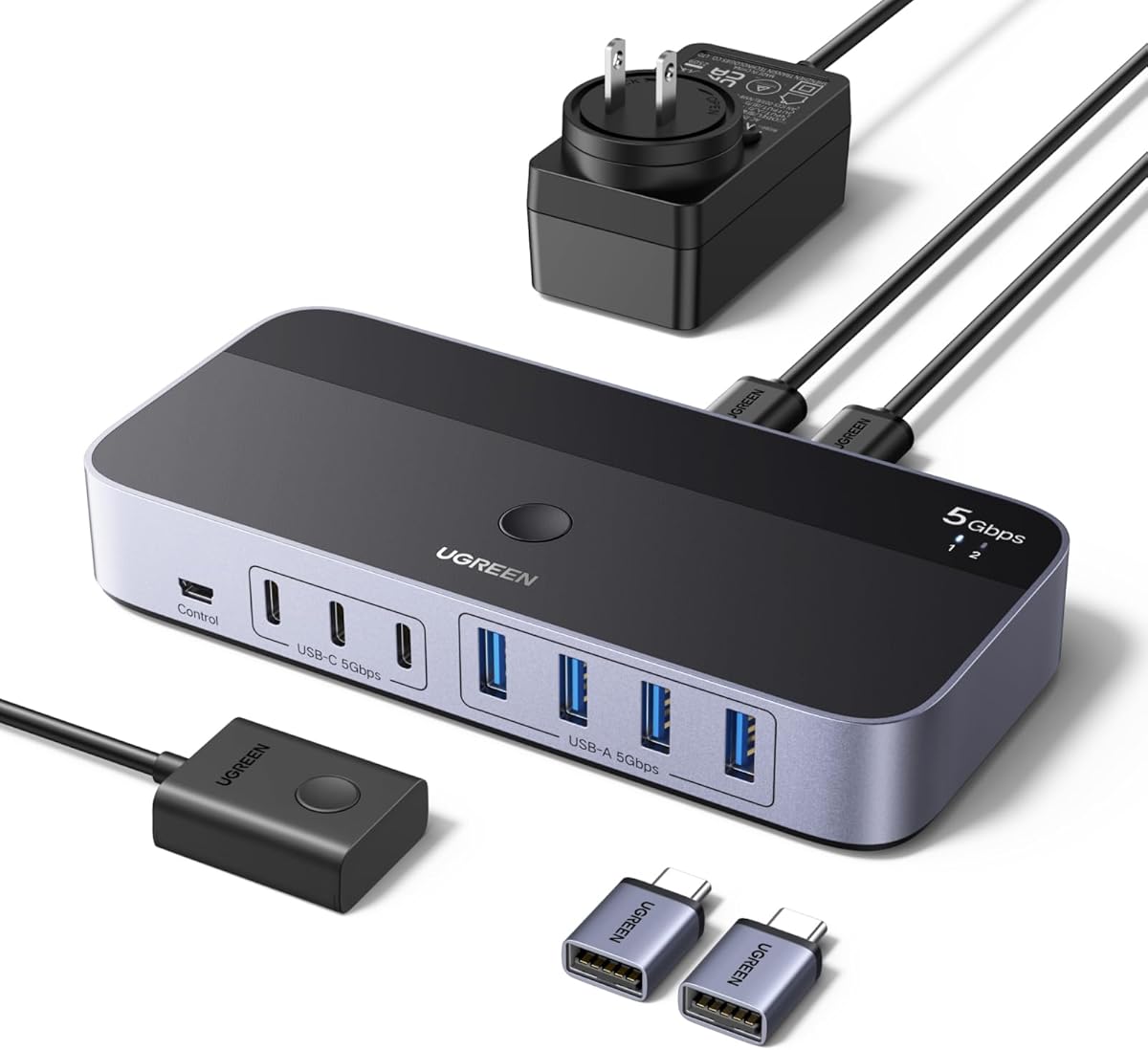
This switch allows two computers to share up to seven devices using a mix of ports. It includes a power adapter which helps with stability when connecting many peripherals. The external controller lets you switch easily from your desk.
We may earn a commission when you buy through this link, at no additional cost to you.
You get four USB-A and three USB-C ports to handle modern and older devices. The speed is up to 5Gbps for efficient file transfers. It works with Windows and macOS without software installation.
The inclusion of the power adapter makes setup straightforward for high power needs. However the larger number of ports means the unit takes up more desk space.
It is ideal for setups with many peripherals like cameras and drives that need sharing. The mix of ports ensures compatibility with a wide range of devices.
Seven ports allow for extensive sharing of various device types between two systems.
The power adapter ensures stable operation for multiple devices simultaneously.
We may earn a commission when you buy through this link, at no additional cost to you.
This switch offers a straightforward way to share two devices between two computers. It draws power from the USB ports so no adapter is needed. The external controller helps keep your desk organized by allowing easy access.
We may earn a commission when you buy through this link, at no additional cost to you.
Plug and play functionality means you do not need to install drivers. It works with common operating systems like Windows and Linux. The LED indicator shows which computer is currently active.
While limited to two devices it covers the most common needs for keyboard and mouse sharing. The controller adds value by simplifying the switching process on a cluttered desk.
It is suitable for basic home office setups where simplicity is key. The included cables ensure you can test it immediately upon arrival.
Powered directly by the computer USB ports for a clean setup.
The included controller keeps your switching accessible and tidy.
We may earn a commission when you buy through this link, at no additional cost to you.
This top tier model offers the fastest transfer speeds available at up to 10Gbps. It supports seven devices with a mix of USB-A and USB-C ports for flexibility. The included power adapter ensures reliable performance for demanding tasks.
We may earn a commission when you buy through this link, at no additional cost to you.
USB 3.2 Gen 2 technology allows for rapid file transfers that save time. The converter adapter helps connect older USB-A devices easily. You get both ports and speed for a complete sharing solution.
The price reflects the premium features but the speed and capacity justify it for professionals. It takes up more desk space but handles more devices than other options.
Choose this if you need maximum speed and port count for professional use. It is a powerful tool for users with many peripherals to share between systems.
10Gbps speeds allow for quick file transfers that improve productivity.
Seven ports accommodate a wide range of devices for demanding workflows.
We may earn a commission when you buy through this link, at no additional cost to you.
Selecting the right switch depends on your port needs speed requirements and whether you need video support. This guide breaks down the essential factors to consider.
Determine how many devices you need to share such as keyboard mouse printer or scanner. Some switches offer two ports while others offer four or seven to accommodate more gear. Look for mix of USB-A and USB-C ports if you use modern laptops.
USB 3.0 and 3.2 models provide faster data speeds than USB 2.0 which helps if you share hard drives. For keyboards and mice speed matters less but for storage devices it is crucial. Ensure the switch supports at least 5Gbps for general use.
Some devices draw enough power to cause disconnections without external help. Switches with power ports allow you to connect an adapter for stable operation. If you plan to share external hard drives look for models with optional power supply.
Buttons on the unit are common but some include an external controller for easier access. This keeps your desk neat and lets you switch without reaching for the hub. Consider where you want the switch to sit on your desk.
A standard switch only handles USB data devices like keyboards and mice. A KVM switch also handles video signals to share a single monitor between computers. If you need to share a screen ensure the product explicitly states KVM support.
Most switches work with Windows macOS and Linux without drivers. Check the product specs to ensure support for your specific OS versions. Plug and play functionality avoids the hassle of installing extra software.
Aluminum shells dissipate heat better than plastic which helps with longevity. A sturdy build ensures the unit can survive frequent handling on a busy desk. High ratings often reflect better materials and construction quality.
Many products include cables but some require you to buy them separately. Check if a power adapter is included as this adds significant value. Having the right cables in the box saves time and money.
Connect the switch to your computers using the provided cables ensuring the input ports face the computers. Then connect your peripherals like keyboard and mouse to the output ports on the switch. Press the button to activate the desired system.
If you use an external controller place it on the desk within reach for easy switching between machines. This avoids the need to move the switch unit and keeps your workspace organized efficiently.
Avoid overloading the switch with more devices than it supports to prevent disconnections. If using high power devices connect the optional power supply to maintain stable performance over time.
Standard USB switches do not support video signals so they cannot share a monitor. You need a KVM switch that specifically supports HDMI or DisplayPort for video sharing. Check the product details for video capabilities.
Most switches are plug and play and work without installing drivers on Windows macOS or Linux. Simply connect the devices and press the button to start using them. Driver installation is typically not required.
Devices like external hard drives draw more power than a USB port can provide alone. An external power supply ensures stable operation and prevents disconnections during use. Look for a power port if you share many devices.
USB 3.0 switches offer faster data transfer speeds up to 5Gbps compared to USB 2.0. This is useful for sharing storage devices but less critical for keyboards and mice. Check the product specs for speed ratings.
Some switches offer a mix of USB-A and USB-C ports for flexibility. Others may require an adapter for USB-C connections. Check the product details for port types to ensure compatibility with your devices.
Yes it is safe to leave the switch connected permanently as it is designed for constant use. Ensure you use the correct power supply if needed to avoid overheating or damage. Proper setup ensures longevity.
The 2 in 2 Out USB 3.0 Switch offers a balanced experience with sturdy build and high user ratings. For budget conscious buyers the BENFEI model provides essential sharing features at a lower cost.
Prioritize port count and speed if you share multiple storage devices or need faster transfers. Consider KVM options if you also want to share a single monitor between your systems.
Prices and availability change frequently so verify current details on retailer pages before making your purchase. Choosing the right switch will streamline your dual computer workflow significantly.