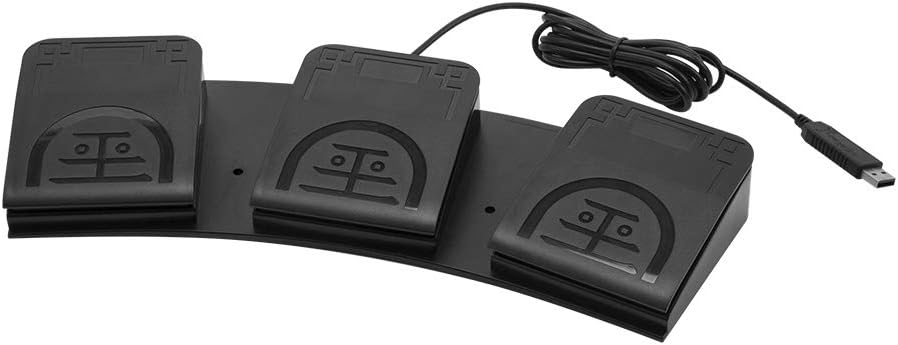
iKKEGOL Upgraded USB Triple
4.4Editor score
Optical switches for quiet operation
Programmable keyboard and mouse
Durable construction with TPU rubber
This comprehensive guide compares the top foot pedals for transcriptionists to help you find the most durable and ergonomic device for accurate transcription
Selecting the right foot pedal can significantly enhance your transcription efficiency. A quality device offers precise control over audio playback, allowing you to maintain focus on typing without interrupting your flow. This guide reviews ten leading options tailored for professionals.
We evaluated each model based on durability, ergonomic design, software compatibility, and switch precision. Our analysis includes detailed specifications and real-world performance insights. This list covers diverse needs, from budget-friendly choices to high-end configurable units designed for heavy daily use.
Each pick highlights key strengths and potential limitations to assist your decision. Features vary from simple plug-and-play functionality to advanced programmability for complex macros. Please note that availability and pricing may fluctuate, so verify current details before purchasing.
4.4Editor score

4.5Editor score

4.2Editor score
The following table provides a side-by-side overview of key specifications for all ten products. This comparison helps you quickly identify which model aligns with your specific software requirements and ergonomic preferences.


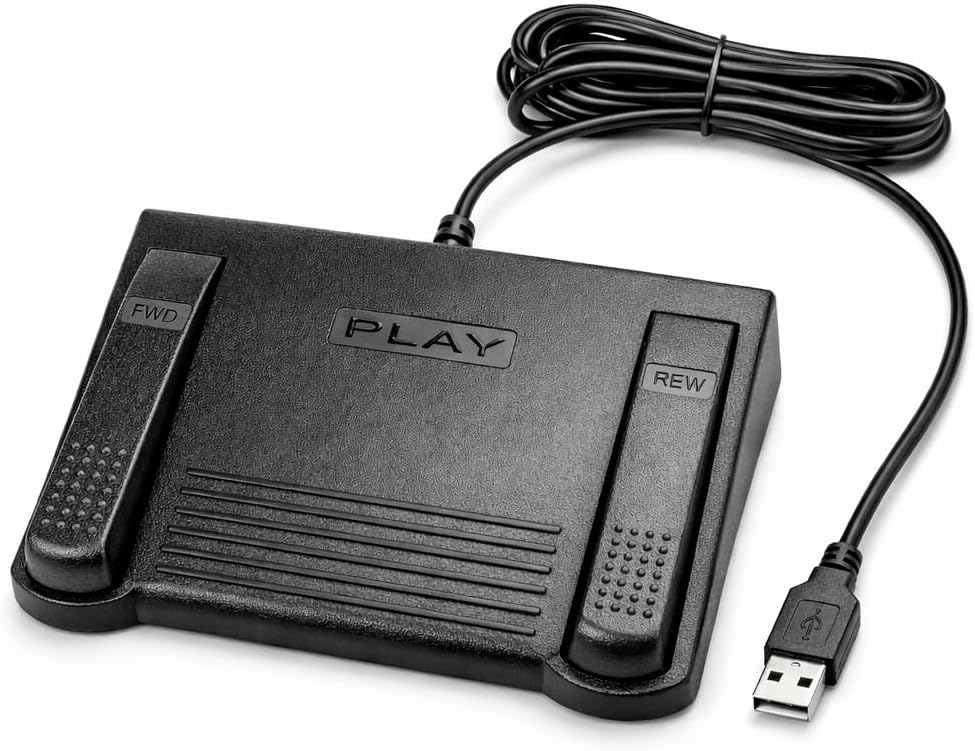

The Infinity 3 USB Foot Pedal stands out as a robust solution for transcriptionists seeking reliability. With a solid 4.5 star rating, it delivers consistent performance for daily workflow demands. Its heavy-duty construction ensures it can withstand repeated use without degradation over time.
We may earn a commission when you buy through this link, at no additional cost to you.
Key strengths include the ultra-heavy-duty micro switches which guarantee countless hours of trouble-free operation. The ergonomic design features a wide, central sloping play pedal that makes moving between functions effortless. This layout reduces foot strain during extended transcription sessions significantly.
While it offers essential controls like play, fast forward, and rewind, it lacks advanced programmability found in higher-end models. Some users may prefer more customization options for specific software macros. However, these limitations are acceptable for those prioritizing simplicity and durability.
This pedal is ideal for professionals who need a dependable device that works out of the box. It suits medical, legal, and general transcription roles where stability is paramount. We recommend it as a top choice for reliable hands-free control.
The heavy-duty components and micro switches ensure this device withstands years of daily use without failure.
The sloping play pedal and wide surface allow natural foot movement, minimizing strain during long shifts.
We may earn a commission when you buy through this link, at no additional cost to you.
The iKKEGOL Upgraded USB Triple Foot Pedal offers exceptional value for transcriptionists on a budget. Rated 4.4 stars, it provides reliable functionality through its HID device standard and optical switches. This makes it a versatile tool beyond just transcription work.
We may earn a commission when you buy through this link, at no additional cost to you.
Its main advantage lies in the optical switches which operate quietly, reducing noise distractions in shared environments. The wide pedal design ensures comfort and stability underfoot. You can program it to execute macros or keyboard shortcuts, adapting to various software needs effectively.
Users must download configuration software to set up custom functions, which adds a setup step compared to plug-and-play units. The design is utilitarian rather than ergonomic specific to transcription. Yet, these trade-offs are minor given the price and flexibility it offers.
This pedal is perfect for those who need a customizable and economical device. It works well for transcription, gaming, and other hands-free tasks. We recommend it for users seeking cost-effective control without sacrificing reliability.
Optical switches provide silent actuation, maintaining a quiet workspace during sensitive transcription sessions.
The ability to program custom macros allows seamless integration with diverse transcription software platforms.
We may earn a commission when you buy through this link, at no additional cost to you.
The Philips LFH-2330 represents a premium option for transcriptionists demanding full control over their workflow. With a 4.2 star rating, it is known for its four configurable pedals and slim profile. This design minimizes foot movement and physical strain during transcription.
We may earn a commission when you buy through this link, at no additional cost to you.
Its standout feature is the ability to configure all four pedals via a user-friendly wizard. This adaptability ensures the device suits personal preferences and specific software requirements. The slim ergonomic design helps reduce physical fatigue by lessening foot movement.
The higher price may deter budget-conscious buyers, and the customization requires some initial setup time. While it is robust, users accustomed to fixed-function units might find the configuration process lengthy. These factors are acceptable for those prioritizing tailored functionality.
Ideal for professional environments like medical or legal transcription, this pedal offers reliability and customization. It is a strong choice for those who need precise control over multiple audio playback functions. We recommend it for users valuing ergonomic efficiency.
Each of the four pedals can be configured to match your specific software needs, enhancing operational flexibility.
The slim profile and ergonomic shape reduce foot strain, supporting comfort during long transcription shifts.
We may earn a commission when you buy through this link, at no additional cost to you.
The VEC in-USB-2 Infinity Digital Foot Control is designed for high durability and endurance. With a 4.4 star rating, it features a rechargeable battery offering up to 1000 hours of recording time. This makes it suitable for extended transcription sessions without power interruptions.
We may earn a commission when you buy through this link, at no additional cost to you.
Its heavy-duty components and precision switches are rated for two million depressions. A mechanical stop prevents accidental triggering of the center pedal. The sloping ergonomic design enhances comfort. It works with most leading transcription products seamlessly.
Managing the battery adds a small maintenance task compared to USB-only units. The weight might be noticeable underfoot for some users. However, the reliability and battery longevity compensate for these minor inconveniences in daily use.
This pedal is perfect for heavy-duty users who need consistent performance. It suits various transcription environments where long usage times are expected. We recommend it for those needing reliable hands-free control over extended periods.
The rechargeable battery ensures uninterrupted workflow for up to 1000 hours of recording time.
A mechanical stop design ensures precise control by preventing unintended pedal activations.
We may earn a commission when you buy through this link, at no additional cost to you.
The Philips ACC2330 is a professional foot control designed for digital dictation systems. With a 4.1 star rating, it features a four-pedal layout and unique toe touch capabilities. This allows for easy relaxation during pauses and controlled foot movement via heel swing.
We may earn a commission when you buy through this link, at no additional cost to you.
The increased width of the center pedal helps avoid unintended presses. Its design focuses on ergonomic comfort and ease of use for professionals. The toe touch control offers a distinct way to interact with audio playback.
Users unfamiliar with four-pedal setups may find it requires adjustment. The feature set is less modern compared to programmable units. However, for specific digital dictation systems, its specialized functions are highly beneficial.
Ideal for professionals using compatible digital systems, this pedal offers reliable control. It suits those who prefer a traditional yet refined ergonomic approach. We recommend it for specialized dictation workflows.
The heel swing operation allows for natural foot movement and relaxation during transcription pauses.
Toe touch control provides precise interaction with the center pedal for accurate playback commands.
We may earn a commission when you buy through this link, at no additional cost to you.
The DAC FP-110-USB is a specialized foot pedal designed for specific computer software. With a perfect 5.0 star rating, it offers unique controls like Next Job and Record alongside standard playback. This makes it ideal for users relying on those specific functions.
We may earn a commission when you buy through this link, at no additional cost to you.
Its three large buttons are clearly labeled and easy to operate. The USB connector ensures straightforward setup. While its software compatibility is narrow, it delivers exceptional performance within its intended niche.
The higher price and limited software support restrict its general appeal. Users not needing specific job navigation may find it unnecessary. However, for the right workflow, its functionality is unmatched.
This pedal is perfect for transcriptionists using compatible software. It offers specialized control that enhances specific workflows efficiently. We recommend it for niche professional needs.
The Next Job button streamlines transitions between files, saving time during batch processing.
A dedicated record button allows for quick capture of audio during transcription or dictation.
We may earn a commission when you buy through this link, at no additional cost to you.
The Infinity IN-USB3 offers a compact solution for transcriptionists needing reliable foot control. With a 4.5 star rating, its low profile design fits easily under desks or in travel kits. The large non-slip surface area ensures stability during use.
We may earn a commission when you buy through this link, at no additional cost to you.
It provides straightforward digital control via USB connection. While it lacks advanced programmability, its simplicity ensures it works without configuration issues. The robust design supports daily professional use effectively.
The minimal design means less cushioning underfoot compared to ergonomic models. Basic features may not suit users needing macros. However, its reliability and portability make it a solid choice.
Ideal for users seeking a simple, stable device, this pedal delivers consistent performance. We recommend it for those prioritizing compactness and reliability.
The low profile allows easy storage and transportation for transcriptionists on the move.
A larger non-slip surface area keeps the pedal firmly in place during use.
We may earn a commission when you buy through this link, at no additional cost to you.
The Express Scribe ECS-FPAE is exclusively designed for Express Scribe software users. With a 3.8 star rating, it features a custom internal control board for seamless operation. This ensures high precision and reliability within that specific software environment.
We may earn a commission when you buy through this link, at no additional cost to you.
Its oversized pedal layout supports easy movement between play, fast-forward, and rewind. The plug-and-play setup requires no wizard configuration. A one-year mail-in warranty adds confidence to its professional grade reliability.
Its compatibility is strictly limited to Express Scribe, which restricts broader use. Users with lower ratings may find it less universally supported. However, for Scribe users, it offers unmatched integration.
This pedal is perfect for dedicated Express Scribe users. It delivers specialized control that simplifies transcription tasks. We recommend it if you use that specific software.
The custom internal control board ensures perfect synchronization with Express Scribe for precise playback.
Large pedals allow easy navigation and reduce fatigue during extended typing sessions.
We may earn a commission when you buy through this link, at no additional cost to you.
The ECS-IN-USB-1 Infinity Foot Pedal is designed for broad compatibility across major software platforms. With a 3.5 star rating, it emphasizes ergonomic comfort and fatigue reduction. The hands-free control helps transcriptionists maintain typing flow without interruption.
We may earn a commission when you buy through this link, at no additional cost to you.
Its contoured layout supports natural foot positioning to minimize strain. The warranty provides added confidence for long-term reliability. It serves as a dependable general-purpose tool for daily workloads.
Lower ratings suggest some variability in user satisfaction or build quality. The generic design lacks unique features compared to specialized models. However, its broad compatibility remains a key asset.
Ideal for general transcription tasks, this pedal offers comfort and flexibility. We recommend it for users seeking a reliable, broad-software compatible device.
Designed to work with most major dictation platforms, offering flexibility for varied workflows.
The contoured layout supports natural foot positioning to reduce strain during long sessions.
We may earn a commission when you buy through this link, at no additional cost to you.
The iKKEGOL Mechanical Switch Foot Pedal offers advanced programmability with standard mechanical switches. With a 4.3 star rating, it supports Windows, Mac, and Linux. The ElfKey software enables complex macros for transcription, coding, or creative suites.
We may earn a commission when you buy through this link, at no additional cost to you.
Its durable build can bear over 100kg weight. TPU rubber feet ensure it stays secure on hard floors. The mechanical switches provide tactile feedback that many users prefer.
Setting up via software is necessary before use. Mechanical switches may produce audible clicks compared to optical options. However, the tactile feedback and customization options are significant advantages.
Ideal for advanced users needing complex macros, this pedal delivers flexibility. We recommend it for those who prioritize programmable control and durability.
Spring-loaded mechanical switches provide satisfying tactile feedback for precise actuation.
Configure complex key combinations via ElfKey software to streamline repetitive transcription tasks.
We may earn a commission when you buy through this link, at no additional cost to you.
Choosing the right foot pedal involves considering compatibility, ergonomics, durability, and features. This section breaks down key factors to ensure you select a device that fits your workflow.
Ensure the pedal supports your transcription software. Some devices work universally, while others are designed exclusively for platforms like Express Scribe. Check documentation for confirmed support.
Prioritize pedals that offer broad compatibility if you switch software frequently.
Look for heavy-duty components and high cycle life ratings. Professional transcription requires consistent reliability over thousands of uses daily. Micro switches or mechanical actuators are ideal.
High durability ensures the pedal withstands years of daily use without failure.
A sloping play pedal and wide surface reduce foot strain during long sessions. Consider the size and shape that fits your desk space comfortably. Features like non-slip bases add stability.
Comfortable design minimizes physical fatigue during extended transcription work.
Some pedals allow macro configuration for advanced workflows. Others offer fixed play, rewind, and fast-forward controls. Decide if customization is necessary for your specific software.
Programmable options offer flexibility but may require initial setup time.
Transcriptionists who work from multiple locations need compact designs. Low profile pedals fit easily into travel kits and under tight desk spaces. USB connectivity ensures easy setup anywhere.
Slim profiles enhance portability for mobile work environments.
Quiet operation is crucial for shared offices or client calls. Optical switches generally produce less noise than mechanical ones. Consider this factor if silence is a priority.
Quieter switches help maintain a professional environment.
Professional-grade devices often come with warranties covering parts and labor. A one-year mail-in warranty offers peace of mind for daily tools. Check terms before purchasing.
Strong warranty support protects your investment over time.
Prices vary significantly from basic universal models to premium configurable units. Determine your needs and find a balance between features and cost. Reliable options exist at every price point.
Choose a device that offers value without compromising essential functionality.
Connect the pedal to your computer via USB and allow the system to recognize it. If using programmable units, install necessary software before configuring functions. Ensure the pedal sits on a flat, stable surface.
Adjust your foot placement to suit the pedal layout comfortably. Use the play, rewind, and fast-forward controls to manage audio playback while typing. Practice until you develop muscle memory for precise control.
Keep the surface clean and free of dust or debris. Periodically check the USB connection for stability. If the device has non-slip pads, ensure they remain intact for safety and performance.
Most universal pedals work with major software like Express Scribe or Dragon, but some are exclusive to specific platforms. Always check the product description for confirmed software support before purchasing.
High-quality models are built to withstand millions of depressions. With proper care and daily use, a professional pedal can last several years without significant wear or failure.
Many advanced models allow programming macros via included software. This lets you assign functions like 'play', 'pause', or custom keystrokes depending on your workflow needs.
Most modern USB foot pedals are plug-and-play and work without extra drivers. However, programmable models might require configuration software to enable full functionality.
Yes, ergonomic designs with sloping pedals and wide surfaces reduce foot strain. Look for models with non-slip bases to keep them stable and comfortable during extended shifts.
Many universal USB foot pedals support both Windows and macOS systems. Confirm compatibility in the product specifications before purchasing to ensure it works with your OS.
We have reviewed ten top foot pedals for transcriptionists, highlighting their unique strengths and limitations. Whether you prioritize budget, programmability, or durability, there is a suitable option for your needs.
Focus on software compatibility and ergonomic design to ensure the device fits seamlessly into your daily workflow. Investing in a reliable pedal can significantly boost productivity and reduce physical strain.
Remember that availability and specifications may change over time. Always verify current details and reviews before making a final purchase decision.