
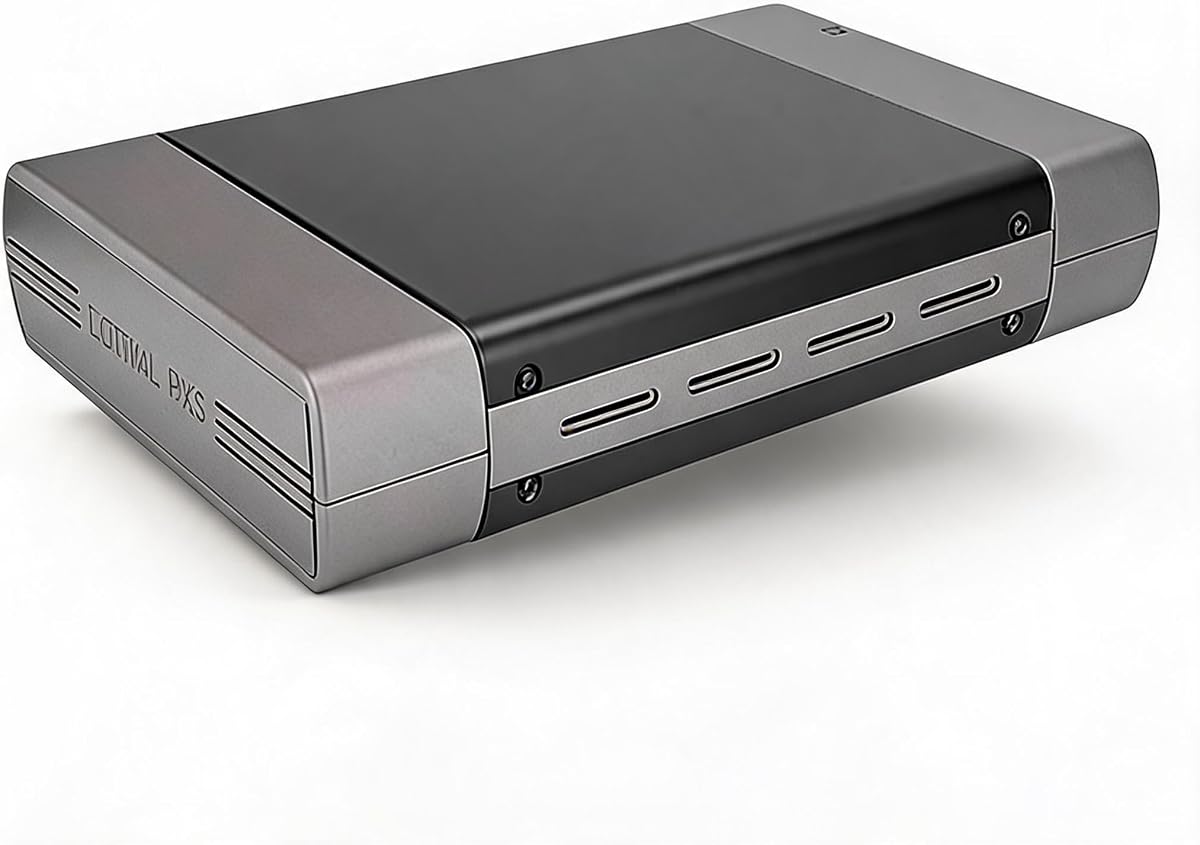
Zunate External Optical Drive Enclosure
Portable slim 9mm design
No external power needed
USB-C and USB-A included
Finding a reliable external optical drive enclosure is essential for anyone who still uses CDs, DVDs, or Blu-ray discs. These devices allow you to connect internal SATA drives to your computer via USB, extending the life of your media collection and ensuring compatibility with modern systems.
We evaluated ten highly rated enclosures based on build quality, data transfer speeds, and ease of use. Each product was assessed for its ability to support various drive depths and types, as well as its overall durability and design. Our goal was to provide a comprehensive list that suits different user needs.
Each pick below showcases specific strengths such as portability, power efficiency, or universal fit. Note that product availability and pricing may fluctuate over time. We recommend checking current listings before purchasing to ensure you get the best value for your specific requirements and budget.
4.6Editor score

4.6Editor score
As an Amazon Associate we earn from qualifying purchases.
The following table provides a side-by-side comparison of all ten selected external optical drive enclosures. It highlights key specifications such as interface types, supported drive sizes, and unique features to help you quickly identify the model that best fits your hardware requirements.




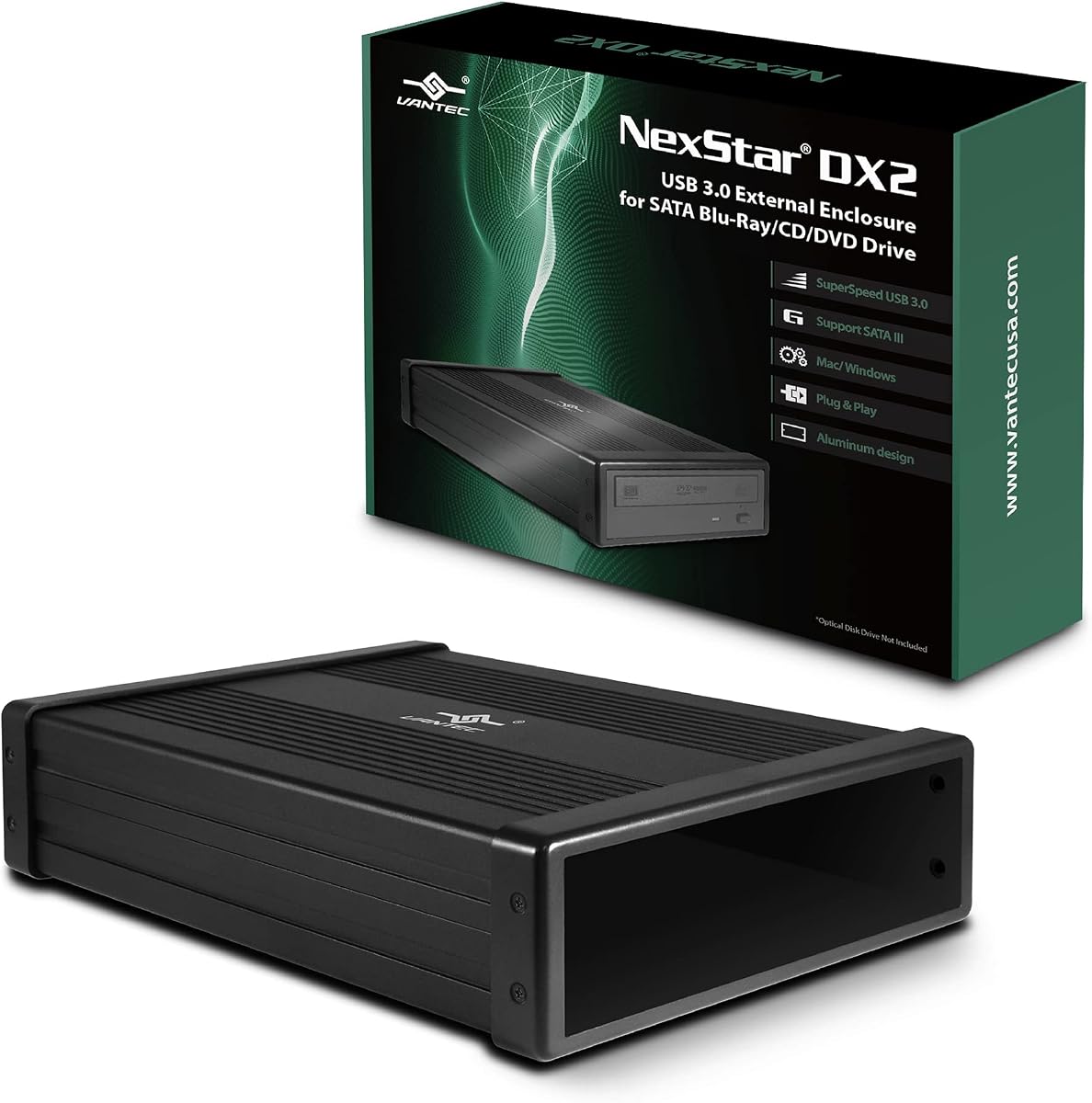
The NexStar DX2 is a highly rated enclosure designed specifically for standard 5.25 inch optical drives. With a rating of 4.6 stars, users appreciate its versatility in fitting any drive depth up to 185mm, making it a reliable choice for repurposing old internal drives.
We may earn a commission when you buy through this link, at no additional cost to you.
This enclosure features a robust aluminum alloy casing that reduces noise and vibration during operation. It supports USB 3.0 speeds up to 5Gbps for smooth read and write performance. The hot swappable feature allows you to connect or disconnect drives without rebooting your system.
While the enclosure is durable, it does require an external 12V AC adapter for power, which adds bulk to your setup. Additionally, it is not ideal for users looking for a portable solution since it is designed for desktop use primarily.
If you need a reliable enclosure for desktop optical drives, this is a top recommendation. It offers excellent build quality and flexibility for various drive sizes, ensuring your legacy media remains accessible on modern systems.
This enclosure can fit any depth optical drive, which is rare and highly beneficial for users with various spare drives.
The aluminum alloy casing not only looks professional but also helps dissipate heat effectively for long-term stability.
We may earn a commission when you buy through this link, at no additional cost to you.
This enclosure offers a flexible solution for converting internal SATA optical drives into external units. It has a rating of 4.4 stars and is designed to fit drives up to 171mm in depth, accommodating a wide range of 5.25 inch models.
We may earn a commission when you buy through this link, at no additional cost to you.
The unit supports both USB Type-A and Type-C 3.0 connections, providing versatility for different computer setups. The aluminum casing helps manage heat and reduces vibration, ensuring smoother operation during extended use or disc burning tasks.
Users should note that this product does not include an optical drive, so you must have a compatible SATA drive to use it. Also, it only supports SATA protocol, meaning older IDE drives will not work with this enclosure.
It is an excellent choice if you already have spare SATA optical drives and need a modern interface. The dual USB support and robust build make it a strong contender for office or home media centers.
Having both Type-A and Type-C ports allows you to connect easily to older and newer computers without extra adapters.
The aluminum material naturally dissipates heat better than plastic alternatives, protecting your drive from overheating.
We may earn a commission when you buy through this link, at no additional cost to you.
The Zunate enclosure is designed for ultra-slim 9mm SATA optical drives often found in laptops. It aims to be an affordable and portable solution, allowing you to easily convert internal drives into external ones without needing additional power sources.
We may earn a commission when you buy through this link, at no additional cost to you.
Its slim profile makes it easy to carry in a laptop bag, and the included woven cable minimizes signal loss for stable transfers. The unit is plug and play, requiring no drivers, and works with various operating systems including Windows and OS X.
One limitation is that it is strictly for slim 9mm drives, so standard desktop drives will not fit. Additionally, there is no user rating data available yet, which makes it harder to gauge long-term reliability compared to other options.
This is a great budget pick for laptop users who want to save their internal drives. Its portability and simplicity make it ideal for occasional media access on the go.
The slim design allows the drive to be powered directly via USB, eliminating the need for bulky adapters.
The Type-C and USB 3.0 cable can be folded inside the casing, reducing clutter during travel.
We may earn a commission when you buy through this link, at no additional cost to you.
This JOTEC enclosure is built with premium aluminum-alloy to ensure excellent heat dissipation during heavy use. It is designed to support 12.7mm-thick SATA DVD drives and includes both USB 3.0 and Type-C cables for maximum connectivity.
We may earn a commission when you buy through this link, at no additional cost to you.
The device features a power-saving sleep mode that activates when the drive is idle, helping to extend its lifespan. It is fully plug and play, supports multiple operating systems, and comes with non-slip feet to keep the unit stable on your desk.
While the aluminum build is sturdy, users must ensure their drive fits the 12.7mm thickness requirement. It may also require external power depending on the drive's needs, which could affect portability.
If you value build quality and cooling, this is a strong option. It balances performance with durability, making it suitable for home or office environments where reliability is key.
The aluminum casing helps keep the drive cool during long reads or burns, preventing performance throttling.
Including both Type-A and Type-C cables ensures you can connect to any modern or legacy computer.
We may earn a commission when you buy through this link, at no additional cost to you.
This Tbest enclosure claims blazing fast 5Gbps USB 3.0 speeds and supports both 12.7mm and 9.5mm drive sizes. It uses the INIC3609 chipset which enables automatic sleep mode for energy efficiency across different devices.
We may earn a commission when you buy through this link, at no additional cost to you.
The device is compatible with a wide range of operating systems including Windows, Linux, and OS X. It is designed to work seamlessly with both SATA I and SATA II interface standards, making it versatile for older and newer drives.
However, with a user rating of 3.4 stars, there may be some inconsistencies in build quality or performance. Some users might find the fit less secure compared to premium models. It is essential to test carefully upon receipt.
It is a good option if you need support for both slim and standard drives at a lower cost point. Just ensure your specific drive fits before purchasing.
The INIC3609 chipset provides stable connectivity and automatically puts the drive to sleep when not in use.
Compatibility with Linux and Mac expands the usability of this enclosure beyond just Windows environments.
We may earn a commission when you buy through this link, at no additional cost to you.
The Vantec CB-ST00U3 is optimized for high-speed SATA optical drives with support for UASP to boost USB 3.0 performance. With a rating of 4.6, it is trusted by users for its stability and speed in data transfers.
We may earn a commission when you buy through this link, at no additional cost to you.
Its compact design makes it easy to store, and the anti-slip mat helps reduce vibration during operation. It supports SATA I, II, and III drives, making it versatile for different generations of optical hardware.
Some drives might require more power than the included adapter provides, so you may need to buy a stronger AC adapter separately. Also, using a SATA bridge controller can slightly limit command capabilities compared to native connections.
For users who need top-tier performance and reliability, this adapter stands out. The UASP support and solid construction justify its position as a premium choice.
UASP allows for faster command processing, significantly speeding up file transfers compared to standard USB protocols.
The included anti-slip mat dampens vibrations, ensuring quieter operation during playback or burning.
We may earn a commission when you buy through this link, at no additional cost to you.
This enclosure is designed for standard 5.25 inch optical drives with a USB 2.0 interface. It has a 4.5-star rating and includes an AC power adapter to ensure stable reading and writing for desktop tasks.
We may earn a commission when you buy through this link, at no additional cost to you.
The lightweight aluminum housing protects your drive from wear and tear while fitting neatly into your workspace. It comes as a ready-to-install kit with all necessary screws and cables, making setup quick and straightforward.
The main drawback is the USB 2.0 speed, which is significantly slower than 3.0 options for large file transfers. It is also not compatible with slim laptop drives, limiting its use to bulkier desktop optical hardware.
If you have older computers with USB 2.0 ports or need a stable power source, this is a solid choice. It prioritizes compatibility and simplicity over raw speed.
The included AC adapter ensures the drive gets enough power for consistent operation, avoiding dropouts.
Everything needed for installation is in the box, so you can start using it immediately without extra shopping.
We may earn a commission when you buy through this link, at no additional cost to you.
This Bewinner enclosure is designed for ultra-thin 9.5mm drives and features a detachable design for easy conversion. It is built from brushed ABS material, offering a scratch-resistant and stylish look for portable use.
We may earn a commission when you buy through this link, at no additional cost to you.
The woven data cable minimizes interference for stable transfer speeds up to 5Gbps. It includes an eject key to prevent disc jamming and is compatible with many OS versions from Windows to macOS.
Since it is ultra-slim, it is not compatible with standard thickness drives. There is also no user rating data yet, so long-term durability is unproven. You must ensure your drive is 9.5mm before buying.
It is a great portable option for laptop users needing occasional external access. The integrated cable and slim profile make it convenient for travel.
The cable folds neatly inside the enclosure, reducing tangles and making storage easier.
A dedicated physical eject key prevents discs from getting stuck, ensuring smooth operation.
We may earn a commission when you buy through this link, at no additional cost to you.
This enclosure is designed for 9mm ultra-slim drives and features a strong woven cable that minimizes signal loss for reliable transfers. It is compact and portable, making it easy to carry and use on various systems.
We may earn a commission when you buy through this link, at no additional cost to you.
The detachable design allows for straightforward swapping of drives. It is plug and play and works with many operating systems. The woven cable ensures stability even in environments with potential electrical interference.
Like other slim models, it will not fit standard desktop drives. The build quality is yet to be widely confirmed by user ratings. However, the anti-interference capabilities are promising for stable data reading.
It is ideal for laptop users who want to repurpose their internal drives. The reliability of the connection is a key highlight here.
The built-in woven data cable protects signal quality, ensuring reliable optical disc reading.
Slim and lightweight, this enclosure fits easily into travel bags for media access on the go.
We may earn a commission when you buy through this link, at no additional cost to you.
This enclosure is designed for quick tool-free installation, allowing you to swap internal drives in seconds. It supports 12.7mm drives and features a stylish brushed finish that resists fingerprints and scratches.
We may earn a commission when you buy through this link, at no additional cost to you.
The integrated USB 3.0 and Type-C cable folds away neatly into the base, keeping your workspace tidy. It provides fast 5Gbps transfer speeds and includes an eject key to ensure discs are released smoothly.
Since it is a newer or less reviewed product, there is no user feedback to confirm long-term durability. It is also specific to 12.7mm drives, so slim drives will not fit. Ensure you measure your drive before purchasing.
If you need a quick and clean setup for standard drives, this is a practical choice. The tool-free design makes it user-friendly for non-technical users.
No screws or tools are needed to install your drive, making the process incredibly simple and fast.
The fold-away cable stores neatly in the base, preventing clutter on your desk.
We may earn a commission when you buy through this link, at no additional cost to you.
Selecting the right enclosure depends on your drive type, connection needs, and portability requirements. This guide breaks down the key factors to help you make an informed decision.
The most critical factor is ensuring the enclosure matches your drive's physical dimensions. Desktop drives typically measure 5.25 inches and fit into enclosures designed for them, while slim laptop drives are usually 9mm, 9.5mm, or 12.7mm thick. Always check the product description for supported sizes before buying to avoid compatibility issues.
Verify your drive dimensions against the enclosure specifications to ensure a secure fit.
Modern enclosures should support USB 3.0 or higher for fast data transfer. Look for 5Gbps or 6Gbps speeds to ensure smooth playback and burning. USB Type-C is becoming standard for modern laptops, so having Type-C or both Type-A and Type-C ports is beneficial for versatility.
Prioritize USB 3.0 and Type-C compatibility for future-proofing your setup.
Slim drives often draw enough power from the USB port alone, while desktop drives usually require an external AC adapter. If you plan to use the enclosure on the go, a bus-powered slim enclosure is better. For desktop use, an AC adapter ensures stable power for reliable burning operations.
Choose bus-powered for portability and AC-powered for desktop stability.
Enclosures made from aluminum alloy dissipate heat better than plastic ones, protecting the drive from overheating during long sessions. Additionally, metal casings are more durable and reduce vibration and noise. Look for features like non-slip feet for added stability during operation.
Aluminum casings offer better heat dissipation and durability than plastic.
A good enclosure should work immediately upon connecting without requiring manual driver installation. This simplifies the setup process across different operating systems like Windows and macOS. Check that the product explicitly states plug-and-play compatibility to avoid software headaches.
Ensure the enclosure supports plug-and-play for hassle-free installation.
Hot swappable capability allows you to connect and disconnect drives without restarting your computer. This is useful if you need to switch between multiple drives or access them frequently. It adds convenience and flexibility to your workflow.
Look for hot-swap support if you need to switch drives frequently.
Most enclosures work with major OS versions, but it is important to verify support for your specific system. Whether you are on Windows 10, macOS, or Linux, check the product details to ensure drivers or firmware are available. This prevents issues where the drive might not be recognized.
Confirm system compatibility to ensure the drive is detected immediately.
A high-quality cable with woven protection reduces signal interference and breakage risks. Some enclosures allow cables to be folded inside for neat storage, which is great for travel. Consider if the cable is detachable or integrated based on your storage preferences.
Choose models with high-quality woven cables for better data stability.
To install your drive, first power off your computer and ensure you have the correct screws or tools if needed. Slide the optical drive into the enclosure gently to avoid bending connectors, and secure it using the provided screws or tool-free clips. Ensure the SATA cable is firmly connected to both the drive and the enclosure.
Once installed, connect the enclosure to your computer using the included USB cable. If your drive requires external power, plug it into a wall outlet. Wait a few seconds for the system to detect the drive, and use your preferred media player to read or burn discs.
To care for your enclosure, keep it in a dry and cool place to prevent heat damage. Avoid bending the cables excessively and wipe the casing with a soft cloth to maintain its finish. If you are traveling, store the enclosure in a padded case to protect it from impacts.
Not all drives fit all enclosures. You must match the physical size and interface type. Most enclosures support SATA interfaces but have specific thickness requirements like 9mm or 5.25 inches. Check the product specifications carefully to ensure compatibility with your drive model before purchasing.
Detection issues often stem from insufficient power or incorrect connections. Ensure you have connected all necessary power adapters if required. Also, try different USB ports or update your system drivers. Most modern enclosures are plug and play, so physical connection checks are usually the first step.
Most modern enclosures are plug and play and do not require manual driver installation. They rely on standard USB drivers built into your operating system. If the drive is not recognized, try restarting your computer or checking for system updates to ensure compatibility.
Yes, most enclosures support read and write functions as long as the internal drive itself supports burning. The enclosure simply provides a bridge to your computer. Use standard burning software to burn data or media to discs just as you would with an internal drive.
Yes, USB 3.0 offers significantly faster data transfer speeds up to 5Gbps compared to USB 2.0's 480Mbps. This results in quicker file copying and smoother video playback. However, optical drives themselves have speed limits, so the difference might be less noticeable during disc reading.
Most USB enclosures are compatible with macOS without needing extra drivers. However, some burning software on Mac may require specific settings to burn DVDs or CDs. Check the manufacturer's website to confirm macOS support before purchasing to avoid compatibility issues.
SATA drives have thin connectors with distinct data and power pins, while IDE drives use a wide ribbon cable connector. Most modern optical drives use SATA. If your drive has a wide ribbon cable, it is IDE and likely not compatible with standard SATA enclosures.
It is generally not recommended. Optical and hard drives have different power and interface configurations. While some enclosures allow swapping, using them for the wrong drive type can lead to damage. Ensure the enclosure specifically states support for hard drives before attempting to use one.
The NexStar DX2, Zunate, and Vantec models stand out as top choices for versatility, budget, and performance respectively. Each offers unique advantages depending on your specific hardware and usage needs.
When selecting an enclosure, prioritize build quality and power requirements to ensure stable operation. Ensure you match the size and interface of your drive to avoid unnecessary returns or compatibility issues.
Prices and availability may change so verify the details on the product page before finalizing your purchase. Choosing the right enclosure keeps your legacy media accessible and extends the life of your optical drives.