
MINISFORUM MS-S1 MAX
4.5Editor score
Unified memory pool design
Cluster ready configuration
Compact desktop footprint
This guide compares the top ten dual GPU AI setups for local inference, training, and enterprise workloads across consumer and workstation grade hardware.
Dual GPU AI setups offer immense power for running large language models locally. These systems combine graphics cards to deliver higher memory bandwidth and compute throughput for complex tasks.
We compared ten distinct configurations ranging from mini PCs to enterprise servers. Our analysis focuses on architecture, memory capacity, cooling solutions, and software compatibility for real world AI workloads.
Each pick highlights specific strengths for different user needs. Prices fluctuate often so check current listings before buying. This guide helps you choose the right hardware for your AI projects.
4.5Editor score

5.0Editor score

4.8Editor score
This table provides a side-by-side view of all ten selected systems. It highlights key specifications to help you compare performance and features quickly.


This personal AI desktop supercomputer brings enterprise scale capabilities to your workspace. It is designed for local model fine tuning and inference tasks.
We may earn a commission when you buy through this link, at no additional cost to you.
Powered by the Grace Blackwell architecture it delivers up to one petaFLOP of AI performance. This allows you to run large models with up to two hundred billion parameters directly on your desktop.
The unified memory design provides 128GB per unit for seamless data access. While powerful the system requires adequate desk space and thermal planning.
It is ideal for developers who need rapid prototyping without cloud latency. The NVIDIA DGX Spark delivers exceptional ROI for increased productivity and innovation.
This system enables high-performance computing right where you need it without moving to a data center.
Gain the freedom to experiment prototype and innovate faster by augmenting your existing laptop or cloud resources.
We may earn a commission when you buy through this link, at no additional cost to you.
The APC ES620 is a dedicated dual GPU AI workstation built for serious machine learning. It combines two RTX 5090 graphics with a high end CPU.
We may earn a commission when you buy through this link, at no additional cost to you.
It features 256GB of DDR5 RAM and an 8TB NVMe storage array. The 360mm liquid cooling ensures the processor stays stable under sustained loads.
The system is preloaded with Windows 11 Pro for Workstations. It comes stress tested with a 1 year parts and labor warranty.
This workstation is perfect for deep learning engineers needing raw power locally. It balances performance with reliability for daily professional use.
Equipped with two GeForce RTX 5090 GPUs for parallel processing and massive model inference.
Advanced cooling maintains optimal thermal performance during long training sessions and heavy computations.
We may earn a commission when you buy through this link, at no additional cost to you.
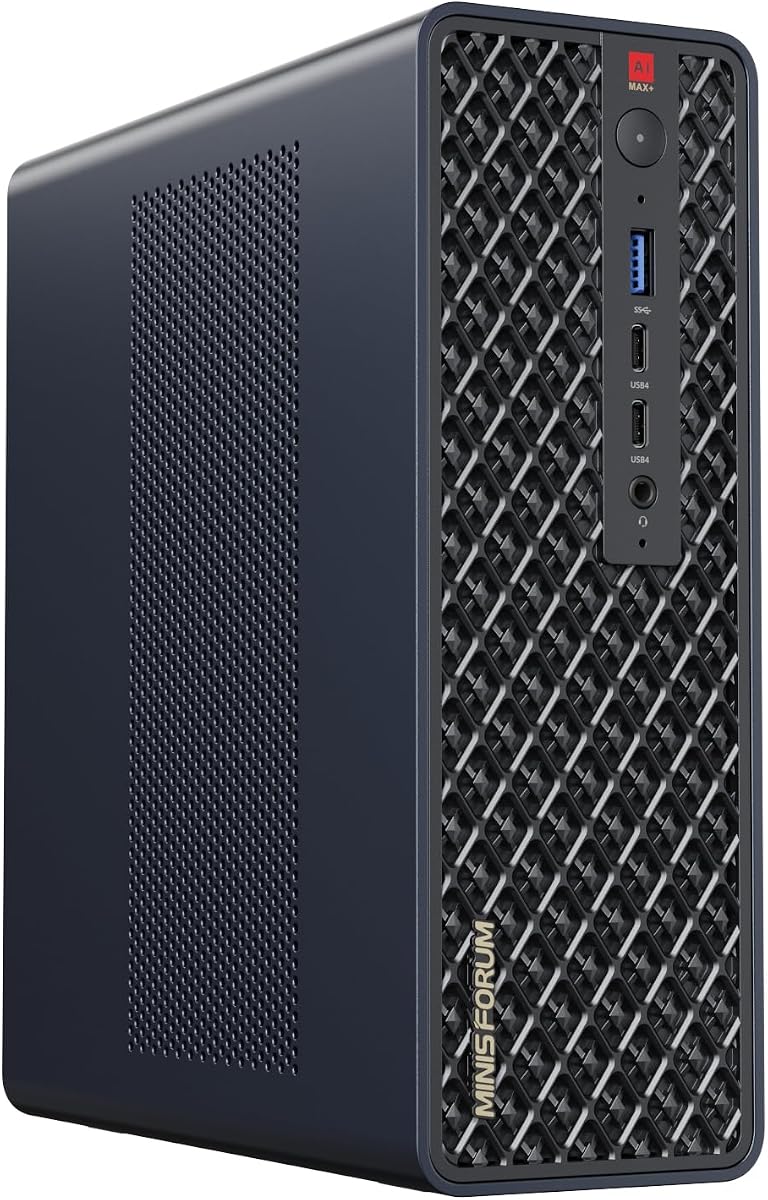
This mini AI workstation offers an accessible entry point for local LLM deployment. It features an integrated GPU and CPU architecture optimized for parallel computing.
We may earn a commission when you buy through this link, at no additional cost to you.
With 128GB of LPDDR5x RAM it removes traditional VRAM bottlenecks. The system supports running a 235B model locally when used in a cluster configuration.
Its aerospace-grade chassis keeps temperatures stable even during continuous workloads. You can also expand storage via the internal PCIe slot.
Ideal for developers needing a small form factor AI testbed. The MS-S1 MAX delivers excellent value for its size and performance.
CPU and GPU access a shared high-bandwidth memory pool for smooth data transfer.
Multiple units can be cascaded into a distributed cluster for high-efficiency computing.
We may earn a commission when you buy through this link, at no additional cost to you.
This unique graphics card combines two Arc Pro B60 GPUs into one unit. It is designed to run large quantized models entirely on a single card.
We may earn a commission when you buy through this link, at no additional cost to you.
The 48GB of GDDR6 memory allows you to eliminate the need for multi-card setups. It delivers 394 TOPS of combined compute power for high concurrency inference.
The triple thermal design ensures stable temperatures during long uninterrupted tasks. It supports PyTorch and other standard ISV applications.
Great for users wanting local LLM deployment without server racks. This card offers a cost effective solution for running multiple large models.
Innovative design combines two GPUs to run large models without complex multi-card setups.
Delivers combined compute power for multi-turn dialogues and complex AI workloads.
We may earn a commission when you buy through this link, at no additional cost to you.
The APC MES2X is built for professional AI workflows and enterprise tasks. It features dual RTX PRO 6000 GPUs for maximum rendering and compute speed.
We may earn a commission when you buy through this link, at no additional cost to you.
Powered by a Ryzen 9 9950X processor it handles data science pipelines with ease. The 8TB NVMe boot drive ensures fast data ingestion and manipulation.
It arrives ready to use with Windows 11 Pro and latest drivers. Custom built with professional cable management for internal organization.
This workstation is ideal for studios and researchers needing reliability. It provides a robust foundation for agentic workflows and advanced data science.
Equipped with NVIDIA RTX PRO 6000 Blackwell GPUs for professional rendering and AI performance.
Massive NVMe storage and DDR5 RAM accelerate large scale data analytics.
We may earn a commission when you buy through this link, at no additional cost to you.
This configuration is a high performance computing server for enterprise clusters. It supports up to eight high-end GPUs in a dense 4U chassis.
We may earn a commission when you buy through this link, at no additional cost to you.
With two AMD EPYC 9005 processors it delivers unmatched multi-threaded processing. It offers vast storage expansion with hot-swap U.2 NVMe drives.
Networking is handled by up to ten high-bandwidth 200GbE NICs. It includes toolless design for streamlined maintenance and efficiency.
Perfect for HPC clusters needing maximum local AI training power. This server is a definitive tool for generative design and digital twins.
High-density 4U GPU server capable of housing eight NVIDIA RTX PRO 6000 Blackwell GPUs.
Supporting up to 15 total NICs including high-bandwidth options to reduce latency.
We may earn a commission when you buy through this link, at no additional cost to you.
Designed for demanding tasks like PIX4Dsurvey this workstation balances graphics and CPU power. It features a 32 core Threadripper processor for heavy multi-threaded work.
We may earn a commission when you buy through this link, at no additional cost to you.
Equipped with 128GB of ECC Reg DDR5 RAM it ensures data integrity during large calculations. The RTX 5090 provides high end graphics and compute for local models.
It includes a 1600W PSU and 360mm AIO CPU liquid cooler for thermal stability. The chassis features 10GbE networking for fast data transfer.
This is a solid choice for engineering and photogrammetry professionals. It handles complex pipelines and rendering without performance bottlenecks.
128GB ECC Reg DDR5 provides error-correcting security for critical data science pipelines.
360mm AIO CPU liquid cooler maintains peak performance under continuous loads.
We may earn a commission when you buy through this link, at no additional cost to you.
This powerful workstation features an AMD EPYC 9965 processor for local AI training. It delivers unmatched multi-threaded processing without cloud latency.
We may earn a commission when you buy through this link, at no additional cost to you.
With 768GB of DDR5 ECC RAM it accelerates data science pipelines and big data analytics. Triple RTX PRO 6000 GPUs provide 288GB of VRAM for complex 3D work.
It arrives turnkey with Windows 11 Pro and a full warranty. Every PC is assembled in the USA and undergoes rigorous stress-testing.
Perfect for engineering and generative design workflows. This system handles massive local LLMs and complex neural networks effortlessly.
Driven by a 192-core AMD EPYC processor for unprecedented machine learning capabilities.
Housed in spacious EPC Pro 2 Server chassis with 2800W Titanium PSU for uptime.
We may earn a commission when you buy through this link, at no additional cost to you.
This Max-Q Edition GPU supercharges local generative AI pipelines with massive 96GB memory. It is engineered for agentic workflows and advanced data science.
We may earn a commission when you buy through this link, at no additional cost to you.
Using the NVIDIA Blackwell architecture it delivers up to 3,511 TOPS of AI performance. It caps power at 300 Watts making multi-GPU scaling viable.
It is built for real-time 3D environments and complex visual effects. This card guarantees zero-lag multi-stream editing and encoding.
Ideal for studios and independent developers needing enterprise hardware. It bridges the gap between intense calculation and breathtaking visual output.
Eliminate VRAM bottlenecks and host heavy open-source LLMs locally without cloud latency.
Efficient thermal management makes multi-GPU desktop scaling viable for research labs.
We may earn a commission when you buy through this link, at no additional cost to you.
This mini workstation comes with a latest generation Zen 5 processor for advanced collaboration. It features 128GB LPDDR5 and a fast PCIe 4.0 SSD.
We may earn a commission when you buy through this link, at no additional cost to you.
The Radeon 8060S graphics are built on the RDNA 3.5 architecture for ultra-high frame rate experiences. It supports five 8K video outputs for large displays.
It includes phase change cooling technology for superior heat management and quiet operation. A standard PCIe x16 slot is available inside for upgrades.
Great for digital signage and CAD tasks requiring high-performance computing. This mini PC improves work efficiency and multimedia task handling.
Five video outputs support multiple monitors display to improve your work efficiency.
Phase change cooling technology maintains consistent performance output while operating quietly.
We may earn a commission when you buy through this link, at no additional cost to you.
Selecting the right dual GPU setup requires balancing performance, memory, and cost for your specific AI tasks.
VRAM capacity is critical for running large language models. Systems with 48GB or more allow you to host quantized models without offloading to slower system RAM.
Prioritize GPUs or unified memory pools that offer at least 48GB to handle modern 70B class models efficiently.
The underlying architecture affects performance and software compatibility. Look for systems using Blackwell or Grace architectures for the best AI throughput.
Ensure the hardware supports the neural network frameworks you plan to use like PyTorch or TensorRT.
Dual GPU setups demand high power supplies and stable electricity. Ensure your PSU has enough wattage to support both GPUs under load.
Choose a system with an efficient PSU to prevent crashes during long inference or training sessions.
Continuous AI workloads generate significant heat. Systems with liquid cooling or robust blower fans maintain stable temperatures under load.
Avoid compact cases without adequate airflow as overheating can throttle performance and shorten hardware lifespan.
High bandwidth memory like GDDR7 or LPDDR5x is essential for fast data processing. Low bandwidth creates bottlenecks during model execution.
Check if the system uses unified memory to avoid latency issues between CPU and GPU transfers.
Future proofing is important for AI setups that may need more storage or networking. Look for systems with extra PCIe slots and NVMe ports.
Flexible expansion allows you to upgrade without replacing the entire workstation later.
Drivers and ISV support ensure your system runs smoothly with enterprise software. Systems with preloaded workstation OS offer better stability.
Verify that the hardware supports virtualization if you plan to allocate resources across multiple tasks.
Consider where you will place the system. Desktop workstations fit offices while server rack units require dedicated space.
Choose a form factor that aligns with your workspace constraints and noise tolerance requirements.
Start by updating all drivers to ensure the latest performance features are enabled. Check that the system recognizes both GPUs in the management console.
Install your preferred AI frameworks like PyTorch or vLLM using official sources. This ensures compatibility with the GPU drivers and reduces runtime errors.
Monitor temperatures regularly using built-in tools to prevent thermal throttling. Keep the chassis clean of dust to maintain optimal airflow for long sessions.
Yes, these setups are ideal for running large language models locally. By combining GPUs you access more memory bandwidth and VRAM to handle 70B parameter models without cloud latency.
Most modern frameworks like PyTorch support multi GPU training automatically. You may need to configure specific settings for inference but no complex manual splitting is needed.
Yes, most workstation grade setups come with Windows 11 Pro for Workstations. It supports multi GPU configurations natively and provides stable driver management.
Unified memory allows the CPU and GPU to share a single pool of high bandwidth memory. This reduces data transfer latency which is critical for large model processing.
While air cooling can work, liquid cooling helps maintain stable temperatures during long sessions. It prevents throttling and ensures consistent performance for training tasks.
Most setups feature multiple NVMe slots and sometimes RAID configurations. Check the specific model for PCIe slot availability if you need additional high speed storage.
The NVIDIA DGX Spark and APC ES620 offer top-tier performance for different needs. Choose the Spark for enterprise software or the ES620 for raw workstation power.
For budget conscious users the MINISFORUM MS-S1 MAX provides a compact cluster ready alternative. It balances size and performance effectively for local testing.
Check current prices and availability before making a purchase. Requirements vary by project so select the setup that matches your specific AI goals.