
Thermalright Assassin X120 Refined SE
4.7Editor score
4 Heat Pipes with AGHP
TL-C12C PWM Fan Included
Wide Socket Compatibility
Explore our expert guide comparing the top CPU Air Cooler Fan Heatsink models for performance and value in October 2026.
Choosing the right CPU Air Cooler Fan Heatsink is crucial for maintaining system stability and preventing thermal throttling during intense workloads or gaming sessions. A high-quality cooler ensures your processor runs at optimal temperatures, extending its lifespan and allowing for consistent performance without unexpected shutdowns or slowdowns.
We evaluated ten leading air coolers based on cooling efficiency, noise levels, build quality, and compatibility with modern sockets like AM5 and LGA1700. Each model was assessed for its heatsink design, fan performance, and ease of installation to provide you with a reliable list of options for your next PC build or upgrade.
Every pick highlights specific strengths such as budget-friendly pricing, premium materials, or advanced features like digital displays and ARGB lighting. Please note that prices and availability can change frequently, so verify current details on the product pages before making your final purchase decision for your specific system needs.
4.7Editor score

4.8Editor score

4.8Editor score
This side-by-side comparison highlights the key specifications and features of each air cooler to help you find the perfect match for your hardware requirements and case size constraints.
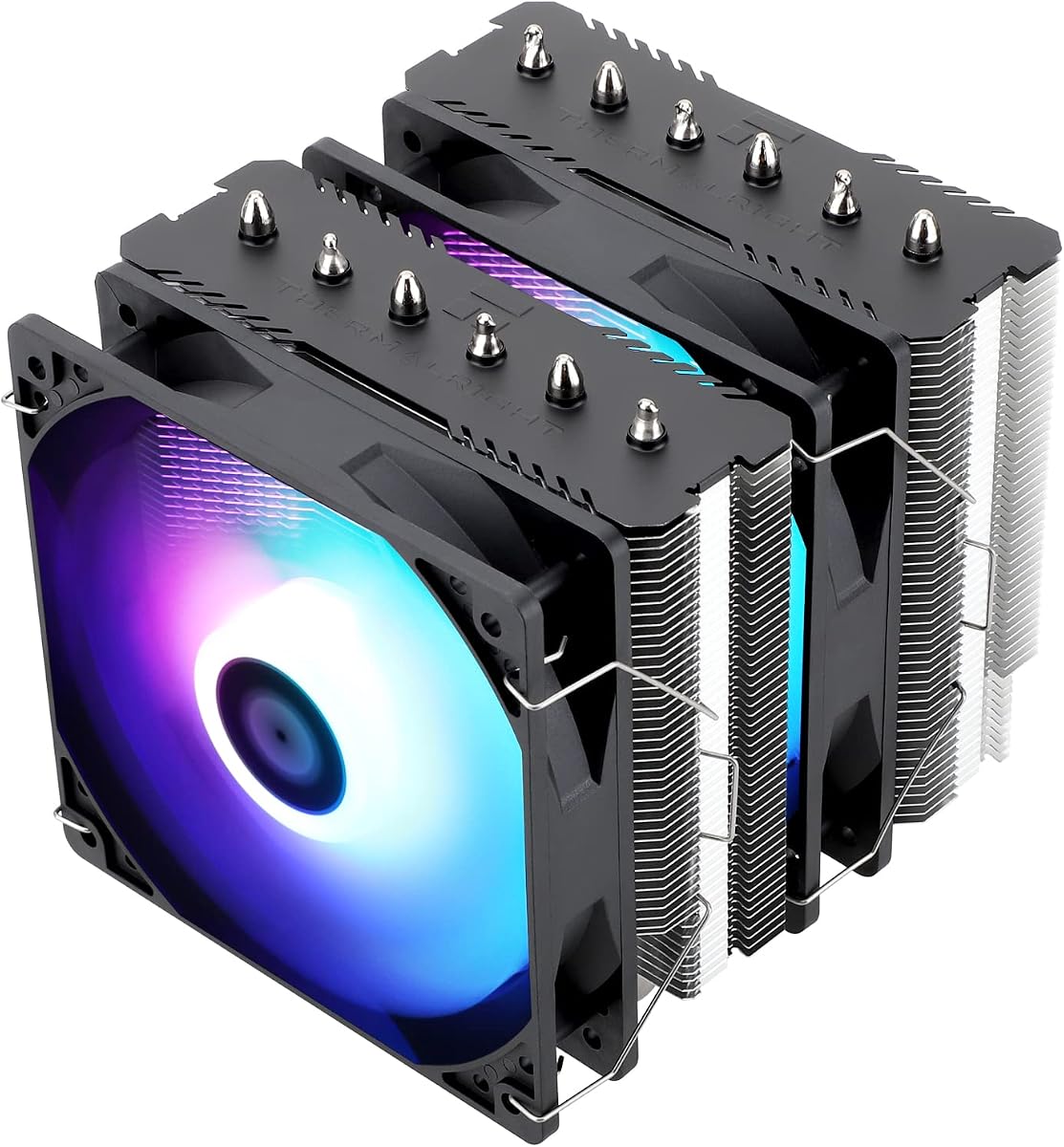


The Thermalright Assassin X120 Refined SE stands out as a highly capable budget option that delivers solid cooling performance without breaking the bank. With a strong rating from users and a focus on efficient heat dissipation through its four heat pipes, this cooler is perfect for standard gaming and productivity builds.
We may earn a commission when you buy through this link, at no additional cost to you.
Its TL-C12C PWM fan ensures quiet operation while maintaining airflow levels that keep thermal throttling at bay. The AGHP technology helps manage heat transfer effectively regardless of case orientation, which adds reliability to its already impressive thermal profile.
While it lacks the premium materials of high-end models, the build quality is robust enough for daily use. The main trade-off is the simpler visual presentation, but for users prioritizing function over form, this unit offers excellent practical performance.
Buyers looking for an affordable upgrade or a new build on a budget will find this cooler a reliable choice. It supports a wide range of sockets including AM5 and LGA1700, making it future-proof for many current platforms.
Four heat pipes work in tandem with an aluminum heatsink to move heat away from the CPU quickly and effectively.
The included fan operates at low decibels ensuring a peaceful environment even under moderate loads.
We may earn a commission when you buy through this link, at no additional cost to you.
The Thermalright Peerless Assassin 120 SE ARGB brings dual tower cooling to the mid-range market with impressive thermal results. It features six heat pipes and two PWM fans that work together to dissipate heat efficiently from high-performance processors.
We may earn a commission when you buy through this link, at no additional cost to you.
The inclusion of ARGB lighting adds a visual flair that many builders appreciate without adding significant cost. The heatsink design is robust and capable of handling higher TDPs, making it suitable for enthusiast-level CPUs that generate more heat.
Installation is straightforward though the size requires a case with adequate clearance. Some users might find the dual fan setup uses up more motherboard headers but the performance gains are worth the consideration for most scenarios.
This model is ideal for those wanting a step up from single tower coolers without moving to liquid cooling. It balances aesthetics and function well and fits well in most standard ATX cases with enough headroom.
The dual tower design with six pipes provides ample surface area for heat exchange during intensive tasks.
ARGB fans synchronize with your motherboard for a cohesive and vibrant look across your system.
We may earn a commission when you buy through this link, at no additional cost to you.
The Noctua NH-D15 chromax.Black is widely regarded as the gold standard for air cooling due to its exceptional balance of performance and silence. Its dual 140mm fans and six heat pipes deliver cooling that rivals many liquid solutions while maintaining near whisper-quiet operation.
We may earn a commission when you buy through this link, at no additional cost to you.
Every component from the fans to the mounting system is designed with precision to ensure reliability over years of use. The all-black design integrates seamlessly into dark themed builds without sacrificing the high performance that Noctua is known for across the industry.
While it carries a premium price tag the long term reliability and low noise justifies the investment for many users. The main drawback is the size so verifying case clearance is essential before purchasing to avoid physical fit issues.
Enthusiasts and professionals seeking the quietest high performance air solution will find this cooler unmatched. It supports the latest sockets and comes with everything needed for a hassle-free installation experience right out of the box.
Optimized fans provide maximum airflow at minimal noise making it ideal for silent PC builds.
High quality copper and aluminum fins ensure efficient heat transfer and durability over time.
We may earn a commission when you buy through this link, at no additional cost to you.
The Noctua NH-U12A chromax.Black offers a unique blend of performance and compatibility with its dual fan design on a single tower. It is designed to fit well within most tower cases while providing cooling efficiency that rivals much larger coolers.
We may earn a commission when you buy through this link, at no additional cost to you.
Its dual NF-A12x25 fans deliver substantial airflow to dissipate heat effectively without obstructing RAM slots or PCIe lanes. This makes it an ideal choice for builders who want top tier performance without sacrificing memory capacity or board features.
The all-black design maintains the premium look of Noctua products while fitting into modern aesthetics. It includes everything needed for installation including high-end thermal paste and a secure mounting system for various CPU sockets.
This cooler is best suited for users who need a balance between performance and case constraints. It works well for high-end CPUs but might be too tall for very small form factor builds.
Dual fans push air through the fins more effectively than single fan designs of similar height.
The design ensures compatibility with most motherboards without blocking critical components.
We may earn a commission when you buy through this link, at no additional cost to you.
The Thermalright Assassin X 120R Digital ARGB distinguishes itself with a digital display that shows real-time CPU temperatures and usage. This feature provides immediate visual feedback on system health without needing third-party software overlays on your monitor.
We may earn a commission when you buy through this link, at no additional cost to you.
The cooler combines this tech with a standard four pipe heatsink and a high-speed PWM fan. It is designed to handle modern gaming CPUs efficiently while adding a unique visual element to your build that draws attention.
While the fan can be audible under load it is manageable for most users who prioritize performance and aesthetics. The software allows for customization of the display content making it a versatile tool for monitoring PC status.
Buyers looking for a conversation piece that still cools effectively will appreciate this unit. It fits most standard cases and offers a differentiator in a market full of traditional cooler designs.
The top screen displays vital stats instantly giving you control over your system parameters.
ARGB lighting can be synchronized with your system lighting for a unified visual theme.
We may earn a commission when you buy through this link, at no additional cost to you.
The classic Noctua NH-D15 sets the benchmark for air cooling with a design that has won countless awards and accolades. Its dual tower structure paired with two NF-A15 fans ensures that heat is moved away from the CPU with exceptional efficiency and silence.
We may earn a commission when you buy through this link, at no additional cost to you.
Noctua quality is evident in every part from the precision mounted fins to the robust SecuFirm2 mounting system. This unit is built to last and backed by a six year warranty that underscores the confidence the company has in its product longevity.
While it is not small and requires significant clearance it performs admirably in most tower cases. The main trade-off is the price but the performance per dollar remains high compared to other premium options in the market.
This cooler is a top choice for those who want the best air cooling without compromising on build quality or quiet operation. It is an investment that serves well for many years and supports a wide range of CPU sockets.
High-grade materials and strict quality control ensure the cooler performs well over many years.
Specialized fan blades reduce turbulence for smoother airflow and less noise pollution.
We may earn a commission when you buy through this link, at no additional cost to you.
The Noctua NH-D15S chromax.Black adapts the classic NH-D15 design to a single fan setup that improves compatibility with high profile memory modules. This asymmetrical design ensures that your RAM stays accessible while still providing top tier cooling performance for your CPU.
We may earn a commission when you buy through this link, at no additional cost to you.
With a 140mm NF-A15 fan this unit delivers strong airflow without the bulk of a second fan. It is ideal for builders who need maximum RAM clearance but still want the high performance and reliability of a dual tower cooler.
The all black finish matches well with modern case designs while the premium quality of Noctua ensures long term reliability. It includes the necessary mounting hardware and thermal paste for a complete installation experience out of the box.
This cooler is perfect for those needing to avoid RAM conflicts while maximizing cooling efficiency. It offers a practical solution for high end builds that prioritize hardware compatibility without sacrificing thermal performance.
The offset design clears most high profile RAM modules ensuring flexible build options.
One high performance fan is enough to keep temperatures low even under heavy loads.
We may earn a commission when you buy through this link, at no additional cost to you.
The Noctua NH-D9L is engineered for compact builds where space is at a premium but performance is still required. Its dual tower design in a 110mm height makes it a rare find for ITX and SFF cases that need more than a basic cooler.
We may earn a commission when you buy through this link, at no additional cost to you.
Despite its small footprint it still utilizes a high quality fan and optimized fins to move heat away from the CPU effectively. This makes it a reliable choice for small gaming PCs or media centers where silence and size matter equally.
The unit is designed to avoid blocking PCIe slots or RAM which is common in smaller form factor builds. It comes with the trusted Noctua mounting system and thermal paste to ensure a secure and efficient installation.
If you are building a PC with limited internal space this cooler offers the best balance of performance and size. It is a specialized tool that solves the cooling challenge in tiny cases without needing liquid cooling.
At just 110mm tall this cooler fits where others cannot without sacrificing cooling capability.
Noctua quality ensures this small cooler lasts as long as larger high performance units.
We may earn a commission when you buy through this link, at no additional cost to you.
The Noctua NH-U12S provides a slim single tower profile that avoids common clearance issues in modern PC builds. It is designed to be a versatile option that fits easily into most cases while providing reliable cooling for standard CPUs.
We may earn a commission when you buy through this link, at no additional cost to you.
Its NF-F12 fan is optimized for focused airflow which helps reduce noise while maintaining efficient heat transfer. This makes it suitable for users who want a quiet system without the bulk of a larger dual tower cooler.
The classic design is proven and offers a high success rate for installation across many motherboard models. It includes premium thermal paste and a secure mounting system to ensure the cooler stays in place securely for years.
This unit is best for builders who value simplicity and compatibility over extreme cooling performance. It works well for standard gaming and office setups where silence and reliability are the primary goals.
Focused flow fan technology ensures minimal noise even when under load conditions.
Simple mounting system and standard size ensure compatibility with most modern motherboards.
We may earn a commission when you buy through this link, at no additional cost to you.
The Thermalright Peerless Assassin 120 SE offers a high performance dual tower design that competes with more expensive models on the market. It features six copper pipes and a soldered base to ensure rapid heat transfer from the CPU to the fins.
We may earn a commission when you buy through this link, at no additional cost to you.
Two 120mm fans provide ample airflow to cool high end processors effectively without needing liquid cooling. The AGHP technology ensures that heat dissipation remains efficient regardless of how the heatsink is oriented in your case.
While it lacks RGB lighting and flashy features it delivers raw cooling power at a very attractive price point. It is a practical choice for users who want the best thermal results without paying extra for cosmetic enhancements.
This cooler is ideal for budget conscious enthusiasts who need serious cooling for overclocking or high TDP CPUs. It fits most standard ATX cases and provides a reliable foundation for any high performance PC build.
Direct contact between pipes and base improves thermal conductivity for faster heat movement.
AGHP technology prevents heat buildup when the cooler is installed horizontally in a case.
We may earn a commission when you buy through this link, at no additional cost to you.
Selecting the right air cooler involves balancing cooling performance with physical constraints and your specific budget.
Look for the Total Dissipation Power (TDP) rating and the number of heat pipes to gauge how well a unit handles heat. Higher TDP ratings and more copper pipes generally mean better temperature management under load.
Aim for a cooler that exceeds your CPU's TDP needs to ensure thermal throttling is avoided during intensive tasks.
Check the manufacturer's list of supported CPU sockets such as AM5 for AMD or LGA1700 for Intel to ensure fit. Most modern coolers support multiple sockets but specific brackets may be required for newer platforms.
Always verify the included mounting kit matches your motherboard socket before making your purchase.
Measure the height of your CPU cooler against the maximum supported height in your case manual to avoid fit issues. Tall dual tower coolers provide better cooling but may obstruct RAM or require larger chassis sizes.
Ensure your case can accommodate the cooler's height and width for a hassle-free installation experience.
Check the decibel (dB) rating of the fans to ensure they fit your preference for a quiet or performance oriented build. Fans with PWM support allow for dynamic speed control which can reduce noise during idle periods.
Prioritize models with low noise ratings if you work in a quiet environment or value a silent PC.
Some coolers come with high quality thermal paste pre-applied or included which saves time and ensures good contact. Others may require you to apply your own paste which adds a step but allows for control over the application.
Verify if the package includes thermal paste to determine if you need to buy it separately.
Examine the materials used such as pure copper heat pipes and aluminum fins to understand durability and heat transfer efficiency. A soldered base often indicates better construction than simple clamping or pressure based designs.
Higher build quality usually correlates with longer lifespan and more consistent performance over time.
Decide on a spending limit that aligns with your performance needs and the rest of your component budget. Budget models offer solid performance for standard builds while premium units provide extra cooling and features.
Choose the best value option that meets your cooling requirements without overspending on unnecessary features.
Look for a generous manufacturer warranty which indicates confidence in product longevity and customer support. Most premium coolers come with a five to six year warranty that covers defects or failures during normal use.
A strong warranty provides peace of mind and protects your investment against premature component failure.
Begin by cleaning your old thermal paste from the CPU heat spreader using isopropyl alcohol and a lint-free cloth. Apply a small pea-sized amount of new paste to the center of the CPU to ensure even coverage without spills.
Install the cooler according to the included instructions ensuring all mounting brackets are secure and the fan is properly seated. Make sure the fan wires connect to the CPU fan header on your motherboard for correct control and monitoring.
Periodically check your system temperatures to ensure the cooler is functioning effectively and not clogged with dust. Use compressed air to clean the fins and fan blades at least once or twice a year to maintain optimal airflow.
Air coolers have improved significantly and often match AIO liquid coolers in performance for standard high-end CPUs. They are generally more reliable and easier to maintain since there are no pumps to fail or coolant to leak inside your case.
Check your PC case specifications for the maximum CPU cooler height supported and compare it to the cooler's dimensions. Most product pages list these dimensions clearly so you can verify fit before purchasing to avoid physical constraints.
If the cooler includes thermal paste you generally do not need to buy more as it is designed to work with that specific unit. However you may prefer to use your own paste if you want specific thermal conductivity properties for your build.
AGHP stands for Anti-Gravity Heat Pipe and helps maintain cooling efficiency when the cooler is installed horizontally. This ensures heat moves effectively through the pipes regardless of orientation preventing bottlenecks in horizontal mounting.
Dual tower coolers have a larger surface area and heat dissipation capacity which allows for better cooling of high TDP CPUs. They often feature two fans that push more air through the fins reducing heat buildup during heavy loads.
Yes many modern air coolers offer ARGB lighting that can be synchronized with your motherboard for a unified look. Check the product details to ensure the cooler supports the lighting control software you plan to use for your build.
Yes tall coolers can sometimes obstruct RAM slots so check clearance requirements for your specific memory modules. Some models like the Noctua NH-D15S are designed to allow high profile RAM to fit without interference.
Dust accumulates on fins and fans reducing airflow so cleaning every six months is recommended for optimal performance. Use compressed air to gently blow out dust from the fins and ensure the fan blades are free of debris.
We have highlighted ten top options ranging from the budget-friendly Thermalright models to the premium Noctua units. Each provides excellent cooling potential and reliability for different needs including performance enthusiasts and budget builders alike.
When choosing prioritize socket compatibility and case clearance to ensure the unit fits your system without issues. Also consider how important noise levels are to you since some models are quieter than others during peak loads.
Remember to verify the latest prices and availability on the retailer pages before purchasing to get the best deal. With the right choice you can maintain optimal CPU temperatures for years of stable and reliable computing.