
Learning Resources Code & Go Robot Mouse
4.5Editor score
Screen-free coding basics
Buildable maze grids
Ideal for ages 4+
This guide compares the top coding toys for kids aged 3 to 12, highlighting screen-free options and programmable robots to help you choose the perfect STEM
Coding toys are interactive tools designed to teach children programming logic through play. Good options combine educational value with engaging mechanics that hold attention. They should encourage problem solving and creativity without overwhelming young learners with complexity.
We compared ten highly rated products based on age suitability, coding complexity, and educational features. Our analysis covers screen-free robots, app-connected devices, and building kits. Each pick offers unique ways to introduce coding concepts to developing minds effectively.
Each review highlights key strengths, ideal age ranges, and specific learning outcomes. You will find detailed breakdowns of pros and cons for every model. Please note that retail pricing and availability change frequently, so verify details before purchasing.
4.5Editor score

4.1Editor score

4.6Editor score
The following table offers a side-by-side comparison of all ten selected coding toys. It highlights core specifications, age recommendations, and unique features to help you quickly identify the right fit for your child's learning needs.






The Thames & Kosmos My Robotic Pet stands out as a top choice for introducing kids to robotics without screens. It earned a solid rating for its engaging design and comprehensive learning manual. This kit teaches programming basics through physical action cards.
We may earn a commission when you buy through this link, at no additional cost to you.
Its standout quality lies in the realistic reptile movements controlled by color sensors. Kids build a fifteen-inch model with articulated joints that react to touch and color cues. The three play modes ensure varied engagement from coding to camouflage.
While the build process requires adult help for younger children, the time investment is justified by the educational depth. The manual guides exploration of engineering design inspired by nature, making it more than just a toy.
This robot is ideal for children eight and older who enjoy hands-on building. It is a strong recommendation for parents seeking a screen-free STEM tool that blends engineering with playful interaction effectively.
The guide teaches how nature inspires engineering solutions through robotic design.
Kids use physical cards to program movements instead of software.
We may earn a commission when you buy through this link, at no additional cost to you.
The Makeblock mBot is an excellent entry-level coding robot designed to teach electronics and programming. It rates highly for its clear instructions and compatibility with Scratch and Arduino. This kit helps kids learn step by step effectively.
We may earn a commission when you buy through this link, at no additional cost to you.
Its key strength is the open-source system allowing connection to over 100 electronic modules. The metal material makes it durable for active play while offering remote control functions like line-following and obstacle avoidance.
Children need batteries that are not included which can delay immediate play. The build is simple enough for a quick assembly but understanding all features takes time and parental guidance.
Ideal for ages eight to twelve, this robot grows with your child's skills. It is recommended for families wanting a scalable STEM project that bridges gaming and real coding concepts.
The system supports over 100 electronic modules and 500 parts.
Users can code using Scratch, Arduino, or Makeblock apps.
We may earn a commission when you buy through this link, at no additional cost to you.
The Sphero Mini packs a ton of fun into a tiny programmable ball. It is a perfect entry into robotics for beginners who enjoy screen-based coding. It features built-in sensors for precise movement control.
We may earn a commission when you buy through this link, at no additional cost to you.
Strengths include versatile drive modes like joystick, slingshot, and tilt using your mobile device. Kids can draw paths or use drag-and-drop blocks to program the robot through the free Sphero Edu app.
It relies on a smartphone which may not suit screen-free preferences. The battery life offers about an hour of play, which is decent for short sessions but needs frequent charging.
This robot suits children eight and up who want a quick gaming and coding mix. It is recommended for learning JavaScript basics and spatial movement concepts in a compact form.
You can drive manually or program paths using the app.
Includes arcade-style games to inspire STEM interest.
We may earn a commission when you buy through this link, at no additional cost to you.
The Learning Resources Code & Go Robot Mouse is designed specifically for young emerging coders. It teaches sequencing and logic without any screen usage. This kit includes everything needed to build a maze and code the mouse.
We may earn a commission when you buy through this link, at no additional cost to you.
Its simplicity is a major strength; kids press buttons to send commands through the mouse. The activity guide offers challenges that foster critical thinking and problem-solving skills in a playful environment.
While it lacks complex coding options, this makes it perfect for preschoolers and early elementary kids. The maze pieces are sturdy enough for classroom rotations or home play sessions without breaking easily.
This is an ideal first robot for ages four and up who are ready to learn basics. It is highly recommended for parents seeking an affordable and effective screen-free introduction to programming.
Children learn logic and directional understanding through trial and error.
Teachers can use grids and cards for STEM center rotations.
We may earn a commission when you buy through this link, at no additional cost to you.
The TEACH TECH Mech-5 offers a unique mechanical coding experience for future engineers. It allows kids to throw, lift, and kick using snap-on coding buttons. This kit emphasizes understanding mechanics through hands-on assembly.
We may earn a commission when you buy through this link, at no additional cost to you.
Its standout feature is the mission-based design that teaches mechanical engineering principles. Unlike pre-assembled toys, this requires multiple hours of build time to ensure proper assembly and functionality.
The build process can be challenging and requires patience from the child. It is not meant for quick play but rather for deep exploration of how machines and coding interact.
Best for ages ten and up, this robot is perfect for kids who love taking things apart. It is recommended for parents looking for a serious STEM challenge that builds real skills.
Follow detailed step-by-step assembly instructions for a true STEM experience.
Kids learn how mechanical parts move through coded actions.
We may earn a commission when you buy through this link, at no additional cost to you.
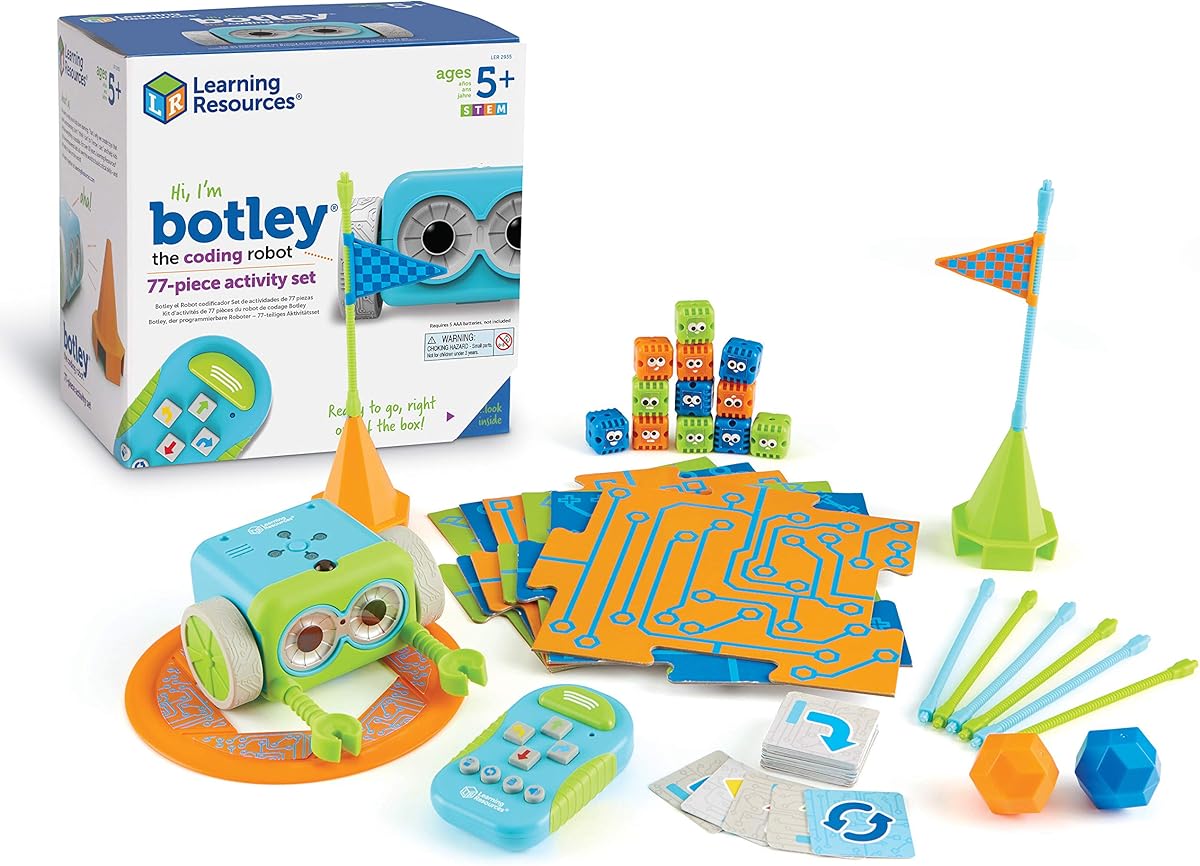
Botley is a friendly robot designed to teach early STEM skills with screen-free play. It includes a remote programmer that lets kids code commands without a tablet. The 77-piece set supports complex obstacle courses and challenges.
We may earn a commission when you buy through this link, at no additional cost to you.
Its ability to detect objects in front of it is a key strength for logic learning. The remote programmer helps build confidence through cause-and-effect actions, making it a great tool for critical thinking.
Setting up the maze requires some time and patience which may be a drawback. You need batteries for both the robot and programmer which are not included in the box.
This is ideal for ages five and up who want interactive coding without screens. It is recommended for families wanting a durable and expandable robotics kit with many accessories.
Botley can detect and avoid objects to improve logic skills.
Teaches how to create repeating sequences efficiently.
We may earn a commission when you buy through this link, at no additional cost to you.
The Ozobot Evo Entry Kit offers both online and screen-free coding experiences. It uses color code markers to program the robot on paper, making it unique. The kit is designed for grades K through 12.
We may earn a commission when you buy through this link, at no additional cost to you.
Its five skill levels ensure it grows with your child's coding abilities. The extensive library of over 700 free lessons covers STEAM and core subjects effectively. The durable case keeps accessories organized for classroom use.
While expensive, the longevity and lesson depth justify the investment. You need specific markers to code which adds to the initial setup requirements. Not required for screen-free play.
This is perfect for educators and parents seeking a comprehensive educational tool. It is highly recommended for families who want a long-term coding robot with broad curriculum support.
Use color markers to program paths without using a screen.
Over 700 free lessons cover STEAM and CS subjects.
We may earn a commission when you buy through this link, at no additional cost to you.
The Botley 2.0 introduces early coding ideas through simple remote-controlled learning. It features new challenges like multi-step paths and object-sensing reactions for deeper play. The 78-piece set allows for endless custom maze creation.
We may earn a commission when you buy through this link, at no additional cost to you.
Key strengths include lights, sounds, and playful music that make coding engaging. The 16 secret code combinations offer open-ended play for curious creators to explore further without guidance.
You will need batteries for the robot and programmer which are not included. The initial setup can take time to build obstacles and understand the remote interface.
This is ideal for young future coders at home or in the classroom. It is recommended for parents wanting a durable, interactive robot that grows in complexity with skills.
Botley reacts to objects and adjusts paths automatically.
Hidden combinations provide extra fun for curious kids.
We may earn a commission when you buy through this link, at no additional cost to you.
Dash is a robot friend designed for kids aged six to eleven ready to provide a STEM advantage. It comes ready to play without any assembly needed. This robot can sing, dance, and respond to voice commands.
We may earn a commission when you buy through this link, at no additional cost to you.
Its standout quality is the use of five different apps for iOS and Android. These tools teach concepts like sequencing, loops, and variables through hands-on play and challenges in classrooms globally.
While it relies on a mobile device, this integration offers rich educational experiences. The robot has increased memory and longer battery life for up to five hours of active play.
This is ideal for families and schools seeking a polished coding robot. It is highly recommended for kids who want a ready-to-use friend for storytelling and app-based coding.
Dash responds to voice commands for interactive storytelling and fun.
Five apps support various coding concepts like Blockly and Path.
We may earn a commission when you buy through this link, at no additional cost to you.
TaleBot Pro is designed for toddlers aged three to five who are just starting to learn. It uses interactive maps and instant voice feedback to offer a creative learning environment. The robot can walk, draw, sing, dance, speak, and record.
We may earn a commission when you buy through this link, at no additional cost to you.
Its storytelling recording feature allows kids to record their own voices and imaginative tales. This fosters creativity and language skills while teaching basic concepts like sequences and loops through playful interaction.
The toy works best for the youngest users and may not challenge older children. It is a specialized tool rather than a general purpose robot for broad age ranges.
This is perfect for parents of toddlers seeking screen-free STEM play. It is highly recommended for fostering early logic, creativity, and communication skills through interactive maps and stories.
Kids record their voices to bring imaginative tales to life.
Combines visuals, sounds, and feedback for engaging learning.
We may earn a commission when you buy through this link, at no additional cost to you.
Choosing the right coding toy depends on age, learning style, and budget. Consider these factors to find a match for your child's needs.
Look for age ranges that match your child's current abilities. Younger children benefit from simple buttons and physical cards, while older kids may enjoy app-based coding and complex builds.
Choose a toy that matches your child's age to ensure engagement and safety.
Screen-free options teach logic without devices, ideal for younger kids. App-based toys offer more advanced programming and interactive games using phones or tablets.
Decide if you prefer screen play or physical interaction for learning.
Entry-level toys focus on sequencing and cause-and-effect using cards. Advanced sets introduce loops, variables, and real programming languages like Scratch or JavaScript.
Select a complexity level that will challenge but not overwhelm your child.
Some kits focus on mechanical engineering while others emphasize logic or storytelling. Identify whether you want to teach STEM, language, or problem-solving skills.
Match the toy's focus to the specific skills you want your child to develop.
Check if the toy requires assembly or comes pre-assembled. Durable materials like metal or hard plastic are better for active play and classroom use.
Choose a sturdy build that will withstand frequent use by your child.
Look for toys that allow add-on modules or compatibility with blocks like LEGO. Expandable kits provide long-term value as your child's skills grow.
Pick a robot that can grow with your child's evolving interests and abilities.
Robust learning resources and clear manuals make coding easier to learn. Some toys offer hundreds of free lessons or community support online.
Ensure the toy includes helpful guides and resources for continued learning.
Check if batteries are included and how long play sessions last. Rechargeable options save money but wired or battery-powered toys offer convenience.
Consider the power source to avoid interruptions during play or learning.
Start by following the assembly guide carefully to ensure all parts fit correctly. Keep screws and small pieces organized in a container to avoid losing them during play.
Regularly clean the sensors and exterior with a soft, dry cloth. Avoid exposing the robot to water or dust to maintain its electronic functionality.
Store batteries properly when not in use to prevent leakage. Keep the robot and accessories in a dry, cool place away from direct sunlight to protect the materials.
Yes, many coding toys are designed specifically for beginners with no prior experience. They use simple buttons, cards, or visual blocks to teach basic logic. This makes them accessible for children as young as three or four.
Some coding toys require a device for app control, while others are completely screen-free. Check the product details to see if it uses Bluetooth or physical cards to operate without a screen.
Coding toys teach sequencing, problem-solving, and critical thinking skills. They also introduce basic programming concepts like loops and variables. These skills support learning in STEM subjects and general logic.
Yes, coding toys are generally safe but always check age recommendations. Many come with warnings about small parts for younger kids. Always supervise children during play to ensure safety.
Play sessions vary from 30 minutes to several hours depending on the toy. Simple games may take less time while building complex mazes takes longer. Battery life usually supports 1 to 5 hours of use.
Many coding toys are designed for classroom use with group activities. Teachers often use them for STEM centers or small group lessons. Durable sets like Botley are common in schools worldwide.
Some advanced robots allow for more complex coding as kids grow. Others are best for specific age ranges but offer many learning variations. Expandable kits with add-ons provide the most long-term value.
First check the batteries and ensure they are inserted correctly. Clean any sensors or ports that might be dirty. If issues persist, consult the manual or contact the manufacturer for support.
The Thames & Kosmos My Robotic Pet offers the best overall experience with its engaging reptile design. For younger kids, the Learning Resources Code & Go Robot Mouse provides an affordable and simple start.
When choosing, prioritize age appropriateness and your child's interest in screens or building. A robot that matches their learning style will ensure long-term engagement and real educational value.
Remember that availability and details may change over time. Always check current product information to confirm specifications and ensure the right choice for your family.