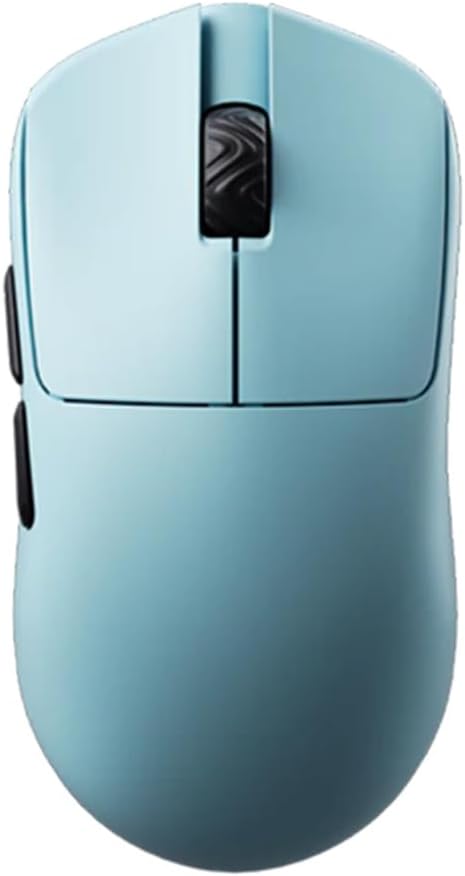
10 Best Claw Grip Gaming Mouse For Small Hands in 2026
This guide compares the top claw grip gaming mice for small hands, evaluating weight, sensor performance, ergonomics, and durability to help you find the
As an Amazon Associate we earn from qualifying purchases. We may earn a commission when you buy through links on this page, at no additional cost to you. Read our affiliate disclosure.As an Amazon Associate we earn from qualifying purchases.Purchases through our links may earn us a commission, at no extra cost to you. Read our affiliate disclosure.
Finding the right gaming mouse for small hands can be challenging, especially when you need a claw grip design that offers precision and comfort. A good mouse should feel light, have a responsive sensor, and support your natural hand posture without causing fatigue during long sessions.
We evaluated ten top-rated mice based on their size, weight, sensor quality, and ergonomic design. Each product was selected for its ability to support claw gripping and suit smaller hand dimensions while delivering reliable performance for competitive and casual gaming alike.
Each pick highlights key features like sensor type, battery life, and build quality to help you make an informed decision. Prices and availability may change over time, so always check the latest listings before purchasing to ensure you get the best current value.
Top 3 Picks for Best Claw Grip Gaming Mouse for Small Hands
Best Budget
Gwolves Skoll Mini SK-S Black 50g Ultralight Weight Honeycomb Design Ergonomic Gaming Mouse with 3389 Sensor – PTFE Skates – 16,000DPI – Detachable Cable (Black) (Small)
Top 10 Best Claw Grip Gaming Mouse for Small Hands in 2026 Compared
The following table compares key specifications across all ten selected models to help you quickly identify which mouse aligns with your specific needs and preferences for gaming performance.
Lamzu Atlantis Mini Champion Edition Wireless Gaming Mouse
51 gram ultra lightweight body
PAW3950 sensor technology
Optical switches for speed
Wireless with Nordic 52840
The Lamzu Atlantis Mini Champion Edition stands out as a top-tier wireless gaming mouse designed specifically for smaller hands and aggressive claw grips. Its 51g weight ensures minimal fatigue, while the PAW3950 sensor delivers precise tracking even during rapid movements.
Pros
Extremely light weight
High precision sensor
Dust-proof encoder
Comfortable for claw grip
Long battery life
Cons
Premium price point
May be too small for large hands
We may earn a commission when you buy through this link, at no additional cost to you.
Its hourglass symmetry design supports natural hand positioning, reducing strain during long gaming sessions. The optical switches provide quick tactile feedback, and the dust-proof encoder enhances longevity, making this mouse a reliable choice for competitive play.
While it comes at a higher price point, the build quality and performance justify the investment for serious gamers. The wireless connection is stable with low latency, and the battery life supports extended use without frequent recharging.
If you prioritize lightweight performance and ergonomic comfort in a wireless form, this mouse is highly recommended. It excels in fast-paced games where precision and speed are critical for maintaining a competitive edge.
Lightweight Precision Engineering
The 51g weight combined with the PAW3950 sensor ensures effortless control and accurate tracking without adding strain to your wrist.
Wireless Reliability
Powered by the Nordic 52840 MCU, the mouse delivers seamless wireless performance with 8K compatibility for ultra-responsive gameplay.
Gwolves Skoll Mini SK-S Black 50g Ultralight Weight Honeycomb Design Ergonomic Gaming Mouse with 3389 Sensor – PTFE Skates – 16,000DPI – Detachable Cable (Black) (Small)
50 gram lightweight design
3389 optical sensor
16000 DPI adjustable
Detachable braided cable
The Gwolves Skoll Mini offers exceptional value with its 50g weight and ergonomic design tailored for claw grip users with smaller hands. The honeycomb structure reduces mass while maintaining durability, making it ideal for fast-paced gaming on a budget.
Pros
Affordable pricing
Honeycomb shell reduces weight
PTFE skates for smooth glide
Detachable cable for portability
Suitable for small hands
Cons
Honeycomb may collect dust
Wired connection limits mobility
We may earn a commission when you buy through this link, at no additional cost to you.
Its 3389 sensor provides reliable tracking with up to 16000 DPI settings, ensuring accuracy across different surfaces. The PTFE skates enhance smoothness, and the detachable cable adds convenience for travel or storage without compromising performance.
Although the wired connection may not appeal to all gamers, it ensures zero latency and consistent performance. The honeycomb design could attract dust over time, but regular cleaning mitigates this issue without affecting functionality.
For budget-conscious buyers seeking a lightweight and responsive mouse, the Skoll Mini is a solid choice. It delivers many premium features at a fraction of the cost, making it accessible to a wider audience.
Cost-Effective Performance
The Skoll Mini combines affordable pricing with high-quality components, delivering a competitive edge without breaking the bank.
Ergonomic Build
Its 50g weight and small size make it easy to maneuver, reducing fatigue during extended gameplay sessions.
The Pulsar X3 LHD Crazylight represents premium engineering with its 43g weight and XS-1 sensor, designed for competitive players who demand precision. Its hybrid ergonomic design balances palm and claw grip comfort, making it versatile for different play styles.
Pros
Featherlight 43g body
Advanced sensor technology
Dust-proof construction
DOT skates included
Hybrid ergonomic shape
Cons
High price point
Limited color options
We may earn a commission when you buy through this link, at no additional cost to you.
Optical switches minimize double-click issues and provide swift responses, while the dust-proof structure ensures long-term reliability. The included DOT skates offer low friction, enhancing glide quality on hard surfaces like glass or aluminum mousepads.
While the price is on the higher end, the build quality and performance justify it for enthusiasts. The lightweight construction reduces wrist strain significantly, though the limited color selection may not suit all aesthetic preferences.
If you seek top-tier performance and a near-weightless feel, the X3 LHD Crazylight delivers. It is particularly suited for FPS gamers who rely on rapid movements and precise tracking for success.
Ultra-Lightweight Mastery
At 43 grams, this mouse is lighter than an egg, offering effortless control without sacrificing durability or responsiveness.
Precision Sensor Tech
The XS-1 sensor ensures flawless tracking with high acceleration and speed, ideal for competitive gaming scenarios.
The Pulsar X2H mini provides a reliable wireless option for small hands, featuring a 52g body and an elevated hump that supports aggressive claw grips. Its PAW3395 sensor ensures accurate tracking, while the optical switches deliver quick and consistent clicks.
Pros
Lightweight wireless design
Optical switches for speed
Up to 100 hours battery
Elevated hump for claw grip
4K polling ready
Cons
Renewed item condition
Slightly heavier than top picks
We may earn a commission when you buy through this link, at no additional cost to you.
With a Nordic MCU, the mouse offers efficient power consumption and up to 100 hours of battery life at 1000Hz polling. The indirect wheel clicks prevent rattling, and the reinforced shell maintains structural integrity during intense use.
While this is a renewed product, it offers cost savings while retaining key performance features. However, it is slightly heavier than some competing models, which might matter to users seeking the absolute lightest option.
For those who prioritize wireless freedom and solid performance, the X2H mini is a strong candidate. Its design specifically addresses comfort for claw grip users, making it a practical choice for daily gaming.
Wireless Freedom
The 2.4GHz wireless connection with 1ms response time ensures lag-free performance comparable to wired alternatives.
Ergonomic Support
The higher hump and narrower waist provide better stability for claw grip users, reducing hand fatigue over time.
Bloody V7 Ergonomic Claw Grip Gaming Mouse with Rubberized Black Coating – Macros/Scripting/Automation – 8 Programmable Buttons – 3200 DPI
Ergonomic shape design
8 programmable buttons
3200 DPI sensor
Adjustable report rate
The Bloody V7 offers a unique approach with its rubberized coating and eight programmable buttons, ideal for users who need macros and quick access to commands. Its ergonomic shape supports claw grip comfort, making it suitable for varied gaming and work tasks.
Pros
Multiple programmable buttons
Ergonomic claw shape
Adjustable CPI settings
Compatible with multiple OS
Affordable price
Cons
Heavier than ultralight options
Older sensor technology
We may earn a commission when you buy through this link, at no additional cost to you.
The 3200 DPI sensor and adjustable report rates provide flexibility for different gaming genres, while the software allows for extensive customization. It works across multiple operating systems, ensuring compatibility for most users.
Compared to modern ultralight models, the V7 is heavier and uses older sensor tech. However, its multi-functionality and comfortable grip make it a practical choice for those who value programmability over weight reduction.
For gamers and professionals who need customizable controls, the V7 is a solid investment. Its build quality and feature set offer good value, especially for budget-conscious users seeking functionality.
Programmable Control
Eight buttons and adjustable CPI settings allow users to tailor the mouse to their specific gameplay or productivity needs.
Ergonomic Comfort
The rubberized coating and claw-friendly shape enhance grip stability and reduce hand fatigue during long sessions.
The Corsair IRONCLAW Wireless SE is packed with features like ten programmable buttons, surface calibration, and a high-capacity battery. Its iCUE software allows deep customization, making it versatile for gamers who use multiple profiles.
Pros
Large programmable button set
Surface calibration
Long battery life
RGB customization
Wired and wireless options
Cons
Designed for larger hands
May be too big for small hands
We may earn a commission when you buy through this link, at no additional cost to you.
Despite the high battery life and precise MARKSMAN sensor, the ergonomic shape is optimized for larger hands. Users with small hands may find it less comfortable for extended claw grip use compared to compact alternatives.
The RGB lighting and durable build add to its appeal, but the size constraint limits its suitability for the target audience. It remains a strong option for those who prioritize customization and longevity over compactness.
If you can accommodate its size, the IRONCLAW Wireless SE offers excellent value through its feature-rich design. However, small-handed gamers should consider lighter or smaller models for better comfort.
Customization Depth
iCUE software enables macros and profile switching, giving users full control over button mapping and performance settings.
Battery Performance
With up to 532 hours on Bluetooth, this mouse supports weeks of use without recharging.
V8 Gaming Mouse, Ultra-Lightweight 36g±3g, Symmetrical Shape, Kailh Optical Switch, Nordic 52840 MCU, PAW 3950 Chip, Web Based Driver, for Claw and Fingertip Gamers, 8K Dongle Included (Yellow)
36 to 39 gram weight
PAW3950 chip
Nordic 52840 MCU
8K Dongle support
The V8 Gaming Mouse weighs approximately 36 grams, making it one of the lightest options available for small hands. Its symmetrical shape supports claw and fingertip styles, while the PAW3950 chip ensures precise tracking and low latency.
Pros
Extremely light weight
Web-based driver
High-precision sensor
Symmetrical shape
Fast optical switches
Cons
May be too light for some
Limited color choices
We may earn a commission when you buy through this link, at no additional cost to you.
The web-based driver simplifies customization without requiring software installation, and the Nordic MCU improves power efficiency. The 8K Dongle inclusion provides high-speed connectivity for responsive wireless play.
Some users might find it too light, affecting aim stability. However, for competitive play where speed is paramount, this weight is advantageous. The build quality remains solid despite the minimalism.
For gamers who value extreme lightness and ease of setup, the V8 is an excellent choice. Its combination of features and affordability makes it a competitive contender in the market.
Web-Based Customization
Drivers accessible via browser allow quick adjustments without installing additional software on your system.
High-Speed Connectivity
The included 8K Dongle ensures rapid response times, ideal for fast-paced competitive gaming scenarios.
Pulsar Gaming Gears X2H Wireless Gaming Mouse, Mini, White
52 gram wireless body
PAW3395 sensor
26000 DPI max
Optical switches
The Pulsar X2H Wireless in White offers the same high-performance features as its black counterpart, with a lightweight 52g design tailored for claw grip users. Its elevated hump and narrower waist provide stable support for aggressive hand positioning.
Pros
Lightweight wireless build
Elevated hump design
Dust-proof structure
Long battery life
Consistent click feel
Cons
Limited color options
Higher price than competitors
We may earn a commission when you buy through this link, at no additional cost to you.
Optical switches and the PAW3395 sensor ensure accurate and durable performance, while the indirect wheel mechanism prevents rattling. Battery life extends up to 100 hours, maintaining responsiveness throughout daily use.
The white finish adds a clean aesthetic, though it may show wear more easily. Given its price point, it competes closely with other models, making the choice largely about personal preference and brand loyalty.
For those seeking style alongside performance, the X2H Wireless delivers. Its ergonomic design and reliability make it a strong option for small-handed gamers who value both looks and function.
Design Consistency
The shell rigidity and indirect wheel ensure consistent performance without rattling or clicking issues over time.
Power Efficiency
The Nordic MCU extends battery life and ensures accurate status readings for uninterrupted gaming sessions.
V6 Gaming Mouse, Ultra-Lightweight 40g, No Hole, Symmetrical Shape, Pixart PAW 3950 Chip, Web Based Driver, for Claw and Palm Gamers, 8K Dongle Included (Kailh Switch, Blue)
40 gram lightweight body
No-hole shell design
PAW3950 chip
8K Dongle support
The V6 Gaming Mouse offers a solid no-hole design at 40 grams, combining durability with lightweight performance. Its symmetrical shape supports both claw and palm grips, making it adaptable for different styles and hand sizes.
Pros
Solid no-hole construction
Low weight
Web-based driver
8K connectivity
Concave buttons
Cons
Limited color options
May lack ventilation for hot hands
We may earn a commission when you buy through this link, at no additional cost to you.
Concave main buttons provide clear positioning and consistent feedback, while the PAW3950 chip ensures stable tracking. The web-based driver simplifies setup, and the 8K Dongle delivers responsive wireless performance.
Unlike honeycomb models, the solid shell resists dust but lacks ventilation. For most users, this is not an issue, but those prone to sweaty hands might prefer a perforated design for airflow.
If you want reliability and minimal weight without compromising on build integrity, the V6 is a smart pick. It delivers competitive features at a reasonable price point for casual and serious gamers alike.
Solid Build Quality
The no-hole shell prevents debris buildup while maintaining strength and stability during vigorous movements.
Efficient Software
Web-based settings adjustment removes the need for heavy software installation, streamlining the user experience.
BenQ Zowie S2-C Symmetrical Gaming Mouse | Professional Esports Performance | Driverless | Paracord Cable | Revisioned C-Features | Matte Black | Small Size
Symmetrical short shape
Driverless simplicity
Paracord cable
3360 optical sensor
The BenQ Zowie S2-C is designed for competitive players who prefer plug-and-play simplicity. Its symmetrical shape and small size make it ideal for claw grip, while the paracord cable ensures minimal drag and movement freedom.
Pros
Plug-and-play simplicity
Professional esports design
Paracord cable
Long-lasting durability
Includes mouse feet
Cons
Fixed DPI settings
Higher price point
We may earn a commission when you buy through this link, at no additional cost to you.
With a 3360 optical sensor and four adjustable DPI levels, the mouse supports precise tracking without needing software. The revisioned features and included extra mouse feet enhance usability and longevity for daily esports practice.
The lack of software customization may deter users who want detailed control. However, its straightforward setup and professional-grade build make it a favorite among tournament players who value consistency and performance.
For those who prioritize reliability and minimal setup, the S2-C is an excellent investment. It stands out as a proven option for competitive gaming, delivering consistent results across various environments.
Plug-and-Play Function
Driverless design eliminates software needs, making setup fast and straightforward for any gaming setup.
Paracord Cable Benefit
The flexible paracord reduces drag, giving you natural movement without cable interference during gameplay.
We may earn a commission when you buy through this link, at no additional cost to you.
Buying Guide – How to Choose the Best Claw Grip Gaming Mouse for Small Hands
Selecting the right claw grip gaming mouse for small hands involves evaluating several key factors to ensure comfort, performance, and durability. This guide outlines the most important considerations.
Weight and Size
For claw grip users with small hands, lighter weights between 40g and 60g reduce strain and allow faster movements. Compact dimensions prevent palm overhang, ensuring your fingers reach buttons naturally without stretching.
Aim for a mouse under 60g with a small footprint to maximize agility and comfort during extended play sessions.
Sensor Performance
High-precision optical sensors with low latency and accurate tracking are essential for competitive gaming. Look for models offering DPI ranges above 16000 and support for high polling rates to ensure smooth cursor movement.
Choose a mouse with at least 3360 sensor quality to guarantee reliable tracking on various surfaces without jitter.
Grip Compatibility
Ergonomics matter greatly for claw grip. Mice with elevated humps and curved backs support finger arches, reducing cramping. Symmetrical designs often suit claw users better due to flexible positioning.
Prioritize models designed with claw-friendly curves and narrow waists for better stability and finger control.
Switch Type and Durability
Optical switches offer faster actuation and higher durability compared to mechanical ones. They reduce issues like double-clicking and provide consistent tactile feedback, crucial for rapid clicks in games.
Select mice with optical or high-cycle mechanical switches to ensure long-term reliability and consistent performance.
Connection Type
Wireless mice provide freedom of movement but require battery management. Wired options deliver zero latency. If you choose wireless, ensure it supports high polling rates and offers long battery life.
Decide between wired for simplicity or wireless with strong battery life depending on your mobility needs.
Customization Options
Programmable buttons and adjustable DPI let you tailor the mouse to your play style. Software support enhances functionality but may complicate setup. Some gamers prefer driverless simplicity.
Balance software features with ease of use to fit your preference for customization and quick setup.
Build Quality and Materials
Durable materials prevent wear from heavy use. Matte coatings improve grip, while rubberized surfaces enhance stability. Check for quality control to ensure switches and sensors function consistently.
Invest in models with proven durability and quality finishes to maintain performance over time.
Price and Value
Premium features come with higher costs. Budget models can offer solid performance without advanced sensors. Determine which features matter most to your gameplay to avoid overspending.
Look for a balance between price and features that meet your specific gaming requirements.
How to Use and Care for Your Claw Grip Gaming Mouse
To maximize comfort, position the mouse so your fingers arch naturally over the buttons without stretching. Keep your wrist straight and supported to avoid strain during long gaming sessions.
Clean the mouse regularly with a soft, dry cloth to remove dust and oils. For honeycomb designs, use a small brush to clear debris from holes and prevent interference with the sensor.
If using a wireless mouse, charge or replace batteries as needed to maintain connection stability. For wired mice, check the cable for damage and store it carefully to avoid fraying or bending.
Frequently Asked Questions
What defines a good claw grip gaming mouse for small hands?
A good claw grip mouse for small hands should be lightweight, ergonomic, and responsive. It should have a curved shape to support finger arches, a high-precision sensor, and buttons easily reachable without stretching the hand.
Are ultralight mice necessary for claw grip?
Ultralight mice aren't mandatory but highly beneficial for claw grip. They reduce fatigue and allow faster movements. Aim for weights under 60g to gain advantages in speed and comfort during extended gaming sessions.
Do wireless mice work well for competitive gaming?
Yes, modern wireless mice with high polling rates and low latency perform as well as wired ones. Look for models with stable connections and long battery life to ensure consistent performance without interruptions.
How often should I clean my gaming mouse?
Clean your gaming mouse weekly to remove dust and oils. For honeycomb models, clean daily to prevent buildup. Regular maintenance ensures smooth gliding and protects internal components from damage.
Is a higher DPI better for claw grip?
Higher DPI allows finer control but isn't always necessary. Many competitive players prefer lower DPI with high polling rates for stability. Focus on sensor accuracy and adjust DPI to your personal preference.
Can claw grip users use symmetrical mice?
Yes, symmetrical mice are often ideal for claw grip as they provide balanced support for both hands. Look for models with sufficient curvature to accommodate your finger position and reduce strain.
Final Thoughts on Choosing the Best Claw Grip Gaming Mouse for Small Hands
Choosing the best claw grip gaming mouse for small hands requires balancing weight, sensor quality, and ergonomic design. The top picks highlighted in this guide offer diverse options to suit different budgets and gameplay styles.
Prioritize comfort and performance by selecting a mouse that fits your hand naturally and supports your preferred grip style. Lightweight and responsive models will enhance your experience and reduce fatigue over time.
Remember that prices and availability change frequently. Check current listings before purchasing to ensure you get the best value for your chosen model.
This guide compares the top 10 adhesive jewelry hooks for wall mounting and display, helping you choose the best option for organizing your accessories.