
Captel MDL 200
Simple corded design
Affordable pricing option
Basic captioning support
This guide compares the top captioned telephones for hearing impaired users, evaluating features like real-time captions, amplification, and ease of use to
Staying connected is vital for everyone, especially those with hearing loss. Captioned telephones bridge the gap by providing text alongside audio calls. This ensures conversations remain clear and accessible for daily communication needs.
We compared leading models based on caption accuracy, sound amplification, and user interface design. Our analysis focuses on features that truly support hard-of-hearing individuals in real-world scenarios at home.
Each pick highlights unique strengths, from budget-friendly options to premium systems with advanced noise reduction. Prices and availability change frequently, so verify details before purchasing to ensure the best fit for your needs.

4.3Editor score
4.3Editor score
This side-by-side comparison helps you evaluate key specifications across all ten products. We focus on essential features like amplification levels, display types, and connectivity options to streamline your decision process.


The Hamilton CapTel 2400iSPNBT stands out as a top choice for those needing reliable captioned telephone services. It combines a large touchscreen with real-time captions to ensure you never miss a word during calls. Users appreciate its clarity and intuitive design, making it ideal for seniors.
We may earn a commission when you buy through this link, at no additional cost to you.
Its standout feature is the ability to display captions instantly on screen while you listen. This dual-mode communication boosts confidence during conversations with loved ones. The amplification reaches up to 40dB, supporting various hearing loss levels effectively.
While it requires high-speed internet for the captioning service, this is standard for such devices. The FCC certification ensures quality, though users must register to access the nationwide captioning service. This minor hurdle ensures compliance and service reliability for eligible residents.
Anyone seeking a robust captioning experience should consider this model. It balances advanced features with ease of use. For those who rely on phones daily, this device offers peace of mind through its comprehensive support system.
Captions appear instantly as you speak, allowing you to read and listen simultaneously for complete understanding.
Voicemails are captioned directly on screen, letting you review messages at your own pace without missing details.
We may earn a commission when you buy through this link, at no additional cost to you.
The Geemarc Ampli550 is designed for those who need loud, clear audio rather than text captions. It delivers exceptional sound amplification to help hard-of-hearing individuals hear every word clearly. Its big buttons and talking features make dialing straightforward for seniors.
We may earn a commission when you buy through this link, at no additional cost to you.
Key strengths include its 55dB TrueSound and a ringer that reaches 95dB. These features ensure you never miss an incoming call. The talking keys announce numbers, reducing dialing errors and building confidence when using the phone.
Unlike captioned phones, this model focuses purely on audio amplification. This might limit its utility for those needing text support. However, for users prioritizing volume and clarity, it is a powerful tool that prevents missed calls effectively.
Ideal for those with moderate hearing loss who do not need captioning. The emergency buttons add a layer of safety for family members. It is a reliable choice for clear communication without the complexity of internet-based caption services.
With up to 55dB amplification, this phone ensures conversations are audible even for severe hearing impairments.
An extra bright flashing strobe accompanies the loud ringer, ensuring calls are noticed even in noisy rooms.
We may earn a commission when you buy through this link, at no additional cost to you.
The Captel MDL 200 offers a straightforward entry point for those seeking captioned telephone functionality without high costs. It is a basic corded phone designed for simplicity. This makes it a good fit for users who need essential captioning features only.
We may earn a commission when you buy through this link, at no additional cost to you.
While specific technical details are sparse in public data, its position in the list suggests affordability and core utility. It likely supports standard captioned phone services, allowing users to read calls as they happen. This is crucial for basic connectivity.
The trade-off is a lack of advanced features like touchscreens or high amplification. Users needing more customization might find it restrictive. However, for budget-conscious buyers, it provides the necessary tool to stay connected with family and friends.
Recommend for those testing captioned phone services before investing in premium models. It serves as a functional baseline for hearing impaired communication. Its simplicity ensures that setup and daily use remain hassle-free for any household.
This model provides essential captioning features at a fraction of the cost of advanced touchscreen systems.
We may earn a commission when you buy through this link, at no additional cost to you.
The Clarity AltoPlus is engineered for users needing both amplification and compatibility with hearing aids. It meets TIA standards for mild to severe hearing loss. This ensures the device works seamlessly with existing assistive technology for better overall communication.
We may earn a commission when you buy through this link, at no additional cost to you.
Its Outgoing Speech Amplification helps users project their voice louder to callers. This two-way benefit addresses common frustrations during calls. The 100dB ringer ensures alerts are never missed, while the backlit screen aids visibility in low light.
Users must manage expectations regarding specific captioning capabilities if relying solely on text. The phone focuses heavily on audio clarity. For those who need both volume and hearing aid integration, this device offers a specialized solution.
Best for individuals who wear hearing aids daily and want a phone that integrates well. The ergonomic design helps those with arthritis too. It balances technical certification with practical features for a comprehensive home phone experience.
With Outgoing Speech Amplification, your own voice is boosted so the other caller can hear you clearly too.
TIA certification guarantees the phone works effectively with most modern hearing aids for seamless audio transmission.
We may earn a commission when you buy through this link, at no additional cost to you.
The Serene Innovations SI-CL-65 brings cordless convenience to hard-of-hearing users with HD calling capabilities. This allows for clearer audio transmission over traditional landlines. The talking caller ID feature ensures you know who is calling without looking at a small screen.
We may earn a commission when you buy through this link, at no additional cost to you.
Mobility is the key benefit here, allowing seniors to move around the house while talking. The design focuses on senior-friendly ergonomics. This makes it a practical choice for active users who do not want to be tethered to a base station.
However, cordless models rely on battery charging which can be a hurdle for some. If power outages occur, the base might not work without backup. Users should weigh mobility against the need for constant, reliable power availability.
Ideal for active seniors who value movement and modern audio quality. It bridges the gap between traditional landlines and modern convenience. For those prioritizing flexibility, this phone provides a comfortable calling experience without sacrificing clarity.
Cordless design lets you move freely around your home or garden while maintaining clear phone conversations.
We may earn a commission when you buy through this link, at no additional cost to you.
The VTech SN5147 combines the reliability of a corded base with the mobility of a cordless handset. This hybrid system is ideal for seniors needing backup during power outages. It offers strong visual and audio alerts to ensure you never miss a call.
We may earn a commission when you buy through this link, at no additional cost to you.
Features like photo dial allow users to call contacts by pressing a picture rather than remembering numbers. This is particularly helpful for those with memory or vision issues. The large backlit display makes reading caller ID straightforward.
The setup involves multiple components like the base and handset, which may be confusing initially. However, the trade-off provides significant value for reliability. Visual ringers are especially useful in noisy environments where sound alone might fail.
Recommended for households needing both backup power and mobility. It balances traditional reliability with modern features. Families will appreciate the ability to call loved ones easily using the intuitive photo dialing system.
A flashing visual ring indicator ensures you see incoming calls even when the ringer volume is lowered.
Photo speed dial slots let you store pictures of family members for one-touch calling without remembering numbers.
We may earn a commission when you buy through this link, at no additional cost to you.
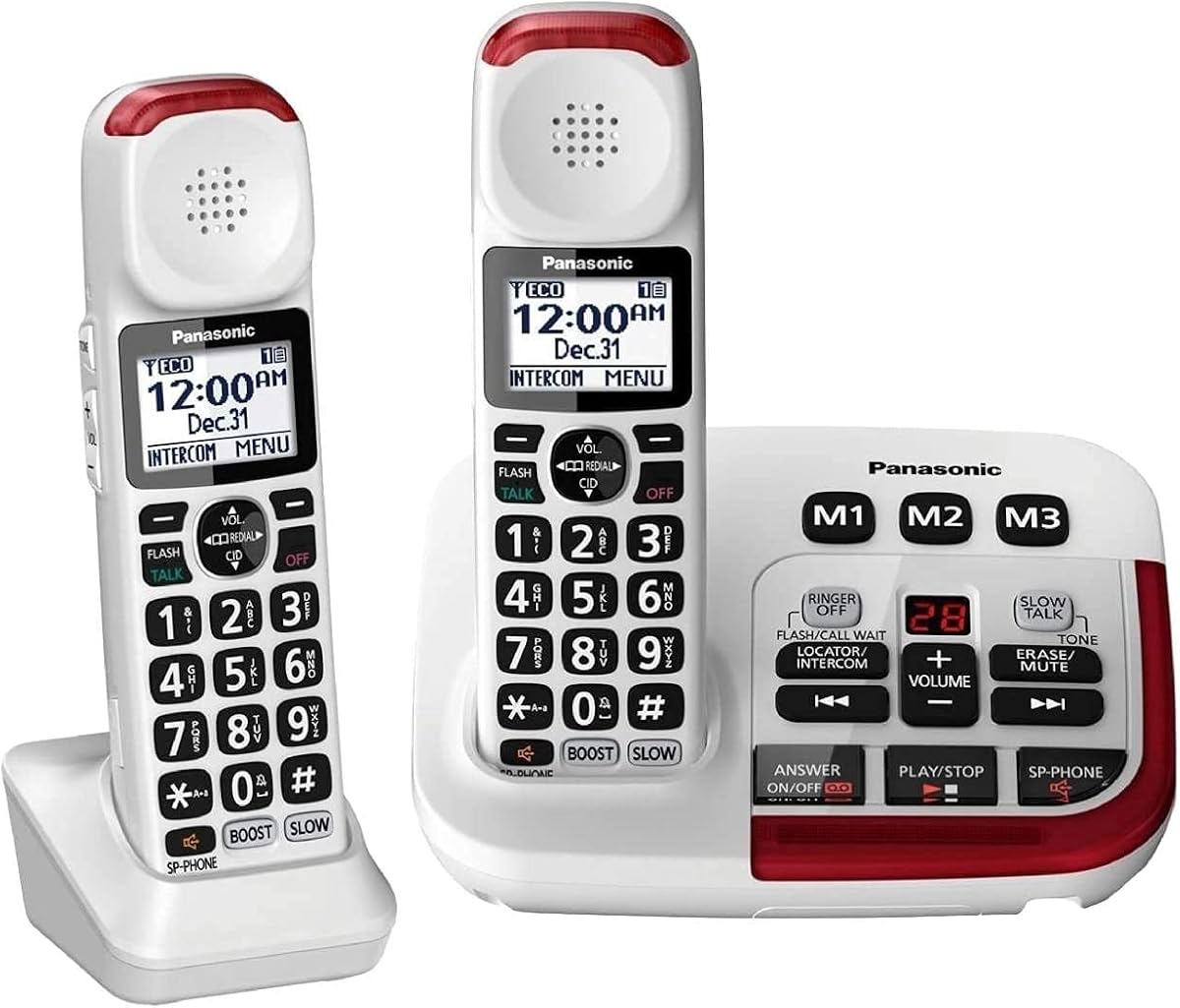
The Panasonic KX-TGM420W represents a premium choice for homes needing multiple handsets and advanced audio features. It supports expansion up to six handsets, making it perfect for large households. Features like slow talk help users process speech at a comfortable pace.
We may earn a commission when you buy through this link, at no additional cost to you.
Noise reduction technology suppresses background interference, ensuring clarity during calls. The 40dB volume boost enhances loudness for those with moderate loss. A built-in answering machine adds functionality for those who cannot answer immediately.
The system is complex and expensive, which might overwhelm simple users. Setting up multiple handsets requires time. However, the investment pays off in flexibility and call quality. It is a comprehensive solution for serious communication needs.
Ideal for large families or those needing flexibility across multiple rooms. The features ensure everyone stays connected effectively. For users who need robust capabilities, this model offers a high-end experience unmatched by simpler devices.
Slow Talk slows down the speed of speech in real time, helping you understand every word clearly.
Noise reduction suppresses background interference to ensure conversations remain clear and comfortable for users.
We may earn a commission when you buy through this link, at no additional cost to you.
The SWISSVOICE Big Button Phone focuses on visual accessibility with large photo memory buttons. This helps elderly users identify contacts instantly without searching for numbers. It includes an extra cordless handset, extending communication options throughout the home.
We may earn a commission when you buy through this link, at no additional cost to you.
Design elements like extra large buttons accommodate unsteady hands or low vision. The 90dB ringer is loud enough to alert users in noisy environments. This phone simplifies the dialing process significantly for those with physical limitations.
Lower user ratings suggest mixed experiences with reliability. It may lack advanced features found in other models. However, the primary benefit is simplicity and visual clarity. For those with vision issues, this approach is highly effective.
Best for users needing visual cues to dial contacts easily. The photo memory feature is a standout benefit. Families should consider this if visual accessibility is the primary concern over advanced audio technology.
Large photo memory buttons show faces on keys, making it easy to see who you are calling at a glance.
We may earn a commission when you buy through this link, at no additional cost to you.
This bundle of the Panasonic KX-TGM420W includes two additional handsets for better household coverage. It retains all premium features like volume boosting and noise reduction. Buying the bundle often offers better value than purchasing handsets separately.
We may earn a commission when you buy through this link, at no additional cost to you.
The system supports expansion up to six handsets, ensuring no family member misses a call. It is a powerful setup for multi-room communication. The digital answering machine adds utility for managing messages efficiently.
The initial cost is high, and managing multiple batteries can be tedious. However, the functionality justifies the investment for large families. It provides a comprehensive communication network that supports everyone's needs simultaneously.
Ideal for large households needing widespread phone access. The bundle approach simplifies setup. For those needing maximum reach, this model delivers reliability and quality across the entire home environment.
Including two extra handsets means everyone in the house has a dedicated device for clear conversations.
We may earn a commission when you buy through this link, at no additional cost to you.
This amplified landline phone is designed for seniors who need loud ringing and simple photo speed dial. It reaches 100dB, ensuring ringtones are impossible to ignore. The flash alert light provides a visual cue for incoming calls.
We may earn a commission when you buy through this link, at no additional cost to you.
Photo buttons let users dial contacts with a simple press of an image. This reduces confusion and speeds up communication. The speakerphone feature allows hands-free use, which is helpful for those with dexterity issues.
While it lacks the complexity of captioning systems, it excels in basic volume and alert functions. It is not suited for those needing text. For those prioritizing volume and simplicity, it serves its purpose well.
Recommended for users needing high volume and visual alerts. The photo dial is a key convenience feature. It remains a practical choice for straightforward communication without needing advanced technological integrations.
The bright LED flashes when a call comes in, making it easy to spot even in low-light conditions.
Store pictures of emergency contacts on speed dial keys for one-touch calling without dialing numbers.
We may earn a commission when you buy through this link, at no additional cost to you.
Choosing the right phone involves assessing your specific hearing loss level and communication needs. This guide outlines essential factors to ensure you select a device that truly supports your daily life.
Captioning services transform voice into text in real-time. Ensure the phone supports a reliable nationwide service if you need to read conversations. Check for registration requirements and internet speed needs for optimal performance.
Prioritize models with verified FCC certification and accessible support to guarantee reliable text delivery for your calls.
Amplification levels determine how loud the phone can make audio. Look for models offering 40dB to 100dB gain depending on your hearing loss severity. Higher volume helps compensate for moderate to severe impairment.
Select a phone that meets your specific volume needs without causing discomfort or feedback when used with hearing aids.
Compatibility ensures the phone works with your hearing devices. Look for TIA certification and dedicated audio jacks or neck loops. This prevents buzzing sounds and ensures clear audio transmission directly to your aids.
Verify the phone meets TIA standards to avoid interference and ensure seamless integration with your existing hearing technology.
Larger screens make reading captions and caller IDs easier. A big display reduces eye strain and helps users with vision issues read numbers quickly. Touchscreens can add convenience but require more careful handling.
Opt for a large, high-contrast display to minimize eye strain and ensure all text remains readable at all times.
Adjustable volume controls allow you to tailor sound levels to your comfort. Some models offer separate controls for ringer and handset. This flexibility ensures you can set the phone to match your daily hearing needs.
Choose a device with separate adjustable controls for ringers and handset to ensure precise volume management.
Captioned phones often require high-speed internet. Ensure your home has a stable connection. Corded models may offer more reliability during power outages compared to cordless ones.
Verify your internet stability and consider a backup power option to maintain service during outages.
Large buttons help prevent dialing errors. This is vital for users with arthritis or dexterity issues. Look for high-contrast numbers for better visibility.
Prioritize oversized, tactile buttons to reduce dialing errors and simplify the calling process.
Features like photo dial, speed dial, and answering machines enhance usability. These tools help users manage contacts and messages independently. Evaluate which features add real value to your routine.
Select a phone with useful extras like photo dial or answering machines to simplify daily management.
Start by connecting the phone to a stable power source and internet if required for captioning. Follow the setup wizard to register your account with the service provider. This step activates the text captioning features.
Keep the device clean by wiping the screen and buttons regularly. Avoid placing it near moisture or extreme temperatures. Check cords occasionally for wear to prevent connection issues over time.
Update settings like volume and caption size as needed. Test the phone with a family member to ensure clarity. Regularly test features like flash alerts to confirm they work properly for your daily use.
Yes, most captioned telephones require high-speed internet to function effectively. The captions are generated via a service that transmits text to your screen. Without internet, you lose the ability to read text captions during calls.
Many insurance plans cover captioned telephones for qualifying hearing loss. Check with your provider for specific coverage details. Often, a doctor's note or certification of hearing impairment is required to qualify for reimbursement.
Yes, many models are designed to work with hearing aids. Look for TIA certification to avoid interference. This ensures your hearing aid does not pick up static noise during calls.
Real-time captions are highly accurate thanks to human monitoring. Most services use a combination of speech recognition and live agents. You may occasionally see minor errors, but the accuracy is generally sufficient for understanding conversations.
Corded models typically still work during outages if your landline provider supplies power. Cordless handsets need charged batteries. Consider a backup power supply if you rely on your phone for emergency calls.
The captioning service itself is usually free for eligible users. You may need to pay for the hardware or shipping. FCC requirements ensure the service remains accessible for qualified individuals with hearing loss.
We have explored ten top options ranging from basic amplification to advanced captioning systems. The Hamilton CapTel and Panasonic models lead in features while others offer budget-friendly alternatives. Your choice depends on specific needs like volume versus text support.
Prioritize features that address your daily challenges directly. If reading text helps most, invest in captioning. If audio is your main issue, look for high amplification. Balancing these factors ensures you get a device that truly helps.
Always check current prices and availability before purchasing as they change often. Verify warranty details and service policies. With the right choice, you can stay connected with confidence and enjoy clearer conversations every day.