
Corded Landline Phones for Seniors
4.2Editor score
9 Big Picture Buttons
110dB Loud Ringer
Hands-Free Calling
This guide compares the top captioned telephone models for hearing impaired users, focusing on clarity, features, and ease of use for seniors.
Captioned telephones are essential tools for individuals with hearing loss who want to stay connected with loved ones. These devices display real-time text of conversations, ensuring no word is missed during important calls. Choosing the right model depends on specific needs like screen size, amplification, and ease of setup.
We evaluated ten leading captioned telephone options based on user feedback, technical specifications, and accessibility features. Our analysis covers everything from traditional landline models to advanced VoIP solutions. Each product was assessed for clarity, reliability, and suitability for seniors with varying degrees of hearing or vision impairment.
Each pick in this list highlights key strengths and potential trade-offs to help you make an informed decision. Note that prices and availability can change frequently on major online retailers. Always verify the latest details before purchasing to ensure the device meets your current requirements and budget constraints.
4.2Editor score

4.3Editor score
4.5Editor score
The following table provides a side-by-side comparison of all ten products reviewed in this guide. It highlights key specifications and features to help you quickly identify the best match for your specific communication needs and home setup.


The Hamilton CapTel 2400iSPNBT stands out as a top choice for those seeking a reliable captioned telephone. With a 4.3 rating from users, it consistently delivers clear, real-time captions that make conversations accessible. Its large touchscreen ensures that text is easy to read, even for those with vision challenges.
We may earn a commission when you buy through this link, at no additional cost to you.
Key strengths include its amplified sound capability up to 40dB and customizable caption sizes. The device supports both auto and assisted captioning options, ensuring flexibility for different user needs. Additionally, the built-in answering machine displays voicemail captions, adding another layer of clarity to missed calls.
However, users should note that this device requires high-speed internet and is only available for US residents with hearing loss. While these are standard requirements for captioned telephones, they may limit accessibility for some. The registration process is necessary but ensures compliance with FCC regulations.
This phone is ideal for seniors who want an intuitive, modern interface for staying connected. If you need a device that balances technology with ease of use, the Hamilton CapTel 2400iSPNBT is a strong recommendation. Always verify eligibility before purchasing to ensure smooth setup.
The large touchscreen allows users to easily navigate menus and adjust settings without physical strain.
Voicemail messages are transcribed directly on the screen, ensuring you never miss important details.
We may earn a commission when you buy through this link, at no additional cost to you.
This corded landline phone offers an affordable solution for seniors who need simple, reliable communication. With a 4.2 rating, it is praised for its large buttons and loud ringer, making it easy to answer calls. While not a full captioned telephone, its features support those with hearing and memory impairments.
We may earn a commission when you buy through this link, at no additional cost to you.
The standout feature is the photo dialing capability, which allows users to call family members by touching their picture. This is particularly helpful for those with dementia or memory loss. The hands-free function ensures that calls can be managed without holding the receiver, reducing physical strain.
On the downside, this model lacks digital captioning capabilities found in more advanced devices. It focuses on audio amplification and visual cues instead. However, for users who prioritize simplicity over advanced features, this trade-off is often acceptable and appreciated.
Ideal for elderly users who need a straightforward way to stay connected, this phone delivers value. Its lack of battery dependency ensures it works during power outages. Consider this if budget is a primary concern and basic functionality suffices.
Customizable photo buttons remove the need to remember numbers, simplifying the calling process.
The 110dB ringer ensures you hear incoming calls even in noisy environments or with severe hearing loss.
We may earn a commission when you buy through this link, at no additional cost to you.
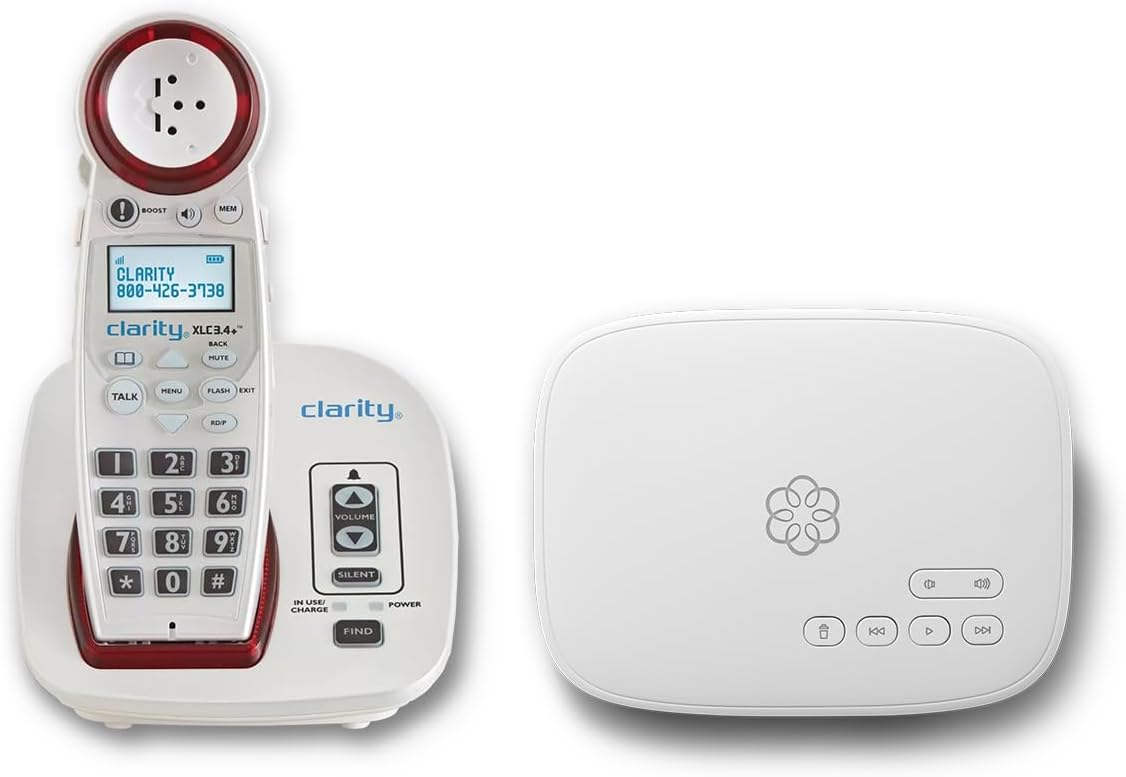
The Ooma Telo bundle represents a premium solution for those seeking both hardware and service excellence. With a 4.5 rating, users appreciate the combination of amplified phone features and robust service protections. The included Concierge Plan offers 24/7 support, ensuring help is always available when needed.
We may earn a commission when you buy through this link, at no additional cost to you.
Features like visual ringer alerts and adjustable speaker volume make this ideal for hearing impaired users. The talking keypad and hearing aid compatibility further enhance usability. Advanced robocall blocking ensures that calls are not just clear, but also safe from unwanted interruptions.
The main trade-off is the requirement for a subscription, which adds to the long-term cost. However, the value of the included features often justifies the expense for families prioritizing safety and clarity. Personal setup assistance is a significant benefit for less tech-savvy users.
This package is best suited for households that want a full-service communication solution. If you value support and advanced features, this bundle delivers on those fronts. Always review the subscription terms to ensure they fit your budget.
Visual cues ensure you never miss a call, even if you cannot hear the ringtone clearly.
24/7 professional assistance helps resolve any setup or usage issues quickly and efficiently.
We may earn a commission when you buy through this link, at no additional cost to you.
The VTech SN5147 is designed for seniors who need a balance between mobility and reliability. With a 4 rating, it offers a hybrid system featuring a corded base for power outages and a cordless handset for convenience. This ensures communication is maintained regardless of power conditions.
We may earn a commission when you buy through this link, at no additional cost to you.
Its 90dB ringer and 50dB audio assist make it suitable for those with significant hearing loss. Photo dial slots and a visual ring indicator further simplify the user experience. The answering machine allows for message recording with slow playback, aiding comprehension.
While not a dedicated captioned telephone, its amplified features provide similar benefits for hearing impaired users. The need to manage two units might be a slight inconvenience for some. However, the flexibility often outweighs this minor drawback.
This model is a solid choice for seniors who value mobility without sacrificing reliability. The visual indicators ensure you never miss a call. Consider this if you want the convenience of a cordless phone with backup options.
The corded base ensures functionality during power outages, while the cordless handset offers freedom of movement.
The 50dB audio assist provides significant volume amplification for clearer hearing during conversations.
We may earn a commission when you buy through this link, at no additional cost to you.
This voice-activated telephone offers a unique approach to making calls without pressing buttons. Designed for users with mobility or vision difficulties, it allows answering, dialing, and ending calls using voice commands. While ratings are not yet available, its focus on accessibility is clear.
We may earn a commission when you buy through this link, at no additional cost to you.
The active listening feature ensures the phone is always ready to receive commands, making it efficient. This is particularly useful for those who cannot easily lift a receiver or reach buttons. The hands-free nature reduces physical effort significantly.
Potential trade-offs include reliance on voice recognition accuracy, which can vary based on speech patterns. Users with clear speech typically find it effective, but others may need time to adapt. Setup requires familiarity with voice commands.
Ideal for individuals with severe mobility or vision impairments, this phone provides independence. It is a modern alternative for those comfortable with voice technology. Consider it if buttons are a barrier to communication.
Control calls entirely with voice commands, removing the need to physically manipulate the device.
The phone remains ready to accept commands at any time, ensuring quick access to features.
We may earn a commission when you buy through this link, at no additional cost to you.
This big button phone is tailored for seniors with low vision and hearing impairments. With a 4.2 rating, it is praised for its simplicity and accessibility features. The large buttons and picture keys make dialing straightforward for those with arthritis or dementia.
We may earn a commission when you buy through this link, at no additional cost to you.
The 40dB amplification ensures that conversations are loud enough to be heard clearly. Memory protection keeps contact information safe even if the phone line is unplugged. Wall mounting capability makes it easily accessible in hallways or bedrooms.
While it lacks digital captions, the visual and audio aids compensate effectively for many users. The basic design means fewer distractions, which some may prefer. However, users needing advanced features might find it limited.
Best for seniors needing physical simplicity, this phone offers reliable communication. The wall mount option is a key benefit for accessibility. Consider it for a no-fuss solution that focuses on core usability.
Stored numbers remain safe even during power interruptions, ensuring contacts are never lost.
Mounting the phone saves counter space and places it within easy reach for those with limited mobility.
We may earn a commission when you buy through this link, at no additional cost to you.
The FLYINGVOICE FIP12WP is a top-rated VoIP phone designed specifically for seniors with dementia. With a perfect 5 rating, it stands out for its customizable image keys that simplify the calling process. This familiarity helps reduce confusion and stress during calls.
We may earn a commission when you buy through this link, at no additional cost to you.
Features like the dedicated help key and 110dB amplified sound ensure safety and clarity. The visual red light alert provides an extra cue for incoming calls, which is crucial for those with hearing loss. Its design is well-suited for nursing homes or home care.
Note that this requires a VoIP service, not a traditional landline. This might be a hurdle for some users accustomed to analog setups. However, once connected, the benefits of modern IP features are substantial and appreciated.
Ideal for caregivers managing care for individuals with memory loss, this phone offers peace of mind. The photo keys make it easy to stay connected. If you have a VoIP setup ready, this is a fantastic choice.
Insert photos of family members into keys for instant, confusion-free dialing.
Pressing the help key allows immediate access to emergency contacts or caregivers.
We may earn a commission when you buy through this link, at no additional cost to you.
Serene Innovations focuses on delivering high-quality audio performance for seniors. With a 3.5 rating, this phone is recognized for its clear sound and reliability. It is a straightforward option for those prioritizing audio quality over complex features.
We may earn a commission when you buy through this link, at no additional cost to you.
The high-definition design ensures that voices are transmitted clearly, reducing the strain on hearing. Its amplified capabilities further assist users with mild to moderate hearing loss. The device is built to perform consistently over time.
However, users have noted mixed experiences, reflected in the lower rating. Some may find the features less comprehensive than other models. It is often chosen for its specific focus on audio performance and reliability.
Consider this if your primary need is crystal-clear sound without extra bells and whistles. It suits those who value simplicity and audio fidelity. Verify specific feature details before purchasing.
Advanced audio technology ensures voices are transmitted with minimal distortion and maximum clarity.
Built for consistent performance, this phone is designed to work reliably over long-term use.
We may earn a commission when you buy through this link, at no additional cost to you.
This phone combines voice dialing with visual and auditory aids for seniors with special needs. While it has a 2.1 rating, it offers unique features like 17 programmable voice memories. The talking Caller ID speaks the number before dialing, adding clarity.
We may earn a commission when you buy through this link, at no additional cost to you.
Voice commands for dial and end make it hands-free, which benefits those with mobility issues. The LED ring indicator ensures visual alerts for calls. These features aim to create a seamless experience for users with limited dexterity.
Critics mention that voice programming can be complex for some users. Lower satisfaction ratings suggest the learning curve might be steep. It is best suited for those willing to invest time in setup.
Consider this if voice control is a priority and you need visual cues. The hands-free features are beneficial. Ensure you are comfortable with voice setup before committing.
The phone announces the caller ID aloud, helping users identify callers before answering.
Program names and numbers to dial instantly using simple voice commands.
We may earn a commission when you buy through this link, at no additional cost to you.
This landline phone is designed to keep seniors connected through simple, effective features. With a 4.2 rating, it is praised for its 9 photo memory keys and loud ringer. The photo keys make dialing effortless, especially for those with memory impairments.
We may earn a commission when you buy through this link, at no additional cost to you.
Hands-free calling ensures that users can manage calls without holding the phone. The LED flash alert provides a visual cue for incoming calls. It is a practical device that focuses on essential connectivity.
Trade-offs include lack of caller ID display and advanced features. However, its simplicity ensures ease of use for most seniors. The no-battery requirement makes it reliable during outages.
Best for seniors needing basic, reliable connectivity, this phone bridges family bonds effectively. The photo keys and loud ringer are key benefits. Consider it for straightforward, hassle-free communication.
Store family numbers under photos for instant, one-touch dialing without memorization.
Visual alerts ensure no call is missed, even in noisy environments or with hearing loss.
We may earn a commission when you buy through this link, at no additional cost to you.
Choosing the right captioned telephone requires evaluating several factors to ensure the device meets your specific needs. This guide breaks down the key aspects to consider before purchasing.
Captioned telephones rely on real-time text display to help users follow conversations. Look for models that support auto captioning for speed and assisted captioning for accuracy. Ensure the device is compatible with your internet connection type as most modern models require broadband.
Verify that the captioning service is available in your region. Some services are limited to US residents with certified hearing loss.
The screen size and text clarity are critical for visibility. Larger displays with adjustable font sizes make reading easier. Touchscreens offer intuitive navigation, while traditional buttons may be preferred for those with arthritis.
Consider models with high contrast settings to reduce eye strain during long conversations.
Amplified sound helps users with hearing loss hear clearly. Look for volume control up to 40dB or higher. Hearing aid compatibility is also a key feature to avoid feedback during calls.
Adjustable tones and ringer volumes ensure you can customize audio settings to your environment.
Setup and navigation should be straightforward. Simple menus and clear icons reduce frustration. Features like photo dialing or voice control can further simplify the process for those with memory or mobility issues.
Choose a model with dedicated buttons for frequent actions to minimize navigation steps.
Most captioned telephones require high-speed internet to function properly. Ensure your home network is stable before purchasing. Some models may also require a VoIP service instead of a traditional phone line.
Check if the device supports Wi-Fi or requires a wired connection for optimal performance.
Safety is paramount for seniors. Look for features like emergency help buttons or visual call alerts. Built-in answering machines with voicemail captions ensure you never miss important messages.
Robocall blocking and caller ID protection add security against unwanted calls.
Consider the availability of customer support. Models with 24/7 service plans offer peace of mind. Check if the manufacturer provides setup assistance or tutorials for seniors.
Accessibility certifications ensure the device meets regulatory standards for hearing impaired users.
Prices vary based on features. Some models require monthly subscription fees for captioning services. Compare the total cost of ownership before buying.
Basic models may lack advanced features but offer reliability. Premium models offer more convenience but at a higher cost.
To begin using your captioned telephone, connect it to a stable high-speed internet line. Follow the manufacturer's instructions to register the device with the captioning service. This step is essential for enabling text display during calls.
Adjust the settings to suit your preferences. Increase the volume and caption size for better visibility. If your model supports photo dialing or voice commands, take time to program contacts early for ease of use.
Maintain the phone by keeping it clean and dust-free. Regularly check for firmware updates to ensure optimal performance. Store the device in a stable location to prevent accidental drops or damage.
Yes, most captioned telephones require high-speed internet to function. The device sends audio data to a captioning center which returns text. Without an active internet connection, captioning services will not work.
Many captioning services are funded by government programs for eligible users. Registration may be required to prove hearing loss eligibility. Always check with local providers for subsidy options.
Some modern captioned phones use VoIP instead of traditional landlines. If you have internet-based phone service, ensure compatibility before purchasing. Traditional models may require a physical phone line connection.
Navigate to the speed dial menu on your device and select a slot. Insert a small photo or enter a contact number. Save the setting and test by calling the number directly.
Slow internet or network congestion can cause delays. Try restarting your router or checking connection speed. Contact customer support if issues persist to troubleshoot technical problems.
Yes, many captioned phones are designed specifically for those with hearing loss. They combine amplified sound with text captions. Features like hearing aid compatibility ensure clear audio during calls.
The Hamilton CapTel 2400iSPNBT leads our list for its balance of clarity and features. It offers robust captioning and an intuitive interface for most users.
Prioritize models with features that match your specific needs like photo dialing or amplified sound. Consider whether you need a landline or internet-based solution before buying.
Always check current pricing and availability as deals change frequently. Verify eligibility requirements to ensure smooth setup and service activation.