
ASRock DeskMini X300
4.2Editor score
Ultra Compact 1.92L Design
Supports AM4 Ryzen CPUs
Triple Display Connectivity
This guide compares the top barebone PCs with AMD processors for performance, value, and versatility in 2026 helping you choose the right compact system.
Barebone PCs with AMD processors offer a unique blend of flexibility and power for enthusiasts and professionals. These systems provide a solid chassis with essential components while leaving RAM and storage up to you.
We evaluated ten distinct models based on processor capabilities, thermal performance, and expansion options. Our selection criteria ensures that every unit delivers reliable AMD Ryzen performance within a compact form factor.
Each pick details specific strengths and ideal use cases so you can match the right unit to your needs. Please note that product availability and pricing may fluctuate frequently across retail channels.
4.2Editor score

4.0Editor score

3.1Editor score
The following table provides a side-by-side overview of the top barebone PCs with AMD processors available in the current market. Each entry highlights key specifications to help you identify the right system for your requirements.





The AOOSTAR MACO stands out as the top choice for power users seeking a compact AMD system with barebone flexibility. It offers a robust Ryzen 7 PRO 8845HS processor that delivers impressive speed for productivity and light gaming tasks.
We may earn a commission when you buy through this link, at no additional cost to you.
Its standout feature is the OCuLink port which enables external GPU connections with minimal latency. This makes it an ideal choice for professionals who need desktop-grade graphics power in a portable chassis.
While it lacks pre-installed memory or storage this is typical for barebone kits. Users must source and install DDR5 RAM and M.2 SSDs separately but this allows for greater customization.
This device is best suited for creators remote workers and enthusiasts who value high performance and expandability in a small form factor.
Dual USB4 ports and dual 2.5G LAN ensure ultra fast data transfer and network redundancy.
The VC heat spreader and turbo fans maintain stable temperatures even under heavy workloads.
We may earn a commission when you buy through this link, at no additional cost to you.
The AOOSTAR GEM12+ is a compelling option for those seeking balanced performance with a focus on gaming capabilities. It features a Ryzen 7 PRO 8845HS that handles heavy multitasking and AAA gaming effectively.
We may earn a commission when you buy through this link, at no additional cost to you.
This unit is notable for its OCuLink port which operates on an independent channel to avoid M.2 slot conflicts. This design allows for seamless external GPU integration without sacrificing internal storage expansion.
The included BIOS settings provide flexibility between silent balanced and performance modes to suit different environments. The vapor chamber cooling ensures the system remains quiet and efficient during prolonged use.
It is an excellent choice for gamers and power users who want a compact unit that can evolve with their hardware needs.
Advanced VAT architecture saves up to 20 percent power compared to standard mini computers.
Supports four screens at 4K resolution with built-in Wi-Fi 6 and Bluetooth 5.2.
We may earn a commission when you buy through this link, at no additional cost to you.
The AOOSTAR GEM12+ PRO distinguishes itself with features designed for security and personalization. It retains the powerful Ryzen 7 PRO 8845HS while adding a customizable built-in display panel for monitoring system stats.
We may earn a commission when you buy through this link, at no additional cost to you.
Fingerprint recognition simplifies the login process making it safer and faster for office or home use. The dedicated OCuLink port ensures that external graphics expansion remains efficient and low latency.
Users should note that this unit requires their own RAM and storage installation. The ability to pick specific components makes it ideal for those with specific memory or storage needs.
This model is perfect for business users who prioritize secure access and want a flexible system that adapts to their workflow.
Use dedicated software to view real-time CPU and GPU data on the built-in panel.
Advanced power-saving architecture reduces consumption by up to 20 percent over standard units.
We may earn a commission when you buy through this link, at no additional cost to you.
The ASRock DeskMeet X300 offers a rare combination of mini PC convenience and desktop expansion capabilities. It supports a wide range of AM4 Ryzen processors and includes a full PCIe 3.0 x16 slot for add-in cards.
We may earn a commission when you buy through this link, at no additional cost to you.
This unit is ideal for users who need more than just a standard mini PC. The inclusion of a 500W power supply allows for greater component compatibility and higher power draw systems.
While it is larger than other barebone units it remains smaller than a typical tower. This makes it a great middle ground for those who want upgradeability without a full-sized case.
Choose this model if you need to add capture cards or specialized internal cards to your compact system.
Supports Ryzen 5000 4000 and 3000G CPUs up to 65W TDP.
Features two Ultra M.2 slots and two SATA3 ports for flexible storage setups.
We may earn a commission when you buy through this link, at no additional cost to you.
The MINISFORUM X1 Lite-255 is a versatile option that focuses heavily on connectivity and external performance. It features a Ryzen 7 255 processor which provides solid multi-threaded capabilities for general use.
We may earn a commission when you buy through this link, at no additional cost to you.
This model supports OCulink which offers faster speeds than standard USB4 for external graphics solutions. The inclusion of full-blood USB4 allows for versatile docking and high-speed data transfer.
The cooling system uses PCM phase-change material to keep the CPU cool during extended use. This helps maintain performance levels without excessive noise from fans.
It is best for users who need multiple displays and plan to use an external GPU dock for heavy graphical tasks.
Supports three independent displays including HDMI2.1 USB4 and DP1.4.
MINISFORUM provides a 3-year limited warranty and professional after-sales service.
We may earn a commission when you buy through this link, at no additional cost to you.
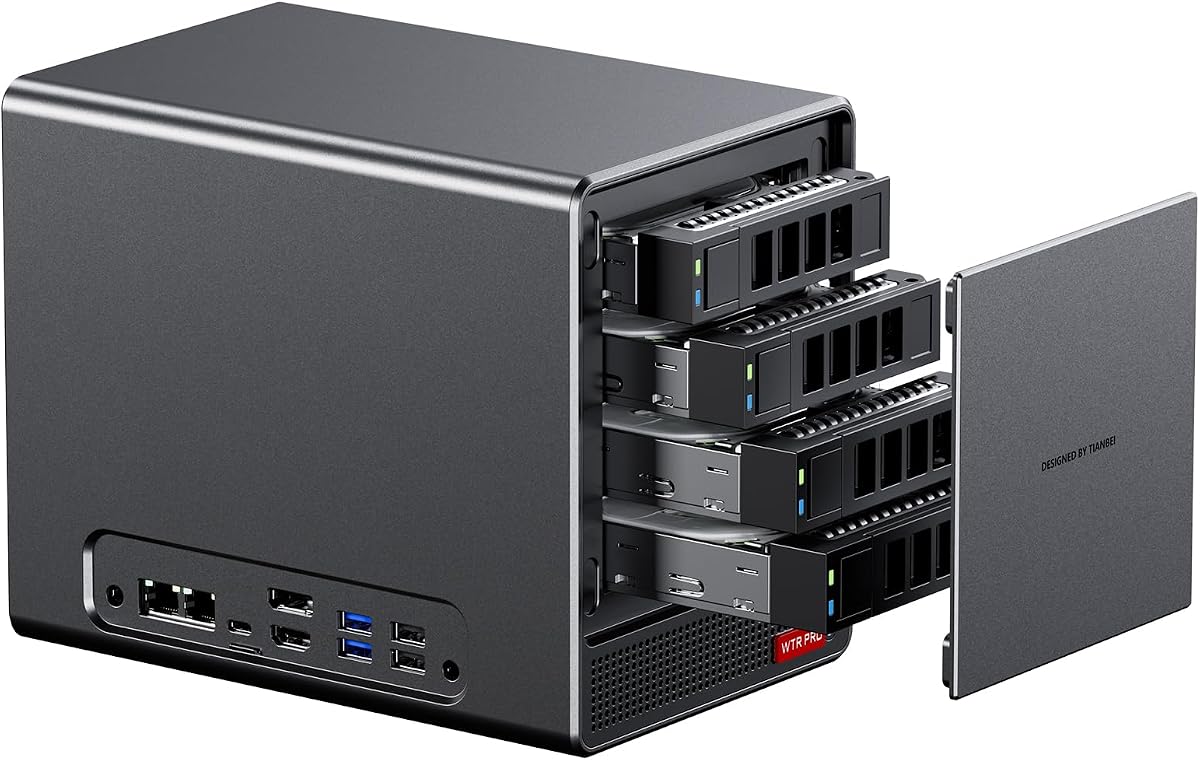
The AOOSTAR WTR PRO is designed specifically for users looking to build a home server or network attached storage system. Its four drive bays allow for significant storage expansion within a compact chassis.
We may earn a commission when you buy through this link, at no additional cost to you.
This unit runs on a Ryzen 7 5825U which is efficient enough to run 24/7 without consuming excessive energy. The cooling system uses a through-the-wall fan to ensure silent operation during data transfers.
With dual 2.5G LAN ports it supports redundant network connections for critical file servers. This makes it reliable for environments where uptime and data speed are priorities.
Select this model if your goal is to create a dedicated file server or soft router for your home network.
Supports up to 4x 22TB SATA drives plus two M.2 NVMe slots.
Connect three 4K displays for multitasking on your server management.
We may earn a commission when you buy through this link, at no additional cost to you.
The ASRock DeskMini X300 is the perfect entry point for those wanting a reliable AMD barebone system. At just 1.92 liters it is one of the smallest full desktops available on the market today.
We may earn a commission when you buy through this link, at no additional cost to you.
This unit supports a wide range of AM4 processors allowing you to choose the exact performance level you need. It also features triple display outputs for productivity setups without needing extra cards.
Storage is flexible with two M.2 slots and two 2.5 inch drive bays. This allows you to balance speed and capacity as your needs evolve over time.
It is the top pick for office work and home use where size and cost are the primary concerns.
Its 1.92L size fits easily into tight spaces like cubicles or small shelves.
Equipped with a 2.5G LAN port for faster file transfers than standard gigabit.
We may earn a commission when you buy through this link, at no additional cost to you.
The ASUS ExpertCenter PN54 represents the cutting edge of AMD processor technology with its AI 300 Series CPUs. It features a powerful NPU that delivers up to 50 TOPS for AI tasks.
We may earn a commission when you buy through this link, at no additional cost to you.
This model is ideal for enterprise environments that require high reliability and advanced connectivity. The inclusion of Wi-Fi 7 and dual 2.5G LANs ensures top-tier network performance.
The tool-free design allows for effortless customization and upgrades without specialized tools. This makes maintenance straightforward for IT administrators managing multiple units.
Choose this premium option for future-proofing your office with the latest AI and networking capabilities.
The XDNA2 NPU provides 5x faster AI performance for dynamic computing.
Its ultra-thin 0.6L chassis sets a new standard for thin computing.
We may earn a commission when you buy through this link, at no additional cost to you.
The AOOSTAR WTR PRO 4+2 is a powerhouse for storage-heavy applications. It combines four SATA bays with two M.2 slots to provide an impressive maximum storage of 96TB.
We may earn a commission when you buy through this link, at no additional cost to you.
This unit runs silently thanks to its intelligent fan control and dustproof design. It is built to support continuous 24/7 operation for home lab or server environments.
Linux compatibility is strong but users may need to configure specific rules for SATA link power management. This ensures full performance from the drives over long periods.
It is the ideal solution for anyone needing a compact but high-density storage server.
Supports VT-X and VT-D for running multiple virtual machines efficiently.
Uses a large 12CM fan and through-air ventilation for effective heat management.
We may earn a commission when you buy through this link, at no additional cost to you.
The ASUS ExpertCenter PN54-S1 focuses on simplicity and ease of use with its tool-free design. It allows quick access for component upgrades without the need for any extra hardware.
We may earn a commission when you buy through this link, at no additional cost to you.
This system supports AMD Ryzen 200 Series processors which offer reliable multitasking capabilities for daily office tasks. The slim 34mm chassis makes it easy to integrate into modern workspaces.
Connectivity remains strong with dual 2.5G LANs and support for four 4K displays. This ensures that users have ample room for productivity and expansion.
Select this model for its user-friendly design and long-term reliability in a business context.
Get quick access to internal components for effortless upgrades without hassle.
Built for 24/7 operation with eco-conscious and durable materials.
We may earn a commission when you buy through this link, at no additional cost to you.
Selecting the right AMD barebone PC requires understanding key factors that impact performance and usability.
The Ryzen processor generation determines how well the system handles multitasking. Look for higher core counts and newer architectures for faster speeds.
Choose a CPU that matches your workload whether it is office work or content creation.
Barebone kits typically do not include RAM so you must verify the supported type. Most newer units support DDR5 which is faster than DDR4.
Ensure the maximum supported capacity fits your long-term memory needs.
Check the number of M.2 slots available for SSDs. Some models offer multiple slots for RAID or capacity expansion.
More slots allow for better separation of OS and data drives.
Effective cooling is critical to maintain performance under load. Look for units with vapor chambers or advanced fan designs.
Good cooling ensures the system stays quiet even during busy tasks.
USB4 and OCuLink ports provide fast data transfer and external GPU support. LAN ports should be 2.5G or higher for modern networks.
More ports mean less need for external hubs or docks.
Verify the number of supported displays to match your productivity setup. Some units support up to four screens at high resolutions.
This is essential for creative work or trading setups.
Ensure the included power adapter provides enough wattage for your components. Some kits include higher wattage PSUs for added flexibility.
A quality PSU protects your investment from power surges.
Consider the physical size and whether it fits your available desk or shelf space. Ultra compact models save room but may limit expansion.
Balance size with the internal features you need for your work.
Begin by installing compatible DDR4 or DDR5 RAM and M.2 SSDs before powering on the unit for the first time.
Follow the manufacturer guidelines for securing components to ensure stability and optimal airflow inside the chassis.
Regularly clean vents with compressed air to prevent dust buildup that can impact cooling performance over time.
No most barebone kits do not include an operating system. You must install Windows or Linux separately after setting up the hardware.
It depends on the socket type. Models with AM4 sockets allow CPU changes but newer soldered CPUs cannot be upgraded by users.
OCuLink is a high-speed port used to connect external graphics cards with minimal latency compared to USB4 or Thunderbolt.
Yes many models with integrated Radeon graphics can handle light gaming well. For AAA titles pair them with an external GPU via OCuLink.
Check the supported speed and type such as DDR4 or DDR5. Buy modules from reputable brands that match the listed specifications in the manual.
Most units support at least two displays. High-end models can drive up to four screens at 4K resolution for productivity.
Advanced models feature vapor chambers or turbo fans. These designs maintain stable temperatures even during rendering or heavy multitasking.
Warranty periods vary by brand. Some offer up to three years while others provide one year so check the specific terms before buying.
We have reviewed ten top AMD barebone PCs ranging from budget office units to high-performance gaming systems.
Focus on your specific needs like RAM speed and connectivity options to find the perfect match for your workspace.
Always verify current prices and stock levels before purchasing to ensure you get the best value.