
4K AI-Powered Conference Webcam with Microphones Speakers
4.1Editor score
Zoom Certified for seamless use
120 degree wide angle lens
Physical lens cover included
Compare the top 10 Auto Tracking Conference Camera models for 2026 featuring AI framing, 4K video, and seamless integration for hybrid work environments.
Modern business communication relies heavily on clear and reliable video conferencing solutions that adapt to dynamic meeting environments without manual intervention.
This guide evaluates ten leading Auto Tracking Conference Camera systems based on video quality, AI accuracy, connectivity options, and overall value for professional settings.
Each selection highlights specific strengths and limitations to help you choose the right device while noting that availability and pricing may vary over time.
4.1Editor score

4.8Editor score

4.6Editor score
The following table compares key specifications across all ten selected Auto Tracking Conference Camera models to help you identify the best fit for your specific setup requirements.


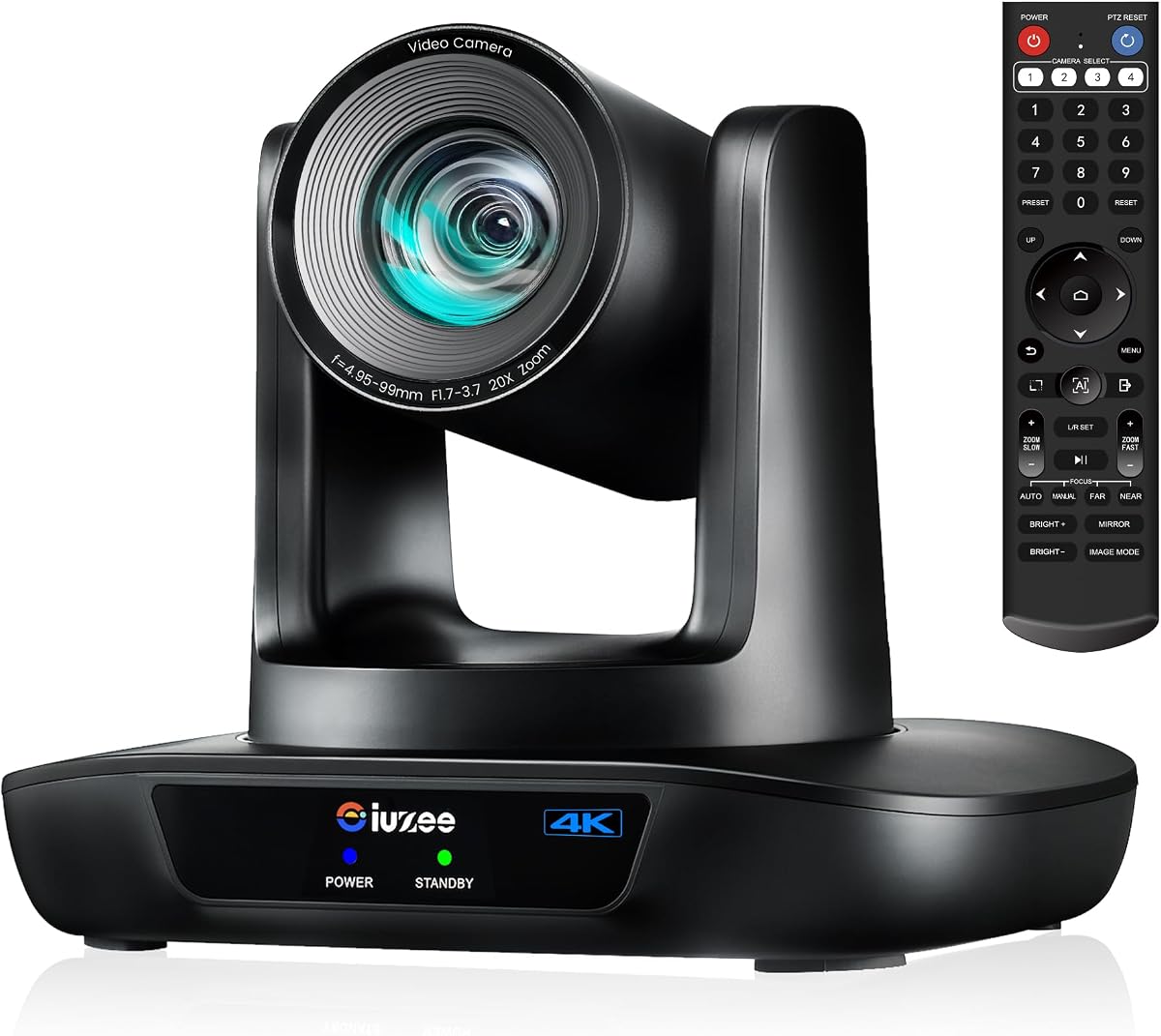


This all-in-one video system combines a 4K PTZ camera with a wireless Bluetooth speakerphone for seamless conferencing in medium sized meeting rooms.
We may earn a commission when you buy through this link, at no additional cost to you.
Its advanced AI algorithms precisely track speakers using facial and humanoid recognition to maintain perfect framing during active discussions.
While the video quality is outstanding the Bluetooth speakerphone operates on a separate 5 meter range that might not cover larger spaces.
It is an excellent choice for organizations seeking a complete plug and play solution with strong technical support and long warranty coverage.
The camera delivers 4K 30fps output through HDMI ensuring that every detail remains clear even when using optical zoom.
Both USB 3.0 and HDMI interfaces provide versatile connectivity options for laptops smart TVs and dedicated video conferencing units.
We may earn a commission when you buy through this link, at no additional cost to you.
Designed specifically for small conference spaces this webcam ensures every participant is visible while maintaining a budget friendly price point.
We may earn a commission when you buy through this link, at no additional cost to you.
It features a wide 120 degree angle that captures entire teams without requiring complex positioning adjustments or multiple devices.
Users report slightly lower reliability compared to premium models making it best suited for basic meeting requirements rather than critical broadcasts.
This unit is ideal for startups or remote workers who need certified performance with essential tracking features at a minimal investment.
The 120 degree wide angle lens ensures all attendees are captured in frame without needing to squeeze into the view.
A physical lens cover is included to provide peace of mind when the camera is not in active use.
We may earn a commission when you buy through this link, at no additional cost to you.
This all-in-one kit delivers smooth 60fps HD video which helps reduce motion blur during fast paced presentations and collaborative sessions.
We may earn a commission when you buy through this link, at no additional cost to you.
The camera supports both HDMI and USB 3.0 connections allowing simultaneous output for recording and conferencing applications effectively.
Although it lacks 4K resolution the 60fps frame rate provides fluid movement that many users prefer for dynamic meeting interactions.
It is a solid option for meeting rooms that prioritize smooth video flow over extreme resolution clarity in everyday use.
The 60fps capability ensures that fast gestures and movements are captured smoothly without stuttering or blur.
A full duplex microphone array with echo cancellation picks up voices clearly across the room for better communication.
We may earn a commission when you buy through this link, at no additional cost to you.
This model introduces a unique set of hand gestures that allow users to toggle tracking modes without touching a keyboard or mouse.
We may earn a commission when you buy through this link, at no additional cost to you.
The remote control offers additional preset positions making it easy to switch between wide shots and close ups quickly.
While the gesture features are innovative they may require a learning curve for teams unfamiliar with non touch interface controls.
It suits creative professionals or tech enthusiastic groups who want more interactive control over their conference camera operations.
Six distinct hand gestures enable users to enable tracking zoom and adjust framing without interrupting their meeting.
The included IR remote supports nine preset positions ensuring the camera can focus on specific spots instantly.
We may earn a commission when you buy through this link, at no additional cost to you.
With a powerful 20x optical zoom this camera excels in large venues where close-ups are needed from distant seating areas.
We may earn a commission when you buy through this link, at no additional cost to you.
The inclusion of LAN PoE power simplifies cabling for permanent installations by reducing the need for separate power outlets.
This model bridges the gap between standard conference rooms and professional broadcast environments requiring long distance clarity.
It is particularly well suited for churches or educational facilities that need detailed views from the back of large halls.
The 20x optical zoom allows you to frame distant speakers with sharp detail without losing image quality.
Power over Ethernet support means you can run power and data over a single network cable for cleaner setups.
We may earn a commission when you buy through this link, at no additional cost to you.
This camera offers three simultaneous HD outputs including LAN making it highly versatile for professional broadcast and streaming workflows.
We may earn a commission when you buy through this link, at no additional cost to you.
It supports advanced encoding formats like H.264 and H.265 ensuring smooth performance even with lower bandwidth internet connections.
Since it lacks a built-in microphone users will need to pair it with external audio equipment for complete conferencing setups.
It is an excellent investment for dedicated streaming teams that require IP streaming capabilities and robust long term support.
Support for RTMP RTSP and SRT protocols allows direct integration with professional streaming platforms and servers.
PoE support enables simple single-cable power and data transmission reducing installation clutter significantly.
We may earn a commission when you buy through this link, at no additional cost to you.
This is the most advanced option available featuring official NDI integration for seamless workflow with broadcast software like vMix and OBS.
We may earn a commission when you buy through this link, at no additional cost to you.
Its professional SDI output supports long cable runs up to 300 feet without needing additional hardware or signal boosters.
The camera tracks people smoothly even when temporarily obscured ensuring continuous framing during complex presentations or events.
It is ideal for production teams that need studio grade features and maximum flexibility for live streaming and recording.
The NDI license allows instant connection to production software without additional drivers or plugins.
Sophisticated AI ensures smooth precise tracking keeps your subject perfectly framed even during brief obstructions.
We may earn a commission when you buy through this link, at no additional cost to you.
This unit combines high resolution 4K output with flexible connectivity including LAN and PoE for various professional installation needs.
We may earn a commission when you buy through this link, at no additional cost to you.
It uses both face and body recognition to ensure smooth tracking even if a speaker briefly moves behind an object.
Some users may need to adjust factory output settings via the remote if their monitors do not support the default resolution.
It serves as a reliable workhorse for educational institutions and churches that need consistent performance over time.
Advanced recognition algorithms maintain smooth and professional video even when speakers shift positions frequently.
Multiple mounting options including wall and ceiling support make it easy to integrate into existing room designs.
We may earn a commission when you buy through this link, at no additional cost to you.
This all-in-one system combines camera microphones and speakers into a single device to significantly simplify setup and reduce cable clutter.
We may earn a commission when you buy through this link, at no additional cost to you.
Its wide 120 degree angle captures full meeting spaces ensuring every participant is clearly visible during virtual calls.
The 5x zoom flexibility allows you to focus on specific details without needing multiple lenses or expensive hardware.
It is a perfect solution for hybrid teams that want a simple plug and play unit for medium sized conference rooms.
Built-in dual speakers and a 4-mic array ensure clear sound playback and voice capture without external gear.
AI automatically detects participants and adjusts the framing in real time to keep everyone centered effectively.
We may earn a commission when you buy through this link, at no additional cost to you.
This compact 3-in-1 webcam integrates a 4K sensor microphone array and speaker into a single portable unit for individual workspaces.
We may earn a commission when you buy through this link, at no additional cost to you.
It features adjustable field of view modes that let you switch between wide group shots and narrower focus for one-on-one meetings.
While it uses digital zoom which may reduce sharpness at high magnification it remains a convenient choice for general calls.
It is ideal for small offices or home setups where space is limited and a single device solution is preferred.
Three adjustable FOV modes allow you to customize the view for either group collaboration or focused solo calls.
The built-in speaker and privacy cover make it easy to carry and secure when moving between locations.
We may earn a commission when you buy through this link, at no additional cost to you.
Selecting the right Auto Tracking Conference Camera involves balancing video quality, AI capabilities, and connectivity options to match your meeting room size and technical needs.
Resolution determines how clear and detailed your video feed will be for remote participants. Look for cameras that support at least 1080p to ensure clarity and choose 4K models if you need to zoom in on documents or whiteboards without losing detail. Higher resolution also future proofs your investment as bandwidth and displays improve.
Prioritize 4K resolution for professional settings and 1080p for basic meetings to balance cost and visual quality.
Optical zoom is superior to digital zoom because it captures more detail by physically adjusting the lens rather than cropping the image. For small rooms 3x optical zoom is sufficient but larger spaces benefit from 20x optical zoom to capture distant speakers clearly. Digital zoom can be useful for minor adjustments but avoid relying on it for critical presentations.
Opt for optical zoom whenever possible to maintain image sharpness and clarity during detailed viewing.
AI auto tracking uses face and body recognition to follow speakers automatically so you do not have to manually adjust the camera. High quality models use advanced algorithms that continue tracking even if a speaker briefly moves behind an object. Poor tracking can lead to awkward framing which distracts remote attendees during key discussions.
Choose a camera with proven face and body recognition to ensure smooth and uninterrupted framing during meetings.
Clear audio is just as important as video for successful conferencing. Some systems include built-in microphones and speakers which simplifies setup but others require separate audio devices. Consider the room size and ensure the audio pickup range covers all participants effectively without excessive background noise.
Assess whether an all-in-one audio solution meets your needs or if separate microphones are required for larger spaces.
Connectivity determines how easily the camera integrates with your existing hardware and software. USB 3.0 is standard for laptops but HDMI is better for direct connection to displays or conference units. Look for models with LAN or PoE support if you plan to mount the camera on a wall or ceiling where power outlets are scarce.
Ensure the camera supports your primary connection method whether it is USB HDMI or network based for smooth integration.
A wider field of view allows the camera to capture more of the room without needing to be moved or angled. 120 degree wide angle lenses are ideal for capturing entire teams whereas narrower views work better for focused presentations. Consider the typical number of participants and room layout when selecting the optimal angle.
Select a 120 degree wide angle for team meetings to ensure every participant is captured clearly in the frame.
Control options include physical remotes software interfaces and even gesture recognition for hands-free operation. Remote controls are essential for preset positions whereas software controls offer more flexibility through your computer. Advanced models might support joystick controllers for professional broadcast scenarios requiring precise adjustments.
Choose a control method that fits your workflow whether it is a simple remote or advanced software integration.
Your camera must work seamlessly with the video conferencing tools your team uses daily like Zoom Microsoft Teams or Google Meet. Look for certified models to ensure all features like auto tracking work correctly within these platforms. Some cameras also support OBS or vMix for users who need live streaming capabilities.
Verify compatibility with your primary conferencing platforms to avoid driver issues or feature limitations.
Connect the camera to your power source and ensure all cables are securely plugged into the correct ports on both the camera and your computer.
Install any necessary drivers if required though most modern models work plug and play on major operating systems.
Clean the lens gently with a microfiber cloth and keep the camera out of direct sunlight to avoid image glare or sensor damage.
Optical zoom uses physical lens movement to magnify the image without losing quality while digital zoom crops the image which reduces sharpness. Optical zoom is preferred for professional presentations to ensure text and details remain clear when viewed remotely.
Yes most modern Auto Tracking Conference Cameras are compatible with multiple platforms including Zoom Microsoft Teams and Google Meet. Check the specific compatibility list before purchasing to ensure your preferred software is supported fully.
Audio pickup ranges vary but many systems support clear voice capture up to 5 meters or 16.4 feet. For larger rooms you may need to pair the camera with separate professional audio equipment for optimal sound coverage.
Most Auto Tracking Conference Cameras are designed to work with both Mac and Windows operating systems without requiring additional drivers. Always verify the specific system requirements on the product page before purchasing.
Most models rely on wired connections like USB or Ethernet for stable performance though some support Bluetooth for audio peripherals. Wi-Fi is less common in dedicated PTZ cameras to ensure consistent high speed data transfer.
Keep the camera lens clean and ensure the room lighting is consistent to help the AI system track faces accurately. Updating the firmware regularly can also improve tracking algorithms and overall performance.
The top picks in this guide offer a range of solutions from budget friendly webcams to professional grade PTZ cameras with NDI integration.
Prioritize video resolution and AI tracking accuracy based on your specific meeting room size and usage frequency to maximize value.
Always check current availability and warranty terms before purchasing since product details and offers may change over time.