
Creality Ender 3 V3 SE
3.8Editor score
CR Touch auto leveling
Sprite direct extruder
Quick assembly design
Explore our expert guide comparing the top 10 auto bed leveling 3D printers for beginners to find the perfect model for your first printing project.
Starting your journey into 3D printing can be daunting with so many technical adjustments involved. Auto bed leveling technology simplifies this process by ensuring the first layer adheres correctly without manual calibration. This guide highlights the best models designed specifically for newcomers who value ease of use and reliable results.
We have evaluated ten distinct printers based on their leveling accuracy, build quality, speed capabilities, and user interface. Our selection process prioritizes machines that reduce setup time and minimize common beginner frustrations like failed prints or inconsistent extrusion. Each option offers a unique balance of performance and affordability to suit different budgets.
Every pick in this list demonstrates how modern automation makes 3D printing accessible to everyone. You will find detailed breakdowns of features, pros, and cons to help you make an informed decision. Please note that prices fluctuate frequently so always check current listings before purchasing your new machine.
3.8Editor score

4.3Editor score

4.3Editor score
This side-by-side comparison evaluates all ten selected printers across key performance metrics. You will see how each model stacks up regarding speed, build volume, and leveling technology to help you choose the right fit.


The FLASHFORGE Adventurer 5M stands out as the top choice for beginners seeking speed without complexity. It holds a strong rating from users who appreciate its one-click auto leveling feature that ensures perfect adhesion every time.
We may earn a commission when you buy through this link, at no additional cost to you.
Its Core XY motion system allows it to print up to 600mm/s with minimal vibration. The direct extruder handles flexible materials well and the heated bed with PEI coating makes removing prints effortless.
While it lacks a fully enclosed chamber which limits use with ABS or materials that emit fumes the open design aids cooling for PLA. Beginners should ensure good ventilation when operating this machine.
We recommend this printer for those ready to create high volume projects quickly. Its balance of performance and user-friendly automation makes it an excellent investment for new makers.
The high acceleration and speed settings allow you to finish projects in record time while maintaining crisp details.
The quick detachable nozzle system lets you swap parts in seconds ensuring you spend less time fixing and more time printing.
We may earn a commission when you buy through this link, at no additional cost to you.
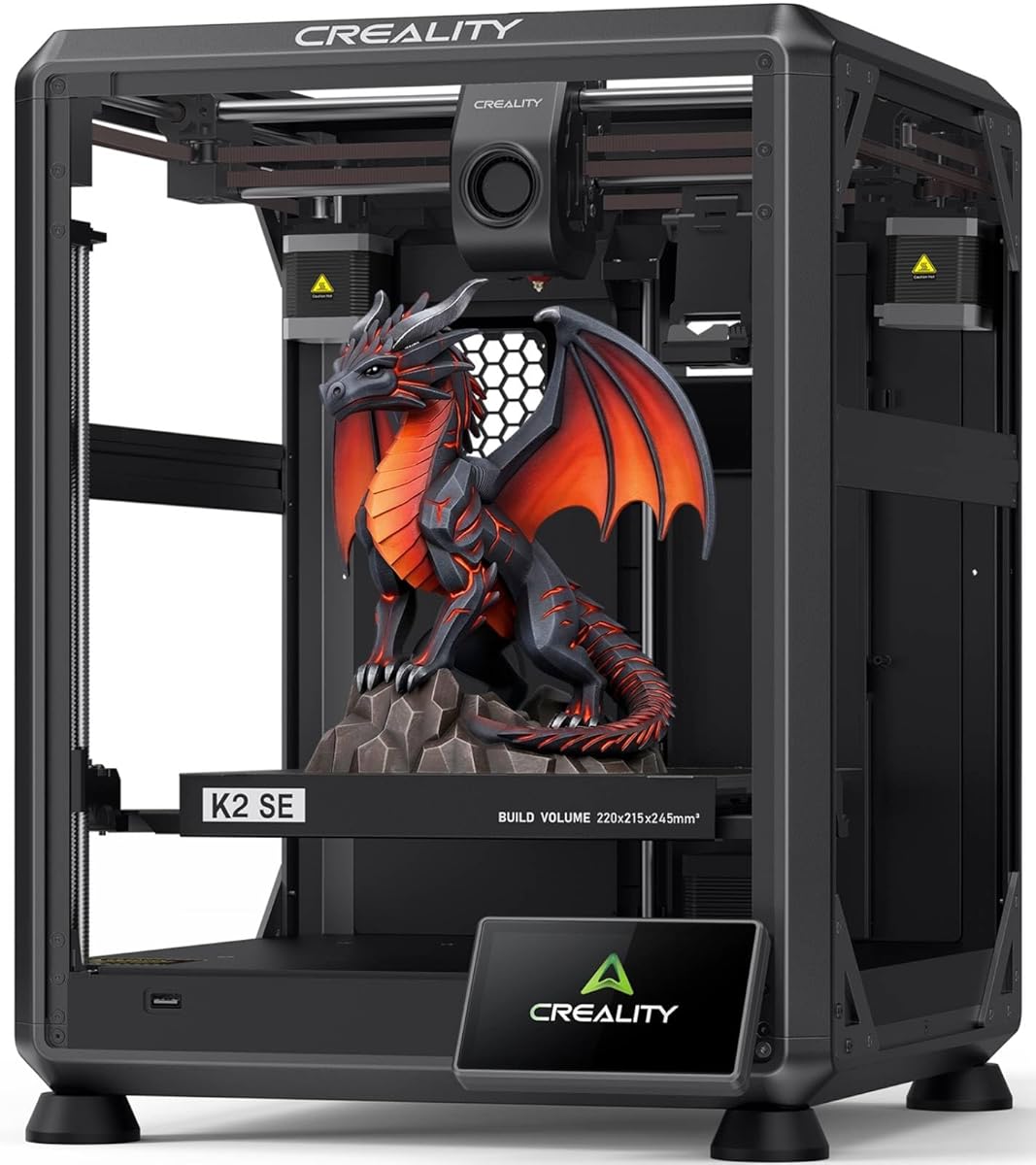
The Creality K2 SE offers a robust metal build that ensures stability during high-speed printing. With a 3.8 rating it shows potential but requires careful setup to maximize its full potential for beginners.
We may earn a commission when you buy through this link, at no additional cost to you.
Its die-cast aluminum alloy frame minimizes flex and the input shaping algorithm reduces ringing on printed parts. The automatic leveling system simplifies the initial setup significantly compared to older models.
Users note that while the hardware is strong the software experience can be tricky initially. Multicolor printing requires an additional purchase which adds to the overall investment cost.
This printer is ideal for users who prioritize durability and plan to upgrade to multicolor capabilities later. Its speed and stability make it a strong contender in the mid-range market.
The solid metal build ensures that high-speed movements do not compromise the precision of your printed parts.
Compatibility with the CFS system allows you to start simple and expand into complex multicolor projects later.
We may earn a commission when you buy through this link, at no additional cost to you.
The E-Leveler 2 is not a printer but an essential tool for those with manual leveling machines. It simplifies the process by providing visual LED feedback to ensure the bed is perfectly even.
We may earn a commission when you buy through this link, at no additional cost to you.
Designed to work with most manual adjustable print beds it removes the guesswork from the paper method. Users can adjust screws confidently knowing when the bed reaches the ideal distance.
While it lacks automation like sensors found in modern printers it remains a cost-effective solution for older models. It is a great bridge for beginners not ready to upgrade their hardware.
We suggest this for anyone struggling with bed calibration on older printers. It ensures consistent first layers and reduces wasted filament during the learning process.
The LED light indicator provides immediate confirmation that your bed is level without needing complex measurements.
We may earn a commission when you buy through this link, at no additional cost to you.
The FLASHFORGE AD5M delivers professional-grade auto calibration at a competitive price point. Users praise its ability to measure nozzle-to-build plate distance accurately for flawless first layers every single time.
We may earn a commission when you buy through this link, at no additional cost to you.
The all-metal CoreXY structure ensures durability and precision during high-speed movements. Features like quick-swap nozzles and power loss recovery add significant value for daily users.
Some users report minor connectivity issues with the mobile app but the core printing performance remains reliable. The lack of a full enclosure limits material options but suits most standard projects.
This model is perfect for users needing reliability without spending on premium features. Its automation reduces friction and makes it a top pick for consistent results.
The one-click leveling system removes manual guesswork ensuring you never worry about bed height again.
Nozzle changes take seconds without tools allowing you to switch between fine and coarse printing effortlessly.
We may earn a commission when you buy through this link, at no additional cost to you.
The QIDI Q2 is designed for those who want to print beyond basic PLA with professional results. It features a heated chamber and high-temperature nozzle that unlock a wide range of engineering materials.
We may earn a commission when you buy through this link, at no additional cost to you.
Its unique auto leveling sensor integrated into the nozzle eliminates manual Z-offset adjustments. This design ensures consistent accuracy and simplifies the user experience significantly for all skill levels.
The triple filtration system and flame-retardant chamber make it safe for indoor environments. While the price is higher the performance justifies the investment for serious hobbyists and small businesses.
We recommend this for users planning to print strong functional parts. Its ability to handle advanced materials while maintaining ease of use makes it a standout premium choice.
The heated chamber prevents warping on tough materials like ABS ensuring reliable results on every print job.
Built-in air filtration captures harmful particles making it safe to run in a home office or classroom.
We may earn a commission when you buy through this link, at no additional cost to you.
The FLASHFORGE 5M Pro improves on the standard model with an enclosed design for better safety and material flexibility. It maintains high speeds while reducing noise with a dedicated silent mode for focused work.
We may earn a commission when you buy through this link, at no additional cost to you.
Auto leveling ensures smooth first layers and the dual filtration system protects against harmful fumes. This makes it suitable for classrooms or homes where air quality matters most to users.
The included nozzle bundle offers versatility from fine detail to rapid prototyping. However the higher price point compared to the standard version might deter some entry-level buyers.
We suggest this for users needing a quieter and safer printing environment. Its enclosed nature and health features make it a strong choice for shared spaces.
The advanced filtration system captures particles ensuring you breathe clean air while your prints are created.
Quiet mode reduces noise levels so printing does not disturb your work or rest environment.
We may earn a commission when you buy through this link, at no additional cost to you.
The Ender 3 V3 SE is a legendary budget-friendly option upgraded with modern automation features. Its CR Touch auto leveling system simplifies setup making it accessible for absolute beginners with limited technical skills.
We may earn a commission when you buy through this link, at no additional cost to you.
The Sprite direct extruder provides reliable filament feeding for a variety of materials. Assembly is fast and the dual Z-axis leadscrews reduce wobble for smoother vertical details.
While it is not the fastest printer on this list it offers excellent reliability for the price. The auto filament loading feature adds convenience that is rare at this budget tier.
We highly recommend this for those starting their first printing journey. It balances cost and functionality perfectly without requiring technical tinkering.
Most parts come pre-assembled so you can start printing within minutes of unboxing the unit.
The Sprite extruder handles flexible and rigid filaments smoothly reducing the risk of jams.
We may earn a commission when you buy through this link, at no additional cost to you.
The CR Touch Kit is an ideal solution for existing Ender owners who want auto leveling without buying a new machine. It allows multi-point detection to compensate for bed unevenness automatically.
We may earn a commission when you buy through this link, at no additional cost to you.
Installation involves mounting brackets and flashing firmware but the result is significantly easier setup. Users report higher success rates and less frustration when using this sensor kit on older models.
It works best with V4.2 boards so checking compatibility before buying is essential. This upgrade transforms a basic printer into a more reliable tool for daily production.
We recommend this for cost-conscious users who already own a compatible Ender printer. It extends the machine life and improves performance affordably.
The system calculates tilt angles and adjusts Z-height automatically to ensure perfect first layers.
We may earn a commission when you buy through this link, at no additional cost to you.
The AD5X brings multi-color printing to beginners without requiring complex external add-ons. Its Integrated Filament System automates detection and refills reducing downtime significantly during long runs.
We may earn a commission when you buy through this link, at no additional cost to you.
Full auto leveling ensures that every color change maintains accurate positioning for clean transitions. The CoreXY structure provides stability even at high speeds to prevent layer shifting.
Managing four colors can be complex for first-timers but the included system handles most tasks automatically. It is a great stepping stone for users wanting visual variety early.
We suggest this for creators prioritizing aesthetic projects over raw speed. The convenience of built-in multi-color features makes it a unique entry in this category.
Print models with multiple colors seamlessly opening up new options for branding and artistic designs.
The IFS system detects filament breaks and switches spools automatically keeping your print alive.
We may earn a commission when you buy through this link, at no additional cost to you.
The final entry is a refined version of the Ender 3 V3 SE emphasizing simplicity and value. It features CR Touch auto leveling and a quiet mainboard for a peaceful printing experience.
We may earn a commission when you buy through this link, at no additional cost to you.
The Sprite extruder ensures consistent flow for PLA and PETG materials. Dual Z-axis screws provide the stability needed for tall prints without excessive vibration.
Flexibility is key with the spring steel plate allowing easy removal. While it is not the fastest printer it offers consistent results that build confidence in new users.
We recommend this for anyone needing a reliable and quiet starter machine. Its balance of features and simplicity makes it a strong final pick.
A 32-bit silent mainboard keeps noise low so you can print without disturbing others.
Dual synchronized lead screws ensure Z wobble is minimized for smoother tall prints.
We may earn a commission when you buy through this link, at no additional cost to you.
Selecting the right printer involves weighing several technical factors against your specific needs and budget.
Auto bed leveling systems vary from simple sensors to advanced nozzle-based detection. Beginners should look for one-click calibration to minimize manual adjustments and ensure consistent first layer adhesion without technical expertise.
Choose models that offer full automation rather than manual assisted tools to save time and frustration.
The size of the printable area dictates what objects you can create in one piece. Larger volumes allow for bigger projects but may require more frequent calibration checks due to bed unevenness.
Select a volume that matches your intended project scale to avoid unnecessary resizing or multiple part assembly.
High-speed printers often sacrifice detail for velocity. Beginners should prioritize balanced machines that maintain quality at reasonable speeds to ensure learning curves are manageable.
Look for printers with acceleration control to maintain detail even at higher speeds.
Some materials emit fumes harmful in enclosed spaces. Enclosed printers with HEPA filters protect your health and allow for printing a wider range of materials safely.
Prioritize machines with built-in safety features if printing in shared living areas.
Quick-swap nozzles and modular parts reduce downtime when issues arise. Beginners need tools that can be serviced easily without specialized skills or long wait times.
Choose printers with accessible components to keep your workflow uninterrupted.
The slicing software and firmware should be intuitive. Good UI design ensures you can adjust settings easily without digging through complex code.
Look for manufacturers that provide easy-to-use apps for remote monitoring and control.
Different nozzles and heaters enable printing various filaments. Beginners might start with PLA but future-proofing with higher temperature capabilities allows growth.
Ensure the printer supports the materials you plan to use now and later.
Active user communities provide quick help when things go wrong. A manufacturer with responsive support can save days of troubleshooting for new users.
Check for available forums and official support channels before purchasing.
Always perform a test print after setup to confirm the auto leveling works correctly. Use a simple calibration cube to check dimensions and bed adhesion before starting complex projects.
Keep the print bed clean by wiping it with alcohol periodically. Dust or grease can interfere with the leveling sensor and adhesion leading to failed prints even with automation.
Update your firmware regularly to access performance improvements. Manufacturers often release patches that refine leveling algorithms and speed settings over time.
Most auto leveling systems handle minor adjustments but you may still need to ensure the bed is roughly level initially. For absolute precision a quick physical check using a piece of paper is still recommended by many experts.
Typically once every 50 to 100 hours of printing is sufficient for auto leveling machines. However always check adhesion if you move the printer or notice inconsistent first layers during printing.
Yes many older models like the Ender 3 can accept kits like the CR Touch sensor. This requires some technical skill but offers a cost-effective way to modernize legacy hardware.
PLA is the easiest due to its low warping tendency. With heated beds and sensors you can also print PETG and TPU reliably. Enclosed chambers expand these options to include ABS.
Enclosed printers offer better temperature stability and safety but cost more. Beginners usually find open frames simpler to maintain while still delivering excellent results for standard materials.
Many new entry-level models include basic auto leveling sensors. However older budget models or DIY kits may require manual calibration unless upgraded with a sensor kit separately.
One-click leveling automates the entire bed mapping process saving significant setup time. It removes human error ensuring the first layer is perfect every single time you start a job.
Auto leveling itself does not slow down printing but ensures consistency. You can print faster with confidence that the first layer will not fail due to bed height issues.
We have explored ten excellent options ranging from budget-friendly Ender upgrades to premium enclosed solutions. Each offers distinct advantages depending on whether you value speed simplicity or advanced material support.
Prioritize features like auto calibration and stable build volumes to ensure your learning curve remains smooth. Investing in a machine that reduces manual work helps you focus on creativity rather than troubleshooting.
Always verify current prices and availability since models change frequently. Choosing the right printer today sets you up for success in your exciting new 3D printing journey.