
Canon PIXMA TR7120
4.3Editor score
Affordable versatility
Compact design
AirPrint support
Finding the right all in one printer for MacBook Air users requires careful consideration of wireless compatibility and printing quality. Modern home offices demand versatile devices that handle documents and photos seamlessly. This guide highlights models optimized for Apple ecosystems and efficient workflows.
We evaluated ten top-rated printers based on connectivity options print speeds and user feedback from verified buyers. Each product offers unique strengths ranging from cost-effective ink systems to advanced scanning capabilities. Our analysis ensures you find a device that matches your specific printing needs.
Every selection includes detailed specifications and real-world performance insights to help you make an informed decision. Prices and availability change frequently so always check current listings before purchasing. We update this guide regularly to reflect the latest tech advancements and user preferences.
4.3Editor score

3.9Editor score

4.0Editor score
As an Amazon Associate we earn from qualifying purchases.
This side-by-side comparison highlights the key specifications and unique features of each selected printer to help you quickly identify the model that best fits your MacBook Air setup and printing demands.




The HP OfficeJet Pro 8125 stands out as a versatile choice for MacBook Air users needing professional-quality prints. With a rating of 3.9 stars it delivers consistent results for documents and presentations. Its AI capabilities ensure web pages print without wasted space or awkward layouts.
We may earn a commission when you buy through this link, at no additional cost to you.
Key strengths include fast print speeds up to 20 ppm for black text which keeps workflows efficient. The automatic document feeder allows quick scanning of multi-page files without manual page turning. Dual-band Wi-Fi maintains a stable connection minimizing interruptions during busy work sessions.
Trade-offs involve the reliance on Instant Ink subscriptions which may add ongoing costs after the trial period. Some users find the initial setup slightly complex compared to simpler models. These factors are acceptable given the robust feature set and reliability for home offices.
Ideal for small business owners or students printing frequent reports this model balances performance with smart features. The large touchscreen makes navigation intuitive for all skill levels. Consider this if you prioritize speed and smart integration over budget constraints.
HP AI removes unwanted content from web pages ensuring prints look professional and focused on essential information.
Dual-band Wi-Fi automatically resolves connection issues providing seamless printing from your MacBook Air or mobile devices.
We may earn a commission when you buy through this link, at no additional cost to you.
The Canon PIXMA TR7120 offers exceptional value for MacBook Air users on a tight budget. Rated 4.3 stars it balances cost and functionality effectively. Its compact design fits easily into small home offices without sacrificing essential features like duplex printing and scanning.
We may earn a commission when you buy through this link, at no additional cost to you.
Strengths include easy setup with smartphones and dual-band Wi-Fi for stable connectivity. The auto document feeder handles multi-page tasks efficiently while the OLED display simplifies navigation. Users appreciate the vivid color output ideal for occasional photos and creative projects.
Trade-offs involve slower print speeds compared to higher-end models and a smaller paper capacity requiring frequent refills. The hybrid ink system is affordable but may need more frequent replacement than tank systems. These limitations are minor for casual users needing basic all-in-one functionality.
This model suits students or home users printing moderate volumes who prioritize affordability. Its seamless integration with Apple devices ensures smooth operation. Choose this if you need reliable performance without breaking the bank or sacrificing core features.
The small footprint complements any workspace design making it perfect for apartments or shared desks.
Apple AirPrint and Canon PRINT App support allow printing directly from your MacBook Air or iPhone without drivers.
We may earn a commission when you buy through this link, at no additional cost to you.
The Canon PIXMA TR8620a delivers premium features for demanding MacBook Air users needing advanced functionality. With a 4.0 rating it excels in capacity and smart integrations. Its ability to reorder ink via Alexa ensures you never run out unexpectedly during critical printing jobs.
We may earn a commission when you buy through this link, at no additional cost to you.
Key strengths include a massive 200 sheet paper capacity reducing refill frequency significantly. The micro SD slot allows direct photo printing from cameras without computer mediation. Fax capabilities add versatility for businesses requiring physical document transmission alongside digital workflows.
Trade-offs involve a larger physical footprint that may challenge tight desk spaces and a higher initial cost. Ink costs may be higher without a subscription service. These drawbacks are acceptable for users prioritizing high-volume output and unique features like voice reordering.
Ideal for home offices with moderate to high volume needs this printer supports diverse media types and workflows. Its robust duty cycle ensures longevity even with frequent use. Opt for this if you want enterprise-level features in a home-friendly package.
Alexa integration automatically orders ink when levels are low eliminating manual tracking and potential interruptions.
Micro SD slot and rear feed support enable printing on various paper types and sizes easily.
We may earn a commission when you buy through this link, at no additional cost to you.
The Epson EcoTank ET-2903 revolutionizes printing with refillable tanks reducing long-term ink costs significantly. Rated 4.3 stars it appeals to high-volume users seeking value. The included ink lasts up to three years making it economical for frequent printing tasks without recurring cartridge purchases.
We may earn a commission when you buy through this link, at no additional cost to you.
Strengths include exceptional photographic quality with high resolution and simple ink refilling without mess. Heat-free technology enhances reliability and durability over time. Mobile printing via Epson Smart Panel app ensures seamless operation with macOS and iOS devices effortlessly.
Trade-offs involve slower color print speeds compared to laser printers and a larger physical footprint for the tanks. Initial investment is higher but offsets over time through ink savings. These factors are acceptable for users prioritizing low ongoing costs over speed.
Perfect for creative professionals or families printing many photos and documents this model offers sustainable value. Its durable design supports heavy daily use without issues. Choose this if minimizing ink expenses is a top priority for your home office.
Refillable tanks reduce plastic waste significantly contributing to environmental sustainability goals effortlessly.
Included ink supply lasts up to three years reducing frequent cartridge replacements and associated costs.
We may earn a commission when you buy through this link, at no additional cost to you.
The Canon PIXMA TS6520 excels in compact design ideal for limited desk spaces around MacBook Air setups. With a 4.2 rating it balances style and function well. The intuitive OLED display provides clear status updates making operation straightforward for all users.
We may earn a commission when you buy through this link, at no additional cost to you.
Strengths include seamless mobile printing via AirPrint and Canon PRINT app. Dual-band Wi-Fi ensures stable connections without dropouts during printing tasks. The hybrid ink system delivers sharp text and vivid colors suitable for personal and professional documents alike.
Trade-offs include the absence of an auto document feeder limiting multi-page scanning efficiency. Single-sided printing may increase paper usage for larger documents. These limitations are acceptable for users prioritizing size savings and simplicity over advanced workflow features.
Best for students or home offices with tight space constraints this model offers reliable core functions. Its elegant design complements modern workspaces beautifully. Select this if you need a stylish printer that fits anywhere without major compromise.
OLED screen offers clear visual feedback on ink levels and printer status at a glance.
Small dimensions allow placement on shelves or desks where larger models cannot fit comfortably.
We may earn a commission when you buy through this link, at no additional cost to you.
The Brother Work Smart 1360 provides robust cloud integration perfect for remote workers using MacBook Air devices. Rated 3.8 stars it offers straightforward functionality for daily needs. Direct printing to cloud apps like Google Drive and Dropbox streamlines workflow significantly.
We may earn a commission when you buy through this link, at no additional cost to you.
Strengths include a clear 1.8 inch color display simplifying menu navigation and setup. Fast black print speeds handle text documents efficiently while maintaining reasonable energy consumption. Its compact design fits easily into varied home office environments without obstruction.
Trade-offs include lower user ratings compared to competitors which may indicate occasional connectivity or durability issues. The absence of fax capabilities limits use for businesses requiring document transmission. These are minor concerns for typical home users needing printing and scanning.
Ideal for remote workers or freelancers needing quick cloud document access this printer delivers essential features. Its simplicity reduces learning curves for new users. Consider this if seamless digital workflow integration is more important than advanced hardware features.
Seamless integration with popular cloud storage apps simplifies document access without requiring computer mediation.
Color display provides clear visual guidance for setup and operation enhancing user experience.
We may earn a commission when you buy through this link, at no additional cost to you.
The HP Envy 6155 excels in photo printing quality for MacBook Air users prioritizing visual accuracy. Rated 4.2 stars it delivers vibrant colors matching on-screen images. P3 color technology ensures true-to-screen reproduction ideal for hobbyists and creative professionals alike.
We may earn a commission when you buy through this link, at no additional cost to you.
Strengths include an intuitive 2.4 inch touchscreen simplifying navigation and settings adjustment. Borderless photo printing capability enhances presentation quality for creative projects. Sustainable design using recycled plastic appeals to environmentally conscious users seeking responsible tech choices.
Trade-offs involve slower black print speeds which may hinder heavy document workflows. The 100-sheet tray requires frequent reloading during bulk printing. These are acceptable compromises given the superior photo capabilities and user-friendly interface design.
Best suited for home users printing photos and occasional documents this model balances quality and ease of use. Its compact design fits well in living spaces. Opt for this if visual fidelity and smart features are your top priorities.
P3 technology ensures prints match screen colors accurately enhancing creative workflow output quality.
Made with significant recycled plastic content reducing environmental impact without sacrificing performance.
We may earn a commission when you buy through this link, at no additional cost to you.
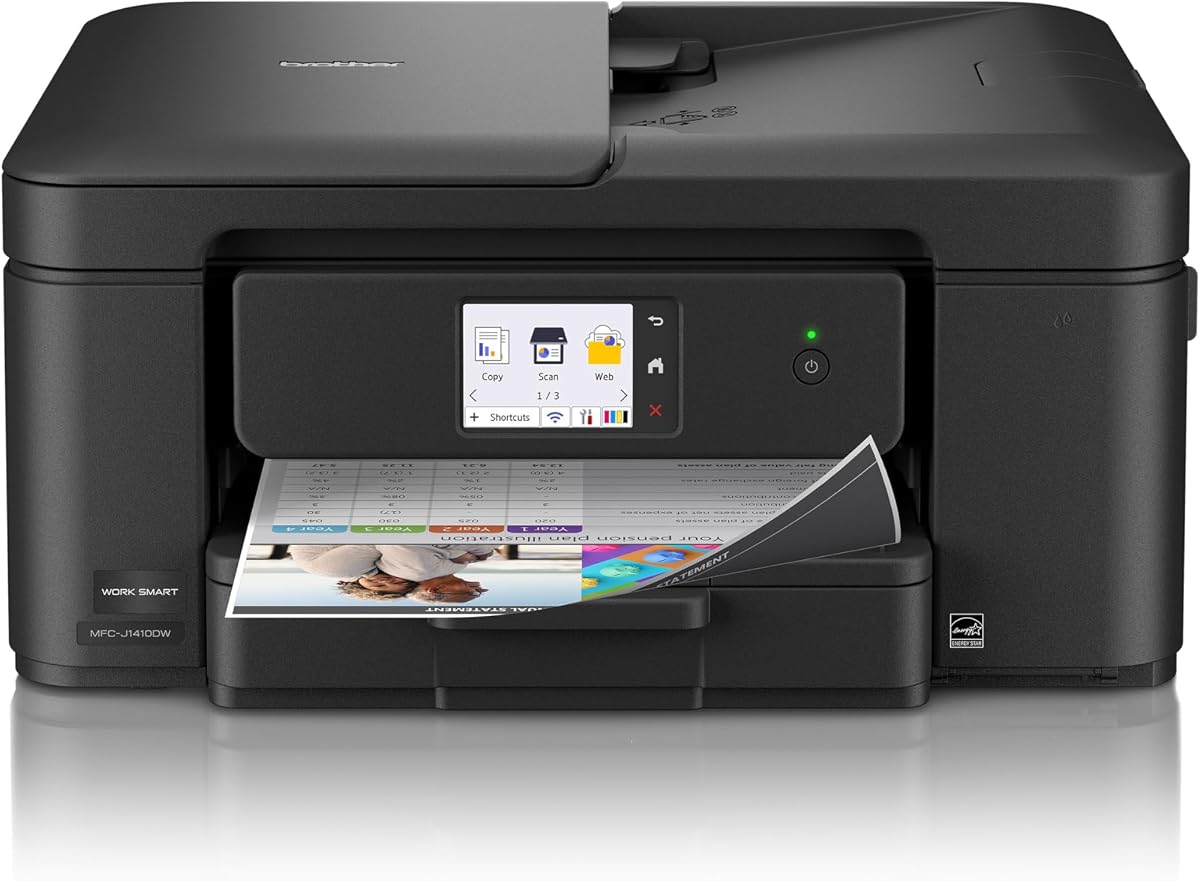
The Brother Work Smart 1410 features a large 2.7 inch touchscreen ideal for intuitive MacBook Air integration. Rated 4.0 stars it combines usability with practical workflow features. The touchscreen allows quick navigation of settings and cloud apps making complex tasks easier.
We may earn a commission when you buy through this link, at no additional cost to you.
Strengths include fast black print speeds up to 16 ppm enhancing document workflow efficiency. Cloud integration with popular storage services enables seamless file retrieval and printing. Automatic duplex printing reduces paper waste and streamlines multi-page job handling effectively.
Trade-offs involve limited Refresh subscription trial which may increase costs after expiration. Reliance on genuine ink ensures performance but restricts third-party cartridge use. These limitations are manageable for users prioritizing interface quality and speed.
Ideal for users wanting easy touchscreen control and fast document output this model delivers reliability. Its compact design suits most home office setups. Choose this if interface ease and speed are critical for your daily operations.
Large touchscreen simplifies menu navigation reducing learning time for all users effortlessly.
Fast black speeds and auto duplex handling ensure documents print quickly and efficiently.
We may earn a commission when you buy through this link, at no additional cost to you.
The HP OfficeJet 3830 offers unique voice control compatibility perfect for tech-savvy MacBook Air users. Rated 4.3 stars it provides essential printing functions efficiently. Alexa integration allows voice commands for discovery and setup simplifying initial connection steps significantly.
We may earn a commission when you buy through this link, at no additional cost to you.
Strengths include Instant Ink ready status for automatic delivery and supply management. Quiet mode minimizes noise disruptions ideal for shared living spaces or night printing. Compact design ensures it fits easily into small desks without consuming much valuable workspace area.
Trade-offs involve older design aesthetics and lack of an auto document feeder limiting scanning workflows. It may lack newer smart features found in recent models. These factors are acceptable given the solid voice control capability and budget-friendly pricing point.
Best for users valuing voice tech and basic printing needs this model provides reliable performance. Its simplicity makes setup and operation straightforward. Select this if you prioritize voice control integration and cost savings over advanced paper handling features.
Alexa compatibility enables hands-free setup and printing commands for convenient operation.
Quiet mode reduces noise levels ensuring minimal disruption in shared or living spaces.
We may earn a commission when you buy through this link, at no additional cost to you.
The Canon PIXMA TR4720 provides essential functions including fax at a budget-friendly price for MacBook Air users. Rated 3.9 stars it covers basic printing and scanning needs well. Alexa smart reorders prevent supply disruptions by automatically ordering ink when levels run low.
We may earn a commission when you buy through this link, at no additional cost to you.
Strengths include an auto document feeder simplifying multi-page scanning and copying workflows. Compact design ensures easy placement in tight spaces without sacrificing functionality. Mobile printing supports AirPrint ensuring quick and convenient operation from any Apple device easily.
Trade-offs involve slower print speeds and basic feature set limiting advanced workflow capabilities. Fax functionality remains manual requiring physical paper handling. These are acceptable for users needing affordable fax and print capability without complexity or premium cost.
Ideal for home offices needing fax capability on a budget this model offers straightforward utility. Its reliability supports consistent basic printing tasks without issues. Choose this if you need fax capability and affordability as primary priorities.
Built-in fax capability supports traditional document transmission needs at a low entry price point.
Alexa smart reorder feature ensures ink arrives before runs out maintaining continuous operation.
We may earn a commission when you buy through this link, at no additional cost to you.
Selecting the right printer involves evaluating connectivity compatibility printing speed and cost efficiency to match your specific workflow needs.
MacBook Air users need printers with robust wireless support including dual-band Wi-Fi and AirPrint compatibility. Look for models offering seamless integration with macOS and iOS to avoid driver issues.
Ensure your chosen printer supports AirPrint for effortless printing without additional software installation or setup complexity.
Print speeds measured in pages per minute impact workflow efficiency significantly for document-heavy tasks. Photo quality depends on ink technology and resolution specifications available on the model.
Prioritize models offering at least 10 ppm black speed for general use and high resolution for photo printing needs.
Ink costs vary widely between cartridge and tank systems affecting long-term expenses. Subscriptions may lower per-page costs but require ongoing commitment and management attention.
Compare total cost of ownership rather than upfront price to find the most economical option for your volume.
An automatic document feeder (ADF) streamlines multi-page scanning and copying tasks reducing manual intervention. This feature is vital for users frequently handling contracts or reports.
Choose models with ADF to save time and effort when processing documents regularly.
MacBook Air setups often occupy limited desk space so compact printers are preferable. Consider dimensions carefully to ensure the unit fits comfortably without cluttering your workspace.
Opt for compact models if desk real estate is at a premium in your home office.
User-friendly interfaces with touchscreens simplify navigation and settings adjustments reducing confusion during operation. OLED or color displays offer clearer status updates than basic LCD screens.
Select a printer with an intuitive display to streamline setup and routine tasks.
Modern printers increasingly offer cloud app integration for direct document access and smart reordering via voice assistants. These features enhance convenience for remote or mobile workflows.
Look for models supporting cloud printing and smart reordering to maintain seamless workflow continuity.
Warranty terms and build quality indicate reliability and support availability for potential issues. A longer warranty provides peace of mind for frequent or heavy usage scenarios.
Check warranty coverage and durability ratings to ensure your investment lasts longer.
To set up your printer connect it to the same Wi-Fi network as your MacBook Air and download necessary drivers or use AirPrint. Follow on-screen prompts to complete configuration and print a test page.
Regular maintenance includes cleaning print heads and running alignment tests to ensure optimal output quality. Keep firmware updated via the manufacturer app or web portal to maintain compatibility and performance.
Store ink cartridges properly and avoid exposing the printer to direct sunlight or dust. Use genuine or recommended ink to prevent clogs and preserve the printhead longevity effectively.
Yes all listed printers support AirPrint or have dedicated macOS drivers ensuring seamless integration with your MacBook Air. AirPrint allows wireless printing without additional software setup simplifying the process significantly for Apple users.
The Epson EcoTank ET-2903 is ideal for heavy volumes due to its refillable ink tanks lasting up to three years. This design reduces frequent cartridge changes and lowers ongoing costs for frequent printing tasks.
Yes the Canon PIXMA TR8620a and TR4720 include built-in fax capabilities for sending and receiving documents. Faxing remains relevant for businesses or individuals needing traditional document transmission alongside digital workflows.
Use printers with dual-band Wi-Fi to connect to less congested frequencies and maintain stable connections. Place the printer close to your router and avoid physical obstructions that may disrupt signal strength during operation.
All models support Apple AirPrint enabling printing directly from iPhone and iPad without drivers. Download manufacturer apps like HP Smart or Canon PRINT App for advanced features like scanning and ink management.
Automatic duplex printing saves paper by printing on both sides reducing waste and costs. This feature accelerates workflows for multi-page documents and is environmentally friendly for daily printing needs.
Subscriptions like HP Instant Ink can lower per-page costs but require commitment and monitoring. Consider your printing volume and budget to determine if the savings outweigh the subscription terms and cancellation policies.
Restart both printer and router and ensure they are on the same network band. Check network settings via the printer display and consult manufacturer support if connectivity problems persist after basic steps.
The HP OfficeJet Pro 8125 leads our list for its balance of speed smart AI features and reliability. It suits users needing professional output and efficient workflows with minimal manual intervention overhead.
Budget-conscious users might prefer the Canon PIXMA TR7120 offering solid features at an accessible price point. High-volume printers will find the Epson EcoTank ET-2903 unmatched in long-term cost efficiency and ease of use.
Remember to check current prices and availability before purchasing as deals change frequently. Selecting the right printer ensures smooth integration with your MacBook Air and enhances productivity without unexpected interruptions.