
VEVOR 60W CO2 Laser Engraver
5.0Editor score
Spacious 24×16 inch work area
Four-way pass-through for large items
Compatible with LightBurn software
Finding the right laser engraver can transform your creative projects into professional results. A 60W laser engraver offers a powerful balance of speed and precision, making it ideal for both hobbyists and small business owners looking to scale production efficiently.
We evaluated ten top-rated models based on power output, safety features, software compatibility, and user feedback. Our comparison focuses on real-world performance metrics like cutting depth, engraving speed, and ease of use to ensure you get the most value for your investment.
Each pick highlights specific strengths such as enclosed safety designs, dual laser systems, or fiber technology for metal work. Prices and availability can change rapidly, so verify the current details on the product pages before making your final purchase decision today.
5.0Editor score

4.8Editor score

4.2Editor score
As an Amazon Associate we earn from qualifying purchases.
The following table provides a side-by-side view of the leading 60W laser engravers available this month. We have distilled key specifications and capabilities to help you quickly identify which machine aligns with your specific material needs and workflow requirements.




The Creality Falcon2 Pro 60W Laser Engraver stands out as a top choice for serious makers and growing businesses. It features a powerful 60W laser paired with a precise 1.6W module for fine details. The fully enclosed Class 1 design ensures safety while maintaining high performance.
We may earn a commission when you buy through this link, at no additional cost to you.
Its adjustable power levels allow you to switch between 60W, 40W, and 22W outputs depending on the material thickness. The built-in HD camera provides accurate positioning and live previews, significantly reducing setup time for batch production runs.
While the machine is robust, the higher price point may be a consideration for casual hobbyists. However, the efficiency gains from the dual laser system and camera workflow often justify the investment for commercial applications.
This engraver is ideal for users who need professional results on wood, acrylic, and leather without compromising on safety. It delivers the reliability needed for consistent, high-volume production in a desktop-friendly package.
The combination of 60W for heavy cutting and 1.6W for fine engraving allows seamless transitions between different project requirements without changing hardware.
The Class 1 fully enclosed structure minimizes laser exposure risks, making it safer for environments with multiple users or shared workspaces.
We may earn a commission when you buy through this link, at no additional cost to you.
This model of the Falcon2 Pro emphasizes raw speed and integrated enclosure benefits. With an output power up to 240000mW, it handles demanding materials like 30mm basswood and 60mm black acrylic efficiently in single passes.
We may earn a commission when you buy through this link, at no additional cost to you.
The built-in camera system allows for intelligent focus and accurate positioning without manual measurement. This feature is particularly useful for batch processes where consistency and speed are critical to meeting tight deadlines.
Setup is surprisingly quick, taking about 10 minutes to get running after unboxing. However, the sheer speed and power might overwhelm users who are just starting their laser engraving journey without prior experience.
Ideal for professional players and sole traders who need rapid mass production capabilities, this machine delivers high efficiency. The flame detectors and safety locks provide peace of mind during extended production runs.
Exceeding 500mm/s engraving speed, this machine significantly reduces processing time, allowing for higher throughput on commercial orders.
The integrated enclosure isolates smoke and noise, maintaining a cleaner and quieter workspace for the operator throughout the day.
We may earn a commission when you buy through this link, at no additional cost to you.
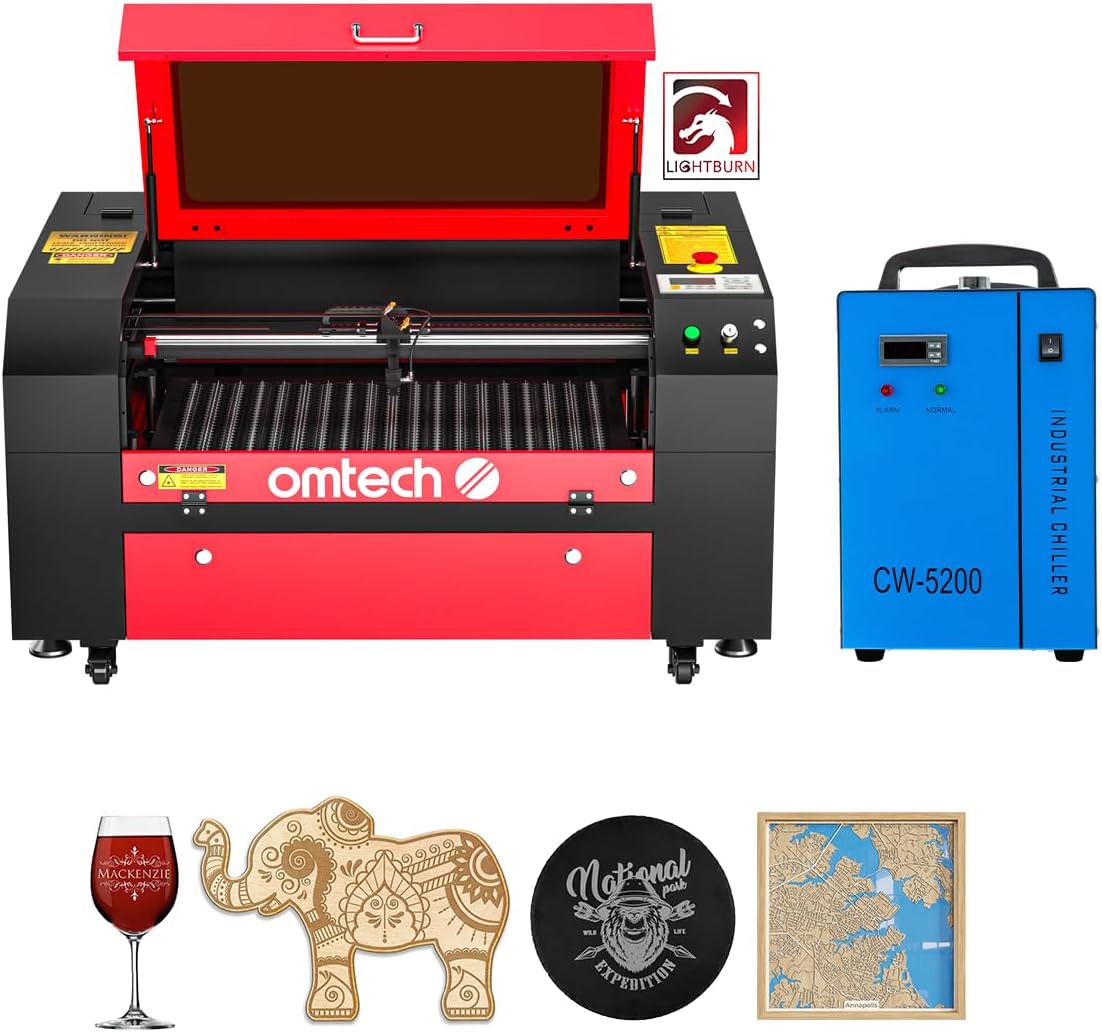
The OMTech Maker 60W CO2 Laser Engraver is a robust option for users who need a larger bed and a complete setup. It comes bundled with a water chiller and LightBurn software, saving you from buying these separately.
We may earn a commission when you buy through this link, at no additional cost to you.
The autofocus feature allows the workbed to adjust automatically, removing the guesswork from focusing the laser. This is crucial for maintaining sharp lines and consistent engraving depths across different material thicknesses.
With four-way pass-through doors, it can accommodate larger items that might not fit within the standard 20×28 inch area. This flexibility makes it suitable for crafting large signs or decorative panels.
This model is perfect for artists and small businesses focusing on non-metal materials like wood, acrylic, and leather. The included accessories ensure you are ready to work immediately after assembly.
The 20×28 inch honeycomb and aluminum blade beds offer ample space for diverse projects without needing frequent material adjustments.
Touch-button adjustments automatically find the right focal distance, streamlining your workflow for repeated production tasks.
We may earn a commission when you buy through this link, at no additional cost to you.
Safety is paramount with the Falcon 2 Pro, which is certified as a Class 1 machine. It features a fire-resistant metal enclosure and an auto-stop function that halts operations if the door is opened.
We may earn a commission when you buy through this link, at no additional cost to you.
This machine cuts through 20mm wood and 30mm dark opaque acrylic in a single pass, saving significant time compared to lower power units. The extra 1.6W light module provides ultra-fine engraving options for detailed work.
Pre-assembled for quick usage, it includes free professional software compatible with Windows and macOS. Users also benefit from lifetime technical support and a 12-month warranty, adding to its reliability.
For beginners to professionals alike, this engraver offers a secure environment for creating projects. It balances safety features with high performance to make laser engraving accessible and safe for various skill levels.
The integrated auto-stop function ensures the laser immediately stops when the enclosure is opened, protecting users from accidental exposure.
Its capability to handle both wood and dark acrylic efficiently makes it a versatile tool for diverse crafting and commercial projects.
We may earn a commission when you buy through this link, at no additional cost to you.
The xTool F2 Ultra brings industrial-grade power to a desktop with its dual 60W MOPA fiber and 40W diode lasers. It can cut 2mm metal and engrave over 100 vibrant colors on metal surfaces with precision.
We may earn a commission when you buy through this link, at no additional cost to you.
Equipped with dual 48MP AI cameras, it boosts precision by 60% compared to single-camera systems. The auto-detection features simplify setup, allowing users to achieve consistent results with minimal manual intervention.
Operating at speeds up to 15,000mm/s, it drastically reduces processing time for deep engraving tasks. The expandable working space allows for automated batch processing using the auto conveyor accessory.
This machine is best suited for professionals who need the versatility to work with a wide range of materials including gold, silver, and aluminum. Its premium features justify the cost for advanced users.
The MOPA laser allows for precise control of pulse width, enabling vibrant color engraving on stainless steel and aluminum without dye.
Using two different laser types in one machine allows for seamless transitions between metal marking and organic material cutting.
We may earn a commission when you buy through this link, at no additional cost to you.
Monport offers a mini fiber laser marking machine that is optimized for metal engraving and marking tasks. It features a customized galvanometer system that achieves speeds up to 10,000mm/s and an accuracy of 0.01mm.
We may earn a commission when you buy through this link, at no additional cost to you.
The fiber laser source boasts a lifespan of up to 100,000 hours, ensuring long-term durability for frequent use. It is designed to engrave all metals including stainless steel, brass, and titanium with deep results.
Although the working area is limited to 5.9×5.9 inches, it is ideal for small jewelry items and parts. The system is easy to use with included software and a red dot pointer for initial alignment.
This machine is perfect for businesses focused exclusively on metal marking. Its small footprint and high precision make it a reliable tool for detailed and quick production runs.
The customized galvanometer system allows for rapid marking speeds, increasing throughput for high-volume metal etching orders.
With a 100,000 hour lifespan, the fiber laser source requires minimal maintenance over years of daily commercial usage.
We may earn a commission when you buy through this link, at no additional cost to you.
The VEVOR 60W CO2 Laser Engraver offers a high-efficiency solution for cutting non-metals at an accessible price. It features a large 24×16 inch work area and speeds up to 600 mm/s for quick results.
We may earn a commission when you buy through this link, at no additional cost to you.
The four-way pass-through design allows users to feed longer materials through the machine manually. This flexibility is beneficial for projects that exceed the standard bed dimensions without needing custom setups.
Cooling is managed by a water pump system to ensure stable operation during use. The built-in air-assist clears dust and smoke, keeping the workspace fresh and the lens clean.
Ideal for hobbyists who want a large bed without breaking the bank, this machine is straightforward to use. It covers most needs for wood and acrylic cutting effectively for home studios.
The 24×16 inch dual work beds accommodate various projects, making it easy to process larger decorative items efficiently.
Integrated water pump cooling ensures the laser tube maintains optimal temperature for consistent performance and longevity.
We may earn a commission when you buy through this link, at no additional cost to you.
This commercial bundle from OMTech provides a complete package with a water chiller and LightBurn software. The autolift feature allows motorized adjustments of the workbed at the touch of a button.
We may earn a commission when you buy through this link, at no additional cost to you.
With speeds reaching up to 600 mm/s and engraving depths of 10 mm on nonmetals, it transforms artistic visions quickly. The honeycomb and aluminum blade beds fit most projects effectively.
The four-way pass-through doors make it easy to accommodate larger and longer items without removing the entire setup. This adds significant utility for businesses handling custom-sized orders regularly.
Users looking for a professional-grade CO2 machine should consider this option for its comprehensive features. It balances automation with power to handle a wide variety of commercial engraving needs.
The motorized workbed adjusts up and down easily, saving time and effort during frequent focusing changes.
Inclusions like the water chiller and LightBurn software provide immediate readiness and cost savings for new buyers.
We may earn a commission when you buy through this link, at no additional cost to you.
The Aliencell X1 Lite stands out for its industrial-level speed and precision. It achieves acceleration of 20,000 mm/s² and a high frequency of 20kHz for sharp results and smooth gradients.
We may earn a commission when you buy through this link, at no additional cost to you.
Aliencell Space simulates engraving with less than 5% deviation, allowing you to see exact depths before processing. This reduces waste and guesswork significantly in your design workflow.
The bed size is massive at 26×21 inches, offering 76% larger surface for large scale projects. It supports materials like wood, leather, acrylic, and felt for diverse applications.
This engraver is designed for those seeking photo-quality results without compromising speed. The SGS certification and Class 1 safety add peace of mind for professional users.
Higher frequency ensures denser laser pulses which deliver smoother gradients and richer grayscale detail in your prints.
The built-in simulation reduces waste by predicting engraving outcomes accurately, saving time on trial and error.
We may earn a commission when you buy through this link, at no additional cost to you.
Cloudray provides a 60W JPT MOPA marking machine that specializes in color marking and detailed metal engraving. It is capable of producing over 100 vibrant colors on various metal surfaces.
We may earn a commission when you buy through this link, at no additional cost to you.
The package includes two F-theta lenses for different working areas and an adjustable height column to support larger setups. This flexibility allows for customized configurations based on the task at hand.
Its portable design makes it easy to carry between workshops or locations. The resolution accuracy of 0.01mm ensures intricate designs and small text are marked with high precision.
This model is ideal for businesses focused on detailed metal etching and jewelry. The reliable JPT source ensures consistent performance for high-quality marking jobs.
The JPT MOPA laser enables unique color marking on metals, adding a premium finish to products without using chemicals.
Including multiple lenses allows users to switch between different working areas to balance speed and detail as needed.
We may earn a commission when you buy through this link, at no additional cost to you.
Choosing the right laser engraver depends on understanding your specific needs for materials, safety, and workflow. This section breaks down the critical factors to consider before purchasing.
60W models come in CO2, Diode, and Fiber types. CO2 is great for wood and acrylic, while Fiber is superior for metals. Diode offers a balance for general hobby use.
Choose the type that matches your primary material to ensure optimal cutting and engraving results.
Look for Class 1 enclosed machines if you want maximum safety without needing protective glasses constantly. Open systems require strict adherence to safety protocols.
Safety should be a top priority to protect yourself from laser exposure and fumes.
Most professional users prefer software like LightBurn for control and design. Ensure the machine supports the software you are comfortable using.
Compatible software streamlines your workflow and reduces the learning curve.
Consider the size of the projects you typically work on. Larger beds allow for bigger items but take up more space.
Select a bed size that fits your production needs without cluttering your workspace.
Real wattage matters. Ensure the machine delivers a true 60W for the cutting power you expect. Some models vary in actual output.
Verify the power specifications to ensure it meets the thickness requirements of your materials.
Prices vary widely from budget CO2 models to high-end fiber systems. Determine your maximum spending limit before shopping.
Balance your budget with the necessary features to avoid overspending or under-specifying.
Reliable customer support and warranties are crucial for complex electronics. Check for availability of parts and technical assistance.
Good support ensures you can quickly resolve any issues during operation.
Features like autofocus and camera preview make the machine easier to operate. These save time on setup.
Prioritize user-friendly features if you want to reduce manual adjustments.
Always start by calibrating the focus according to the manufacturer's guidelines to ensure the beam is concentrated at the correct distance. This step is essential for achieving clean cuts and sharp details.
Ensure proper ventilation is connected to the machine to remove smoke and fumes generated during the process. Good airflow prevents buildup and maintains a safe environment.
Regularly clean the lenses and mirrors with a soft cloth to prevent dust from affecting performance. Keeping optical surfaces clean extends the life of the machine.
A 60W laser engraver can cut wood, acrylic, leather, and some metals depending on the type. CO2 models handle non-metals well, while fiber models are designed for metal marking and engraving.
Yes, 60W is powerful enough for small commercial production. It offers a good balance of speed and capacity for signs, personalization, and batch jobs.
With Class 1 enclosed machines, protective glasses are not needed inside the enclosure. However, open systems require laser-safe eyewear appropriate for the specific wavelength.
Typical CO2 tubes last around 3000 to 5000 hours. Fiber lasers often last significantly longer, up to 100,000 hours depending on usage.
LightBurn is widely regarded as the best professional software for laser engravers. It supports most machines and provides advanced control over settings and design.
Standard CO2 lasers cannot engrave bare stainless steel well. You need a fiber laser or a coated surface to achieve marks on stainless steel effectively.
We have highlighted the top picks from the Creality Falcon2 Pro to the xTool F2 Ultra and VEVOR options. Each model serves different needs ranging from budget-friendly to premium industrial performance.
Prioritize the features that matter most to your workflow. Safety, speed, and software compatibility should drive your decision to ensure satisfaction.
Prices and availability fluctuate frequently so please verify current details on the Amazon product pages before making your purchase decision today.