
Generic ZhenLoong Full Tower
4.6Editor score
15 Hot Swap Bays
Full Tower Chassis Design
Supports EATX Motherboards
Finding the right storage solution is critical for modern data needs. A 16 bay NAS enclosure offers massive capacity for backups, media, and enterprise workloads without compromising on speed or reliability.
We evaluated ten top models based on drive compatibility, thermal management, and expansion options. Our analysis covers everything from budget DAS units to high-end rackmount JBODs and full NAS systems.
Each selection highlights unique strengths for different use cases. Note that product availability and pricing fluctuate frequently, so verify current details before making your final purchase decision today.
4.6Editor score
4.5Editor score

4.8Editor score
As an Amazon Associate we earn from qualifying purchases.
The following table provides a side-by-side comparison of the ten leading 16 bay NAS enclosures and storage solutions available this month.


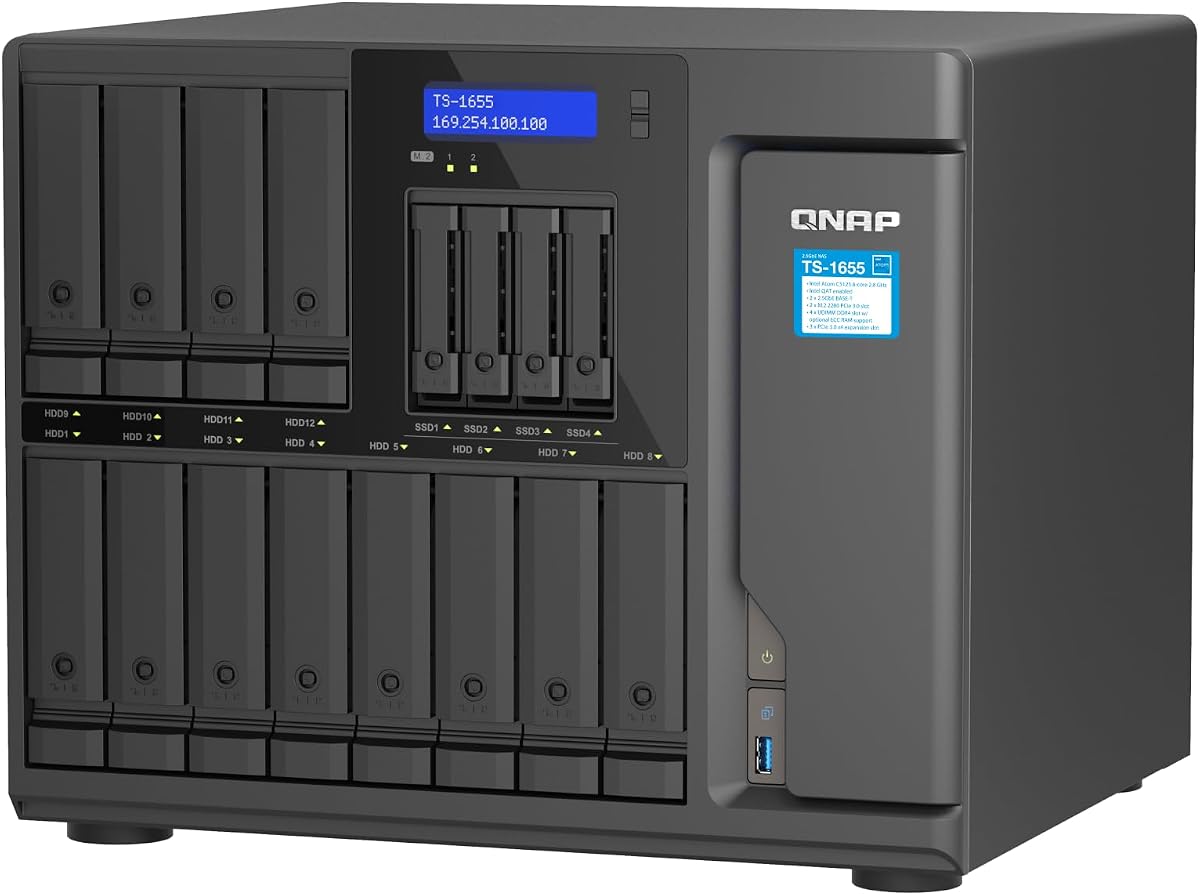
This hybrid NAS system delivers exceptional performance for users needing substantial storage capacity. Its 16-bay design supports a mix of 3.5-inch and 2.5-inch drives, allowing for flexible configuration based on budget and speed requirements.
We may earn a commission when you buy through this link, at no additional cost to you.
The Intel Atom C-5125 processor handles multitasking efficiently, while the support for up to 128GB of ECC RAM ensures stability during heavy workloads. Dual M.2 NVMe slots provide crucial cache acceleration for improved database and media editing performance.
While the price point is significant, the long-term availability and upgradeability justify the investment for enterprise or professional studio environments. The dual 2.5GbE ports offer a sweet spot between cost and speed for most office networks.
Businesses and power users seeking a reliable central repository should prioritize this model. It balances raw capacity with enough processing power to run containers and virtual machines simultaneously without bottlenecks.
Users can mix HDDs and SSDs across 12 standard bays and 4 dedicated 2.5-inch slots for optimized tiered storage.
Dual M.2 NVMe PCIe Gen 3 slots allow for dedicated read/write caches or full storage pools depending on your needs.
We may earn a commission when you buy through this link, at no additional cost to you.
For builders who want to create a custom NAS from scratch, this full tower chassis offers an incredible value proposition. It supports up to 15 hot-swappable drives, making it nearly equivalent to a 16-bay system in capacity.
We may earn a commission when you buy through this link, at no additional cost to you.
The chassis accommodates everything from ITX to EATX motherboards, giving you complete freedom to choose your CPU and cooling solution. The inclusion of eight full-height PCI expansion slots means you can add multiple PCIe SATA controller cards easily.
The trade-off involves a longer shipping cycle, often taking up to forty days for delivery. Additionally, you must source your own motherboard, power supply, and RAID controller to make this enclosure functional as a storage system.
DIY enthusiasts and system integrators looking for raw physical capacity at a low cost will find this chassis ideal. Just ensure you have the necessary components ready before ordering to avoid delays in your project timeline.
Eight full-height PCI slots allow for extensive PCIe expansion beyond just storage controllers.
Compatible with ITX, MATX, ATX, and EATX boards, providing unmatched flexibility for custom builds.
We may earn a commission when you buy through this link, at no additional cost to you.
The Synology RS4021xs+ represents the pinnacle of rackmount NAS solutions for serious organizations. With 16 drive bays and an eight-core processor, it handles complex tasks like virtualization and high-bandwidth video streaming effortlessly.
We may earn a commission when you buy through this link, at no additional cost to you.
Its dual redundant power supplies ensure that hardware failures do not interrupt operations, a critical feature for business continuity. Furthermore, the two PCIe expansion slots allow for hardware upgrades like 10GbE cards or NVMe cache adapters to boost throughput.
This unit can scale up to 40 drives by connecting two RX1217 expansion units, making it a future-proof investment. The robust construction and five-year warranty reflect Synology's commitment to reliability in demanding environments.
Large offices and data centers that require guaranteed uptime and massive scalability should invest in this model. It delivers top-tier performance and support for enterprise applications and services without compromise or hesitation.
Connect up to two expansion units to support a total of 40 drive bays for petabyte-scale storage.
PCIe slots allow upgrading to high-speed network cards for faster data transfers across the LAN.
We may earn a commission when you buy through this link, at no additional cost to you.
This expansion unit is designed specifically to pair with compatible Synology DiskStation models. It adds 12 drive bays to your existing setup, allowing you to expand storage without migrating data to a new primary system.
We may earn a commission when you buy through this link, at no additional cost to you.
Synology's Disk Management System (DSM) unifies the management of your base unit and this expansion, creating a single logical volume. This means you can manage all drives through one interface without needing complex RAID software.
The main limitation is its dependency on Synology hardware; it will not work with third-party NAS units or generic PCs. If you are already invested in the Synology ecosystem, this is the most reliable way to increase capacity.
Users needing to reach the 16-bay threshold can combine this 12-bay unit with a smaller base unit. It is an excellent solution for maintaining data integrity and system simplicity as your storage needs grow over time.
DSM treats the expansion drives as part of the main system, simplifying administration significantly.
Configuration takes minutes using Synology's unified tools without requiring technical expertise.
We may earn a commission when you buy through this link, at no additional cost to you.
This enclosure offers a direct-attached storage solution for users needing quick access to multiple drives without a full network setup. It supports both 2.5 and 3.5-inch drives, making it versatile for mixed drive environments.
We may earn a commission when you buy through this link, at no additional cost to you.
The aluminum alloy body helps dissipate heat efficiently, complemented by three internal fans to keep drives cool under load. Tool-free installation means you can swap drives quickly without needing screwdrivers or technical tools.
Since it lacks RAID functionality, data redundancy must be handled by software on your host computer. However, the USB 3.0 interface provides fast transfer speeds, up to 5Gbps, for moving large media files rapidly.
Creative professionals needing portable high-capacity storage will find this unit highly practical. Just ensure you test each drive individually upon setup to avoid confusion about which drive is active in the system.
Transfer 1GB files in seconds using USB 3.0 ports, which are ten times faster than USB 2.0.
Use the USB HOST port to daisy chain up to three devices for a total of 720TB storage.
We may earn a commission when you buy through this link, at no additional cost to you.
This hybrid NAS model focuses on providing high performance and stability for diverse workloads. Its 16-bay design accommodates a mix of SATA drives, ensuring you can balance cost and speed according to specific usage requirements.
We may earn a commission when you buy through this link, at no additional cost to you.
The Intel Atom C-5125 processor is a robust choice for virtualization and backup tasks. It supports up to 128GB of ECC RAM, which significantly enhances system reliability for mission-critical business operations.
Dual M.2 NVMe slots offer flexibility for either caching or dedicated storage, improving read/write performance for media editing or databases. The dual 2.5GbE networking provides a solid bandwidth foundation without needing expensive 10GbE cards.
Organizations looking for a future-proof solution should value its long-term availability. This ensures that firmware updates and support remain consistent, reducing the risk of premature obsolescence for your infrastructure investment.
Dual 2.5GbE ports accelerate file access and large backup tasks without upgrading network switches.
Support for Coral M.2 accelerators enables faster image recognition and AI processing capabilities.
We may earn a commission when you buy through this link, at no additional cost to you.
This enclosure acts as a high-performance JBOD storage unit for desktop or server use. It provides 16 drive bays, mixing 3.5-inch and 2.5-inch drive options for maximum storage density on a single shelf.
We may earn a commission when you buy through this link, at no additional cost to you.
The included QXP-1600eS PCIe SATA card ensures that the enclosure can connect efficiently to host computers running Windows or Linux. This makes it an ideal choice for expanding local storage without relying on network connections.
While it lacks the networking features of a full NAS, its SATA 6Gbps speed ensures that data transfer rates are maximized for physical connections. The desktop form factor is compact enough for smaller setups or dedicated storage rooms.
IT administrators and content creators needing simple, fast storage expansion should consider this unit. It delivers raw capacity and speed effectively while keeping costs lower than networking-dependent alternatives.
SATA 6Gbps speed ensures fast read/write operations without network latency limitations.
The included PCIe SATA card simplifies installation and ensures compatibility with host systems.
We may earn a commission when you buy through this link, at no additional cost to you.
The DS3622xs+ delivers significant computing power for virtualization and backup services in a compact 12-bay chassis. It supports up to 48GB of memory and high-speed networking options to handle demanding enterprise workloads efficiently.
We may earn a commission when you buy through this link, at no additional cost to you.
While it starts with 12 bays, the unit can scale up to 36 by adding two DX1222 expansion units. This makes it highly flexible for businesses that need to grow their storage capacity incrementally without overhauling the system.
Features like Fibre Channel support and NVMe SSD caching allow for specialized optimization depending on your application needs. The five-year warranty adds further confidence for organizations relying on this hardware for daily operations.
Enterprises requiring strong performance and scalability should appreciate this model. Just plan for expansion units if you need a true 16-bay minimum to avoid needing additional hardware immediately upon purchase.
Scale storage up to 36 bays using two DX1222 expansion units seamlessly.
Consolidate video management and VMs with a capable 6-core Intel Xeon processor.
We may earn a commission when you buy through this link, at no additional cost to you.
This rackmount JBOD is engineered for efficiency in small media cabinets or crowded server rooms. Its short-depth design allows it to fit in spaces where standard depth enclosures cannot, saving valuable rack real estate.
We may earn a commission when you buy through this link, at no additional cost to you.
It features redundant power supplies to ensure continuous operation even if one power unit fails. This level of reliability is essential for environments where downtime is not acceptable, such as data centers or broadcast facilities.
The Mini-SAS HD interface provides a high-speed connection to compatible QNAP NAS systems for petabyte-level storage expansion. While the rail kit is sold separately, the build quality supports secure and stable installation in a rack.
IT managers needing flexible, economical expansion for existing QNAP NAS units should find this unit useful. It offers a solid balance of capacity and reliability for professional storage architectures and setups.
Short depth design simplifies installation in media cabinets or cable-dense areas.
Redundant power supplies guarantee service continuity during power hardware failures.
We may earn a commission when you buy through this link, at no additional cost to you.
This model pushes the boundaries of NAS connectivity and processing with enterprise-grade features. While it provides 10 bays, its high-speed networking and USB4 ports make it a powerhouse for media production and AI tasks.
We may earn a commission when you buy through this link, at no additional cost to you.
The AMD Ryzen V3C14 processor supports intensive virtualization and large-scale storage operations. Dual 10GbE ports ensure that data can be moved quickly across networks, while USB4 offers an alternative ultra-fast connection for external devices.
With ECC DDR5 RAM, data integrity is maintained even during heavy workloads. This makes it suitable for mission-critical business storage where reliability and speed are equally important requirements for operation.
Power users and creative studios requiring high bandwidth and advanced features will value this unit. It serves as a central hub for workflows that demand speed and stability without compromising on storage capacity or expandability.
Dual 10GbE ports and USB4 40Gbps provide ultra-fast bandwidth for data transfers.
Optimized for AI RAG servers and virtualization platforms with strong processing capabilities.
We may earn a commission when you buy through this link, at no additional cost to you.
Selecting the right enclosure depends on your specific storage needs, budget, and technical requirements.
Verify that the enclosure supports the size of hard drives you plan to use. Most 16 bay units accept 3.5-inch and 2.5-inch drives, but some require specific form factors like SAS or NVMe instead.
Ensure the enclosure can handle the physical weight of the drives to prevent mechanical failure over time.
The connection type determines how fast data moves between drives and your network. Look for SATA 6Gbps, Mini-SAS HD, or Ethernet ports depending on whether you need local or network access.
USB 3.0 is common for DAS, while dedicated NAS units usually rely on Ethernet for sharing data across networks.
For critical storage, dual power supplies ensure uptime if one unit fails. This is standard on high-end rackmount models but rare in entry-level desktop units.
Redundant power helps maintain continuous operation during maintenance or unexpected hardware failures.
High-density enclosures generate significant heat. Efficient fan systems with proper airflow are necessary to prevent thermal throttling or drive damage.
Check noise levels if the unit will be placed in a quiet office or home environment.
Determine if you need hardware RAID built into the enclosure or if you will handle it via software. JBOD units offer flexibility, while RAID units provide data protection.
Software RAID allows for easier migration between hardware but requires a capable host system to manage.
Consider whether you might need more bays later. Some units allow daisy-chaining or connecting expansion units to grow your storage capacity.
PCIe slots are also valuable if you plan to upgrade networking cards or add specialized accelerators.
Top brands often offer longer warranties and better technical support. This can reduce long-term costs if hardware issues arise.
Check for long-term availability of firmware updates to keep your system secure and compatible with modern software.
Decide between a desktop unit and a rackmount chassis. Rackmount units save space in server rooms but require rack rails and proper mounting hardware.
Ensure you have the physical space and cooling environment suitable for the type of enclosure you choose.
Before inserting drives, ensure the enclosure is powered off and grounded to prevent electrostatic damage. Insert drives gently into the bays to avoid misalignment or physical damage to the connectors.
Regularly check fan operation and clean dust from vents using compressed air. Overheating is a common cause of drive failure, so maintaining good airflow is essential for longevity.
Keep firmware updated through the manufacturer's software or dashboard. Security patches and feature updates improve performance and protect your data from vulnerabilities.
Most 16 bay enclosures support both 3.5-inch and 2.5-inch drives. However, you may need adapters or specific drive caddies for smaller drives. Always check the product specs for specific size compatibility.
DAS and JBOD units often do not include hardware RAID controllers. You may need a PCIe SATA card or host software RAID. Full NAS units typically include built-in RAID logic for drive management.
A NAS is a network-attached storage device with its own OS and network interfaces. A JBOD is a simple enclosure for multiple drives that connects via USB or SATA without network features.
Look for enclosures that support daisy-chaining or expansion units. Some models allow connecting additional JBOD units via Mini-SAS HD or USB ports to increase total capacity.
They can be louder than smaller units due to multiple fans. Rackmount models are designed for server rooms, while desktop models may require placement in less audible areas.
16 bay units often need high-wattage power supplies to support multiple spinning drives. Always use the provided adapter and ensure your electrical outlet can handle the load safely.
Our top picks cover diverse needs from budget-conscious builders to enterprise data centers. The QNAP TS-1655-8G-US stands out for its blend of capacity and performance.
Prioritize factors like interface speed, cooling, and redundancy based on your environment. DIY enthusiasts may prefer the ZhenLoong tower, while businesses will appreciate Synology's reliability.
Always verify current availability and pricing before purchasing. Storage technology evolves quickly, so confirming specs ensures you get the right solution for your evolving needs today.