
Corsair RS120-R ARGB Reverse Triple Pack
4.7Editor score
Reverse Rotor Design
Daisy-Chain Connections
High Static Pressure
This guide compares the top 10 Corsair case fans for performance, lighting, and noise control to help you choose the perfect cooling solution for your PC build.
Choosing the right cooling solution is critical for maintaining optimal performance and longevity in any modern PC build. Corsair offers a wide range of high quality fans designed to balance airflow, static pressure, and aesthetic appeal effectively.
We evaluated ten distinct models based on their engineering specifications, lighting capabilities, and overall user satisfaction ratings. Our analysis focuses on real world performance metrics and ease of integration with popular motherboard ecosystems.
Each selection below highlights key strengths and potential trade-offs to guide your decision making process. Prices and availability may vary over time so always check current listings before finalizing your purchase order.
4.7Editor score

4.6Editor score

4.7Editor score
The following table provides a side-by-side comparison of all ten selected Corsair fan models. This view helps you quickly identify key specifications like size, RPM, and unique features across the lineup.


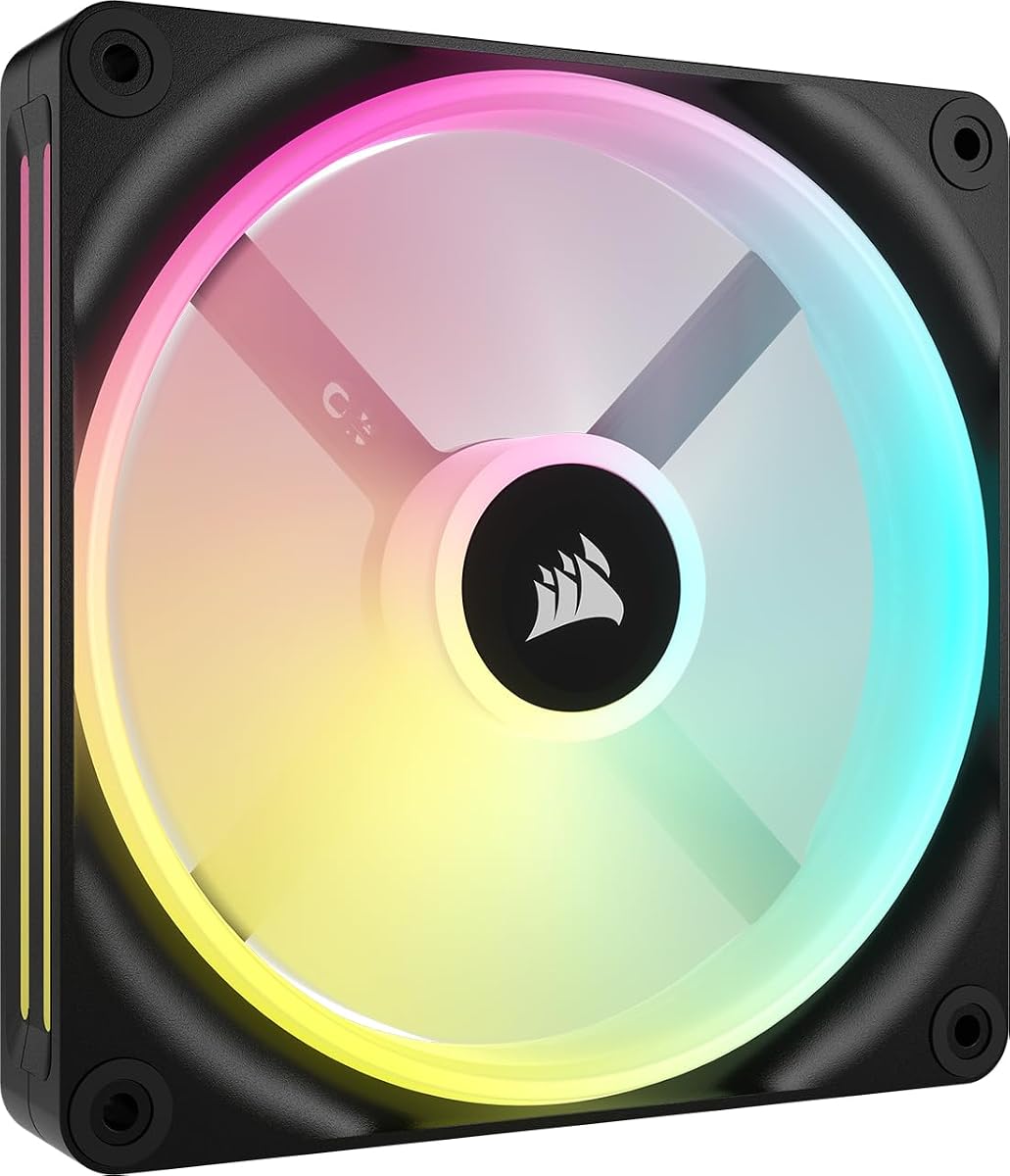


This triple pack offers excellent performance for builders seeking high airflow without breaking the bank. With a solid 4.6 rating it stands out for its balance of cooling power and manageable noise levels.
We may earn a commission when you buy through this link, at no additional cost to you.
The AirGuide technology directs airflow precisely where needed which is crucial for radiator cooling. Users appreciate the daisy-chain connections that simplify cable management significantly.
While it lacks the advanced hub features of newer models it delivers reliable performance. The magnetic dome bearing ensures longevity and smooth operation even at high speeds.
It is an ideal choice for mid-range builds needing efficient cooling. We recommend it for those prioritizing raw performance and simplicity over complex lighting ecosystems.
The daisy-chain design reduces clutter by connecting multiple fans to a single connector.
Anti-vortex vanes focus air on hot spots to improve thermal efficiency.
We may earn a commission when you buy through this link, at no additional cost to you.
This kit is the top choice for enthusiasts wanting seamless integration and stunning visuals. It includes the necessary hub to power all features making setup surprisingly straightforward.
We may earn a commission when you buy through this link, at no additional cost to you.
The dual light loops provide a layered aesthetic that stands out in any glass case. Airflow remains strong thanks to the high RPM capability and efficient blade design.
The main trade-off is the cost compared to standard RGB fans. However the convenience of a unified control system often justifies the extra expense for premium users.
Ideal for custom loop builds or high-end gaming rigs. We suggest this for those who value aesthetics and ecosystem integration as much as cooling.
Fans connect directly to each other and the hub for minimal wiring.
Two distinct LED rings create a more immersive lighting effect.
We may earn a commission when you buy through this link, at no additional cost to you.
For white builds seeking clean lines this reverse fan pack delivers excellent value. The higher rating reflects its ability to balance cooling with a visually pleasing design.
We may earn a commission when you buy through this link, at no additional cost to you.
By reversing the motor housing the RGB ring is fully visible even when used as intake. This eliminates the dark motor look found on standard fans.
Performance is adequate for general cases though not as aggressive as the non-reverse models. The zero rpm mode ensures silence when the system is under light load.
Best for builders prioritizing looks on a budget. We recommend it for white themed builds needing basic cooling without complex wiring.
Reverse rotor puts the light ring in front for unobstructed visibility.
Zero RPM mode keeps fans still until cooling is actually required.
We may earn a commission when you buy through this link, at no additional cost to you.
This black variant offers the same visual benefits as the white model for dark themed builds. It maintains a high rating due to its effective blend of style and basic cooling.
We may earn a commission when you buy through this link, at no additional cost to you.
The reverse design hides the motor hub ensuring RGB lighting looks perfect from all angles. This is a premium feature often costing more in other brands.
Users note that while airflow is slightly less than standard fans it suffices for most needs. The magnetic bearing ensures smooth spinning and reduced noise over time.
Best for black case builds prioritizing aesthetics. We recommend it for users wanting a premium look without paying premium prices.
Black frame blends with dark cases while keeping RGB vibrant.
Affordable pricing makes reverse tech accessible to budget builders.
We may earn a commission when you buy through this link, at no additional cost to you.
The QX140 brings larger 140mm cooling power to the Link ecosystem. While rated slightly lower it offers substantial airflow for those needing more volume than 120mm units.
We may earn a commission when you buy through this link, at no additional cost to you.
Its larger blade surface allows it to move significant air at lower speeds which helps with noise. The bridge connectors allow chaining without extra wires if you expand later.
Users note the Time Warp lighting needs the hub to function fully. This requires a separate purchase which can add to the total cost unexpectedly.
Ideal for cases supporting 140mm fans. We recommend it for users wanting larger fans within the iCUE ecosystem.
140mm blades push more air per rotation than smaller 120mm variants.
Includes bridge connectors so you can easily add more fans later.
We may earn a commission when you buy through this link, at no additional cost to you.
This premium reverse kit solves the aesthetic issue while providing top tier performance. The inclusion of QuikTurn screws makes installation notably faster and easier.
We may earn a commission when you buy through this link, at no additional cost to you.
Combining the reverse rotor with the Link system provides both beauty and ease of use. Airflow remains high with 2400 RPM capability ensuring efficient heat dissipation.
The price reflects the advanced engineering and included accessories. It is a significant investment but reduces installation frustration for complex builds.
Best for premium builds needing reverse fans and fast install. We recommend it for users valuing speed and visual perfection equally.
QuikTurn screws allow one handed mounting for quicker setup times.
Combines reverse aesthetics with high performance RGB lighting loops.
We may earn a commission when you buy through this link, at no additional cost to you.
The RX140 MAX is a powerhouse with a thick design that moves massive amounts of air. Its rating reflects excellent performance for those needing high cooling capacity.
We may earn a commission when you buy through this link, at no additional cost to you.
At 102 CFM this fan outperforms many thinner models. The thicker blades allow it to spin slower while moving more air resulting in lower noise.
The thickness might prevent fit in tight cases or with thick radiators. Verify compatibility before purchase to avoid installation issues.
Best for large cases needing maximum airflow. We recommend it for liquid cooling setups with ample clearance.
Thick blades push over 100 CFM for superior cooling capability.
Lower RPM requirement due to size means less noise.
We may earn a commission when you buy through this link, at no additional cost to you.
This black fan is designed for pure cooling without RGB distractions. The 4.2mm static pressure makes it excellent for pushing air through dense radiators.
We may earn a commission when you buy through this link, at no additional cost to you.
Constructed from liquid crystal polymer it resists vibration for smoother operation. This material choice adds durability to its functional design.
Users appreciate the focus on performance over lights. However the thickness requires verification for clearance in standard 120mm slots.
Best for radiators and heatsinks. We recommend it for silent cooling builds prioritizing thermal efficiency.
No lights means money saved for better cooling performance.
Liquid crystal polymer reduces vibration and increases longevity.
We may earn a commission when you buy through this link, at no additional cost to you.
This fan is an excellent choice for white builds needing 140mm cooling. Its high rating indicates strong reliability and performance in real-world conditions.
We may earn a commission when you buy through this link, at no additional cost to you.
It moves nearly 96 CFM which is impressive for a single unit. The RGB is bright and easily controlled via iCUE Link software.
It works well as a standalone unit or part of a larger system. Ensure you have a Link system if you plan to chain multiple fans.
Best for white cases needing airflow. We recommend it for users wanting quality cooling with visual appeal.
Vivid lighting effects enhance the look of any open chassis.
Works with the iCUE Link ecosystem for simplified wiring.
We may earn a commission when you buy through this link, at no additional cost to you.
This kit offers a complete start to the iCUE ecosystem. It includes the necessary hub to control lighting and speed effectively.
We may earn a commission when you buy through this link, at no additional cost to you.
Renewed condition means it has been inspected and restored for use. This offers significant savings for those needing multiple fans quickly.
The hub is a valuable addition that saves buying separately. Check warranty terms carefully before purchasing renewed electronics.
Best for budget builds starting the Link system. We recommend it for users comfortable with refurbished gear.
Starter kits often include the hub which is sold separately elsewhere.
Renewed items cost less than brand new options.
We may earn a commission when you buy through this link, at no additional cost to you.
Selecting the right fans requires balancing airflow, static pressure, size, and features. This guide breaks down the key factors to consider.
Airflow measures total air volume per minute while static pressure measures force. High airflow fans suit open cases while high static pressure is better for radiators.
Choose high static pressure if mounting behind dense grilles or radiators.
120mm fans are standard but 140mm units move more air per rotation. Ensure your case supports the dimensions before purchasing.
Check case manual for supported sizes and clearance limits.
PWM fans offer precise speed control based on temperature while DC fans are simpler. Ensure your motherboard header matches your choice.
Prioritize PWM for modern boards to optimize noise and cooling.
RGB fans offer visual customization but add complexity and cost. Non-RGB fans focus purely on performance and simplicity.
Pick RGB only if aesthetics are a priority for your build.
Daisy-chain fans connect directly to a motherboard header while hubs centralize control. Hubs reduce cable clutter significantly.
Opt for hubs if you plan to install many fans.
Magnetic dome and sleeve bearings affect noise and longevity. Magnetic bearings are generally quieter and last longer.
Prioritize magnetic bearings for silent operations.
Reverse fans hide the motor for cleaner looks when used as intake. This improves aesthetics without sacrificing cooling much.
Use reverse fans for front intake slots to avoid ugly motors.
This feature stops fans when temperatures are low. It ensures silence during light workloads.
Check if your fans support this if you prioritize quiet idle times.
Install fans using the screws provided ensuring even pressure to avoid vibration. Secure all cables properly to prevent contact with fan blades.
Use software like iCUE to set curves based on CPU temperatures. This optimizes cooling performance and minimizes unnecessary noise.
Periodically dust your fans using compressed air. Clean dust buildup ensures smooth operation and prevents noise issues over time.
Corsair fans typically offer superior build quality and longevity. They feature higher quality bearings and better airflow performance compared to standard OEM fans.
No traditional RGB fans can connect directly to motherboard headers. However Link fans require the system hub for centralized control and power.
PWM controls the speed and power of the motor while ARGB controls the lighting. You may need both headers for full functionality.
Yes you can mix sizes as long as your case has space for each. This allows flexible cooling configurations.
Most models stay under 30 decibels at high speeds. Magnetic dome bearings help keep noise levels low.
Yes they are compatible with any motherboard supporting PWM or DC headers. However proprietary features work best with Corsair software.
We have reviewed ten top choices ranging from budget reverse packs to premium kits. Each offers unique benefits for specific cooling and aesthetic needs.
Prioritize static pressure for radiators and airflow for general intake. Ensure your case supports the dimensions and features you select.
Prices and availability vary so check current listings before buying. Regular maintenance ensures your cooling system performs efficiently.