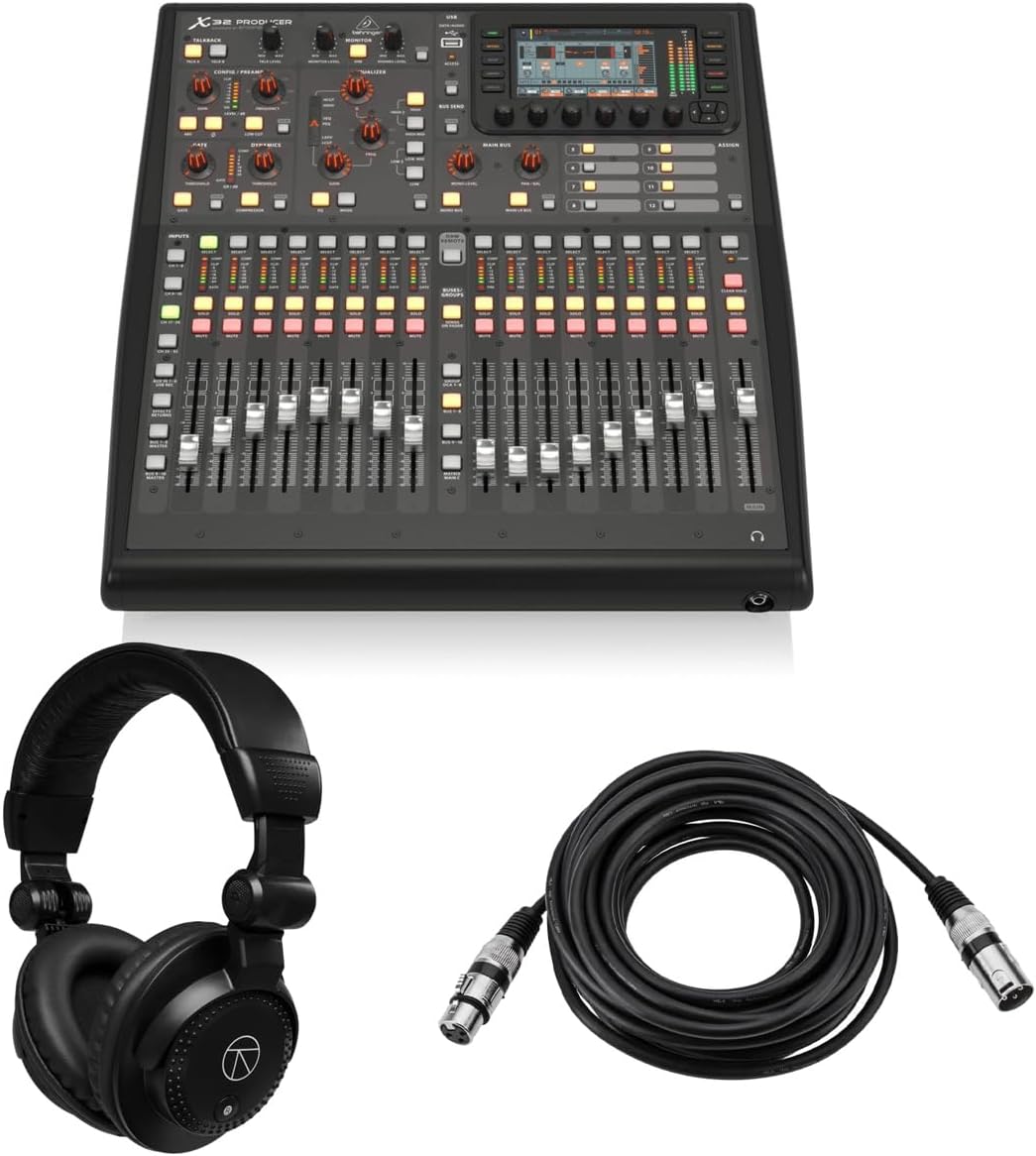
Behringer X32 PRODUCER
5.0Editor score
40 input channels
Rack mountable
Includes cables
High dynamic range
This guide compares the top ten digital mixing consoles for live sound and studio use based on features, sound quality, and user interface.
Digital mixing consoles have revolutionized audio production by offering unprecedented control over sound in live and studio environments. These devices integrate multiple audio channels into a single unit allowing engineers to manipulate levels effects and routing with precision. Choosing the right console is critical for ensuring professional sound quality and efficient workflow during critical audio sessions.
We evaluated ten leading digital mixing consoles based on their input capacity processing power and ease of use. Our analysis considered factors like preamp quality fader count and connectivity options to determine the best value for different users. This list covers a wide range of needs from compact mobile setups to large scale production environments.
Each pick in this guide highlights specific strengths such as budget friendliness or advanced digital signal processing capabilities. Readers will find detailed breakdowns of pros and cons to help them make an informed decision for their specific audio setup. Please note that product availability and pricing may change so verify current details before purchasing.
5.0Editor score

4.7Editor score

4.9Editor score
The following table provides a side by side overview of the ten top rated digital mixing consoles available in October 2026. Each entry highlights key technical specifications to help you quickly compare capabilities across different models and price points.


The Behringer X32 stands out as a top contender in the digital mixing console market with its impressive 40-input capacity and 25-bus architecture. It holds a strong 4.7 rating from users who praise its audiophile sound quality and professional features. This console is designed for both studio and live applications making it a versatile choice for engineers.
We may earn a commission when you buy through this link, at no additional cost to you.
Its standout quality lies in the 32 MIDAS-designed mic preamps that deliver crystal clear audio capture. The 25 fully automated motorized faders provide instant overview and powerful scene management which is crucial for live performances. Additionally the individual LCD Scribble Strips on all channels make assignment and distinction intuitive for the operator.
While the feature set is extensive it can present a steep learning curve for newcomers to digital mixing. The physical size of the unit is also considerable which might be a constraint for smaller stage setups or portable tours. However these trade-offs are generally acceptable given the professional grade capabilities it offers at its price point.
This console is ideal for medium to large scale productions where sound quality and flexibility are paramount. Whether you are managing a church service a theater production or a concert venue the X32 delivers consistent performance. We highly recommend it for users seeking a reliable workhorse that can handle complex audio tasks with ease.
The 32 MIDAS-designed mic preamps ensure that every input source is captured with minimal noise and maximum clarity.
Motorized faders allow for quick scene recalls and precise adjustments during live shows or recording sessions.
We may earn a commission when you buy through this link, at no additional cost to you.
The Behringer X32 PRODUCER is a fantastic option for those seeking professional features without the full-size footprint. With a perfect 5.0 rating it offers a robust 40-input 25-bus digital mixing console that is rack-mountable for easier integration. This bundle includes essential accessories like headphones and a microphone cable making it ready for immediate use.
We may earn a commission when you buy through this link, at no additional cost to you.
Its key strengths include 16 programmable MIDAS preamps that deliver an impressive 114 dB dynamic range for pristine audio quality. The console features a 5-inch TFT display and 17 motorized faders that streamline the mixing process efficiently. Built-in effects engines such as Lexicon 480L simulations provide extensive creative control without external gear.
The primary trade-off is the smaller display compared to the standard X32 which might require an external monitor for detailed editing. While this adds to the setup cost it allows for greater flexibility in how the console is deployed in different environments. This design choice ensures that the core functionality remains accessible without compromising on sound quality.
This product is perfect for small to medium venues home studios or mobile engineers who need a durable and powerful mixing solution. The included bundle items add significant value and reduce the initial setup time for new users. We recommend it for anyone looking to upgrade to digital mixing while maintaining a compact and efficient workflow.
The rack-mountable form factor saves valuable stage space and allows for secure integration into existing AV setups.
Virtual FX rack features high-end simulations like Lexicon and PCM70 for professional sound without extra plugins.
We may earn a commission when you buy through this link, at no additional cost to you.
The Allen & Heath Qu-5 is a premium choice known for its exceptional audio quality and ultra-low latency performance. It features 96kHz XCVI FPGA processing which provides the power needed for professional live sound and recording applications. Users appreciate its flexible mixing architecture and extensive connectivity options that cater to demanding production environments.
We may earn a commission when you buy through this link, at no additional cost to you.
Its standout feature is the combination of 38 inputs and 12 configurable mixes managed through a 7-inch capacitive touchscreen. The 17 motorized faders and chromatic channel metering ensure that every adjustment is precise and visible at a glance. Remote control via Windows macOS iOS and Android apps adds significant convenience for engineers working off-stage.
The higher price point reflects the premium components and advanced DSP capabilities included in the console. Beginners might find the array of options overwhelming initially but the intuitive workflow helps mitigate this over time. These trade-offs are justified by the superior sound fidelity and reliability it offers in critical listening situations.
This console is best suited for professional audio engineers and high-end production teams who prioritize sound quality and flexibility. Whether for live events or studio recording the Qu-5 delivers a refined experience that stands out in the market. We recommend it for users who need a robust system capable of handling complex audio routing with precision.
96kHz XCVI FPGA Processing ensures clean signal paths with minimal latency for real-time performance.
Includes 16 XLR/TRS inputs 12 outputs and a 128×128 SLink expansion port for scalable audio systems.
We may earn a commission when you buy through this link, at no additional cost to you.
The Yamaha DM3 Standard is designed for users who need a compact yet powerful digital mixing solution. It offers 22 channels and a renowned Yamaha sound quality that ensures reliable performance in various settings. This console is particularly useful for portable setups where space and weight are critical considerations for transport.
We may earn a commission when you buy through this link, at no additional cost to you.
Its 96kHz sample rate and best in class 9-inch touch screen provide a modern and responsive user experience. The 16 professional Yamaha preamps capture audio with clarity while the 18×18 USB audio interface allows for seamless playback and recording. This makes it ideal for content creators and small venue operators.
The limited channel count means it may not suit large scale productions but it is perfect for small groups or solo artists. The physical faders are smaller than full-size consoles which might take some getting used to for those with larger hands. However the touch screen compensates well for the lack of physical knobs and buttons.
We recommend this console for small businesses or mobile engineers who need high quality sound in a portable package. Its ease of use and robust build quality make it a reliable choice for everyday mixing tasks. It serves as an excellent entry point into digital mixing without sacrificing essential audio performance features.
The large 9-inch touch screen simplifies navigation and makes scene management efficient and intuitive.
Integrated 18×18 USB interface supports high fidelity recording and playback directly from the console.
We may earn a commission when you buy through this link, at no additional cost to you.
The Behringer WING is a full stereo digital mixing console designed for users who need extensive routing and control. It features 48 channels and 28 buses allowing for complex signal flows in large production environments. The 24 motorized faders provide instant overview and precise scene management for demanding audio tasks.
We may earn a commission when you buy through this link, at no additional cost to you.
Key features include 8 award-winning Midas PRO mic preamps and outputs that ensure top tier audio fidelity throughout the chain. Plug and play remote I/O connectivity supports up to 144 signals over AES50 ports which is great for large stage setups. The main display includes a capacitive touch screen for easy access to channel properties.
The complexity of the system requires time to master and may be overkill for smaller applications. The cost is also higher compared to other digital consoles in this category. However for professional audio environments these features provide the necessary flexibility and sound quality to meet high standards consistently.
This console is ideal for touring sound engineers and large venue operators who need reliable and scalable mixing solutions. The stereo mixing capabilities and extensive I/O make it a strong contender for high-end productions. We recommend it for teams who need a powerful tool capable of handling complex audio routing with ease.
8 Midas PRO mic preamps and outputs onboard ensure exceptional sound clarity and dynamic range.
3 AES50 ports feature SuperMAC technology for ultra-low jitter and latency across remote I/O.
We may earn a commission when you buy through this link, at no additional cost to you.
The Yamaha MGX12 is a versatile digital mixing console that includes a comprehensive software bundle for added value. With 18 channels and dual USB-C interfaces it is well suited for modern multimedia production needs. This console stands out for its assistive features like auto gain and clip safe which simplify the mixing process.
We may earn a commission when you buy through this link, at no additional cost to you.
Its key strengths include a built-in DSP processor for professional sound and latency-free monitoring during performance. The 4.3-inch touchscreen and 5 control knobs provide a tactile and responsive workflow for quick adjustments. It also features a 4K video capture and pass-through which is rare in audio consoles.
The limited number of input channels restricts its use for larger ensembles but it is perfect for smaller setups. The I/O options are somewhat basic compared to full sized units which might limit expansion potential. However for users needing a simple yet powerful tool for content creation this trade-off is negligible.
We recommend this console for podcasters streamers and small bands that need integrated video and audio control. The included software bundle adds significant utility and makes it ready for production right out of the box. It is an excellent choice for those prioritizing ease of use and modern connectivity features.
Features like Auto Gain and Clip Safe help maintain consistent levels without constant manual adjustment.
4K video capture and pass-through make it ideal for hybrid audio video production environments.
We may earn a commission when you buy through this link, at no additional cost to you.
The Behringer X32 COMPACT offers a compact design without compromising on the core features of the X32 series. It provides 40 input channels and 25 bus routing making it a powerful tool for medium size productions. This console is rated 4.7 by users who value its audiophile sound quality and robust build.
We may earn a commission when you buy through this link, at no additional cost to you.
Its standout quality is the 16 MIDAS-designed mic preamps that deliver professional grade audio capture in a smaller unit. The 17 motorized faders allow for powerful scene management and DAW control which enhances workflow efficiency. Individual LCD Scribble Strips on channels ensure easy assignment and intuitive channel distinction.
The smaller display and limited external connectivity compared to the full X32 are minor trade-offs for its portability. It might lack some of the advanced routing options found in larger models but covers most needs for smaller venues. These factors make it a practical choice for users needing a balance of power and space.
This console is best for churches schools and small venues that need reliable performance without large equipment. The durable construction ensures it withstands the demands of regular use in various environments. We recommend it for those seeking a compact solution with professional sound capabilities and intuitive control.
A compact footprint allows for easy transport and installation in smaller stage or studio spaces.
16 MIDAS-designed preamps ensure high fidelity audio capture suitable for professional recordings.
We may earn a commission when you buy through this link, at no additional cost to you.
The PreSonus StudioLive Classic is a reliable digital mixer known for its Fat Channel signal processing and XMAX preamps. It offers 16 channel inputs and 12 faders which suit small to medium recording projects well. With a 3.9 rating it is a budget friendly option for those needing essential digital mixing capabilities.
We may earn a commission when you buy through this link, at no additional cost to you.
Its key strengths include a 31-band graphic EQ on the main bus and powerful internal effects processors for creative sound. The 18-in/16-out USB 2.0 audio interface allows recording all channels and main mix directly to a computer. A software library with Studio One Artist DAW adds significant value for new producers.
The design is older compared to newer models and might lack modern connectivity like USB-C or Wi-Fi. The lower rating suggests some users find the interface or features less intuitive than competitors. However for those on a budget it still provides solid performance and essential recording tools.
We recommend this console for beginners or small bands needing a straightforward mixing solution with recording capabilities. The included software and hardware features make it a good entry point into digital audio production. It remains a viable choice for users prioritizing value and core mixing functions over advanced features.
The Fat Channel features EQ compressor expander and limiter on all channels and buses.
Integrated USB audio interface supports multitrack recording and playback for DAW workflows.
We may earn a commission when you buy through this link, at no additional cost to you.
The Behringer X AIR XR18 is a unique digital mixer designed to be controlled via iPad or Android tablets. It offers 18 inputs and 12 buses with 16 MIDAS-designed mic preamps for audiophile sound quality. This console holds a 4.6 rating for its convenience and powerful features in a small package.
We may earn a commission when you buy through this link, at no additional cost to you.
Its key strengths include a built-in tri-mode Wi-Fi router that allows direct operation without external networks. The 18×18 bidirectional USB interface supports direct recording on tablets and computers. This makes it highly portable and suitable for remote control scenarios where physical access is limited.
The reliance on a mobile device for control can be a limitation for users without tablets or smartphones. The absence of physical faders means all adjustments happen on screen which might be less tactile for some engineers. However these features are acceptable given the portability and flexibility the unit offers.
This mixer is ideal for mobile sound engineers and content creators who need remote control capabilities. Its compact design and robust audio quality make it a great choice for small live events or studio work. We recommend it for users prioritizing wireless control and ease of transport in their workflow.
Direct tablet control allows mixing from anywhere within Wi-Fi range for flexible setups.
Built-in Wi-Fi router eliminates the need for external networks or routers for operation.
We may earn a commission when you buy through this link, at no additional cost to you.
The QSC TouchMix-16 is a compact digital mixer that comes with a protective bag making it ready to go. It features 20 full function inputs and 6 aux outputs to handle a variety of audio sources. With a 4.4 rating it is praised for its user-friendly workflow and solid build quality.
We may earn a commission when you buy through this link, at no additional cost to you.
Its key strengths include a 4-band full parametric EQ and variable filters on all channels for precise tone shaping. The talkback section and USB 2-track recording make it suitable for podcasts and small live performances. The compact design ensures easy transport and setup in a variety of venues.
The reliance on the touchscreen for most controls can be a limitation in loud environments where screens are hard to see. Limited routing options mean it is not suitable for complex production needs requiring multiple subgroups. However for general mixing tasks these trade-offs are acceptable for the convenience offered.
We recommend this mixer for solo entertainers and small groups needing a quick setup and reliable sound. The included bag and comprehensive inputs make it a practical choice for mobile applications. It is an excellent option for users seeking simplicity and performance in a single unit.
Simplified controls allow for quick adjustments and easy learning curve for new users.
20 full function inputs cover mic line and stereo sources for diverse audio scenarios.
We may earn a commission when you buy through this link, at no additional cost to you.
Selecting the right digital mixing console requires understanding your specific audio needs and technical requirements. This guide outlines key factors to consider to help you find the perfect match for your setup.
Input and output capacity determines how many microphones and instruments you can connect simultaneously. Consider the number of channels you need for current projects and any potential future growth.
Choose a console with enough inputs to handle your maximum expected load without exceeding its limits.
The quality of the mic preamps directly impacts the clarity and noise floor of your recordings. High-end preamps like MIDAS or Yamaha designs offer cleaner signal capture and better dynamic range.
Prioritize consoles with high-quality preamps to ensure your audio source sounds professional and clear.
Physical size affects how easy the console is to transport and install in different venues. Rack-mountable or compact models save space while larger ones offer more physical controls.
Select a size that fits your typical travel needs and installation environment for ease of use.
The user interface dictates how quickly you can access settings and adjust levels during a show. Touchscreens provide flexibility while physical knobs and faders offer tactile feedback.
Opt for an interface that balances screen access with physical controls for efficient workflow.
Connectivity options like USB audio interfaces and expansion ports determine how the console integrates with computers and other gear. Modern consoles offer USB-C and Ethernet for faster data transfer.
Ensure the console supports the connections you need for recording and external device integration.
Built-in software and effects processors save money and space by eliminating the need for external units. Look for consoles that include essential effects like reverb compression and delay.
Verify the included software meets your creative needs to avoid additional expenses later.
Scalability refers to the ability to add more I/O units or expand the system as your needs grow. Expandable consoles allow for remote I/O which is vital for large stage setups.
Choose a system with expansion capabilities if you plan to increase your setup size in the future.
Budget considerations should balance cost against the features and durability you require for long-term use. Higher-end models may cost more but offer better reliability and sound quality.
Determine your budget range and find the model that offers the best feature set within it.
Begin by familiarizing yourself with the layout and primary controls of your specific digital mixer model. Use the manual or online tutorials to learn how to assign channels and set up scenes efficiently.
Store the console in a cool dry place and avoid exposure to direct sunlight or moisture to prevent damage. Use protective cases during transport to shield faders and knobs from physical impact and wear.
Regularly update the firmware to ensure you have the latest features and bug fixes for stable operation. Clean the touchscreen and faders with a microfiber cloth to maintain responsiveness and hygiene over time.
Digital mixing consoles process audio signals digitally offering more flexibility with effects routing and recall. Analog consoles use physical circuits for signal processing which some users prefer for their sound character.
Most digital consoles operate independently but a computer is needed for recording or editing scenes. Some models offer standalone recording to SD cards or USB drives without a computer.
A typical live show with a band might need 16 to 24 inputs for vocals and instruments. Consider adding extra channels for future expansion or backup microphones during setup.
Digital consoles can have a steeper learning curve due to menu diving and software reliance. However intuitive interfaces and tutorials make the transition easier for most users over time.
Yes many digital mixers include USB audio interfaces that support multitrack recording for home studios. Ensure the sample rate and resolution match your recording software requirements.
A 48kHz sample rate is standard for most video and live sound applications. Higher rates like 96kHz offer better fidelity for recording but require more processing power.
We have explored ten top digital mixing consoles ranging from compact units to professional racks. The Behringer X32 and Allen & Heath Qu-5 lead in sound quality and feature sets for serious users.
Prioritize input capacity and preamp quality when selecting a console for your specific audio needs. Ensure the interface matches your workflow preferences to maximize efficiency during live or studio sessions.
Always check current prices and availability before purchasing as these may change frequently. Verify the console supports your required connections and software to avoid compatibility issues later.