GeeekPi AI HAT+ Kit
4.5Editor score
Hailo AI accelerator
Metal case included
Active cooler included
Discover the best AI Raspberry Pi Kits for beginners and pros. Compare specs, sensors, and learning resources to build vision, voice, and robotics projects.
The world of artificial intelligence is expanding rapidly, and hobbyists want to build real projects. AI Raspberry Pi Kits offer a complete way to learn coding, sensors, and machine learning. They bring powerful tools to your desk for hands-on education and creative development.
We compared ten top kits based on hardware, sensors, and educational support. Our review looks at AI accelerators, camera modules, and software resources. We aim to help you choose the right kit for your skill level and project goals.
Each pick shows unique strengths for different users and project types. Some focus on robotics while others emphasize vision systems or language models. Prices and availability change over time so check current details before purchasing your ideal development station today.
4.5Editor score

4.6Editor score

4.5Editor score
This section provides a side-by-side comparison of all ten featured kits. It highlights core components, sensor counts, and target use cases to help you quickly identify the best match for your AI development needs.

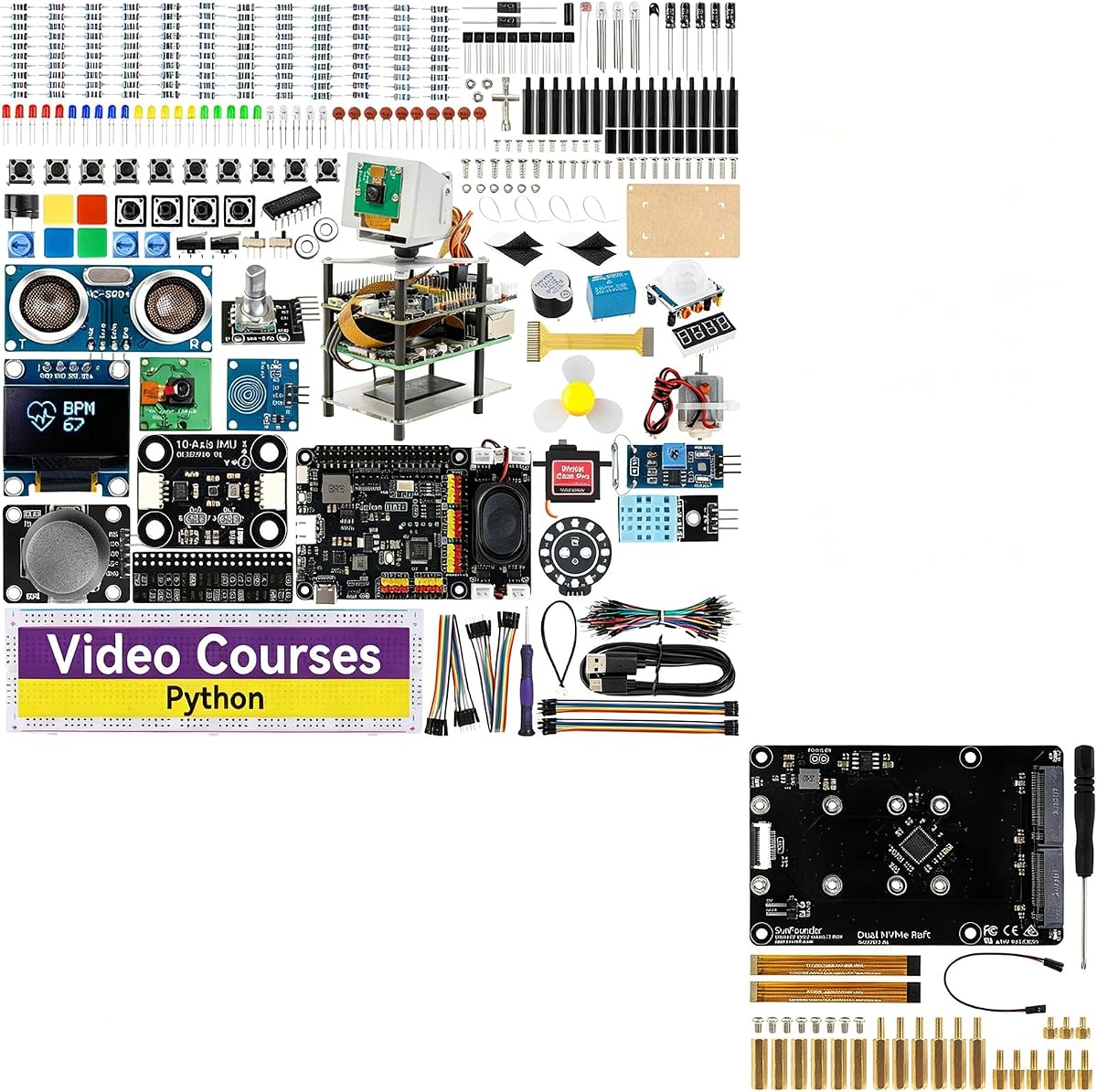


The SunFounder AI Fusion Lab Kit stands out as a top choice for AI learning on Raspberry Pi. It supports multiple Large Language Models like ChatGPT and Gemini right out of the box. The kit comes with essential hardware to start building interactive projects.
We may earn a commission when you buy through this link, at no additional cost to you.
It includes a Pan-Tilt HAT and camera for AI vision tracking with YOLO and OpenCV. The Fusion HAT+ provides power and safe shutdown features with built-in audio. Video lessons with Paul McWhorter guide you through Python basics to AI integration.
One trade-off is that the Raspberry Pi board itself is not included in the box. Some users might find the volume of components overwhelming at first. However the structured curriculum makes these complexities manageable for most learners.
This kit is ideal for beginners who want a complete learning path without hunting for parts. It delivers value through quality components and expert instruction for those new to AI hardware projects.
Access powerful language models directly to enhance project interactivity and response capabilities.
Seamless connection of cameras and motors via the Fusion HAT+ simplifies complex robotics tasks.
We may earn a commission when you buy through this link, at no additional cost to you.
The Vilros Raspberry Pi 5 AI Kit offers a premium experience for serious AI developers. It includes the powerful Pi 5 board alongside a Hailo-8L AI accelerator for high-speed processing. This combination ensures smooth performance for demanding tasks like real-time object detection.
We may earn a commission when you buy through this link, at no additional cost to you.
The kit comes fully loaded with a 128GB Micro SD card and essential cables. A neoprene storage case keeps your components organized and safe during transport. The active cooler maintains optimal temperatures even under heavy AI workloads.
While the price point is higher than some other options it delivers a complete professional setup. Users focused on performance might find the lack of extra sensors like cameras limiting initially. You may need to source additional modules for specific projects.
This kit is perfect for those who need reliable high-speed inference capabilities right away. It removes the guesswork of component compatibility for a streamlined development experience.
The Hailo-8L chip significantly speeds up neural network operations for faster results.
Pre-installed OS and included hardware mean you can start coding immediately.
We may earn a commission when you buy through this link, at no additional cost to you.
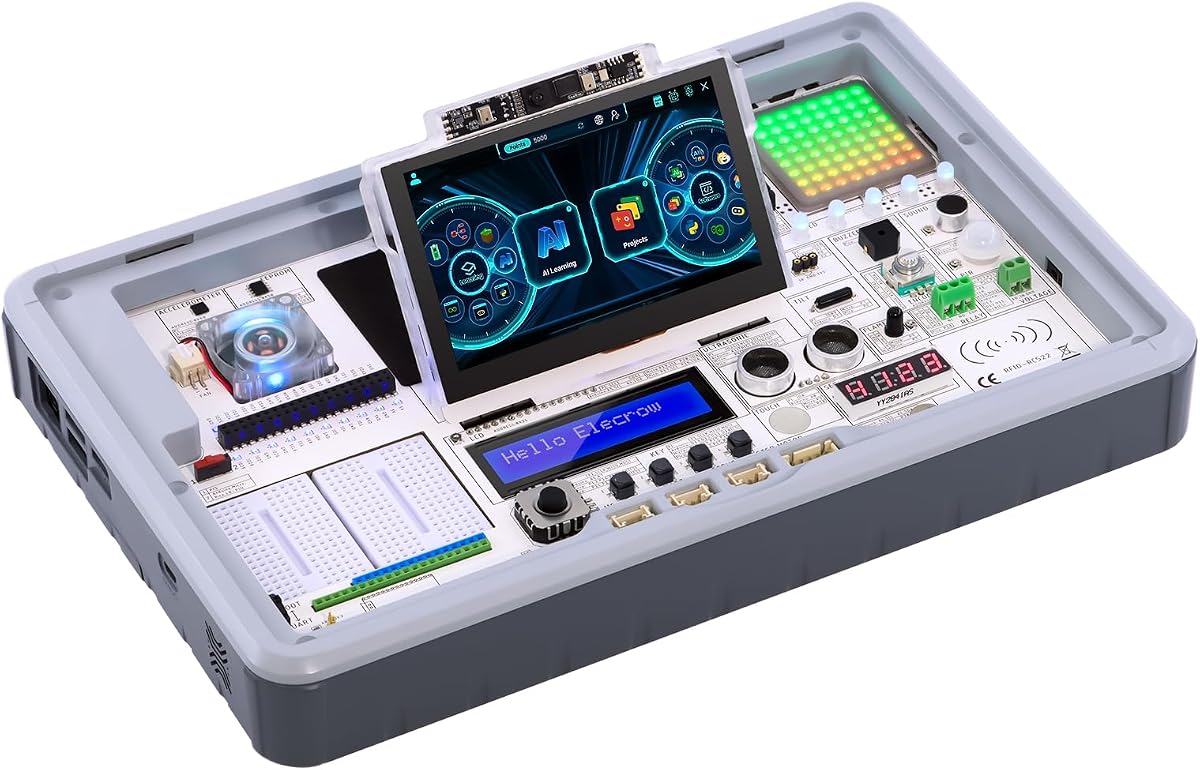
The ELECROW CrowPi3 Basic provides a unique all-in-one station for learning AI concepts. It features a capacitive touch display and forty-one different sensors pre-integrated into the board. This design eliminates the need for complex wiring and makes it easy to start coding.
We may earn a commission when you buy through this link, at no additional cost to you.
With two hundred structured lessons the kit guides you from identifying components to running code. It supports multiple development boards making it versatile for different project needs. The built-in camera and display allow for immediate visual feedback on your programs.
Some users may wish for a more powerful AI chip for advanced neural network tasks. The kit focuses more on educational breadth than deep learning performance. Additionally the Raspberry Pi board must be purchased separately for full functionality.
This option is highly recommended for students and educators prioritizing ease of use. It offers a fantastic entry point into electronics and programming without frustration.
Pre-installed sensors allow you to experiment with inputs instantly without soldering.
A robust library of lessons ensures steady progress for learners at all levels.
We may earn a commission when you buy through this link, at no additional cost to you.
This bundle combines the AI Fusion Lab Kit with a Dual NVMe Raft for expanded storage. It allows you to build a powerful local server or NAS system alongside AI projects. The Raft supports PCIe Gen 2.0 for fast data transfer speeds up to 500MB/s.
We may earn a commission when you buy through this link, at no additional cost to you.
You can run OpenMediaVault or configure RAID setups for reliable storage management. The AI Lab components enable you to add smart processing capabilities to your server. This makes it ideal for makers who want to combine data storage with machine learning.
The complexity of integrating storage with AI hardware might be challenging for beginners. You will need to handle multiple components and potentially manage more wiring than a simple kit. Power management also requires attention to ensure stability.
This product is best suited for advanced users building custom home server solutions. It offers a unique way to combine data storage with intelligent processing capabilities.
Dual SSD slots allow for quick access to large datasets needed for AI training.
The Raft turns a Pi into a capable server for media or network storage.
We may earn a commission when you buy through this link, at no additional cost to you.
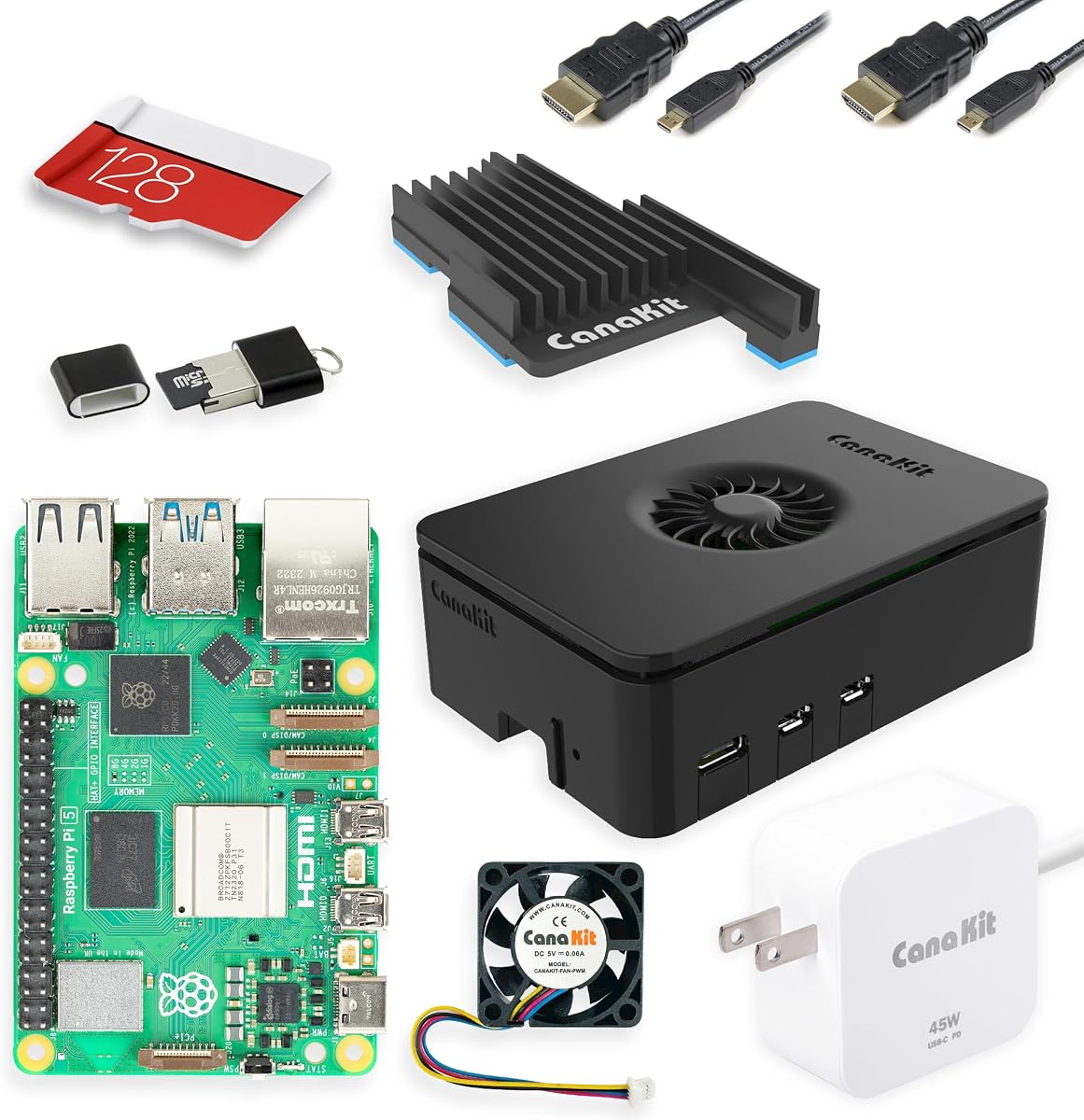
The CanaKit Raspberry Pi 5 Starter Kit PRO provides a reliable foundation for any project. It includes the Pi 5 board and a Turbine Black case with effective cooling. The package is complete with power and HDMI cables so you can use it right away.
We may earn a commission when you buy through this link, at no additional cost to you.
Its high-quality build and 4K video support make it versatile for media and computing. The 45W power supply ensures stable energy delivery for peripherals and expansion boards. This makes it a strong candidate for those planning to add AI hardware later.
It lacks specific AI sensors like cameras or accelerators included in the box. Users must purchase separate add-ons to run vision or language models effectively. It focuses more on general computing rather than specialized AI training.
This kit is recommended for builders who want a robust base system first. It ensures your Pi runs efficiently before adding complex AI components to the mix.
The 45W supply provides ample power for all ports and connected devices.
Support for multiple 4K displays enhances usability for interactive AI dashboards.
We may earn a commission when you buy through this link, at no additional cost to you.
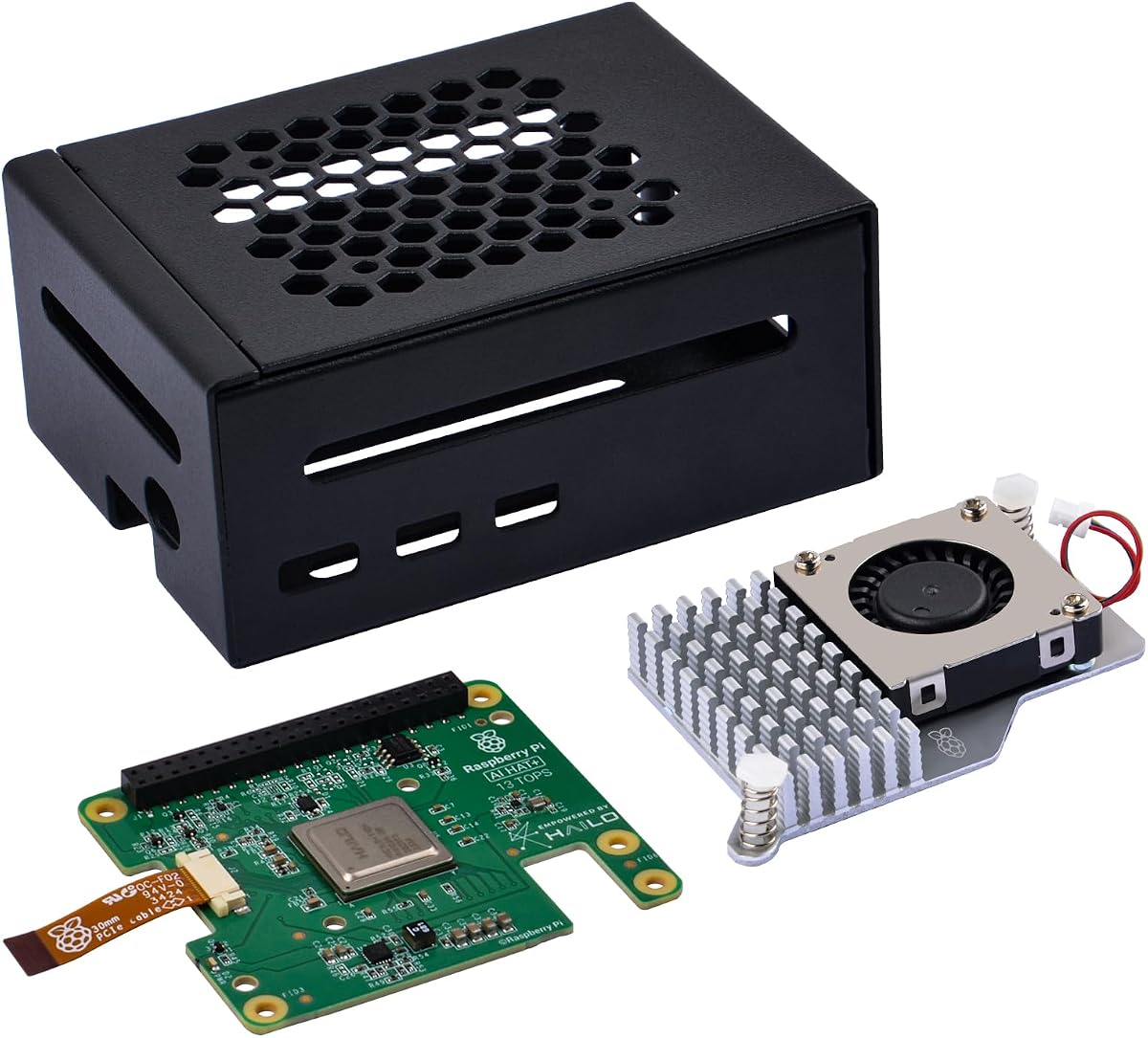
The GeeekPi AI HAT+ Kit offers an affordable entry into hardware-accelerated AI. It includes a metal case and active cooler to protect and cool your Pi 5. The Hailo accelerator handles object detection and pose estimation tasks efficiently.
We may earn a commission when you buy through this link, at no additional cost to you.
It communicates via PCIe Gen 3 for low latency processing. The setup is designed to be plug-and-play with updated OS images. This means your Pi automatically detects the accelerator for AI computing tasks.
Note that the Raspberry Pi board is not included in this kit. You will need to purchase one separately along with any camera modules you might want. The focus is strictly on the acceleration hardware and protection.
For budget-conscious users needing performance this is a smart choice. It provides necessary cooling and protection while enabling serious AI processing power.
PCIe connection ensures fast data transfer between the Pi and the NPU.
A sturdy metal case keeps your hardware safe from physical damage and dust.
We may earn a commission when you buy through this link, at no additional cost to you.
The Seeed Studio Essentials Kit is designed for developers focusing on Edge AI and servers. It includes the Pi 5 and an official case with active cooling for stability. The preloaded SD card allows you to start working immediately without setup delays.
We may earn a commission when you buy through this link, at no additional cost to you.
This kit supports Docker and complex workloads making it ideal for running containerized apps. The active cooling fan ensures your system stays fast during intensive calculations. It provides a stable base for hosting AI services at home.
It does not come with specialized AI sensors or accelerators built-in. You will need to add those components separately to run vision or language tasks. This makes it a flexible base rather than a standalone AI solution.
Recommended for developers building custom solutions on a Pi workstation. It prioritizes stability and performance for backend processing and development environments.
Optimized for Docker to simplify running multiple services simultaneously on the Pi.
Official components ensure maximum compatibility and longer hardware lifespan.
We may earn a commission when you buy through this link, at no additional cost to you.
This kit transforms a Pi Zero 2W into a conversational robot with ChatGPT-4o. It includes twelve servos for realistic movements like walking and sitting. Users can interact with it via voice commands and real-time video feedback.
We may earn a commission when you buy through this link, at no additional cost to you.
The app control and FPV features make it interactive and fun to operate remotely. Integrated sensors help it detect obstacles and respond to touch and sound. This creates a rich interactive experience for learning robotics and AI.
Building the robot requires patience due to the number of servos and parts. The Pi Zero 2W is less powerful than Pi 5 for heavy AI processing. However it is sufficient for voice commands and visual recognition basics.
It is best for makers who want to build a smart robotic companion. It bridges the gap between code and physical interaction in an engaging way.
ChatGPT integration allows for natural conversation and complex command understanding.
Twelve servos enable diverse motion capabilities for learning kinematics and control.
We may earn a commission when you buy through this link, at no additional cost to you.
The ELECROW CrowPi 3 AI Station is a comprehensive platform for AI exploration. It features a capacitive touch display and a large microphone for voice interaction. With forty-one sensors and modules it offers a clear layout for easy prototyping.
We may earn a commission when you buy through this link, at no additional cost to you.
Over two hundred guided courses cover AI interaction and Node-RED IoT projects. This extensive curriculum helps learners progress from basic coding to advanced hardware control. The touch display makes interacting with AI models intuitive and engaging.
The Raspberry Pi 5 board is not included in this station. Users focused on high-performance AI tasks might find the onboard sensors sufficient but the CPU external for deep learning. It is designed more for education and rapid testing.
This station is ideal for educators and students needing a complete learning kit. It simplifies hardware setup so you can focus on learning concepts instead.
Pre-wired sensors allow you to test code without wiring breadboards manually.
The display provides immediate visual output for your AI applications and scripts.
We may earn a commission when you buy through this link, at no additional cost to you.
The CrowPi 3 AI Station with 16GB RAM offers top-tier performance for professionals. It includes a ready-to-use environment for AI experimentation and rapid prototyping. The touch display and microphone support intuitive human-computer interaction.
We may earn a commission when you buy through this link, at no additional cost to you.
Forty-one onboard sensors are clearly labeled for fast learning and development. Over two hundred structured lessons support skill building from fundamentals to advanced apps. This version solves memory constraints common in standard Pi 5 boards.
The high price may be excessive for beginners just learning Python basics. It is an investment in a high-capacity workstation for complex projects. However it eliminates the need for extra board purchases for large models.
This is the premium choice for serious developers needing maximum RAM. It combines high performance with comprehensive educational resources in one package.
16GB RAM allows you to run larger models without crashing or lag.
Touchscreen and mic provide immediate feedback for voice and visual projects.
We may earn a commission when you buy through this link, at no additional cost to you.
Choosing the right kit involves balancing hardware specs with your learning goals.
Look for models with at least 8GB RAM to handle basic AI tasks efficiently. Higher RAM like 16GB is better for running large language models locally without lag. The CPU speed impacts how quickly your code runs and processes data.
Prioritize models with higher memory and newer processor generations for future-proofing.
Some kits include hardware accelerators like Hailo chips to speed up neural networks. These components handle object detection tasks much faster than the CPU alone. Check if your target apps need dedicated AI hardware for real-time performance.
Include an accelerator if you plan to do real-time video analysis or object detection.
A good kit includes cameras microphones and motion sensors to build interactive projects. Check the count and type of sensors to ensure they meet your project needs. High-quality sensors provide better data for your AI algorithms to learn from.
Ensure the sensor set matches your interests like vision audio or motion detection.
Look for kits that offer video lessons written guides and sample code. Structured lessons help you understand how to connect hardware to software effectively. Community forums and responsive support can save you hours when debugging issues.
Choose a kit with strong documentation and lessons to avoid getting stuck.
AI workloads generate heat so active cooling cases and quality power supplies are vital. A proper cooling system prevents performance throttling during long sessions. Stable power ensures your peripherals like cameras do not disconnect unexpectedly.
Always verify the kit includes an active fan or heatsink for your board.
Ensure the kit supports the Raspberry Pi model you plan to use or includes it. Good kits are compatible with add-ons like SSDs or additional cameras later. Flexibility allows you to upgrade your project as your skills grow over time.
Check compatibility with HATs and other boards to allow future project upgrades.
Consider the case design if you plan to move your setup often. Portable cases protect your Pi from dust and scratches during transport. A compact design is useful if you are building mobile robots or field projects.
Select a kit with a sturdy case if you plan to use it outside.
Calculate the total cost including the board and any missing components needed. Kits that include more parts often offer better value than buying separately. Focus on value rather than just the sticker price to avoid hidden costs later.
Compare what is included versus what you must buy separately to get the best value.
Start by installing the provided software image on your storage card using the official tool. This ensures you have the correct drivers for cameras and sensors to work. Follow the step-by-step tutorials to connect your first sensor and run a test script.
Keep your kit in a dry and dust-free environment to protect the electronics from damage. Use a soft brush to gently remove dust from the case and ventilation ports regularly. Avoid touching the pins and components directly to prevent static damage.
Update your system software frequently to get security patches and performance improvements. Check the official forum for new tutorials and community projects that match your kit model. Regular updates ensure your AI models run smoothly without compatibility issues.
Some kits include the board while others require you to buy it separately. Always check the product description to see if the Raspberry Pi is part of the package. This affects the total cost you need to budget for before ordering.
The SunFounder AI Fusion Lab Kit is excellent for vision because it includes a camera and specific lessons on YOLO. It helps you understand object detection and tracking without complex wiring. This makes it a top choice for visual AI projects.
Most of these kits are designed to be compatible with the Raspberry Pi 5 board. They often include cases or headers that fit the newer board form factor. Verify the product details to ensure support for your specific board model before buying.
Pi Zero kits are cheaper and smaller but have less power for complex AI tasks. Pi 5 kits offer more processing power and better support for large models. Choose Pi 5 if you need speed and want to run advanced software.
Kits like the SunFounder AI Robot Kit include ChatGPT integration out of the box. You typically connect via Wi-Fi and use Python libraries to send commands. The included documentation guides you through setting up the connection and testing voice features.
Yes many of these kits provide lessons and support designed specifically for beginners. They offer step-by-step guidance to help you understand wiring and coding basics. You do not need prior engineering experience to start building projects with them.
Yes you can often add SSDs via the USB ports or NVMe slots. Some bundles specifically include a Dual NVMe Raft to support high-speed storage. This helps when you need to store large datasets for your AI projects locally.
Manufacturers usually offer online documentation and customer support via email or forums. The SunFounder and ELECROW kits often have active communities on social media for help. You can also find video tutorials that assist with troubleshooting issues.
We reviewed ten top AI Raspberry Pi Kits ranging from beginner friendly options to professional stations. The SunFounder AI Fusion Lab Kit leads as the top pick for its comprehensive learning path and components.
Consider your project needs such as sensor count and memory requirements before you decide. Kits with accelerators suit performance projects while those with lessons suit education goals.
Always check current availability and pricing before purchasing your ideal development station today. Prices and stock levels may change so verify details on the product page before you checkout.