
YCA1030 Dusk to Dawn Sensor
4.4Editor score
Hard-wired photocell design
IP65 weather resistant
Fits standard outlet box
Discover the top light sensors for home security in 2026. We compare smart motion detectors, outdoor photocells, and presence sensors to help you protect your
Securing your home requires reliable technology that detects movement and adjusts lighting automatically. A good light sensor for home security integrates seamlessly with your existing setup to enhance safety without constant manual intervention.
We evaluated ten top-rated products based on connectivity, detection range, battery life, and ease of integration. Our analysis covers Zigbee, Wi-Fi, LoRa, and hard-wired options to suit every smart home ecosystem.
Each pick highlights specific strengths like weather resistance or smart home compatibility. Please note that prices and availability change frequently, so verify current details before making your final purchase decision today.
4.4Editor score

4.4Editor score

4.4Editor score
This side-by-side comparison highlights the core specifications of each light sensor for home security to help you choose the right fit for your specific needs.


The Akamatis Litos v3 stands out as a top-tier light sensor for home security by combining mmWave radar with integrated ambient light sensing. Its ability to detect stationary human presence ensures lights stay on while someone is reading, even without movement. This device earns a high rating for its precision and integration with open-source platforms.
We may earn a commission when you buy through this link, at no additional cost to you.
Its mmWave radar uses 24GHz technology to penetrate through materials better than traditional PIR sensors. The integrated VEML7700 light sensor matches human eye sensitivity, allowing for precise automation rules that respond to actual lighting conditions. The light-permeable front design ensures accurate readings without physical obstructions.
While powerful, this sensor demands a Home Assistant setup which might overwhelm beginners. It does not work with generic smart hubs out of the box. Users must be comfortable with local automation systems to fully leverage its advanced features like presence detection.
Tech-savvy homeowners seeking reliable automation for dark rooms should choose this sensor. It is ideal for those who already use Home Assistant for local control. Its dual sensing capability makes it a robust choice for secure and efficient lighting management.
mmWave radar detects stationary humans unlike PIR sensors which miss sitting or lying individuals.
The VEML7700 sensor provides accurate lux readings for smarter automated lighting decisions.
We may earn a commission when you buy through this link, at no additional cost to you.
This YCA1030 sensor offers a simple and effective way to manage outdoor lighting for security. It acts as an automatic switch turning lights on at dusk and off at dawn. It is highly rated for its reliability and low cost for homeowners wanting basic automation.
We may earn a commission when you buy through this link, at no additional cost to you.
It supports a wide voltage range from 120V to 277V making it versatile for many fixtures. The IP65 rating ensures it withstands rain and dust effectively. UL listing adds a layer of safety for residential and commercial electrical applications.
Being hard-wired limits flexibility compared to wireless options. You cannot move it easily once installed without rewiring. It lacks smart features like mobile notifications or remote control capabilities for advanced security routines.
Budget-conscious users looking for reliable exterior light control will find this sensor valuable. It is perfect for driveways or porches where constant motion detection is not needed. The lack of batteries ensures long-term low maintenance operation.
Automatically manages power to your lights based on ambient light levels without user input.
Protected against harsh elements with IP65 rating for outdoor placement in all seasons.
We may earn a commission when you buy through this link, at no additional cost to you.
The Philips Hue Outdoor Motion Sensor delivers high-end performance for securing your exterior spaces. It integrates perfectly with the Hue ecosystem to turn lights on when motion is detected. This device is known for its seamless automation and robust weather resistance.
We may earn a commission when you buy through this link, at no additional cost to you.
Its wide 160-degree detection angle covers large areas like porches and driveways effectively. The automatic dusk to dawn feature ensures lights only activate when necessary to save energy. It works with major assistants like Alexa and Google for voice control options.
A significant requirement is the Hue Bridge which must be purchased separately. This adds to the initial cost and setup complexity. Users without an existing Hue setup may find the investment steep compared to simpler sensors.
Homeowners already invested in Philips Hue lighting should choose this for consistent automation. It offers the best experience for integrated home security and lighting. The combination of range and smart features justifies the premium price tag.
The 160-degree angle ensures no blind spots in your driveway or garden entryways.
Built to withstand rain and snow with IP44 rating for reliable year-round outdoor use.
We may earn a commission when you buy through this link, at no additional cost to you.
This Zigbee sensor is designed for users who prioritize local control and privacy. It combines motion detection with ambient light measurement to create intelligent automation scenarios. It is highly rated for its versatility across different smart home platforms.
We may earn a commission when you buy through this link, at no additional cost to you.
The integrated light sensor allows you to avoid triggering lights during the day. You can customize sensitivity to prevent false alarms from pets or curtains. The adjustable ball-joint mount ensures you aim the sensor exactly where needed.
It requires a Zigbee hub which is a prerequisite for functionality. This means it cannot connect directly to Wi-Fi or mobile apps without an intermediate device. Users must verify their hub compatibility before purchase to ensure smooth setup.
Enthusiasts looking for energy-efficient and customizable home security should pick this sensor. It works well with Home Assistant for complex rules. The dual-sensing capability makes it a smart choice for interior and exterior use.
Combines PIR motion and Lux detection for smarter lighting automation decisions.
360-degree adjustable mount lets you target specific high traffic areas easily.
We may earn a commission when you buy through this link, at no additional cost to you.
The YoLink Indoor Motion Sensor excels at covering large properties with its unique LoRa technology. It connects directly to other devices without needing an internet connection for core functions. This makes it ideal for large homes or rural properties.
We may earn a commission when you buy through this link, at no additional cost to you.
You can pair sensors directly with sirens or light switches locally. This ensures alerts work even if your internet goes down. The hub supports plug and play setup making it easy to add devices via QR codes.
The system relies on the YoLink Hub which is proprietary to their ecosystem. It does not integrate with Google Home or Alexa natively. Users are restricted to the YoLink app for notifications and management.
Homeowners needing reliable coverage over large distances should choose this sensor. It is perfect for monitoring multiple buildings. The ability to send text alerts ensures you are always notified of activity.
LoRa technology covers over 2000 feet penetrating walls and obstacles better than Wi-Fi.
Device to device pairing keeps automations running even if power or internet fails.
We may earn a commission when you buy through this link, at no additional cost to you.
This TP-Link Tapo sensor balances cost and performance for everyday home security. It uses Sub-1G technology to ensure reliable connections without draining batteries quickly. Users appreciate its long battery life and simple integration with the Tapo ecosystem.
We may earn a commission when you buy through this link, at no additional cost to you.
It detects motion across a wide 120-degree angle up to 23 feet away. You can customize sensitivity to avoid false alarms from pets. Smart Actions allow you to link the sensor to lights and other Tapo devices easily.
It requires a Tapo Hub to function which is sold separately. The battery life is excellent but depends on usage frequency. It lacks integrated ambient light sensing compared to more specialized models.
Users looking for a straightforward smart sensor at a low price should choose this. It is great for basic automation like turning on hallways. The hub requirement ensures a secure network connection for your smart home.
Operates for up to 2 years on one battery reducing maintenance frequency significantly.
Uses low-power protocol for better range and reliability than standard Wi-Fi devices.
We may earn a commission when you buy through this link, at no additional cost to you.
This Philips Hue sensor focuses on securing entry points like doors and windows. It sends instant alerts when opened or closed allowing you to monitor access. It is highly rated for its reliability and integration with Hue lighting.
We may earn a commission when you buy through this link, at no additional cost to you.
It features a real-time alert system that notifies your mobile device immediately. You can automate lights to turn on when a door opens to deter intruders. The tamper detection adds an extra layer of security against removal.
It requires a Hue Bridge and works best within the Hue ecosystem. It detects contact states rather than movement which limits its use as a standalone motion detector. Users must have an existing setup to get value.
Homeowners prioritizing door and window security should choose this sensor. It pairs well with indoor lights to simulate occupancy. The high rating reflects its dependability for entryway monitoring.
Monitors doors and windows closely to alert you immediately when opened.
Notifies you if someone attempts to remove the sensor from its mount.
We may earn a commission when you buy through this link, at no additional cost to you.
The Ring Motion Detector simplifies security by eliminating the need for a base station. It uses Amazon Sidewalk to connect directly to your network for alerts. This makes it one of the easiest sensors to install in any room.
We may earn a commission when you buy through this link, at no additional cost to you.
It includes a pet friendly mode that ignores motion from animals under 50 pounds. This reduces false alarms significantly while maintaining security coverage. Instant alerts ensure you know about intruders right away.
Amazon Sidewalk connection is required for it to function properly. Users must ensure this feature is enabled on their Ring devices. The coverage is 90 degrees which may require multiple sensors for larger rooms.
Renters or simple setup seekers should choose this sensor for its flexibility. It works well with other Ring security products for a complete system. The lack of a hub saves upfront costs.
No hub needed allows you to start monitoring your home immediately.
Adjustable settings ignore small pets to prevent unnecessary security alerts.
We may earn a commission when you buy through this link, at no additional cost to you.
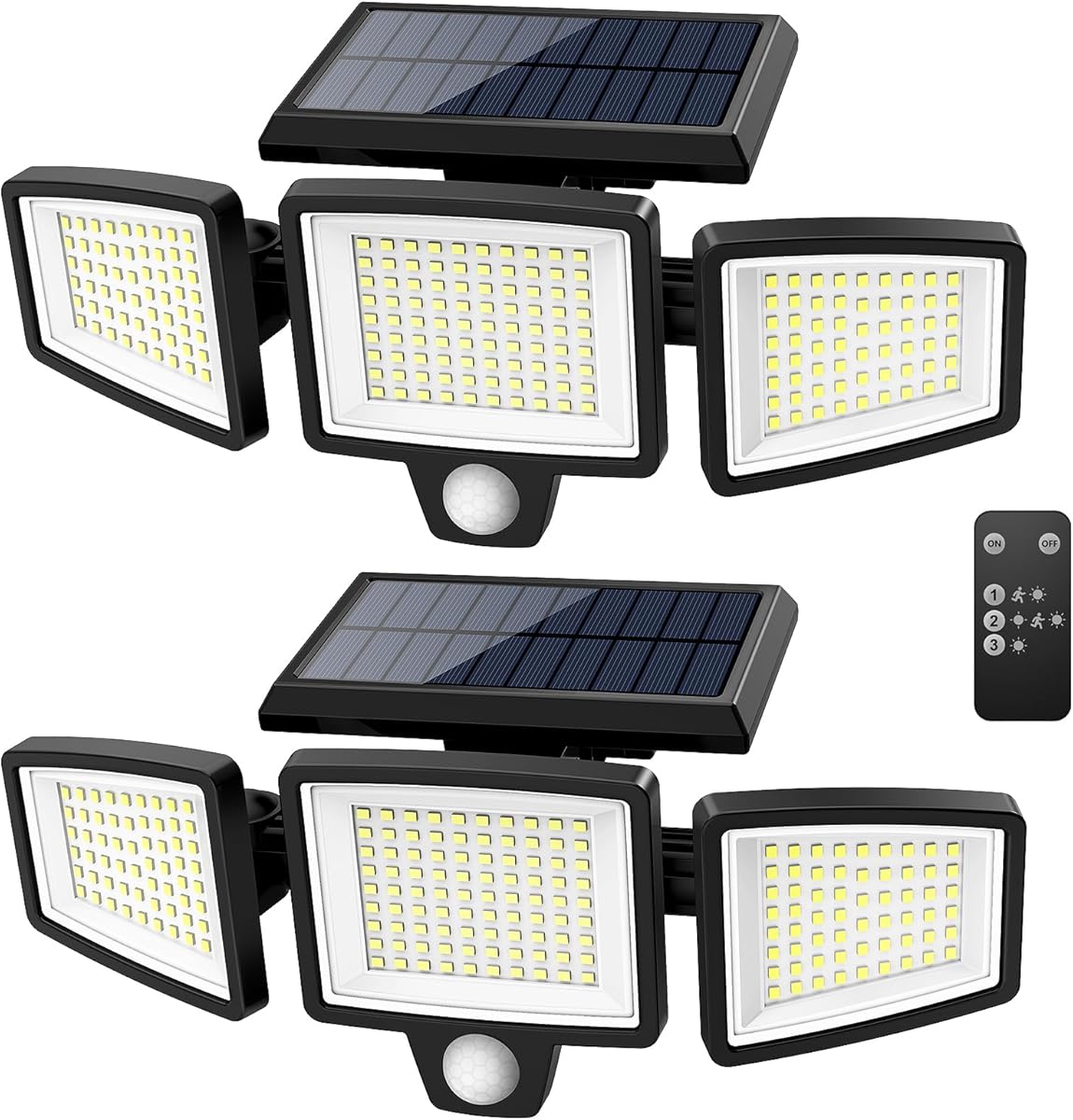
This Tuffenough product combines a motion sensor with a powerful floodlight for security. It produces 2500 lumens of light to illuminate large areas effectively. It is highly rated for its versatility and ease of installation.
We may earn a commission when you buy through this link, at no additional cost to you.
It features three adjustable heads and a 270-degree angle for broad coverage. You can choose from three lighting modes using the included remote. The solar panel allows for wireless placement anywhere there is sunlight.
Its performance depends on direct sunlight charging so it may be dimmer on cloudy days. The size is large compared to standalone sensors. It is designed for outdoor use only which limits indoor application.
Homeowners needing bright outdoor security lights should choose this all-in-one solution. It is perfect for driveways and yards. The high brightness ensures visibility and deterrence in dark areas.
2500LM provides significant illumination to deter intruders and light pathways.
Three modes including dim light sensor and strong light provide versatility.
We may earn a commission when you buy through this link, at no additional cost to you.
This pack offers two photocell sensors for automatic outdoor light control. It handles multiple voltages making it suitable for various regions. It is highly rated for its value when covering multiple fixtures.
We may earn a commission when you buy through this link, at no additional cost to you.
Each unit has a swivel mount to adjust the light sensitivity direction. The IP65 rating ensures durability against rain and dust. The delay feature prevents false triggers from passing car headlights.
It is hard-wired which requires electrical knowledge for installation. It does not offer smart control or notifications. The bulk pack is best for those needing to cover several outdoor lights simultaneously.
Users needing to automate multiple lights at a low cost should choose this pack. It is reliable for basic exterior lighting needs. The inclusion of two units adds significant value.
Getting two sensors allows you to cover multiple entry points at once.
Compatible with various inputs to ensure it works in different regions.
We may earn a commission when you buy through this link, at no additional cost to you.
Choosing the right light sensor involves understanding your home layout and existing smart tech.
Wireless sensors use Wi-Fi, Zigbee, or proprietary protocols like LoRa. Hard-wired sensors connect directly to your electrical system. Ensure the protocol matches your existing hubs to avoid extra costs.
Match the protocol to your smart home setup to ensure smooth integration without extra hubs.
Battery-powered sensors offer placement flexibility but need replacement. Hard-wired sensors provide continuous power but require installation effort. Solar options are great outdoors but depend on sunlight.
Pick a power source that aligns with your access to wiring and maintenance preferences.
PIR sensors detect movement but miss stationary people. mmWave radar detects presence even when still. Photocells detect light levels to manage dusk to dawn lighting.
Select technology that fits whether you need motion or presence detection.
Sensors range from 90 degrees to 270 degrees. Wide angles cover more room but can cause false alarms. Narrow angles are precise for hallways.
Choose a field of view that covers your target area without overlapping irrelevant zones.
Check if the sensor works with Alexa, Google, or Home Assistant. Some require specific hubs like Hue or Tapo. Open-source compatible sensors offer more flexibility.
Verify compatibility with your current assistants to enable useful automations.
Outdoor sensors need high IP ratings like IP65 or IP44. Indoor models do not need water protection. Look for frost-resistant features if you live in cold climates.
Ensure the sensor rating matches the exposure level of your installation spot.
Battery life varies from 1 year to 2+ years depending on usage. Look for low-power designs like Zigbee or LoRa. Some sensors send battery status alerts.
Prioritize sensors with long battery life to reduce maintenance tasks.
Wireless sensors typically use adhesive or magnetic mounts. Hard-wired units require electrical wiring and tools. Plug-and-play hubs simplify adding wireless devices.
Select an installation method you are comfortable with to avoid professional costs.
Install the sensor where it has a clear view of the area. Avoid pointing it at windows or vents that cause false alarms. Ensure the lens is clean and free of obstructions.
For wireless models, replace batteries promptly when alerts are received. Clean the exterior regularly to prevent dust buildup on sensors. Check that the firmware is up to date.
Test your automations to ensure lights turn on and off correctly. Adjust sensitivity settings if false triggers occur. Review your smart home app logs to monitor performance over time.
Many wireless sensors require a hub like Zigbee or Tapo to communicate. Some use Wi-Fi directly but may rely on Amazon Sidewalk. Hard-wired sensors do not need a hub but require electrical wiring.
Traditional PIR sensors require movement to detect presence. Advanced mmWave radar sensors like Litos v3 can detect stationary individuals. Check the tech specs before buying for this specific feature.
Most outdoor specific sensors have IP ratings like IP44 or IP65 for protection. Indoor models are not designed for exposure to rain. Always check the waterproof rating before placing it outside.
Adjust the sensitivity settings to ignore small movements like curtains. Avoid placing sensors near heat sources or air vents. Ensure pets are accounted for with pet-friendly modes.
Some systems like YoLink allow device-to-device pairing without internet. Most smart sensors need internet for remote notifications. Local hubs can keep automations running if Wi-Fi fails.
Wireless sensors usually last between 1 to 2 years on a single battery. Usage frequency affects this duration. Look for low-power protocols like Zigbee for longer life.
Yes, sensors allow lights to turn off automatically when no motion is detected. Light sensors prevent lights from turning on during the day. This reduces electricity consumption significantly.
A photocell measures ambient light and turns on when it gets dark. It turns off when the sun rises. This automatic cycle is ideal for outdoor path lighting.
We have reviewed ten top options ranging from hard-wired photocells to smart mmWave detectors. Each sensor offers unique benefits depending on your home setup and security goals.
Prioritize connectivity and power sources that fit your daily routine. Consider your smart home ecosystem to ensure seamless integration without compatibility issues.
Remember to check current prices and availability before buying. Security needs evolve so choosing a flexible and reliable sensor ensures long-term protection.