
PUTORSEN Quad Monitor Mount for 49 Top and 27 Screens
4.5Editor score
Holds 49 inch ultrawide
Gas spring extension
Advanced 3-section arm
Finding the right 4 monitor mount with adjustable arms transforms your workspace into a productive station. These mounts lift screens off the desk, freeing up valuable space while allowing ergonomic positioning for long work sessions.
We evaluated ten top-rated quad stands based on build quality, arm flexibility, weight capacity, and ease of installation. Each product was analyzed for stability, cable management, and compatibility with common monitor sizes to ensure a reliable recommendation.
Each pick highlights specific strengths like gas spring tension, heavy duty construction, or budget friendly pricing. Note that prices fluctuate frequently so verify current costs before purchasing to secure the best deal available today.
4.5Editor score

4.5Editor score

4.5Editor score
As an Amazon Associate we earn from qualifying purchases.
The following table presents a side-by-side comparison of all ten quad monitor mounts to help you quickly identify the best fit for your specific desk and screen requirements.

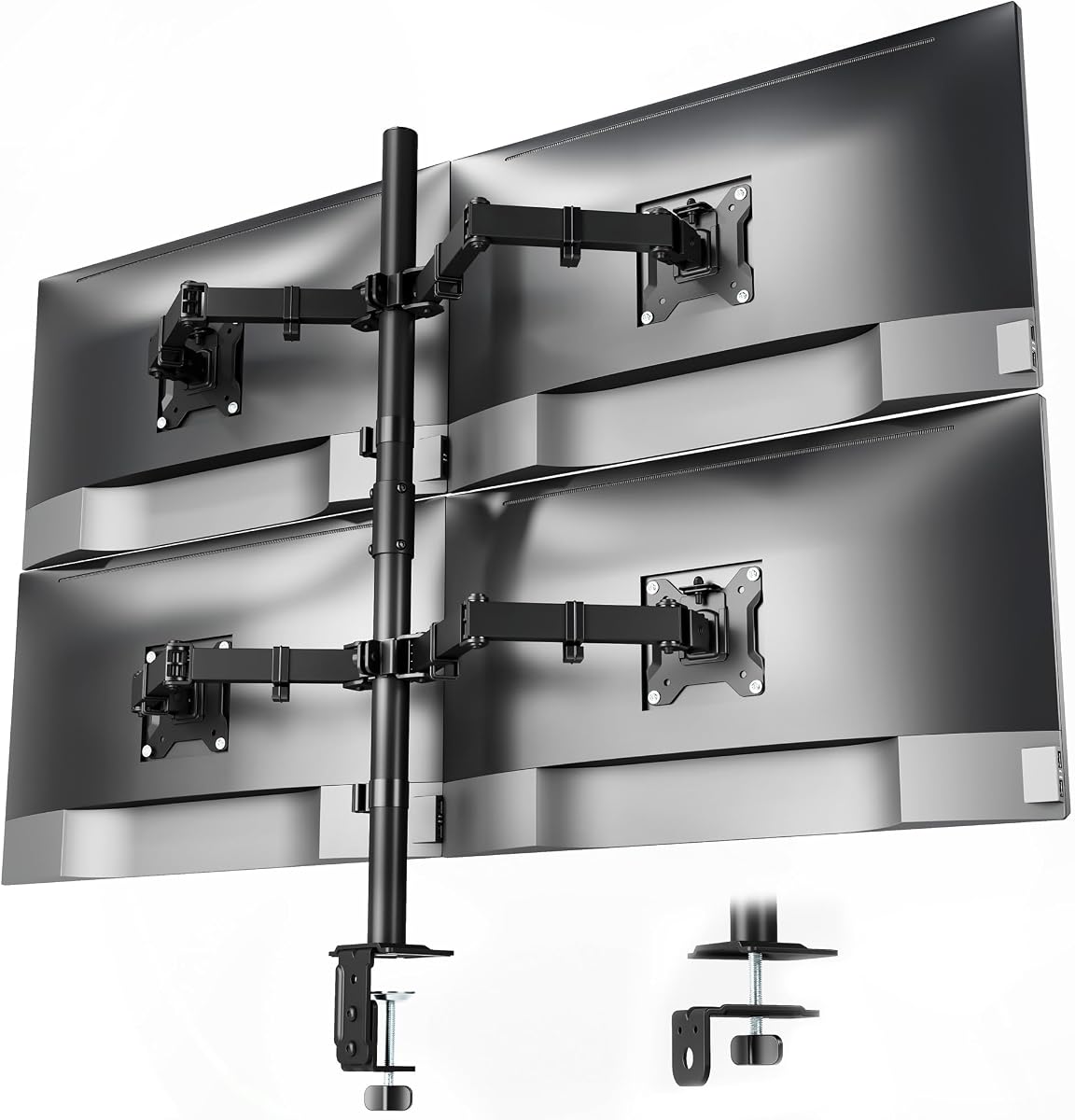


The WALI Stacked 4 Monitor Mount stands out as a top choice for users seeking a reliable quad setup without breaking the bank. With a solid 4.5 rating from verified buyers, it delivers the performance needed for home offices and professional workstations.
We may earn a commission when you buy through this link, at no additional cost to you.
Its strong steel frame provides excellent stability even during adjustments, ensuring your screens stay level. The arms offer full articulation with tilt, swivel, and rotation capabilities, allowing you to find the optimal viewing angle effortlessly.
While it supports monitors up to 27 inches which limits larger ultrawide options the price makes it accessible. The integrated cable management system hides clutter, contributing to a clean workspace that supports focus and productivity.
This mount is ideal for users with multiple mid-sized monitors who need durability and flexibility. We recommend it for those prioritizing value and straightforward setup over maximum size capacity.
Elevating monitors off the desk frees up significant surface area for keyboards and other essentials.
Adjusting screens to eye level reduces neck and back strain during long work sessions.
We may earn a commission when you buy through this link, at no additional cost to you.
The VIVO Pneumatic Arm Quad Ultrawide is engineered for professionals needing massive screen real estate. Its ability to hold up to four ultra-wide displays makes it a powerhouse for trading, gaming, or video editing setups.
We may earn a commission when you buy through this link, at no additional cost to you.
Heavy-duty cast aluminum construction ensures the arms remain sturdy under the weight of large screens. The pneumatic adjustment mechanism lets you reposition monitors effortlessly with a simple touch, balancing weight seamlessly.
While the cost is higher, the durability and capacity justify the investment for demanding users. Tilt and swivel angles reduce glare, while detachable VESA plates simplify the mounting process for complex configurations.
We recommend this mount for users with premium ultrawide monitors who need reliable support and precise control. It is a top-tier choice for those investing in a high-end multi-monitor environment.
Pneumatic springs counterbalance monitor weight for effortless height adjustments anytime.
Premium aluminum materials resist wear and maintain structural integrity over time.
We may earn a commission when you buy through this link, at no additional cost to you.
The PUTORSEN Quad Monitor Mount offers a unique solution for mixed setups, holding a 49-inch screen on top with three 27-inch screens below. This configuration is perfect for traders and multitaskers needing varied screen sizes.
We may earn a commission when you buy through this link, at no additional cost to you.
Its 3-section arm design distributes weight evenly, preventing sagging even with heavy loads. The gas spring extension allows you to adjust the reach and height to fit your desk perfectly without struggling with stiff joints.
While the installation might require careful attention to weight distribution, the result is a stable and secure workstation. The detachable VESA plates and included hardware make the process straightforward for most users.
We recommend this for users who need a versatile setup combining ultrawide and standard monitors. It balances flexibility and strength effectively for professional environments requiring specific screen arrangements.
3-section arms ensure even weight balance to keep monitors steady and level.
Gas spring extension allows precise positioning to match your ergonomic needs.
We may earn a commission when you buy through this link, at no additional cost to you.
The monTEK Quad Monitor Stand balances features and affordability for most users needing four screens. It supports displays ranging from 17 to 32 inches with a solid 22-pound capacity per arm.
We may earn a commission when you buy through this link, at no additional cost to you.
Stability is a key highlight thanks to advanced joint design that prevents sagging during use. Integrated cable organizers help maintain a clean look, keeping wires out of sight and away from distractions.
Quick-release VESA plates make attaching monitors simple and efficient. However, some users may find the assembly process requires patience to ensure everything is tightened correctly for optimal performance.
This mount is suitable for home offices wanting a clean multi-screen setup without premium costs. It offers reliable performance for general productivity and entertainment needs effectively.
Quick-release plates simplify monitor attachment reducing setup time significantly.
Built-in organizers ensure wires stay hidden for a professional appearance.
We may earn a commission when you buy through this link, at no additional cost to you.
The MOUNT PRO 4 Monitor Mount is an excellent entry-level option for budget-conscious buyers. It accommodates monitors up to 32 inches with an extra tall pole that supports standing desk conversions comfortably.
We may earn a commission when you buy through this link, at no additional cost to you.
With a capacity of 17.6 pounds per arm, it handles most standard monitors well. The 360-degree rotation allows flexible orientation switching between landscape and portrait modes easily.
Cable clips help keep wires organized, and the clear instructions simplify assembly. While not as heavy-duty as aluminum models, it provides solid stability for typical home office monitors.
We recommend this for users needing a basic quad setup on a tight budget. It meets essential needs effectively without extra features that drive up costs.
Extra tall pole height accommodates users who prefer standing during work.
Full rotation supports both landscape and portrait modes for productivity.
We may earn a commission when you buy through this link, at no additional cost to you.
The MOUNTUP Quad Monitor Stand offers solid performance with exceptional customer support. It supports 17 to 32-inch monitors with reliable adjustability and a sturdy central pole design.
We may earn a commission when you buy through this link, at no additional cost to you.
The base supports all four arms efficiently freeing up desk space. Quick-release plates make swapping monitors easy. The 3-year support warranty provides peace of mind for long-term use.
Adjustment knobs can be stiff initially but stabilize well once set. Cable clips keep wires tidy though they are basic. Overall it delivers good value for the price offered.
We recommend this for users seeking dependable support with strong after-sales service. It is a practical choice for home offices prioritizing reliability and warranty protection.
3-year support ensures assistance if any issues arise over time.
Central base design frees desk surface for other essentials.
We may earn a commission when you buy through this link, at no additional cost to you.
The VIVO Quad Pneumatic Monitor Mount introduces pneumatic convenience with dual spring arms. It supports 17 to 32-inch displays, making it a smooth experience for moving screens into place.
We may earn a commission when you buy through this link, at no additional cost to you.
The steel and aluminum construction balances weight and durability effectively. Tension can be adjusted to match monitor weights ensuring stability without sagging. The clamp mounts securely to desks up to 3.25 inches thick.
Fixed center brackets limit flexibility but provide essential stability. The pneumatic springs remain the highlight for users wanting effortless adjustments without fighting resistance.
This mount is best for those valuing smooth motion and sturdy build quality. We recommend it for users with mid-weight monitors needing ergonomic movement.
Pneumatic springs enable smooth effortless adjustments for screen positioning.
Steel aluminum mix provides robust support for long-term reliability.
We may earn a commission when you buy through this link, at no additional cost to you.
The Pholiten Quad Monitor Arm allows precise screen positioning with its unique forward backward adjustment. It supports monitors up to 32 inches, making it adaptable for varied layouts.
We may earn a commission when you buy through this link, at no additional cost to you.
Gas spring technology ensures smooth movement. The arms can slide forward or backward allowing users to customize depth based on desk space needs. VESA plates provide tilt and rotation flexibility.
Installation requires attention to detail but yields a solid setup. The moderate weight capacity works for most standard displays. Cabling is well managed along the arms.
We recommend this for users who need depth customization in their setup. It is ideal for desks where screen proximity matters significantly for ergonomics.
Forward backward arm movement allows precise screen placement for comfort.
Gas springs make adjustments fluid and effortless throughout the day.
We may earn a commission when you buy through this link, at no additional cost to you.
The WALI Quad Monitor Desk Mount is a classic choice with high user satisfaction. It supports 13 to 32-inch displays, offering excellent flexibility for varied setups.
We may earn a commission when you buy through this link, at no additional cost to you.
With a 22-pound capacity per arm, it handles heavier monitors with ease. The two-stage locking system ensures stability for C-clamp and grommet options. Built-in cable management keeps wires tidy.
Installation is straightforward with all hardware provided. The clamp should be padded to avoid desk scratches. Overall it delivers reliable performance for general use cases.
We recommend this for users seeking proven reliability and high ratings. It is a solid investment for multi-screen productivity without premium features.
4.6 rating indicates consistent user satisfaction and reliability.
Wide range of supported sizes fits most monitor types easily.
We may earn a commission when you buy through this link, at no additional cost to you.
The VIVO Quad Monitor 13 to 32 inch is a solid entry-level quad stand. It supports four screens with a 22-pound capacity per arm ensuring stability for most displays.
We may earn a commission when you buy through this link, at no additional cost to you.
Its design allows for basic adjustments including tilt and swivel. The clamp mounts without drilling and works on desks up to 3.94 inches. Cable clips help maintain a tidy desk.
Tilt angles are limited compared to premium models but suit basic needs. Assembly is simple with provided hardware and instructions. It offers good value for budget users.
We recommend this for users wanting a cost-effective quad setup. It is suitable for home offices needing functional monitor support without advanced features.
Affordable pricing makes it accessible for budget-focused buyers.
Standard adjustments meet everyday needs for multi-screen work.
We may earn a commission when you buy through this link, at no additional cost to you.
Selecting the right quad mount involves balancing size compatibility, weight capacity, and adjustability to ensure your workspace remains ergonomic and organized.
Ensure the mount supports your monitor dimensions. Most mounts range from 13 to 32 inches with some premium models supporting 49 inches ultrawides. Verify that your screens fall within the specified limits before purchase.
Always check the product specifications to confirm the maximum width and height supported by the mount.
Each arm must support your monitor's weight. Look for mounts with at least 17.6 lbs capacity per arm for standard screens and higher for ultrawides. Exceeding capacity causes sagging.
Calculate total monitor weight to ensure the mount remains stable under daily use.
Adjustable arms offer tilt swivel and rotation for ergonomic viewing. Full articulation helps reduce glare and strain during work sessions. Pneumatic or gas spring systems make adjustments smoother.
Prioritize mounts with multiple degrees of motion for better flexibility.
Most mounts include C-clamp and grommet base options. Verify your desk thickness and edge structure to choose the right base. Clamp-free options are easier for solid desks.
Measure your desk depth and thickness to avoid installation issues.
Integrated cable organizers keep wires tidy and prevent tangling. Look for arms with built-in clips or channels. A clean setup improves focus and reduces desk clutter.
Effective cable management is key to maintaining a professional workspace.
Steel and aluminum frames provide durability and stability. Heavier materials prevent wobbling during adjustments. Check user reviews for feedback on long-term reliability.
Invest in sturdy materials to ensure the mount lasts through years of use.
Clear instructions and labeled parts simplify setup. Quick-release VESA plates speed up monitor attachment. Complex configurations may require more time so check assembly videos beforehand.
Plan for adequate time during setup to ensure correct installation.
Quad mounts range from affordable budget options to premium models with gas springs. Determine your priorities such as build quality versus cost. Balance needs to avoid overspending.
Focus on essential features that match your specific monitor setup.
Install the mount securely on a sturdy desk surface using the provided C-clamp or grommet base. Ensure the clamp is tightened sufficiently to prevent shifting during use.
Attach monitors to the VESA plates and tighten screws securely. Adjust each arm to the desired height and angle before locking tension knobs. Use the full range of motion for comfort.
Regularly check tension knobs to maintain optimal positioning. Clean the arms and cables periodically to prevent dust buildup. Avoid applying excessive force during adjustments to prolong the life of the joints.
Most mounts support screens ranging from 13 to 32 inches. Premium models can handle up to 49-inch ultrawides. Always verify the specific size limits before purchasing to ensure compatibility with your displays.
Standard mounts usually hold 17.6 to 22 pounds per arm. Heavier models support up to 44 pounds for ultrawides. Check the product specs to ensure your monitor weight fits within these limits.
Yes most mounts are compatible with curved screens as long as they have standard VESA holes. Verify the curvature radius limits specified by the manufacturer to ensure proper fit.
Glass desks may not support clamp mounts safely. Use grommet or adhesive mounts if available. Check the manufacturer guidelines to ensure your desk material can handle the pressure.
Gas spring and pneumatic arms both use compressed air to counterbalance monitor weight. They provide smooth effortless adjustments compared to mechanical springs which require manual tension settings.
Use the built-in cable clips and channels provided on the mount arms. Route wires through these guides to keep them hidden. Additional cable ties can further secure loose ends for a tidy look.
Assembly is straightforward with clear instructions and labeled parts. Most setups take under 30 minutes. If using multiple monitors ensure you have a second person to help with positioning.
Most brands offer a warranty ranging from 1 to 3 years. Check the product page for specific coverage details. Contact the seller for support if any issues arise during the warranty period.
The WALI Stacked 4 Monitor Mount stands out for its balance of price and reliability. The VIVO Pneumatic Arm and PUTORSEN options provide premium features for larger displays.
Prioritize weight capacity and screen size compatibility when making your choice. Ensure the mount supports your desk thickness and preferred installation method for a stable setup.
Prices for these mounts change frequently so verify current costs before purchasing. Checking the latest deals helps secure the best value for your quad monitor workspace.