
Amazon Basics Height Adjustable Monitor Stand
4.6Editor score
3-level stackable design
Lightweight ABS plastic
Non-skid feet included
This guide compares the top desktop monitor riser options for ergonomics, storage, and stability to help you choose the best riser for your office setup in
A desktop monitor riser elevates your screen to eye level, reducing neck strain and improving posture during long work sessions. Choosing the right stand involves considering material durability, weight capacity, and additional storage features to keep your workspace organized.
We analyzed ten highly rated monitor risers based on user feedback, build quality, and ergonomic design. Each product was evaluated for stability, ease of assembly, and compatibility with various devices including laptops, monitors, and printers to ensure a comprehensive comparison.
Each pick highlights specific strengths like adjustable heights, dual monitor support, or built-in storage drawers. Prices and availability may change over time, so verify current details on the product pages before making your final purchasing decision for your desk.
4.6Editor score

4.7Editor score

4.6Editor score
The following table provides a side-by-side comparison of all ten monitor risers reviewed in this guide. Each entry lists key specifications and direct links to verify current availability and detailed product information on Amazon.



The WALI Computer Monitor Stand stands out as the top choice for its robust metal construction and versatile height adjustments. Users appreciate the large shelf that accommodates various device sizes while the ventilated design ensures proper airflow.
We may earn a commission when you buy through this link, at no additional cost to you.
This riser offers three distinct height settings to help align your screen with your eyes, reducing neck strain significantly. The open space underneath provides ample room for keyboards and notebooks, keeping your desk tidy and organized.
While the assembly requires basic tools and the metal legs can be sharp if not handled carefully, these are minor issues given the stability it provides. The maximum weight capacity ensures it won't wobble even with heavier monitors or printers.
Anyone looking for a reliable and sturdy solution should consider this model for their home or office desk. It balances cost and performance effectively, making it a strong recommendation for general users needing ergonomic support.
Raising your monitor to eye level helps maintain a neutral spine position and reduces fatigue during long work hours.
The vented holes in the metal shelf allow heat to escape from laptops or monitors, preventing overheating issues.
We may earn a commission when you buy through this link, at no additional cost to you.
The TEAMIX 20 Inch Monitor Stand brings a stylish wood aesthetic to any desk while providing impressive stability for heavy setups. Its simple design blends well with home decor and offers a reliable surface for laptops or screens.
We may earn a commission when you buy through this link, at no additional cost to you.
Users find that the high weight capacity allows them to place multiple items on top without worrying about flexing or tipping. The internal space is sufficient to slide a standard keyboard underneath for a clean workspace appearance.
The lack of height adjustment might be a limitation for some users who need specific ergonomic angles, but it is easy to assemble quickly. The wood finish looks premium but requires care to avoid water rings or scratches.
This stand is ideal for those prioritizing design and strength over adjustable features in their workstation setup. It serves well as a printer stand or laptop riser where a fixed height suits the user's needs.
The black wood finish complements modern office furniture and adds a touch of warmth to cold tech setups.
With an 80-pound capacity, this stand can handle heavy gaming monitors or multiple devices simultaneously.
We may earn a commission when you buy through this link, at no additional cost to you.
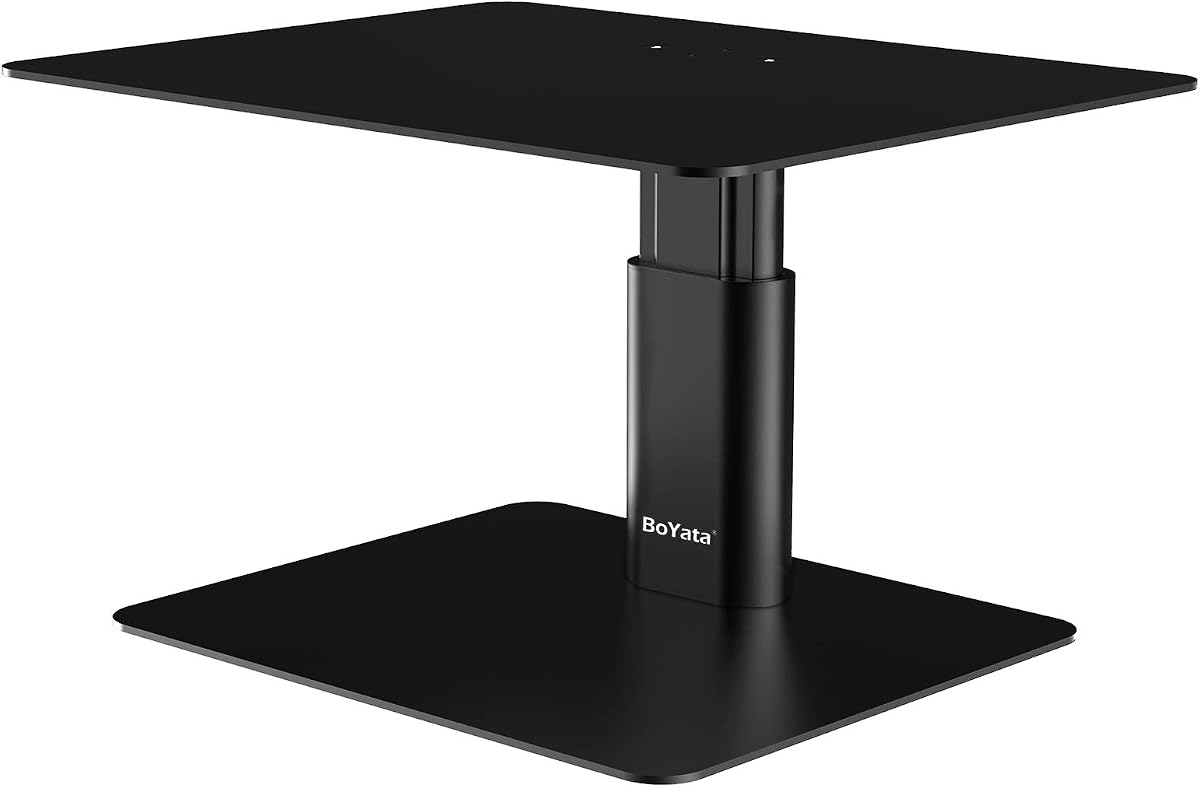
The BoYata Monitor Stand features a unique twist knob that allows users to adjust the height easily without needing tools for each setting. This flexibility helps tailor the viewing angle to specific preferences quickly.
We may earn a commission when you buy through this link, at no additional cost to you.
Its metal construction ensures durability and longevity, providing a stable platform that resists bending even under regular use. The base includes pads that grip the desk surface effectively to prevent sliding during typing.
The height range is somewhat limited compared to other adjustable models, which might not suit all ergonomic needs. However, the simplicity of the design makes assembly straightforward and the storage space underneath is practical.
For users seeking a balance between adjustability and sturdiness, this stand offers a solid option for office or home use. It is particularly useful for those who want a fixed but customizable height for their monitor.
The twist knob mechanism allows quick height changes to match different seating positions throughout the day.
Heavy metal plates provide a solid base that keeps the monitor steady even when using a touch screen.
We may earn a commission when you buy through this link, at no additional cost to you.
The Amazon Basics Height Adjustable Monitor Stand is a cost-effective solution that delivers on basic functionality without breaking the bank. It offers three height levels through detachable legs, allowing for easy customization of your screen position.
We may earn a commission when you buy through this link, at no additional cost to you.
Users appreciate its lightweight nature which makes it simple to move between desks or rooms as needed. The anti-slip feet provide decent grip on smooth surfaces, keeping the setup stable during normal use.
As it is made of plastic, it may not feel as heavy or robust as metal options, and the weight limit restricts it to lighter devices. However, for most laptops and small monitors, it performs admirably well.
This stand is an excellent choice for budget-conscious buyers or those who need a temporary riser solution. It proves that affordability does not have to come at the cost of essential ergonomic features.
The low price makes it accessible for students or remote workers who need immediate ergonomic improvements.
Weighing significantly less than metal stands, it is easy to pack when moving offices or traveling.
We may earn a commission when you buy through this link, at no additional cost to you.
The YAOHUOO Dual Monitor Stand Riser is designed for power users who need to support multiple screens or large TVs. Its 39-inch width provides ample space, and the heavy-duty steel legs ensure it stays rock solid under load.
We may earn a commission when you buy through this link, at no additional cost to you.
With a 100-pound capacity, this stand can handle virtually any office setup without wobbling, making it a top choice for stability. The ergonomic height helps improve posture while the shelf below stores keyboards and accessories.
The main drawback is that it takes up a large footprint on your desk, which might not suit smaller workspaces. Assembly takes a bit more time due to the larger number of parts, but the result is worth the effort.
For users with large desks and a need for dual-monitor setups, this stand is the premium choice that delivers professional results. It is built to last and supports a variety of device types including printers and TVs.
The wide surface accommodates two monitors side by side, facilitating multitasking workflows effectively.
Steel legs and high weight capacity ensure the stand never shakes even when typing vigorously.
We may earn a commission when you buy through this link, at no additional cost to you.
This offer of two metal monitor risers provides excellent value for buyers needing to elevate multiple screens or devices. Each stand includes a phone holder and features heat dissipation holes to protect your electronics from overheating.
We may earn a commission when you buy through this link, at no additional cost to you.
The cold-rolled steel construction ensures durability and a high load capacity, allowing you to place heavy devices on top safely. The adjustable height lets you customize the view, and the open space underneath keeps your desk clear.
Some users might find the phone holder slightly obstructive depending on their desk layout, and the steel edges should be handled with care. However, the fact that you get two units makes it a great option for multi-person desks.
Ideal for households or offices with more than one workstation, this pack ensures everyone has a dedicated riser without extra cost. It combines utility with robust materials to handle daily tasks efficiently.
Buying two units allows for matching stands on a shared desk or for separate rooms in the house.
Ventilation holes actively cool your laptop or monitor, extending the life of your devices.
We may earn a commission when you buy through this link, at no additional cost to you.
The Klearlook Foldable Stand stands out for its unique foldable legs and built-in storage drawer, offering practical organization right on your desk. It adjusts in width to fit various monitor sizes and requires no assembly upon arrival.
We may earn a commission when you buy through this link, at no additional cost to you.
Users love the hidden drawer for storing small items like cables or notepads, keeping them out of sight but easily accessible. The white finish looks clean and modern, complementing many contemporary home office setups.
The drawer mechanism might be small for larger items, and the white color requires regular cleaning to stay pristine. However, the ability to fold the stand away when not in use is a significant space-saving feature.
This riser is perfect for those who value organization and flexibility in their workspace design. It offers a unique blend of style and function that sets it apart from standard flat stands.
The built-in drawer provides a convenient spot for desk accessories that would otherwise clutter the surface.
Foldable legs allow the stand to be stored flat under a desk when not needed.
We may earn a commission when you buy through this link, at no additional cost to you.
The OPNICE Desk Organizers model is built for efficiency, featuring a drawer and pen holders to keep your desk accessories tidy. It is ready to use right out of the box, requiring no assembly or tools.
We may earn a commission when you buy through this link, at no additional cost to you.
Users appreciate the sleek black finish which looks professional in any office setting. The dual monitor support and sturdy metal construction ensure it remains stable even with heavier equipment on top.
The storage space is functional but may not fit bulky items, and the fixed height means you need to measure before buying. Despite these minor limitations, it is a great option for organizing a messy workspace.
This stand is ideal for professionals who want a clean and organized desk without spending time on assembly. It combines ergonomic lifting with practical storage to improve overall workflow efficiency.
Built-in pen holders and a drawer provide dedicated spots for writing tools and notes.
The unbox and use feature saves time and effort for busy professionals.
We may earn a commission when you buy through this link, at no additional cost to you.
The WESTREE Dual Monitor Stand offers a unique look with its wood finish and thick steel legs, blending industrial and rustic styles. It is built to support dual monitors and provides ample space for storing devices underneath.
We may earn a commission when you buy through this link, at no additional cost to you.
Users find that the pre-drilled holes make assembly straightforward, and the anti-slip pads keep the stand firmly in place on any surface. The ergonomic height helps reduce eye strain by positioning screens at eye level.
While the wood finish adds style, it can be prone to chipping if not handled with care during shipping or setup. The assembly process is simple but still requires some time compared to pre-assembled options.
This stand is a perfect choice for those who want their desk to look stylish while maintaining high functionality. It is versatile enough to serve as a printer or TV stand in other rooms as well.
The mix of wood and steel creates a warm yet sturdy look that suits modern home offices.
Its wide design allows it to function as a stand for printers or large monitors equally well.
We may earn a commission when you buy through this link, at no additional cost to you.
The gianotter Dual Monitor Stand offers a feature-rich design with magnetic pen holders and a dedicated storage drawer for office supplies. It arrives fully assembled, saving you time and effort upon arrival.
We may earn a commission when you buy through this link, at no additional cost to you.
Users appreciate the high-strength metal materials that ensure the stand remains stable even with heavy monitors on top. The ergonomic height helps improve posture and the open space underneath allows for keyboard storage.
The magnetic pen holders are a nice touch for quick access to pens but might not hold heavier items securely. While the overall design is practical, some users might prefer a wider shelf for larger devices.
This stand is recommended for users who want a convenient and organized setup without the hassle of assembly. It combines essential ergonomic benefits with thoughtful organizational features for a polished workspace.
Magnetic pen holders offer a unique way to keep writing tools visible and accessible.
Arriving pre-assembled means you can start using it immediately without tools.
We may earn a commission when you buy through this link, at no additional cost to you.
Selecting the right monitor riser requires evaluating your specific desk space and device requirements. This guide outlines the key factors to consider to ensure you find a stand that offers stability and ergonomic benefits.
The material of the stand determines its longevity and aesthetic appeal. Metal options offer high durability and heat dissipation, while wood provides a warmer look. Plastic is lightweight but may not support heavier loads as well as metal.
Choose a material that matches your workspace style and can withstand the weight of your devices.
Ensure the stand can support the weight of your monitor or laptop. Heavy gaming monitors require a higher weight capacity to prevent tipping or damage. Check the manufacturer's specifications to confirm the limit.
Always select a stand with a capacity higher than your device's weight for safety.
Measure your desk space to ensure the riser fits without crowding your keyboard area. A wide stand might offer more stability but could limit other space. Consider if you need a dual monitor setup.
Confirm the shelf dimensions match your device size for secure placement.
Some stands offer adjustable height settings to suit different users. This feature helps achieve proper ergonomic alignment with your eyes. If fixed height is acceptable, a static stand may suffice.
Opt for adjustability if multiple people share the desk space.
Many modern risers include drawers or pen holders for organization. These features keep your desk clutter-free by storing items underneath. Consider how much storage you actually need.
Look for models with storage if you want a tidy workspace.
Some stands come fully assembled while others require tools to build. If you value convenience, look for no-assembly options. If you want a custom fit, assembly might be necessary.
Choose based on your willingness to spend time putting it together.
Rubber pads on the bottom prevent the stand from sliding on smooth desks. This ensures your monitor stays safe and secure. Without them, the stand could shift during use.
Always verify the stand has grippers for stability.
Ventilated designs help keep devices cool by allowing airflow underneath. This is crucial for laptops or processors that generate heat. Overheating can damage electronics over time.
Prioritize stands with holes or slots for better cooling.
Place the stand on a flat, stable surface to ensure safety. Align your monitor so the top is at or slightly below eye level to maintain good posture.
Clean the stand regularly with a dry cloth to remove dust and debris. Avoid using harsh chemicals that could damage the finish or coating on metal and wood models.
Check the screws and joints periodically to ensure everything remains tight. If the stand moves, adjust the positioning to prevent instability during use.
Yes, lifting your monitor to eye level helps you keep your head aligned with your spine. This reduces the need to look down, which can cause neck and back strain over time.
Most risers are designed to support laptops as well as monitors. Ensure the stand is wide enough and the weight capacity matches your device for safe use.
Storage space varies by model but generally fits standard keyboards and small accessories. Check the dimensions of the stand to know how much clearance you have.
Many modern stands come pre-assembled for convenience. Others may require basic tools and a few minutes to put together following the included instructions.
Yes, stands with ventilated designs allow air to flow underneath the device. This helps prevent heat buildup and keeps your electronics running efficiently.
Yes, wide dual monitor stands are available to support two screens side by side. Ensure the shelf width matches your combined monitor setup.
Choosing the right riser depends on your specific needs for ergonomics and storage. The WALI stand offers the best overall value for most users needing adjustability and strength.
Prioritize a model with the capacity to support your devices and features like storage to maximize your desk utility. A well-chosen stand can transform a cluttered workspace into an organized hub.
Always check the latest product details on the official pages before purchasing. Prices and availability can change, so verifying the current specs ensures you get the best deal.