
Replacement TV Remote Control for All Fire Series
4.3Editor score
Works with Fire Stick 4K Max
Includes voice control features
Simple pairing process
Discover the top Fire Stick Replacement Remote options for 2026. This guide compares features, compatibility, and voice control to help you choose the right
Finding a reliable Fire Stick Replacement Remote is essential for seamless streaming. A good remote offers intuitive controls, voice search, and broad compatibility with your devices.
We evaluated ten top models based on user feedback, feature sets, and ease of pairing. Our list covers budget-friendly options and premium choices with advanced capabilities.
Each pick highlights key specifications and real-world performance. Note that pricing and availability can change frequently, so verify details before purchasing.
4.3Editor score
4.5Editor score

4.5Editor score
This table provides a quick side-by-side overview of the leading replacement remotes available in the market today.
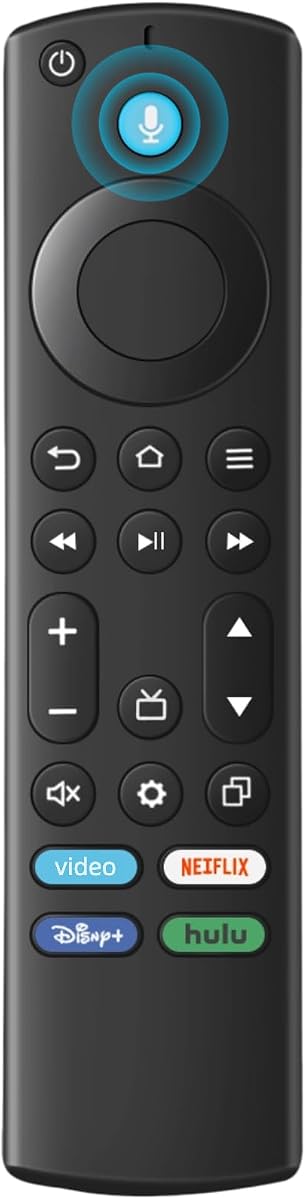


This replacement remote stands out for its wide compatibility with Fire Stick and TV Cube models. It offers a solid 4.2-star rating from users seeking a straightforward voice-enabled solution.
We may earn a commission when you buy through this link, at no additional cost to you.
The key strength lies in its ability to handle voice commands for content search and app launching. Users appreciate the seamless pairing process with most modern Fire TV devices.
While it lacks advanced features like backlit buttons, the basic functionality remains robust. The design is ergonomic and fits comfortably in hand for extended viewing sessions.
Anyone needing a reliable backup remote for their Fire Stick 4K will find this a practical choice. It balances cost and performance effectively for everyday streaming needs.
Voice commands allow quick searching and content launch without manual input.
Compatible with Fire Stick 3rd Gen, 4K Max, and various smart TV models.
We may earn a commission when you buy through this link, at no additional cost to you.
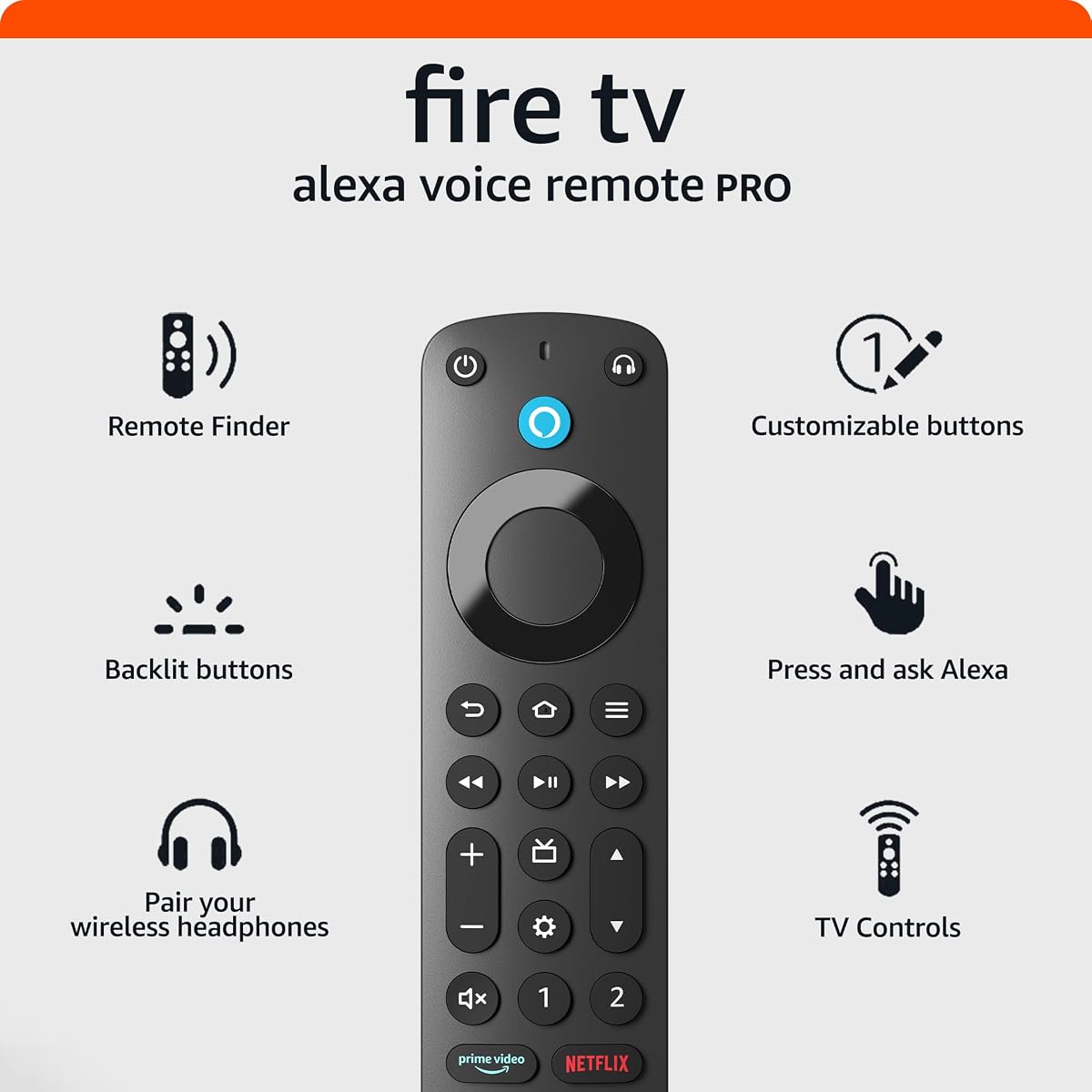
The Alexa Voice Remote Pro leads the pack with premium features like a built-in remote finder and backlit buttons. It holds an impressive 4.5-star rating for its advanced capabilities.
We may earn a commission when you buy through this link, at no additional cost to you.
Its standout features include customizable shortcuts and a dedicated headphone button for wireless pairing. Users love the ability to find misplaced remotes using the Alexa app or voice commands.
While the price is higher than standard remotes, the convenience of backlit buttons and TV controls justifies the cost. It streamlines navigation significantly in dimly lit rooms.
Power users and those who value convenience will appreciate the Pro model. It transforms the streaming experience into a smoother, more intuitive interaction with your entertainment system.
Use Alexa or the Fire TV app to ring the remote when it is lost.
Buttons light up automatically when motion is detected for easier navigation.
We may earn a commission when you buy through this link, at no additional cost to you.
This remote offers exceptional value for those seeking a functional replacement without breaking the bank. With a 4.5-star rating, it proves cost-effectiveness does not mean sacrificing quality.
We may earn a commission when you buy through this link, at no additional cost to you.
The device supports voice activation for hands-free control and includes four customization buttons for quick access to favorite apps. Users find pairing straightforward even for first-time users.
The main trade-off is the lack of premium features like backlighting. However, for standard streaming tasks, it performs reliably without lag or connection issues during daily use.
Budget-conscious consumers looking for a dependable spare remote should consider this option. It delivers core functionality effectively at a price point that rivals generic brands.
Provides essential features like voice control and shortcut buttons at a low cost.
Works with Fire TV Stick 4K and various Insignia models seamlessly.
We may earn a commission when you buy through this link, at no additional cost to you.
This model shines in versatility, supporting various Fire TV generations and Omni TVs. It has earned a solid 4.3-star rating from users who need cross-device compatibility.
We may earn a commission when you buy through this link, at no additional cost to you.
Key strengths include a long range of up to 12 meters and reliable voice control integration. Users appreciate the robust support team that assists quickly with setup questions.
While it works well, some users report minor delays during initial pairing. This issue is usually resolved by ensuring batteries are fresh and the power cycle is followed.
Those needing a remote that works across different Fire ecosystems will find this reliable. It bridges the gap between older and newer devices without requiring hardware changes.
Operates effectively from up to 12 meters away from the device.
Compatible with Fire Stick Select, Plus, Max, and HD models.
We may earn a commission when you buy through this link, at no additional cost to you.
Famous for its rapid automatic syncing, this remote reduces setup time significantly. With a 4.2-star rating, it appeals to users who prioritize convenience and speed.
We may earn a commission when you buy through this link, at no additional cost to you.
The remote includes instant access shortcuts for popular apps and supports voice commands for basic navigation. It pairs seamlessly with Fire Smart TVs without complex configuration steps.
While the layout is basic, it covers all essential functions needed for daily streaming. The build quality is durable enough for regular use in living room environments.
Anyone wanting a plug-and-play solution for their Fire Stick will enjoy this device. It simplifies the initial setup process and delivers consistent performance over time.
Connects automatically when inserted without manual pairing steps.
Direct buttons allow launching services without navigating deep menus.
We may earn a commission when you buy through this link, at no additional cost to you.
Priced aggressively, this remote delivers solid performance across the Fire Series line. It holds a 4.3-star rating for its balance of cost and functional reliability.
We may earn a commission when you buy through this link, at no additional cost to you.
The device features standard playback controls and voice commands to launch content easily. Users find the LED indicator helpful during the pairing process to confirm connection status.
While the build feels lightweight, it withstands daily handling well. The lack of fancy features makes it an ideal backup remote for households with multiple devices.
Budget shoppers needing a basic replacement should consider this model highly. It fulfills essential remote duties without unnecessary bloat or excessive cost.
Offers a low-cost solution for replacing lost or broken remotes.
Includes familiar arrow keys and navigation buttons for intuitive use.
We may earn a commission when you buy through this link, at no additional cost to you.
This official Amazon remote stands out because it manages TV power and volume directly. With a 4.5-star rating, it offers a unified control solution for home entertainment systems.
We may earn a commission when you buy through this link, at no additional cost to you.
It includes dedicated power and mute buttons along with preset app shortcuts. Users appreciate the convenience of controlling their TV and Fire Stick without switching remotes.
The guide button helps browse live TV apps easily. While it lacks customizable buttons, the standard layout remains familiar and efficient for most users.
Households wanting a single remote to control both devices will find this ideal. It eliminates the clutter of multiple remotes on the coffee table effectively.
Manages both Fire TV and connected soundbars with one device.
Includes batteries so you can start using it immediately after setup.
We may earn a commission when you buy through this link, at no additional cost to you.
Known for fitting a wide range of Fire Stick and Cube models, this remote is a versatile choice. It holds a strong 4.4-star rating among users seeking broad device support.
We may earn a commission when you buy through this link, at no additional cost to you.
The LED indicator provides clear feedback during the pairing process. Users like the voice control capabilities that simplify searching for shows without typing.
Although manual matching is needed occasionally, the process is straightforward. The build is basic but durable enough for regular family use without issues.
Anyone needing a generic remote that works across different generations will find this useful. It bridges the gap between various Fire hardware iterations effectively.
Flashes LED lights to confirm when pairing mode is active successfully.
Works with Fire Stick Lite, 4K, and Cube models seamlessly.
We may earn a commission when you buy through this link, at no additional cost to you.
This remote is optimized to work with external smart TVs like Hisense and Insignia. It has earned a 4.3-star rating for users needing broader TV integration beyond just Fire TV.
We may earn a commission when you buy through this link, at no additional cost to you.
It offers quick access buttons for favorite content and voice functionality for easy navigation. Users appreciate the ability to manage both streaming and basic TV functions.
The build is standard for this price range but remains reliable. Occasional updates may be needed via the voice button if the device prompts for firmware changes.
Home theater setups with multiple brands will benefit from this remote. It ensures compatibility across different hardware ecosystems without needing multiple controllers.
Designed to work seamlessly with Hisense, Insignia, and Pioneer TVs.
Shortcuts help jump directly to apps without deep menu navigation.
We may earn a commission when you buy through this link, at no additional cost to you.
Notable for its dedicated support team, this remote assists users from purchase through setup. It has received a 4.4-star rating for reliable performance and helpful after-sales service.
We may earn a commission when you buy through this link, at no additional cost to you.
Voice control and four shortcut buttons make navigating content simple. Users appreciate the responsive support team that resolves pairing issues quickly when they occur.
While batteries are not included, the remote is easy to set up with standard AAA cells. The build quality is sufficient for daily use in most living room environments.
Buyers who value customer support will find this option reassuring. It ensures a smooth experience even if you encounter initial technical hurdles during setup.
Support team available to answer questions before and after purchase.
Works with QLED Fire-Series TVs and standard Fire Stick models.
We may earn a commission when you buy through this link, at no additional cost to you.
Choosing the right remote depends on your specific device model and desired features.
Ensure the remote explicitly lists your Fire Stick generation or TV model. Using an incompatible remote can lead to pairing failures.
Always check the product description for supported models before buying.
Voice-enabled remotes make searching for content much faster and easier. Look for a built-in microphone and compatible Alexa functions.
Voice features are essential for hands-free navigation and smart home integration.
Consider the placement of volume, power, and navigation keys. A comfortable layout reduces strain during long viewing sessions.
Ergonomic designs with distinct button shapes improve overall user experience.
A good remote should maintain connectivity at least 30 feet away. Bluetooth connectivity usually offers better range than traditional infrared signals.
Check if the remote supports Bluetooth to avoid needing line-of-sight for control.
Most remotes use AAA batteries that last several months. Some premium models may include rechargeable options or battery-saving features.
Look for models with low power consumption to reduce replacement frequency.
Premium remotes often include buttons you can program for specific apps or commands. This customization saves time accessing your favorite services.
Programmable buttons are highly useful for power users who frequently switch apps.
Remotes with TV controls let you adjust volume and power without a second controller. This feature simplifies your entertainment setup significantly.
If you want one remote for all devices, prioritize models with IR TV capabilities.
Good customer support ensures you get help if pairing issues arise. A satisfaction guarantee or warranty provides peace of mind during purchase.
Check the seller's return policy to ensure you can exchange the product if needed.
To start, insert fresh AAA batteries into the back of the remote. Ensure they are placed in the correct orientation according to the diagram inside the compartment.
Pairing usually involves holding the Home button for ten to fifteen seconds until the light flashes. If it does not pair, try removing the batteries and waiting before retrying.
Clean the buttons gently with a dry cloth to avoid liquid damage. Keep the remote away from extreme heat or moisture to maintain its internal electronics.
Not all remotes work with every TV. Most work with Fire Stick devices but may require separate control for non-compatible TVs. Check the product specs to confirm if your TV brand is supported.
Unplug your Fire Stick, wait thirty seconds, and plug it back in. Hold the Home button on the new remote for ten to fifteen seconds until the LED flashes rapidly. The device should connect automatically.
Most of these remotes use two AAA batteries. Always ensure you have fresh batteries when testing a new remote to avoid false failures due to low power.
Yes, voice control is optional. You can use the standard navigation buttons just like a traditional remote. The voice button is only needed if you wish to activate Alexa commands.
Connectivity issues often stem from battery placement or distance. Ensure batteries are inserted correctly and you are within ten feet of the device. Try resetting the remote by removing batteries and reinserting them.
Only specific premium models like the Alexa Voice Remote Pro feature backlit buttons. Most budget options have standard buttons. Check the product details carefully if you need illumination in the dark.
No, these remotes are not waterproof. Avoid exposing them to liquids to prevent internal damage. Wipe them with a dry cloth for cleaning instead of using damp materials.
Some remotes include dedicated volume buttons that work with compatible TVs. Others rely on the Fire Stick settings menu. Verify if the remote supports TV control before purchasing.
We reviewed ten top remotes covering budget, premium, and general use cases. The choices range from simple replacements to feature-rich controllers with voice capabilities.
Prioritize compatibility and voice features to match your viewing habits. For advanced needs, the premium models offer backlighting and remote finding tools.
Prices fluctuate often so check current listings before making a final decision. Verify your device model to ensure the remote you choose will pair successfully.