
Thermaltake View 380 TG ARGB
4.7Editor score
Pillarless glass panels
Hidden connector support
4 ARGB fans included
This guide compares the top 10 dual system PC cases for 2026, analyzing airflow, modularity, and dual-chamber designs to help you choose the right chassis.
Selecting the right chassis is crucial for any high-performance build, especially when you need room for multiple systems or advanced cooling. A dual system PC case offers unique flexibility for enthusiasts who want to run separate workloads or maximize component density in a single footprint.
We evaluated ten leading models based on airflow efficiency, cable management tools, and structural rigidity. Our analysis focuses on how well each case handles heat dissipation, supports large GPUs or radiators, and maintains a clean aesthetic with modern tempered glass panels.
Each pick below highlights specific strengths like modular interiors or hidden connector support. Please note that availability and pricing change frequently, so verify current stock and deals before making your final purchase decision online.
4.7Editor score

4.3Editor score
The following table provides a side-by-side overview of the key specifications and unique features for each of the ten dual system PC cases reviewed in this guide.


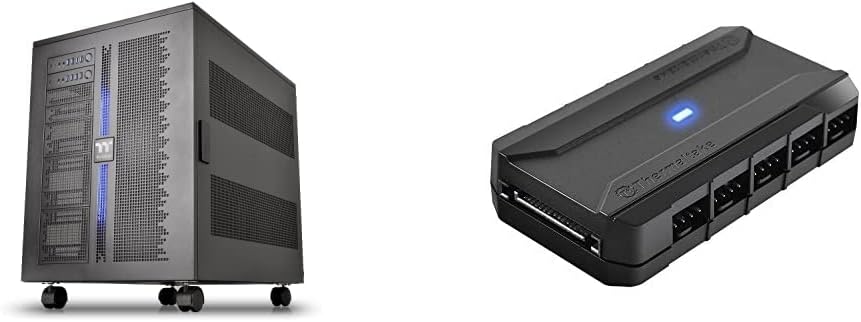
The Thermaltake Core W200 stands out as a unique solution for users needing to house two separate systems in one chassis. It supports installing two motherboards and power supplies in a back-to-back configuration which is rare in modern cases.
We may earn a commission when you buy through this link, at no additional cost to you.
Its fully modular design allows for complete breakdown and flexible component placement. The included Commander FP hub powers up to ten PWM fans simultaneously ensuring you have ample control over airflow for such a large build.
While the complexity of building two systems is high the support for 600mm radiators makes it ideal for extreme custom liquid cooling projects. The build quality is robust but requires patience to assemble correctly.
This case is best for advanced enthusiasts or workstation users who need parallel computing power without occupying two desks. It is a specialized tool rather than a general-purpose gaming chassis.
The chassis allows for two independent systems with separate I/O and power connections enabling parallel workloads.
Support for up to 600mm radiators on both top and front enables massive custom loops for overclocking.
We may earn a commission when you buy through this link, at no additional cost to you.
The NZXT H9 Flow RGB+ features a dual-chamber design that separates the main components from the PSU for improved thermal performance. This layout is standard in high-end cases but executed well here with perforated steel panels.
We may earn a commission when you buy through this link, at no additional cost to you.
It supports up to nine 140mm fans across the top front and bottom plus one 120mm in the rear. The panoramic view is achieved with seamless wraparound tempered glass that showcases your build details perfectly.
Cable management is simplified with extra-wide channels and built-in Velcro straps. The case also supports rear-connecting motherboards which helps achieve a cable-free look for a clean aesthetic.
This case is ideal for users who want a modern look with excellent airflow without extreme complexity. It balances style and function effectively for high-performance gaming builds.
Angled front-right fans ensure efficient cooling for high-performance builds by directing air over hot components.
Tie-down points and Velcro straps make routing cables effortless even in the restricted rear chamber.
We may earn a commission when you buy through this link, at no additional cost to you.
The ASUS TUF Gaming GT502 divides internals into two chambers allowing independent cooling zones for CPU and GPU. This separation helps manage heat effectively without complex modifications to the airflow path.
We may earn a commission when you buy through this link, at no additional cost to you.
It includes a vertical mount to stand your graphics card up proud and banishes sag with a bundled support bracket. Tool-free side panels make access to components simple by pressing a button hidden on the rear.
Front panel connectivity includes USB 3.2 Gen 2 Type-C and two USB 3.0 ports which is convenient for peripherals. The tempered glass panels provide a tactfully tinted view of the main chamber.
This case suits users who want robust build quality and modern features like Type-C at a competitive price. It is a reliable choice for mid-tower gaming setups.
Independent cooling zones allow you to configure airflow for CPU and GPU separately for better thermal performance.
High-speed USB 3.2 Gen 2 Type-C port ensures fast data transfer for modern drives and peripherals.
We may earn a commission when you buy through this link, at no additional cost to you.
The Cooler Master HAF II 500 features an oversized Mighty40 cooling system with two 220mm front intake fans and one 180mm rear exhaust. This design uses large ventilation openings to improve airflow throughput significantly.
We may earn a commission when you buy through this link, at no additional cost to you.
Split-level cable management optimizes routing space and creates room for oversized rear exhaust cooling. The MasterRail mounting system supports multiple fan and radiator sizes at the front and top of the case.
A dual-mode GPU holder clamps a single GPU for stability or supports two GPUs up to 3.6 slots thick each. The flexible storage cage supports 3.5-inch and 2.5-inch drives in orientations based on PSU length.
This case is perfect for users prioritizing raw cooling performance and flexibility for multiple GPUs. It is a practical choice for workstations or heavy gaming rigs.
The two 220mm front intake fans provide immense static pressure and volume for cooling hot components.
Dual-mode holder allows for multiple GPU configurations or single GPU stability with robust clamping.
We may earn a commission when you buy through this link, at no additional cost to you.
The Antec Flux Pro is crafted with a combination of metal glass and wood to create a high-quality texture. It features a multi-directional vent design supporting up to 12 fans simultaneously with pre-installed PWM fans.
We may earn a commission when you buy through this link, at no additional cost to you.
An innovative iShift PSU 90-degree mount helps optimize space inside the case for easier cable management. Removable cooling brackets on the top front and PSU shroud allow for flexible configuration.
The case supports simultaneous installation of a 420mm radiator and a 360mm radiator which is rare in most chassis. This enables extreme cooling setups for overclocking enthusiasts.
This full-tower case is best for users needing extensive fan capacity and unique aesthetic materials. It is a premium choice for custom builds.
The iShift 90-degree mount reorients the power supply to free up space for cables and GPUs.
Support for 12 fans allows detailed tuning of airflow paths for optimal thermal performance.
We may earn a commission when you buy through this link, at no additional cost to you.
The ASUS ROG Strix Helios II is made for showcase builds with an aluminum front panel featuring a diamond-grille design. This premium design supports effective cooling while looking distinctive compared to standard mesh panels.
We may earn a commission when you buy through this link, at no additional cost to you.
Optimal thermal performance is delivered by four pre-installed 140x28mm performance fans. PC building is made easy with support for EATX motherboards and graphics cards up to 450mm long.
Effortless cable management is enabled by a multifunction cover with graphics card holders and a PSU shroud. The I/O panel features two USB 20Gbps Type-C ports and four USB-A 3.0 ports.
This case is the choice for enthusiasts who want the highest build quality and premium aesthetic. It is worth the investment for high-end flagship builds.
Aluminum and steel construction with diamond-grille design ensures both durability and a luxury look.
Supports graphics cards up to 450mm long ensuring compatibility with the largest next-gen GPUs.
We may earn a commission when you buy through this link, at no additional cost to you.
The HAVN HS 420 features a hybrid structure designed to direct cool air from the bottom intake onto the centrally positioned GPU. This dual-chamber design balances airflow with traditional case size ratios.
We may earn a commission when you buy through this link, at no additional cost to you.
It supports up to 420mm radiators on its top right and bottom fitting a total of eleven 140mm fans with custom panel ventilation. The heat-formed UniSheet glass panel minimizes visual distortion for a panoramic view.
A unique SimpliCable routing system and fan hub cleanly route your cables for a pristine overall appearance. The customizable space fits combinations of storage fans radiators and portable displays.
This case is ideal for those seeking a balance of cooling efficiency and modern features. It is a versatile choice for mid-tower custom builds.
The hybrid structure channels bottom intake air directly to the GPU for targeted cooling efficiency.
Top-to-bottom grooved guides route cables cleanly to maintain a pristine look inside the case.
We may earn a commission when you buy through this link, at no additional cost to you.
The Thermaltake Capo X delivers the ability for parallel operation from a single chassis. It can house two independent mATX systems simultaneously while minimally impacting the footprint left on your desk.
We may earn a commission when you buy through this link, at no additional cost to you.
Configurable cooling supports up to thirteen 120mm fans and air coolers up to 180mm in height. Hidden connector support allows support for mATX hidden connector motherboards to hide cables for a cleaner build.
Two detachable clamp GPU braces mount directly to the chassis frame providing top and bottom support for graphics cards. Each system features its own I/O consisting of power reset and USB ports.
This case is perfect for professionals needing two systems in one footprint without losing desk space. It is a specialized solution for high-density setups.
Houses two independent mATX systems simultaneously saving desk space while allowing full parallel workloads.
Supports ASUS BTF and MSI PROJECT ZERO boards to hide cables for a cleaner aesthetic.
We may earn a commission when you buy through this link, at no additional cost to you.
The NZXT H6 RGB+ features a dedicated secondary chamber isolates power and cables from your main build. This dual-chamber design separates components for improved thermals and cleaner aesthetics.
We may earn a commission when you buy through this link, at no additional cost to you.
A single-piece tempered glass is bent to a tight radius for minimal distortion allowing every component to be front and center. Ultra-fine mesh across top and front-right panels improves airflow without restricting intake.
Standardized mounts across top front-right bottom and rear support up to ten 120mm fans for flexible cooling. An integrated adjustable anti-sag bracket keeps heavy GPUs firmly supported and properly aligned.
This case is ideal for users wanting a compact dual-chamber design with seamless glass. It is a stylish choice for smaller high-performance builds.
Single-piece bent tempered glass creates a seamless look without visual distortion from seams.
Mesh panels across multiple sides ensure high airflow despite the compact chassis size.
We may earn a commission when you buy through this link, at no additional cost to you.
The Thermaltake View 380 TG ARGB is a dual chamber case with pillarless front and side tempered glass panels. This design offers a panoramic view of your components while maintaining a clean aesthetic.
We may earn a commission when you buy through this link, at no additional cost to you.
It is compatible with hidden-connector motherboards to help hide cables for a cleaner build. Four hydraulic bearing 120mm ARGB Lite fans are pre-installed to get you started with cooling and lighting.
The I/O ports include Gen 2 USB 3.2 Type-C two USB 3.0 ports and HD audio. It supports a 360mm radiator and 415mm VGA length for standard modern hardware.
This case offers a great balance of modern features and affordability. It is an excellent entry-level choice for dual-chamber builds.
Pillarless front and side tempered glass panels offer a seamless look for your build display.
Compatible with hidden-connector motherboards to route cables behind the board for a clean look.
We may earn a commission when you buy through this link, at no additional cost to you.
Choosing a dual system PC case requires careful consideration of size airflow and component support to ensure your build runs smoothly.
Ensure the case supports the motherboard form factors you plan to use such as ATX or mATX. Check if it offers space for one large system or two smaller systems.
Verify the internal dimensions match your planned component sizes.
Look for cases with dual-chamber designs or multiple intake fans to manage heat effectively. More fans usually mean better airflow potential.
Check radiator support sizes if you plan on custom liquid cooling.
Dual systems or dual chambers can complicate cable routing. Look for cases with ample space behind the motherboard tray.
Tools like Velcro straps and routing guides help keep things tidy.
Modern GPUs are long and heavy so check maximum length and weight support. Look for anti-sag brackets to prevent damage.
Some cases support vertical mounting for better aesthetics.
Cases made of steel and aluminum are more durable than cheaper plastic options. This ensures stability for heavy components.
Glass panels require careful handling during transport.
Check if the I/O panel has the ports you need such as USB-C or audio jacks. Dual systems may need separate I/O hubs.
Front USB 3.0 ports are standard for modern builds.
Modular cases allow you to remove panels or drives to fit specific hardware. This is useful for custom loops.
Look for removable radiators or flexible drive cages.
Measure your desk space before buying a large dual system case. Ensure the case fits through doorways and your intended room.
Consider the height and width carefully during planning.
When assembling your case follow the manual to secure panels properly using provided screws. Ensure you use correct spacing to prevent short circuits.
Regular cleaning with compressed air helps maintain airflow. Keep the interior dust free to prevent overheating of components.
Handle glass panels carefully during transport. Use protective wraps or keep the original box for safety.
A dual system PC case is designed to house two separate computer systems in one chassis. This allows for parallel computing power without needing two desks or separate units. It is useful for professionals and enthusiasts.
Most of the cases listed in this guide support ATX motherboards comfortably. Some models like the Antec Flux Pro even support E-ATX for larger boards. Always verify the specific specs before buying.
Some cases like the Thermaltake View 380 include fans to get you started. Others like the NZXT H9 may include fans depending on the bundle. Check the package contents carefully.
Yes many of these cases support radiators up to 360mm or 420mm. This is essential for custom liquid cooling builds. Verify the specific mount locations in the manual.
Dual chamber cases often have dedicated channels for cable management. Look for extra-wide channels and Velcro straps included in the box. Route cables away from airflow paths.
Many cases feature tool-free side panels for easy access. However assembling two systems might take more time than a standard build. Patience is key for these complex cases.
Several models like the Thermaltake Capo X support hidden connector motherboards. This helps hide cables for a cleaner aesthetic. Check the description for specific motherboard compatibility.
We have reviewed ten top dual system PC cases ranging from the versatile Thermaltake Core W200 to the budget-friendly View 380 TG ARGB.
Prioritize airflow and cable management to ensure your system runs cool and looks great. A dual chamber design can make a huge difference in thermal performance.
Prices and stock levels change frequently so check current availability on our links before purchasing your next chassis.