
SANSUI 24 Inch Curved 160Hz Gaming Monitor
4.4Editor score
160Hz Refresh Rate
1500R Curvature
FHD VA Panel
Multiple Game Modes
Choosing the right display is crucial for immersive gaming experiences. A curved 160Hz gaming monitor offers a perfect blend of speed and wrap-around visuals. These screens reduce eye strain while delivering smooth motion for competitive play and cinematic adventures alike.
We have carefully evaluated ten top-rated models based on panel quality, response times, and connectivity options. Our comparison focuses on real-world performance metrics like refresh rate consistency and color accuracy. This list covers various sizes from compact 24-inch units to expansive ultrawide displays.
Each pick highlights specific strengths such as budget value, premium features, or ergonomic design. Readers can find detailed insights into what makes each monitor stand out in its category. Please note that availability and specific model configurations may change over time.
4.4Editor score
4.5Editor score

4.6Editor score
As an Amazon Associate we earn from qualifying purchases.
This side-by-side comparison evaluates all ten selected monitors based on key performance metrics. We look at resolution, curvature, refresh rates, and special features to help you decide quickly.






This SANSUI monitor offers an impressive entry point into high refresh rate gaming. With a 24-inch curved VA panel, it delivers smooth visuals without breaking the bank. Its 4.4 rating reflects consistent performance for budget-conscious gamers seeking speed.
We may earn a commission when you buy through this link, at no additional cost to you.
The 160Hz refresh rate ensures fluid motion in fast-paced titles. Combined with a 1ms MPRT response time, ghosting is minimized effectively. The 1500R curvature wraps around your field of view, enhancing immersion during long sessions.
Trade-offs include the absence of integrated speakers and a basic stand. However, VESA compatibility allows for alternative mounting solutions. These compromises are acceptable given the competitive pricing and strong core gaming features.
Ideal for budget-focused gamers who prioritize refresh rates over premium build quality. This model serves well as a secondary display or primary setup for casual competitive play.
The 1500R curve reduces distortion and pulls your focus deeper into the screen for better engagement.
Up to 160Hz refresh rate provides smoother frame transitions compared to standard 60Hz displays.
We may earn a commission when you buy through this link, at no additional cost to you.
This 27-inch variant expands the visual real estate while maintaining the 160Hz refresh rate. It is suited for gamers wanting a bit more screen space without jumping to ultrawide formats. The 4.4 rating indicates solid reliability across various use cases.
We may earn a commission when you buy through this link, at no additional cost to you.
Features like a built-in game assistant with crosshairs and timers add utility for competitive titles. The 4000:1 contrast ratio offers deeper blacks typical of VA panels. Anti-flicker and low blue light technologies help reduce eye fatigue over time.
Users must note that HDR functionality is limited to HDMI connections. Additionally, the lack of speakers means external audio is necessary. These limitations are minor considering the robust feature set for gaming.
Best for users wanting a larger screen size at a budget-friendly price point. It balances performance and size effectively for mid-range setups.
On-screen overlays like crosshairs and timers provide tactical advantages during gameplay sessions.
Anti-flicker and low blue light modes protect eyes during extended gaming marathons.
We may earn a commission when you buy through this link, at no additional cost to you.
This model stands out with superior color performance thanks to 97% DCI-P3 coverage. It appeals to gamers who also care about content creation or media consumption. The 4.5 rating suggests higher satisfaction regarding color fidelity and panel uniformity.
We may earn a commission when you buy through this link, at no additional cost to you.
Performance remains competitive with 160Hz refresh rate and 1ms response times. The panel supports HDR content for more vibrant highlights in compatible games. Connectivity includes HDMI 2.0 and DP 1.4 ensuring compatibility with modern PCs.
While the stand offers tilt adjustments, it lacks height or swivel features. There is also no USB hub for peripheral connectivity. These are common trade-offs in budget monitors but worth noting for ergonomic setups.
Recommended for gamers prioritizing color accuracy on a budget. Its balance of performance and visual quality makes it a strong contender in its class.
97% DCI-P3 coverage ensures richer and more vibrant colors for media and games.
A Kensington lock slot provides security for public or shared gaming stations.
We may earn a commission when you buy through this link, at no additional cost to you.
This monitor brings 4K resolution to the curved 160Hz category, offering breathtaking detail. It is ideal for users with powerful graphics cards who want sharpness without sacrificing speed. The 4.3 rating reflects satisfaction with image quality despite the higher cost.
We may earn a commission when you buy through this link, at no additional cost to you.
Built-in speakers reduce desktop clutter by eliminating the need for external audio. The 32-inch size paired with 1500R curvature creates a highly immersive environment for open-world games. HDMI 2.1 support ensures future-proofing for next-gen consoles.
Driving 4K at high refresh rates requires significant GPU power which may limit accessibility. The price is higher than FHD options but justified by the resolution and features. Users should verify system compatibility before purchasing.
Best suited for enthusiasts seeking the highest resolution in a curved form factor. It bridges the gap between clarity and smooth motion effectively.
4K UHD resolution delivers sharp details that standard 1080p screens cannot match.
Built-in speakers provide convenient sound without adding extra peripherals to your desk.
We may earn a commission when you buy through this link, at no additional cost to you.
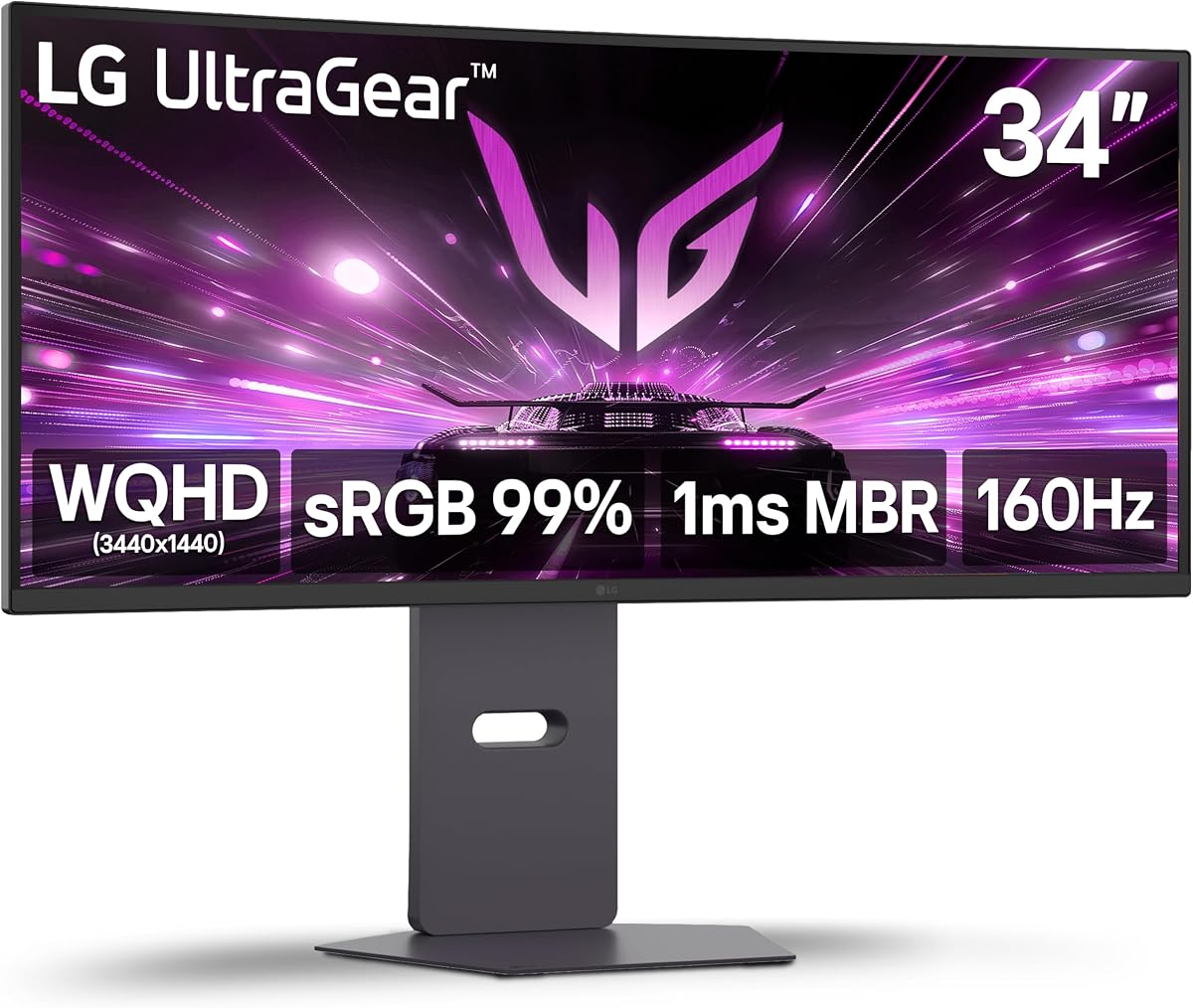
This LG UltraGear model delivers exceptional balance between resolution speed and build quality. The WQHD resolution provides ample screen space for multitasking and gaming. With a 4.5 rating, it is trusted by users for reliable high-end performance.
We may earn a commission when you buy through this link, at no additional cost to you.
Features like Dynamic Action Sync minimize input lag for sharper reactions. The ergonomic stand offers height and swivel adjustments which are rare in gaming monitors. Waves MaxxAudio ensures immersive sound without needing external speakers.
The larger footprint requires a spacious desk setup which might not fit all environments. It is also more expensive than entry-level options but offers better long-term value. The HDR10 support enhances visual fidelity significantly.
Recommended for serious gamers wanting premium features and superior ergonomics. It serves as an excellent centerpiece for a high-end gaming station.
Adjustable height and swivel settings ensure comfortable viewing angles during long sessions.
Dynamic Action Sync reduces latency for immediate response to on-screen events.
We may earn a commission when you buy through this link, at no additional cost to you.
This renewed version provides access to premium LG UltraGear features at a reduced cost. It has achieved a perfect 5.0 rating reflecting high customer satisfaction with the refurbished unit. Users appreciate the cost savings without compromising on core gaming performance.
We may earn a commission when you buy through this link, at no additional cost to you.
The specs match the new model exactly including 160Hz refresh and WQHD resolution. Amazon's renewed program ensures quality checks are performed before sale. Connectivity and stand features remain identical to the brand new unit.
Warranty coverage might be shorter compared to buying directly from the manufacturer. Additionally packaging may look different than a standard retail box. These are minor concerns for buyers focused on value and function.
Best for budget-conscious buyers seeking premium quality. It offers a reliable path to high-end gaming without the full retail price tag.
Amazon Renewed ensures the product is tested and certified to work like new.
You get the same advanced features like HDR10 and FreeSync as the new model.
We may earn a commission when you buy through this link, at no additional cost to you.
This Samsung monitor features a deep 1000R curve that wraps tightly around your vision. It is designed for total immersion making it distinct from standard flat or lightly curved screens. The 4.4 rating indicates strong approval for its unique viewing experience.
We may earn a commission when you buy through this link, at no additional cost to you.
Eye Saver Mode minimizes blue light to protect your eyes during long gaming hours. The QHD resolution ensures sharp details across the 32-inch panel. FreeSync technology syncs refresh rates to prevent screen tearing during intense gameplay.
The extreme curvature might feel too aggressive for users with flat desk setups. Additionally the stand offers basic tilt adjustment without height flexibility. These factors should be considered if ergonomics are a high priority.
Ideal for gamers who prioritize immersion above all else. Its unique curvature creates a highly engaging visual environment for single-player adventures.
This tight curvature matches the human eye field of view for maximum immersion.
Eye Saver Mode reduces blue light exposure to minimize strain during long play.
We may earn a commission when you buy through this link, at no additional cost to you.
This Sceptre monitor offers an affordable entry into 34-inch ultrawide gaming. With up to 180Hz refresh rate, it delivers smooth motion for the price. The 4.2 rating shows general satisfaction with the value proposition for budget buyers.
We may earn a commission when you buy through this link, at no additional cost to you.
Unique design elements like luminous backcover lights add a stylish touch to any setup. Dual DisplayPort inputs allow for flexible multi-device connectivity. The wide aspect ratio boosts productivity significantly compared to standard screens.
Build quality can vary slightly between units which is common with budget brands. The stand might not offer enough adjustability for ideal viewing angles. These are acceptable compromises given the price and performance benefits.
Best for users wanting an ultrawide screen without breaking the bank. It offers great speed and screen real estate for casual to competitive gaming.
The 21:9 aspect ratio provides extra horizontal space for multitasking and games.
LED backcover lights allow you to match the monitor to your room aesthetic.
We may earn a commission when you buy through this link, at no additional cost to you.
This Alienware monitor represents the pinnacle of curved gaming display technology. With a 4.6 rating, it is highly praised for its build quality and visual performance. It targets enthusiasts who demand the best in design and picture fidelity.
We may earn a commission when you buy through this link, at no additional cost to you.
The 180Hz refresh rate offers silky smooth motion ideal for competitive shooters. DCI-P3 color coverage ensures that colors are vibrant and accurate for media. Hardware-based low blue light tech protects eyes while maintaining color integrity.
The price is higher than standard monitors but matches the premium experience provided. It requires a sturdy desk due to its design and size. Users investing here expect a long-lasting and high-performing centerpiece.
Recommended for serious enthusiasts wanting top-tier features and design. It stands out as a leader in performance and visual quality in the market.
Iconic styling ensures the monitor looks great in any modern gaming setup.
95% DCI-P3 coverage delivers professional-grade color accuracy for games and media.
We may earn a commission when you buy through this link, at no additional cost to you.
This AOC model boasts one of the fastest refresh rates available in this category. With 200Hz and 0.3ms response time, it is built for competitive speed. The 4.5 rating shows strong approval from users looking for responsiveness.
We may earn a commission when you buy through this link, at no additional cost to you.
The stand includes height adjustment which is a valuable ergonomic feature. HDR Ready support adds contrast enhancement although it is not full HDR. Connectivity options include multiple HDMI and DisplayPort inputs for versatile setups.
Full HDR performance is limited compared to premium panels but adequate for the price. Achieving 200Hz requires high-end hardware which may be a barrier. Overall performance remains excellent for speed-focused gamers.
Best for competitive gamers needing maximum refresh rates. It offers a compelling mix of speed and ergonomics at a competitive price point.
0.3ms response time minimizes motion blur for clearer moving targets.
Height adjustable stand allows for better posture during extended gaming.
We may earn a commission when you buy through this link, at no additional cost to you.
Selecting the right monitor involves balancing speed, resolution, and budget. This guide breaks down the essential factors to consider for an optimal purchase.
Refresh rate determines how many frames per second the screen displays. 160Hz offers significantly smoother motion than 60Hz or 144Hz screens. For fast-paced shooters this reduces perceived lag and improves fluidity.
Look for verified 160Hz capability in DisplayPort modes for best results.
Resolution affects image sharpness and detail density. FHD is standard for 24-inch monitors while WQHD is ideal for 34-inch units. Higher resolutions require stronger graphics cards to maintain high refresh rates.
Balance resolution with your GPU capability to ensure smooth gameplay.
Curved screens wrap around your field of view for immersion. 1500R is a common standard balancing immersion and desk fit. 1000R offers deeper immersion but may not suit all desk setups.
Choose a curve radius that matches your seating distance and preference.
VA panels provide deep blacks and high contrast ratios ideal for dark scenes. IPS panels offer wider viewing angles but may have lower contrast. TN panels are fast but usually lack the curve or color quality.
VA panels are common for curved monitors and deliver great immersion.
Response time measures how quickly pixels change color to avoid ghosting. 1ms MPRT or GtG is standard for competitive gaming. Slower response times may cause blurs during fast movement.
Check for MPRT or GtG specs to ensure crisp moving images.
Inputs like DisplayPort and HDMI ensure compatibility with PCs and consoles. Ensure your ports support the desired refresh rate and resolution. HDMI 2.1 or DP 1.4 are recommended for high performance.
Verify cable specifications to avoid limiting refresh rate potential.
Stands that allow tilt, swivel, and height adjustment reduce neck strain. VESA mounting compatibility lets you use wall mounts or arms later. Good ergonomics are crucial for long gaming sessions.
Prioritize stands with height adjustability if you sit for long periods.
HDR support enhances contrast and brightness in compatible games. Color gamut coverage like sRGB or DCI-P3 affects visual richness. High quality panels provide more vivid and accurate colors.
Look for sRGB and DCI-P3 percentages for better visual fidelity.
Ensure your graphics card settings are configured to output the correct refresh rate. Check both Windows settings and GPU control panel to select 160Hz explicitly. Using lower rates may result in stuttering or less smooth motion.
Clean the screen gently with a microfiber cloth and appropriate cleaner. Avoid harsh chemicals or excessive water that might damage the curved surface. Dust buildup can affect color and contrast over time.
Adjust brightness and color settings to match your room lighting. Use eye care modes at night to reduce strain. Proper calibration helps maintain visual comfort during long gaming hours.
Yes, 160Hz provides smoother motion compared to 144Hz especially in fast-paced games. The extra frames reduce blur and make tracking targets easier. The difference is noticeable for competitive players seeking an edge.
To utilize 160Hz fully your PC must generate frames at that rate. Lower-end systems might cap at lower rates but the monitor still benefits from higher refresh support. Matching your hardware to the monitor is key.
Curved monitors wrap around your vision for better immersion and reduced eye strain. They create a more natural viewing field especially on larger screens. This helps you feel more connected to the game environment.
VA panels are ideal for curved monitors due to high contrast ratios. They produce deep blacks and vibrant colors which enhance gaming visuals. They also support curving better than other panel types.
Yes, curved monitors offer wider screen real estate suitable for multitasking. They reduce eye movement when switching between windows. This boosts efficiency for work or creative projects alongside gaming.
DisplayPort is typically preferred for high refresh rates and higher resolutions. It supports more bandwidth than standard HDMI versions. Always check cable specs to ensure they support your target refresh rate.
The ten monitors listed provide diverse options from budget to premium categories. Each offers unique strengths such as resolution, speed, or ergonomic features. Selecting depends on your specific needs and available budget.
Prioritize refresh rate and response time if competitive gaming is your focus. For immersive single-player experiences curvature and resolution take precedence. Always balance performance with physical ergonomics for comfort.
Prices and availability fluctuate so verify current details before purchasing. Checking user reviews can provide further insights into long-term reliability. We hope this guide helps you find your ideal gaming display.