
M.2 Heatsink Cooler 2280 SSD
4.6Editor score
Double-sided clip design
Aluminum alloy body
Universal fit standard
This guide compares the top M2 2280 SSD Heatsink models for 2026, evaluating cooling performance, build quality, and compatibility to help you choose the right
M.2 NVMe SSDs are incredibly fast but generate significant heat during heavy workloads. Without proper cooling, they throttle performance to protect themselves. A dedicated heatsink is essential for maintaining peak speeds and ensuring long-term drive health in your PC or console.
We evaluated ten leading M2 2280 SSD heatsink options based on thermal efficiency, material quality, and ease of installation. Our analysis covers budget-friendly aluminum fins, advanced heatpipe designs, and active cooling solutions to help you find the perfect match for your setup.
Each product pick highlights key specifications, pros, cons, and ideal use cases. You will see how different designs handle thermal throttling and which ones offer the best value. Prices and availability change frequently so verify current details before purchasing to ensure compatibility.
4.6Editor score

4.7Editor score

4.7Editor score
Compare the top ten M2 2280 SSD Heatsink models side by side to evaluate their cooling capabilities and design features. This table helps you quickly identify which option matches your specific storage and cooling requirements.


The be quiet! MC1 Pro stands out as a top-tier solution for cooling high-speed NVMe drives. Its integrated heatpipe ensures heat moves quickly from the controller to the fins keeping temperatures low under load.
We may earn a commission when you buy through this link, at no additional cost to you.
Crafted from premium aluminum with a matte black finish this heatsink matches high-end builds perfectly. It supports both single and double-sided drives making it versatile for various modern SSD configurations without needing extra spacers.
While the price is higher than basic fins the performance gain is worth it for heavy users. The mounting system is straightforward and ensures a tight fit that maximizes thermal transfer efficiency over time.
Buy this if you want reliable cooling for a fast drive in a stylish PC. It is ideal for gamers and creators who need sustained speeds without worrying about drive throttling during intense tasks.
The heatpipe technology rapidly spreads heat across the fins preventing hotspots that cause throttling.
Durable aluminum construction with a stylish matte finish ensures longevity and visual appeal.
We may earn a commission when you buy through this link, at no additional cost to you.
This affordable heatsink provides essential cooling for budget builds without breaking the bank. It features a double-sided clip design that holds the SSD firmly against the aluminum body for direct contact.
We may earn a commission when you buy through this link, at no additional cost to you.
Made from aluminum alloy with anodized treatment it resists corrosion and looks good in most cases. It includes thermal silicone pads that help fill gaps ensuring efficient heat transfer from the drive.
It does not have advanced features like heatpipes but it lowers temps significantly compared to no cooling. The clip mechanism is stable and easy to snap into place without needing extra tools or screws.
Perfect for budget PC gamers or PS5 owners needing a simple fix. If you want to prevent throttling on a mid-range drive without spending much this is a practical and effective choice.
Designed to fit standard 2280 form factors and even works well inside PlayStation 5 consoles.
Delivers solid temperature reductions at a fraction of the cost of premium cooling solutions.
We may earn a commission when you buy through this link, at no additional cost to you.
Thermalright brings its cooling expertise to SSDs with this high-performance heatsink. It features a large fin array and advanced thermal pads that transfer heat very efficiently to the aluminum surface.
We may earn a commission when you buy through this link, at no additional cost to you.
The design includes a reverse gravity heat pipe which moves heat quickly regardless of orientation. With dozens of fins the total surface area is maximized to dissipate heat into the surrounding air effectively.
Installation uses adjustable screws to ensure tight contact for different drive thicknesses. While larger than basic models it provides top-tier cooling that maintains maximum read write speeds under continuous heavy workloads.
Choose this if you run demanding applications or games that tax your SSD continuously. It is best for users who need the absolute best passive cooling and want to ensure optimal drive longevity.
A high fin count creates a large surface area to release heat into the air efficiently.
Nano thermal pads ensure minimal resistance between the SSD and the heatsink surface.
We may earn a commission when you buy through this link, at no additional cost to you.
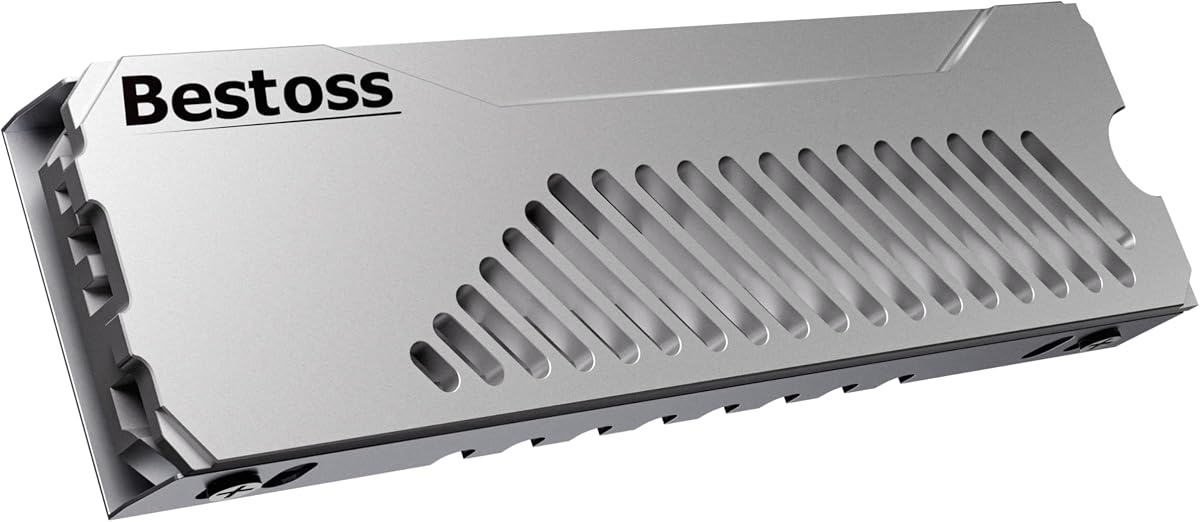
This Bestoss heatsink uses a hollowed-out top design to help heat move away from the drive. The aluminum body is lightweight which helps keep airflow in your case unobstructed while still providing coverage.
We may earn a commission when you buy through this link, at no additional cost to you.
It includes silicone thermal pads that fill the microscopic gaps between the drive and the metal. This contact is crucial for passing heat to the fins where air can cool it down effectively.
The matte texture looks nice and resists fingerprints making it a decent cosmetic fit for modern cases. While it may not match premium models it offers a solid middle ground for standard usage needs.
Ideal for builders who want a sleek look without spending much. It works well for general computing and light gaming where extreme cooling performance is not the main priority.
The lightweight hollow design ensures that cooling air flows freely around the case components.
A minimalist deep matte finish helps the heatsink blend seamlessly into dark PC builds.
We may earn a commission when you buy through this link, at no additional cost to you.
Sabrent designed this heatsink to match their Rocket SSDs but it works with others too. It combines copper and aluminum for a balanced approach to heat conduction and surface area dissipation.
We may earn a commission when you buy through this link, at no additional cost to you.
The kit comes with tape screws and a screwdriver making installation easy for most desktop PC users. It supports both single and double-sided drives so you do not need to worry about height clearance issues.
Copper helps draw heat away from the controller quickly while aluminum spreads it to the fins. This hybrid method offers reliable performance for daily tasks and gaming without excessive cost or complexity.
Great for Sabrent users or anyone needing a straightforward desktop cooling solution. It provides consistent thermal protection and includes everything needed for a secure installation right out of the box.
Combining copper and aluminum optimizes both heat absorption and dissipation in one unit.
All necessary mounting hardware is included so you can install the cooler immediately.
We may earn a commission when you buy through this link, at no additional cost to you.
This set offers five heatsinks which is perfect for workstations or multi-drive builds. Each unit uses an aluminum fin design to provide adequate cooling for standard desktop usage scenarios.
We may earn a commission when you buy through this link, at no additional cost to you.
Installation is tool-free using silicone elastic bands that press the heatsink onto the drive. This method is quick and allows you to swap drives without worrying about stripping screws or losing parts.
The included thermal pads have decent conductivity to bridge the gap between the SSD and metal. For most users this keeps temperatures within safe ranges preventing slowdowns during sustained read write operations.
Buy this if you need to cool multiple drives at a low cost per unit. It is an efficient way to ensure all your storage remains cool without buying individual cooling solutions separately.
A five-pack allows you to cool several drives at once for workstations or NAS builds.
Silicone elastic bands secure the heatsink firmly without requiring any screwdrivers or tools.
We may earn a commission when you buy through this link, at no additional cost to you.
Arctic is known for cooling quality and this M2 Pro fits both PCs and PlayStation 5 consoles. It uses a click mechanism to secure the drive eliminating the need for screws or rubber bands.
We may earn a commission when you buy through this link, at no additional cost to you.
The heatsink has additional mass which helps absorb heat spikes during intense gaming sessions. TP-3 thermal pads are included to ensure excellent thermal contact between the SSD and the cooler.
Since it meets Sony specifications it is safe for use inside the PS5 to improve storage cooling. The design is simple but effective ensuring your drive stays cool without complicating the installation process.
Ideal for PS5 owners and PC users wanting a hassle-free install. The click fit ensures the cooler stays in place even if you move your console or tower around regularly.
Fully meets Sony specifications so you can safely expand your console storage with cooling.
The built-in click mechanism holds the heatsink firmly in place without any screws or tape.
We may earn a commission when you buy through this link, at no additional cost to you.
Thermalright leverages its 20 years of cooling research to deliver this dependable aluminum cooler. It covers both sides of the drive for uniform cooling and uses screws for a secure fit.
We may earn a commission when you buy through this link, at no additional cost to you.
The sandblasted finish looks good and increases surface area slightly for better heat transfer. Thermal conductivity film helps bridge any gaps between the components to improve overall cooling efficiency.
This model is designed to fit standard 2280 drives in most desktop motherboards without issue. It provides strong cooling performance that prevents throttling during large file transfers or gaming.
A solid choice for desktop users who want proven brand reliability. It balances price and performance well ensuring your storage remains cool and responsive during heavy usage periods.
Covering both sides of the drive ensures heat is drawn away evenly from all components.
Sandblasted aluminum adds a premium look and helps slightly increase heat dissipation.
We may earn a commission when you buy through this link, at no additional cost to you.
This Pro model uses an 8mm pure copper heat pipe to move heat away from the drive core. The aluminum body spreads this heat across the fins to keep temperatures low and stable.
We may earn a commission when you buy through this link, at no additional cost to you.
Double layer silicone sheets help ensure the heat pipe contacts the SSD surfaces tightly. The silver gray color matches many PC builds while offering solid cooling performance for gaming.
It fits standard 2280 drives and works with some 2260 or 2242 sizes too. The construction feels solid and the pipe design is efficient at managing heat spikes during intensive read write tasks.
Good for users who want pipe cooling at a reasonable price. The copper core transfers heat faster than solid aluminum ensuring your drive maintains top speeds under sustained loads.
The 8mm copper pipe rapidly transfers heat from the SSD controller to the cooling fins.
Double layer pads ensure consistent thermal contact to maximize the cooling efficiency.
We may earn a commission when you buy through this link, at no additional cost to you.
This cooler uses active cooling with a high-speed micro blower fan to push air through the fins. It includes a copper heat pipe to move heat from the drive to the aluminum heatsink body.
We may earn a commission when you buy through this link, at no additional cost to you.
The stainless steel backplate adds rigidity to help with contact and overall stability. The small fan operates silently despite its high RPM making it a good option for low noise builds.
Active cooling ensures that heat is physically moved out rather than just stored in a block. This is beneficial for cases with poor airflow or drives that run hot even with passive cooling.
Choose this if you want maximum cooling assurance and have room for the wiring. It is a reliable solution for keeping drives cool when standard passive heatsinks are not enough.
The micro fan actively moves air through the fins to remove heat faster than passive cooling.
A reinforced steel backplate ensures structural stability and better thermal contact.
We may earn a commission when you buy through this link, at no additional cost to you.
Selecting the right heatsink involves considering material quality, cooling method, and compatibility with your case or console.
Most heatsinks use aluminum for its balance of weight and thermal conductivity. Some premium models add copper heat pipes to draw heat away from the controller faster. Look for alloys that offer good heat transfer without adding too much bulk.
Prioritize aluminum alloys for general use and copper pipes for heavy workloads or high-end gaming builds.
Passive cooling relies on surface area and airflow to dissipate heat silently. Active cooling adds a small fan to force air through the fins which is better for hot environments. Decide based on your noise tolerance and case airflow.
Choose passive for silent builds and active if your case has limited natural airflow around the motherboard.
Mounting styles range from clips and screws to rubber bands. Screwed mounts are the most secure and ensure consistent contact pressure. Bands are easier but may loosen over time or vibrate loose.
Look for mounts that use screws or robust clips for long-term reliability and stable thermal contact.
Ensure the heatsink fits the 2280 form factor and matches your case or console layout. Some models are certified for PS5 installation while others are PC specific. Check if it clears your motherboard slots or other components.
Verify exact dimensions and certifications especially if installing in compact cases or consoles like PS5.
High conductivity pads fill microscopic gaps between the SSD and the heatsink. Quality pads with higher W/mK ratings transfer heat more efficiently. Avoid cheap pads that compress poorly or dry out quickly.
Check for high-quality silicone pads with good thermal conductivity to maximize heat transfer.
Larger surface areas with more fins help dissipate heat into the surrounding air. Heatsinks with grooves or honeycomb patterns often perform better than flat blocks. More fins mean better air contact and cooler drives.
Opt for designs with more fins or grooves to increase the total cooling surface area.
Anodized or sandblasted finishes protect the aluminum from corrosion and add durability. A sturdy build ensures the fins do not bend during installation or transport. Durability helps the heatsink last as long as your SSD.
Choose units with robust finishes and solid construction to ensure long-term performance and look.
Prices vary from budget options to premium active coolers. Determine your budget and cooling needs to find the best value. Higher prices often buy better materials and mounting but basic models work well for average use.
Balance cost with your actual cooling needs to avoid overspending on features you might not need.
Before installation power down your computer and disconnect it from the wall outlet. Ground yourself to prevent static damage to the SSD. Remove the existing drive from the M.2 slot carefully.
Clean the SSD surface with a soft brush or air to remove dust. Apply the thermal pad carefully to the controller and flash chips ensuring it covers the contact areas evenly.
Attach the heatsink using the provided screws or clips ensuring even pressure. Tighten screws in a cross pattern to secure the heatsink flat against the drive.
Yes especially for NVMe SSDs which generate significant heat under load. Without cooling they can throttle performance and reduce lifespan over time. A heatsink helps maintain peak speeds and protects your data.
Yes but the heatsink must meet Sony's height and thermal requirements. Look for models explicitly listed as PS5 compatible to ensure they fit inside the console expansion slot safely.
Single sided heatsinks cool only the top of the drive. Double sided ones cover both sides to cool all components. Double sided is better for drives with memory or controllers on both sides.
Thermal pads bridge the air gap between the SSD and the metal block. They conduct heat from the chips to the fins allowing the heatsink to transfer heat to the air effectively.
Using a heatsink usually does not void warranty if installed correctly. Some manufacturers sell their own branded coolers. Check your drive warranty terms but most allow third-party cooling solutions.
Most common SSDs use the 2280 form factor meaning 22mm wide and 80mm long. Ensure your heatsink is designed for 2280 to fit correctly in your motherboard slot.
Use compressed air to blow dust out from between the fins. Do not use water or liquid cleaners on the heatsink. Clean gently to avoid bending the thin fins and damaging the mount.
Active cooling with fans is more effective for removing heat quickly. Passive cooling is silent and simpler. Use active if airflow is poor or if you need the lowest possible drive temperatures.
We reviewed ten top M2 2280 SSD Heatsink models ranging from budget picks to premium solutions. The be quiet! MC1 Pro offers the best overall balance while the basic 2280 cooler is great for budget builds.
Prioritize compatibility with your case or console and look for secure mounting options. A high-quality thermal pad and solid material choice are essential for reliable long-term cooling performance.
Prices and availability can change so check current details before purchasing. Investing in a good heatsink ensures your SSD runs cool and maintains high speeds over years of use.