
VTech SN5147 Amplified Corded/Cordless Senior Phone
4.0Editor score
50dB Audio Assist
22-Minute Recording
Photo Speed Dial
This guide compares the top 10 best Answering Machines for Seniors in October 2026, evaluating features like large buttons, loud ringers, and simple setups.
Finding the right communication tool is essential for seniors who want to stay connected with family and friends. Modern Answering Machines for Seniors offer simple interfaces that make checking messages and taking calls effortless without confusion.
We evaluated ten top-rated landline and cordless systems based on ease of use, sound clarity, and accessibility features. Our comparison highlights devices with big buttons, loud ringers, and reliable message storage to suit various home environments.
Each pick includes detailed pros and cons to help you choose the best fit for your specific needs. Please note that product prices and availability may change over time, so checking current listings is always recommended.
4.0Editor score
4.4Editor score
4.1Editor score
This side-by-side comparison highlights key specifications across all ten selected models to help you quickly identify the system that best matches your communication needs and home setup.


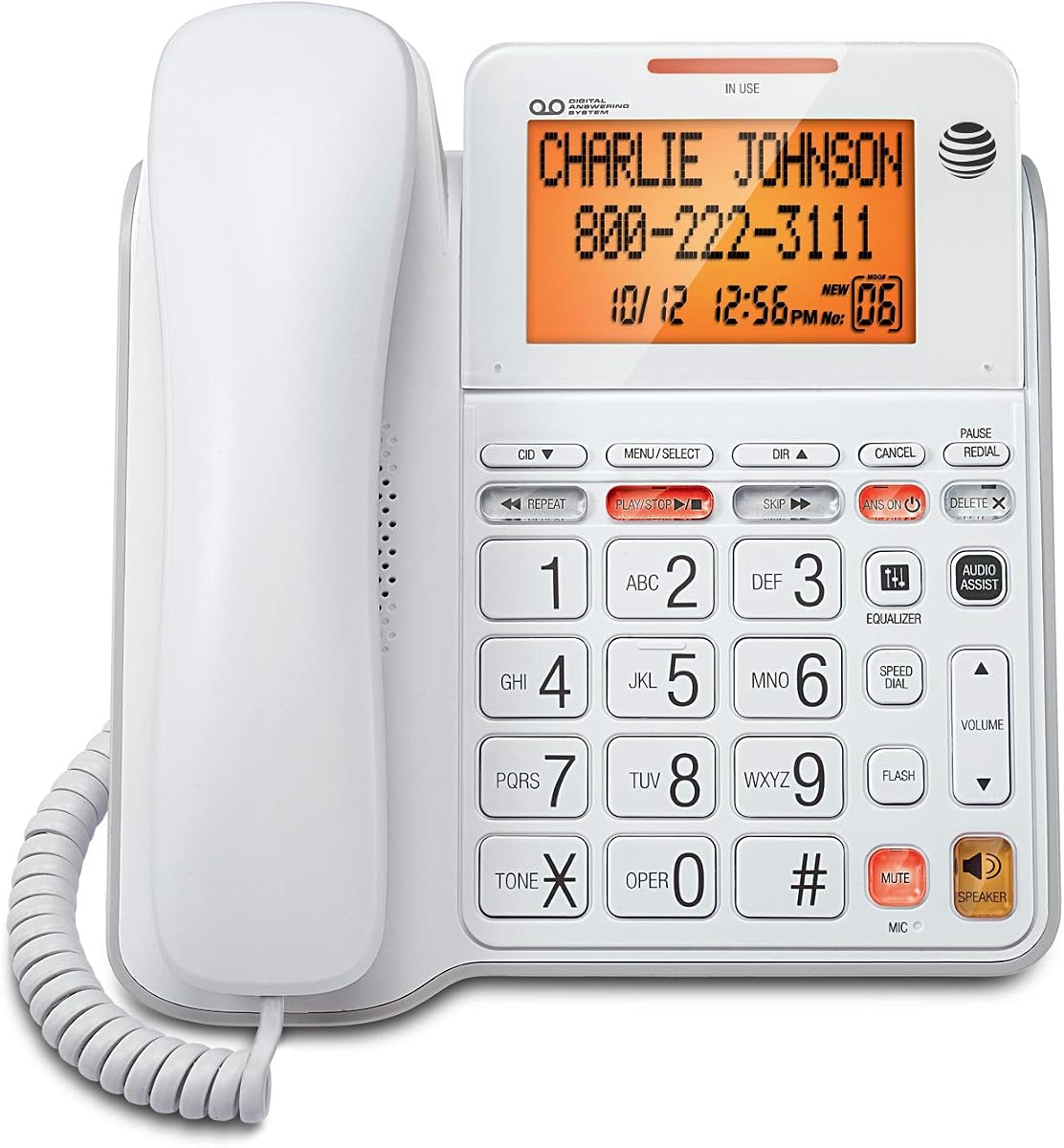
The AT&T CL4940 is a robust corded phone designed with seniors in mind. It holds a solid 4.4 rating due to its reliable performance and user-friendly features like a large tilt display and built-in digital answering system.
We may earn a commission when you buy through this link, at no additional cost to you.
This device stands out for its ability to work during power outages, ensuring you stay connected even when the lights go out. The large tilt display shows caller ID and call history clearly, reducing eye strain for users with vision challenges.
While the answering system requires batteries for full functionality, this is a minor trade-off for the convenience of not needing a separate machine. The 50-name call log helps screen calls effectively, and the speakerphone allows for comfortable hands-free conversations.
If you prioritize reliability and ease of use in a traditional phone setup, this model is an excellent choice. It combines essential features like caller ID and message storage without overwhelming complexity, making it ideal for daily home use.
The corded design ensures basic calling works even when the power fails, which is crucial for seniors who rely on phones for emergencies.
The adjustable backlit LCD screen provides a clear view of caller information from any angle, helping users identify who is calling before picking up.
We may earn a commission when you buy through this link, at no additional cost to you.
This cordless system offers modern convenience with a 4.2 rating. It features a digital answering machine capable of recording up to 22 minutes of messages, making it easy to manage incoming calls without missing important details.
We may earn a commission when you buy through this link, at no additional cost to you.
The standout feature is the smart call blocker that automatically stops robocalls before they ring. The handset announces the caller's name, allowing users to screen calls effectively. The large 2-inch screen and lighted keypad are particularly helpful for those with vision impairments.
While the audio assist helps amplify voices, some users might find the initial setup of blocking features slightly technical. However, once configured, the system provides significant protection against unwanted calls and improves daily communication quality.
This model is perfect for seniors who want a cordless phone with advanced security features. The intercom function also allows easy communication between handsets, which is useful in larger homes or multi-room setups.
The automatic robocall blocking prevents nuisance calls from interrupting your day, offering peace of mind without manual intervention.
High-contrast text on the extra-large screen makes reading caller IDs and call history records effortless even in low-light conditions.
We may earn a commission when you buy through this link, at no additional cost to you.
The VTech VG232 is designed specifically with seniors in mind, earning a 4.3 rating for its accessibility features. It includes a 14-minute digital answering machine and full-duplex speakerphone for natural conversations without cutting out.
We may earn a commission when you buy through this link, at no additional cost to you.
Its M4/T4 hearing aid compatibility ensures users with hearing devices can communicate clearly without interference. The oversized buttons and high-contrast backlit display make dialing and reading numbers simple in any lighting condition, reducing frustration.
While it stores fewer contacts than some models, this simplicity helps avoid confusion. The absence of monthly fees for message storage is a significant advantage, keeping costs low while maintaining reliable functionality for everyday communication needs.
If you need a straightforward phone that works well with hearing aids, this is a strong choice. It balances essential features like caller ID and messaging with a design that prioritizes user comfort and ease of operation.
The M4/T4 rating ensures clear audio for users with hearing aids, preventing static and noise during conversations.
Full-duplex technology allows both parties to speak simultaneously, making hands-free calls feel more like face-to-face chats.
We may earn a commission when you buy through this link, at no additional cost to you.
This single-handset model offers the same robust features as the two-handset version but at a lower price point. It holds a 4.2 rating for its long range and effective call blocking system that filters out unwanted calls automatically.
We may earn a commission when you buy through this link, at no additional cost to you.
The handset announces caller IDs, allowing users to screen calls before answering. With a large 2-inch screen and lighted keypad, dialing is easy even in the dark. The full-duplex speakerphone makes hands-free calls comfortable and clear.
Some users may find the setup of call blocking features slightly complex, but the long-term benefits outweigh this initial hurdle. It provides solid protection against telemarketers while keeping essential communication features accessible.
This is an excellent choice for single-person households or those who only need one main phone station. It combines modern security with traditional ease of use, ensuring seniors stay safe and connected without unnecessary bulk.
The unique antenna design ensures the signal reaches throughout the entire home, preventing dropped calls in corners or distant rooms.
Audio assist technology temporarily boosts volume and clarity, helping users hear conversations more clearly during difficult conditions.
We may earn a commission when you buy through this link, at no additional cost to you.
The Panasonic system stands out with its 2-way recording feature, allowing users to save important conversations for later review. It also includes a one-ring scam alert to protect against common phone scams targeting seniors.
We may earn a commission when you buy through this link, at no additional cost to you.
The illuminated keypad makes dialing easy in the dark, while the speed dial feature provides quick access to favorite contacts. Users appreciate the reliable connection quality typical of Panasonic products, which often perform well in noisy environments.
While recording calls can be useful, users must be aware of consent laws in their area. Additionally, battery life might require frequent charging for heavy users. However, the security features make this a top contender for safety-conscious buyers.
If security and conversation recording are priorities, this model offers unique advantages. It provides a balance of traditional phone reliability with modern safety features that protect against scams and unwanted calls effectively.
Record both sides of a call to keep track of important details or instructions shared during important conversations.
The one-ring scam alert displays a confirmation screen when returning a suspicious call, helping you avoid falling for tricks.
We may earn a commission when you buy through this link, at no additional cost to you.
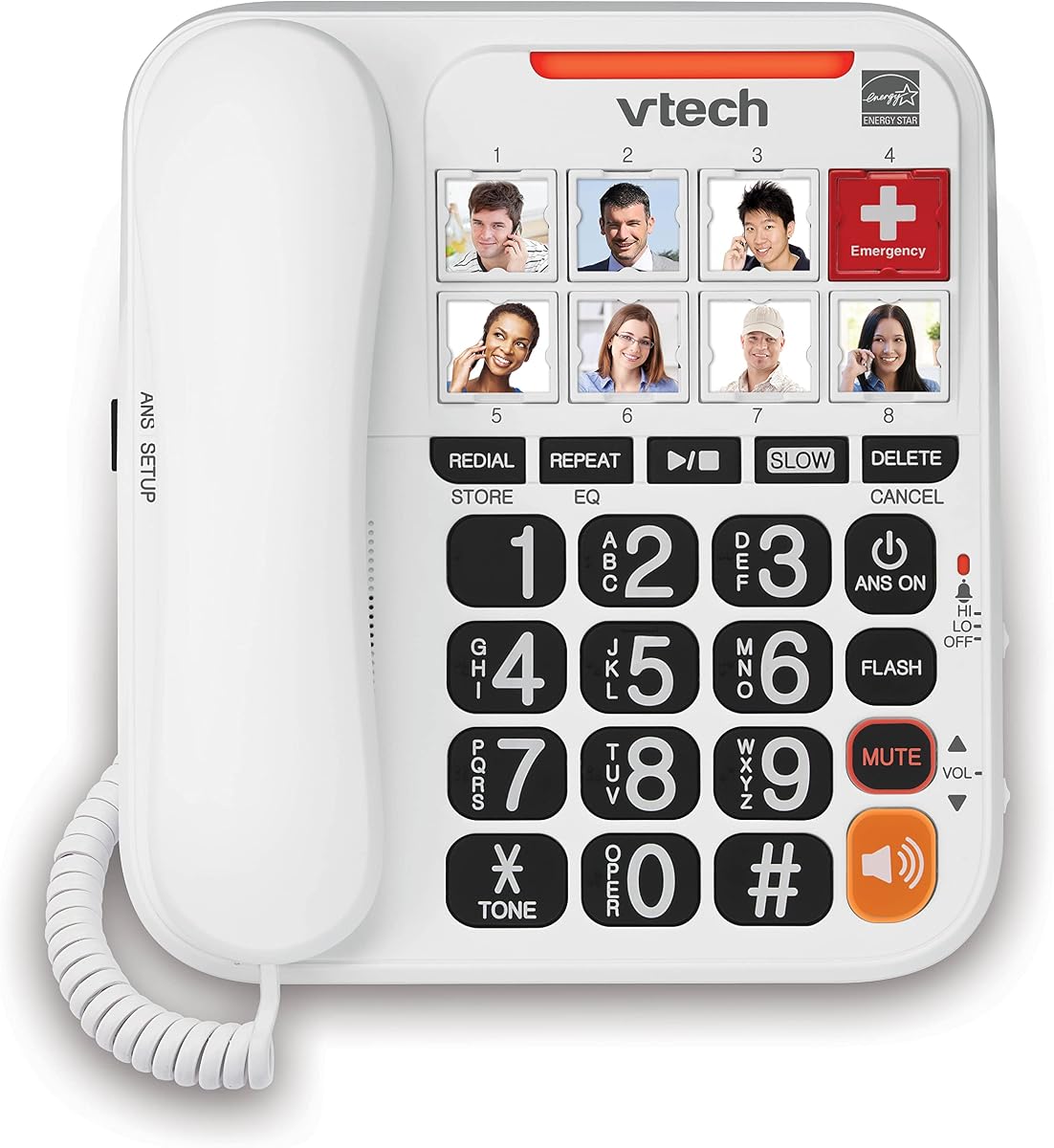
This amplified phone is designed specifically for seniors with hearing loss, earning a 4.1 rating for its powerful audio features. It includes an 8-photo speed dial system that helps those with memory support by visually identifying contacts.
We may earn a commission when you buy through this link, at no additional cost to you.
The 90dB ringer ensures you never miss a call, even with the TV on or when away from the phone. Visual alerts flash when a call comes in, adding an extra layer of notification for hard-of-hearing users.
While the price is higher than basic models, the specialized features justify the cost for those who need extra volume and clarity. The full-duplex speakerphone allows for comfortable conversations without holding the heavy handset.
For seniors who need significant audio assistance and memory aids, this is a standout choice. It prioritizes accessibility over sleek design, ensuring communication remains effortless and clear for those with specific hearing needs.
Attach photos to speed dial keys so users can recognize friends and family members quickly by sight rather than just by number.
Flashing indicators provide a visual cue for incoming calls, ensuring no calls are missed even when the ringer volume is lowered for comfort.
We may earn a commission when you buy through this link, at no additional cost to you.
This hybrid system offers the best of both worlds with a reliable corded base and a cordless handset for mobility. It has a 4.0 rating and is built specifically for seniors who need both stability and freedom to move around.
We may earn a commission when you buy through this link, at no additional cost to you.
The 50dB audio assist boosts incoming volume for clearer hearing during calls. With photo dial slots, you can quickly reach loved ones with one touch. The visual ring indicator ensures calls aren't missed in noisy environments.
The cordless handset depends on battery charging, which might be a hassle for some. However, the base remains functional during power outages, keeping you connected when it matters most. It expands up to four handsets for larger households.
If you need mobility without sacrificing reliability, this model fits well. It balances essential amplified features with modern convenience, making it a practical choice for seniors who move frequently within their home.
Enjoy the reliability of a corded base during power outages while using the cordless handset for convenience around the house.
Add up to three extra handsets to cover more rooms, ensuring the entire family stays connected without additional wiring.
We may earn a commission when you buy through this link, at no additional cost to you.
Designed with arthritis and vision needs in mind, this model features oversized buttons and an extra-large display. It holds a 4.4 rating, praised by users who struggle with small keys or fine motor control on standard phones.
We may earn a commission when you buy through this link, at no additional cost to you.
The tilt display reduces strain by allowing you to adjust the angle for better viewing. Audio assist helps boost volume when needed, and the speakerphone supports hands-free conversation. It records up to 25 minutes of messages clearly.
While it lacks modern call-blocking features, its primary goal is accessibility. The sturdy build might feel heavy for some, but the ergonomic design supports easier dialing. It is a dependable choice for those prioritizing physical usability.
This phone is ideal for seniors with physical limitations who need a straightforward device. It simplifies the calling process through thoughtful design choices that remove common barriers to communication.
Large buttons require less precision to press, making dialing comfortable and reducing finger strain for users with joint pain.
Adjusting the screen angle helps reduce eye strain, ensuring caller ID and time are visible clearly from any seating position.
We may earn a commission when you buy through this link, at no additional cost to you.
For larger homes, this three-handset system provides excellent coverage and features. It shares the same high-quality specs as other AT&T models but adds extra units for whole-home communication. Users praise its reliable range and blocking capabilities.
We may earn a commission when you buy through this link, at no additional cost to you.
Every handset features a large screen and lighted keypad, making use simple across the house. The intercom function allows quick communication between units without ringing the main line. This is a premium choice for families needing multiple phone points.
The cost is higher, but you avoid buying separate phones later. Charging three devices can be a chore, but the system handles it reliably. Blocking robocalls works seamlessly on all handsets, ensuring consistent protection everywhere.
This is the best pick for households needing multiple phones with senior-friendly features. It ensures everyone in the home has access to clear communication and protection from unwanted calls without needing different setups.
Three handsets ensure no matter where you are in the house, you can reach for a phone without needing to walk far.
Use the intercom to talk between handsets instantly, perfect for quick messages between family members without dialing.
We may earn a commission when you buy through this link, at no additional cost to you.
This unit is for those who already have a phone and just need a reliable answering machine. It stores up to 99 messages with time stamps, helping users know exactly when calls arrived without confusion or manual logging.
We may earn a commission when you buy through this link, at no additional cost to you.
Remote access allows checking messages from any touch-tone phone, which is great for travelers or busy individuals. The message guard memory protection ensures recordings stay safe even during power outages. It offers ample capacity for homes needing more than standard minutes.
While it lacks a handset, it integrates seamlessly with existing landline setups. It works well for those who prefer simplicity in their hardware. The multilingual prompts make it accessible for non-English speaking household members.
Choose this if you need pure voicemail capacity without a new phone. It is a robust solution for managing communications reliably, ensuring you never miss critical calls thanks to high storage and accessible playback features.
Store up to 99 messages without needing to delete old ones, ideal for households with high call volumes or busy periods.
Listen to messages from any phone number, giving you flexibility to check important updates while away from home.
We may earn a commission when you buy through this link, at no additional cost to you.
Selecting the right answering machine involves more than just checking the price. You must consider how easy it is to operate, how well it handles volume needs, and whether it fits your home setup.
Look for devices with simple menus and large buttons. Seniors often struggle with complex digital setups, so a straightforward interface ensures they can check messages without calling for help.
Choose models with clear audio prompts and large displays to minimize confusion during daily use.
Many seniors experience hearing loss, making high-quality audio crucial. Devices with audio boost or adjustable volume allow users to hear incoming calls and messages more clearly.
Prioritize models rated for hearing aid compatibility to avoid interference and ensure clarity during conversations.
A large, backlit display helps users read caller IDs and message counts easily. This feature reduces eye strain and ensures critical information is visible even in low light.
Opt for screens with high contrast and adjustable tilt to accommodate various viewing angles.
Check how many minutes of messages the system can store. Some units hold only 10 minutes while others offer hours of space. This determines how often you need to delete old messages.
Select a model with ample storage to avoid losing important calls if you are busy.
Consider whether the phone works during power outages. Corded units often stay functional during blackouts, while cordless ones rely on batteries. A backup battery ensures you remain reachable in emergencies.
Look for systems that retain messages even when the main power is interrupted.
Robocalls are a major nuisance for seniors. Systems that offer automatic call blocking or caller ID announcement help screen unwanted calls before they disrupt your day.
Choose models with dedicated buttons for blocking numbers to simplify the process of managing contact lists.
Corded phones offer reliability and do not need charging, which some seniors prefer. Cordless units provide mobility within the home but require regular battery maintenance.
Decide based on whether you need a fixed station or the ability to move around the house while talking.
Answering machines range from budget-friendly basic units to advanced systems. Evaluate the cost against the features you actually need rather than paying for extras you will not use.
Invest in a model that balances essential accessibility features with affordability for long-term satisfaction.
First, set up the outgoing message by pressing the record button and speaking clearly. Keep your message short and welcoming so callers know what to expect when they leave a message for you.
Regularly check your messages to keep the storage space available. Delete old messages promptly to ensure the system can record new ones without interruption, especially important if you use the machine frequently.
Keep the phone in a location where you can easily hear the ringer. Clean the buttons and display with a dry cloth to prevent dust from interfering with touch sensitivity, and change batteries regularly for cordless models.
No, regular phones can work, but specialized models offer easier features like bigger buttons and louder ringers. These enhancements make it much simpler for seniors to manage messages without frustration.
Usually, you plug the device into the phone line and power outlet. Then, press the record button to set your outgoing message and adjust the answer mode settings to automatic so it picks up after a few rings.
Most models have memory protection that prevents data loss during power outages. If you lose a recording, it may be due to battery depletion. Replace the batteries immediately to avoid future data loss.
Yes, many modern units come with call blocking technology that filters out suspected spam before they ring through. This feature helps seniors avoid scams and unwanted interruptions effectively.
Recording times vary from 10 minutes to several hours depending on the model. Higher-end units typically offer more space, so you do not need to delete messages frequently to make room for new ones.
Battery replacement is simple on most models. The battery compartment is usually located on the back of the base unit or handset. Using standard AA batteries makes this an easy task for anyone.
Many models are specifically designed to be hearing aid compatible. Look for M4/T4 ratings on the device specifications to ensure there is no interference when using your personal hearing aids.
We reviewed ten top Answering Machines for Seniors ranging from basic corded units to advanced cordless systems. Our top picks include the AT&T CL4940 for reliability and the VTech SN1127 for those needing extra audio support.
When choosing, focus on features that match the user's specific needs such as volume boost, button size, and ease of setup. A simple interface is often more valuable than complex tech that goes unused.
Prices for these devices can fluctuate, so it is wise to check current listings before making a final decision. Ensure you buy from a trusted retailer to receive warranty support and reliable customer service.