
Bluetooth 1D&2D Barcode Scanner 3-in-1
4.3Editor score
Affordable pricing option
2.4G and Bluetooth modes
130000 code storage
This guide compares the top barcode scanner for iPad models across connectivity, battery life, and scanning accuracy to help professionals choose the best tool
Finding the right barcode scanner for iPad can transform how you manage inventory, track assets, or process sales on the fly. A good device should connect reliably, read codes quickly, and last through long shifts without draining your tablet battery.
We evaluated ten top-rated scanners based on compatibility, scanning speed, battery endurance, and real-world usability. Our comparison looks at Bluetooth performance, 2D capabilities, and ergonomic design to ensure you get a tool that fits your specific workflow demands.
Each pick below highlights key strengths and potential trade-offs so you can decide which model matches your needs. Please note that prices and availability change frequently, so check the current listing before making your final purchase decision today.
4.3Editor score
4.9Editor score

4.9Editor score
The following table provides a side-by-side comparison of the ten selected barcode scanners for iPad. Each entry includes key specifications like connection type, battery capacity, and scanning capabilities to help you quickly identify the right fit for your mobile operations.


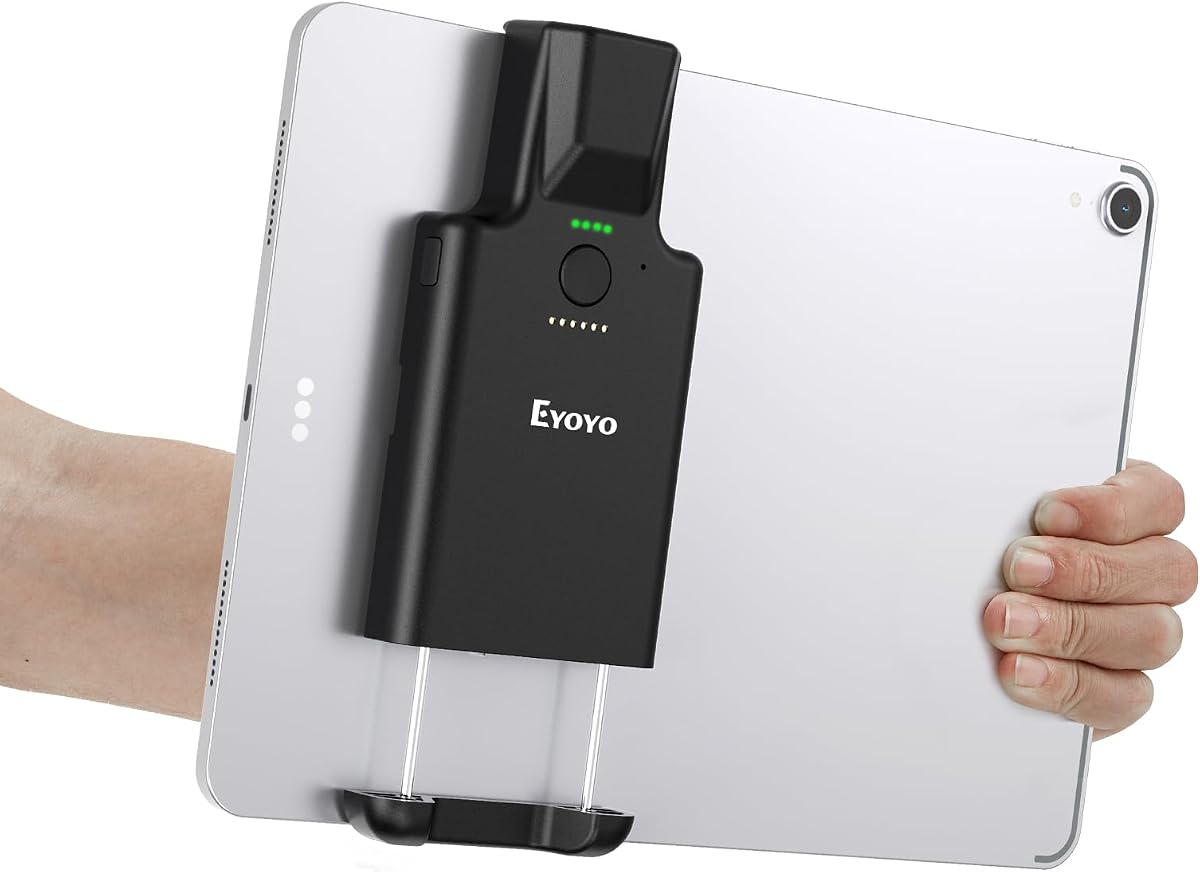
The Eyoyo 1D 2D Portable Bluetooth Scanner stands out as the top choice for iPad users. With a 4.9 rating, it combines reliable connectivity with unique features designed for tablet integration. Its ability to read both 1D and 2D barcodes makes it versatile for inventory, retail, and asset tracking tasks.
We may earn a commission when you buy through this link, at no additional cost to you.
This scanner features an upgraded retractable clip that fits iPads and tablets between 5.7 and 7.1 inches. This design keeps your device steady while you scan, reducing the need for a second hand or stand. The 3000mAh battery supports up to 30 hours of continuous scanning and up to 30 days of lighter use. LED indicators clearly show remaining charge levels so you can manage power effectively.
While powerful, the scanner does not support 2.4G wireless, limiting connection options to Bluetooth or USB. It is also slightly heavier than pocket-sized units, which may matter if portability is your top priority. However, for mobile workflows where tablet stability and long endurance are key, these trade-offs are minor.
If you need a scanner that works seamlessly with an iPad and handles mixed code types, this model is the best fit. It is ideal for retail staff, warehouse managers, and librarians who use tablets to manage data. The combination of clip convenience, strong battery, and reliable 2D scanning earns it our Editor's Choice award.
The retractable clip allows you to attach the scanner directly to your iPad, freeing up your hands for items or other tasks during busy shifts.
With a 3000mAh battery, you can scan thousands of items without worrying about recharging, supported by LED indicators to track remaining charge accurately.
We may earn a commission when you buy through this link, at no additional cost to you.
The PecuMecu TM-10B offers excellent value for iPad users who need both 1D and 2D scanning without spending much. Rated 4.3 stars, it supports three connection modes and handles offline storage well. It is an ideal pick for small businesses or personal use where cost matters more than premium materials.
We may earn a commission when you buy through this link, at no additional cost to you.
This scanner supports 2.4G wireless, Bluetooth, and USB wired connections, giving you flexibility depending on your environment. Its internal memory can store up to 130,000 barcodes, useful if you work in areas with weak signals. The 2600mAh battery supports over nine hours of continuous use. It scans quickly at up to 350 times per second.
The build is functional but basic compared to higher-end models. It lacks extra accessories like a clip or charging dock. However, for tasks focused on decoding speed and cost, these omissions do not hinder performance. It reads damaged and low-contrast codes reliably thanks to CMOS imaging.
Choose this scanner if you want 2D capability at a low price and need multiple connection options. It is well suited for retail, warehouse, or personal inventory management on iPad or iPhone. The offline storage and fast scan speed make it a practical tool for mobile data collection.
This model delivers reliable 1D and 2D code reading including PDF417 and Data Matrix at a price point that fits tight budgets.
Store up to 130,000 scanned codes locally to continue working in low connectivity zones and upload later when near your receiver.
We may earn a commission when you buy through this link, at no additional cost to you.
The NetumScan Bluetooth Barcode Scanner with Charging Doc earns the Best Premium badge for its robust build and accessory value. With a 4.9 rating, it provides reliable connectivity, durable design, and a convenient charging dock. It is a top choice for businesses that demand long-term reliability and low maintenance.
We may earn a commission when you buy through this link, at no additional cost to you.
This scanner features an upgraded chip for stable Bluetooth pairing without dropouts. The included dock acts as both a charging station and data receiver, reducing cable clutter. It supports vibration mode for silent operation in quiet settings. The 1200mAh battery charges in four hours and offers all-day performance for high-frequency use.
The unit is built to withstand 2-meter drops onto concrete, making it tough for field operations. Its dual-button control avoids accidental power-offs during intense scanning. However, the battery is smaller than some rivals, and the dock adds to your desk footprint. For demanding environments, these are acceptable trade-offs.
Select this scanner if you need a durable, dock-supported device for professional retail or warehouse workflows. It suits teams that value consistent uptime, rugged design, and silent operation. The combination of drop resistance, dock convenience, and reliable decoding justifies the premium positioning.
Engineered to survive 2-meter drops onto concrete, this scanner withstands rough handling and maintains performance in busy warehouse or retail settings.
The multi-functional base docks and charges the scanner while acting as a data receiver, reducing cable mess and ensuring your device is always powered.
We may earn a commission when you buy through this link, at no additional cost to you.
The NETUM NT-1228bc delivers reliable 1D scanning with flexible connectivity for iPad and PC users. Rated 4.4 stars, it offers offline storage and programmable features suited for high-volume tasks. While it lacks 2D support, its robust performance on standard barcodes makes it a solid pick for retail and logistics.
We may earn a commission when you buy through this link, at no additional cost to you.
This scanner supports 2.4G wireless, Bluetooth, and wired modes for maximum flexibility. Its 2500-pixel CCD engine decodes worn or tightly spaced 1D barcodes quickly. The 2600mAh battery supports up to 200,000 scans per charge. It can store 100,000 codes offline and allows programmable prefixes, suffixes, and key combos.
It does not read 2D QR or PDF417 codes, limiting use cases to 1D-only environments. The lack of a clip or stand may inconvenience mobile users. However, its strong recognition of damaged codes and long battery life keep it relevant. The auto-sensing mode also reduces trigger fatigue during heavy use.
Choose this scanner if your workflow relies on 1D barcodes and you need reliable offline storage and customization. It fits retail checkouts, libraries, and warehouses where 2D codes are rare. The combination of battery life, programmability, and 1D accuracy makes it a dependable tool for mobile data collection.
Configure custom prefixes, suffixes, and keyboard keys to match your POS or data system requirements without needing extra software.
Store up to 100,000 barcodes when out of range and upload them later, ensuring no data is lost during disconnected field work.
We may earn a commission when you buy through this link, at no additional cost to you.
The NetumScan Desktop Barcode Scanner is ideal for iPad setups where the tablet stays on a counter or desk. With a 4.6 rating, it offers handsfree omnidirectional scanning and auto-sensing. It is best for fixed workstations such as checkout desks, reception areas, or small office inventory stations.
We may earn a commission when you buy through this link, at no additional cost to you.
This scanner reads 1D and 2D codes including QR on paper and screens. Its anti-slip base keeps it stable, and built-in vibration protection reduces damage from falls. IP54 protection guards against dust. The auto-sensing feature activates it when an item moves, reducing manual triggering and improving throughput.
It lacks Bluetooth, so you cannot use it away from your desk. USB power means you are tethered to a port. For mobile workflows, this limits flexibility. However, for high-volume stationary scanning, its design reduces fatigue and speeds up transactions. No software installation is required for plug-and-play use.
Pick this scanner if you need a stationary, handsfree solution for iPad or PC at a fixed location. It suits retail registers, libraries, or reception desks where customers or staff scan items repeatedly. The omnidirectional read and auto-sensing make it efficient for repetitive tasks.
Place the scanner on the desk and let it read items automatically as they pass, reducing staff movement and speeding up checkout or check-in.
An anti-slip base and anti-vibration design keep the unit secure on busy counters, ensuring consistent read performance during active shifts.
We may earn a commission when you buy through this link, at no additional cost to you.
The Eyoyo Mini is the lightest option here, weighing just 35 grams. With a 4.3 rating, it excels in portability and fits easily in a pocket. For users who prioritize mobility and need basic 1D scanning on iPad, it is an excellent compact choice for quick checks.
We may earn a commission when you buy through this link, at no additional cost to you.
This scanner supports 2.4G wireless, Bluetooth, and USB wired modes. It reads common 1D barcodes including UPC, EAN, and Code 128. A 650mAh battery lasts up to eight hours continuous, and auto-off extends standby. The vibration mode helps in quiet settings like libraries or offices without disturbing others.
It does not support 2D codes or screen scanning, limiting it to printed labels. The battery is smaller than larger units, so heavy users may need more frequent charges. However, for tasks focused on quick stock checks or travel, its size and lightness outweigh these limits.
Choose this scanner if you need a pocket-sized tool for light mobile use on iPad. It suits bookstores, small shops, or field auditors who carry scanners daily. The combination of ultra-light design, vibration mode, and flexible connectivity makes it ideal for portable tasks.
At just 35 grams, this scanner fits in your pocket and reduces hand fatigue during all-day rounds without adding bulk to your setup.
Switch to vibration mode to get scan confirmation without audible beeps, making it suitable for quiet environments like libraries or offices.
We may earn a commission when you buy through this link, at no additional cost to you.
The NetumScan U820 combines a portable scanner with a charging dock for flexible use. With a 4.1 rating, it supports 1D and 2D codes and connects via Bluetooth, 2.4G, or USB. It is a practical choice for small businesses or FBA sellers who want a dock without going full industrial.
We may earn a commission when you buy through this link, at no additional cost to you.
This scanner uses an upgraded wireless chip for stable connections optimized for iPhone and iPad. The dock acts as a data receiver and charging station. The 1200mAh battery supports extended shifts and charges in four hours. Vibration mode reduces noise, and the pocket-sized design fits easily in a work bag.
Reviews note occasional connectivity issues compared to higher-rated models. The dock adds weight and footprint if you are mobile. However, its balance of 2D support, dock convenience, and size makes it useful for light to medium workflows. It reads distorted and low-contrast codes well.
Pick this scanner if you want a compact, dock-supported device for mixed 1D and 2D tasks. It suits retail inventory, library checks, or e-commerce prep. The combination of portability, 2D capability, and dock convenience offers good value for growing businesses.
The integrated base functions as both a charging station and data receiver, streamlining setup and reducing cable needs in small workspaces.
Despite its small size, this unit handles both 1D and 2D codes including QR, making it versatile for modern retail or warehouse tasks.
We may earn a commission when you buy through this link, at no additional cost to you.
This Bluetooth Wireless Handheld Scanner offers dual wireless modes and offline storage at an affordable price. With a 3.8 rating, it supports both 1D and 2D codes and works with iPad. It is a functional budget option for small tasks where cost matters more than advanced features.
We may earn a commission when you buy through this link, at no additional cost to you.
The scanner works via 2.4G wireless and Bluetooth with no software required. Its 16MB memory stores up to 50,000 codes offline. It reads PDF417, Data Matrix, and QR codes. The ergonomic design weighs 110 grams. The included base helps hold it upright when not in use.
User feedback notes occasional Bluetooth disconnects or slower response times compared to premium models. The base adds weight and may not suit all setups. However, for intermittent scanning tasks on iPad, it offers acceptable performance and versatility. The dual wireless modes help when one protocol fails.
Select this scanner if you need basic 2D scanning with offline storage on a budget. It suits light retail or personal inventory use. The combination of dual wireless connectivity, offline memory, and low price makes it a viable entry-level tool.
Switch between 2.4G wireless and Bluetooth depending on network conditions, maintaining connectivity when one signal is weak.
Store up to 50,000 codes locally to avoid losing scans during poor signal periods, ensuring reliable data collection in remote areas.
We may earn a commission when you buy through this link, at no additional cost to you.
The KUIIYER Bluetooth Scanner balances durability and features for mobile use. With a 4.3 rating, it handles both 1D and 2D codes, offers IP54 protection, and includes an LED light. It is a strong choice for warehouses or field work where devices face dust, moisture, or drops.
We may earn a commission when you buy through this link, at no additional cost to you.
This scanner connects via Bluetooth, 2.4G wireless, or USB. Its 2000mAh battery supports long shifts. An auxiliary light improves visibility in dark or dim areas. It stores up to 50,000 codes offline. The ABS+PC shell resists drops up to 1.5 meters and the unit is lightweight and ergonomic.
It lacks a clip or stand, which may inconvenience tablet users. Battery life is good but not the longest in class. However, the IP54 rating and drop resistance make it tougher than many peers. The built-in light also helps in poorly lit storage or night-time checks.
Pick this scanner if you need a tough, weather-resistant device for mixed 1D and 2D scanning. It suits logistics, construction, or warehouse environments. The combination of IP54 durability, offline storage, and auxiliary light makes it a reliable tool for rough conditions.
IP54 rating protects against dust and water splashes, allowing use in damp or dusty environments without risking internal damage.
A built-in auxiliary LED light improves barcode visibility in dim or poorly lit areas, reducing read failures in storage rooms or night shifts.
We may earn a commission when you buy through this link, at no additional cost to you.
The Inateck BCST-70 excels in range and battery endurance for large space workflows. With a 4.5 rating, it offers over 115ft of Bluetooth distance and 180 days of standby. It is ideal for warehouses or large retail floors where you need to stay connected across wide areas.
We may earn a commission when you buy through this link, at no additional cost to you.
This scanner reads 1D barcodes including blurry or broken ones under dim light. Its 2600mAh battery supports long use without frequent charging. The external TPU case is twice as thick as similar products and withstands 6ft drops. It supports multiple keyboard languages and connects in seconds.
It does not read 2D codes and is priced higher than many rivals. For users who only need 1D scanning, this is acceptable. However, if QR codes are common in your workflow, look elsewhere. The durable case and long standby make it a reliable choice for large operations.
Choose this scanner if you need maximum range and battery life for large indoor spaces. It fits warehouses, big-box retail, or field asset tracking. The combination of long distance, durability, and extended standby makes it a top pick for wide-area operations.
Connect over 115 feet away without signal loss, allowing you to roam large warehouses or stores while maintaining reliable data flow.
Enjoy up to 180 days of standby after a full charge, reducing downtime and ensuring the scanner is ready when you need it.
We may earn a commission when you buy through this link, at no additional cost to you.
Selecting the right scanner for iPad depends on your workflow, budget, and scanning needs. This guide outlines key factors to help you choose a model that delivers reliable performance and value.
Check whether the scanner supports Bluetooth, 2.4G wireless, or USB wired connections. For iPad, Bluetooth is essential for cable-free use. Some models offer multiple modes for flexibility across devices. Ensure the scanner lists iOS support in its compatibility specs before buying.
Choose a scanner that matches your connectivity needs and guarantees seamless pairing with your iPad.
1D scanners read traditional barcodes like UPC and EAN. 2D scanners also read QR, PDF417, and Data Matrix codes found on mobile screens or modern labels. Decide which codes you need based on your inventory or retail system. Many current scanners support both at low extra cost.
Opt for 2D capability if you scan digital codes or need future-proof flexibility.
Battery capacity affects how long the scanner lasts between charges. Look for 2000mAh or higher for full shifts. Some units include charging docks or offer long standby times. If you scan thousands of items daily, prioritize endurance and fast charging options to minimize downtime.
Choose a model with enough capacity to cover your busiest periods without recharging.
Industrial environments demand rugged builds. Check for drop protection ratings and IP dust or water resistance. Some models have reinforced cases or anti-slip bases. If your scanner will travel or face rough handling, durability features prevent costly replacements over time.
Prioritize drop resistance and IP ratings if you work in warehouses or field settings.
Offline storage lets you scan without a live connection and upload later. This is useful for remote or weak signal areas. Look for models with at least 50,000 code storage. Compare instant upload versus storage modes to match your data workflow and network conditions.
Select offline storage if you often work away from your network receiver.
Comfortable triggers and weight reduce fatigue during extended use. Some scanners include clips or docks to hold them steady. Pocket-sized models are lighter but may have smaller batteries. Consider how you will hold the device and whether accessories like clips suit your iPad setup.
Choose an ergonomic design that fits your hand and matches your use pattern.
Advanced scanners allow custom prefixes, suffixes, and key combos. This helps match data formats for POS or inventory systems. Programmable settings reduce manual entry errors. Review the scanner's manual or product details to confirm available configuration options.
Opt for programmable features if your data format requires consistent prefixes or delimiters.
Scanners range from budget-friendly to premium. Balance cost with needed features like 2D scanning, battery life, and durability. Higher price may bring better build or support. For small businesses, mid-range models often provide the best value without unnecessary features.
Choose a model that meets your must-have specs while staying within your budget.
To get started, pair your scanner with iPad via Bluetooth by enabling pairing mode on the scanner and selecting it in iOS Settings. For wired use, connect via USB and allow access on your iPad when prompted.
Position the scanner a few inches from the barcode and press the trigger until you hear a beep or see a light. For damaged or low-contrast codes, adjust the angle and distance. Most scanners support auto-sensing modes that activate when an item moves.
Care for your scanner by keeping it dry and storing it in a protective case if available. Clean the lens gently with a soft cloth. Charge regularly to preserve battery health. Avoid dropping it frequently, and if you notice connection issues, reset and re-pair it.
Most Bluetooth barcode scanners do not require an app because they act as a keyboard input device. However, some workflow apps may need setup to capture scan data. Check your inventory or POS app settings to ensure scans register correctly.
Many modern 2D barcode scanners can read QR and 2D codes from screens. 1D-only scanners cannot read screen codes reliably. Review the product specs to confirm screen scanning capability before purchasing.
1D scanners read traditional linear barcodes such as UPC. 2D scanners read matrix codes like QR, PDF417, and Data Matrix that store more data and fit on screens. If your workflow includes digital codes, a 2D scanner is necessary.
Battery life varies by model and usage intensity. Most offer eight to thirty hours of continuous scanning and several days of standby. Heavy scanning may require daily recharging, while moderate use can stretch to weeks.
Many of the listed scanners note incompatibility with Square POS systems. If you use Square, check product details carefully or choose a model explicitly certified for Square integration to avoid connection or data issues.
If your iPad lacks Bluetooth, you may use a USB wired scanner with an adapter or select a model with 2.4G wireless and a receiver. Check your iPad model's port availability and choose compatible connection modes.
Our top picks cover a range of needs from budget 2D scanning to premium durable solutions. The Eyoyo 1D 2D Portable offers unmatched tablet integration, while the PecuMecu TM-10B delivers affordability without sacrificing core performance.
Prioritize battery life, 2D capability, and connection stability based on your workflow. If you scan in quiet environments, look for vibration mode. For large spaces, choose models with long Bluetooth range and durable builds.
Prices and availability can change, so verify current listings before purchase. Review your device compatibility and app requirements to ensure a smooth setup. With the right scanner, your iPad becomes a powerful tool for inventory and retail tasks.