
ASRock 760GM-HDV
4.3Editor score
MicroATX Form Factor
Supports 8-Core CPU
Affordable Price Point
This guide compares ten top Asrock AM3 Motherboard models for performance, features, and value to help you choose the right platform for your legacy or budget
Selecting the right motherboard is crucial for any PC build, especially when working with legacy AM3 platforms. These boards support powerful AMD Phenom II and Athlon II processors, offering a cost-effective path for budget gaming or office setups. Finding a reliable model ensures stability and compatibility with your existing hardware components.
We evaluated ten Asrock AM3 Motherboard options based on chipset performance, expansion slots, and connectivity features. Our analysis focuses on real-world usability, build quality, and specific capabilities like USB support and SATA speeds. This list helps you navigate the wide range of options available for this classic socket type.
Each pick highlights unique strengths such as overclocking potential, form factor, or specific I/O ports. You will see detailed specs and pros to guide your decision. Please note that product availability and pricing can change frequently, so verify details before purchasing to ensure compatibility with your system.
4.3Editor score

4.2Editor score

5.0Editor score
The following table provides a side-by-side comparison of all ten Asrock AM3 Motherboard models. It highlights key specifications such as chipset type, memory support, and expansion capabilities to help you quickly identify the board that fits your specific requirements.




The ASRock 760GM-HDV stands out as a highly affordable option for those building on a strict budget. With a solid rating of 4.3 stars, it delivers reliable performance for AMD Phenom II and Athlon II processors. Its MicroATX design makes it ideal for smaller cases while still supporting up to 8-Core CPUs.
We may earn a commission when you buy through this link, at no additional cost to you.
Key strengths include its support for the AM3+ socket, which allows for future CPU upgrades within the AM3 ecosystem. The board includes essential features like DDR3 memory support and Gigabit Ethernet for networking. The power delivery is stable, ensuring your system runs smoothly even under moderate loads.
Trade-offs include the lack of USB 3.0 ports, which may limit data transfer speeds for modern peripherals. The expansion slots are also limited compared to ATX boards, restricting multi GPU setups. However, for basic office or entry-level gaming builds, these limitations are often acceptable given the price point.
This board is perfect for users seeking a no-frills, functional foundation for a budget PC. If you prioritize cost savings over cutting-edge connectivity, the 760GM-HDV is a strong recommendation. Always check your CPU compatibility list before purchasing to ensure a smooth installation experience.
Ideal for budget builds where saving money is the primary goal without sacrificing core functionality.
Allows you to use both older AM3 and newer AM3+ processors for flexible CPU upgrades.
We may earn a commission when you buy through this link, at no additional cost to you.
The ASRock 970A-G/3.1 is our top pick for its balance of modern features and legacy support. Rated 4.2 stars, it bridges the gap between older AM3 systems and newer storage solutions. The inclusion of an M.2 slot is rare for this era, offering fast SSD options without PCIe adapters.
We may earn a commission when you buy through this link, at no additional cost to you.
Its AMD 970 chipset supports high-speed memory up to 2400MHz, enhancing overall system responsiveness. The rear I/O includes USB 3.1 Type-A and Type-C ports, which are essential for modern peripherals. Quad CrossFireX support allows for multi GPU configurations if you need extra graphical power.
While it lacks the latest PCIe standards, the performance remains robust for most tasks. The board is larger than MicroATX options, requiring a standard ATX case. Some users may find availability challenging as these models are older. However, if you find one, it is a versatile choice.
Recommend this for enthusiasts who want to maximize an AM3 platform with some modern storage and USB features. It is excellent for custom builds that need both legacy CPU support and fast storage access. Verify stock availability before planning your build to ensure you can source the board.
The M.2 slot provides fast NVMe or SATA SSD options for improved boot times.
USB 3.1 Type-C support allows for modern high-speed data transfer and device charging.
We may earn a commission when you buy through this link, at no additional cost to you.
With a perfect 5.0 rating, the ASRock 890FX Deluxe4 represents premium build quality for AM3 users. It features the powerful AMD 890FX chipset, which offers superior performance and features compared to lower-tier models. The board supports up to 16GB of DDR3 memory, ensuring smooth multitasking.
We may earn a commission when you buy through this link, at no additional cost to you.
Connectivity is a major strength, with six SATA3 ports and multiple USB 3.0 headers. This makes it ideal for users needing extensive storage arrays or legacy peripherals. The onboard audio supports 7.1 channels with a Realtek codec, delivering high-quality sound without needing a separate card.
The main trade-off is its price, which might seem high for an older generation board. You also need a full-size ATX case to accommodate its size. However, the reliability and feature set justify the cost for those building a high-performance legacy gaming PC. It handles demanding workloads well.
Buy this if you want the best possible AM3 experience with top-tier features. It is suitable for gamers and power users who need maximum flexibility. Always check your case dimensions to ensure this larger board fits comfortably in your setup.
The 890FX chipset provides the best performance and connectivity options for AM3 platforms.
Six SATA3 ports allow you to connect multiple SSDs and HDDs easily.
We may earn a commission when you buy through this link, at no additional cost to you.
The ASRock 970M PRO3 offers a balanced mix of features and compact design. Rated 4.0 stars, it fits well in smaller cases while providing modern connectivity like USB 3.0. Its MicroATX layout saves space without sacrificing essential performance features for AM3 processors.
We may earn a commission when you buy through this link, at no additional cost to you.
Key strengths include the AMD 970 chipset, which supports high-speed memory and storage. The presence of SATA3 ports ensures you can connect modern SSDs efficiently. This board is great for users who want a clean, small build with good compatibility for older CPUs.
The main limitation is the reduced number of expansion slots compared to ATX boards. You will not be able to install multiple expansion cards easily. Additionally, it lacks M.2 support found in some other models. For most users, these trade-offs are acceptable given the size and price.
Ideal for small form factor builds or office systems. It provides enough power for gaming or general use without taking up too much room. Verify your case supports MicroATX boards before purchasing to ensure a proper fit.
The MicroATX form factor allows for smaller, more compact computer cases.
USB 3.0 and SATA3 support ensures modern peripheral and storage speeds.
We may earn a commission when you buy through this link, at no additional cost to you.
The ASRock 970 EXTREME3 provides a reliable ATX option with strong storage support. It has a rating of 3.6, indicating decent performance. The board supports high CPU power and offers RAID configurations for data redundancy. This makes it suitable for users prioritizing storage over graphics.
We may earn a commission when you buy through this link, at no additional cost to you.
Key strengths include five SATA3 ports and an eSATA3 port for external drives. This is excellent for users managing large media libraries or backups. It also supports USB 3.0 for faster external transfers. The ATX design ensures plenty of room for expansion and airflow.
However, the lower rating suggests potential build quality or BIOS issues. Some users may find the feature set outdated compared to newer models. The lack of advanced networking features is another drawback. Still, it remains a cost-effective choice for basic storage builds.
Recommend this for data-centric tasks like media centers or NAS systems. It offers the connectivity needed for multiple drives without breaking the bank. Always verify the board condition if buying refurbished due to its age.
The eSATA3 port allows for high-speed external drive connections.
Supports multiple RAID modes to protect your data effectively.
We may earn a commission when you buy through this link, at no additional cost to you.
The ASRock 960GM-VGS3 FX is designed for basic computing needs. With a 3.7 rating, it serves well for office tasks or light media playback. It supports AM3+ CPUs and includes solid capacitors for better power stability. The MicroATX size makes it easy to install in budget cases.
We may earn a commission when you buy through this link, at no additional cost to you.
Key strengths include its price and included video output, saving the need for a dedicated graphics card. It supports X-Boost for faster USB transfers. This board is useful for home PCs where simplicity is key. It handles general productivity well without requiring complex setup.
The main downside is limited gaming performance due to the integrated graphics. Users should not expect high frame rates on modern titles. The chipset is also outdated, meaning slower data transfers compared to modern boards. Still, it is a practical choice for non-gamers.
Best for users needing a cheap computer for web browsing and documents. It is reliable for light usage and requires no additional GPU. Verify power supply requirements before installation to ensure stable operation.
Ideal for users who need a low-cost system for basic tasks.
Solid capacitors help ensure long-term reliability under daily use.
We may earn a commission when you buy through this link, at no additional cost to you.
The ASRock 880GXH/USB3 offers a mix of legacy support and modern USB options. It has a 3.0 rating, reflecting its age. The board features AMD 880G chipset with integrated Radeon graphics. This allows for some basic gaming without a separate card.
We may earn a commission when you buy through this link, at no additional cost to you.
Key strengths include USB 3.0 ports, which are rare for this old generation. Hybrid CrossFireX support lets you combine integrated and discrete graphics for a performance boost. It is a decent option for casual users upgrading from very old systems. The standard ATX size fits most cases.
However, performance is limited compared to newer hardware. You may face driver compatibility issues with modern operating systems. The build quality is decent but not exceptional. It is best used for simple tasks rather than heavy workloads.
Recommend for basic home use or office builds needing USB 3.0. It is cost-effective for users with older AM3 CPUs. Ensure you check driver support for your specific OS before installing.
Hybrid CrossFireX combines GPU power for slightly better performance.
Offers modern USB speeds for faster data transfers with compatible devices.
We may earn a commission when you buy through this link, at no additional cost to you.
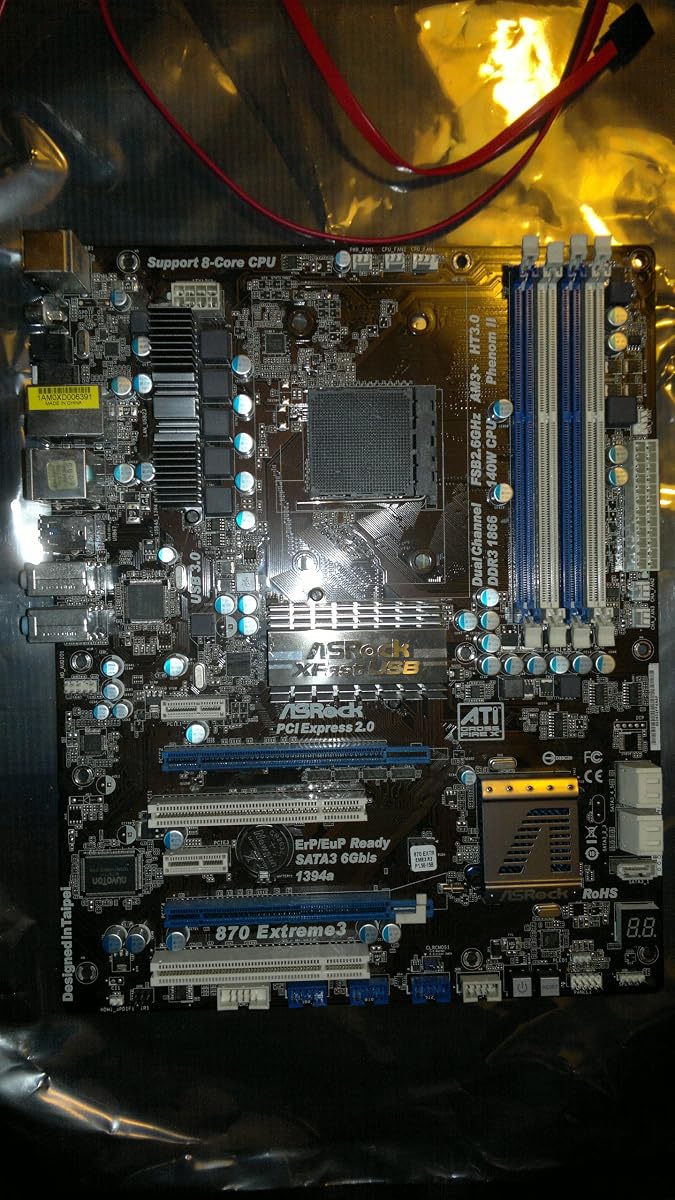
The ASRock 870 EXTREME3 R2.0 sits in the mid-range category for AM3 boards. It has a 3.9 rating, showing reliable performance. The AMD 870 chipset provides good support for multi GPU setups. USB 3.0 ports are included for external peripherals.
We may earn a commission when you buy through this link, at no additional cost to you.
Key strengths include five SATA3 ports and RAID support. This makes it useful for storage-heavy builds. The memory support allows for dual-channel speeds. It is a solid choice for users wanting a balance of features and cost without paying premium prices.
The main drawback is the BIOS age, which might complicate CPU support for newer chips. You may need to update BIOS before installing certain CPUs. Also, the PCIe version is limited compared to modern standards. These are minor issues for most legacy builds.
Ideal for general purpose computers needing good connectivity. It works well with a range of AM3+ processors. Verify CPU compatibility before purchase to avoid update issues.
Multiple SATA3 ports allow connecting multiple drives easily.
Good value for users needing a full ATX board without high costs.
We may earn a commission when you buy through this link, at no additional cost to you.
The ASRock 990FX EXTREME3 is a powerhouse for AM3 users seeking maximum performance. It carries a 3.8 rating and features the high-end 990FX chipset. This board supports Quad CrossFireX and Quad SLI for advanced graphics setups. It handles CPUs up to 140W easily.
We may earn a commission when you buy through this link, at no additional cost to you.
Key strengths include high-speed memory support and extensive USB options. The network controller is robust, ensuring stable connections. It also supports THX audio for premium sound. This is ideal for enthusiasts who need every bit of power from their AM3 CPU.
The cost is high, which might not make sense if you can upgrade to modern hardware. Power consumption is also higher than other options. You need a quality PSU to handle the load. For legacy performance, it is unmatched.
Best for dedicated gaming rigs using older hardware. It provides the stability and features needed for high load tasks. Ensure your power supply is sufficient before purchasing.
Supports up to four GPUs for extreme graphical performance.
THX support ensures high-fidelity audio for entertainment systems.
We may earn a commission when you buy through this link, at no additional cost to you.
The ASRock 970DE3/U3S3 offers a practical solution for budget builds. With a 3.9 rating, it delivers reliable performance. The board supports AM3+ processors and includes USB 3.0 ports. This mix of features makes it useful for general tasks.
We may earn a commission when you buy through this link, at no additional cost to you.
Key strengths include two SATA3 ports and multiple SATA2 ports. This allows for a mix of speed and capacity. It is easy to install and fits standard ATX cases. The price point is low, making it attractive for cost-conscious users.
The main limitation is the mixed SATA speeds, which can bottleneck fast SSDs. You may need to plan your storage layout carefully. The feature set is basic compared to premium boards. Still, it handles daily use well.
Ideal for basic gaming or office PCs on a budget. It offers enough connectivity for most users. Always plan your drive placement to take advantage of the faster ports.
Offers essential features like USB 3.0 at a low cost.
ATX form factor ensures compatibility with most computer cases.
We may earn a commission when you buy through this link, at no additional cost to you.
Choosing the right AM3 motherboard depends on your budget and performance needs. Consider key factors like chipset capabilities, storage options, and form factor before purchasing.
The chipset determines your system's capabilities, including USB support and storage speeds. Higher-tier chipsets like 890FX or 990FX offer better performance and features.
Look for 970 or 990FX for maximum performance or 760G for basic tasks.
AM3 motherboards support DDR3 memory. Check the maximum supported speed and capacity to ensure your system runs efficiently. Faster memory can improve gaming and multitasking.
Aim for boards supporting at least 1600MHz memory for best results.
Modern needs may require SATA3 ports for fast SSDs. Some boards offer M.2 slots for even faster storage. Ensure the board has enough ports for your drive needs.
Verify you have enough SATA3 ports for your SSDs and HDDs.
USB 3.0 or 3.1 support is crucial for modern peripherals. Check the number of rear ports to match your devices. Limited USB can restrict your ability to connect peripherals.
Choose a board with at least 3.0 ports for faster data transfers.
ATX boards offer more expansion slots while MicroATX save space. Select based on your case size and expansion needs. Larger boards need larger cases.
Ensure your case supports the chosen form factor before buying.
Always check the CPU support list on ASRock's website. Older boards may need BIOS updates to support newer AM3+ CPUs. Verify this before installing to avoid issues.
Confirm the board supports your specific CPU model out of the box.
High-performance CPUs need robust power phases. Look for solid capacitors to ensure stable power under load. This is vital for overclocking.
Check for solid capacitors and good VRM design for stability.
Integrated audio codecs vary by model. Ensure you get decent sound quality if you don't use a separate card. Network controllers should support Gigabit Ethernet.
Verify audio and network specs match your home or gaming needs.
Keep the motherboard clean by using compressed air. Dust can cause overheating or electrical shorts. Ensure your case fans are working properly to maintain airflow.
AM3 boards can support older AMD CPUs that handle basic gaming well. They are suitable for budget builds or retro setups. You should be aware that they do not support modern hardware standards.
Yes, AM3 boards have PCIe slots for dedicated graphics cards. You can use GPUs like the GTX 1050 for entry-level gaming. Ensure your power supply is sufficient for the GPU you choose.
Most do not natively support NVMe SSDs. Some models like the 970A-G/3.1 have M.2 slots that might work. You may need PCIe adapters for NVMe support on older boards.
The AMD Phenom II X6 or X4 processors are excellent choices. These CPUs offer strong performance for the platform. Ensure your motherboard supports them via BIOS updates.
Visit ASRock's support page and look up your board model. Check the CPU support list for your specific processor model. Note that BIOS updates may be required for newer CPUs.
Yes, you can install Windows 10 on AM3 motherboards. Drivers may need to be downloaded manually. Performance will be limited by the older hardware architecture.
Prices and availability change frequently, so check current listings. These boards are great for specific legacy needs. Verify your CPU compatibility to ensure a smooth build experience.