
Computer Speakers for Desktop PC Monitor
4.2Editor score
USB-C and USB-A compatibility
Clip-on monitor mounting design
Dual passive radiators for bass
This guide compares ten top-rated external speakers for MacBook users, evaluating connectivity, sound quality, and design to help you find the perfect audio
Finding the right external speakers for your MacBook can transform your listening experience. Whether you need clear sound for calls or rich bass for media, the right setup matters.
We compared ten highly-rated options based on connectivity, audio performance, and build quality. Each product offers unique features to suit different workflows and desk spaces.
Each pick highlights key strengths and potential trade-offs to guide your decision. Note that availability and pricing can change, so check current listings before buying.
4.2Editor score
4.5Editor score

4.5Editor score
This comparison table outlines the key specifications and features of each recommended speaker to help you quickly identify the best match for your MacBook setup.




This USB speaker system stands out for its seamless compatibility with modern MacBooks and its space-saving design. It offers a rated quality of 4.2 stars and delivers surprisingly loud sound with deep bass for its compact size.
We may earn a commission when you buy through this link, at no additional cost to you.
The standout feature is the built-in USB-C adapter which ensures connectivity with latest MacBooks without extra dongles. The adaptive-channel-switching with G-sensor ensures left and right audio remain correct regardless of clamp position. Touch controls on the front allow quick volume adjustments.
While it performs well, it may not suit setups with very thick monitors due to clamp limits. The bass is impressive but might lack deep resonance at very low volumes. These trade-offs are acceptable given its budget-friendly nature and compact footprint.
Ideal for MacBook users wanting powerful sound without cluttering their desk. If you value easy connectivity and a clean setup, this speaker delivers excellent value and performance for everyday media and work tasks.
The built-in USB-C adapter ensures this speaker works directly with modern MacBooks without needing additional dongles or drivers.
Designed to clamp securely to monitors, this speaker frees up valuable desk space while keeping audio directed toward you.
We may earn a commission when you buy through this link, at no additional cost to you.
Amazon Basics offers a straightforward stereo solution for MacBook users needing basic audio enhancement. With a 4.4 star rating, these speakers provide dependable performance powered directly from USB ports without extra cables.
We may earn a commission when you buy through this link, at no additional cost to you.
The USB-powered design means no external adapters are needed and the 3.5mm aux input allows connection to any device. In-line volume control is easily accessible and the metal finish adds a touch of durability and style.
Sound quality is adequate for casual listening but lacks the richness of higher-end models. The absence of Bluetooth limits flexibility compared to wireless alternatives. These limitations are acceptable given the budget price point and simplicity.
Perfect for users prioritizing affordability and basic functionality over advanced features. If you want reliable external audio without complexity, this speaker pair fits the bill effectively.
These speakers draw power directly from your MacBook's USB port eliminating the need for separate power adapters.
Beyond USB, the 3.5mm aux input ensures compatibility with any device offering standard analog audio output.
We may earn a commission when you buy through this link, at no additional cost to you.
The Logitech Z207 offers versatile connectivity for MacBook setups requiring both wired and wireless options. Rated at 4.4 stars, it provides clear full-range audio and flexible switching between audio devices effortlessly.
We may earn a commission when you buy through this link, at no additional cost to you.
Its Bluetooth capability paired with 3.5mm input allows seamless transitions between your MacBook and other devices. Logitech Easy-Switch technology simplifies this process by pausing one device while activating another directly from the speaker.
While functional, the Bluetooth version is outdated compared to newer standards and the build is predominantly plastic. These factors impact long-term durability and connectivity range slightly. However, for budget-conscious users, it remains a solid choice.
Recommended for MacBook users who value versatility in connecting multiple devices. If switching between phones and laptops frequently is a priority, this speaker simplifies that workflow effectively.
With both Bluetooth and 3.5mm inputs, these speakers let you switch between devices without unplugging cables.
Volume, pairing, and power are all accessible directly on the speaker for quick adjustments without reaching your Mac.
We may earn a commission when you buy through this link, at no additional cost to you.
Creative Pebble V3 brings a modern minimalist look with powerful audio performance for MacBook users. Rated 4.4 stars, it delivers 50 percent louder sound and clear dialog processing for enhanced media experiences without clutter.
We may earn a commission when you buy through this link, at no additional cost to you.
The USB-C connection ensures clean setup while Bluetooth 5.0 provides wireless streaming when away from desk. Clear Dialog audio processing enhances speech clarity during meetings or movies without affecting background audio quality.
Cable length between speakers may restrict placement flexibility and there is no built-in microphone for calls. These are minor compromises given the clean design and solid audio output. It fits well in sleek workspaces.
Ideal for MacBook users who prioritize aesthetics and USB-C connectivity. If you need a clean, powerful speaker that supports both wired and wireless modes, this model delivers strong performance.
Clear Dialog processing ensures spoken words remain intelligible during videos without increasing overall volume levels.
Single USB-C cable provides both power and audio for a tidy desk without extra adapters or cables.
We may earn a commission when you buy through this link, at no additional cost to you.
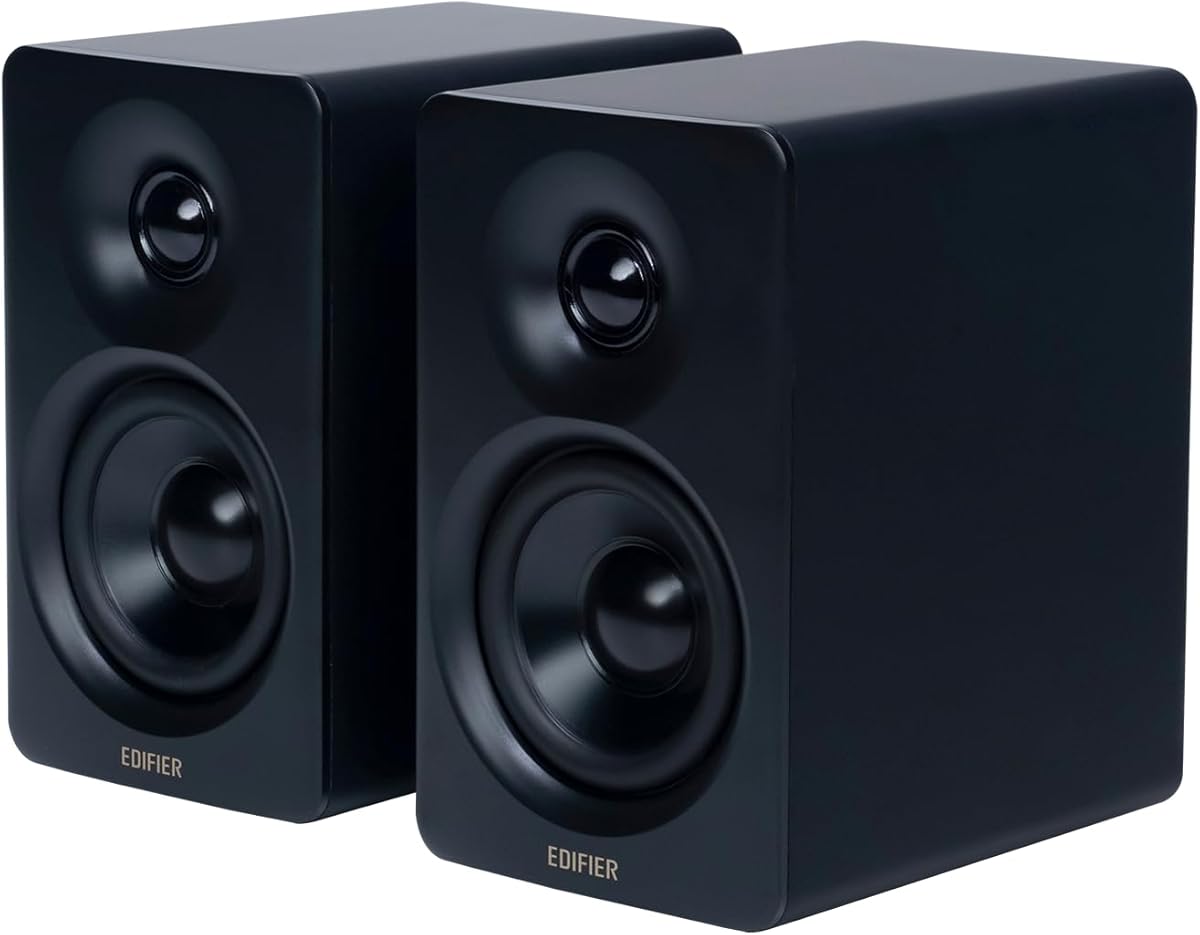
The Edifier M60 delivers premium audio quality with high-resolution certification and powerful output for serious MacBook users. Rated 4.5 stars, it offers 66W RMS total power and Hi-Res Audio for both wired and wireless connections.
We may earn a commission when you buy through this link, at no additional cost to you.
Its standout features include LDAC codec support for high-resolution Bluetooth streaming and a user-friendly touch panel for control. The bundled aluminum stands angle the speakers correctly for reduced distortion and better ear-level positioning.
While the price is higher than entry-level options, the audio fidelity and build quality justify the investment. Some users may need specific USB-C power ports for full performance. Overall, it balances features and sound excellence.
Best for MacBook users seeking high-quality audio and wireless resolution. If you prioritize sound fidelity and modern wireless codecs, the M60 offers unmatched value in its class.
Hi-Res certification ensures precise sound reproduction suitable for audiophiles and critical listening tasks.
LDAC codec supports high-bitrate Bluetooth transmission for rich wireless audio directly from your Mac.
We may earn a commission when you buy through this link, at no additional cost to you.
Edifier MR3 monitors offer professional-grade sound suitable for creators and MacBook users needing accuracy. Rated 4.5 stars, they deliver a flat response from 52Hz to 40kHz ensuring precise monitoring for audio or video work.
We may earn a commission when you buy through this link, at no additional cost to you.
Balanced TRS and RCA inputs provide reliable connection options while Bluetooth supports multi-point streaming. The EDIFIER ConneX app allows deep EQ customization enabling personalized sound tuning for different tasks or environments.
Achieving optimal sound requires time for calibration and the premium cost may be prohibitive for casual users. However, the precision and flexibility offered make it worthwhile for production needs. Build quality reduces distortion significantly.
Perfect for creators needing accurate audio monitoring alongside everyday listening. If you require studio-quality sound and control, the MR3 is an excellent investment for your MacBook setup.
Hi-Res certification ensures flat response across frequencies for accurate sound reproduction without artificial boosting.
The EDIFIER ConneX app provides detailed EQ adjustments and sound mode switching for tailored audio experiences.
We may earn a commission when you buy through this link, at no additional cost to you.
This USB speaker bar offers reliable performance for MacBook users needing a simple audio upgrade. Rated 4.2 stars, it delivers loud stereo sound with enhanced bass using dual drivers and a passive radiator.
We may earn a commission when you buy through this link, at no additional cost to you.
Plug-and-play functionality ensures it works immediately upon connecting to your MacBook USB port. Broad compatibility across macOS and other systems ensures it fits most setups easily without driver installation or extra configuration steps.
Maximum volume may be lower than high-end options and control features are limited. These constraints are acceptable given its compact design and straightforward usage. It suits basic desktop needs well.
Recommended for users seeking straightforward external audio without complexity. If you want a plug-and-play solution that enhances sound simply, this speaker provides dependable results.
No drivers required for setup making it ready to use immediately upon connecting to any USB port.
The slim soundbar design fits neatly on desks without taking up much space near your laptop.
We may earn a commission when you buy through this link, at no additional cost to you.
The FUNLOGY speaker delivers impressive sound from a tiny footprint making it ideal for minimal MacBook desks. Rated 4.2 stars, it features dual full-range drivers and a 30-degree tilt design optimizing audio direction.
We may earn a commission when you buy through this link, at no additional cost to you.
Its compact palm-sized design saves desk space while the gold-plated AUX input minimizes signal noise for clear sound. The volume dial offers intuitive control and Japanese design standards ensure reliable build quality and customer support.
Bass depth is limited compared to larger speakers and there is no Bluetooth option for wireless streaming. These limitations are acceptable for its size and design goals. It works well for casual listening.
Best for MacBook users with limited desk space needing clean audio. If you prioritize a compact footprint and stylish build, this speaker offers solid performance in a small package.
The 30-degree tilt directs sound straight to your ears for better clarity and immersion at desk level.
Recognized with a VGP award, this speaker offers reliable Japanese engineering and noise-reducing components.
We may earn a commission when you buy through this link, at no additional cost to you.
This Dell speakerphone is tailored for business MacBook users prioritizing clear conference audio. Rated 4.2 stars, it supports Microsoft Teams and Zoom with full duplex audio allowing multiple voices to be heard clearly.
We may earn a commission when you buy through this link, at no additional cost to you.
Intuitive setup via USB-C or USB-A ensures quick connection to laptops or monitors. LED indicators show call status and volume changes while the Microsoft Teams button allows quick access to meetings directly.
Its design focuses on voice calls meaning music playback may lack richness. For creative work, dedicated speakers are better suited. However, for remote work it excels at clarity and connectivity.
Ideal for MacBook users needing reliable conference audio and meeting access. If clear voice communication is your priority, this device provides excellent integration with business platforms.
Certified for major platforms ensures seamless compatibility and optimized audio for business calls and meetings.
Multiple people can speak simultaneously without audio cuts ensuring natural flow during conference calls.
We may earn a commission when you buy through this link, at no additional cost to you.
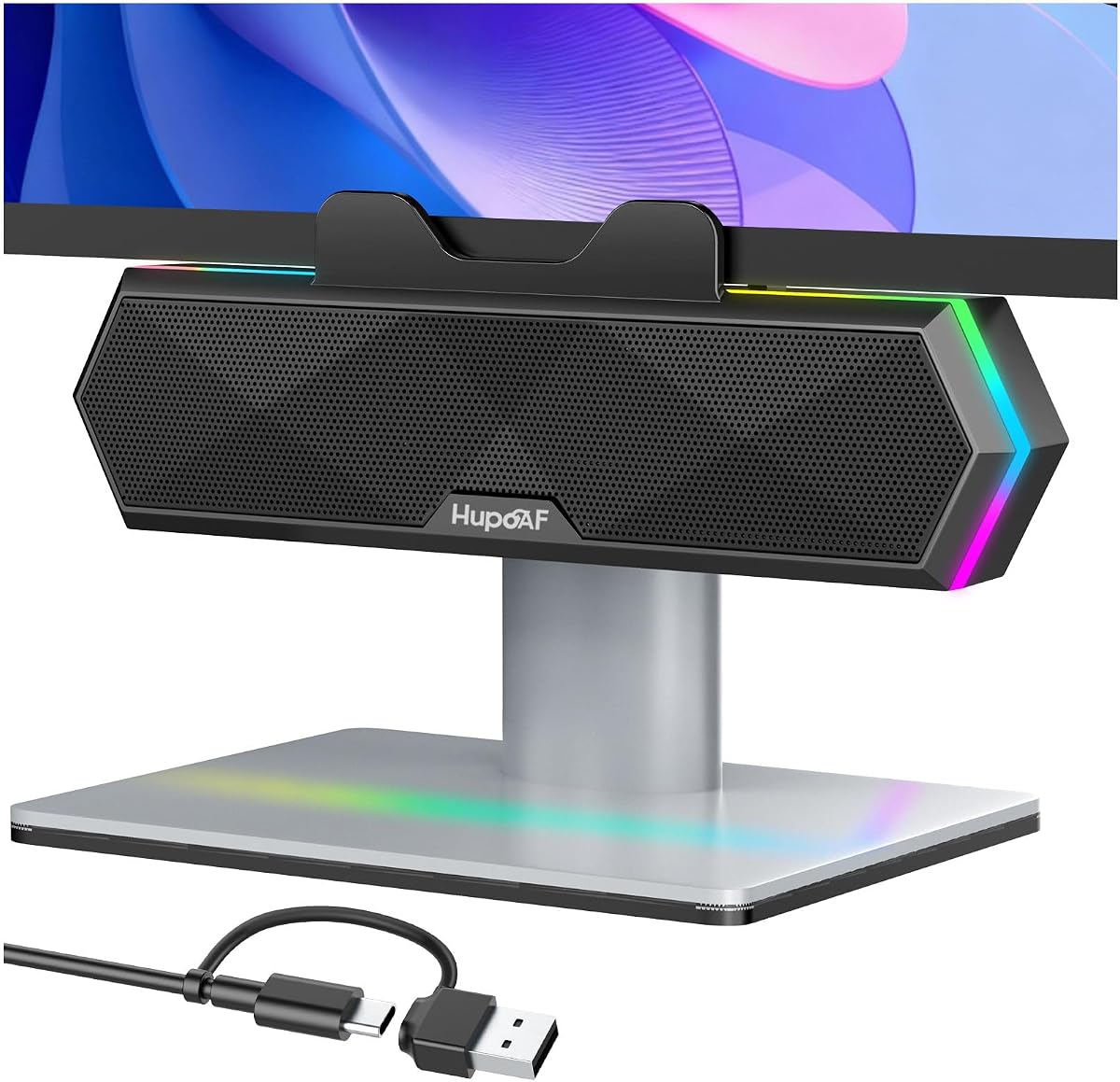
This clip-on speaker adds a gaming flair with vibrant RGB lights and loud stereo sound for MacBook users. Rated 4.6 stars, it delivers sparkling highs and deep bass with dual ultra-magnetic drivers and passive radiators.
We may earn a commission when you buy through this link, at no additional cost to you.
The non-slip spring clamp secures to monitors easily saving desk space while multifunction controls manage volume and lighting. USB plug-and-play ensures immediate setup without drivers or software installations required on your system.
RGB lighting adds visual appeal but might distract in professional settings. Also not compatible with TVs so limits use to computers. These are minor trade-offs given the high quality and fun design.
Perfect for gamers or creative users wanting style and sound. If you value lighting customization and loud audio in a small package, this speaker brings energy to your desk.
Six lighting modes allow you to customize your setup colors to match your gaming rig or mood.
The non-slip clamp attaches firmly to monitor edges preventing slipping while freeing up desk space.
We may earn a commission when you buy through this link, at no additional cost to you.
Choosing the right external speakers involves evaluating connectivity, sound quality, and build to ensure they match your workflow.
Modern MacBooks often lack audio jacks making USB-C or wireless connections essential. Look for speakers that support USB-C directly or include adapters to avoid extra dongles.
Ensure the speaker supports the ports available on your Mac to guarantee seamless plug-and-play functionality without needing extra hardware.
Sound quality varies significantly by driver size and amplifier power. Higher RMS wattage generally translates to clearer sound and better bass at higher volumes.
Check for features like balanced response or Hi-Res certification if you need accurate sound for media creation or critical listening.
Desk space is often limited especially with laptops. Compact designs or clip-on mounts help maximize desk real estate while keeping audio accessible.
Choose a form factor that fits your workspace visually and physically to ensure it complements your setup without clutter.
Bluetooth support adds flexibility allowing you to stream audio from phones or tablets without cables. Look for newer Bluetooth versions like 5.0 for better stability.
Wireless is convenient for casual use but wired connections offer lower latency and consistent performance for professional tasks.
Easy access to volume and mute controls enhances usability during calls or media playback. Touch panels or physical dials provide quick adjustments.
Remote controls or app-based management can further streamline workflow if you prefer centralized audio management tools.
Materials like metal or sturdy plastics contribute to longevity and better sound isolation. Check for warranties or build reviews to ensure reliability.
A robust build ensures your speakers withstand daily use without degradation in audio quality or physical damage.
Budget speakers offer basic functionality while premium models bring advanced audio features and build quality. Balance your needs against what you can afford.
Investing more can yield better audio fidelity and features but entry-level options often suffice for casual listening needs.
Connect your speakers to the appropriate USB-C or USB port and select them as the output device in system settings. Ensure cables are seated firmly to avoid intermittent audio or connection issues.
Adjust volume levels gradually to avoid distortion and test audio balance between left and right channels using playback settings to ensure proper stereo imaging.
Regularly clean speakers with a soft dry cloth to prevent dust buildup in drivers. Avoid using liquids or harsh chemicals that might damage sensitive electronic components.
Most modern USB speakers are plug-and-play and work immediately without driver installation. If issues arise, check your macOS sound settings to ensure the correct output device is selected.
Yes all listed speakers are compatible with MacBook Air and Pro models. Ensure your MacBook has the required USB or USB-C ports for connectivity.
Bluetooth offers flexibility for multiple devices but USB provides lower latency and consistent audio quality. Choose USB for media editing and Bluetooth for casual use.
Many models include clip-on clamps that fit monitor edges. Ensure your monitor thickness fits within clamp limits to avoid instability or damage.
Most options support Windows, Linux, and Android via USB or aux inputs. Compatibility is broad but always verify connection types match your other devices.
High-quality speakers typically last several years with proper care. Avoid overloading volume or exposing units to moisture to extend their lifespan.
Many modern speakers include USB-C support eliminating the need for adapters. Check product specs to confirm native USB-C compatibility for your model.
Some RGB models offer a setting to turn lights off completely for focused work. Consider disabling RGB if you need a distraction-free workspace.
These ten speakers offer diverse options for every workflow and budget. Whether you need compact space-saving designs or premium audio fidelity there is a match for your MacBook.
Prioritize connectivity and sound quality that align with your specific needs. If you value wireless convenience Bluetooth options are ideal but wired offers consistency.
Remember to check current availability and pricing before buying as market conditions change. Invest in a setup that enhances your daily experience with reliable sound.