
UGREEN Ethernet Coupler 10Gbps
4.7Editor score
Supports up to 10Gbps
Compatible with PoE devices
Simple plug and play setup
This guide compares the top ten Ethernet line extender solutions for home and business networks, focusing on range, speed, and reliability.
Finding a reliable Ethernet line extender is crucial for modern networks that span large homes or offices. These devices help overcome physical barriers like thick walls and long distances that standard cables cannot easily cross without signal loss.
We compared ten top-rated models based on their maximum range, data throughput capabilities, ease of installation, and overall stability. Our analysis focuses on how well each solution maintains network integrity across various environments and wiring types.
Each pick below highlights specific strengths and ideal use cases for different needs. Please note that availability and pricing can change frequently, so verify details before making your final purchase decision for your specific setup.
4.7Editor score

4.8Editor score

4.2Editor score
The following table provides a side-by-side overview of the leading Ethernet line extender options available today. Compare their key specifications, performance capabilities, and specific use cases to determine the best fit for your network expansion needs.



The StarTech 10/100 Ethernet Extender stands out as the top choice for users needing to bridge long distances in industrial or commercial settings. With a robust 4.8 star rating from verified buyers, it offers reliable performance where standard copper cables fall short.
We may earn a commission when you buy through this link, at no additional cost to you.
Its primary strength lies in its ability to extend network connectivity up to 0.5 miles using existing twisted pair cabling. This feature is invaluable for facilities like warehouses, campuses, or large estates where running new fiber optic lines is prohibitively expensive. The unit supports variable bandwidth and distance configurations, allowing administrators to optimize the setup based on specific needs.
While the 100Mbps limit may not suit high-bandwidth streaming applications, it is more than sufficient for remote management, VoIP, and surveillance feeds. The transparency of the device ensures that critical protocols like VLAN tags and Wake on LAN remain intact without modification.
IT professionals and facility managers should consider this extender when dealing with legacy wiring or challenging environments. Its plug-and-play nature combined with detailed LED indicators makes deployment straightforward even for less experienced technicians.
This extender is perfect for IP video surveillance systems and remote equipment monitoring where maintaining a stable connection over long distances is critical.
By supporting VLAN tag pass-through and PXE boot, the device ensures compatibility with complex network infrastructures without requiring deep technical reconfiguration.
We may earn a commission when you buy through this link, at no additional cost to you.
The TP-Link AV1000 Powerline Adapter Kit is a popular solution for extending network access to rooms where Wi-Fi signals are weak or blocked. It achieves a solid 4.2 rating by leveraging HomePlug AV2 technology to turn electrical outlets into network ports.
We may earn a commission when you buy through this link, at no additional cost to you.
This kit allows users to achieve speeds up to 1000 Mbps theoretically, though real-world performance depends on the age and quality of home wiring. It is ideal for connecting smart TVs, game consoles, and desktops in basements or attics where running Ethernet is impossible.
While the adapters are compact and fit neatly into outlets without blocking adjacent sockets, they require careful placement. They must be plugged directly into wall outlets on the same circuit and kept away from large appliances that generate electrical noise.
Homeowners looking for a clean and fast solution without drilling holes will find this kit highly effective. The inclusion of power saving mode also ensures that energy consumption remains low during periods of inactivity.
Setting up the adapters is incredibly easy as you simply plug them in and press the pair button, avoiding complex configuration menus or software installation.
TP-Link is a signatory of the CISA Secure-by-Design pledge, ensuring that this device is built with advanced security as a core requirement from the start.
We may earn a commission when you buy through this link, at no additional cost to you.
For those seeking an inexpensive way to extend an existing Ethernet cable run, the UGREEN Ethernet Coupler offers a straightforward and highly rated solution. With a 4.7 star average, it provides a reliable connection for users who simply need to bridge a gap in their wiring.
We may earn a commission when you buy through this link, at no additional cost to you.
This coupler supports speeds up to 10Gbps and is compatible with all standard Ethernet cable categories from Cat5 to Cat8. A standout feature is its support for Power over Ethernet (PoE), allowing it to pass power to devices like IP cameras without needing a separate adapter.
Although it is a passive device and does not regenerate signals like active extenders, it performs well for distances under 328 feet. The unique arch pin design ensures a secure fit that prevents accidental disconnection and data loss.
This product is best suited for home offices or small businesses that need to connect devices across a room or hallway without the cost or complexity of active hardware.
Because it supports PoE, this coupler is perfect for installing security cameras that require both data and power over a single cable run.
The coupler works seamlessly with any standard RJ45 network cable, ensuring it fits into existing infrastructure without requiring cable replacements.
We may earn a commission when you buy through this link, at no additional cost to you.
The NETGEAR PLP2000 Powerline Adapter Kit brings high-speed connectivity to rooms that standard Wi-Fi cannot reach effectively. Rated 4.2 stars by users, it utilizes Homeplug AV2 technology to deliver up to 2000 Mbps over existing electrical wiring.
We may earn a commission when you buy through this link, at no additional cost to you.
This kit includes MIMO and Beamforming technology which helps direct the signal more efficiently, reducing interference and improving stability. The extra pass-through power outlet ensures that you do not lose a valuable socket on the wall while extending your network.
Performance depends heavily on the quality of the electrical wiring and the proximity of the adapters on the same circuit. However, when conditions are favorable, it provides enough bandwidth for multiple 4K streaming devices and lag-free gaming.
Users in multi-story homes or large apartments will appreciate the ability to maintain a wired connection quality through the power grid without drilling holes for cables.
The high throughput and low latency of this kit make it an excellent choice for bandwidth-intensive applications like 4K video and online gaming.
Beamforming technology ensures that data is directed specifically to the connected device, maximizing efficiency and minimizing signal loss through walls.
We may earn a commission when you buy through this link, at no additional cost to you.
For scenarios requiring massive extension of network cables, this VDSL Ethernet Extender Kit is a robust solution. It pushes the standard Ethernet limit of 328 feet to an impressive 7000 feet, making it suitable for large properties or outdoor installations.
We may earn a commission when you buy through this link, at no additional cost to you.
The kit allows you to use standard CAT5 through CAT8 cables or even phone cables to transmit signals, offering flexibility in deployment. It operates as a transparent bridge, requiring no software installation and working immediately upon connection.
While the price point is higher than standard extenders, the ability to cover such vast distances without signal degradation justifies the cost for specific industrial or agricultural applications.
Network administrators deploying cameras or sensors in remote areas will find this kit indispensable for maintaining a reliable wired connection where wireless signals are unreliable.
The ability to use existing phone lines or various Ethernet cable categories allows for cost-effective deployment in buildings with mixed wiring infrastructures.
The lack of software installation requirements means the system is operational as soon as power is applied, saving time during deployment.
We may earn a commission when you buy through this link, at no additional cost to you.
The TP-Link AV600 Powerline Ethernet Adapter Kit offers a budget-friendly entry point into powerline networking. With a rating of 4.2 stars, it provides a reliable way to extend internet access to rooms where Wi-Fi is weak.
We may earn a commission when you buy through this link, at no additional cost to you.
While the Ethernet port is limited to 100 Mbps, this is often sufficient for web browsing and streaming in areas where faster speeds are not critical. The power saving mode automatically reduces energy consumption when the adapter is not in use, adding to its efficiency.
This kit works well for basic tasks such as connecting smart home devices or secondary computers. It is compatible with other TP-Link powerline adapters, allowing for future expansion if higher speeds are needed.
Users seeking a simple and cost-effective solution for basic connectivity needs will appreciate the straightforward setup and secure wired connection it provides.
The automatic power saving mode helps reduce electricity costs by lowering consumption during periods of inactivity without affecting performance.
The plug and pair functionality allows users to establish a network connection without navigating complex menus or downloading additional software.
We may earn a commission when you buy through this link, at no additional cost to you.
This TP-Link KIT offers a premium solution by combining a powerline adapter with a Wi-Fi 6 extender to cover both wired and wireless gaps. With a 4.1 rating, it allows users to create a seamless network that bridges thick walls and distant rooms effectively.
We may earn a commission when you buy through this link, at no additional cost to you.
The AX1500 speeds ensure that modern devices benefit from the latest Wi-Fi 6 technology while the powerline component ensures a stable backhaul connection through electrical wiring. One-click Wi-Fi cloning makes it easy to match your existing network name for a seamless roaming experience.
Users can manage the network through a mobile app or desktop tool, providing visibility and control over connected devices. The support for EasyMesh ensures it integrates well with other compatible routers for whole-home coverage.
Those looking to upgrade their home network to Wi-Fi 6 without replacing their router will find this hybrid kit a versatile and future-proof option.
By cloning your router settings, the extender allows devices to switch between networks without losing connection as you move around your home.
The inclusion of Wi-Fi 6 ensures better performance in crowded environments with multiple connected devices needing high bandwidth.
We may earn a commission when you buy through this link, at no additional cost to you.
This TP-Link Powerline Kit provides a balanced approach by offering both a gigabit Ethernet port and AC1200 Wi-Fi speeds to extend connectivity. It scores 4.0 stars among users who need flexible options for devices in different locations.
We may earn a commission when you buy through this link, at no additional cost to you.
The passthrough power socket allows you to plug another device into the adapter without losing an outlet, maintaining convenience. It supports OneMesh technology, enabling it to work with compatible TP-Link routers to form a unified network.
While the Wi-Fi 5 standard is not the latest, it still provides reliable speeds for most home tasks. The setup is straightforward, requiring no configuration and pairing easily with the accompanying adapter.
This kit is well suited for users who have mixed device types needing both wired stability and wireless convenience in hard-to-reach areas of their home.
The design includes a power outlet on the adapter itself, ensuring you do not lose a socket while installing the network extender.
Integration with OneMesh allows for seamless roaming across your home without manual switching between different network signals.
We may earn a commission when you buy through this link, at no additional cost to you.
The Ethernet Range Extender Kit is designed for environments where existing coax or twisted pair wiring must be utilized. It achieves a 4.6 star rating by reliably extending networks up to 600 meters without needing new cabling.
We may earn a commission when you buy through this link, at no additional cost to you.
Both units are mains powered to regenerate the signal actively, ensuring stability over long distances. The device acts as a transparent Layer 1 segment, meaning it passes through VLAN tags and other protocols without interference.
This kit is ideal for industrial or commercial settings where existing wiring is already in place and cannot be easily replaced. Its rugged design ensures durability in demanding conditions.
Facility managers and network installers will appreciate the flexibility to use various cable types while maintaining a secure and stable connection across large areas.
Supplied adapters allow the extender to work with coaxial cables as well as twisted pair, adapting to the infrastructure already present.
Unlike passive splitters, this active extender regenerates the signal at both ends to maintain connectivity over much longer distances.
We may earn a commission when you buy through this link, at no additional cost to you.
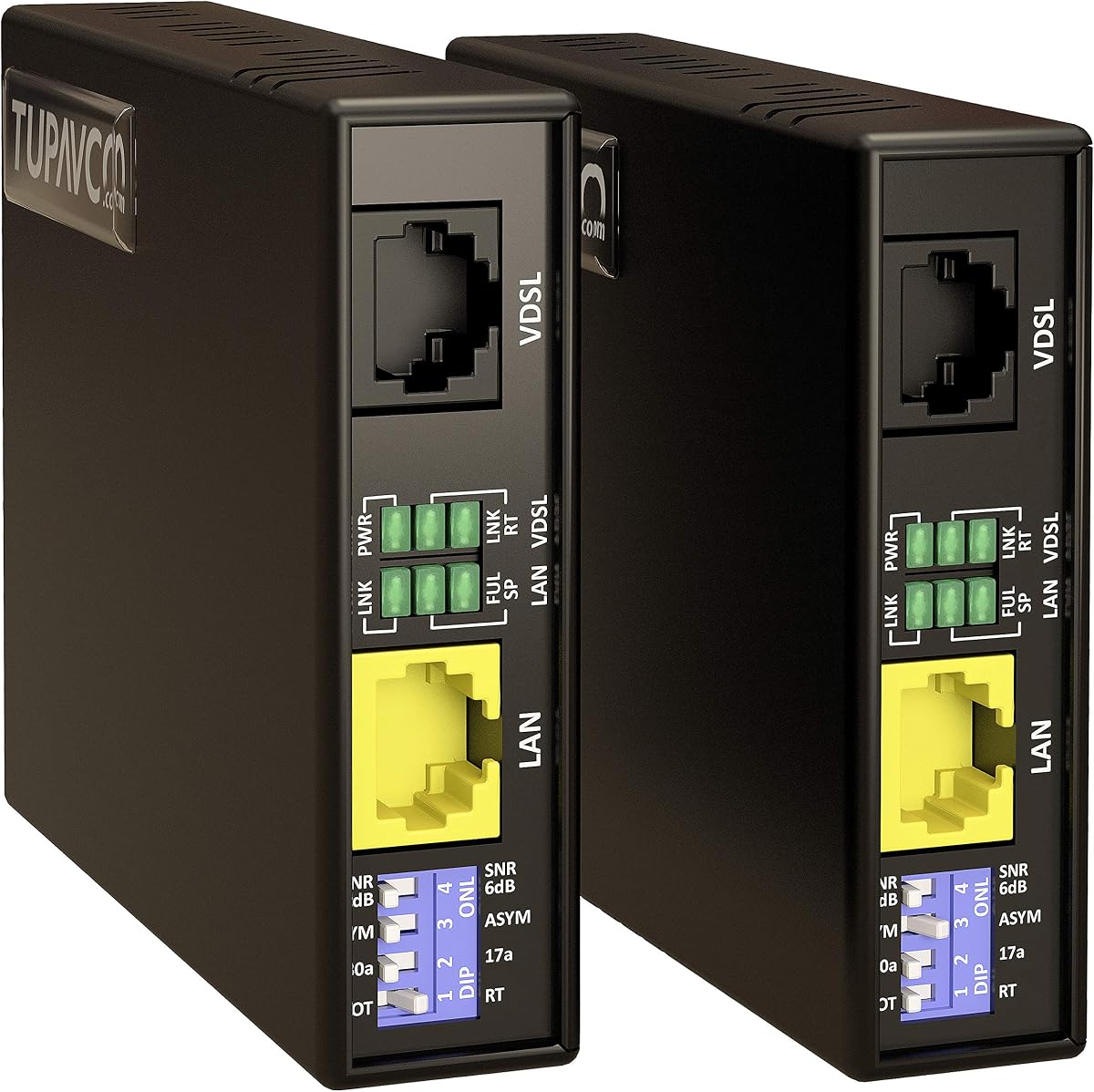
This VDSL Ethernet Extender Kit offers an impressive combination of range and speed for long-distance connections. With a 4.6 star rating, it extends effective network cabling up to 5000 feet while maintaining speeds up to 300Mbps.
We may earn a commission when you buy through this link, at no additional cost to you.
The device supports G.INP which helps reduce noise and interference, ensuring a cleaner signal over long runs. The included DIP switch allows users to adjust settings for different cable profiles and performance needs.
It is a cost-effective solution for properties that already have phone or network cabling in place. The plug-and-play nature ensures that the system is ready to use without software configuration.
Users needing high-speed data transfer over long distances in residential or industrial settings will find this extender highly capable and reliable.
The G.INP support significantly minimizes the impact of noise, maintaining higher speeds and reliability even in electrically noisy environments.
The 4-position DIP switch allows for tailored configuration to match the specific characteristics of the existing cabling infrastructure.
We may earn a commission when you buy through this link, at no additional cost to you.
Selecting the right extender involves considering your distance requirements, desired speed, and the existing infrastructure in your space.
The distance you need to cover is the primary factor in your decision. Passive extenders like couplers are limited to about 328 feet while active extenders can reach miles depending on cabling. Measure your exact requirements to choose between these types.
Always choose an extender with a range rating exceeding your physical distance needs to account for signal loss.
Different devices and applications require varying bandwidth levels. High definition streaming and gaming need gigabit speeds while basic web browsing works with 100 Mbps. Check the maximum data rate of the extender to match your internet plan.
Ensure the Ethernet ports on the extender support the speeds you require to avoid bottlenecking your network.
Review the existing cables in your building to determine if you can use Ethernet, coax, or phone lines. Some extenders support twisted pair while others are designed for coaxial wiring. Using existing wiring reduces installation costs significantly.
Select an extender that is compatible with the types of cables you have to avoid replacing infrastructure.
Active extenders require external power adapters at both ends while passive couplers draw power from the device. Consider whether power outlets are available at remote locations before purchasing.
Plan for power access at the remote end to ensure the active extender operates reliably.
Look for models that support plug and play functionality to avoid technical installation hurdles. Configurable units with DIP switches offer more control but may require technical knowledge.
Choose a setup method that matches your technical comfort level to simplify deployment.
Ensure the extender supports the protocols your network uses such as VLANs or PoE. Some devices pass VLAN tags transparently while others may block them.
Verify protocol support to maintain network security and segmentation.
For industrial or outdoor use, check for rugged housings and temperature ratings. Standard residential units may not withstand extreme conditions.
Select an enclosure rating appropriate for the environment to ensure longevity.
Passive extenders are cheaper but have limited reach and speed. Active extenders cost more but provide greater performance and distance.
Balance cost with performance requirements to get the best value.
Begin by verifying your physical distance requirements and matching them to the extender model. Measure the exact length of cable or space you need to bridge to ensure the device will function correctly in your location.
Connect the local unit to your router using an Ethernet cable and plug it into a power outlet. Connect the remote unit to your target device and power it on as well ensuring both units are operational simultaneously.
Monitor the LED indicators on the units to confirm a stable connection has been established. Keep the units free from dust and heat sources to maintain optimal performance over time.
Active extenders regenerate the signal and require power at both ends to cover long distances. Passive extenders simply connect two cable segments without boosting the signal and rely on the original cable quality.
Yes many specialized extenders support coaxial cables as well as twisted pair wiring. These models often include adapters to convert between Ethernet and coax connectors easily.
High quality active extenders maintain speed over distance better than passive ones. The actual speed depends on the extender model and the quality of the cabling used.
Some extenders support Power over Ethernet allowing devices like cameras to receive power through the cable. Always verify PoE compatibility before purchasing.
Standard Ethernet runs are limited to 328 feet but extenders can reach thousands of feet. The exact distance depends on the specific model and cabling type.
Most models are plug and play requiring no software installation. Advanced industrial units may have DIP switches to adjust settings for different environments.
We reviewed ten top-rated extenders covering options from passive couplers to active industrial units. Each offers unique benefits depending on distance speed and wiring needs.
Prioritize your distance and speed requirements first before considering budget constraints. The best model is one that fits your physical infrastructure seamlessly.
Prices and availability change frequently so check current listings before purchasing. Verify all specifications against your needs to ensure compatibility with your existing network.