
HDMI Extender Over Single Cat5e/6/7 Ethernet
4.9Editor score
Supports 1080p at 60Hz
Power over Cable technology included
Smart EDID copy for compatibility
This guide compares the top HDMI Extender Cat 5 6 7 Ethernet models for reliable long distance signal transmission in home and professional AV setups.
Finding the right HDMI extender can transform your entertainment setup by allowing flexible cable management. These devices let you send high definition video and audio over standard Ethernet cables instead of bulky HDMI runs.
We evaluated ten top rated models based on signal quality, distance capabilities, and ease of installation. Our analysis focuses on real world performance with Cat5e Cat6 and Cat7 cabling for various environments.
Each pick highlights specific strengths like power options or video resolution support. Prices and availability change frequently so verify current details before purchasing to ensure the best value for your needs.
4.9Editor score

4.6Editor score
4.2Editor score
The following table offers a side-by-side comparison of all ten selected HDMI extenders. Review these specifications to understand how each model handles resolution support distance and connectivity features.




This OREI extender stands out for its impressive range and support for modern video standards. It receives a strong rating from users who value reliability in professional setups.
We may earn a commission when you buy through this link, at no additional cost to you.
The device supports 4K at 60Hz with full color depth which ensures crisp visuals. Power over Cable means you only need one adapter making installation cleaner.
While it supports HDR HLG the one-way IR limit might be a minor constraint for some users. Still the video quality outweighs this limitation for most setups.
It is ideal for home theaters or conference rooms needing long cable runs without signal loss. We recommend this for anyone prioritizing high resolution performance.
The extender handles HDMI 2.0a and HDCP 2.2 for smooth streaming of protected content.
Compact design fits easily in tight spaces and requires minimal configuration to get started.
We may earn a commission when you buy through this link, at no additional cost to you.
This model delivers exceptional value by supporting Full HD resolution over long distances. Users praise its plug and play nature and smart compatibility features.
We may earn a commission when you buy through this link, at no additional cost to you.
The smart EDID copy function solves common handshake issues ensuring your source and display connect seamlessly. It also uses power over cable to reduce cable clutter.
The main trade-off is the lack of 4K support which limits it for ultra high definition setups. However for 1080p needs it is a top choice.
It works well for classrooms or office setups where cost and simplicity matter most. We suggest this for budget conscious buyers needing reliable extension.
Smart EDID copy reads display parameters automatically to prevent no signal errors.
Built with premium aluminum alloy to dissipate heat during extended use.
We may earn a commission when you buy through this link, at no additional cost to you.
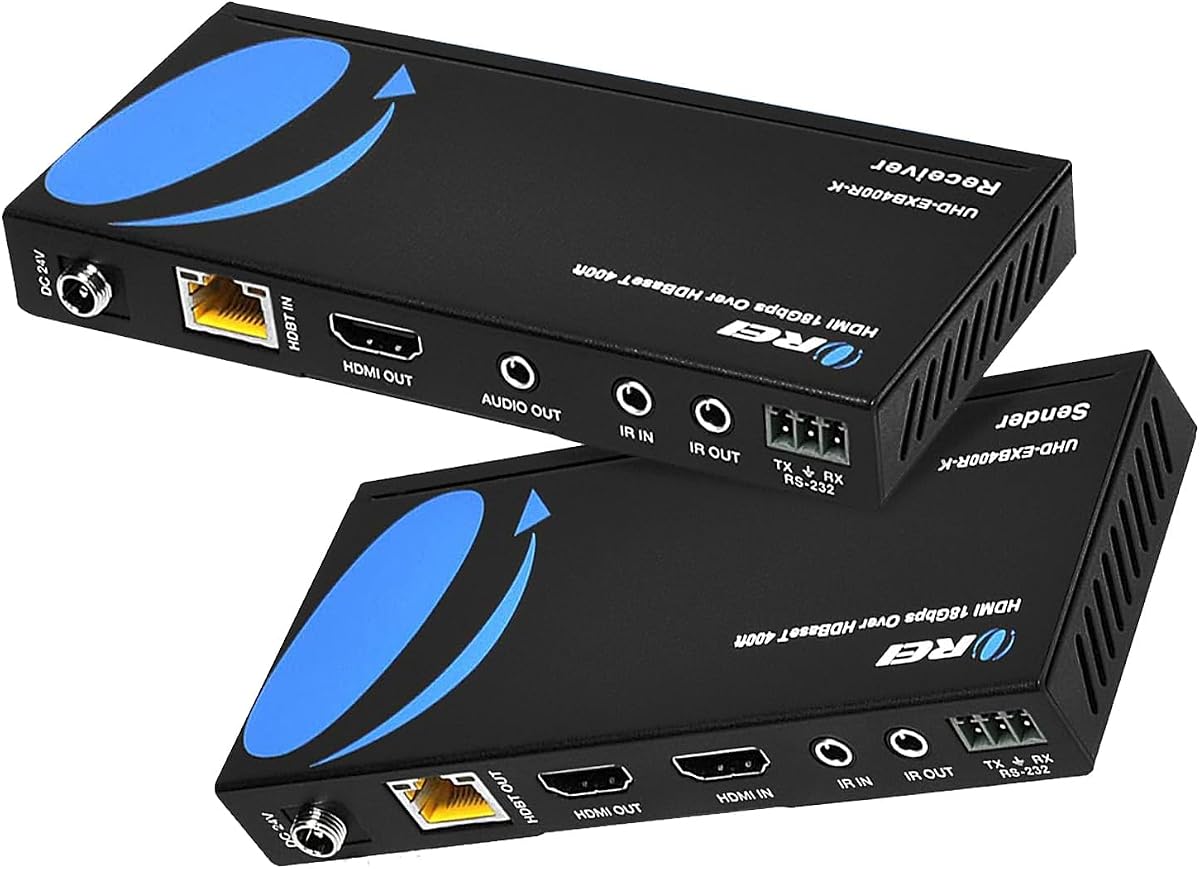
This HDBaseT extender offers professional grade features for large installations. It supports massive distances up to 400 feet with zero latency transmission.
We may earn a commission when you buy through this link, at no additional cost to you.
The RS-232 control port allows system integration with advanced AV setups. Two-way IR lets you control devices from either end of the cable run.
While it requires a specific matching pair for optimal performance the range and features justify the cost. Users note it works well for digital signage.
It is perfect for commercial projects or large home theaters where distance is a major factor. We recommend this for users needing robust control options.
RS-232 command control enables advanced automation for professional environments.
Supports 4K 60Hz with HDR10 and Dolby Vision for immersive viewing experiences.
We may earn a commission when you buy through this link, at no additional cost to you.
This balun focuses on delivering solid 4K performance with helpful connectivity features. It supports HDMI 2.1 and 18Gbps for high bitrate content.
We may earn a commission when you buy through this link, at no additional cost to you.
The loop out feature allows local viewing at the source which is useful for monitoring. EDID management ensures smooth resolution compatibility with different displays.
It does not offer power over cable so separate adapters are required at both ends. The range is also shorter compared to some other models.
We suggest this for setups where local monitoring is needed and distance is under 165 feet. It is a good choice for office environments.
18Gbps bandwidth ensures uncompressed transmission of 4K video and high quality audio.
Loop out port lets you connect a local screen while sending signal to a remote one.
We may earn a commission when you buy through this link, at no additional cost to you.
This unit provides a cost-effective way to extend HDMI signals with some advanced features. It supports 4K resolution but limited to 30Hz which affects smoothness.
We may earn a commission when you buy through this link, at no additional cost to you.
Power over cable makes installation easier by reducing power adapters needed. The loop out feature allows you to monitor content at the source.
It is not compatible with IP or streaming systems which limits versatility for some users. For simple HDMI extension it performs reliably.
We recommend this for users needing basic 4K extension at a lower price. It suits smaller offices or home setups with standard TVs.
Power over cable technology reduces cable clutter by powering the receiver from the transmitter side.
Uses video transmission technology to ensure stable visuals over long cable runs.
We may earn a commission when you buy through this link, at no additional cost to you.
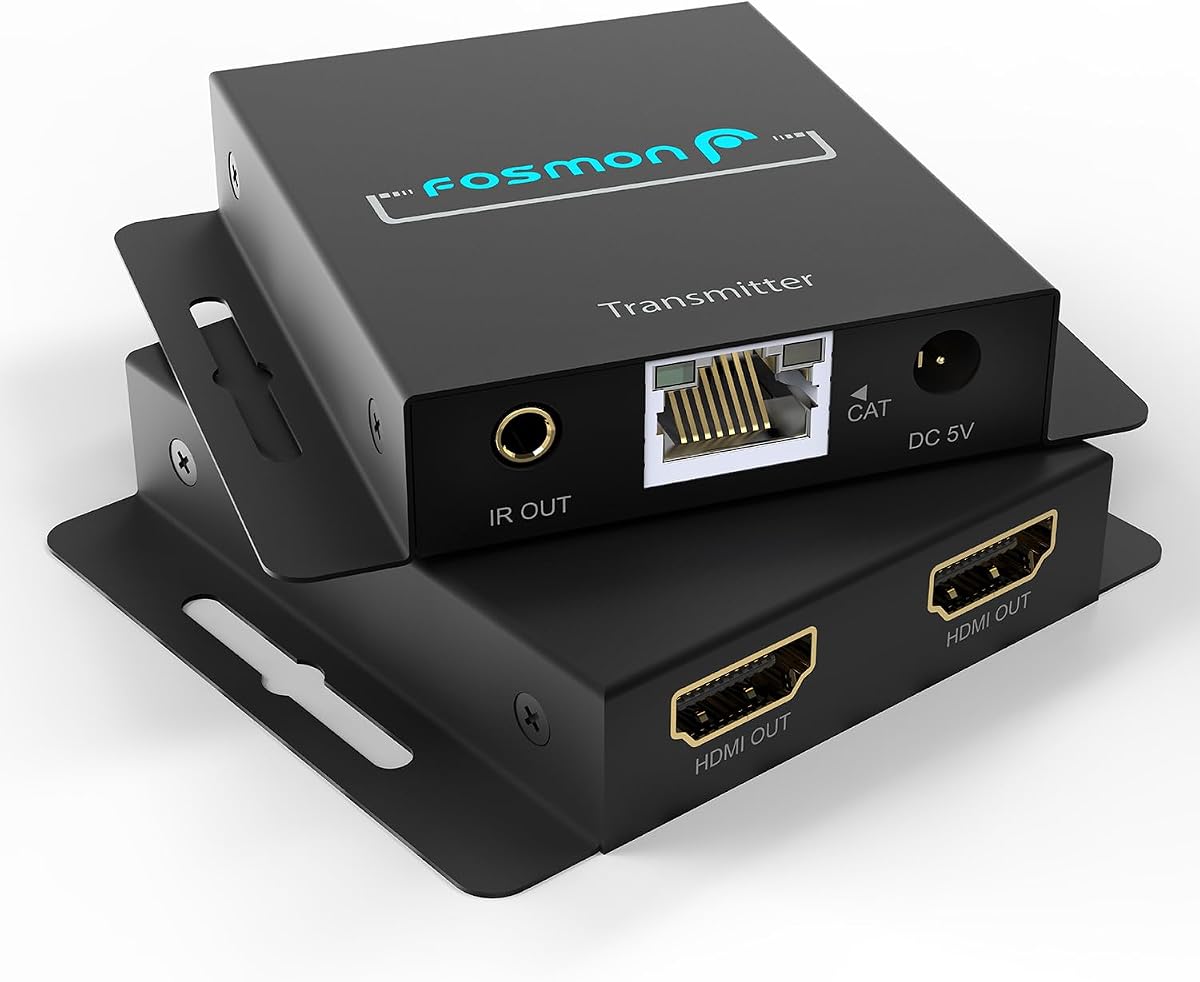
This Fosmon model focuses on delivering reliable Full HD performance over long distances. It supports 3D content and includes useful control features.
We may earn a commission when you buy through this link, at no additional cost to you.
The auto EQ button adjusts settings for cable length improving signal stability. You can also use the receiver loop out for a multi-display setup.
It is limited to 1080p which means it is not suitable for modern 4K displays. However for standard HD setups it offers great value.
We suggest this for classrooms or offices where 1080p is sufficient. It is a solid choice for users needing extended reach.
EQ button automatically adjusts settings based on cable length to prevent signal loss.
Receiver loop out allows you to send signal to two different displays simultaneously.
We may earn a commission when you buy through this link, at no additional cost to you.
This avedio model is designed for ease of use with robust hardware. It supports deep color and 3D for better image fidelity in supported content.
We may earn a commission when you buy through this link, at no additional cost to you.
The metal shell minimizes electromagnetic interference ensuring a clean signal. It is compatible with a wide range of devices including gaming consoles.
It does not support 4K resolution which limits it for high-end home theaters. Users should note that Cat5e cables have slightly less range than Cat6.
We recommend this for users seeking a simple balun for HD content. It works well for digital signage and casual entertainment setups.
Sturdy metal shell reduces noise interference and increases overall device longevity.
Built-in adjustment system optimizes performance for PCs gaming consoles and streaming devices.
We may earn a commission when you buy through this link, at no additional cost to you.
This Monoprice extender offers solid performance with professional features. It supports 4K at 30Hz and has a perfect rating from users.
We may earn a commission when you buy through this link, at no additional cost to you.
Bidirectional IR allows control from either end which is convenient for remote setups. Smart EDID ensures compatibility with different display types.
The 4K refresh rate is lower than the 60Hz models which may affect gaming. Still it is reliable for movies and general content.
We suggest this for users needing professional reliability and IR flexibility. It is a good option for conference rooms or living rooms.
Bidirectional IR lets you control source devices from the receiver side easily.
Smart EDID helps the system automatically select the correct resolution for the display.
We may earn a commission when you buy through this link, at no additional cost to you.
This PWAY extender delivers impressive specs including true 4K at 60Hz. It supports 4:4:4 color which ensures sharp text and vibrant images.
We may earn a commission when you buy through this link, at no additional cost to you.
The loop-out port allows real-time monitoring which is helpful for setup and testing. It also uses power over cable to simplify the installation process.
While details on HDR support are not specified it handles standard 4K content well. The range is sufficient for most residential and commercial needs.
We recommend this for users needing 4K60Hz without paying premium prices. It is a versatile choice for gaming and media setups.
Supports 4:4:4 chroma for crisp text and high detail image fidelity.
Loop-out port helps technicians check the signal locally before sending it remotely.
We may earn a commission when you buy through this link, at no additional cost to you.
This J-Tech unit is unique because it uses TCP/IP for signal transmission. This allows it to reach massive distances of up to 400 feet.
We may earn a commission when you buy through this link, at no additional cost to you.
The M-JPEG technique ensures image quality loss even at long ranges. It includes IR extension to keep your remote controls functional.
It is limited to 1080p so it is not suitable for 4K content. Also using TCP/IP might not work with all network setups.
We suggest this for extreme distance needs where standard baluns fail. It is best for large venues or multi-story homes with HD content.
TCP/IP transmission enables extension up to 400 feet which is ideal for large buildings.
M-JPEG technique processes images to maintain quality over long network cables.
We may earn a commission when you buy through this link, at no additional cost to you.
Selecting the right HDMI extender requires understanding your specific needs and constraints. This guide breaks down key factors to consider before making a purchase.
Different models support varying cable lengths from 165 feet up to 400 feet. Always measure the distance between your source and display to ensure the extender covers it. Using the wrong cable type like Cat5e for long runs can reduce effective range.
Choose a model that exceeds your measured distance by a comfortable margin for reliable signal stability.
Consider whether you need 1080p or 4K support and at what refresh rate. Some budget extenders support 4K but only at 30Hz which may feel less smooth for gaming. High end models support 60Hz and HDR for better quality.
Match the resolution specs of the extender to your display and source devices to avoid bottlenecks.
Power over Cable or PoC allows you to power the receiver from the transmitter using the Ethernet cable. This reduces the need for extra power outlets near the display. Models without PoC need separate adapters at both ends.
Look for PoC support if you want a cleaner installation with fewer cables.
Many extenders include IR pass-through to let you control source devices remotely. Some support two-way IR which lets you control the display from the source. This is critical for setups where devices are hidden in cabinets.
Ensure the extender offers the IR configuration that matches your control needs.
Features like HDMI loop out allow you to monitor the signal locally while sending it elsewhere. Some models include RS-232 for system integration in professional settings. EDID management helps avoid compatibility issues.
Identify any extra features you need for your specific use case to narrow down options.
The type of Ethernet cable matters for performance. Cat6 and Cat7 cables are recommended for 4K and long runs. Ensure the cables are high quality solid copper for best signal integrity.
Invest in good cables to avoid signal dropouts or degradation over distance.
Metal housing helps dissipate heat and protect internal components. Plastic cases may be lighter but can be less durable over time. Look for reputable brands that offer warranties.
Choose a device with a robust build to ensure long term reliability.
Check that the extender supports the HDCP version required by your source device. Some older models may not work with newer streaming devices or gaming consoles. Read reviews for specific device compatibility notes.
Verify HDCP and HDMI version support to ensure your devices work together seamlessly.
Connect the HDMI cable from your source device like a Blu-ray player to the transmitter. Then plug an Ethernet cable into the transmitter and the other end into the receiver.
Power on the devices and check the indicators on both units. Ensure the power adapter is connected correctly especially if using Power over Cable.
Care for your extender by keeping it in a well-ventilated area to prevent overheating. Avoid exposing the device to extreme temperatures or direct sunlight.
Cat5e can support 4K but usually only at shorter distances or lower refresh rates. For reliable 4K 60Hz we recommend using Cat6 or Cat7 cable. Always check the specific model requirements for cable compatibility.
HDMI over Ethernet sends a direct uncompressed signal over a cable without networking. HDMI over IP uses network protocols to transmit video and may require a switch. The former is simpler and faster for single source to display setups.
Most HDMI extenders support standard audio formats like Dolby Digital and TrueHD. However support for advanced formats like Atmos depends on the specific model. Check the product specs for detailed audio format compatibility.
First check that all cables are securely connected and powered on. Try a different HDMI source or display to isolate the problem. Verify the EDID settings or reset the extender if possible.
Most basic extenders are not designed to work with network switches as they expect a direct connection. Only models specifically supporting Ethernet or IP protocols can use switches. Always check the product manual for switch compatibility.
Yes all HDMI extenders transmit both video and audio signals simultaneously. They preserve the original audio quality without converting to separate audio cables. This makes them a complete solution for AV extension.
No HDMI over Ethernet extenders are plug-and-play devices and do not require drivers. They work immediately after connecting the cables and powering on. This makes them easy to set up in any environment.
A well maintained HDMI extender can last many years with normal use. Lifespan depends on usage frequency and environmental conditions. Proper ventilation and avoiding physical damage help extend its life.
We have reviewed ten top extenders offering a range of features from budget friendly 1080p solutions to professional 4K models. Each pick has unique strengths suited to different distances and resolutions.
Prioritize the factors that matter most to you such as distance range or support for modern video formats. Investing in the right extender ensures a smooth and reliable viewing experience.
Remember to check current prices and availability before purchasing as these can change quickly. Verify cable requirements and warranty details to get the best value for your setup.