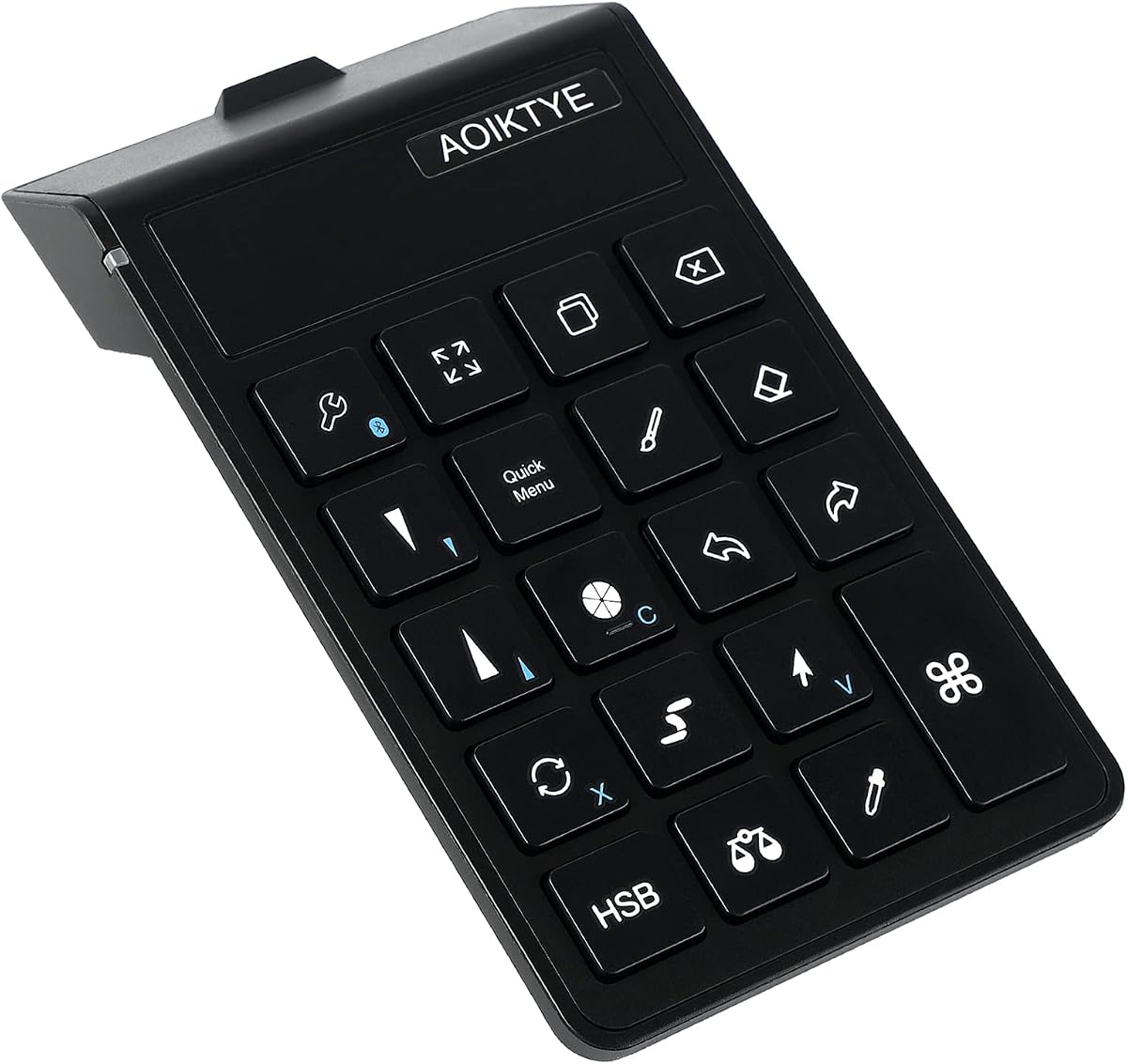
AOIKTYE Procreate Keyboard
4.5Editor score
Twenty two shortcut keys included
Eighty four hour battery life
Optimized for Procreate workflow
This guide compares the top ten iPad Drawing Bluetooth Controller options to help digital artists find the perfect shortcut keypad and dial combo for their
Finding the right iPad Drawing Bluetooth Controller can transform your digital art workflow significantly. These devices offer essential shortcuts and dials that streamline painting and editing tasks. You need a reliable tool that pairs seamlessly with your iPad and supports your favorite creative apps effectively.
We evaluated ten leading models based on connectivity, customization options, and ergonomic design. Each product was assessed for battery life, compatibility with drawing software, and overall build quality. Our goal is to help you identify the device that best fits your specific artistic needs and budget constraints.
Every pick below highlights unique strengths and potential limitations for various user types. Whether you are a professional illustrator or a hobbyist, there is an option here for you. Please note that prices and availability can change frequently so always verify the current details before purchasing.
4.5Editor score

4.2Editor score

4.4Editor score
The following table provides a side by side comparison of all ten products. It highlights key specifications and features to help you quickly identify the right device for your iPad setup.


The HUION Keydial Mini stands out as a versatile tool for digital artists using iPads. With a rating of 4.2 stars it offers a robust set of programmable keys and a custom dial. Its wireless connectivity ensures a clutter free workspace which is essential for creative professionals.
We may earn a commission when you buy through this link, at no additional cost to you.
This device excels in customization allowing you to map complex shortcuts to individual buttons. The dial controller is particularly useful for adjusting brush sizes or navigating timelines efficiently. The setting preview function helps you memorize your custom layouts without constant reference to manuals.
While it requires driver setup for full functionality on iPad it remains a powerful addition to any creative setup. The only drawback is the need for specific software support to unlock all features. However this trade off is acceptable given the efficiency gains it provides.
Artists looking to streamline their workflow should consider this keypad for its balance of features and portability. It is an excellent investment for those who spend hours daily on digital painting or video editing tasks.
The eighteen programmable keys allow for rapid access to tools reducing repetitive mouse movements significantly.
Bluetooth 5.0 ensures stable connection up to ten meters letting you draw from a comfortable distance.
We may earn a commission when you buy through this link, at no additional cost to you.
The AOIKTYE wireless keyboard is specifically designed for users of the Procreate app on iPad. With a high rating of 4.5 stars it delivers essential shortcuts tailored for digital painting workflows. Its budget friendly price point makes it accessible for beginners and hobbyists alike.
We may earn a commission when you buy through this link, at no additional cost to you.
Key features include twenty two shortcut functions that cover essential actions like undo copy and paste. The battery life is impressive lasting up to eighty four hours on a single charge. This ensures you can work uninterrupted during long creative sessions without worrying about power.
Although it is optimized for Procreate it works with other painting software too. The ergonomic height improvement over the first generation makes it more comfortable to use. The only downside is that it may lack advanced features found in premium competitors.
For iPad users focused on Procreate this keyboard offers exceptional value for money. It simplifies the drawing process and allows artists to focus on their art rather than interface navigation.
The layout is tailored for common Procreate actions speeding up the creative process significantly.
With up to eighty four hours of use you rarely need to charge the device.
We may earn a commission when you buy through this link, at no additional cost to you.
The ShanWan Portable Wireless Bluetooth Game Controller offers a unique blend of gaming and drawing capabilities. While it has a lower rating of 3.4 stars it provides versatility for users who want one device for multiple purposes. It connects wirelessly to iPads and other devices seamlessly.
We may earn a commission when you buy through this link, at no additional cost to you.
It supports custom button mapping which allows for tailored control schemes. The ergonomic design ensures comfort during extended use whether gaming or creating art. The rechargeable battery provides power without the need for constant cable management or replacements.
However the user experience may vary depending on the specific software you use. The lower rating suggests some users find it difficult to configure for non gaming tasks. It is a good option if you prioritize gaming alongside drawing tasks.
If you need a dual purpose controller for gaming and light drawing this model is worth considering. Just be prepared to spend time setting up the custom mappings to suit your specific needs.
Switch between drawing and gaming modes easily with customizable button mapping options.
Compatible with iPhone iPad PC and Switch making it a versatile choice for mixed setups.
We may earn a commission when you buy through this link, at no additional cost to you.
The TNP iPad Remote Control is a useful tool for navigating your iPad wirelessly. With a rating of 3.6 stars it focuses on general control rather than drawing specific features. The trackpad allows you to move the cursor just like on a laptop or desktop.
We may earn a commission when you buy through this link, at no additional cost to you.
It includes a home button which helps in switching between apps quickly. The Bluetooth 5.0 ensures a stable connection within a good range. It also works as a wireless presenter remote for slides and videos which is handy for teaching or presenting.
However it lacks specific drawing shortcuts which limits its utility for artists. It is more suited for general device control than creative work. The trade off is a simpler device that is easy to use for navigation tasks.
If you need a remote for media and presentations this device is a solid choice. Just remember it is not designed for digital art creation tasks.
The built-in trackpad lets you navigate the screen without touching the iPad directly.
Quickly switch apps or activate Siri with a dedicated home button on the remote.
We may earn a commission when you buy through this link, at no additional cost to you.
The XPPen Mini Keydial offers a compact solution for artists who need quick access to shortcuts. Rated at 4.3 stars it features a dial and ten customizable keys. It is designed to integrate well with creative software on both Mac and Windows.
We may earn a commission when you buy through this link, at no additional cost to you.
The battery life is exceptional lasting up to three hundred hours on a single charge. The anti ghosting performance ensures that multiple keys can be pressed simultaneously without errors. This is crucial for complex shortcuts used in drawing and editing apps.
For iPad users you will need to download the specific Shortcut Remote app for setup. This adds a step to the initial configuration but pays off in customization. It is a robust tool for those who prioritize long battery life and reliable connectivity.
Artists who value a clean workspace and long use time will find this device very useful. It balances portability with powerful features that enhance the digital art experience effectively.
Multiple keys can be pressed at once without errors ensuring complex shortcuts work perfectly.
With three hundred hours of use the battery rarely needs charging during daily work.
We may earn a commission when you buy through this link, at no additional cost to you.
The DIGIDRAW K30 Wireless Remote Controller stands out with its unique dual dial design. With a perfect rating of 5.0 stars it is praised for its precision and build quality. The two dials allow for independent control of different parameters like zoom and brush size.
We may earn a commission when you buy through this link, at no additional cost to you.
Eleven custom keys provide quick access to frequently used functions. The tactile markers on the keys help you locate commands by feel without looking away from the canvas. This feature supports a seamless creative flow which is highly valued by professional artists.
It is lightweight at 82 grams making it easy to hold in one hand. The battery lasts forty hours which is sufficient for most workdays. Although it requires a driver for full customization the performance justifies the setup time.
For artists needing precise control without a mouse this device is an excellent investment. The dual dial system offers capabilities that few other controllers in this category provide effectively.
Two dials let you adjust multiple settings simultaneously for faster workflow.
Tactile markers on keys help you find buttons by feel without looking at the device.
We may earn a commission when you buy through this link, at no additional cost to you.
The TourBox Lite Bluetooth is a premium creative controller designed for serious artists. With a rating of 4.4 stars it offers a refined layout that simplifies complex workflows. The eight key system replaces hundreds of keyboard shortcuts with intuitive physical controls.
We may earn a commission when you buy through this link, at no additional cost to you.
Its wireless connection allows you to create anywhere without cable constraints. The ergonomic design supports long drawing sessions by reducing hand fatigue. It works seamlessly with most creative apps including Photoshop Clip Studio Paint and Lightroom.
The main trade off is the higher price point compared to standard keypads. However the unified control approach saves time and enhances creativity significantly. The device includes presets that detect your active app and switch settings automatically.
Professional artists looking for a top tier tool to enhance their workflow should consider this model. It represents a significant step up in design and usability for digital creative tasks.
Seamlessly switch between apps without reconfiguring controls manually for efficiency.
Designed for comfort during long sessions reducing strain on your hand and wrist.
We may earn a commission when you buy through this link, at no additional cost to you.
The Modded Tablet Controller G8 PLUS is a high performance device for tablet gaming and input. With a 5.0 star rating it is praised for its durability and precision. The Hall Effect sticks ensure smooth and accurate control without physical contact wear.
We may earn a commission when you buy through this link, at no additional cost to you.
It supports motion sensing with a six-axis gyroscope which is great for compatible games. The magnetic interchangeable parts allow you to personalize the look and function of the controller. It fits a wide range of tablets including iPad and Galaxy Tab models directly.
While primarily a gaming controller it offers wireless Bluetooth connectivity. The battery is split into two sides with fifty hourmAh each for extended use. The only limitation is that it is not a drawing specific tool like a keypad.
Gamers who also draw may find this useful for game control but it lacks drawing shortcuts. It is an excellent choice for those prioritizing gaming performance on tablet devices.
Precision sticks offer durable and smooth control without physical wear over time.
Built-in gyroscope allows for tilt based controls in compatible gaming apps.
We may earn a commission when you buy through this link, at no additional cost to you.
The Clip Studio Tabmate 2 is designed specifically for users of Clip Studio Paint. With a rating of 4.0 stars it focuses on enhancing productivity within that specific software. The device uses Bluetooth Low Energy to maintain a stable connection to your iPad.
We may earn a commission when you buy through this link, at no additional cost to you.
It allows you to assign frequent operations to buttons for faster production. A key benefit is the included twelve month license for Clip Studio Paint Debut. This makes it a comprehensive package for new artists starting with this software.
However it requires AA batteries which need to be purchased separately. This adds ongoing maintenance compared to rechargeable models. The functionality is highly specialized so it may not suit users of other drawing apps.
If you primarily work in Clip Studio Paint this controller is a tailored solution. It streamlines common tasks and provides a valuable software license as a bonus.
Buttons are pre mapped for common Clip Studio Paint functions to save time.
Includes a twelve month license for Clip Studio Paint Debut for new users.
We may earn a commission when you buy through this link, at no additional cost to you.
The Wacom Intuos Small is a classic Bluetooth graphic drawing tablet that offers pen and tablet input. With a rating of 4.4 stars it is known for its precise control and industry leading technology. The pen is battery free providing a natural feel similar to drawing on paper.
We may earn a commission when you buy through this link, at no additional cost to you.
It connects wirelessly via Bluetooth which simplifies your workspace setup. The package includes software and training resources to help you get started quickly. It is compatible with almost all creative software on the market.
While it is not a keyboard controller it provides a dedicated input method for drawing. The small footprint makes it easy to place on any desk. It is a reliable choice for artists who prefer a traditional pen interface.
For those starting out or looking for a reliable drawing surface this tablet is highly recommended. The combination of wireless connectivity and included resources makes it a great value.
The EMR pen requires no batteries so you can draw naturally without worry.
Access to top creative software and training with every purchase of the tablet.
We may earn a commission when you buy through this link, at no additional cost to you.
Selecting the right controller requires understanding your specific workflow and software needs. This guide outlines the critical factors to consider before making a purchase decision.
Ensure the device supports Bluetooth 5.0 or higher for stable and fast wireless connections. Some models may also offer wired options for environments with interference. A stable connection is essential for lag free drawing and control.
Look for devices with proven stability and a good range to avoid disconnections during critical moments.
Check if the controller works seamlessly with your preferred drawing apps like Procreate or Photoshop. Some devices come with custom apps or drivers to enable specific features. Universal compatibility gives you more flexibility across different platforms.
Choose a model that explicitly supports your main software to maximize the utility of its shortcuts.
A good controller should allow you to map keys to the functions you use most often. Devices with multiple sets of customizable shortcuts can handle complex workflows better. Look for features that let you switch between profiles quickly.
Prioritize models with robust customization features to tailor the device to your unique habits.
Long battery life ensures you can work through extended sessions without interruption. Rechargeable batteries are generally preferred over disposable ones for cost and environmental reasons. Check the continuous use hours to estimate how often you will need to charge.
Aim for a device that offers at least forty hours of continuous use for reliable daily performance.
The physical design should be comfortable to hold for long periods to prevent fatigue. Look for lightweight models that fit well in your hand without being bulky. Features like textured grips or raised markers help with blind operation.
Select a device that feels natural in your hand to maintain comfort during creative work.
Dials are excellent for adjusting parameters like brush size or zoom without breaking focus. Check if the dial can be configured for multiple different functions within your software. A responsive dial adds a layer of precision to your workflow.
Consider a controller with a high quality dial if you frequently adjust settings while drawing.
Durable materials ensure the device can withstand daily use and travel. Look for products with positive reviews regarding longevity and resistance to wear. A well built device will protect your investment over time.
Choose a model from a reputable brand known for producing reliable hardware.
Compare the features offered against the price to ensure you are getting good value. More expensive models may offer premium features like OLED screens or wireless freedom. Determine your budget and prioritize the features that impact your workflow most.
Balance the cost with the benefits to find a device that fits both your needs and budget.
Begin by downloading the official driver or app for your device if required. Pair the controller with your iPad via Bluetooth settings to establish the connection. Test the basic functions like button presses and dial rotation before starting work.
Customize the keys to match your most frequent actions for better efficiency. Use the software companion to assign shortcuts like undo, brush size, and layer switch. Regularly check for firmware updates to keep performance optimal and secure.
Keep the device clean by wiping it with a soft dry cloth after use. Store it in a dry place away from direct sunlight to preserve the battery life. Proper care ensures the controller remains functional and responsive for years to come.
Yes many controllers like the AOIKTYE Procreate Keyboard are specifically optimized for Procreate. Others support it through standard shortcuts but you may need to check compatibility lists. Always verify if the app supports custom key mapping for best results.
Some devices require a companion app or driver to unlock advanced features like dial customization. Others function as standard keyboards immediately after pairing. Check the product details to see if additional software setup is necessary for your model.
Battery life varies by model but many offer between forty to one hundred hours of use. Rechargeable models are convenient and often include a long standby time. Look for specific hour ratings to ensure it fits your daily usage patterns.
Some models like the ShanWan or Modded Tablet Controller support both drawing and gaming. However drawing specific keypads lack the analog sticks and triggers needed for gaming. Choose a multi platform device if you plan to game on your iPad.
Most devices require a desktop driver or mobile app to assign custom shortcuts to keys. You can map them to commands like copy paste or brush size. Follow the manufacturer instructions to configure the layout for your specific needs.
The XPPen Mini Keydial offers one of the longest lifespans with around three hundred hours. The AOIKTYE keyboard also provides substantial battery life at eighty four hours. Compare battery specs to find a model that minimizes charging interruptions.
Some advanced controllers like the TourBox or XPPen support multiple device switching via Bluetooth. This allows you to switch between iPad and computer easily. Look for multi device support features if you work across multiple platforms regularly.
Dials provide precise control over parameters like zoom brush size without using on screen tools. They allow you to adjust settings without breaking your focus on the canvas. This feature significantly speeds up workflows in complex creative applications.
The HUION Keydial Mini AOIKTYE Procreate Keyboard and TourBox Lite Bluetooth stand out as top picks for their versatility. Each offers distinct features tailored to different artist needs from budget to premium options. Selecting the right one depends on your specific software and workflow requirements.
Prioritize compatibility and customization options when making your final decision. A device that integrates well with your tools will save you time and enhance creativity. Remember that ergonomics and battery life play a key role in daily comfort.
Always check the current pricing and availability before purchasing to ensure you get the best deal. These devices are investments in your creative process so choose wisely based on your long term needs. Happy drawing with your new Bluetooth controller setup.