
VSD Mini Macro Pad Shortcut Keypad
4.1Editor score
Compact 6 LCD keys
Side RGB lighting
USB powered operation
Discover the best macro pad for streaming options compared for streamers and creators. We analyze features, compatibility, and performance to help you choose
Streaming requires seamless control over multiple applications simultaneously. A macro pad for streaming acts as a dedicated command center allowing creators to trigger scenes, manage audio, and launch apps with single taps. These devices significantly reduce clutter and increase workflow efficiency during live broadcasts or recording sessions.
We evaluated ten top-rated macro pads based on key features including key count customization options and software compatibility. Each product was analyzed for build quality visual feedback capabilities and integration with popular streaming platforms like OBS and Twitch. Our goal is to provide a clear comparison of the most reliable tools available.
Each pick highlights specific strengths suited for different user needs ranging from budget-friendly starters to premium professional consoles. Note that product prices and availability can fluctuate over time so check current listings before purchasing. This guide ensures you find a device that aligns with your specific streaming and production requirements today.
4.1Editor score

4.4Editor score

4.8Editor score
This side-by-side comparison lists all ten evaluated products with their core specifications and direct purchase links. It allows for quick identification of key differences such as the number of programmable keys type of lighting and system support. Use this table to narrow down options before reading detailed reviews.





The VSD M18 Macro Pad stands out as a top contender for streamers needing extensive control options. With a rating of 4.4 stars it offers a robust set of 18 keys including 15 LCD visual keys and 3 physical buttons. This model provides an excellent balance of functionality and ease of use for daily streaming tasks.
We may earn a commission when you buy through this link, at no additional cost to you.
Its standout quality lies in the ability to program single actions or multi-step sequences. You can trigger pre-set macros input text switch OBS scenes or adjust media playback with a single tap. The LCD keys accept JPG PNG and GIF animations allowing you to visualize functions clearly which is crucial during live broadcasts.
The adjustable RGB surround light ring adds a premium touch to your desk setup offering ambient lighting that enhances visual appeal. However some users may find the software learning curve slightly steep compared to simpler devices. These trade-offs are acceptable given the depth of customization available at this price point.
This macro pad is ideal for content creators who need to manage multiple apps like OBS Discord and Photoshop simultaneously. It works seamlessly with Windows and macOS via USB-C connection. We recommend it for those seeking a versatile command center that grows with their workflow needs.
LCD keys display custom icons and animations ensuring you know exactly what each button does during high pressure moments.
The Operation Follow function runs multiple macro steps in order reducing the need for repetitive manual inputs.
We may earn a commission when you buy through this link, at no additional cost to you.
The Streaming Deck N1 offers a unique vertical layout that addresses the common issue of desk clutter. Rated at 4.7 stars it introduces three practical switchable modes including a dedicated calculator mode and a numeric keypad mode. This versatility makes it more than just a streaming tool.
We may earn a commission when you buy through this link, at no additional cost to you.
Its key strength is the ability to save valuable desktop space while expanding shortcut keys. You can drag files browsers apps and videos to the 15 LCD keys for one-click access. The plugin marketplace allows you to optimize workflows by downloading ready-made plugins for various applications.
While the vertical design is innovative it may require an adjustment period for users accustomed to horizontal controllers. Additionally some setup steps recommend watching tutorial videos for smooth operation. These minor hurdles are outweighed by the efficiency gains for users with limited desk real estate.
Ideal for streamers with compact setups this device integrates well with Windows and macOS systems. It supports mainstream software like OBS YouTube and Photoshop effectively. We suggest it for those who prioritize space efficiency without sacrificing key customization options.
The vertical orientation reduces the horizontal space required leaving more room for mice and monitors.
Switching between calculator numeric keypad and shortcut modes allows diverse utility beyond streaming tasks.
We may earn a commission when you buy through this link, at no additional cost to you.
The VSD M18 Stream Controller builds on the popular M18 design with enhanced focus on multi-shortcut macro programming. It holds a 4.5 star rating and features 18 customized macro keys including 15 visual LCD keys and 3 buttons. This model excels at handling complex task sequences efficiently.
We may earn a commission when you buy through this link, at no additional cost to you.
Its core feature is the one-click multi-hotkey capability which streamlines game combos video editing and photography workflows. The Operation Follow feature executes multiple macro operations simultaneously or in a specific sequence. This level of control is essential for content creators managing intricate production steps.
The surrounding RGB light ring creates a visually stunning atmosphere enhancing your overall desktop experience. However the device requires installing specific software to unlock full functionality. These requirements are standard for this class of device and are justified by the advanced automation capabilities provided.
This controller is perfect for gamers and professionals who need rapid access to multiple functions. It integrates with Windows and macOS via USB-C and supports popular apps like Streamlabs and Discord. We recommend it for users who prioritize workflow speed and visual customization.
Triggering multiple actions at once reduces time spent switching windows or searching for shortcuts.
LCD keys support different images and animations for enhanced recognition and memorization of complex macros.
We may earn a commission when you buy through this link, at no additional cost to you.
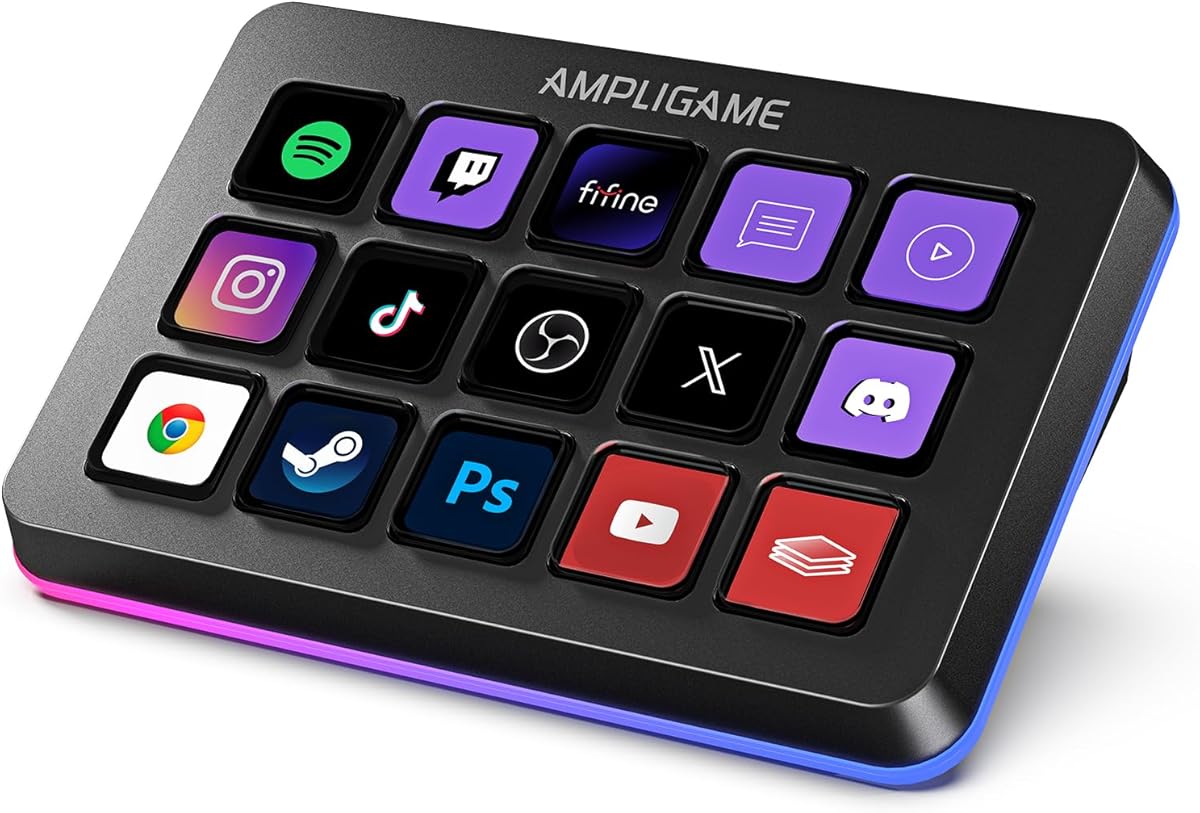
The VSD Mini Macro Pad is an excellent entry point for streamers looking for budget-friendly solutions. With a 4.1 star rating it features 6 fully customizable LCD visual keys that function as a compact macro keypad. Its small footprint makes it ideal for portable setups or minimal desks.
We may earn a commission when you buy through this link, at no additional cost to you.
It supports one-touch shortcut and macro execution allowing instant scene switching or app launches without complex settings. The dual side custom RGB light bars add stylish ambient lighting that complements any desk setup. Being powered directly via USB ensures continuous operation without battery concerns during long streams.
The main limitation is the reduced number of keys compared to larger models which might restrict complex workflows. Additionally Linux users must adapt via open-source SDK files rather than plug-and-play. These constraints are manageable for beginners or those needing basic macro functions.
This pad is recommended for hobbyists or secondary setups where space is at a premium. It works with Windows and macOS and integrates with OBS and Discord. We suggest it for users who need simple macros without investing in a full-sized deck.
Designed in mini portable size to save desk space while retaining full macro customization functions.
Powered directly via USB cable for continuous power supply without need for battery replacement.
We may earn a commission when you buy through this link, at no additional cost to you.
The VSD N4 Pro Stream Controller is tailored for creators needing precise audio and video control. Rated at 4.4 stars it combines 10 LCD keys with 4 RGB knobs and an interactive touch bar. This hybrid approach allows for both quick triggers and fine-tuned adjustments in one device.
We may earn a commission when you buy through this link, at no additional cost to you.
Its standout quality is the USB sound deck functionality which lets you trigger sound effects and adjust audio atmosphere with one tap. The knobs allow precise control over volume and playback without reaching for software sliders. This is particularly useful during live broadcasts where audio levels matter.
While the price is higher than basic models the added controls justify the cost for professional users. The built-in passive USB dock and ergonomic stand enhance usability and connectivity. These features make it a complete studio console rather than just a macro pad.
This controller is best suited for streamers and editors managing complex audio mixes. It works seamlessly with Windows 10 and macOS 11 systems. We recommend it for those prioritizing audio control alongside standard scene management.
Adjustable knobs provide tactile control over volume and media playback reducing reliance on mouse clicks.
Fully adjustable audio-synced RGB lighting adds a professional aesthetic to your streaming setup.
We may earn a commission when you buy through this link, at no additional cost to you.
The fifine D6 RGB Macro-Keyboard delivers strong performance with a 4.6 star rating. It features 15 customizable macro keys allowing you to create and assign different operations based on live stream needs. The visual operation keypad ensures you see the app before pressing reducing errors during streaming.
We may earn a commission when you buy through this link, at no additional cost to you.
Key strengths include the bright vivid RGB ring with 9 different controllable modes that enhance your gaming setup aesthetic. You can drag-and-drop icons and set up plugins from the console store to customize your setup effortlessly. This makes multi-tasking easier across gaming editing and office work.
Some users may need to ensure firmware and software are updated before initial use which adds a setup step. The average desktop footprint means it requires dedicated desk space. However the high satisfaction rating indicates these are minor issues for most users.
This device is ideal for content creators who value visual feedback and customization. It integrates well with OBS Streamlabs and Twitch. We suggest it for users looking for a visually immersive macro experience.
Touchscreen keys show application icons so you know exactly what you are pressing.
Drag-and-drop setup makes organizing tasks and scenes straightforward for non-technical users.
We may earn a commission when you buy through this link, at no additional cost to you.
The TreasLin VSDinside Stream Controller offers a unique selling point with dynamic icon support. Rated at 4.4 stars it features 18 macro keys including 15 visual LCD buttons and a rotary knob. This device breaks ground by allowing animations rather than just static images on keys.
We may earn a commission when you buy through this link, at no additional cost to you.
Its core strength is the VSDinside marketplace offering thousands of plugins icons and scenes. You can create dedicated shortcut scenarios for work live streaming and media controls. This flexibility helps streamline workflows by organizing tasks into specific modes.
While most dock models rely on static icons this model supports dynamic animated ones for a vibrant interface. However using Spotify integration requires an active Premium account which limits some users. These trade-offs are acceptable given the extensive customization options available.
This deck is ideal for creators who want personalized and engaging interfaces. It works seamlessly with PC and Mac systems. We recommend it for users seeking advanced visual customization.
Support for animated icons transforms your interface from static to unique and full of personality.
Switch between daily work and live modes to instantly change your shortcut layout.
We may earn a commission when you buy through this link, at no additional cost to you.
The Streonor S15 Stream Controller distinguishes itself with 3 non-touch status display panels. It holds a 4.6 rating and includes 15 customizable LCD keys for various shortcuts and controls. These status panels display real-time information like weather CPU temperature or system performance.
We may earn a commission when you buy through this link, at no additional cost to you.
Its standout feature is the ability to create action flows that trigger multiple commands with one key. You can build dedicated layouts for streaming editing or gaming to match your specific desk setup. This organization helps maintain focus during complex tasks.
While the status panels provide valuable context Linux users are not supported on this device. Uninstalling similar controller software before setup is necessary to avoid conflicts. These constraints are minor considering the robust feature set offered.
This controller is perfect for streamers needing real-time monitoring alongside quick controls. It supports Windows 10 and macOS Big Sur. We suggest it for users who want system stats on the hardware.
Status panels show CPU GPU and memory usage without opening additional software windows.
Trigger multiple commands sequentially with a single key press for efficient workflow management.
We may earn a commission when you buy through this link, at no additional cost to you.
The Streonor S10 Stream Controller achieves an exceptional 4.9 star rating reflecting high user satisfaction. It combines 10 customizable LCD keys with an integrated touchscreen and 4 programmable rotary knobs. This design centralizes control for streamers editors and multitaskers effectively.
We may earn a commission when you buy through this link, at no additional cost to you.
Its standout quality is the combination of quick command keys and precise tactile knobs for volume and media playback. The touchscreen allows access to supported information and controls reducing window switching. This makes it a central hub for complex projects.
While the price is higher the all-in-one design reduces the need for separate audio mixers. Third-party services may require active accounts which limits some features. These requirements are standard for professional tools of this caliber.
This controller is ideal for creators needing both instant commands and precise adjustments. It supports Windows and macOS systems. We recommend it for professionals who need a premium console.
Combines keys knobs and touchscreen to reduce the number of devices needed on your desk.
Build faster multi-action workflows by launching apps and switching scenes from one place.
We may earn a commission when you buy through this link, at no additional cost to you.
The Elgato Stream Deck MK.2 is an industry standard with a 4.8 star rating. It features 15 customizable LCD keys that provide instant control over apps tools and platforms. This model is renowned for its reliability and extensive plugin ecosystem.
We may earn a commission when you buy through this link, at no additional cost to you.
Its key strength is the powerful plugin library supporting OBS Twitch Spotify and Philips Hue among others. You can trigger single or multiple actions with one-touch operation and receive visual feedback confirming execution. This reliability is crucial for professional streaming environments.
While the price is higher than some competitors the software support and hardware quality justify the investment. The limitation of 15 keys is standard for this form factor. These trade-offs are acceptable for those valuing stability and community support.
This deck is best suited for professionals who need dependable performance. It supports Windows and macOS systems effectively. We recommend it as a premium choice for serious streamers.
Industry standard hardware ensures consistent performance during critical live broadcast sessions.
Access to a vast network of community plugins and integrations enhances functionality over time.
We may earn a commission when you buy through this link, at no additional cost to you.
Choosing the right macro pad depends on your specific streaming needs desk space and budget. This guide outlines key factors to consider before purchasing a device.
The number of programmable keys determines how many shortcuts you can access simultaneously. Models range from 6 keys to 18 keys offering varying levels of control. More keys allow for complex workflows but require more desk space.
Choose a key count that matches your typical number of active applications during streams.
LCD keys provide visual feedback through icons GIFs or images. This helps identify functions quickly during live sessions. Some models support dynamic animations while others use static images.
Look for models supporting GIFs if you want highly customizable visual feedback.
Software quality and plugin availability are critical for functionality. Some brands offer extensive marketplaces with thousands of plugins while others have limited options. Check if the software supports your preferred operating system.
Verify plugin compatibility with OBS Twitch and Discord before buying.
RGB lighting adds aesthetic value to your setup and helps distinguish modes. Features range from simple rings to audio-synchronized bars. Consider if this visual element aligns with your stream's aesthetic.
Ensure the RGB options are customizable to match your branding.
Confirm the device supports your OS such as Windows or macOS. Some models have limited Linux support or require additional SDKs. Compatibility affects the ease of setup and daily use.
Check OS requirements on the product page to ensure plug-and-play capability.
Consider the layout orientation and build quality. Vertical designs save space while horizontal layouts mimic traditional keyboards. Durability ensures longevity under frequent use.
Select a design that fits comfortably within your workspace constraints.
Some controllers include audio mixing features or dedicated knobs. This reduces the need for separate soundboards. Evaluate if you need hardware volume control during broadcasts.
Opt for devices with audio control if mixing is a frequent task.
Prices vary significantly based on features and brand. Budget models offer basic macros while premium units provide audio control and high build quality. Determine a budget that balances features with cost.
Set a budget limit before shopping to find the best value.
Begin by installing the provided software and connecting the device via USB. Most devices require drivers or a specific app to map keys correctly. Ensure you have admin permissions for smooth installation.
Customize your keys by dragging and dropping icons or assigning macros. Group functions by scenarios like streaming or editing to organize workflows effectively. Save profiles for quick switching during broadcasts.
Maintain the device by keeping it free of dust and liquid spills. Regularly update software to access new plugins and improvements. Store it in a dry place when not in use to prevent damage.
No a macro pad supplements your keyboard by providing quick access to complex commands. It does not replace standard typing functions but streamlines repetitive tasks. You can use both simultaneously for enhanced productivity.
Yes most macro pads support OBS Studio directly through plugins. You can assign scene switching and media controls to specific keys. Check the product details for confirmed OBS integration.
Yes most models allow full customization of key labels and actions. You can upload custom icons or GIFs to define functions. This flexibility ensures the device adapts to your workflow.
Most plugins are free but some third-party services may require active accounts. For example music streaming integrations often need premium accounts. Verify plugin requirements on the software marketplace.
Most devices support Windows and macOS effectively. Linux support varies by model and may require SDKs. Always verify the specific OS requirements on the product page before purchasing.
Yes macro pads are highly useful for gaming to execute combos or chat quickly. They can launch apps and manage overlays seamlessly. Ensure the latency is low for competitive gaming scenarios.
We highlighted the VSD M18 Streaming Deck Stream N1 and Elgato Stream Deck MK.2 as top picks based on features and value. Each offers unique strengths suited for different needs and budgets. Review these options to find the best fit.
Prioritize features like key count customization and software ecosystem when making your decision. Ensure the device integrates well with your existing streaming tools for smooth operation. These factors define long-term usability.
Prices and availability can fluctuate so check current listings on official stores before purchasing. Use the comparison table to quickly evaluate key differences. This ensures you select the best macro pad for streaming.