
YAWYORE Gaming PC
4.5Editor score
Ryzen 7 5700X CPU
RTX 5060 GPU
32GB DDR4 RAM Memory
This guide compares ten top gaming PCs for playing Kenshi, analyzing processors, graphics cards, and memory to help you find the ideal rig for immersive
Choosing the right gaming PC for Playing Kenshi requires careful consideration of processing power and graphics capabilities to handle its complex simulations. This guide explores systems designed to deliver smooth performance in demanding open-world environments.
We evaluated each product based on CPU performance, GPU rendering power, and memory capacity to ensure they meet the needs of sandbox gamers. Our comparison highlights how each machine handles multitasking and sustained gaming sessions.
Each pick showcases specific strengths and features tailored to different budgets and performance expectations. Note that availability and pricing may change, so verify current details before making your final purchase decision.
4.5Editor score

4.5Editor score
4.8Editor score
This side-by-side comparison examines ten leading gaming PCs optimized for running Kenshi efficiently. We analyze key specifications including processor cores, graphics architecture, and storage speed to highlight performance differences.


This Skytech Gaming PC Desktop stands out as an exceptional choice for demanding sandbox titles like Kenshi. It delivers robust performance with a Ryzen 7 9850X3D processor and RX 9070 XT graphics card ensuring smooth gameplay.
We may earn a commission when you buy through this link, at no additional cost to you.
The system handles complex simulations efficiently thanks to its powerful hardware. The 32GB DDR5 RAM allows for seamless multitasking while the 2TB Gen4 NVMe SSD provides rapid loading times for large game libraries.
While the price reflects its high-end components, the value proposition is strong for serious gamers. The liquid cooling system maintains optimal temperatures during extended sessions ensuring consistent frame rates.
For players seeking top-tier performance and reliability in a prebuilt system, this model is a top recommendation. It combines cutting-edge technology with thoughtful design to meet the needs of modern gaming.
The Ryzen 7 9850X3D CPU offers enhanced cache and processing power tailored for gaming workloads and simulation-heavy titles.
A 360mm AIO liquid cooler with ARGB fans keeps the CPU cool and allows for sustained performance without throttling during intense gameplay.
We may earn a commission when you buy through this link, at no additional cost to you.
The YAWYORE Gaming PC offers an excellent entry point for players looking to run Kenshi without breaking the bank. It features a Ryzen 7 5700X processor paired with an RTX 5060 graphics card for capable performance.
We may earn a commission when you buy through this link, at no additional cost to you.
Its 32GB DDR4 RAM provides ample headroom for multitasking while the 1TB NVMe SSD ensures quick game loads. This combination makes it suitable for both gaming and light creative workloads.
While it uses older DDR4 technology the system still delivers reliable frame rates and stability. The 650W power supply ensures efficient energy use and provides room for future upgrades.
This PC is ideal for budget-conscious gamers who want a capable machine out of the box. It balances cost and performance well making it a strong choice for casual and intermediate players.
Balances modern GPU capabilities with a cost-effective CPU to deliver smooth gameplay in mid-range settings without overspending.
Built-in WiFi and Bluetooth allow for easy connection to peripherals and networks without needing additional cables or adapters.
We may earn a commission when you buy through this link, at no additional cost to you.
This premium Skytech Gaming PC Desktop is designed for enthusiasts who demand the best performance available. It features a powerful Ryzen 7 9850X3D processor and an RTX 5080 graphics card for ultra-smooth gameplay.
We may earn a commission when you buy through this link, at no additional cost to you.
The system supports high-resolution gaming with excellent stability and speed. Its 32GB DDR5 RGB memory and 2TB NVMe SSD provide fast access to data and a visually stunning setup with customizable lighting.
The 360mm AIO liquid cooler ensures that even under heavy loads the CPU remains cool and responsive. This level of engineering is ideal for users who want the highest possible fidelity and speed.
If you seek a top-tier gaming machine that can handle the most demanding titles Kens this model delivers. It is a solid investment for serious gamers and content creators alike who prioritize quality.
The RTX 5080 GPU delivers exceptional ray tracing and frame rates suitable for 4K gaming and immersive visual experiences.
Showcase your PC with the stunning King 95 case featuring tempered glass and ARGB lighting for a premium look.
We may earn a commission when you buy through this link, at no additional cost to you.
The msi Codex Z2 Gaming Desktop brings reliable performance with a Ryzen 7 8700F processor and RTX 5070 graphics. It handles AAA titles and multitasking with ease and suits both work and gaming needs.
We may earn a commission when you buy through this link, at no additional cost to you.
The Blackwell architecture GPU offers improved ray tracing and efficiency while the system design emphasizes simplicity. It includes effective system cooling fans that maintain stable temperatures during extended use.
While the design is straightforward it avoids unnecessary bloat and focuses on core functionality. The 2TB SSD provides ample space for games and media making it a practical choice for everyday users.
This desktop is recommended for those who value efficiency and clean aesthetics over flashy features. It delivers consistent performance and is a strong contender in the mid-range market.
Powered by NVIDIA's Blackwell architecture the GPU offers a generational leap in performance for modern games and creative apps.
Four system cooling fans pull cool air in and push heat out ensuring the PC stays cool without excessive noise.
We may earn a commission when you buy through this link, at no additional cost to you.
The KOTIN Prebuilt Gaming PC offers a unique feature with its built-in 11.3-inch smart display showing real-time system stats. This adds a functional and visual touch to the battlestation while running games like Kenshi.
We may earn a commission when you buy through this link, at no additional cost to you.
It is powered by a Ryzen 7 9700X processor and RTX 5070 graphics card ensuring smooth 1440p gameplay. The 32GB DDR5 6000MHz memory supports fast multitasking and quick data access.
The 850W 80+ Gold power supply provides stable power with room for future upgrades. Its design is aimed at users who want performance plus a distinctive look without needing external monitoring tools.
For gamers who appreciate real-time system insights this PC stands out. It balances practical features with solid performance making it a compelling option for those seeking something different.
The smart display shows CPU GPU temps and usage in real time allowing easy monitoring during gaming or creative tasks.
Fully assembled and tested with Windows 11 Home pre-installed this PC is ready to set up in minutes after shipping.
We may earn a commission when you buy through this link, at no additional cost to you.
This Skytech Gaming PC Desktop features a Ryzen 7 9800X3D processor and RTX 5070 Ti graphics card for top-level gaming performance. It is tailored to run demanding games with high stability and speed.
We may earn a commission when you buy through this link, at no additional cost to you.
The 32GB DDR5 RAM and 2TB Gen4 NVMe SSD provide fast multitasking and quick storage access. These components ensure that load times are minimal and frame rates remain consistent.
The included liquid cooling system maintains optimal CPU temperatures while the PC comes with a free gaming keyboard and mouse. This makes it an all-in-one solution for new gamers.
Ideal for those seeking a powerful rig with essential peripherals included this model delivers solid results. It balances performance with convenience and supports a wide range of gaming needs.
The 9800X3D CPU uses 3D V-Cache technology to improve gaming responsiveness and frame-rate stability significantly.
Includes free gaming keyboard and mouse to get you started quickly without needing to buy extra peripherals separately.
We may earn a commission when you buy through this link, at no additional cost to you.
The KOTIN Gaming PC Desktop combines a Ryzen 7 9800X3D processor with RTX 5070 graphics for high-quality gameplay. It features a smart display and advanced cooling to maintain performance and visual appeal.
We may earn a commission when you buy through this link, at no additional cost to you.
Its 32GB DDR5 6000MHz memory and 1TB NVMe SSD offer fast performance and storage for large game libraries. WiFi 7 and Bluetooth provide convenient wireless connectivity for peripherals and networks.
The 360mm liquid cooler and digital display on the cooler head help manage temperatures during heavy workloads. This PC is assembled in California and supports lifetime technical service for ongoing support.
For gamers who want premium features and a clean look this PC is a strong choice. It delivers high performance and unique design elements that enhance the overall gaming experience.
The built-in 11.3-inch display shows real-time system info like CPU and GPU usage adding a practical and stylish touch.
Built-in WiFi 7 enables faster wireless networking and Bluetooth supports easy pairing with peripherals for a clean setup.
We may earn a commission when you buy through this link, at no additional cost to you.
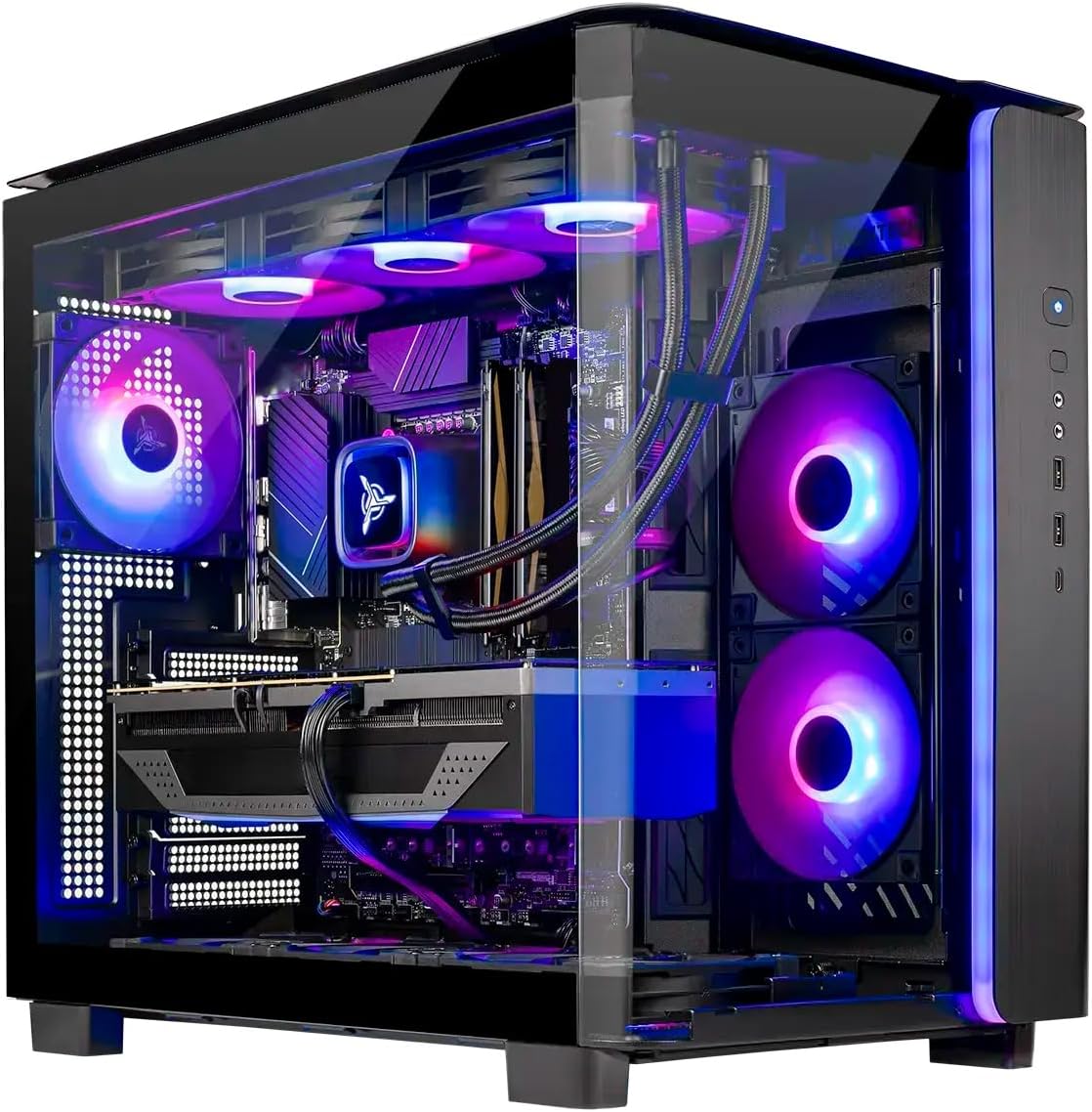
This Skytech Gaming O11 Vision Gaming PC delivers a sleek look with its Lian Li PC-O11 Vision case and ARGB lighting. It features a Ryzen 7 7700X processor and RTX 5070 GPU for reliable gaming performance.
We may earn a commission when you buy through this link, at no additional cost to you.
The system includes 32GB DDR5 RAM and a 1TB Gen4 NVMe SSD for fast access to games and data. Its 360mm AIO liquid cooler ensures the CPU stays cool even during long sessions.
An 850W Gold ATX 3 power supply provides stable power with efficiency and headroom for upgrades. The design emphasizes visual appeal without sacrificing essential performance components.
Ideal for users who want a PC that looks as good as it performs this model is a strong choice. It balances style and power effectively for a modern gaming setup.
Showcase your PC with the stunning Lian Li PC-O11 Vision Case featuring tempered glass and vibrant ARGB lighting.
The 360mm AIO liquid CPU cooler keeps the system cool and quiet maintaining performance without thermal throttling.
We may earn a commission when you buy through this link, at no additional cost to you.
The Horizon Autherium Dragon RGB I9 RTX Gaming PC offers massive storage and memory with 5TB total and 64GB RAM. It is designed for users who need room for large libraries and high multitasking.
We may earn a commission when you buy through this link, at no additional cost to you.
Its Core i9 unlocked OC CPU and RTX 5070 OC graphics provide strong performance for VR and gaming. The system includes Windows 11 PRO for advanced security and device control features.
The 360mm liquid cooling and 11 fans help maintain stability during long sessions. It comes with a 3-year parts and 5-year labor warranty plus access to experienced support specialists.
This PC is a great fit for power users who value storage capacity and extended warranty coverage. It supports a wide range of tasks from gaming to professional workflows efficiently.
Includes 1TB NVMe SSD plus 4TB HDD for 5TB total storage ideal for large game libraries and media files.
Features a 3-year parts and 5-year labor warranty with access to specialists for hardware and software support.
We may earn a commission when you buy through this link, at no additional cost to you.
The Lenovo Legion Tower 5i is an expandable gaming PC with an Intel Core Ultra 7 265F CPU and RTX 5070 Ti GPU. It offers solid performance and future-proofs your setup with upgradable memory up to 128GB.
We may earn a commission when you buy through this link, at no additional cost to you.
Its tool-less side panel makes upgrades easy and customizable RGB lighting adds a personal touch to your gaming sessions. The system includes 3 months of PC Game Pass to access popular titles.
An optimized air-cooling solution maintains peak performance while keeping noise levels low for quiet operation. Connectivity is strong with 2.5G Ethernet and WiFi 6E for seamless online play.
For gamers who want a flexible and reliable tower this model is a strong contender. It balances performance ease of upgrade and included perks to support a long-lasting gaming experience.
The transparent tool-less side panel lets you easily upgrade and showcase your rig without needing specialized tools.
Includes 3 months of PC Game Pass and EA Play to access a wide range of games right out of the box.
We may earn a commission when you buy through this link, at no additional cost to you.
Selecting the right gaming PC for Playing Kenshi requires evaluating key components that impact performance and stability in complex simulations. This guide outlines the essential factors to consider when making your choice.
The CPU is critical for handling physics and AI calculations in sandbox games like Kenshi. Look for multi-core processors with strong single-thread performance to ensure smooth frame rates.
Aim for modern Ryzen or Intel processors with at least 8 cores to manage multitasking and game simulations efficiently.
A dedicated GPU with sufficient VRAM is essential for rendering detailed environments and maintaining visual fidelity. Higher-end cards support ray tracing and better texture quality.
Choose a GPU with at least 8GB VRAM for 1080p gaming and 12GB or more for 1440p or 4K resolutions.
Sufficient RAM allows for seamless multitasking and smoother in-game performance when managing large worlds. DDR5 RAM offers higher speeds and efficiency over DDR4.
Aim for at least 32GB of RAM to future-proof your system and support background applications alongside your game.
NVMe SSDs provide faster load times compared to traditional hard drives. A larger capacity ensures you have room for multiple games and mods.
Select a system with at least a 1TB NVMe SSD for quick access to your game library and files.
Effective cooling prevents thermal throttling and maintains consistent performance during long gaming sessions. Both air and liquid cooling options have benefits depending on build size.
Prebui with dedicatedAIO liquid coolers offer reliable temperature control without extra configuration.
A reliable PSU with enough wattage ensures stable power delivery to all components. Look for 80 Plus certification for efficiency and longevity.
Choose a PSU with at least 750W to support high-performance GPUs and potential future upgrades.
Modern PCs should offer WiFi 6 or newer and multiple USB ports for peripherals. Bluetooth support is also useful for wireless controllers and headsets.
Verify that the PC has sufficient I/O ports including HDMI or DisplayPort for your monitor setup.
A solid warranty protects your investment against hardware failures. Look for manufacturers that offer responsive technical support.
Consider brands with at least a one-year parts and labor warranty and access to customer service for troubleshooting.
Begin by placing your PC in a well-ventilated area away from direct sunlight or heat sources to ensure airflow is not restricted by surrounding objects.
Regularly update your graphics drivers and system firmware to maintain compatibility with games like Kenshi and to benefit from performance improvements.
Use compressed air to clean dust filters and fans every few months to prevent overheating and to extend the lifespan of internal components.
While Kenshi can run on modest hardware a high-end PC ensures smoother performance in large battles and complex simulations. It also supports higher resolutions and graphical settings for an immersive experience.
16GB RAM is the minimum but 32GB is recommended for smoother multitasking and to prevent stuttering in modded or large save files. More RAM helps with future updates and game expansions.
Yes Kenshi benefits from multi-core CPUs for physics and AI calculations. Modern Ryzen or Intel processors with 8 cores or more provide better stability and performance for complex worlds.
Prebuilt PCs offer convenience and reliability with tested components and included support. They are a great option if you want a ready-to-use system without building it yourself.
An NVMe SSD provides much faster load times than a traditional hard drive. It also improves overall system responsiveness and reduces wait times when loading saves.
Upgrading depends on your needs and budget. Systems with easy-to-open cases and extra slots make future upgrades simpler. Consider your long-term plans before committing to a purchase.
These gaming PCs also excel at video editing streaming and 3D modeling. Their powerful hardware supports a wide range of creative and professional applications beyond gaming.
Ensure your drivers are up to date check for overheating with monitoring tools and close background applications. Restarting your PC can also resolve temporary glitches or slowdowns.
This guide reviewed ten gaming PCs suited for Playing Kenshi highlighting performance features and design options. Each model offers unique strengths whether you seek budget-friendly value or premium power.
Prioritize CPU and GPU performance along with adequate RAM and storage to ensure smooth gameplay. Consider factors like cooling and upgrade potential for long-term satisfaction.
Prices and availability change frequently so check current listings and promotions before buying. Take time to compare specs and choose the PC that best fits your needs and budget.