
KPXOS OSU3X Custom Gaming Keyboard
3.4Editor score
Adjustable trigger distance down to 0.05mm
Customizable startup screen interface
Supports multi-key combinations easily
This guide compares the top ten keyboards for Geometry Dash focusing on magnetic switches rapid trigger technology and compact designs to help you choose the
Finding the right keyboard for Geometry Dash can significantly enhance your gameplay experience. Players need precise inputs and fast response times to navigate through challenging levels successfully. This guide explores ten excellent options designed to meet the demands of rhythm gaming and competitive play.
We evaluated each product based on key features like switch type, polling rate, and customizability. Our analysis covers magnetic switches, rapid trigger capabilities, and ergonomic designs tailored for speed. Every item listed here offers unique benefits that cater to different player preferences and setups.
Each selection provides detailed insights into performance, build quality, and user-friendly features. Remember that product availability and specifications may vary over time so check current listings before purchasing. Our goal is to help you make an informed decision that aligns with your gaming needs and budget.
3.4Editor score
4.7Editor score

4.5Editor score
This side-by-side comparison highlights the distinct features of each keyboard model to help you understand their strengths and weaknesses at a glance. From magnetic switch technology to compact layouts we cover what matters most for Geometry Dash players seeking optimal performance and reliability during intense gaming sessions.





This keyboard stands out with its advanced Hall magnetic linear switches and rapid trigger technology designed for high-performance gaming. With a 4.7 rating users appreciate its precision and responsiveness which are critical for rhythm games like Geometry Dash.
We may earn a commission when you buy through this link, at no additional cost to you.
The inclusion of a 0.96 inch IPS color screen adds a unique layer of customization allowing players to monitor key ranges and button counts in real time. The programmable knob enhances usability by letting users assign functions like song list scrolling to a single physical control.
While the performance is impressive users should note that calibration is necessary before first use or after firmware upgrades. This step ensures the magnetic switches operate at optimal sensitivity so it is a small trade-off for the level of accuracy provided.
Ideal for competitive players seeking speed and customizability this keyboard delivers reliable inputs and ergonomic features. Its compact design saves desk space while offering the functionality needed for intense gaming sessions making it a top recommendation for Geometry Dash enthusiasts.
Rapid Trigger allows keys to reset instantly when released enabling faster key presses and improved reaction times during gameplay sequences.
The IPS screen lets users customize text and display key stats providing visual feedback that enhances interaction and monitoring during sessions.
We may earn a commission when you buy through this link, at no additional cost to you.
Affordability meets functionality with this keyboard offering magnetic switches and rapid trigger capabilities at a budget-friendly price. It is an excellent entry point for players wanting to upgrade from standard mechanical keyboards without a large investment.
We may earn a commission when you buy through this link, at no additional cost to you.
The adjustable trigger distance down to 0.05mm provides significant control over key sensitivity which can help players tailor the device to their specific playing style. The visual feedback display adds a modern touch allowing users to track key travel and status in real time.
Despite its advantages some users have reported a lower rating likely due to minor usability quirks or software limitations. However for those prioritizing cost and core magnetic switch features this model delivers solid performance for casual and intermediate gaming.
This keyboard is best suited for beginners or budget-conscious gamers looking to explore magnetic switch technology. Its plug-and-play setup minimizes configuration time so you can start improving your gameplay quickly with minimal hassle or technical knowledge required.
This model brings hall effect magnetic switch benefits to a lower price tier making advanced gaming tech accessible to more players.
Real-time key travel visualization helps users understand their input patterns and optimize settings for better performance during play.
We may earn a commission when you buy through this link, at no additional cost to you.
Similar to the top pick this keyboard shares key features like Hall magnetic linear switches and a high-speed polling rate. It maintains a strong 4.7 rating reflecting user satisfaction with its performance and build quality for rhythm gaming.
We may earn a commission when you buy through this link, at no additional cost to you.
The hot-swap capability allows users to replace switches easily without soldering offering flexibility for those who want to experiment with different tactile experiences. The IPS screen continues to provide valuable visual feedback during gameplay enhancing the overall user interaction.
Some users may find the calibration process a slight inconvenience particularly after updates. However this ensures the magnetic switches remain accurate over time which is essential for maintaining consistency in competitive gaming scenarios.
This model is ideal for players seeking a reliable alternative to the top-ranked device without sacrificing performance. Its compact design and advanced features make it a versatile choice for optimizing input speed and precision in Geometry Dash.
Switch replacement without soldering encourages customization and maintenance allowing users to swap components as needed.
The 8000Hz polling ensures minimal delay between key press and system recognition for fluid responsive gameplay experiences.
We may earn a commission when you buy through this link, at no additional cost to you.
This keyboard emphasizes compactness and rapid trigger technology making it well-suited for space-constrained setups. With a 4.6 rating it delivers reliable performance and customization options that appeal to dedicated Geometry Dash players.
We may earn a commission when you buy through this link, at no additional cost to you.
The IPS screen supports custom animations adding a personal touch to the device. Users can adjust trigger release settings between 0 and 4mm allowing for tailored actuation points that match individual playing styles and preferences.
The hot-swappable nature of the switches means users can upgrade or replace components easily extending the keyboard's lifespan. However the limited number of physical switches might require external controls for additional macro or media functions.
Perfect for gamers prioritizing speed and desk space this keyboard offers the essential magnetic switch performance needed for rhythm games. Its design balances functionality with portability making it a strong contender for competitive and casual users alike.
The screen allows custom animations which helps users personalize their setup and monitor status visually during gaming.
Adjustable trigger release from 0 to 4mm provides granular control over key actuation for optimized gameplay performance.
We may earn a commission when you buy through this link, at no additional cost to you.
This premium model combines cutting-edge magnetic technology with a sleek compact design. Its 4.5 rating reflects strong user satisfaction with its performance and the convenience of its web-based driver which simplifies customization.
We may earn a commission when you buy through this link, at no additional cost to you.
The 0.02mm Rapid Trigger RT step ensures lightning-fast response times which is crucial for complex combos and rapid inputs in rhythm games. Dynamic RGB lighting adds visual appeal and can be synchronized with gameplay for an immersive atmosphere.
While the web-based driver offers easy access it may require internet connectivity and system compatibility checks. Some users might find the compact layout initially limiting but it optimizes desk space significantly for better mouse movement.
Ideal for gamers seeking a high-performance all-in-one solution this keyboard delivers speed and customization in equal measure. Its self-developed magnetic switches and web-driven settings make it a top choice for those wanting premium features without bloat.
Accessing settings via a web browser eliminates the need for bulky software downloads simplifying the customization process.
An ultra-low RT step distance allows keys to reset faster enabling quicker successive inputs during intense gameplay.
We may earn a commission when you buy through this link, at no additional cost to you.
This wireless mechanical keyboard offers exceptional versatility with triple mode connectivity supporting multiple devices seamlessly. A 4.2 rating indicates solid performance with a few users noting minor wireless latency considerations compared to wired alternatives.
We may earn a commission when you buy through this link, at no additional cost to you.
The 1.14 inch TFT screen provides ample space for displaying custom images and system info enhancing the visual experience. Hot-swappable switches and a gasket design ensure a comfortable typing feel while allowing for easy maintenance and personalization.
Battery life is a strong point with the 8000mAh cell supporting long sessions without frequent recharging. However the wireless nature might introduce slight delays that serious competitive gamers could notice during high-speed inputs.
Best suited for users valuing flexibility and aesthetics this keyboard delivers a robust feature set. Its combination of wireless freedom and customizable hardware makes it a great choice for those who switch between gaming and work frequently.
Switch between Bluetooth wired and wireless modes effortlessly allowing seamless transitions across multiple devices and platforms.
The gasket design provides shock absorption and a premium feel reducing harsh vibrations during intense typing or gaming.
We may earn a commission when you buy through this link, at no additional cost to you.
This keyboard stands out for its advanced gaming features including Dynamic Keystroke and Simultaneous Opposing Cardinal Directions support. With a 4.7 rating it is highly praised for precision and build quality making it a strong option for competitive players.
We may earn a commission when you buy through this link, at no additional cost to you.
The adjustable actuation down to 0.01mm allows fine-tuned control over key sensitivity ensuring consistent inputs. The gasket structure dampens vibrations and hollow sounds delivering a refined acoustic experience that appeals to both gamers and typists.
While the performance is impressive the lack of wireless connectivity might be a drawback for some users. Additionally software features are Windows-specific which limits customization options for Mac users compared to other platforms.
Ideal for gamers needing maximum control and precision this keyboard offers top-tier features in a compact wired design. Its PBT keycaps and gasket build ensure durability and comfort supporting long gaming sessions without fatigue.
These advanced features allow nuanced input control resolving conflicting key presses for smoother gameplay movement and actions.
PBT keycaps resist wear and shine while offering a textured feel that remains comfortable during extended use sessions.
We may earn a commission when you buy through this link, at no additional cost to you.
This keyboard focuses on fast trigger mode and rapid responsiveness tailored for gamers who need instant feedback. A 4.5 rating reflects strong satisfaction with its speed and compact form factor that fits well in limited desk spaces.
We may earn a commission when you buy through this link, at no additional cost to you.
The adjustable actuation point between 0.02mm and 3.44mm provides flexibility for different playstyles. The web-based driver allows customization without software downloads simplifying the process of setting macros and RGB effects directly from a browser.
Windows-only support for the driver may limit usability for Mac users who rely on cross-platform compatibility. However for Windows gamers this keyboard offers a streamlined experience with high polling rates and responsive magnetic switches.
Best for players prioritizing speed and simplicity this model delivers consistent performance with minimal setup. Its compact design and web-driven settings make it a practical choice for optimizing inputs in rhythm games like Geometry Dash.
Fast trigger mode ensures commands take effect instantly giving players an edge in quick reaction scenarios.
Saving 40% desktop space allows more room for mouse movement while retaining essential keys for gaming workflows.
We may earn a commission when you buy through this link, at no additional cost to you.
This white variant offers a distinct aesthetic appeal along with magnetic switch technology and visual feedback capabilities. Despite a lower 3.0 rating it serves as an accessible entry point for users interested in customization and RGB lighting.
We may earn a commission when you buy through this link, at no additional cost to you.
The visual feedback display allows users to track key travel and status in real time enhancing interaction during gameplay. Precise magnetic calibration ensures each key is tuned correctly though the process may require initial setup adjustments.
Some users reported issues with software or consistency which affects overall satisfaction. However the core functionality remains solid for basic gaming needs and those prioritizing style over advanced performance metrics.
Best suited for casual players seeking a stylish and functional input device this keyboard provides essential magnetic switch benefits. Its simple setup and customizable interface make it a decent option for those exploring entry-level magnetic keyboard options.
Real-time key travel visualization helps players understand input patterns and optimize their gameplay technique effectively.
Software allows startup screen personalization enabling users to display custom names or information for a tailored experience.
We may earn a commission when you buy through this link, at no additional cost to you.
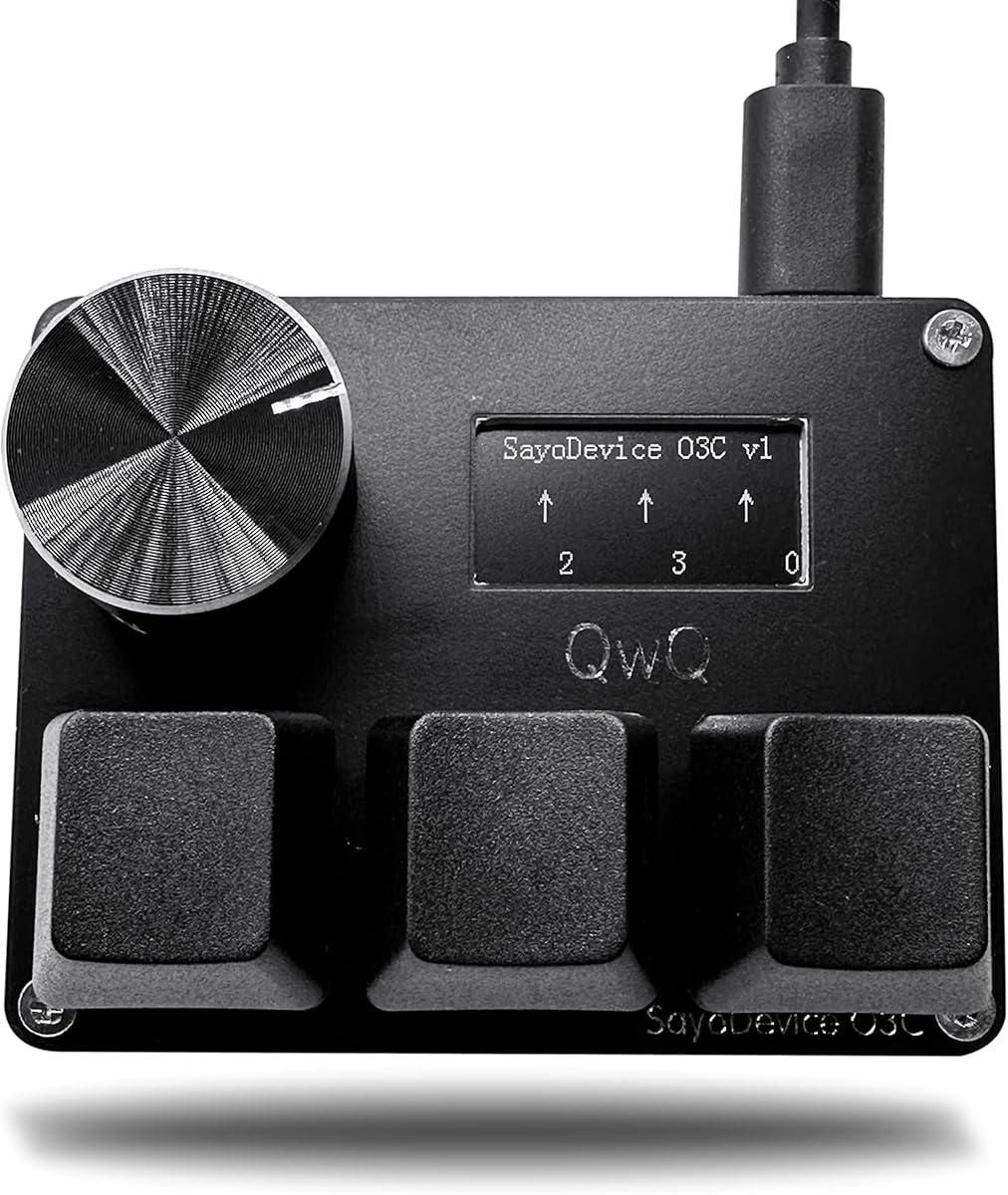
This device functions more like a compact keypad designed for specific use cases and rhythm games. With a 3.1 rating it offers unique features like a programmable knob and boot customization though users may find the form factor limiting for general use.
We may earn a commission when you buy through this link, at no additional cost to you.
The knob can be assigned to scroll song lists or other functions adding convenience during gameplay. High-speed polling ensures inputs are processed quickly making it viable for timed sequences where responsiveness is critical.
As a keypad rather than a full keyboard it may not suit users needing a full set of keys for typing or broader gaming genres. Calibration is simple but requires attention to ensure optimal performance for individual magnetic switches.
Ideal for niche gamers or those needing an extra input device for specific game mechanics this keypad offers specialized utility. Its plug-and-play design minimizes setup complexity making it an accessible option for quick integration into existing setups.
Modifying the boot interface allows users to personalize device names and startup visuals for a more unique setup.
Assigning the knob to functions like song scrolling adds physical control and convenience during rhythm gameplay sessions.
We may earn a commission when you buy through this link, at no additional cost to you.
Selecting the right keyboard involves evaluating several technical factors that impact performance and comfort. This guide breaks down essential considerations to help you find a device tailored to your gaming style and preferences.
Magnetic switches like Hall Effect provide consistent actuation without physical contact reducing wear and improving precision. Rapid Trigger technology allows keys to reset instantly when released which is vital for fast key presses in rhythm games.
Look for keyboards that support adjustable actuation points to fine-tune sensitivity based on your playing style and comfort.
A high polling rate such as 8000Hz ensures your inputs are transmitted to the system frequently reducing input lag. This is crucial for maintaining timing accuracy in competitive gameplay scenarios.
Prioritize models with polling rates of 1000Hz or higher to guarantee smooth and responsive performance during intense sessions.
Compact layouts like 60% save desk space allowing more room for mouse movement which is beneficial for aiming in games. Some keyboards offer mini keypads or dedicated controls that can streamline specific functions.
Choose a form factor that fits your setup and provides access to essential keys without unnecessary bulk or distractions.
Wired connections typically offer lower latency compared to wireless alternatives which can be critical for competitive gaming. However wireless modes provide flexibility for users who switch between multiple devices.
If wireless is a priority ensure the keyboard supports reliable low-latency modes like 2.4GHz or Bluetooth for stable connections.
Programmable keys macro support and RGB lighting allow you to tailor the keyboard to your workflow and aesthetic preferences. Web-based drivers simplify customization without requiring bulky software installations.
Select models that offer intuitive software or onboard memory to save profiles and settings for easy access across devices.
Materials like PBT keycaps resist wear and shine ensuring the keyboard maintains its look and feel over time. A gasket mount design can reduce vibrations and hollow sounds providing a more comfortable typing experience.
Invest in keyboards with hot-swappable switches to extend their lifespan and allow for future upgrades without replacing the whole unit.
Magnetic keyboards often require initial calibration to ensure optimal performance and consistent key activation. This process may need to be repeated after firmware updates but it guarantees accurate input recognition.
Be prepared to follow on-screen steps for calibration to maintain the highest level of precision throughout your gaming sessions.
Ensure the keyboard supports your operating system whether it is Windows macOS or Linux. Some advanced features like web drivers may be platform-specific which could limit functionality on certain devices.
Check product descriptions and reviews to confirm compatibility with your setup before making a purchase to avoid potential issues.
Start by calibrating your magnetic switches following the manufacturer's steps to ensure accurate input detection. This process optimizes key sensitivity and reduces the risk of missed keystrokes during gameplay.
Utilize the customization software or web driver to remap keys create macros and adjust RGB lighting. Tailoring these settings helps streamline your workflow and enhances visual feedback during intensive gaming sessions.
Keep the keyboard clean by regularly removing dust and debris from keycaps using a soft brush or compressed air. Store it in a dry environment and avoid excessive force on keys to maintain long-term performance and durability.
Magnetic keyboards offer rapid trigger technology and adjustable actuation which reduce input lag and improve timing accuracy. These features allow players to execute fast key presses and resets essential for high-level gameplay.
Adjustable actuation lets you set the depth at which a key registers enabling personalized sensitivity. This helps reduce fatigue and enhances precision by matching key response to your finger pressure habits.
Most magnetic keyboards work out of the box but advanced features like macro mapping often need companion software. Some models offer web-based drivers eliminating the need for local installation simplifying setup.
Wired keyboards generally provide lower latency and more stable connections ideal for competitive rhythm gaming. Wireless options are convenient but may introduce slight delays depending on the connection technology used.
Calibration typically involves following on-screen prompts to teach the keyboard key thresholds before first use. This ensures consistent detection of key presses and releases so accuracy remains optimal over time.
Rapid Trigger technology resets a key as soon as it is released allowing for faster reactivation without waiting for a fixed actuation point. This reduces delay and improves responsiveness during rapid input sequences.
Most models support extensive RGB customization via software or onboard controls allowing effects like color waves or reactive lighting. This helps match the keyboard's look to your setup and gaming mood.
Magnetic switches lack physical contacts reducing wear and tear compared to traditional mechanical switches. Combined with quality materials like PBT keycaps these keyboards are built to withstand years of intensive gaming.
The keyboards highlighted in this guide offer a range of features from rapid trigger technology to compact designs and customizable interfaces. Selecting the right one depends on your budget setup and performance needs.
Prioritize magnetic switches high polling rates and reliable connectivity to ensure your inputs are fast and consistent. Consider additional features like hot-swappable switches or web drivers for enhanced flexibility and longevity.
Always check the latest product listings and user reviews before purchasing as specifications and availability can change. Making an informed choice will help you enjoy a seamless and responsive gaming experience in Geometry Dash.