
Newmen GM326
4.4Editor score
Affordable entry price point
Hot swappable linear switches
Multi-function volume knob
Discover the top 75 percent mechanical keyboards for 2026. We compare layout, switches, connectivity, and build quality to help you find your perfect typing
Finding the right 75 percent mechanical keyboard can transform your daily computing experience. These compact layouts save desk space while keeping essential keys like arrows and function rows intact for efficient workflow.
We evaluated ten top models based on build quality, switch performance, connectivity options, and user feedback. Our comparison focuses on value, customization potential, and overall typing satisfaction for gamers and professionals alike.
Each pick highlights unique strengths from budget-friendly entry points to premium wireless options with multimedia knobs. Prices and availability change frequently, so always check current listings before making your final purchase decision today.
4.4Editor score

4.6Editor score

4.7Editor score
This side-by-side comparison highlights key specifications across all ten models to help you quickly identify which features matter most for your specific workflow and budget requirements.

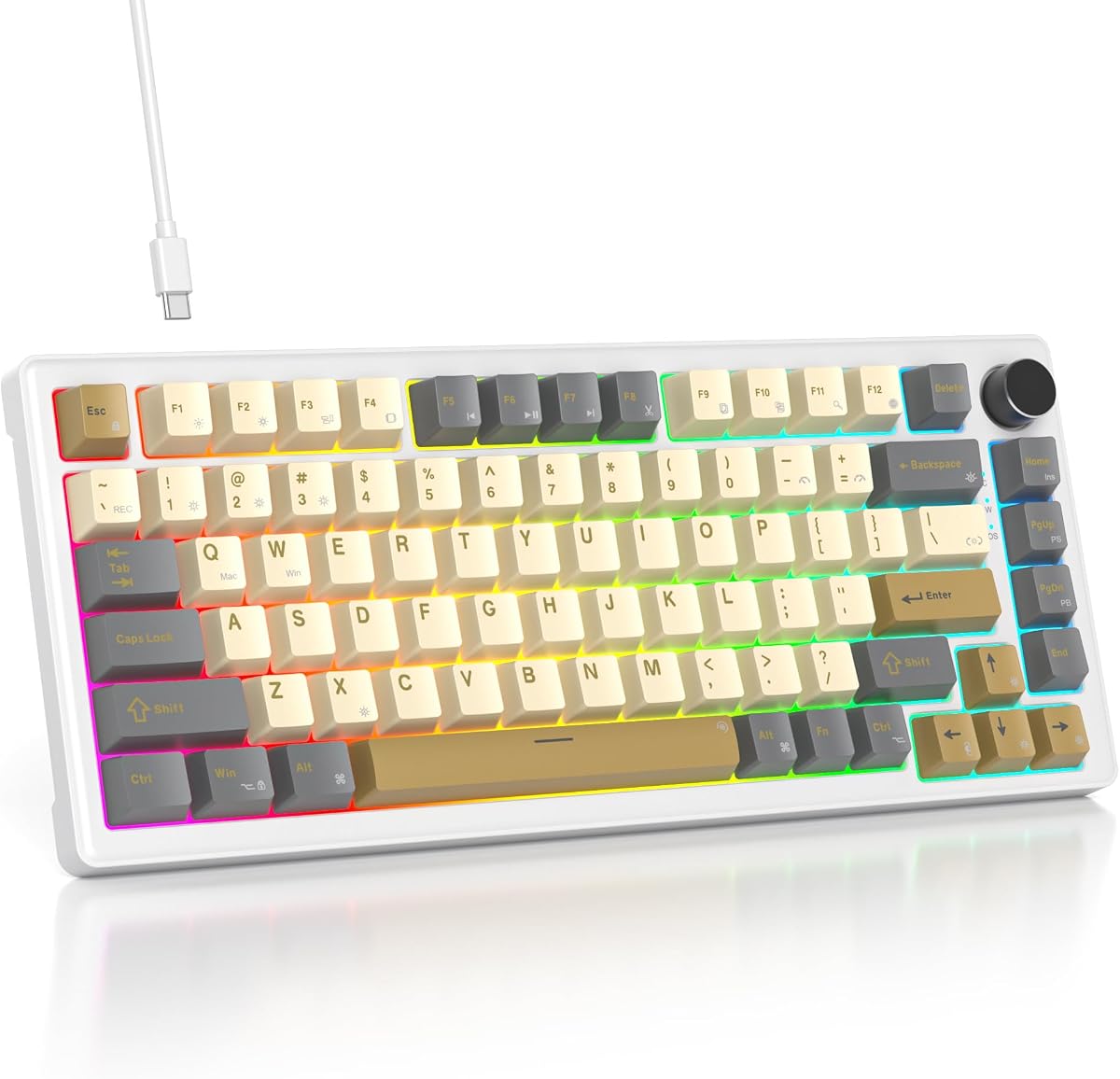


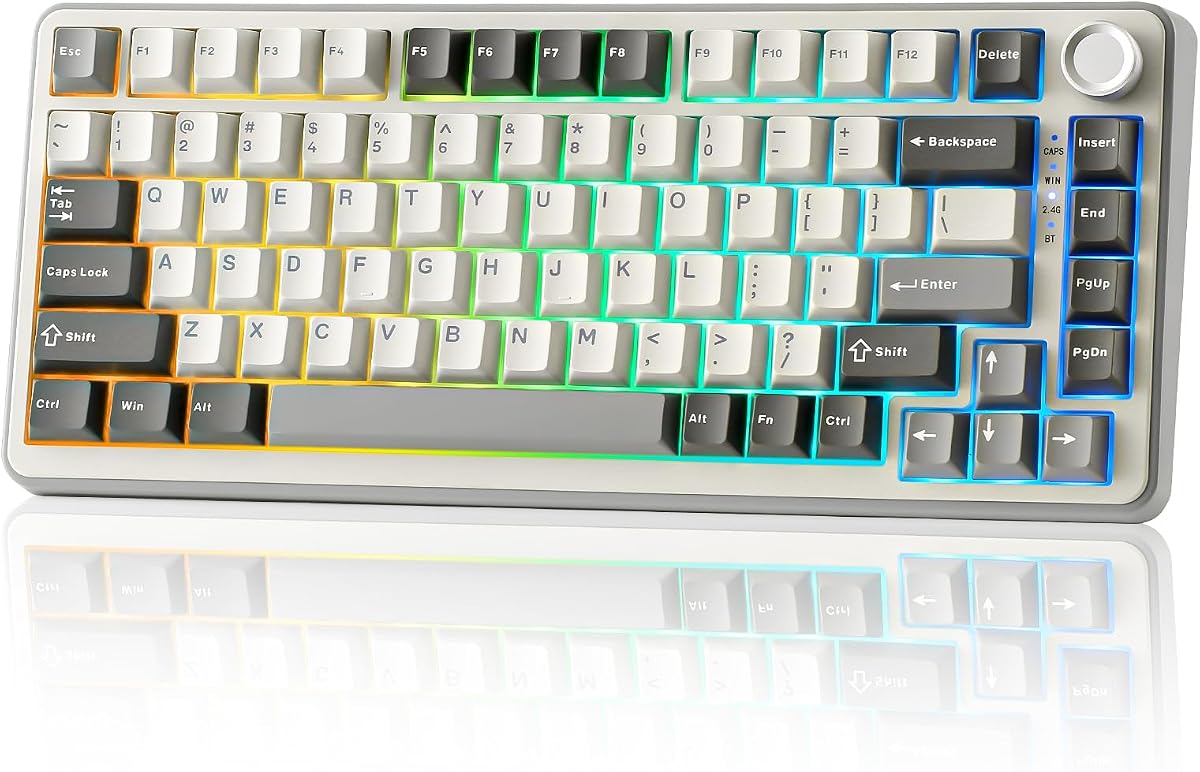
The AULA F75 Pro stands out as a top contender in the 75 percent mechanical keyboard market. With a solid rating of 4.6 stars, users praise its blend of modern features and reliable performance that appeals to both gamers and typists.
We may earn a commission when you buy through this link, at no additional cost to you.
Its tri-mode connectivity supports Bluetooth 5.0, 2.4GHz wireless, and USB-C wired connections simultaneously allowing seamless switching between five devices. The pre-lubed Reaper switches deliver a smooth and creamy typing experience without the need for manual lubrication upon arrival.
While the side printed PBT keycaps offer durability and a unique aesthetic, the driver software is limited to Windows systems in wired mode which may inconvenience Mac users. However, the robust hardware performance largely offsets this minor software limitation for most buyers.
Buyers seeking a balanced mix of wireless flexibility, premium acoustic feel, and aesthetic appeal should prioritize this model. It represents a strong value proposition in the mid-range category with features often found on more expensive alternatives.
The five layers of filling silencer effectively reduce cavity noise while the single key slotting on the PCB optimizes stability for a soft and elastic typing feel.
With a rechargeable 4000mAh battery and support for five connected devices users can easily switch tasks across laptops, desktops, and mobile phones without interruption.
We may earn a commission when you buy through this link, at no additional cost to you.
The Newmen GM326 offers an accessible entry point into the world of mechanical keyboards. With a rating of 4.4 stars, it delivers core mechanical functionality at a price that undercuts most competitors in this compact layout category.
We may earn a commission when you buy through this link, at no additional cost to you.
Its hot-swappable design lets users experiment with different switches without soldering while the multi-function knob provides quick volume adjustments. The rainbow LED backlight adds visual flair without demanding expensive RGB technology found in premium models.
The use of ABS keycaps means they may develop shine or wear over time compared to PBT alternatives and the lack of wireless limits mobility to a fixed desk setup. These trade-offs are acceptable given the low cost and solid performance.
Ideal for students or office workers needing a reliable, portable mechanical keyboard on a tight budget this model delivers essential features without unnecessary extras. It proves that quality mechanical typing is available even at budget price levels.
The detachable USB-C cable and small mini size make it easy to transport for home or business trips while the ergonomic stepped keycaps improve comfort during long sessions.
Full key anti-ghosting ensures accurate input during gaming or writing tasks while the hot-swap sockets allow future upgrades to enhance sound or tactile feel.
We may earn a commission when you buy through this link, at no additional cost to you.
The Womier SK80 delivers a premium experience with its distinctive color multimedia display and refined build quality. Users rate it 4.7 stars for its ability to combine visual appeal with a comfortable and quiet typing experience.
We may earn a commission when you buy through this link, at no additional cost to you.
Its gasket mount design paired with an EVA positioning plate provides a soft and responsive feel that reduces typing noise significantly. The customizable screen allows GIF images system system info, and lighting settings to be displayed directly on the keyboard.
While the software customization is extensive the screen requires wired mode to set images and may feel gimmicky to some users. However the acoustic performance and unique visual features make it stand out as a flagship option for enthusiasts.
Those seeking a high-end aesthetic with superior sound dampening and customizable visuals will find this keyboard worth the investment. It sets a new standard for personalization in the 75 percent form factor category.
The 11-degree oblique angle screen is ergonomically placed to show battery status connection mode, and RGB settings at a glance for easier daily adjustments.
Premium hot-swappable switches with south-facing light diffusers create an out-of-the-box clean typing sound enhanced by bottom filling and gasket mounting.
We may earn a commission when you buy through this link, at no additional cost to you.
The RK ROYAL KLUDGE R75 impresses with its gasket mount construction and creamy switch feel at a competitive price. A 4.4 star rating reflects strong satisfaction among users who prioritize acoustic quality and wireless reliability.
We may earn a commission when you buy through this link, at no additional cost to you.
Its 3-pin or 5-pin hot-swap PCB supports customization while the poron cotton and five layers of sound-absorbing material reduce vibration and noise. The CNC metal knob adds a premium touch to volume control and lighting adjustment.
While the switches are pre-lubed and smooth the driver software occasionally experiences connectivity issues or needs updates to function flawlessly. Battery life remains solid when RGB is off but drops with lighting effects active.
Buyers wanting a wireless keyboard with a premium gasket feel and durable keycaps will appreciate this model. It balances performance and price effectively for those seeking an upgrade from basic mechanical boards.
Single key slotted PCB ensures stable keystrokes while the five-layer padding dampens vibration for a quieter and softer typing feel.
PBT keycaps resist oil and wear over time and the metal knob provides a sturdy interface for daily volume and lighting adjustments.
We may earn a commission when you buy through this link, at no additional cost to you.
The Keychron K2 is a trusted choice for users working across macOS and Windows systems. Rated 4.4 stars it combines robust battery life with reliable Bluetooth connectivity and dedicated keycap sets for both operating systems.
We may earn a commission when you buy through this link, at no additional cost to you.
Its Super Red switches offer linear responsiveness with a long lifespan of up to 50 million keystrokes. The 4000mAh battery supports up to 72 hours of typing or a week of typical use with lights off.
While it lacks RGB and gasket mounting its simplicity ensures broad compatibility and stable performance. The white backlight is elegant but limits personalization compared to color options found on other modern boards.
Professionals and creatives who switch between devices often will value its seamless connectivity and dedicated layout keys. It remains a dependable workhorse for everyday typing and light gaming tasks.
Extra keycaps for both Mac and Windows operating systems ensure full functionality and convenience when switching between different devices or environments.
The 4000mAh large battery allows for up to 7 days of normal use when accounting for 8 hours per day and can last even longer with lights off.
We may earn a commission when you buy through this link, at no additional cost to you.
The AULA S75 PRO stands out for its interactive LCD screen and robust wireless performance. Rated 4.6 stars it offers a unique interface for displaying images, system status, and lighting effects while maintaining a sturdy build quality.
We may earn a commission when you buy through this link, at no additional cost to you.
Its tri-mode connectivity supports Bluetooth 5.0, 2.4GHz wireless, and USB-C with seamless switching across five devices. The pre-lubed switches and five layers of filling silencer deliver a smooth and quiet typing feel.
The screen requires wired mode for image setup and runs best on Windows which limits flexibility for Mac users. Despite this the unique features and strong wireless performance make it a top pick for visual enthusiasts.
Users wanting real-time status updates and a modern design will enjoy the added interactivity of the screen. It complements a gaming or professional setup with both utility and eye-catching customization.
The screen shows battery status date and time system info and even GIF images offering a dynamic interface that updates in real time for quick visibility.
Save up to five devices and switch rapidly using side buttons or shortcut keys ensuring smooth workflow across PCs, laptops, tablets, and mobile devices.
We may earn a commission when you buy through this link, at no additional cost to you.
The YUNZII B75 PRO delivers a rich creamy sound through its pre-lubed Cocoa Cream V2 switches and gasket mount construction. Users rate it 4.6 stars for its exceptional acoustic quality and reliable wireless connectivity.
We may earn a commission when you buy through this link, at no additional cost to you.
Its 4000mAh battery supports extended wireless sessions and the tri-mode connectivity allows seamless switching across Bluetooth 2.4GHz and USB-C. The gasket design with five-layer padding enhances comfort and reduces typing noise.
While the switches are smooth and quiet some users find the software setup complex for full RGB customization. However the build quality and sound profile are praised as competitive with higher-end options.
Typists seeking a satisfying sound and tactile experience will find this keyboard rewarding. It offers a compelling mix of comfort and wireless freedom for daily use at a reasonable price.
Five-layer padding and precision-tuned stabilizers work together to eliminate rattles and produce a clean solid typing sound that is pleasant during long work sessions.
Tri-mode connectivity ensures stable wireless performance with a large battery that keeps the keyboard ready for long work or intense gaming without frequent charging.
We may earn a commission when you buy through this link, at no additional cost to you.
The 75% Retro Mechanical Keyboard offers a compelling blend of comfort and customization at a low cost. With a 4.6 star rating users appreciate its gasketed mount and pre-lubed White Jade switches that deliver a quiet and creamy typing experience.
We may earn a commission when you buy through this link, at no additional cost to you.
Its five-layer padding ensures stability and comfort while the full-key macro programmability supports productivity and gaming efficiency. The music rhythm lighting adds a fun visual layer without adding excessive cost or complexity.
Being wired limits mobility to a fixed desk but ensures consistent performance without battery concerns. The casing is primarily plastic but durable enough for daily office or home use.
Buyers wanting a comfortable gasket feel and switch customization without paying premium prices will find this keyboard ideal. It balances build quality and features for the budget-conscious enthusiast.
Unlike traditional screw-mounted keyboards this gasketed mount ensures a tight fit between internal components providing a smooth and quiet action that reduces typing fatigue.
Hot-swap PCB supports 3-pin or 5-pin switches freely allowing users to tailor acoustic performance and tactile feel to their specific preferences.
We may earn a commission when you buy through this link, at no additional cost to you.
The 75 Percent Gasket Keyboard delivers a quiet and responsive typing experience with its gasket-mounted design. Rated 4.6 stars it provides a solid build with sound-absorbing pads and premium PBT keycaps for lasting durability.
We may earn a commission when you buy through this link, at no additional cost to you.
Its hot-swap socket allows easy switch changes while full key anti-ghosting ensures accurate input during gaming or writing tasks. The RGB lighting is customizable through software for a personalized look.
Lacking wireless connectivity limits portability but the wired setup ensures consistent performance and eliminates battery anxiety. The PBT keycaps resist oil and wear maintaining texture over time.
This model suits users who prioritize stability and sound quality over wireless features. It offers a reliable and comfortable typing platform for professional or gaming use on a desk.
The gasket-mounted structure with sound-absorbing pads provides a softer quieter typing experience that reduces noise and delivers a cushioned feel for extended use.
Equipped with high-quality PBT keycaps this keyboard resists oil and wear ensuring a clean and durable surface that maintains its texture over time.
We may earn a commission when you buy through this link, at no additional cost to you.
The MageGee 75% offers a straightforward and reliable mechanical experience for traditional gamers. With a 4.1 star rating it focuses on essential features like red switches and blue backlighting without complex software requirements.
We may earn a commission when you buy through this link, at no additional cost to you.
Its linear Red switches provide smooth and fast actions ideal for gaming while the sturdy metal panel adds durability. The full anti-ghosting and N-key rollover ensure accurate input during intense gameplay sessions.
The lack of software means lighting adjustments are handled via shortcuts and ABS keycaps may shine over time. However its plug-and-play simplicity and broad compatibility make it convenient for users who prefer minimal setup.
Ideal for casual gamers or users needing a simple mechanical keyboard without bloat this model meets core needs efficiently. It remains a solid choice for those prioritizing function over advanced customization.
All 87 keys support N-key rollover ensuring commands are executed accurately even when pressing multiple keys at once during competitive gameplay.
Ergonomic ABS double-color injection keycaps and adjustable two-step kickstands provide a stable and comfortable typing posture for extended gaming sessions.
We may earn a commission when you buy through this link, at no additional cost to you.
Choosing the right 75 percent mechanical keyboard involves balancing layout comfort, acoustic preferences, and connectivity needs. Here are the key factors to consider before making your purchase.
A 75 percent layout typically includes 80 to 84 keys offering a balance between compactness and functionality. It retains arrow keys and function rows while eliminating the number pad to save desk space.
Look for models that preserve essential navigation and media keys to ensure workflow efficiency without sacrificing portability or desk real estate.
Mechanical switches come in linear tactile, and clicky varieties. Linear switches like Reds are smooth and fast ideal for gaming while tactile or clicky switches offer feedback for typing accuracy.
Select switch types based on whether you prioritize gaming speed or typing feedback. Hot-swap boards let you change switches later if your needs evolve.
Wired boards provide stable low-latency connections perfect for gaming. Wireless models with Bluetooth or 2.4GHz options offer flexibility and a cleaner desk setup for multitasking across devices.
Consider how many devices you connect to and whether latency sensitivity matters. Tri-mode keyboards offer the most versatility for hybrid workflows.
Gasket-mounted keyboards use rubber or silicone mounts to reduce vibration and noise creating a softer and more premium feel. Traditional screw mounts are sturdy but may transmit more impact noise.
For comfort and acoustic refinement prioritize gasket mounting. Metal or aluminum cases also add durability compared to plastic options.
PBT keycaps are textured and resistant to oil wear making them durable over time. ABS keycaps are smooth and offer better light transmission but may develop shine after heavy use.
Choose PBT for longevity and tactile feel or ABS if you prefer translucent effects. Double-shot molding ensures legends remain clear and fade-resistant.
RGB lighting enhances aesthetics and usability in low-light environments. Look for models with multiple lighting effects, per-key customization, and macro support for advanced workflow automation.
If personalization matters select boards with accessible drivers and south-facing LEDs to prevent light leakage and improve visual clarity.
Wireless boards rely on built-in batteries typically ranging from 1000 to 4000mAh. Charging via USB-C ensures modern compatibility and quick recharge times for consistent use.
Check advertised battery life with RGB on and off. Larger capacities support extended wireless sessions without frequent interruptions for charging.
Driver software enables macro programming lighting customization, and key remapping. Some brands restrict software to specific operating systems like Windows which can limit cross-platform use.
Verify software support for your OS and ensure features like macro support or screen customization work as needed before purchasing.
To maximize the lifespan of your mechanical keyboard regularly clean between keycaps with a soft brush or compressed air to remove dust and debris. Avoid harsh chemicals that can damage keycaps or internal components.
For wireless models ensure the battery is fully charged before use and disconnect from Bluetooth devices when not needed to conserve power. Store in a dry environment to protect internal electronics from moisture.
Customize lighting and macro settings via the provided software to suit your workflow. If your keyboard supports hot-swapping experiment with different switches to refine typing feel and sound without permanent modifications.
A 75 percent keyboard combines the compactness of tenkeyless layouts with the retention of arrow keys and function rows. This saves desk space without compromising essential keys for efficient navigation and media control during work or gaming.
Yes hot-swappable boards allow you to change switches without soldering which is ideal for experimentation. Beginners can test different switches to find their preferred feel and sound without permanent modifications or expensive replacements.
A gasket mount adds cushioning between the PCB and case reducing vibration and noise for a softer and quieter typing experience. While slightly more expensive it delivers premium acoustic comfort that many users find worth the investment.
Choose wired keyboards for minimal latency and stable performance ideal for competitive gaming. Wireless boards offer flexibility and clean setups for productivity. Consider your connectivity needs and whether you prioritize mobility or consistency.
Most models feature customizable RGB lighting via driver software or onboard controls. Some allow per-key customization while others offer preset patterns. Always check software availability and lighting features before purchasing to ensure desired customization.
Many models include Mac and Windows compatibility with dual OS keycaps. Some brands like Keychron provide dedicated layouts for Mac users while others require software switching. Verify OS support for your specific system before buying.
Our top picks highlight the best combinations of comfort, features, and value for different user needs. The AULA F75 Pro leads in versatility while the Womier SK80 stands out for premium customization.
Prioritize what matters most to you whether it is wireless freedom, acoustic refinement, or budget-friendly options. Each model offers unique strengths that can enhance both your workflow and enjoyment.
Remember to check current availability and prices before purchasing. Features and pricing may shift as new models arrive so verify the latest details to ensure you choose the right keyboard for your setup.