
Anker 2.4G Wireless Ergonomic Mouse
4.2Editor score
Adjustable DPI settings
USB receiver connectivity
Power saving mode
Discover the top ergonomic mice for wrist pain designed to reduce strain and improve comfort during long computer sessions with detailed reviews and comparisons
Finding the right mouse can transform your daily workflow and protect your long-term health. Ergonomic mice are designed to align with natural hand positions, reducing the strain on your wrists and forearms during extended use. This guide explores the best options available to help you make an informed decision for your workspace.
We compared ten leading ergonomic mice based on design, connectivity, battery life, and user feedback. Each product was evaluated for its ability to promote a neutral handshake grip and minimize repetitive strain. Our analysis covers wireless options with various DPI settings to suit different tasks and hand sizes effectively.
Every pick in this list highlights specific strengths and ideal use cases for diverse users. You will find options ranging from budget-friendly models to premium devices with advanced features. Please note that product availability and terms may change, so always verify details before purchasing to ensure the best fit for your needs.
4.2Editor score

4.4Editor score

4.4Editor score
This side-by-side comparison highlights the key specifications and features of the top ten ergonomic mice. Whether you need silent clicks, rechargeable batteries, or multi-device connectivity, this table helps you quickly identify the model that fits your workflow and hand size requirements.




The Logitech Lift Vertical Ergonomic Wireless Mouse stands out as a top choice for users seeking comfort and efficiency. With a rating of 4.4 stars, it is praised for its 57-degree vertical angle that promotes a natural handshake grip. This design helps reduce strain on your wrist and forearm during long work sessions.
We may earn a commission when you buy through this link, at no additional cost to you.
Its standout qualities include whisper-quiet clicks and a SmartWheel that ensures smooth scrolling. The mouse supports both Bluetooth Low Energy and Logi Bolt USB connectivity, making it versatile for various devices. Additionally, the battery life can last up to two years on a single set of batteries.
While it is designed for small to medium right hands, some users might find the price higher than other options. However, the comfort provided by the ergonomic shape and textured grip makes it a worthwhile investment for daily use. The certified post-consumer recycled plastic also appeals to eco-conscious buyers.
This mouse is ideal for professionals and students who spend hours at a desk and want to minimize discomfort. Its ergonomic certification and intuitive controls ensure productivity without compromising health. We recommend it for anyone prioritizing long-term wrist health and reliable performance.
The 57-degree vertical angle aligns your hand in a natural handshake position, reducing muscle strain and improving posture throughout the day.
Whisper-quiet clicks and a precision SmartWheel provide a peaceful workspace experience while maintaining high productivity and seamless navigation.
We may earn a commission when you buy through this link, at no additional cost to you.
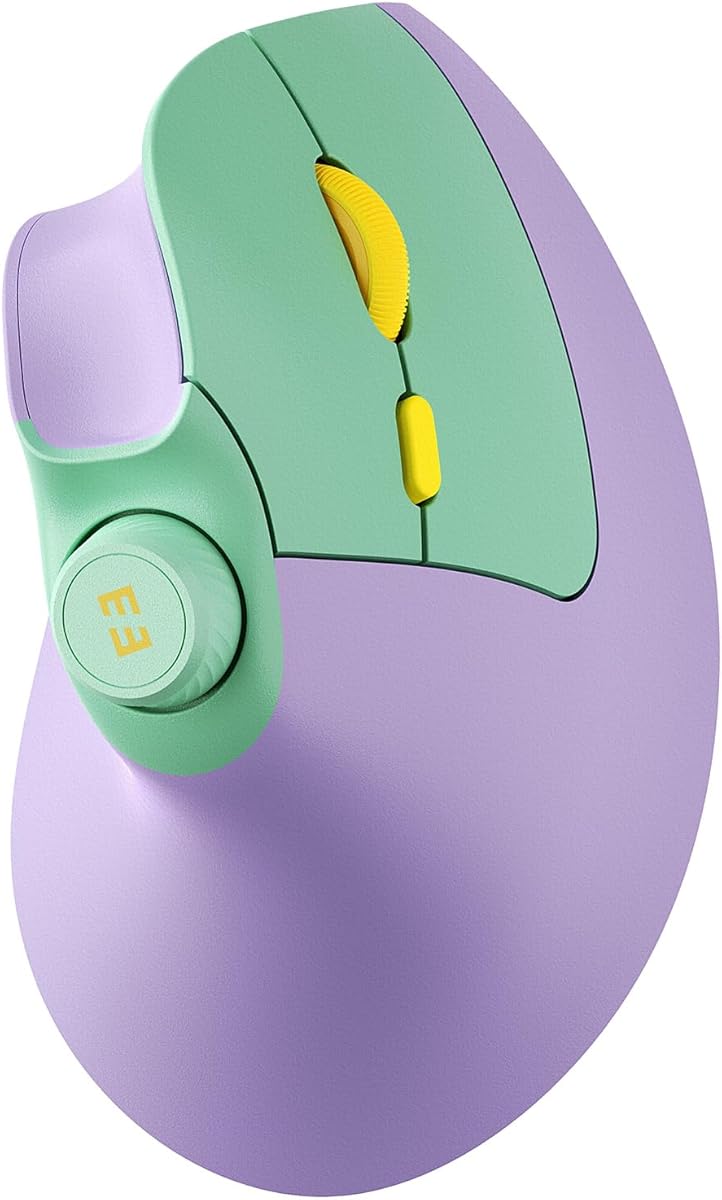
The Anker 2.4G Wireless Ergonomic Mouse offers an excellent entry point for those looking to switch to a vertical design without a high cost. Rated 4.2 stars, it features a scientifically designed structure that promotes a neutral wrist position. This helps reduce strain and amplifies productivity for daily tasks.
We may earn a commission when you buy through this link, at no additional cost to you.
It boasts adjustable DPI settings ranging from 800 to 1600, allowing for smooth tracking on various surfaces. The mouse includes convenient next and previous buttons for effortless webpage browsing, which is great for internet enthusiasts. It also transitions into a power-saving mode after inactivity to conserve battery life.
One trade-off is that it relies on a USB receiver rather than Bluetooth, which uses a USB port. Additionally, the click sounds are unavoidable, which might not suit quiet environments. Despite these minor issues, the durability and warranty coverage provide good value for the price.
This mouse is best for users who want a straightforward ergonomic solution for work or leisure activities. Its user-friendly design and efficiency make it a solid choice for those new to vertical mice. We recommend it for budget-conscious buyers needing reliable performance.
Multiple DPI levels ensure accurate cursor movement and smooth tracking across different surfaces for versatile usage scenarios.
Dedicated next and previous buttons streamline web browsing and document navigation to enhance daily workflow efficiency.
We may earn a commission when you buy through this link, at no additional cost to you.
The TECKNET Ergonomic Mouse features impressive connectivity options with both Bluetooth and 2.4G wireless support. It allows seamless switching between three devices, making it ideal for users who manage multiple computers or tablets. The 4800 DPI sensor ensures high precision for various tasks from coding to design.
We may earn a commission when you buy through this link, at no additional cost to you.
Silent click technology ensures that your work remains undisturbed, perfect for libraries or shared offices. The mouse also offers six adjustable DPI levels for customized sensitivity. However, it requires AAA batteries which are not included, and side buttons may not work with macOS systems.
While the battery dependency is a slight inconvenience, the deep sleep mode helps conserve power when not in use. The 36-month warranty provides peace of mind for long-term use. Users appreciate the ergonomic design that places the palm at a near-vertical angle.
This mouse is suitable for tech-savvy users needing flexibility across devices without breaking the bank. Its silent operation and high performance make it a strong contender in the mid-range market. We recommend it for hybrid workers or students with multiple gadgets.
Seamlessly switch between Bluetooth and USB connections to connect up to three devices for a streamlined workflow experience.
Nearly silent clicks prevent disturbances while maintaining responsive tracking and adjustable sensitivity for diverse daily tasks.
We may earn a commission when you buy through this link, at no additional cost to you.
The UGREEN Ergonomic Wireless Mouse is designed with a natural vertical handshake position to reduce wrist rotation and strain. It features five buttons that enhance productivity for browsing and navigation tasks. The mouse supports both Bluetooth and 2.4G wireless connections for versatile use across devices.
We may earn a commission when you buy through this link, at no additional cost to you.
Adjustable DPI settings allow you to switch between precise editing and fast scrolling effortlessly. PTFE glide feet ensure smooth movement with reduced friction, adding to the comfort. The quiet clicks are perfect for open offices or quiet environments where noise control is important.
One limitation is the reliance on a single AA battery instead of a rechargeable one, though the smart sleep mode extends usage. The build is straightforward and lacks advanced customization but delivers reliable performance. It is fully compatible with various systems including Windows and macOS.
This mouse is an excellent choice for those seeking a practical and affordable ergonomic solution. Its balanced features and comfort make it suitable for general office work and daily use. We recommend it for users needing a dependable vertical mouse without extra cost.
The vertical handshake design keeps wrists straight and muscles relaxed to reduce strain during extended computer sessions.
A five-button layout combined with adjustable DPI offers efficient control for diverse tasks without needing extra software.
We may earn a commission when you buy through this link, at no additional cost to you.
The ProtoArc EM11 NL is specifically designed for small to medium hands with a maximum length of 7.5 inches. Its rechargeable 500mAh battery eliminates the need for disposable cells, offering convenience and eco-friendly usage. The dual Bluetooth connectivity allows connections to up to three devices simultaneously.
We may earn a commission when you buy through this link, at no additional cost to you.
The vertical design keeps your wrist naturally straight to reduce discomfort and repetitive strain risks. Silent clicks help maintain focus in quiet environments though some buttons are not silent. Users should note there is a learning curve to adapt to the shape for optimal comfort.
While forward and back buttons may not work on macOS systems, the mouse offers reliable performance for most users. The Type-C charging is modern and convenient for daily use. The ergonomic benefits become apparent after a week or two of consistent usage.
This mouse is perfect for individuals with smaller hands who struggle to find comfortable ergonomic options. Its rechargeable nature and silent features make it a practical choice for students and professionals. We recommend it for those prioritizing fit and sustainability.
Designed specifically for hand lengths under 7.5 inches to ensure a comfortable and natural grip without strain.
A built-in Li-Ion battery provides long-lasting power and reduces waste through easy Type-C charging cycles.
We may earn a commission when you buy through this link, at no additional cost to you.
The Lekvey Ergonomic Mouse features a high-capacity rechargeable battery that offers over 150 hours of continuous use. It connects via a 2.4G USB receiver for plug-and-play simplicity without Bluetooth pairing. The ergonomic design encourages a neutral handshake wrist position to reduce strain effectively.
We may earn a commission when you buy through this link, at no additional cost to you.
Adjustable DPI levels allow for different sensitivity settings depending on your tasks. Page back and forward buttons enhance browsing convenience. Many users report significant wrist pain reduction after a few days of adjustment. The mouse is compatible with a wide range of systems including Mac OS.
Although it lacks Bluetooth connectivity, the USB receiver ensures stable performance for desktop or laptop use. The design is sleek and practical for medium to large hands. The 36-month warranty adds value and confidence in the product's durability.
This mouse is ideal for users who prefer a rechargeable device without complex setups. Its comfort and battery life make it a great option for daily office work. We recommend it for those seeking reliability and ease of use.
A built-in rechargeable battery delivers over 150 hours of usage to reduce the hassle of frequent battery changes.
Connect via a USB receiver without drivers for immediate use and consistent performance across compatible systems.
We may earn a commission when you buy through this link, at no additional cost to you.
The TECKNET Ergonomic Mouse features a 52-degree vertical angle that fits small to medium hands comfortably. With Bluetooth 5.0 and 2.4G connectivity, it offers versatile options for different devices. The 600mAh rechargeable battery provides up to two months of usage on a single charge.
We may earn a commission when you buy through this link, at no additional cost to you.
Six adjustable DPI levels allow for precise control whether you are editing photos or gaming. Silent click technology reduces noise by 99% to keep your environment distraction-free. The six total buttons streamline workflows with shortcuts for increased efficiency.
While some buttons are not silent and forward back options have Mac limitations, the overall performance is strong. The 36-month support and durable build ensure long-term satisfaction. It is fully compatible with Windows and Mac OS X for broad usability.
This mouse is a top choice for professionals needing flexibility and high performance without noise. Its ergonomic design and battery efficiency make it suitable for extended sessions. We recommend it for users seeking a robust and quiet vertical mouse.
Bluetooth 5.0 and a massive 600mAh battery ensure reliable connections and minimal downtime for productive workdays.
Whisper-quiet clicks and adjustable DPI provide accurate tracking while maintaining a peaceful and focused workspace.
We may earn a commission when you buy through this link, at no additional cost to you.
The seenda MOU-302 stands out with a built-in volume knob for quick media control without switching windows. It connects via Bluetooth or 2.4G to up to three devices simultaneously for hybrid workflows. The ergonomic design promotes a natural handshake grip to reduce wrist pressure effectively.
We may earn a commission when you buy through this link, at no additional cost to you.
Silent clicks ensure a quiet environment suitable for libraries or offices. The mouse supports adjustable DPI settings for smooth control across different tasks. A 500mAh battery allows up to two months of use per charge via USB-C for convenience.
While the DPI is lower than some high-end models, it is sufficient for most office and casual tasks. The unique volume feature adds significant value for streamers and multimedia users. It works with Windows, macOS, iOS, and Android for broad compatibility.
This mouse is ideal for users who need frequent media control and device switching. Its ergonomic comfort and rechargeable battery make it a versatile choice. We recommend it for multitaskers and content consumers.
A dedicated volume knob lets you adjust audio quickly without interrupting your workflow or switching applications.
Switch between up to three devices easily to manage work and personal devices without disconnecting or pairing.
We may earn a commission when you buy through this link, at no additional cost to you.
The Logitech MX Vertical is a premium ergonomic mouse designed and tested with criteria set by leading ergonomists. It reduces muscular activity by 10 percent compared to standard mice while maintaining performance. The 57-degree vertical angle improves wrist posture and reduces pressure on the wrist.
We may earn a commission when you buy through this link, at no additional cost to you.
Its advanced optical tracking with a 4000 DPI sensor results in 4x less hand movement for reduced fatigue. A cursor speed switch instantly adjusts DPI for accuracy or speed. The textured rubber surface ensures a natural grip that fits various hand shapes.
While it is a higher-end option, the health benefits and build quality justify the investment for many users. The USB receiver ensures stable wireless connection. It is designed to work well for people with different hand sizes and preferences.
This mouse is perfect for professionals prioritizing long-term health and precision. Its ergonomic excellence and durable design make it a top choice for daily work. We recommend it for those seeking the best in ergonomic comfort.
A high-precision sensor and adjustable cursor speed deliver accurate control and reduced hand movement for efficiency.
Tested by leading ergonomists to ensure optimal wrist posture and reduced muscle strain during extended use.
We may earn a commission when you buy through this link, at no additional cost to you.
The TECKNET 2.4G Wireless Ergonomic Vertical Mouse features a 60-degree vertical grip that promotes a natural handshake. It offers six programmable buttons to speed up workflows and reduce repetitive click fatigue. The left and right buttons are designed for quiet operation in focused environments.
We may earn a commission when you buy through this link, at no additional cost to you.
Five adjustable DPI levels allow switching between precise work and fast browsing. The mouse uses a reliable 2.4GHz wireless connection for stable performance over distance. A USB-A nano receiver ensures easy pairing and interference-free use across devices.
While it lacks Bluetooth, the rechargeable battery and durable build provide good value. Users are encouraged to give it a few days to adjust to the shape. The 36-month warranty supports long-term use and customer satisfaction.
This mouse is ideal for office workers needing programmable features and ergonomic comfort on a budget. Its quiet operation and connectivity ensure productivity. We recommend it for cost-conscious buyers needing reliable functionality.
Six customizable buttons let you create shortcuts that streamline repetitive tasks and improve overall daily efficiency.
A stable 2.4GHz connection and silent clicks create a distraction-free workspace perfect for open offices or home setups.
We may earn a commission when you buy through this link, at no additional cost to you.
Choosing the right ergonomic mouse requires considering several factors beyond just comfort. This section outlines key elements to help you select a device that fits your hand, workflow, and device ecosystem effectively.
Hand size plays a critical role in ergonomic comfort. Small to medium hands may benefit from compact designs while large hands need more support. Always check product dimensions and recommended hand lengths to avoid discomfort.
Measure your hand length from the base of your palm to the tip of your middle finger. Compare this with the mouse specifications to ensure a snug fit that supports your natural grip.
Most ergonomic mice feature a vertical design between 52 and 60 degrees to align your wrist with your forearm. This reduces pronation and strain. A textured surface ensures a stable grip even during sweaty sessions.
Look for a model that allows you to rest your forearm comfortably on the desk. A natural handshake position is key to reducing muscle activity and preventing long-term injuries.
Connectivity options include Bluetooth, 2.4G wireless, or both. Bluetooth is convenient for laptops without USB ports while 2.4G offers stable performance for desktops. Some mice allow switching between multiple devices for hybrid setups.
Choose based on your primary devices and USB availability. Dual connectivity provides flexibility if you switch between work and personal computers frequently.
Battery life varies between disposable AAA batteries and rechargeable internal cells. Rechargeable models reduce waste and long-term costs but require occasional charging. Disposable ones may last months but need replacement.
Evaluate your usage patterns. If you work long hours daily, a rechargeable model with fast charging might be more practical than one with frequent battery changes.
DPI determines cursor sensitivity and tracking precision. Adjustable DPI levels let you switch between tasks like browsing and design. Higher DPI reduces hand movement for precise cursor control.
Ensure the mouse offers multiple DPI settings to adapt to different workflows. A cursor speed switch adds convenience for quick adjustments during tasks.
Additional buttons like page back or volume control enhance productivity. Silent click features are essential for quiet environments. Check if buttons are programmable for custom shortcuts.
Prioritize features that match your daily tasks. A simple layout may suffice for general use while complex workflows benefit from extra programmable buttons.
A strong warranty indicates manufacturer confidence in product durability. Look for at least 18 months of coverage to protect against defects. Reliable customer service ensures quick resolution for technical issues.
Check registration requirements to activate extended warranties. A robust support network reduces hassle if the mouse encounters problems over time.
Ensure the mouse works seamlessly with your operating system. Some features like side buttons may not function on macOS. Verify driver availability for customization.
Choose a universally compatible model to avoid limited functionality. Cross-platform support is vital for multi-device users working across different systems.
To get the most out of your ergonomic mouse, adjust your desk height so your elbow is at a 90-degree angle while using it. This ensures your forearm stays straight and reduces tension in your wrist. Rest the mouse gently on the surface without pressing down hard.
Allow a few days for your muscles to adapt to the vertical shape. If you experience initial discomfort, alternate between the ergonomic and standard mouse gradually. Consistent use will help improve your posture and reduce strain over time.
Keep the mouse clean by wiping it with a soft cloth to remove dust and oils. Check the charging port or battery compartment periodically for debris. Proper maintenance extends the lifespan of the device and ensures smooth tracking performance.
Ergonomic mice promote a neutral wrist position which reduces strain on the carpal tunnel. While they do not cure existing conditions, they help prevent worsening symptoms. Consult a medical professional for specific health advice.
Most users report no loss in overall performance once they adapt to the shape. A learning curve exists but productivity often improves due to reduced fatigue. Comfortable tools enable longer focused sessions without breaks.
Yes, many ergonomic mice offer high DPI and fast response times suitable for gaming. However, the vertical grip may take adjustment. Look for models with adjustable DPI to fine-tune sensitivity for gaming tasks.
A DPI range between 800 and 1600 is sufficient for standard office tasks. Higher DPI helps reduce hand movement for precision. Adjustable settings allow you to switch between tasks like browsing and detailed editing.
Most users adapt within one to two weeks of regular use. During this time, your muscles adjust to the new angle. Start with shorter sessions and gradually increase usage to build comfort and muscle memory.
Rechargeable mice reduce waste and long-term costs significantly. They also offer convenience with USB-C charging. However, ensure the battery life meets your usage needs before purchasing to avoid frequent charging interruptions.
The top picks highlight a range of options from budget-friendly models to premium devices. The Logitech Lift stands out for its comfort and silent operation while the Anker model offers excellent value for beginners. Each choice caters to specific hand sizes and connectivity needs.
Prioritize features like vertical angle, battery life, and DPI settings that match your daily workflow. Ergonomic comfort is a long-term investment in your health and productivity. Choose a model that allows easy adaptation and offers reliable performance.
Always check current prices and availability before purchasing to get the best deal. Product terms and warranties may change over time so verify details with the seller. With the right ergonomic mouse, you can work comfortably and efficiently for years.