
TobenONE DisplayLink Docking Station
4.4Editor score
120W power adapter included
Triple or quad 4K support
Eighteen total connection ports
This guide compares the top docking stations for 3 monitors, evaluating display support, connectivity options, charging power, and compatibility to help you
Creating a productive workspace often requires multiple screens to manage tasks efficiently. A docking station for 3 monitors allows you to connect several displays through a single laptop port. This setup enhances multitasking capabilities for professionals who need extended screen real estate for complex projects.
We have carefully analyzed the market to identify the most reliable and feature-rich options available. Our comparison focuses on video output capabilities, port diversity, charging speeds, and overall build quality. Each product listed here has been selected based on user feedback and technical specifications.
Every review highlights key strengths and potential limitations to help you make an informed decision. You will find detailed insights into compatibility and performance for various laptop models. Please note that product availability and pricing may change frequently on retailer websites.
4.4Editor score

4.4Editor score

4.3Editor score
The following table provides a side-by-side overview of the ten selected models. It highlights essential specifications such as port counts, video resolution support, and power delivery capabilities to help you compare them quickly.


This Plugable model stands out as a top choice for professionals needing reliable multi-monitor setups. It holds a solid user rating and is built for enterprise environments. The docking station supports triple HDMI displays making it versatile for various workflow needs.
We may earn a commission when you buy through this link, at no additional cost to you.
Its 100W charging capability ensures your laptop remains powered during intensive tasks. The inclusion of DisplayLink technology allows it to work effectively even on Apple Silicon Macs. This expands the utility of Mac devices which are often limited to single external displays.
While it requires a driver installation on macOS for full functionality this is a minor trade-off for the enhanced compatibility it offers. The build quality is robust and designed to withstand daily office use. It does not support HDCP content playback which limits streaming options but is perfect for productivity.
We recommend this docking station for business users and IT departments needing standardized hardware. Its lifetime support guarantee provides peace of mind for long-term deployment. This model excels in stability and connectivity options for demanding work environments.
DisplayLink technology enables triple display support on Macs which typically restrict users to a single external monitor.
The 100W charging port delivers enough power to run the dock and charge a laptop simultaneously under heavy load.
We may earn a commission when you buy through this link, at no additional cost to you.
This TobenONE dock offers a premium experience with an extensive array of ports for maximum connectivity. It supports up to three or even four displays allowing for incredibly expansive workspace configurations. The 120W power adapter is included which simplifies setup and ensures stable operation.
We may earn a commission when you buy through this link, at no additional cost to you.
The docking station supports both HDMI and DisplayPort outputs giving you flexibility in monitor connections. It works across Windows macOS and Chrome OS with the necessary driver. This makes it a versatile solution for mixed environments where different operating systems are used.
The main trade-off is the higher price tag and the bulkiness of the unit which may take up significant desk space. However the included power supply and the sheer number of ports justify the cost for power users. It is particularly useful for content creators needing multiple video feeds.
We suggest this model for users who need every possible connectivity option available. The ability to connect multiple high-resolution monitors without compromise is its biggest strength. It delivers professional grade performance for those who refuse to compromise on their setup.
With three HDMI and three DisplayPort outputs you can customize your monitor setup to suit any professional need.
The 120W adapter ensures both the dock and your laptop receive adequate power without extra purchases.
We may earn a commission when you buy through this link, at no additional cost to you.
The HoDo docking station provides an accessible entry point for users needing multiple screen support. It supports a triple display setup through a mix of HDMI DP and VGA ports. This versatility allows it to connect with older monitors alongside modern displays.
We may earn a commission when you buy through this link, at no additional cost to you.
While it is budget-friendly it still offers essential features like 100W power delivery for your laptop. The build quality is decent for the price and includes basic USB ports for peripherals. It is a practical choice for those working from home on a tight budget.
The limitation lies in the USB speeds which are generally standard rather than high-speed data transfer. The VGA port may reduce resolution on other displays when in use. These trade-offs are acceptable given the low cost and functionality it provides.
We recommend this unit for students or casual users who need extra screens without spending much. It effectively solves the problem of limited ports on modern laptops. It is a solid budget option for basic multi-monitor productivity.
Combining HDMI DP and VGA allows you to connect a wider variety of monitors and projectors.
This dock offers essential multi-monitor functionality at a fraction of the cost of premium alternatives.
We may earn a commission when you buy through this link, at no additional cost to you.
This Selore model offers a unique feature with its integrated weather display which shows real-time info. It supports triple display setups with three HDMI and two DisplayPort outputs for flexibility. The docking station is packed with ports including high-speed USB options.
We may earn a commission when you buy through this link, at no additional cost to you.
The weather display adds a nice touch for quick updates without unlocking your device. It also includes a privacy button to instantly disable external screens which is useful in public spaces. These features make it stand out from standard docking stations in its category.
Users on Mac systems will find that it only supports mirror mode not extended displays. This is a hardware limitation common with many docking stations due to Apple chip restrictions. The privacy feature requires a double press but offers a convenient way to secure your screen.
We suggest this dock for users who value unique utility features alongside standard connectivity. The combination of high port count and the smart screen makes it a great value. It is ideal for home office setups where convenience is highly valued.
The built-in LCD screen provides instant weather and time updates without needing to check your phone.
A dedicated privacy button allows you to instantly turn off external monitors for security.
We may earn a commission when you buy through this link, at no additional cost to you.
This TobenONE docking station is designed to maximize connectivity with eighteen distinct ports. It supports triple 4K displays at 60Hz ensuring sharp visuals on all connected screens. The high number of USB ports eliminates the need for additional hubs.
We may earn a commission when you buy through this link, at no additional cost to you.
It delivers 100W power delivery keeping your laptop charged while connected. The setup is aimed at reducing cable clutter and keeping your workspace organized. It is a robust solution for users with many peripherals to connect.
Windows users will get full extended display functionality while Mac users are limited to mirroring. The power adapter requirement is manageable but requires a separate purchase if not included. This unit is perfect for offices with multiple USB devices.
We recommend this for power users who need to connect a large number of devices. The speed and port count make it a strong contender for complex workstations. It ensures your laptop remains a powerful workstation with all accessories attached.
Triple 4K at 60Hz support provides smooth and sharp visuals across all three monitors.
With nine USB ports you can connect keyboards mice drives and more without extra hubs.
We may earn a commission when you buy through this link, at no additional cost to you.
This Plugable unit is engineered for enterprise environments where reliability is paramount. It supports up to three HDMI monitors and is designed for seamless integration. The build quality ensures stability for daily office use over long periods.
We may earn a commission when you buy through this link, at no additional cost to you.
The 100W PD charging keeps your system powered throughout the workday. It works with both Windows and macOS making it flexible for mixed device fleets. Plugable is known for strong technical support which helps resolve any setup issues quickly.
Linux users may find compatibility limited as it is not fully supported by the software. HDCP support is absent which means streaming services may not work correctly. These are specific limitations that do not affect standard business productivity tasks.
We suggest this docking station for business IT managers needing reliable hardware for staff. The lifetime support and compatibility guarantee add significant value. It is a trusted choice for ensuring consistent performance across multiple workstations.
Designed with office deployment and IT needs in mind for streamlined management.
North American based technical support ensures you can get help when you need it.
We may earn a commission when you buy through this link, at no additional cost to you.
This Acer docking station offers a balanced set of features at a competitive price. It includes an 110W adapter which simplifies the purchase process and ensures compatibility. The triple display support allows for productive multitasking setups easily.
We may earn a commission when you buy through this link, at no additional cost to you.
The security slot provides an extra layer of protection for your hardware in public spaces. It also includes SD and TF card readers for easy file transfers. The aluminum body helps with heat dissipation during prolonged use.
Mac users will find they can mirror screens but not extend them due to system limits. The extra USB-C port is for data only not video which is a common constraint. These limitations are standard and do not impact general productivity significantly.
We recommend this unit for home office users who want reliability and included accessories. The high rating suggests strong customer satisfaction with its performance. It is a great balance of cost and functionality for most users.
The 110W power adapter comes in the box ensuring you have everything needed to start.
An integrated security slot allows you to lock the dock to your desk to prevent theft.
We may earn a commission when you buy through this link, at no additional cost to you.
This Selore model combines a wide range of ports into a sleek 13-in-1 design. It supports triple monitor setups with three HDMI outputs for a unified desktop experience. The USB 3.1 ports provide fast data transfer speeds for quick file access.
We may earn a commission when you buy through this link, at no additional cost to you.
A dedicated one-touch button makes switching between mirror and extend modes simple. This adds convenience for users who frequently change display settings. The 100W PD ensures your laptop stays powered while using multiple screens.
To use the triple display feature your laptop must support DisplayPort Alt Mode. Mac users should be aware that extended displays are not supported on all versions. Checking laptop specs before purchase is important to ensure full compatibility.
We suggest this dock for Windows users needing fast data and video connectivity. The one-touch control adds a layer of ease for daily use. It is a reliable tool for expanding your workspace effectively.
A physical button allows you to quickly switch display modes without using software settings.
USB 3.1 ports offer 10Gbps speeds for rapid file transfers and peripheral responsiveness.
We may earn a commission when you buy through this link, at no additional cost to you.
This Plugable dock is optimized for Windows users who prefer a driverless experience. It uses MST technology to extend displays without extra software installation. The 2.5GbE Ethernet port offers faster networking speeds than standard Gigabit connections.
We may earn a commission when you buy through this link, at no additional cost to you.
It supports a triple display setup with high resolution options for detailed work. The USB ports include 10Gbps variants which are ideal for external drives. This makes it a strong choice for data-heavy workflows.
Mac users will find this unit unsuitable as it does not support Apple systems. The MST feature relies on your laptop having the right hardware support. For those with compatible Windows machines this simplifies the setup process greatly.
We recommend this for business users who need reliable networking and display options. The driverless feature saves time during deployment. It is a professional tool designed to integrate smoothly into modern workflows.
Windows users can connect and use the dock immediately without downloading additional drivers.
The 2.5GbE port provides high-speed wired internet for better connectivity than standard Ethernet.
We may earn a commission when you buy through this link, at no additional cost to you.
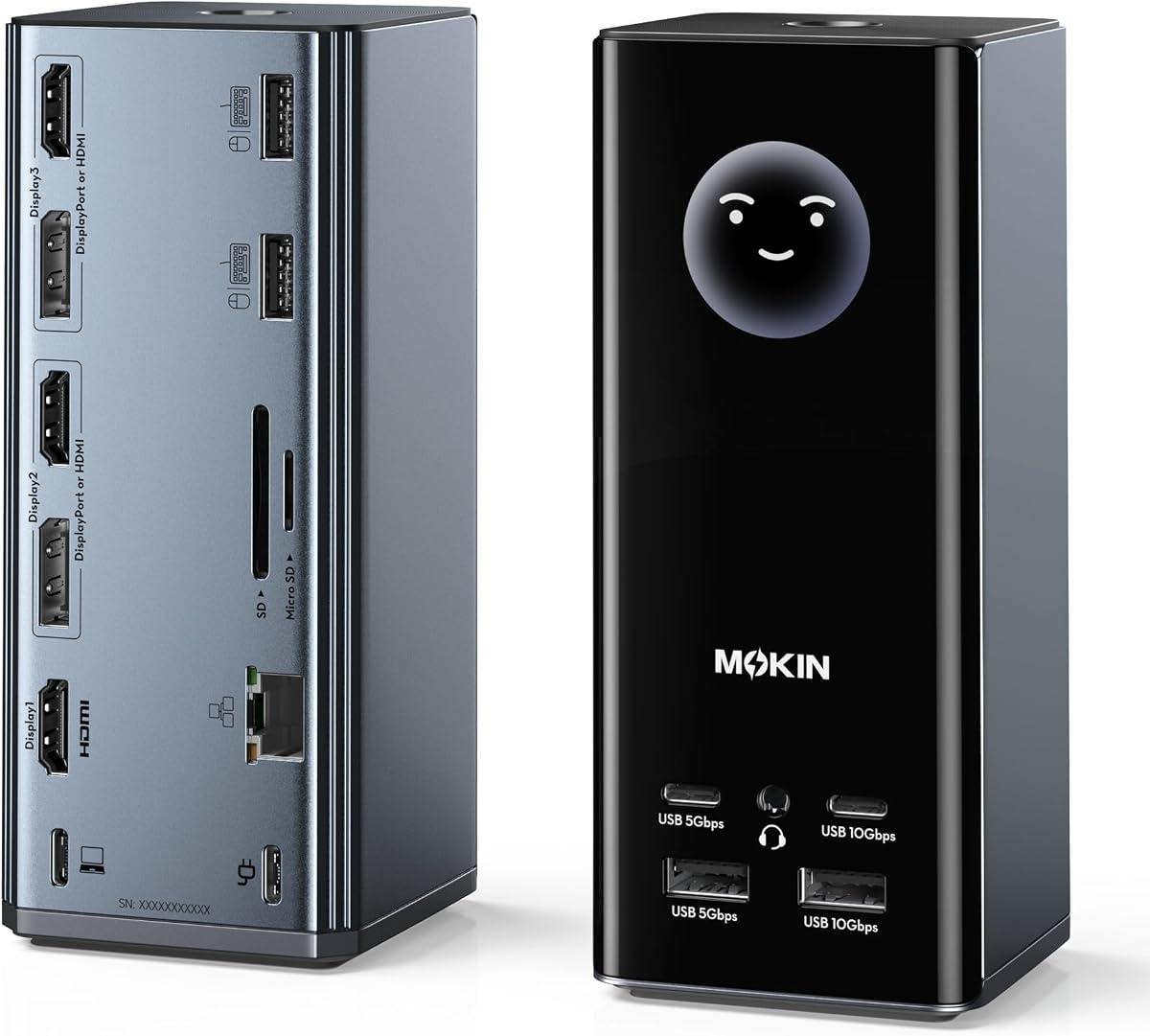
This MOKiN docking station features a smart LCD screen that displays weather and status info. It offers a wide range of ports including HDMI and DisplayPort for triple monitor setups. The weather sync keeps you updated without checking your phone.
We may earn a commission when you buy through this link, at no additional cost to you.
Privacy protection is enhanced by a lock button to turn off screens instantly. The silicone suction base keeps the dock stable on your desk during use. These features improve daily user experience and desk organization.
Modifying screen settings may require a firmware update which can be a minor hurdle. Mac users can mirror screens but not extend them. For Windows users this dock provides excellent connectivity and smart features.
We recommend this for users who like extra tech features on their desk. The combination of weather info and privacy controls adds practical value. It is a modern solution for those who want a connected workspace.
The integrated screen syncs with your network to show real-time weather and charging data.
Silicone suction cups on the base ensure the dock stays in place during regular use.
We may earn a commission when you buy through this link, at no additional cost to you.
Choosing the right docking station requires understanding your specific hardware and display needs. This section outlines the key factors to consider before making a purchase.
Check if your laptop supports multiple external displays via USB-C. Some systems like Macs with Apple Silicon may require DisplayLink technology for more than one monitor. Ensure the dock supports your desired resolution such as 4K at 60Hz.
Verify that your laptop has the necessary DisplayPort Alt Mode or Thunderbolt to drive three screens.
Look for a dock with enough HDMI or DisplayPort connectors to match your monitor setup. Some models mix HDMI and DP ports so confirm cable compatibility. Triple HDMI docks are common but DP may offer higher refresh rates.
Ensure the ports support the resolutions you need for all three monitors simultaneously.
Select a docking station that provides sufficient wattage to charge your laptop. 100W is standard for high performance laptops and ensures stable operation. Lower wattage may lead to battery drain under heavy load.
Confirm the adapter is included or check the required wattage before buying.
USB 3.1 or higher speeds are ideal for connecting external drives quickly. Some docks offer 10Gbps ports which are beneficial for creative professionals. Older USB 2.0 ports may limit transfer speeds significantly.
Check the number of USB ports to ensure you can connect all your peripherals.
Windows users generally have more flexibility with MST technology for extended displays. Mac users should check for DisplayLink support or accept mirror limitations. Chrome OS support varies by model.
Read compatibility notes to avoid issues with your specific operating system.
A durable dock should have a metal chassis for heat dissipation. Look for units with security slots if you use them in shared spaces. The size and design should fit your desk layout.
Quality construction ensures the dock lasts longer under daily use.
Some docks include smart features like weather displays or privacy buttons. These can add convenience but may not be essential for everyone. SD card readers are useful for photographers and content creators.
Consider which extra functions align with your daily workflow needs.
Look for brands that offer lifetime technical support or strong warranties. Reliable customer service helps resolve any driver or hardware issues quickly. Business users may need compliance certifications for procurement.
Strong support ensures peace of mind for long-term hardware investment.
Connect the docking station to your laptop using the included USB-C cable. Ensure the port on your laptop supports video and data transfer for full functionality. Then plug your monitors into the HDMI or DisplayPort outputs.
Adjust your display settings in the system menu to extend rather than mirror. This allows each screen to show unique content improving your productivity. Use the docking station's ports to connect your peripherals like keyboards and mice.
Keep the dock in a well-ventilated area to prevent overheating. Dust can accumulate on ports so clean it gently with compressed air periodically. Proper care extends the lifespan and performance of your hardware.
Not all laptops support three external monitors via a single cable. Most modern Windows laptops with Thunderbolt 3 or 4 support it. Macs often require DisplayLink software to achieve more than one extended display.
Windows users often do not need drivers for basic setups. However Mac users may need DisplayLink drivers for extended displays. Always check the product description for software requirements.
Yes but Macs with Apple Silicon are limited to one or two external displays without extra software. Many docks support mirror mode on Mac. Extended desktop on Mac requires DisplayLink technology.
Most docks support 1080p on all three screens or 4K on one and 1080p on others. Some high-end models support triple 4K at lower refresh rates. Check the specific specs for your desired setup.
Some docks include a power adapter while others do not. If not included check the required wattage to ensure your laptop charges properly. Using a lower wattage charger may limit performance.
If your laptop lacks DisplayPort Alt Mode it will not support video through USB-C. You may need a different adapter or a dock with an alternative connection type. Check your laptop's specs before buying.
We have reviewed ten top models that offer reliable multi-monitor setups for different budgets. From the feature rich TobenONE to the budget friendly HoDo there is a option for everyone. Choosing the right dock depends on your specific laptop and display needs.
Prioritize compatibility and power delivery to ensure your laptop runs smoothly. Make sure the dock supports your operating system and desired resolution. Additional features like high-speed data transfer can further enhance your workflow.
Please check current product availability and prices as they change over time. A good docking station is an investment in your daily productivity and comfort. Select the one that best fits your workspace requirements.