
RedThunder One Handed Gaming Keyboard RGB Backlit 35 Keys
4.4Editor score
Fast 3ms response speed
Macro recording capabilities
Ergonomic portable design
Discover the best gaming keypads for immersive control. We compare top models featuring programmable keys, RGB lighting, and ergonomic designs for gamers.
Gaming keypads offer specialized control for intense sessions. They provide programmable keys and ergonomic layouts to enhance performance. Choosing the right model depends on your specific gaming needs and preferences.
We evaluated ten top models based on switch quality and customization options. Each product was reviewed for build quality and software features. This list covers various budgets and specific gaming requirements.
Each pick shows unique strengths like wireless connectivity or mechanical switches. Prices fluctuate often so check current listings before buying. These devices transform how you interact with your favorite games daily.
4.4Editor score

4.3Editor score

4.3Editor score
This side-by-side comparison highlights key specifications across all ten models to help you make an informed decision based on your specific needs and budget.




The Razer Tartarus V2 is a top choice for gamers seeking comfort and customization. It features 32 programmable keys and a unique thumbpad for movement. This model balances tactile feedback with soft cushioning effectively.
We may earn a commission when you buy through this link, at no additional cost to you.
Its Mecha-membrane switches provide mechanical-like feedback without the noise. The 8-way directional thumbpad allows for console-style movement control. Full programmability via Razer Hypershift ensures complex commands are easily accessible.
While it lacks traditional mechanical switches, the soft touch reduces fatigue during long sessions. Some users prefer dedicated macro software which is included here but adds dependency. These trade-offs are acceptable given the ergonomic benefits.
This device suits gamers who value comfort and RGB customization. It integrates well with existing Razer setups. We recommend it for those needing an ergonomic off-hand device.
The thumbpad allows for precise analog movement in supported games.
Chroma sync enables lighting effects that match game events.
We may earn a commission when you buy through this link, at no additional cost to you.
The Redragon K585 offers exceptional value for budget-conscious gamers. It features 42 keys including 7 onboard macro keys for instant combos. The layout is tactical and efficient for MMO games.
We may earn a commission when you buy through this link, at no additional cost to you.
You can swap switches without soldering to customize feel. The USB pass-through port keeps your desk organized by connecting peripherals. A magnetic wrist rest adds comfort without permanent bulk.
While the software is functional, it may lack advanced features found in premium models. Some users might find the build feels lightweight compared to metal options. These factors are minor considering the low cost.
This keypad is ideal for players wanting macros without high costs. It works well with Redragon keyboards for a unified look. We recommend it for casual gamers looking for performance.
Seven macro keys allow quick execution of complex ability rotations.
The USB pass-through port simplifies cable management on your desk.
We may earn a commission when you buy through this link, at no additional cost to you.
The Redragon K585 PRO brings wireless convenience to the table. It maintains the 42-key layout with macro capabilities found in the wired version. Connectivity options include BT and 2.4GHz for flexibility.
We may earn a commission when you buy through this link, at no additional cost to you.
Battery life supports all-day gaming sessions on a single charge. The hot-swap feature lets you tune the feel to match your main board. Customization through software ensures deep adjustments.
Wireless connection might introduce slight latency compared to wired options. Charging adds a maintenance step not needed for wired models. These are minor inconveniences for the freedom provided.
This model suits gamers who prefer a clutter-free desk. It pairs well with other Redragon gear for aesthetics. We recommend it for those prioritizing mobility.
Up to 20 hours of continuous play ensures uninterrupted gaming.
Supports both Bluetooth and 2.4GHz wireless for reliable connection.
We may earn a commission when you buy through this link, at no additional cost to you.
The AZERON Cyber II stands out with its Hall Effect thumbstick. It eliminates drift and supports precise analog movement for games. This device combines 30 mappable keys with unique ergonomic adjustments.
We may earn a commission when you buy through this link, at no additional cost to you.
The software allows deep customization of stick settings and keybinds. Adjustability ensures a perfect fit for hand sizes between 6.3 and 7.5 inches. The modular design supports future updates and enhancements.
The price is high compared to standard options. The software complexity may overwhelm casual users. These factors are acceptable given the unique features.
This keypad is for serious gamers needing analog precision. It transforms gameplay by replacing standard WASD inputs. We recommend it for competitive players.
Hall Effect technology ensures no drift and smooth analog input.
Adjustable parts ensure comfort for various hand sizes.
We may earn a commission when you buy through this link, at no additional cost to you.
The RedThunder One Handed Gaming Keyboard is a portable solution. It features 35 keys with 3ms response for fluent gameplay. The compact size saves desk space effectively.
We may earn a commission when you buy through this link, at no additional cost to you.
Macro recording is straightforward with FN key combinations. Anti-ghosting ensures all inputs register during intense action. The wrist rest supports comfort during extended use.
RGB modes are limited compared to premium RGB options. Key count may limit complex command setups. These are minor trade-offs for portability.
This device is great for gamers needing a travel-friendly option. It is fully compatible with multiple operating systems. We recommend it for casual users.
Built-in game chip delivers faster response times for competitive play.
Driver free plug and play ensures immediate compatibility.
We may earn a commission when you buy through this link, at no additional cost to you.
The Keychron C0 HE targets competitive FPS players. It boasts an 8K polling rate and Rapid Trigger magnetic switches. Inputs are detected via real-time travel for ultra-low latency.
We may earn a commission when you buy through this link, at no additional cost to you.
Actuation is adjustable with high precision for fine control. The web-based configurator simplifies setup across systems. Per-key RGB lighting adds customization without complex software.
Web-based configuration may feel limited to advanced software users. Wired connection limits flexibility. These are acceptable for performance gains.
This keypad suits high-level gamers requiring instant resets. It works on both Windows and macOS. We recommend it for competitive titles.
Instant key reset allows faster movement resets in FPS games.
Web configurator works seamlessly on Windows and macOS.
We may earn a commission when you buy through this link, at no additional cost to you.
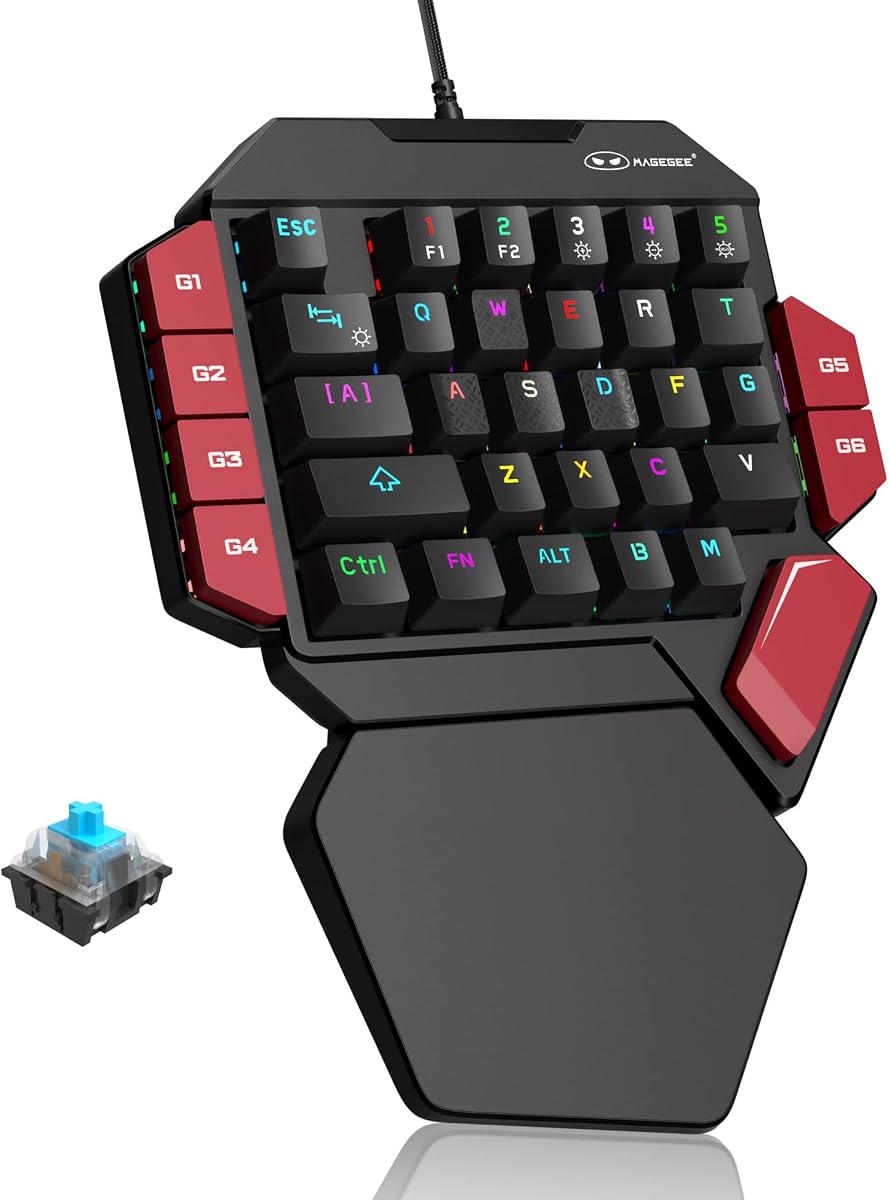
The MageGee One Handed delivers mechanical precision. It features 35 keys with Blue switches for tactile feedback. The layout is compact with six macro keys for customization.
We may earn a commission when you buy through this link, at no additional cost to you.
Loud click sounds provide clear paragraph feeling. Macro recording allows custom commands with simple steps. A large wrist rest reduces fatigue during use.
Noise may be disruptive in shared environments. Six macro keys might limit complex setups. These are typical mechanical trade-offs.
This keypad is for fans of mechanical keyboards. It fits well on smaller desks. We recommend it for typing and gaming.
Blue switches provide strong tactile feedback for precise gaming.
Six recording keys let you save frequent command sequences.
We may earn a commission when you buy through this link, at no additional cost to you.
The AJAZZ AK029 saves significant desk space. Its 29-key design uses Hall Effect switches for no dead zones. Rapid Trigger mode ensures instant reset for precision.
We may earn a commission when you buy through this link, at no additional cost to you.
Adjustable actuation allows fine-tuned sensitivity. The aluminum plate provides stability without compromising responsiveness. RGB lighting offers 20 modes for flair.
Fewer keys may require reliance on macros. Web-only config lacks advanced features. These trade-offs balance well for FPS play.
This keypad suits minimalist gamers wanting precision. It is great for low-sensitivity mouse play. We recommend it for competitive shooters.
8KHz polling delivers consistent performance for competitive play.
Hall Effect switches ensure every tap registers instantly.
We may earn a commission when you buy through this link, at no additional cost to you.
The Razer Tartarus V2 variant offers similar performance with focus on RGB. It features 32 programmable keys and Chroma synchronization. This model integrates well with other Razer hardware.
We may earn a commission when you buy through this link, at no additional cost to you.
High-performance Mecha-membrane switches provide comfortable tactile feedback. The thumbpad allows natural movement control. Fully programmable macros support complex workflows.
Some may find membrane switches less durable than mechanical. Dependency on Razer hub adds cost. These are acceptable for the ecosystem benefits.
This device suits fans of RGB customization. It enhances immersion with light sync. We recommend it for Razer users.
Chroma sync supports 16.8 million colors for games.
Fully remappable keys allow total customization of layout.
We may earn a commission when you buy through this link, at no additional cost to you.
The Redragon RM104 offers wireless convenience with unique controls. It features a multifunction smart knob for audio and lighting. Tri-mode connectivity ensures seamless switching.
We may earn a commission when you buy through this link, at no additional cost to you.
A large battery supports long-term use. Customizable software allows macro assignment for workflows. RGB effects match your setup effectively.
This is a full keyboard layout not one-handed. The knob may require familiarity. These are acceptable for the features.
This keyboard suits those wanting smart controls. It works across PC and Mac. We recommend it for general use.
Rotate for volume or press for mute instantly.
4000mAh capacity ensures weeks of usage between charges.
We may earn a commission when you buy through this link, at no additional cost to you.
Choosing the right gaming keypad requires evaluating several factors. This guide breaks down key aspects to help you select the perfect model.
Switch type determines tactile feedback and durability. Options include mechanical, membrane, and Hall Effect. Mechanical offers precision while membrane provides comfort.
Select switches based on your preference for noise and feel.
Key count varies from 29 to 42 keys. More keys allow complex macros while fewer save space. Consider your game requirements like MMO vs FPS.
Choose a count that matches your command needs.
Connectivity options include wired, wireless, or tri-mode. Wired ensures low latency while wireless frees your desk. Battery life matters for wireless models.
Pick connectivity based on your setup constraints.
Macro features allow complex commands on one press. Some models offer onboard storage while others rely on software. Look for easy recording steps for best utility.
Prioritize models with robust macro tools.
RGB lighting adds customization and immersion. Look for per-key lighting and software sync. Chroma or other ecosystem support helps integration.
Ensure lighting options match your visual style.
Ergonomic design reduces wrist fatigue. Features like wrist rests and adjustability matter. A comfortable fit ensures longer gaming sessions.
Focus on comfort to prevent strain.
Software allows deep customization of keys. Web-based or desktop tools vary in complexity. Check compatibility with your operating system.
Choose software that fits your technical skills.
Build quality ensures durability and stability. Materials like aluminum or reinforced plastic help. A sturdy keypad withstands intense gaming.
Look for solid materials for longevity.
Begin by connecting your keypad to your PC via USB or wireless dongle. Install any necessary software to configure macros. This ensures all features work correctly.
Clean your keypad regularly to dust dust. Use a soft brush or compressed air to clear debris. This extends the life of the switches.
Avoid exposing the device to liquids or excessive heat. Store it in a dry place when not in use. Proper care maintains performance over time.
Yes, they provide specialized control for specific games. They allow faster access to macros. This can significantly improve performance in MMO or strategy titles.
Most work with any PC game. You map keys to specific actions. Some games may require adjustments for best results.
High-quality models offer low latency. 2.4GHz wireless matches wired speeds closely. Ensure your setup supports wireless for best experience.
Most models support full customization. Software allows remapping and macro recording. You can tailor the layout to your needs.
They supplement standard keyboards rather than replacing them. The right hand stays on the mouse. This setup is common for gamers.
Most last years with regular use. Keycaps may wear but switches are durable. Proper maintenance helps extend longevity significantly.
We explored ten top models ranging from budget to premium. The Redazer Tartarus V2 and Redragon K585 lead in value. Each offers unique strengths for different needs.
Prioritize ergonomics and macro features when selecting. Match the switch type to your preference. This ensures comfort during extended gaming.
Prices change frequently so verify current listings. We hope this guide helps you find the perfect device. Enjoy enhanced performance with your new setup.