
Hard Drive Reader USB 3.0 & Type C
4.1Editor score
Universal USB connectivity
Plug and play support
Wide OS compatibility
Finding the right laptop hard drive adapter kit is essential for anyone looking to recover data or upgrade storage. These tools allow you to connect internal drives externally without opening the case. A good kit supports various drive sizes and interfaces while maintaining high transfer speeds for efficient data management.
We compared ten leading adapter kits based on compatibility, speed, power supply, and ease of use. Our analysis covers both IDE and SATA connections to ensure you can access older or newer drives. Each product was evaluated for reliability, build quality, and support features to help you make an informed decision.
Each pick in this list highlights specific strengths for different user needs. Whether you need a budget-friendly option or a premium dual-drive solution, you will find a match. Prices and availability may change, so check the latest details on the product pages before purchasing.
4.1Editor score

4.4Editor score
4.6Editor score
As an Amazon Associate we earn from qualifying purchases.
This comparison table provides a side-by-side overview of all ten adapter kits. It highlights key specifications such as interface types, power requirements, and supported drive formats to help you quickly identify the best option for your specific hardware needs.


The Unitek USB 3.0 IDE/SATA Adapter stands out as a versatile solution for users needing to access multiple drives. With a 4.4 rating, it offers reliable performance for data migration and recovery tasks. The dual-drive capability allows you to connect one IDE and one SATA drive simultaneously, which is rare in this category.
We may earn a commission when you buy through this link, at no additional cost to you.
Its high-speed transfer rates of up to 6Gbps via SATA III ensure efficient data handling. The included 12V/2A power adapter provides stable operation especially when using both drives. Hot-swapping support and an On/Off switch protect your drives from unnecessary wear during frequent changes.
One trade-off is the reliance on USB-A ports which limits use on newer Type-C only laptops. Additionally the external power adapter is essential for 3.5 drives making it less portable than bus-powered options. However these limitations are acceptable for desktop use where stability is prioritized over portability.
This adapter is ideal for IT professionals and home users managing legacy hardware. If you need a reliable way to access old IDE and SATA drives at once, this is a strong choice. Check current availability and support options before purchasing to ensure compatibility with your system.
Connect one IDE and one SATA drive simultaneously to maximize data transfer efficiency without swapping cables repeatedly.
The included 12V/2A adapter ensures consistent power for demanding drives preventing dropouts during critical recovery operations.
We may earn a commission when you buy through this link, at no additional cost to you.
This Hard Drive Reader offers an affordable entry point for accessing internal laptop drives externally. With a 4.1 rating, it covers both USB 3.0 and Type-C connections making it versatile for modern and older laptops. It supports 2.5 and 3.5 inch drives which suits most common storage scenarios.
We may earn a commission when you buy through this link, at no additional cost to you.
The kit includes a USB-C to USB adapter ensuring you can use it with laptops that lack traditional USB-A ports. Its plug-and-play design means no extra drivers are needed for quick setup. Dedicated technical support is available to help resolve any usage problems you might encounter.
Transmission speeds are lower compared to premium models reaching 5Gbps for SATA and 133Mbps for IDE. Some users may find the manual instructions detailed but complex. These issues are minor given the budget price making it a practical choice for occasional data recovery tasks.
Ideal for students or home users on a tight budget, this adapter gets the job done without breaking the bank. If you need basic access to old drives occasionally, this is a cost-effective solution. Verify port compatibility before ordering to avoid needing extra adapters.
Compatible with both USB-A and USB-C ports providing flexibility for different laptop models without additional purchases.
Professional technical support is ready to assist with setup and usage problems ensuring a smooth experience.
We may earn a commission when you buy through this link, at no additional cost to you.
This YINNCEEN adapter is designed for universal drive recovery with support for up to 6TB capacity. It offers USB 3.0 speeds of 5Gbps ensuring efficient data transfer for large files. The included 12V/2A power supply ensures stable operation for power-hungry 3.5 inch drives.
We may earn a commission when you buy through this link, at no additional cost to you.
The compact body design makes it easy to store and transport for on-the-go data access. Hot-swapping support allows quick drive changes without rebooting your computer. LED indicators provide clear status updates on power and activity helping you monitor operations at a glance.
Some older IDE drives may require jumper settings to function correctly which adds complexity. The external power adapter adds bulk making it less portable than bus-powered cable options. However the robust power supply ensures reliability when accessing demanding or aged drives.
Recommended for users needing high capacity support and reliable power for older drives. If you have large 3.5 inch hard drives, this adapter provides the necessary stability. Check jumper settings for old drives before use to ensure proper recognition.
Handles hard drives up to 6TB allowing you to access modern high-capacity storage without compatibility issues.
The included power adapter ensures drives spin up reliably preventing errors during critical data recovery sessions.
We may earn a commission when you buy through this link, at no additional cost to you.
This adapter is specifically marketed as a data recovery kit with features optimized for stability and ease of use. It includes an extended body design to make connecting 3.5 inch IDE ports easier. The softer 4-pin power cable reduces stress during connection preventing damage to older ports.
We may earn a commission when you buy through this link, at no additional cost to you.
With a high 4.6 rating, it offers strong performance for IT enthusiasts and pros. The flexible USB 3.0 cable improves durability and reach for various setups. Professional technical support and clear safety guidance ensure you can recover files safely without risking data loss.
The specialized design makes it bulkier than simple cable adapters which might limit portability. It also comes at a higher price point than basic universal models. However the improved cable quality and support make it worth the investment for critical recovery tasks.
Ideal for professionals or advanced users who need reliable recovery tools. If you are retrieving critical data from old drives, this kit provides the stability needed. Ensure you use the included power adapter for optimal performance with 3.5 drives.
Designed to prevent common data loss risks by addressing power shortages and port mismatch issues effectively.
Includes comprehensive after-sales support and safety guidance to help users navigate complex recovery scenarios.
We may earn a commission when you buy through this link, at no additional cost to you.
This docking station is perfect for users who work exclusively with SATA drives offering a sleek lay-flat bay design. It supports UASP for improved speeds when paired with compatible hosts. The tool-free design allows you to swap drives in seconds without any screws or tools.
We may earn a commission when you buy through this link, at no additional cost to you.
The included 12V power adapter ensures 3.5 inch drives operate reliably without brownouts. It is plug-and-play on Windows macOS and Linux requiring no extra software installation. The LED indicator clearly shows power and activity status for intuitive monitoring during transfers.
It does not support IDE drives which limits its use for older hardware recovery. You may need a separate adapter if your laptop has only USB-C ports. Despite these limitations it remains a top choice for frequent SATA drive access and testing.
Recommended for IT pros and enthusiasts needing a quick SATA access solution. If you frequently swap 3.5 and 2.5 inch SATA drives this docking station offers convenience and speed. Check your host port type before purchasing to ensure compatibility.
Swap drives instantly without tools or screws saving time during testing or data migration workflows.
Enhanced transfer speeds via UASP protocol when used with compatible systems for faster data handling.
We may earn a commission when you buy through this link, at no additional cost to you.
This compact cable adapter is ideal for accessing 2.5 inch SATA SSDs and laptop drives directly. It uses bus power from the USB port which eliminates the need for extra adapters. The UASP support enables faster data transfers on compatible systems compared to standard USB 3.0.
We may earn a commission when you buy through this link, at no additional cost to you.
With a 4.7 rating, it is highly reliable for everyday data access. You can simply connect the cable and start transferring files without drivers. It is lightweight and portable making it perfect for travelers who need to access laptop drives on the go.
It only supports 2.5 inch drives so desktop 3.5 inch drives will not work. Older high-capacity 2.5 drives may need more power than USB provides causing spin-up issues. These limits are acceptable for SSDs and standard laptop HDDs.
Best for users who need a simple cable for laptop drives and SSDs. If you only access 2.5 inch drives occasionally this is the simplest solution. Ensure your USB port can supply enough power for your specific drive before use.
Small enough to fit in a laptop bag providing quick access to drives anywhere without bulky equipment.
Faster transfer speeds on compatible systems compared to traditional USB 3.0 protocols for efficiency.
We may earn a commission when you buy through this link, at no additional cost to you.
This enclosure provides a protective case for 2.5 inch drives converting them into portable external drives easily. It supports both USB Type-C and Type-A connectors for maximum compatibility. The tool-free design allows quick access to the drive by simply pushing the cover to.
We may earn a commission when you buy through this link, at no additional cost to you.
With UASP support, it offers transfer speeds up to 5Gbps which is faster than traditional USB 3.0. The compact body fits 7mm and 9.5mm thick drives covering most laptop SSDs and HDDs. An 18-month warranty provides peace of mind for long-term use.
It does not support IDE or 3.5 inch drives so it is not suitable for older hardware. The cover may feel less robust than heavy-duty cases but is sufficient for light storage. These limits are acceptable for users wanting a simple permanent enclosure.
Ideal for users wanting to turn a spare SSD into a portable external drive. If you need a quick solution to backup or access 2.5 drives this is a great option. Verify your drive thickness before purchasing to ensure it fits.
No screws needed to install the drive allowing you to swap it out quickly and securely.
USB-C and Type-A plugs let you connect to modern and older devices without extra adapters.
We may earn a commission when you buy through this link, at no additional cost to you.
This adapter features a dual interface design with USB 3.0 and Type-C ports for versatile laptop connections. It supports SATA and IDE drives simultaneously but not two IDE drives at once. The included 12V/2A power adapter ensures 3.5 drives can spin up reliably.
We may earn a commission when you buy through this link, at no additional cost to you.
With 5Gbps transfer speeds, it offers fast file transfers for modern SSDs. Hot-swap support allows easy drive changes without rebooting. LED indicators show power and activity status for intuitive operation during data recovery or backups.
The cable quality is mixed and users may need to set jumpers on old IDE drives for master/slave configuration. Initial setup can be confusing with new drives requiring initialization. These issues are manageable for users familiar with drive setups.
Recommended for budget users needing flexibility for different laptop ports. If you access both SATA and IDE drives occasionally this adapter offers good value. Check jumper settings for old IDE drives to ensure proper recognition before use.
Use USB 3.0 or Type-C based on your laptop availability without needing separate cables.
Supports drives up to 6TB allowing access to large storage without compatibility issues.
We may earn a commission when you buy through this link, at no additional cost to you.
This adapter supports not just hard drives but also optical drives like CD and DVD for versatile recovery. It features dual-head IDE connectors for 40 and 44 pin drives covering most legacy hardware. The 5Gbps transfer rate ensures efficient data access on modern systems.
We may earn a commission when you buy through this link, at no additional cost to you.
USB 3.0 and Type-C ports let you connect to most laptops easily. The 12V/2A power adapter ensures stable power for larger drives. LED lights indicate power and activity status helping you confirm successful connections instantly.
New drives may need initialization and jumper settings on IDE drives require attention. Desktop users should connect to rear USB ports for stable power. These minor steps are worth the extra flexibility for reading old media.
Ideal for users needing to access optical media and hard drives. If you have old CD or DVD drives to read this adapter is one of the few that supports them. Ensure you initialize new drives before expecting data access.
Read CD ROM and DVD ROM drives to retrieve data from old discs directly.
Compatible with both 40 and 44 pin IDE connectors for broad legacy hardware support.
We may earn a commission when you buy through this link, at no additional cost to you.
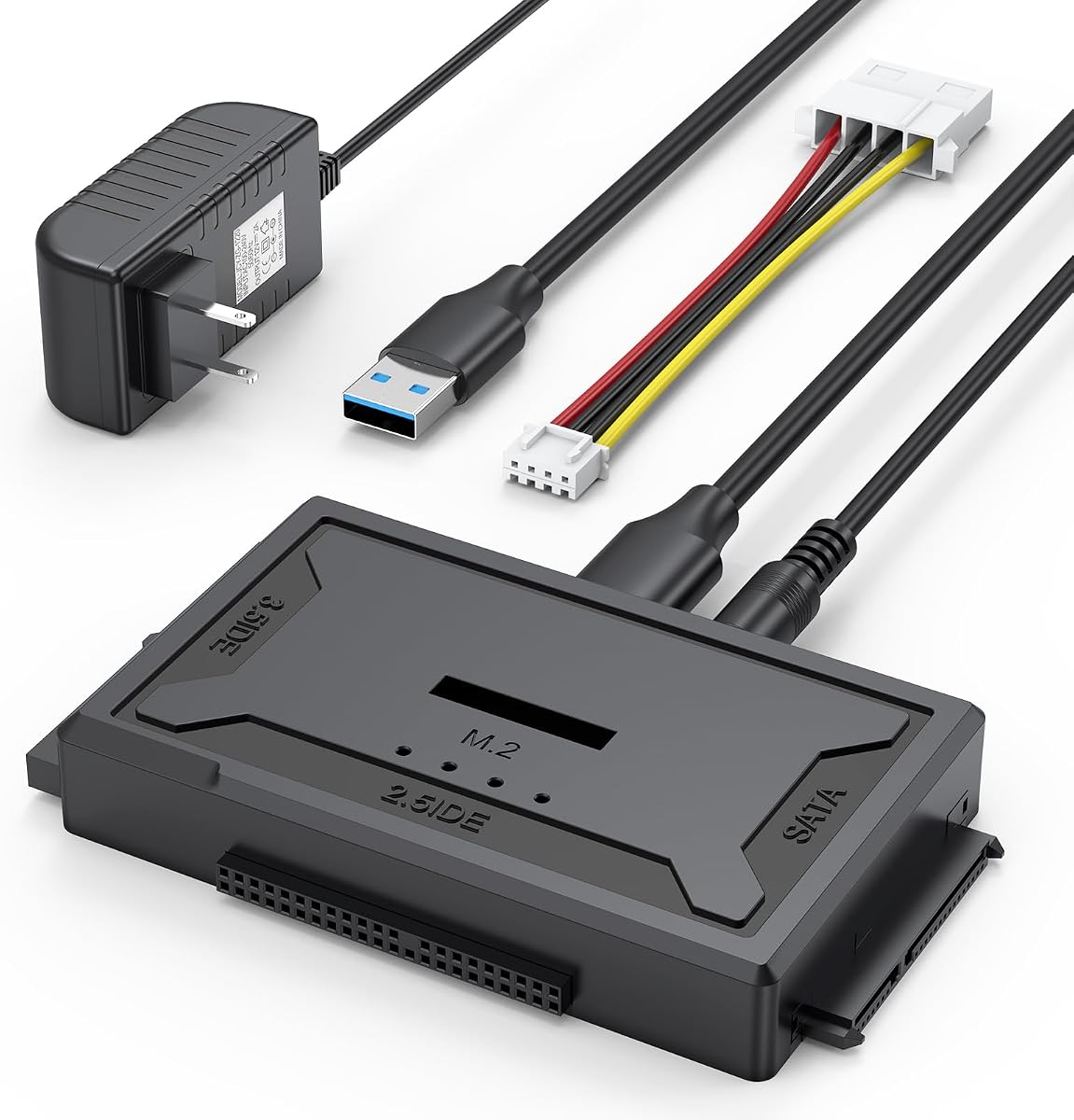
This 4-in-1 reader supports IDE SATA and M.2 drives simultaneously offering the broadest compatibility in this list. It delivers speeds up to 10Gbps for M.2 NVMe drives making it fast for modern storage. The flexible 4-pin power cable improves connection quality for old IDE drives.
We may earn a commission when you buy through this link, at no additional cost to you.
It supports any size M.2 drives due to an open design which is rare in compact docks. USB 3.0 and USB-C ports let you connect to various hosts. The included power adapter ensures reliable power for 3.5 inch drives without dropouts.
The price is higher than other models and mSATA drives are not supported. The open design may be less robust for travel compared to enclosed docks. However the M.2 support justifies the cost for users needing the latest tech.
Best for users with modern M.2 drives and legacy hardware. If you need to read NVMe and old SATA IDE drives this is the most capable option. Check if your M.2 drive uses NVMe or SATA protocol before purchasing.
Handle M.2 NVMe and SATA drives with ultra-fast 10Gbps speeds for modern SSDs.
Compatible with any size M.2 drive offering flexibility for different form factors.
We may earn a commission when you buy through this link, at no additional cost to you.
Selecting the right adapter kit depends on your drive types and connection needs.
Ensure the adapter supports both IDE and SATA if you have older hardware. Some kits only support SATA drives so check the connector type before buying.
Verify your drive connector to match the adapter options.
Choose an adapter with USB 3.0 Type-C compatibility for modern laptops. USB-A only adapters may limit use on newer devices.
Select dual port adapters for flexibility.
3.5 inch drives need external power adapters to spin up correctly. Bus-powered options are limited to 2.5 inch drives and SSDs.
Check included power supplies for stability.
Look for USB 3.0 support with UASP for faster data transfers. Higher speeds improve efficiency when handling large files.
Prioritize USB 3.0 and UASP features.
Adapter kits vary in support for 2.5 and 3.5 inch drives. Some kits support both sizes while others limit you to one.
Confirm size compatibility before purchasing.
If you need to read CDs or DVDs, select a kit that supports optical drives. Most hard drive adapters do not include this feature.
Choose optical support if reading old media.
Hot-swappable designs allow you to change drives without rebooting. This feature adds convenience for frequent testing or access.
Look for hot-swap features for ease.
Durable cables and connectors prevent damage to your drives over time. Flexible power cables help with easier connection to older ports.
Check cable quality and build materials.
Connect the adapter to your computer first before attaching any drives to ensure proper detection. Use the rear USB ports on desktops for stable power delivery.
Insert the drive carefully into the adapter connector matching the pins correctly. Secure any cables firmly to avoid disconnection during use.
Safely eject the drive from the operating system before unplugging to prevent data loss. Store the adapter in a dry place to maintain its condition.
Most modern adapters are plug-and-play and do not require extra drivers on Windows macOS or Linux. Just connect the kit and your operating system will recognize the drive automatically.
Yes many adapters support 3.5 inch drives but they require an external power adapter to spin up. Ensure the kit includes a 12V power supply for reliable operation.
Yes if the adapter supports IDE connections with the correct 40 or 44 pin connector. Check the product specifications to confirm IDE compatibility before buying.
New drives often require initialization in disk management before they can be accessed. Follow your OS instructions to format the drive after connecting it.
USB 3.0 adapters typically offer speeds up to 5Gbps for SATA drives. Actual speeds depend on your drive type and computer ports.
These kits can help read drives with minor mechanical issues. If the drive is physically damaged, professional data recovery services may be needed.
The top picks include versatile dual-drive solutions and budget-friendly options for different needs. Choose based on your drive interface and port requirements for the best fit.
Prioritize adapters with stable power supplies and USB 3.0 speeds for reliable performance. Avoid cheap kits that lack essential power connectors for larger drives.
Prices and availability may change so always verify current offers before purchasing. Check compatibility with your specific drives to ensure smooth data access.